
Best PDF Editor Software of 2026
Updated April 24, 2025 at 8:52 AM

Written by Supriya Deka
Market Research Specialist

Edited by Lindsay Page
Editor
- Popular Comparisons
- Buyers Guide
Compare Products
Showing 1 - 25 of 95 products
Compare Products
Sort by
Reviews: Sorts listings by the number of user reviews we have published, greatest to least.
Average Rating: Sorts listings by overall star rating based on user reviews, highest to lowest.
Alphabetically (A-Z): Sorts listings by product name from A to Z.

Xodo PDF Studio is a powerful enterprise-level desktop PDF editor with advanced PDF editing, annotation, and organization tools ...Read more about Xodo PDF Studio
No reviews yet


Adobe Acrobat helps teams create, edit, sign, and share documents securely trusted worldwide for reliable PDF workflows. Now wit...Read more about Adobe Acrobat

Adobe Acrobat's Best Rated Features
See All
Adobe Acrobat's Worst Rated Features
See All

ABBYY FineReader PDF allows users to convert, edit, and share PDF documents. It is suitable for individuals and businesses. This...Read more about ABBYY FineReader PDF


ABBYY FineReader PDF's Best Rated Features
See All
ABBYY FineReader PDF's Worst Rated Features
See All

iLovePDF is an online document management platform designed for managing and editing PDF documents. It provides tools for tasks ...Read more about iLovePDF
iLovePDF's Best Rated Features
See All
iLovePDF's Worst Rated Features
See All

DocHub is an intuitive online tool that simplifies document management. With its powerful features, you can edit PDFs, eSign doc...Read more about DocHub
DocHub's Best Rated Features
See All
DocHub's Worst Rated Features
See All

Edit Pdfs is an online solution for managing your PDFs. With the most advanced text recognition technology on the market. Test o...Read more about Edit Pdfs
Edit Pdfs's Best Rated Features
See All
Edit Pdfs's Worst Rated Features
See All

FormatPDF is an online, cloud-based service for you to swiftly and straightforwardly modify your PDFs. The website provides over...Read more about FormatPDF
FormatPDF's Best Rated Features
See All
FormatPDF's Worst Rated Features
See All

iScanner is much more than just a scanner. It combines a document scanner with AI filters to remove any noise, fingers, or skews...Read more about iScanner
iScanner's Best Rated Features
See All
iScanner's Worst Rated Features
See All

Smallpdf is a document management and editing tool for desktop and mobile devices. It includes PDF tools for converting, compres...Read more about Smallpdf
Smallpdf's Best Rated Features
See All
Smallpdf's Worst Rated Features
See All

Adobe Acrobat Reader DC is a PDF viewer, which helps organizations view, sign, share and annotate PDFs. It lets users create, se...Read more about Adobe Acrobat Reader
Adobe Acrobat Reader's Best Rated Features
See All
Adobe Acrobat Reader's Worst Rated Features
See All

Sejda is a comprehensive PDF editing tool that can be used on the cloud or as a desktop application. It includes features for ed...Read more about Sejda
Sejda's Best Rated Features
See All
Sejda's Worst Rated Features
See All

PDFgear is an all-inclusive PDF solution for businesses, offering editing, protecting, converting, signing, annotating, organizi...Read more about PDFgear
PDFgear's Best Rated Features
See All
PDFgear's Worst Rated Features
See All

PDNob PDF Editor is a software that assists businesses with the management and editing of PDF documents. It is designed for use ...Read more about PDNob PDF Editor
PDNob PDF Editor's Best Rated Features
See All
PDNob PDF Editor's Worst Rated Features
See All

Fabreasy PDF Creator is a windows-based stationery / letterhead solution for a single user or a company. It allows you to add le...Read more about Fabreasy PDF Creator


Create, edit and manage PDFs in large-scale applications to get to market faster with our SOC 2 Type 2 certified PDF SDK. Using...Read more about Adobe PDF Library
Adobe PDF Library's Best Rated Features
See All
Adobe PDF Library's Worst Rated Features
See All

iLovePDF 2 is a cloud-native document platform that lets teams convert, compress, edit, protect, and sign PDFs. Users can split,...Read more about iLovePDF 2
iLovePDF 2's Best Rated Features
See All
iLovePDF 2's Worst Rated Features
See All

LightPDF is an all-in-one, AI-powered PDF productivity platform designed to help users create, understand, and manage documents ...Read more about LightPDF

DocMadeEasy offers tools for users to edit, sign, and share PDF files securely. Free and easy to use! With millions of document...Read more about DocMadeEasy
DocMadeEasy's Best Rated Features
See All
DocMadeEasy's Worst Rated Features
See All

UPDF is a PDF editor with AI integration designed for editing, annotating, converting, and organizing PDF documents. It is suita...Read more about UPDF
UPDF's Best Rated Features
See All
UPDF's Worst Rated Features
See All

Professional PDF Editor PDF Extra is your all-in-one PDF toolkit - reader, editor and converter. Take full control of the conte...Read more about MobiPDF

Systweak PDF Editor is PDF editing software for Windows. It allows users to view, annotate, edit, convert, compress, encrypt, an...Read more about Systweak PDF Editor

Wondershare HiPDF is an AI-powered online PDF solution that offers a wide range of features such as chatting with PDF, AI readin...Read more about HiPDF

PDF Editify is an online platform that allows users to fill, sign, and edit PDF documents. It caters to individuals and professi...Read more about PDF Editify

PDFLiner is an online PDF editor that helps users from all over the world to ease their paperwork. Using this service you can ed...Read more about PDFLiner
PDFLiner's Best Rated Features
See All
PDFLiner's Worst Rated Features
See All

Creating, editing and commenting in PDF files with FlexiPDF Professional 2022 as intuitive as exporting them for further editin...Read more about FlexiPDF
Popular Comparisons


Buyers Guide
This detailed guide will help you find and buy the right pdf editor software for you and your business.
Last Updated on April 24, 2025PDFs are crucial for businesses. Whether you're sending out invoices or contracts, or maintaining customer records and scanned documents, PDFs ensure documents are viewed as intended.
But what if you want to make changes to a PDF, such as editing text, adding or removing objects, or commenting while reviewing? Instead of converting the PDF to an editable doc again, making changes, and converting back to a PDF, you can simply use a PDF editor and make changes in just a few clicks.
PDF editing software can save time and help you process PDFs faster without changing the file format. With the wide range of PDF editors available, choosing the one that best meets your needs can feel overwhelming. That's why we created this PDF editing software buyers guide with all the essential information you need to choose the right tool.
Here’s what we'll cover:
What is PDF editor software?
PDF editors allow users to upload, create, and edit content within PDFs. These tools help users edit text and images within PDFs, rearrange pages, password-protect files, electronically sign documents, and more. Users can also convert other file formats such as Word documents, Excel sheets, HTML, JPG, Gifs, and images to PDFs (and vice versa).
PDF editors typically integrate with optical character recognition software, document scanning software, and document generation software.
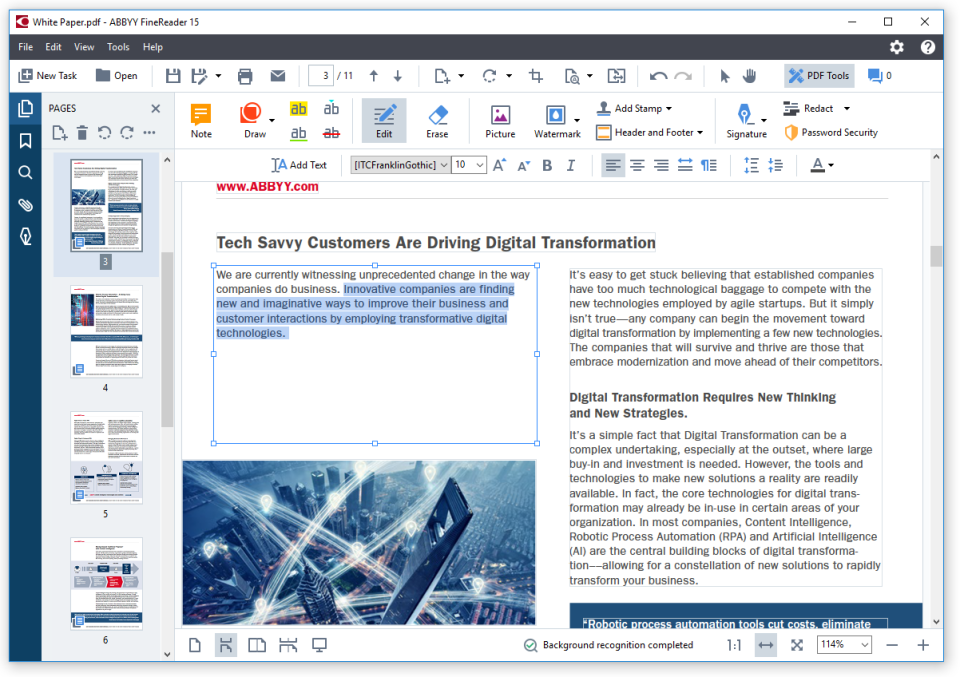
Text editing feature in ABBYY FineReader PDF Software (Source)
Common features of PDF editors
Most PDF editing tools have the following features in common:
Convert to PDF | Convert other file formats to PDFs. |
Image editing | Edit existing images or add and remove images and shapes within PDFs. |
Text editing | Add, remove, or edit text within PDFs. |
Annotations | Add comments or notes to specific sections of PDFs. |
Access controls/permissions | Add permissions to determine how users can interact with files to protect both sensitive information and file ownership. |
Electronic signature | Sign a PDF electronically, and give others permission to digitally view and sign documents. |
Optical character recognition | Convert images of typed, handwritten, or printed text into machine-encoded text. |
Forms management | Create PDF forms, distribute forms, and receive responses. You can manage, track, and view all forms and responses within the software. |
Merge/Append files | Combine documents, spreadsheets, emails, and more into a single, organized PDF. You can also reorder pages and assign page numbers. |
Side-by-side comparison | Compare documents by opening two PDFs in the same window. |
Full text search | Search PDF text to find specific words or phrases. |
What type of buyer are you?
Before purchasing PDF editing software, you should determine which buyer category you're in so you can choose the right tool. The majority of buyers fall into the following categories:
Small and midsize businesses (SMBs; up to 500 employees): SMBs generally have smaller teams and fewer clients, so they handle a limited amount of documents. Buyers in this segment can use PDF editors to alter contract templates and edit necessary fields for individual customers.
Some free PDF editors or reasonably priced basic versions with features including optical character recognition, electronic signatures, page rearrangement, and text and image editing can work for these buyers.
Large enterprises (over 500 employees): Enterprises with large teams and client bases deal with a large number of documents. PDF editors can help such buyers create and manage sensitive documents, customize branding, and protect files with passwords.
A fully featured PDF editor that offers password protection, user restriction settings, and customizable branding along with the ability to handle large files are often a better fit for buyers in this segment. Since these businesses often share documents with a large number of people, they should opt for a tool with security features to maintain the security of distributed PDFs.
Benefits of PDF editing software
Enhanced security: PDF editors have built-in security features that ensure the safety of information within the documents. Features such as password protection, user restrictions, and encryption can restrict recipients and viewers from printing the PDF, and changing or copying the content.
Easy editing: PDF editors allows users to directly edit PDFs without converting or retyping the document. Optical character recognition features make scanned or image-based documents searchable and editable.
Better control and visibility: PDF editors can convert PDFs into a read-only format that can't be altered without leaving digital footprints. This lets you effectively track changes to maintain version control and visibility when collaborating on the same file.
Key Considerations:
Mobile: The rise in bring your own device (BYOD) policies means employees work with many types of devices, such as tablets and smartphones, in the workplace. You want a PDF editor that supports use on smartphones, tablets, or laptops so you can view, edit, convert, and share files from anywhere. Look for dedicated mobile apps when evaluating PDF editors.
Collaboration: A PDF editor should allow multiple participants to collaborate on a single document. This will help both co-located and distributed teams to review and edit PDFs simultaneously. Look for PDF editors with shared review features to facilitate collaboration.
Features and cost: The cost of a PDF editing tool varies based on included features. Before buying software, determine the needs of your organization and which software features can help meet them. If you handle a small number of documents, consider a free or basic version of PDF editing software. But if you need advanced features such as a built-in spell-checker, language support, multi-file merging, and validating PDFs for ISO standards, you should look for an enterprise solution.
Market trend to understand:
Here’s a market trend to keep in mind when selecting a PDF editor for your business:
Artificial intelligence (AI) technology in PDF editors: AI-enabled PDF editors are capable of analyzing document structure or image processing to find relevant objects within document images and compare documents faster. Such software can apply neural networks to extract necessary elements such as text lines, tables, barcodes, and labels without having to improve the quality of images and documents beforehand. This tech can use previously gained experience while processing pages character-by-character or line-by-line to provide better, faster results. PDF editing tools with AI technology also allow users to recognize complex scripts in multiple languages. Many software providers have already implemented AI in their PDF editing software offerings, and more are expected to follow.
Note: The application selected in this article is an example to show a feature in context and is not intended as an endorsement or recommendation. It has been obtained from sources believed to be reliable at the time of publication.