



WinEx
About WinEx
WinEx Pricing
Starting price:
$4,950.00
Free trial:
Available
Free version:
Not Available
Other Top Recommended Construction Software


Most Helpful Reviews for WinEx
1 - 5 of 69 Reviews
Justin
Construction, 2-10 employees
Used weekly for less than 6 months
OVERALL RATING:
5
EASE OF USE
5
VALUE FOR MONEY
5
CUSTOMER SUPPORT
5
FUNCTIONALITY
5
Reviewed August 2020
Awesome!
Amazing just amazing, from everything they do from top to bottom they will work with you and help you and bend over backwards to satisfy you!
PROSThe program is really easy to get started and use. It also will do thing you never thought about doing for example (demo parts of the job)
CONSThe only thing I can think of is that its another to take in at first and to try and do this all alone but that is where the customer support is extraordinary, I mean they are Johnny on the spot I wouldn't use anything else for my take offs.
Reasons for switching to WinEx
Poor customer support and just a very hard system to figure out and also didn't have all the bells and whistles these guys do!
Mel
Environmental Services, 201-500 employees
Used weekly for less than 12 months
OVERALL RATING:
4
EASE OF USE
4
VALUE FOR MONEY
5
CUSTOMER SUPPORT
5
FUNCTIONALITY
4
Reviewed November 2020
WinEx Master won the bid!
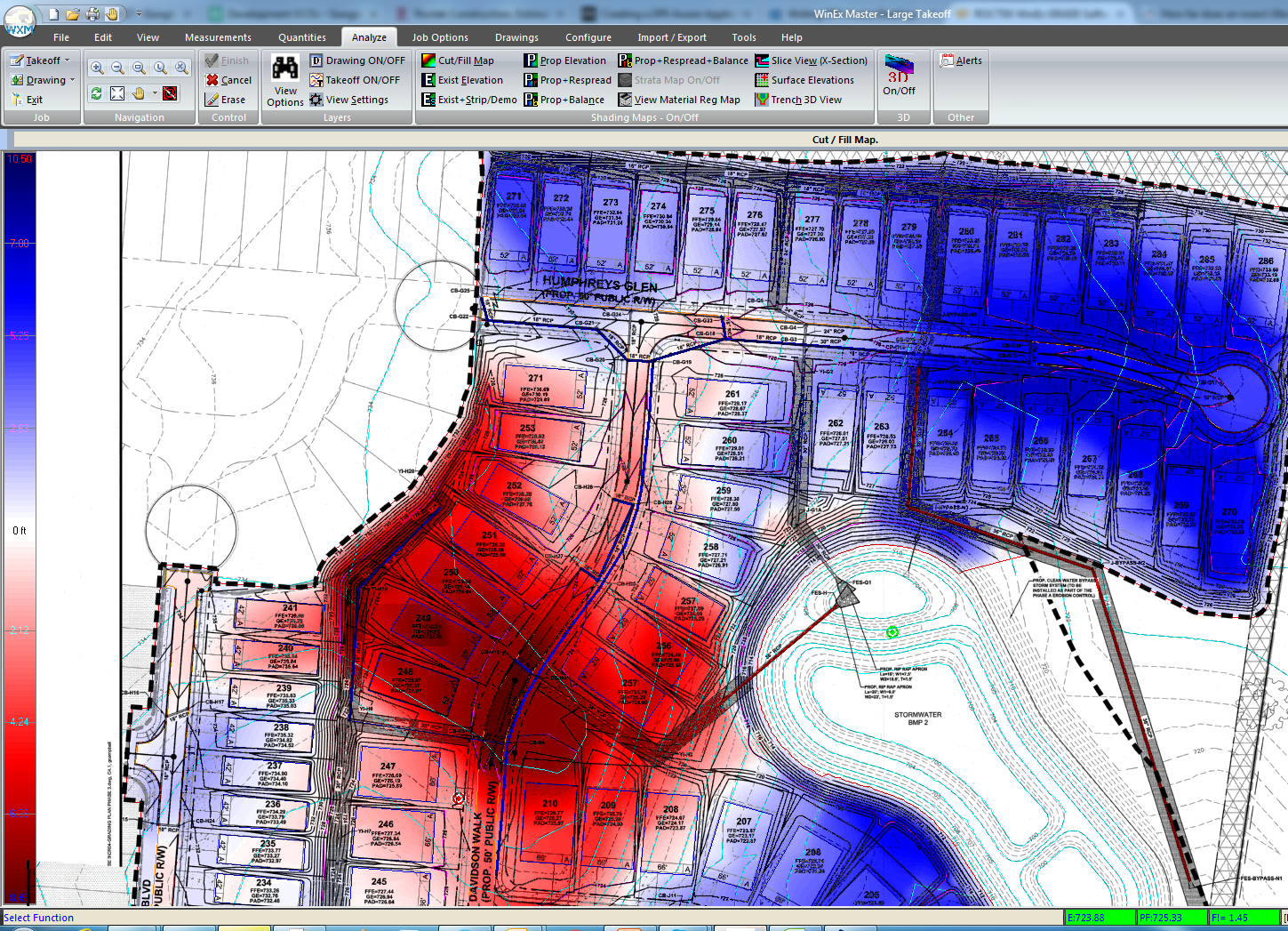
I recently used the program for a proposal on a project with several sites and a wide range of scopes of work. The client had provided quantity take-offs for cut and fill and import materials. We were able to double check their quantities and determine that the client's quantities were high by about 20%. We submitted our proposal with an alternate and take-off backup, reducing the overall cut and fill, and import costs considerably. Having confidence in our take-off's allowed us to go to the client with this project savings and ultimately helped us win the bid. The technical support has been an incredible help. They take the time to understand my take-off requirements and offer solutions. I do a lot of my take-off's after hours, so most of the time, its just support getting back to me very promptly with a few pointers to help me work more effectively. I have become more confident with my take-off results when I use the program. The more I use WinEx Master, the more indispensable it is becoming to the estimation process.
PROSI like that the software will work seamlessly with different types of electronic media, pdf or AutoCAD for example. The visualizations are high quality and very detailed, making it a very effective tool to explain a take-off to others. The program is easy to manipulate to allow "what if" scenarios. There are built in features that make previously difficult tasks easier (Alt Plan). The on-screen prompts are very helpful. The program support has been incredible and very knowledgeable about their product and my industry. The program is not a drag on my laptop resources.
CONSI have not found an aspect yet that I can say needs to be improved. I would like to see more help videos and a little more detail in the manual, but neither of these items have been a problem because the support has been incredible.
Reasons for switching to WinEx
The process of using Adobe to do takeoffs is too cumbersome, its not designed for what I need it do. gathering information in Adobe and using it in Excel leads to errors. I am not proficient in AutoCAD so using that for earth moving take-offs didn't work for me. AutoCAD is very expensive; we don't have it on everybody's computer. Having to rely on someone in another office to do a take-off for me gave me no confidence in the results. Also, not having the flexibility to manipulate/work the take-off approach was very limiting. With WinEx Master, I have a program that is less expensive, easier to use and at my fingertips.
Melissa
Construction
Used free trial
OVERALL RATING:
3
EASE OF USE
3
CUSTOMER SUPPORT
3
FUNCTIONALITY
2
Reviewed May 2014
Too many processing errors.
Line tracking is is a good feature. Data input screens are well-thought-out, and graphics seem to be pretty good.
CONSToo many processing errors. They just can't seem to get topsoil re-spread to calculate correctly. Software design seems to be a long way off from end user in terms of knowing what kind of info an excavator wants. We are excavators. Keep it simple and stop adding functions that don't work. Many other software packages cost much less with little or no yearly subscription fee.
Michael
Construction, 51-200 employees
Used daily for less than 6 months
OVERALL RATING:
4
EASE OF USE
4
VALUE FOR MONEY
5
CUSTOMER SUPPORT
5
FUNCTIONALITY
5
Reviewed December 2021
WinEx Master
While the learning curve is somewhat steep, the benefits of WinEx Master have made the effort worth it. Quick, accurate take-offs with ready-made mark-ups in one step are always beneficial.
PROSSupport. The #1 feature of this software, above all others that I have used, is the efficiency and accessibility of the support staff. There is a plethora of take-off modeling software, while some are easier to use than others, they are all ultimately making volumetric measurements...Roctek's support team elevates the product's usefulness in ways that AgTek and others do not.
CONSReports. Getting the information from the take-off software into the workstream can be greatly improved. The overall trend in construction ERP software is to take a project from the design/pre-construction phase into completion with as little redundant work and admin load as possible. The ability to bridge Roctek's data into ERP software is crucial. Additionally, increasing the functionality of 2D applications would be an excellent addition to Roctek's difference in the market. Being able to use one software for quick area take-offs or more complex 3D applications would be a tremendous benefit to specialty subs and mid-market-sized GC's.
Reason for choosing WinEx
I wasn't part of that decision process.
Reasons for switching to WinEx
Moved from an AgTek to Roctek company.
Kyle
Construction, 51-200 employees
Used daily for less than 6 months
OVERALL RATING:
5
EASE OF USE
5
VALUE FOR MONEY
5
CUSTOMER SUPPORT
5
FUNCTIONALITY
5
Reviewed July 2023
WinEx User Review
I have been in a position doing construction estimating for the past 5 years. I just started doing earthwork take-offs a few months ago. I had never done a mass earthwork take-off prior to using this software. The team at Rocktek has been amazing to work with. On day one, I did the basic starters training course. It only took about an hour to go through. From that moment, I was able to explore the software and easily figure out how to implement additional features. There software is not bogged down with a bunch of features/information that is not applicable. Everything is designed for a streamline success of your earthwork take-offs.
PROS-Quick response from Rocktek-Training is very simple and straight forward-The reports given are very informative and gives you exactly what you need. -Making quick adjustments to existing take-offs is very simple-If you have any questions, no matter how simple. They are happy to sit with you and work through it all.
CONS-Have not found any yet that impact my work or speed getting take-off completed.


