


Best Fleet Management Software of 2026
Updated February 18, 2026 at 8:52 AM


Talk with us for a free 15-min consultation
Expert advisors like Jacqueline, who have helped 1,000+ companies, can find the right software for your needs.
- All Software
- Software Advice FrontRunners
- Popular Comparisons
- Buyer's Guide
- Frequently Asked Questions
Fleet management software helps businesses efficiently track vehicles, schedule maintenance, and manage dispatch for mobile assets such as cars, trucks, and heavy equipment. With over 300 products available each tailored to different fleet sizes, industries, and operational needs—finding the right solution can be challenging. To simplify your search, I worked with our fleet management software advisors to compile a list of top-recommended productsi and fleet management software FrontRunners based on user reviews. For more details, read my Fleet Management software buyer’s guide.
Fleet Management Software
Sort by
Reviews: Sorts listings by the number of user reviews we have published, greatest to least.
Average Rating: Sorts listings by overall star rating based on user reviews, highest to lowest.
Alphabetically (A-Z): Sorts listings by product name from A to Z.

AUTOsist is a cloud-based fleet maintenance management solution for businesses of all sizes and types. Key features include main...Read more about AUTOsist


AUTOsist's Best Rated Features
See All
AUTOsist's Worst Rated Features
See All

GPS Insight is a web-based solution that transforms the way fleet and field service teams achieve operational efficiency and dri...Read more about GPS Insight


GPS Insight's Best Rated Features
See All
GPS Insight's Worst Rated Features
See All

Geotab is a web-based fleet management solution that is transforming the transportation and logistics industries. From initial a...Read more about Geotab
Geotab's Best Rated Features
See All
Geotab's Worst Rated Features
See All

Azuga Fleet offers a comprehensive fleet tracking system that combines GPS, dash-mounted cameras, vehicle diagnostics, and drive...Read more about Azuga Fleet


Azuga Fleet's Best Rated Features
See All
Azuga Fleet's Worst Rated Features
See All

EAGLEi GPS is a GPS-based fleet tracking solution that provides detailed reports and alerts on a range of predictive maintenance...Read more about EAGLEi GPS
No reviews yet
recommendations
Software Advice FrontRunners 2026

(904)

(260)

(241)

(211)

(355)

(1685)

(67)

(142)

(239)

(68)
Best for Mobile app

Samsara

Samsara is the most requested by users for mobile app out of the most popular tools, based on our analysis of Fleet Management products with the most market demand.
Samsara is best for organizations prioritizing mobile app functionality for fleet management. Our reviewers say the mobile app offers reliable real-time tracking, easy sharing of tracking links, and streamlined vehicle maintenance, making it especially practical for teams needing on-the-go access and operational efficiency.
- Reviewers Perspective
"We love using samsara , it makes our party rental company stress free, we know where our driver at all times, if they are speeding , maintenance is easier with the app , it tell you what's wrong with vehicle, you don't have to keep track yourself ."
RBRodrigo Botta
manager
Used for 2+ years
We analyzed 515 verified user reviews for Samsara to find out what actual users really think.
Ease of Use
Staff onboard quickly thanks to a clear interface and straightforward workflows. This reduces training time and supports efficient daily operations in both office and field environments.Real-Time Tracking
Managers access up-to-date fleet locations and receive instant notifications. This enables rapid response to operational needs and improves oversight for logistics and safety compliance.Vehicle Tracking
Organizations track driver activity, routes, and maintenance needs. Access to route histories and safety insights helps optimize routes and maintain regulatory compliance. - Key FeaturesSamsara's scoreCategory average
GPS
4.674.52 category average
Real-Time Monitoring
4.644.60 category average
Vehicle Tracking
4.724.68 category average
- Screenshots


Best for Customer Satisfaction

One Step GPS

According to our user reviews, One Step GPS is the highest rated for customer satisfaction out of the most popular tools.
One Step GPS is best for businesses seeking high customer satisfaction in fleet tracking solutions. Our reviewers point out the ease of onboarding, responsive customer support, and user-friendly app, which together simplify setup and ongoing use for both managers and drivers.
- Reviewers Perspective
"I like that it’s very easy to learn how to operate the app and install the product in your vehicle, I love what the app comes with from knowing the mileage the real time location of your vehicle the engine scanning to see if there’s a problem with the vehicle if someone is speeding, the security of knowing you can disable the starter and all the value you get for such a small price, I get an email of someone checking in on me from one step gps all the time to see if I’m having any problems so they are very in tune with their customers I never have any issues with this product and I’m sure if I did the customer service would be right on it!"
RDRobert Dunne
CEO
Used for 1-2 years
We analyzed 194 verified user reviews for One Step GPS to find out what actual users really think.
Customer Support
Support teams respond quickly via chat or phone, offering help in both English and Spanish. This ensures setup and troubleshooting are accessible for diverse teams managing mixed vehicle fleets.Vehicle Tracking
Teams monitor vehicle locations, mileage, and maintenance status in real time. Custom naming, geofencing, and reporting streamline dispatching and support operational efficiency for service-based businesses.Setup
Installation is straightforward, aided by tutorials and easy device switching. This lets companies quickly onboard new vehicles and manage assets with minimal technical overhead. - Key FeaturesOne Step GPS's scoreCategory average
GPS
4.944.52 category average
Real-Time Monitoring
4.744.60 category average
Vehicle Tracking
4.834.68 category average
- Screenshots


Best for User Interface

OptimoRoute

OptimoRoute is the highest rated for its user interface out of the most popular tools, based on our analysis of Fleet Management products with the most market demand.
OptimoRoute is best suited for users who value an intuitive user interface for route planning and delivery management. Our reviewers say the platform is easy to navigate, with features like quick import, visual route mapping, and flexible scheduling that save time and streamline daily operations.
- Reviewers Perspective
"The platform has allowed us to easily schedule routes for our drivers, optimize our fleet, and increase our weekly deliveries by over 30%."
AOAlejandra Olmos
Project Manager
Used for 1-2 years
We analyzed 187 verified user reviews for OptimoRoute to find out what actual users really think.
Ease of Use
Both admin and driver interfaces are intuitive, allowing staff to quickly learn the system. This reduces training time and supports efficient daily delivery operations.Route Management
Dispatchers schedule, optimize, and track routes for multiple drivers and stops. Real-time tracking and drag-and-drop adjustments help adapt to changing delivery needs.Customer Support
Support teams resolve issues quickly and provide clear guidance. This ensures smooth onboarding and ongoing operations for businesses managing complex logistics. - Key FeaturesOptimoRoute's scoreCategory average
GPS
4.524.52 category average
Real-Time Monitoring
4.754.60 category average
- Screenshots


Best for Usability

ClearPathGPS

Of the products listed on our FrontRunners report, ClearPathGPS is the highest rated for its usability out of the most popular tools.
ClearPathGPS is best for SMBs seeking strong usability in vehicle and fleet tracking. Our reviewers say the system is easy to learn, with a user-friendly interface and straightforward setup, enabling efficient real-time tracking and quick onboarding for new users.
- Reviewers Perspective
"We have never had a problem tracking our vehicles, it has made it so much easier knowing where our drivers are."
JMJossie Macedo
VP
Used for 6-12 months
We analyzed 181 verified user reviews for ClearPathGPS to find out what actual users really think.
Vehicle Tracking
Teams track fleet locations, routes, and driver behavior with an intuitive interface. Features like trip histories and speed monitoring help streamline daily fleet management.GPS Tracking
Setting up GPS units is quick, and users can easily locate vehicles and manage geozones. This supports efficient allocation and monitoring of fleet resources.Truck Tracking
Managers view truck locations and generate detailed activity reports. This aids in recovering stolen vehicles, managing schedules, and improving operational efficiency. - Key FeaturesClearPathGPS's scoreCategory average
GPS
4.864.52 category average
Real-Time Monitoring
4.884.60 category average
Vehicle Tracking
4.924.68 category average
- Screenshots


Most Rated for SMBs

Zonar

Of the products listed on our FrontRunners report, Zonar is the most requested by small businesses out of the most popular tools.
Zonar is most rated for SMBs looking for comprehensive fleet management with robust reporting and tracking features. Our reviewers highlight the user-friendly interface, flexible reporting, and effective onboarding support, making it accessible for teams managing diverse vehicle fleets.
- Reviewers Perspective
"The platform has helped simplify fleet management and improve daily operations by providing better visibility, reliable tools and consistent reporting. While there are occasional areas that could be more intuitive or streamlined, the system overall delivers insights and supports more efficient workflows."
PDPauline Diglio
Operations Specialist
Used for 1-2 years
We analyzed 353 verified user reviews for Zonar to find out what actual users really think.
- Key FeaturesZonar 's scoreCategory average
GPS
4.664.52 category average
Real-Time Monitoring
4.834.60 category average
Vehicle Tracking
4.914.68 category average
- Screenshots


Most Used By Transportation/Trucking/Railroad

Motive

Of the products listed on our FrontRunners report, Motive is the most requested by users in transportation/trucking/railroad out of the most popular tools.
Motive is most used by transportation, trucking, and railroad companies needing industry-specific fleet and driver management. Our reviewers say it streamlines compliance, real-time tracking, and maintenance, with easy onboarding and strong support for regulatory requirements.
- Reviewers Perspective
"Motive has very advanced AI powered monitoring features that help us to gain clear view of our vehicles, their equipments and their health status."
DNDon Neto
Senior Diesel Technician
Used for 2+ years
We analyzed 762 verified user reviews for Motive to find out what actual users really think.
Driver Management
Managers monitor driver performance, safety, and compliance. Features like safety scoring and incident alerts help maintain regulatory standards and improve driving habits.Truck Management
Teams track vehicles, schedule maintenance, and access truck data from a single dashboard. This supports efficient management of both large and small fleets.Log Management
Electronic logs are easy to edit, audit, and store for compliance. This simplifies the transition from paper logs and supports quick access during audits or inspections. - Key FeaturesMotive's scoreCategory average
GPS
4.394.52 category average
Real-Time Monitoring
4.424.60 category average
Vehicle Tracking
4.514.68 category average
- Screenshots


Best for Integrations

Truckbase

In our analysis of Fleet Management products with the most market demand, Truckbase is the most requested by users for integrations out of the most popular tools.
Truckbase is best for SMBs needing strong integrations with other transportation software and accounting tools. Our reviewers say integrations with QuickBooks and ELDs streamline billing, document management, and dispatching, improving workflow efficiency across teams.
- Reviewers Perspective
"the AI importations of rate confirmations and dispatch orders along with the integrations with QuickBooks and factoring make billing quick, easy and accurate."
CSClay Swartzentruber
President
Used for 1-2 years
We analyzed 61 verified user reviews for Truckbase to find out what actual users really think.
- Key FeaturesTruckbase's scoreCategory average
GPS
3.04.52 category average
Real-Time Monitoring
4.04.60 category average
- Screenshots


Most Used By Non-Profit Organization Management

Routific

According to our user reviews, Routific is the most requested by users in non-profit organization management out of the most popular tools.
Routific is most used by non-profit organization management teams seeking efficient route planning and delivery coordination. Our reviewers say it offers easy-to-use route optimization, quick onboarding, and real-time updates, which help volunteer-driven teams manage complex delivery schedules.
- Reviewers Perspective
"It is reliable route planning and makes the coordination much easier at handling numerous daily stops."
KBKim Baker
Manager, Logistics
Used for 2+ years
We analyzed 122 verified user reviews for Routific to find out what actual users really think.
Customer Support
Support teams assist quickly during onboarding and ongoing use. This ensures businesses can resolve issues and maintain delivery schedules without disruption.Delivery Management
Users organize and track deliveries, handling bulk uploads and scheduling stops. This streamlines coordination for both daily and large-scale delivery operations.Route Optimization
The system generates efficient itineraries, considering traffic and time windows. This helps businesses reduce travel time and manage complex delivery schedules. - Key FeaturesRoutific's scoreCategory average
GPS
4.804.52 category average
Real-Time Monitoring
4.894.60 category average
- Screenshots


Most Used By Construction
GPS Insight

According to our user reviews, GPS Insight is the most requested by users in construction out of the most popular tools.
GPS Insight is most used by construction companies needing reliable vehicle tracking and dispatching. Our reviewers say it saves time with real-time location data, customizable reporting, and a user-friendly app, supporting efficient field operations and asset management.
- Reviewers Perspective
"GPS Insight has a lot of great features but being able to see all around the truck and the driver has been a saving grace more than once already."
KGKimberly Garcia
Safety Coordinator
Used for 1-2 years
We analyzed 178 verified user reviews for GPS Insight to find out what actual users really think.
Customer Support
Support staff resolve issues efficiently and are available via phone. This helps teams address billing, technical, or setup questions without disrupting fleet operations.Features
Users set up landmarks, geofences, and reporting tools to analyze vehicle activity. The system adapts to evolving business needs and supports operational flexibility.Ease of Use
Managers and staff navigate the platform easily, speeding up setup and corrections. This supports efficient management of vehicles and employees across industries. - Key FeaturesGPS Insight's scoreCategory average
GPS
4.584.52 category average
Real-Time Monitoring
4.294.60 category average
Vehicle Tracking
4.804.68 category average
- Screenshots


Best for Setup onboarding implementation

Momentum IoT

According to our user reviews, Momentum IoT is the highest rated for setup onboarding implementation out of the most popular tools.
Momentum IoT is best for businesses seeking easy setup, onboarding, and implementation of vehicle tracking solutions. Our reviewers point out the super-fast installation, simple onboarding process, and intuitive interface, making it accessible for teams with minimal technical experience.
- Reviewers Perspective
"The repair & maintenance alerts, the speed alerts & more all make for an affordable, intelligent solution to vehicle information& tracking!"
LPLynne Pace
CFO and VP of Finance
Used for 1-2 years
We analyzed 58 verified user reviews for Momentum IoT to find out what actual users really think.
Vehicle Tracking
Fleet managers monitor vehicle locations, speeds, and driver behavior in real time. Geo-fencing and maintenance alerts support quick response to emergencies and route optimization.Setup
Plug-and-play hardware and clear instructions enable fast deployment across vehicle types. This minimizes downtime and allows teams to start tracking assets with minimal technical expertise.Mobile Device
Users manage operations via mobile app and web platform. This flexibility supports field teams and managers who need to monitor assets or update routes on the go. - Key FeaturesMomentum IoT's scoreCategory average
GPS
4.644.52 category average
Real-Time Monitoring
4.684.60 category average
Vehicle Tracking
4.784.68 category average
- Screenshots


Azuga Fleet

- Reviewers Perspective
"What I really Liked most about Azuga's Fleet program is its ability to track every location of all vehicle assets from day to day activities and how it gives you a perspective on how well your drivers are performing."
AFANGEL FRANKY
Asset Manager
Used for 2+ years
We analyzed 187 verified user reviews for Azuga Fleet to find out what actual users really think.
Ease of Use
Users consistently highlight Azuga Fleet’s ease of use, describing the software as intuitive for both web and mobile platforms. Managers and administrative staff can quickly access vehicle information and features, streamlining daily operations.Vehicle Tracking
Users rely on Azuga Fleet for real-time vehicle tracking, monitoring drivers and vehicles efficiently throughout the day. Project managers and fleet supervisors review historical routes and driver behavior to improve oversight and accountability.Fleet Management
Users appreciate Azuga Fleet’s comprehensive management capabilities, enabling monitoring of vehicle locations, driver performance, and fleet safety. The system supports asset tracking, geofencing, and operational optimization for diverse fleet sizes. - Key FeaturesAzuga Fleet's scoreCategory average
GPS
4.474.52 category average
Real-Time Monitoring
4.454.60 category average
Vehicle Tracking
4.534.68 category average
- Screenshots


AUTOsist

- Reviewers Perspective
"Excellent...for my needs as a car lover but could do with more flexible reports and summaries."
JAJose A. Forés
VP for Arena Operations
Used for 2+ years
We analyzed 121 verified user reviews for AUTOsist to find out what actual users really think.
Ease of Use
Users consistently mention AUTOsist's user-friendly interface, making fleet operations straightforward and easy to learn for new team members. Administrative staff can navigate the app and web portal without extensive training, supporting quick adoption and daily management.Customer Support
Users praise AUTOsist for responsive and helpful customer support, assisting with setup, customization, and issue resolution. Fleet coordinators benefit from timely responses and a smooth onboarding process, making platform adoption less stressful.Maintenance and Repair
Users rely on AUTOsist to streamline maintenance and repair tracking, monitoring costs and scheduling preventive service. Operations managers coordinate repairs, communicate between departments, and ensure regular maintenance to prevent breakdowns. - Key FeaturesAUTOsist's scoreCategory average
GPS
5.04.52 category average
Real-Time Monitoring
5.04.60 category average
- Screenshots


- Reviewers Perspective
"It’s made project management much more efficient for me, providing me with a concise visual overview of tasks and resources, saving me hours of planning per week."
AAAditya Alluk
Customer Service Representative
Used for 1-2 years
We analyzed 70 verified user reviews for Visual Planning to find out what actual users really think.
Ease of Use
Users find Visual Planning straightforward to navigate, with an intuitive design that makes daily tasks simpler. Both beginners and advanced users can quickly learn the system, supporting efficient onboarding and daily operations.Customization
Users appreciate Visual Planning’s extensive customization options, tailoring dashboards, workflows, and displays to unique business needs. Managers configure resources and project tools for HR, CRM, and operations management.Project and Resource Management
Users rely on Visual Planning for organizing tasks, scheduling, and collaborating across teams. Features like Gantt charts and reporting tools provide clear overviews of timelines and assignments, improving coordination and decision-making. - Screenshots


ISAAC

- Reviewers Perspective
"ISAAC does not just touch on one thing, ISAAC is a complete solution for our business, for our daily log tracking, our invoicing, distribution, equipment tracking, telemetry, training etc."
ABAndré Bissonnette
Directeur des opérations
Used for 2+ years
We analyzed 38 verified user reviews for ISAAC to find out what actual users really think.
- Key FeaturesISAAC's scoreCategory average
GPS
4.524.52 category average
Real-Time Monitoring
4.474.60 category average
Vehicle Tracking
4.634.68 category average
- Screenshots


eLogii

- Reviewers Perspective
"Finally ability to create route for your fleet in minutes based on settings that are relevant to your organization and fleet is simple amazing."
ZGZelimir Grujicic
Distribution and Transportation Manager
Used for 2+ years
We analyzed 35 verified user reviews for eLogii to find out what actual users really think.
Customer Support
Users find eLogii's customer support team highly responsive and available whenever assistance is needed. Logistics managers benefit from thorough onboarding, ongoing technical support, and a team willing to adapt the platform to evolving business requirements.Route Planning and Optimization
Users value eLogii for efficient route planning and optimization, enabling quick creation of routes tailored to fleet and organizational needs. Operations teams automate load and route optimization, supporting various planning modes and rapid route development.Driver App
Users appreciate how the eLogii driver app simplifies onboarding and daily operations, allowing drivers to manage routes and tasks efficiently. Fleet managers monitor real-time proof of delivery and driver progress throughout the day. - Key FeatureseLogii's scoreCategory average
GPS
4.314.52 category average
Real-Time Monitoring
4.504.60 category average
- Screenshots

MIR-RT

- Reviewers Perspective
"I have been using MIR since the 90s and I must say that it is a robust solution that has a developed support team2, abundant resources and that accompanies us at every stage and project."
ABAlexandre Boutin
Directeur Systèmes d'information
Used for 2+ years
We analyzed 111 verified user reviews for MIR-RT to find out what actual users really think.
Customer Support
Users consistently find MIR-RT’s customer support team attentive, knowledgeable, and quick to respond to technical issues or questions. Transportation and fleet managers benefit from ongoing guidance, professional staff, and resources like webinars and conferences, which help them stay informed and confident in their use of the software.Inventory Management
Users rely on MIR-RT for comprehensive inventory management, tracking parts, equipment, and maintenance costs across operations. Fleet managers can monitor inventory status, generate shopping lists, and conduct live inventory counts, streamlining workflow and supporting cost control.Maintenance
Users value MIR-RT for robust maintenance management, enabling tracking of preventive and corrective work, repairs, and warranty information. Mechanics and managers can plan, research history, and ensure compliance with inspections, centralizing data for better operational decisions. - Key FeaturesMIR-RT's scoreCategory average
GPS
4.704.52 category average
Real-Time Monitoring
4.754.60 category average
- Screenshots
Methodology
The research for the best Fleet Management software list was conducted in October 2025. We evaluated data (user reviews and demand signals) from the past 24 months as of the research date. Read the complete methodology.
Popular Fleet Management Comparisons


Buyer's Guide
This detailed guide will help you find and buy the right fleet management software for you and your business.
Last Updated on February 04, 2025Here's what we'll cover:
What you need to know about fleet management software
What is fleet management software?
Essential features of fleet management software
Benefits and competitive advantages of using fleet management software
How to choose the best fleet management software for your business
Software related to fleet management
More resources for your fleet management journey
What you need to know about fleet management software
Fleet management software facilitates vehicle and logistics management for businesses. Last year, we spoke with over 1,700 software buyers, finding that 66% prioritize dispatch and scheduling while 48% focus on route planning and optimization. [1] This shows a high demand for features that improve efficiency and flexibility in fleet operations, especially in industries, such as transportation, delivery services, and logistics where efficient scheduling and route optimization are crucial to manage operating costs and meet customer delivery expectations.
To give you an idea about the fleet management market, we have 479 products on our site and have gathered more than 2,800 verified user reviews in the past year. [2] This extensive data pool means access to numerous software options tailored to meet diverse operational needs, from small businesses to large enterprises, for decision-makers in the transportation and logistics sectors.
Pricing for fleet management software varies based on feature depth and scalability. Entry-level plans start at $128, mid-tier plans at $512, and high-end solutions can cost up to $856. [3] Understanding these price points helps buyers budget accordingly and choose a plan that best fits their operational scale and feature requirements.
First-time fleet management software buyers must select a system that complements their operational needs. These key considerations include vehicle tracking, dispatch management, GPS functionality, inspection management, and route optimization. When assessing these factors, buyers should reach out to vendors and ask the questions that can help them gauge the right software, such as:
How effectively does the software track fleet vehicles in real time?
What features are available for dispatch management to ensure efficient scheduling?
Does the GPS functionality offer precise and timely route information?
How comprehensive is the inspection management, and does it integrate with maintenance schedules?
Can the software optimize routes to reduce operational costs and enhance delivery times?
Selecting the right fleet management software from hundreds of options can be challenging. This guide simplifies your decision by detailing key features and providing step-by-step selection advice. Benefit from the expertise of our advisor, Ian Oehlke, who has guided many buyers through the process over seven years, ensuring you find the perfect match for your needs. Reach out to schedule a consultation with them or any of our other advisors.
What is fleet management software?
Fleet management software helps businesses track shipments and inventory, optimize delivery routes, and schedule shipments efficiently. It is designed to minimize operational costs, reduce fuel consumption, and shorten delivery times.
Fleet management software offers essential features such as vehicle tracking, dispatch management, GPS navigation, inspection management, and route optimization. These tools improve fleet performance by streamlining route scheduling, improving dispatch accuracy, and ensuring timely deliveries—key benefits that support operational efficiency and cost reduction for businesses relying on transportation and logistics.
A common misconception among buyers, as highlighted by Oehlke, is the confusion between fleet and transportation management systems. "Many come to me thinking they need a solution for managing common carriers and choosing between them. But they really need a robust tool for internal scheduling and dispatching, which is the strength of fleet management systems," says Oehlke. Understanding this difference is key for businesses that own and operate fleets, as the right software ensures efficient management of these essential operations.
Essential features of fleet management software
Choosing the right fleet management software involves understanding its core and common features. Every fleet management software provides core features like vehicle tracking and routing, which are essential for managing fleet movements and logistics. Based on extensive reviews and discussions with software providers, we've identified several common features that complement these core functionalities.
Core fleet management software features
Vehicle tracking: | Essential for monitoring vehicles in real time. It allows you to see their location, speed, and route. Critical to 94% of users, this feature enhances safety and operational control. |
Routing: | Automates the planning of daily routes, optimizes schedules, and ensures accurate directions are provided. |
This involves tracking and managing the upkeep of vehicles and equipment, which is crucial for maintaining high operational standards and preventing costly downtime. |
Common fleet management software features
GPS: | Offers precise navigation and positioning to ensure optimal routing and vehicle use. 84% of users regard it as highly critical for its accuracy and reliability. |
Inspection management: | Facilitates regular checks of vehicles and equipment to ensure they meet safety and operational standards, with 69% of users considering it vital for compliance. |
Route optimization: | Analyzes multiple factors to find the most efficient routes, reducing fuel costs and delivery times, and is valued by 63% of users for its cost-saving potential. |
Dispatch management: | Manages and schedules the deployment of personnel and resources effectively, crucial for maintaining service levels and operational readiness. |
Driver management: | Tracks driver qualifications and activities, ensuring compliance with regulations and enhancing safety measures. |
Employee management: | Oversees schedules and performance, optimizing workforce allocation and enhancing productivity. |
Monitors fuel usage, identifying opportunities to improve efficiency and reduce expenses. | |
Keeps track of parts and supplies, ensuring availability and minimizing delays in operations | |
Reporting and statistics: | Collects and analyzes data to produce actionable insights into fleet performance, aiding strategic decision-making. |
Vehicle Identification Number (VIN) lookup: | It uses a vehicle's unique identifier to access detailed information about its history and specifications. |
Streamlines creating, assigning, and tracking maintenance and repair tasks. | |
Alerts/notifications: | This function sends timely updates and notifications about important events or potential issues, helping to manage operations more effectively. |
After exploring the core and common features, it's essential to further refine your understanding by differentiating between features that buyers often request and those truly critical for operational success.
Buyers usually request features like dispatch and scheduling, but key insights reveal that features like GPS tracking and route optimization are often more crucial for operational success. Oehlke elaborates on a common oversight, saying, "While many seek scheduling and dispatching tools, they often overlook the need for integrated GPS tracking, which not every dispatch system offers. It's crucial to ensure that the software matches both these needs, as GPS functionality is vital for comprehensive fleet management."
The chart below clearly shows this difference, helping you focus on what will actually improve your fleet management capabilities. Review to ensure your final software choice aligns closely with these critical features.

Benefits and competitive advantages of using fleet management software
Oehlke has observed from his extensive conversations with software buyers that one of the most significant advantages of adopting fleet management software is its ability to support business expansion and operational scaling. He explains, "I have recently spoken to a small company that had been managing with a single dispatcher manually. As they expand, they’re adding more dispatchers due to increased load volume. A structured platform to manage these workflows becomes essential to ensure new staff is set up for success and the business can handle the growing workload."
In addition to these operational improvements, our analysis of more than 500 user reviews over the past year highlights several other significant benefits of fleet management software: [2]
Enhanced operational efficiency: Fleet management software simplifies complex logistics operations, allowing for real-time management and coordination of vehicles. Users appreciate how this leads to smoother operations and reduces manual scheduling and tracking time.
Improved navigation and route efficiency: Users benefit from advanced GPS navigation that directs drivers accurately and adjusts routes in real time to avoid delays. This precision significantly cuts down travel times and fuel costs.
Comprehensive asset management: This software helps businesses extend the lifespan of their vehicles and equipment by keeping a detailed and accessible record of all fleet assets. It also improves maintenance scheduling and usage tracking.
Seamless system integration: Integrating fleet management software with other business systems enhances data accuracy and reduces administrative overhead. Users report that this integration supports better decision-making across their operations.
Optimized route planning: Sophisticated algorithms enable businesses to minimize mileage and fuel usage, lowering operating costs and boosting profitability. This tool is highly valued for its ability to enhance logistical efficiency.
How to choose the best fleet management software for your business
1. Define your requirements
Understanding and identifying your specific requirements is crucial when choosing fleet management software because it ensures your selected solution aligns perfectly with your operational needs. This clarity helps prevent overspending on unnecessary features and focuses your search on products that benefit your fleet operations.
Identify your operational scope
Consider the types of vehicles you manage, their usage patterns, and the geographic areas they cover. Our data reveals that the trucking and delivery services industries are the primary users of fleet management software, accounting for 26% and 15%, respectively. [1] Insights from our discussions with over 1,700 buyers show that 52% of businesses using fleet management software manage fleets of up to 9 vehicles. [1] Understanding these metrics helps tailor your search to solutions that cater to your operational scale and industry needs.
Gauge the cost as per your needs
Most fleet management software uses subscription-based pricing, which varies depending on the depth of features and scalability. Entry-level plans typically start at $128, mid-tier plans at $512, and high-end solutions can reach up to $856. [3]
When evaluating these options, it's essential to consider the upfront and recurring costs. Upfront costs consist of initial expenses to set up and implement the software. In contrast, recurring costs are ongoing expenses for maintaining and operating the software, such as monthly or annual subscription fees. Knowing these costs will help you assess the total cost of ownership and ensure that the software fits within your budget over the long term.
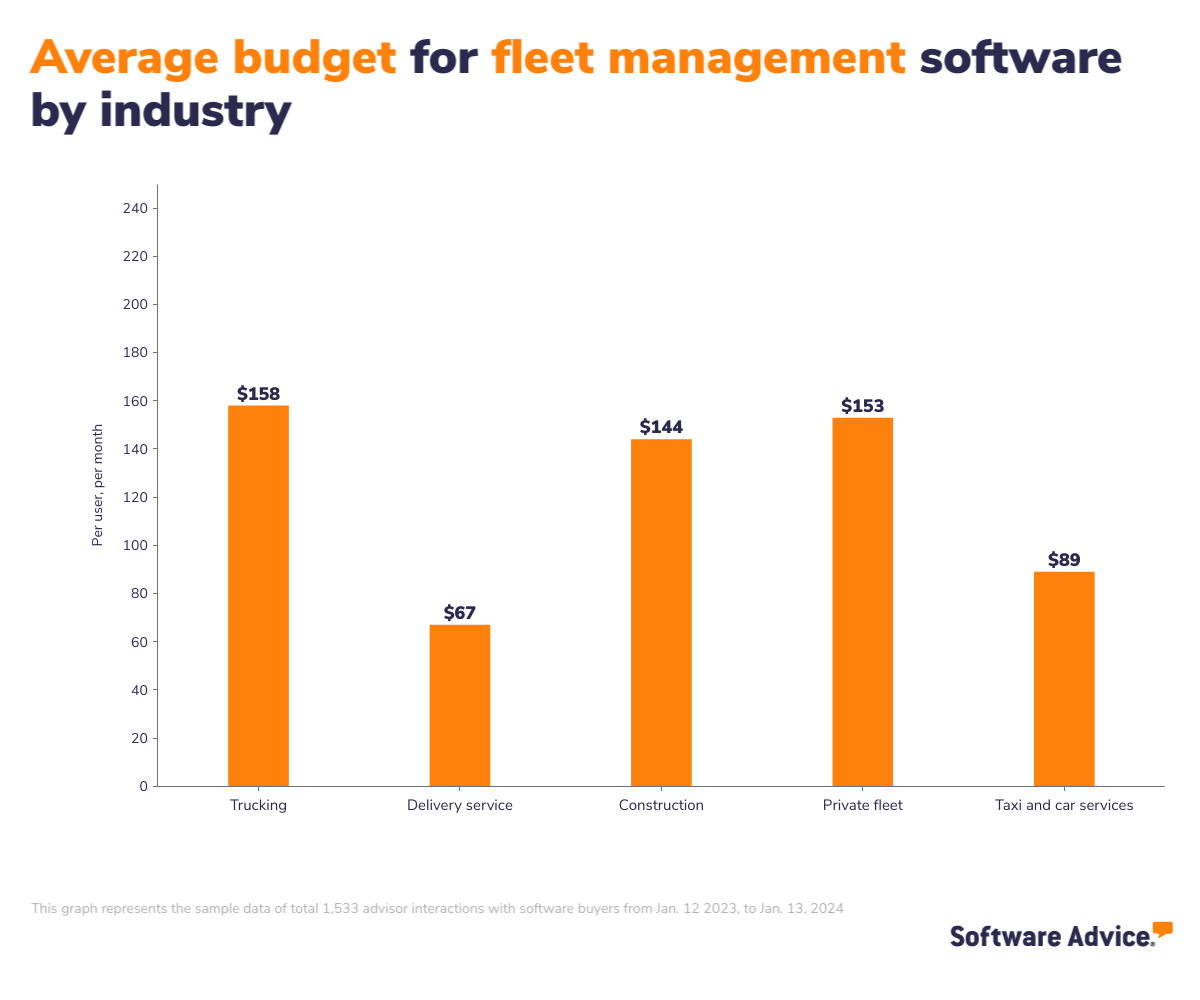
Similarly, understanding industry-specific costs is crucial for setting realistic budget expectations when selecting fleet management software. Different sectors such as trucking, delivery services, construction, private fleet operations, and taxi and car services may require varied financial commitments due to their unique operational demands.
The image below shows the average budget for fleet management software in various industries, giving you a better idea of potential costs. This can help you match your budget expectations with industry standards and maximize your investment.
Know all the possible drawbacks
Despite fleet management software's significant advantages, certain drawbacks may hinder your operations. Our analysis of more than 500 reviews from buyers who have substantial experience with these systems over the past year highlights several common issues, including contract complications, challenges with logging and mileage tracking, limited phone support, unexpected software changes, and difficulties in invoice tracking.
These issues can disrupt the smooth functioning of fleet operations if not addressed. Here are some ways to mitigate these challenges:
Work with providers to include provisions allowing adjustments or cancellations without severe penalties.
Choose systems that offer multiple support channels, including phone, email, and live chat, to ensure comprehensive and accessible support.
Check for software offering 24/7 phone support and online troubleshooting.
Invest in software with customizable dashboards and features catering to your tracking and logging needs.
Engage with user communities and subscribe to update notifications to effectively prepare for and adapt to software changes.
Utilize software with integrated AI to enhance invoice and mileage tracking accuracy, reducing manual data entry and errors.
Evaluate integration capabilities
When selecting fleet management software, ensuring smooth integration with existing systems is as crucial as the software's core functionality.
From discussions with over 1,700 software users last year, 65% preferred an integrated suite—software that combines multiple needed functions into a single, cohesive platform. [1] This preference underscores the importance of a unified solution that can streamline various operational processes without needing multiple separate tools.
Moreover, 87% of users preferred web-based fleet management solutions. [1] This trend highlights the growing demand for software accessible from anywhere and compatible with various devices, enhancing the flexibility and responsiveness of fleet operations.
As businesses strive to integrate their fleet management systems with other crucial business software, they often encounter specific challenges. Oehlke provides insight into one such critical area, noting, "Many fleet management systems include invoicing capabilities and must integrate seamlessly with accounting programs to ensure financial data flows directly into the general ledger. This integration is essential for accurate financial tracking and streamlining the management of invoicing processes."
Understanding these integration needs is crucial for businesses to select software that effectively enhances their operational workflows and adheres to their technological and strategic requirements.
Ensure regulatory compliance
Ensuring your fleet management software complies with industry regulations is essential for legal and operational integrity. Compliance requirements can vary by location and operations, often involving vehicle safety, emissions controls, driver hours, and maintenance record-keeping.
While discussing compliance, it's also important to address common misconceptions about the capabilities of fleet management software, especially regarding driver certifications and licensing. Oehlke clarifies, "Many expect fleet management software to handle driver certifications, licensing, and training, but these functions are typically managed by learning management systems designed for tracking compliance." Understanding this ensures you choose software that meets your compliance needs and fits your fleet’s operational requirements.
2. Make a shortlist of fleet management software
Creating a shortlist of fleet management software is essential when facing numerous options. This focused approach ensures you spend your time evaluating software that aligns with your business needs and operational goals, streamlining your selection process.
Get expert help from an advisor
Finding the right fleet management software can be overwhelming. Our advisors at Software Advice, such as Ian Oehlke, specialize in helping businesses navigate the vast market. With their expertise, they offer 1:1 personalized consultations to identify software that fits your needs and budget quickly. You can easily start a chat online or schedule a call to begin narrowing down your choices effectively.
Explore our list of fleet management FrontRunners
Before you speak with an advisor, you might want to explore your options independently to come to the consultation with informed questions. Our FrontRunners report is an excellent place to start. This list features only the highest-rated fleet management software based on user feedback and usability. To appear on this list, a product must:
Accumulate at least 20 unique user reviews over the past 24 months.
Demonstrate essential functionality, as evidenced by publicly available sources like the vendor’s website.
Include all core features, such as vehicle tracking, routing, maintenance management, and the most common features.
Check out our full methodology description for more details on compiling the report.
3. Pick your best option
Choosing the best fleet management software is more than features and pricing—it's about finding a solution that perfectly aligns with your business's specific needs and operational workflow. Here's how to ensure that your final choice is the most suitable for your fleet's requirements.
Prepare for vendor demos
Vendor demos are a vital opportunity to see fleet management software in action. To get the most out of these demonstrations:
List specific functionalities you want to see, particularly those unique to your fleet operations, such as real-time tracking or advanced route optimization.
Ensure that all decision-makers, especially those who use or interact with the software daily, are present during the demo to provide their perspectives.
Present real-world scenarios your fleet encounters and ask the vendor to demonstrate how their software would handle these situations.
Assess efficiency and functionality
Our analysis of user pain points for fleet management software over the past year reveals that 45% of users cite efficiency and 29% highlight functionality sufficiency as crucial concerns, making these aspects critical to assess when picking the best option [1]:
Efficiency evaluation: Explore how the software automates complex processes like route optimization or integrates seamlessly with other operational tools to save time and reduce errors.
Functionality depth: Ensure the software comprehensively covers crucial operations, such as detailed compliance tracking for regulatory requirements or advanced analytics for fleet performance monitoring.
Evaluate long-term adaptability
Choosing fleet management software that adapts to your evolving needs is crucial. Essential factors to consider include scalability for handling more complex operations as your fleet grows, modularity to add new features as needs evolve, and technological flexibility to integrate advancements like IoT and autonomous vehicles. These elements are vital for sustaining operational efficiency and compliance over time.
One of the unique capabilities that set fleet management software apart, as Oehlke points out, is its sophisticated route optimization tools designed specifically for commercial vehicles. Unlike standard navigation systems, fleet management software provides route planning that considers the specific needs of large commercial vehicles. "These tools are not just about navigating like a simple Google Maps system; they take into account the dimensions and restrictions of commercial vehicles, ensuring routes are optimal for things like fuel efficiency, toll avoidance, and legal compliance with road use," explains Oehlke. This attention to detail in route planning is crucial for fleets to maintain efficiency and cost-effectiveness as they scale up.
This focus on specialized route optimization highlights the importance of selecting software that meets current operational needs and evolves with technological advancements and industry demands.
4. Make the most of your fleet management software
Once you've selected and purchased your fleet management software, the next step is implementation and maximizing its true potential. Whether you're transitioning from another system or adopting digital management for the first time, focus on these considerations to optimize your investment:
Detailed training programs: Implement comprehensive training sessions for all users, from drivers to fleet managers. Ensure that everyone understands how to use the software's features effectively, focusing on modules most relevant to their roles.
Data migration: Carefully plan the migration of existing data into the new system. This may involve transferring vehicle information, maintenance records, and driver data. Ensure data integrity is maintained during the transition and consider employing a phased approach to reduce operational disruptions.
Role-specific customization: To improve efficiency and user adoption, customize user interfaces and functionalities to meet the specific needs of different roles within your organization, such as dispatchers, fleet managers, and maintenance teams.
Proactive maintenance scheduling: Use the software’s features to set up proactive maintenance alerts based on vehicle usage patterns and historical data. This can help prevent breakdowns and extend vehicle life.
Software related to fleet management
As you explore options for the ideal fleet management software, you might encounter various related software types that perform similar functions or could be integrated with your fleet management system. These solutions can enhance your operations by focusing on specific fleet and transportation management aspects.
Equipment maintenance software: Helps manage the upkeep and repair of equipment, ensuring operational readiness and extending asset life.
Fleet maintenance software: Specialized software designed to streamline the maintenance of vehicles, including scheduling repairs and tracking expenses.
Maintenance management software: Provides a comprehensive toolset for managing all maintenance activities, improving reliability, and reducing operational downtime.
Towing software: Tailored for businesses that operate towing services, offering features like dispatching, impound lot management and invoicing.
Transportation dispatch software: Optimizes the scheduling and dispatch of vehicles and drivers, enhancing communication and efficiency in transportation operations.
Transportation management software: Facilitates the planning and execution of the physical movement of goods, optimizing supply chain operations.
Trucking software: Designed specifically for the trucking industry, this software supports freight management, dispatch, compliance, and tracking.
More resources for your fleet management journey
About our contributors
Author
Shubham Gupta is a writer at Software Advice, specializing in project management. His focus is to guide project managers from planning to execution and beyond. His expertise also spans construction, manufacturing, and other related topics.
Shubham’s research and writing for Software Advice is informed by nearly 200,000 authentic user reviews and more than 10,000 interactions between Software Advice software advisors and project management software buyers. Shubham also regularly speaks to project managers and PMO leaders so he can provide the most up-to-date and helpful information to small and midsize businesses purchasing software or services.
Outside work, Shubham likes to explore the depth of Urdu poetry and enjoys his time with his dog.
Editor
Parul Sharma is a content editor at Software Advice with expertise in curating content for various niches, including SaaS, digital marketing, and search engine optimization. With over half a decade of experience in content writing and editing, Parul has the expertise to simplify complex terms into engaging, valuable content for targeted audiences. She completed her graduation and post-graduation in English literature from Delhi University and was awarded the Dr. Asha Sahni Memorial Award for being the highest scorer in her graduating class.
Parul has contributed to the news, lifestyle, education, and health verticle of DNA India, India’s premier media channel. Outside of work, she can be found curating healthy recipes, coloring in mandala books, and spending quality time with her family.
Advisor
Ian Oehlke is a senior software advisor. He joined Software Advice in 2018 as a software advisor. He is based in Austin, Texas.
Ian works directly with small business leaders to connect them with best fit software providers. He assesses the technology needs of small businesses seeking fleet management software through one-to-one conversations and provides a short list of potential matches. His favorite part of being a software advisor is helping those who are struggling to make sense of what software market to be looking into.
Ian holds a bachelor’s degree in business management.
Sources
Software Advice advisor call notes: Findings are based on data from telephonic conversations that Software Advice’s advisor team had with small-to-midsize businesses seeking fleet management tools. For this report, we analyzed phone interactions from October 11, 2023, to October 11, 2024. Read the complete methodology.
Software Advice reviews data: Software Advice reviews are collected from verified users for individual software products. For this report, we analyzed reviews from October 2023 to October 2024. Read the complete methodology.
Software Advice software pricing data: Only products with publicly available pricing information and qualified software products within the category, as of May 2024, are included in the pricing analysis.
Fleet Management FAQs
- What is fleet management software?
Fleet management software helps businesses monitor and improve their vehicle operations. It includes vehicle tracking, maintenance scheduling, fuel management, and route optimization.
- What is the best fleet management software to choose from?
According to our analysis of products with high market demand and reviews, AUTOsist had the highest overall rating from verified reviewers on Software Advice.
- How much does fleet management software cost?
Fleet management software usually uses a subscription model. Basic plans start at $128, mid-level plans at $512, and premium options can go up to $856. Prices may vary depending on the features and scalability needed.
- How do you manage fleet maintenance?
Managing fleet maintenance effectively requires organized check scheduling, real-time monitoring of vehicle conditions, and quick response to repair needs. Fleet maintenance software can simplify these tasks by automating schedules, tracking repairs, and keeping detailed vehicle histories.
- How do you create a fleet management plan?
A fleet management plan should outline your goals, evaluate fleet requirements, and establish rules for buying, maintaining, and disposing of vehicles. It must also include strategies for managing costs, training drivers for safety, and following regulations. Regularly reviewing and updating the plan as your fleet and business change is essential for continued success.