
Best Construction Categories
Best Facilities Management Categories
Best Human Resources Categories
Best Legal Management Categories
Best Manufacturing Categories
Best Medical Categories
Best Property Management Categories
Get 1-on-1 advice in 15 minutes. It's free.

Josh P.

How Small Construction Businesses Choose Software: Insights From 8,000+ Buyers
Each year, Software Advice’s advisors speak with thousands of construction business owners and managers evaluating new software. These buyers are actively searching for tools that solve real operational problems. Estimates that take too long, projects scattered across multiple tools or workflows that have outgrown general accounting systems and spreadsheets.
To understand what construction software requirements look like in practice, we analyzed more than 8,000 advisor conversations. These construction software trends show that buyers are moving past first-time adoption, 55% of them are small businesses, most generate under $5 million in annual revenue and need five or fewer software users.
Below are the patterns that show what construction buyers prioritize, what tools they use today, why they switch, and what they expect to spend.
Key takeaways
We analyzed 8,200+ advisor conversations with small construction businesses (55% with 10 or fewer employees) to uncover what they need from software in 2026.
Estimating (72%) and project management (68%) are the two features buyers overwhelmingly prioritize, and three-quarters want both in a single platform.
Most buyers are not adopting software for the first time: 40% already use construction-specific tools and 37% use accounting or general PM software.
Efficiency (48%) and functionality gaps (28%) are the top reasons they switch software.
Budgets split into two camps — 39% spend under $165/month, while 30% spend over $495/month, with an average of $150 per user per month.
What features do construction software buyers prioritize?
When buyers call advisors to discuss construction software, they are asked which capabilities matter most to them. The answers are quite consistent across company sizes and segments.
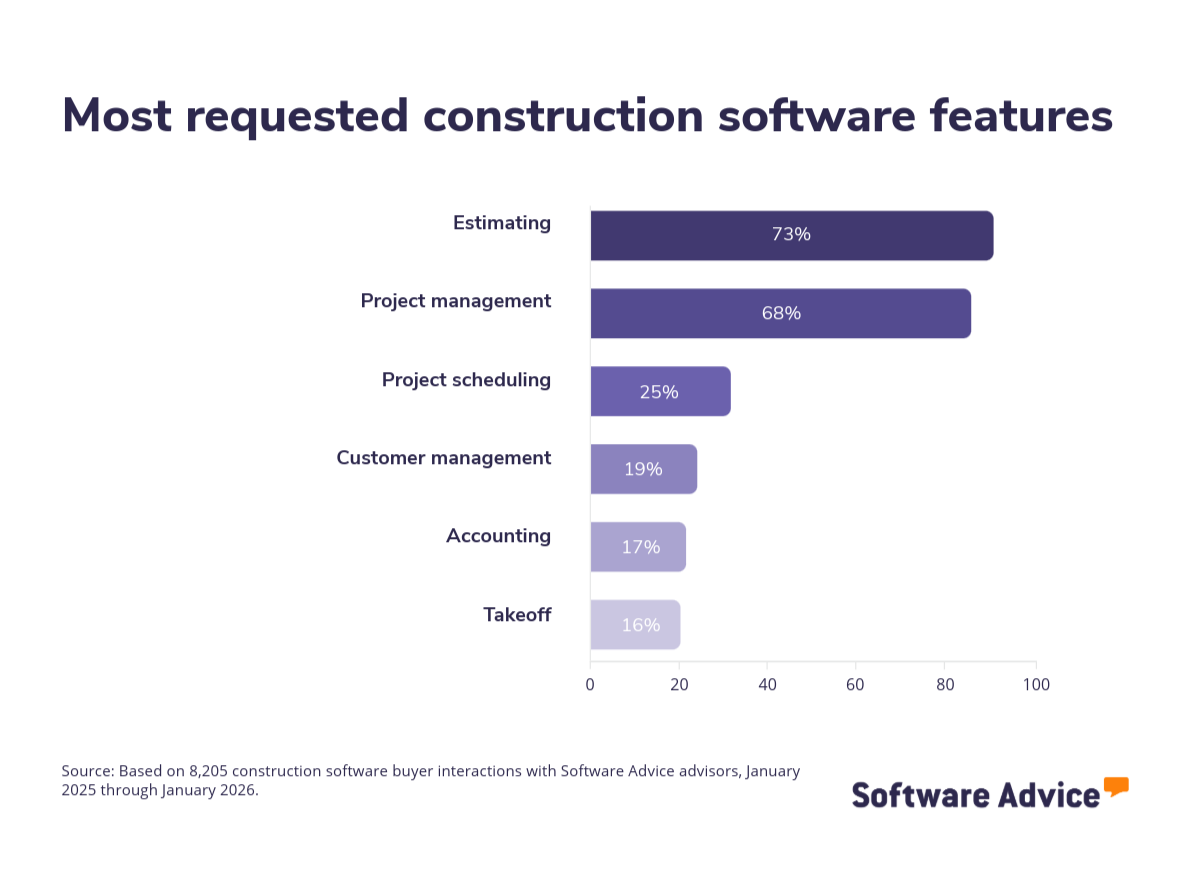
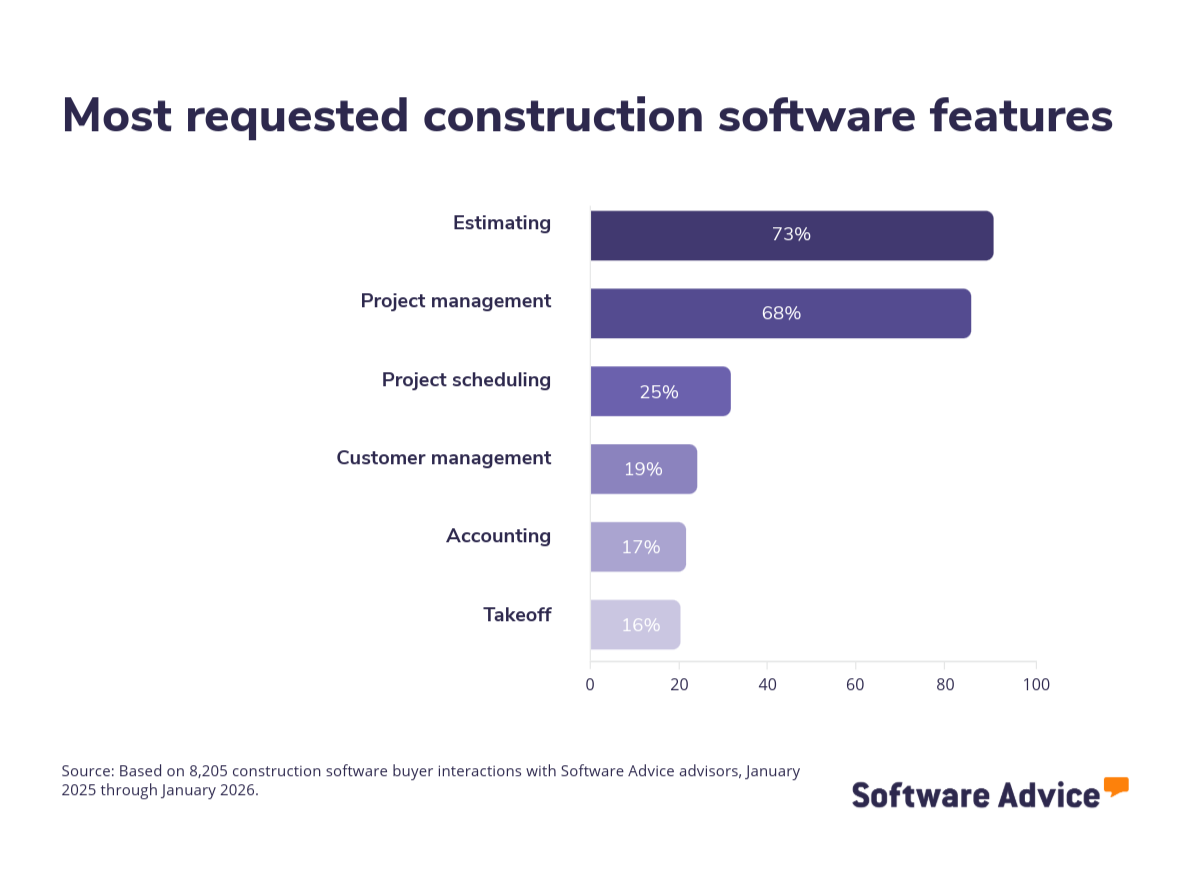
Estimating is the most requested feature at 72%. For many small construction businesses, accurate estimates directly affect profitability. Inaccurate estimates can reduce margins or result in lost bids. Whether it is a residential remodeler pricing a kitchen renovation or an electrical contractor quoting fit-out for a commercial building, buyers expect estimating features to directly impact whether they are profitable on every project.
Project management is close behind at 68%. This is a notable shift from previous years, where project management trailed estimating by a wide margin. The gap has narrowed, suggesting that buyers are looking for tools that handle the execution phase, as well as the bidding phase. Scheduling crews, tracking progress, managing documents, coordinating subcontractors: these are the daily realities that project management features address. For a general contractor running three active job sites, this feature helps teams monitor progress without relying on manual updates.
After those top two, there is a significant drop. Project scheduling (25%), customer management (19%), accounting (17%), and takeoff (16%) all matter, but none are requested by more than a quarter of buyers. The message is clear: get estimating and project management capabilities right first. Everything else is secondary.
Most buyers want one tool, not a toolbox
Three out of four buyers who expressed a preference said they want an integrated suite rather than a collection of specialized tools. This makes sense when you consider the needs of construction software buyers.
Smaller crews rarely have IT staff to manage integrations between multiple systems. So, they usually want one login, one place where the estimate connects to the project schedule and the schedule connects to invoicing.
When a remodeler creates an estimate, that estimate should feed directly into the project plan. When materials are ordered, the cost should update the actuals against budget. When the client asks for a change order, the impact on timeline and cost should be visible without switching between three different applications.
That is what an integrated suite offers, and it’s why small construction businesses overwhelmingly prefer this approach over assembling best-in-class tools that may not talk to each other.
What tools do construction businesses currently use?
Before evaluating new tools, most buyers are already managing their projects. However, understanding what buyers already use reveals a lot about trends in construction technology adoption.
About 40% of the buyers in our data already use construction-specific software. The tools they mention most often are QuickBooks (38% of this group), Procore (11%), and Buildertrend (7%). These are not first-time software buyers. They are businesses that adopted a tool and found it either too much or too little for their workflows.
Another 37% use software that was not built for construction but has been filling the gap. Accounting platforms are the most common (28% of this group), followed by general project management tools (18%). These buyers built a workflow from what was available, say QuickBooks for invoicing, maybe Asana or Microsoft Project for scheduling, Dropbox for document sharing. It works, until the business reaches a point where switching tools starts costing you. Perhaps, estimates don’t connect to invoices. Project updates live in one system while budgets live in another. These small inefficiencies add up across projects.
Manual methods, including pen-and-paper and spreadsheets, account for about 30% of buyers. Spreadsheets specifically are used by 15%. And roughly 22% of buyers say they have no “formal method” in place at all.
What stands out is that the buyers who have never used any kind of tool are now the minority. The typical construction software buyer in 2026 is someone who has been managing their business with something, whether it is dedicated software, accounting tools, or a combination of spreadsheets and phone calls, and has decided that something is no longer enough.
If you are replacing an existing construction tool, focus on the specific gaps that tool could not fill. If you have been piecing together a workflow from accounting software and spreadsheets, look for a platform that consolidates those functions so the data flows between them without manual re-entry. And if you are adopting software for the first time, prioritize ease of setup and onboarding over advanced features you will not use in your first year.
Why do construction businesses switch software?
When advisors ask buyers what is driving their search, the answers point to a common experience: the current approach worked for a while, and then it didn’t.
Efficiency is the top driver at 48%. This is the pain of doing things the slow way, and it shows up in every corner of a small construction business.
A remodeler re-enters the same client information into a spreadsheet estimate, then into QuickBooks for invoicing, then into a separate calendar for scheduling. A general contractor spends the first hour of every Monday morning calling subcontractors for progress updates that could have been visible in a shared dashboard. An electrical contractor prints PDF blueprints for takeoff instead of using digital tools that calculate quantities automatically.
These issues are not major failures, but they repeat across projects. They are small inefficiencies that repeat across every project, every week. For a business running on tight margins and limited staff, that adds up. When buyers cite efficiency, they are usually describing a process that works but costs more time and attention than it should.
Functionality gaps are the second most common driver at 28%. This is less about speed and more about capability.
The accounting software handles invoices but cannot produce a construction estimate. The project management tool tracks tasks but doesn’t understand job costing or change orders. The spreadsheet can model almost anything, but it cannot send automated updates to a client or generate a professional bid package.
Functionality gaps tend to appear at growth inflection points. Once general contractors are running three projects simultaneously with some crew, they usually need software that tracks costs per job, per phase, and per trade. The tool that was sufficient at one size becomes a bottleneck at this stage.
The remaining pain points are smaller but tell their own stories. About 8% of buyers cite new business opportunities as their motivation, suggesting they see software as a growth tool (beyond an operational fix). They want to bid on more projects, produce more professional proposals, or expand into new types of work. User-friendliness (7%) and affordability (7%) round out the top five.
Taken together, the pattern is consistent: construction businesses go looking for new software because something in their current setup is costing them time, limiting what they can do, or both.
Quick reference: Reasons why construction businesses switch software
Reason for switching | % of buyers |
|---|---|
Efficiency (slow processes, manual re-entry) | 48% |
Functionality gaps (missing capabilities) | 28% |
New business opportunities | 8% |
User-friendliness | 7% |
Affordability | 7% |
Source: Software Advice analysis of buyer conversations (2026)
How much do construction businesses spend on software?
The average construction software buyer pays $450 per month, though budgets vary widely by business size. There is a split between two types of buyers.
The under-$165 per month group is typically the smaller end of the market: solo operators, two-to-five-person crews, and businesses looking for a tool that covers the essentials without a significant monthly commitment. At this price point, buyers need estimating and basic project tracking. They don’t need multi-site portfolio management or enterprise-grade reporting.
The over-$495 per month group tends to be businesses with 20 or more employees, multiple concurrent projects, and workflows that require more advanced functionality. These buyers need deeper project management, financial tracking across job sites, subcontractor coordination, and reporting that rolls up across the entire operation.
Pro tip
When comparing prices across tools, make sure you are comparing the same pricing model. A tool quoted at $99 per user per month and a tool quoted at $349 per month flat aren’t directly comparable without knowing your team size.
Calculate the total monthly cost for the number of users you need currently, not the number you might need in two years. You can always upgrade.
What construction software do you need for your trade?
Construction covers a wide range of businesses, and what works for a residential remodeler won’t necessarily work for a heavy highway contractor. The buyers in our data span more than 20 specialty segments, but five account for the majority of conversations. These are the top buyer profiles using construction tools and their use cases.
If you’re a residential remodeler
You are managing a steady pipeline of renovation projects, each requiring an accurate estimate, clear communication with the homeowners, and coordination with subcontractors who come and go as different phases of the work require. So, your workflow lives and dies on the estimate. If it is accurate, the project will be profitable. If it isn’t, you feel it in the margin.
Residential remodeling buyers typically budget around $63 per user per month, the lowest among the top five segments.
Look for software that produces clean, client-facing proposals and lets you adjust them quickly when a homeowner changes scope mid-project. You also need a way to track multiple active jobs without losing details across them, and a communication tool that keeps homeowners updated.
If you’re a general contractor
You oversee the most complex projects among all buyer segments. General contractors (GCs) are coordinating multiple trades, managing subcontractor schedules, and bearing responsibility for keeping the entire project on time and within budget.
General contractors typically budget around $150 per user per month, reflecting the deeper functionality their work demands.
Look for software that leans hard into project management, scheduling, and document management. You need to see which trades are on site today, which deliveries are expected this week, which submittals are pending review, and whether the overall timeline is tracking. Budget tracking across trades, change order management, and the ability to share documents are the core of what you need in the tool at first.
If you build custom homes
Your projects span the full lifecycle from design through completion, which means your software needs are broader than most. You are collaborating with architects and engineers during design, managing material procurement and subcontractors during construction, and handling client change orders throughout. Because custom homes involve extensive client interaction and frequent scope changes, the ability to document decisions and update budgets in real time matters as well.
Buyers in this segment budget around $88 per user per month, landing between remodelers and general contractors.
Look for software that offers strong scheduling and material tracking. Tools that let you manage the build phase the way you already manage: by phase, by trade, or by timeline. Make sure the software is built for your workflow and type of projects.
If you’re a specialty contractor
Whether your focus is concrete, masonry, insulation, or another specific trade, your workflow is often straightforward: receive a scope of work, estimate the job, schedule the crew, execute, and invoice. The software that serves you best handles that cycle cleanly without requiring you to configure features built for GCs managing multi-trade projects.
Specialty contractors budget around $150 to $157 per user per month, comparable to general contractors despite typically needing a narrower set of features.
Look for tools that are built for, or easily adapt to, your specific trade. A concrete contractor needs different default templates and cost categories than a painter, and your software should accommodate that.
If you’re in electrical or teledata
You likely coordinate multiple small-scale jobs simultaneously. You might have crews at five different sites on the same day, each doing different work. That makes real-time scheduling and dispatching your top priority, followed by the ability to track progress across all active jobs at once.
Buyers in this segment budget around $150 per user per month, in line with other specialty trades.
Look for tools that account for specific materials, labor rates, and the particular requirements of electrical or telecommunications work. Estimating for your segment is more specialized. General estimating templates won’t cut it if they don’t understand conduit runs, cable tray specs, or low-voltage infrastructure, for instance. Mobile access also matters more for you than others because your crews need information in the field, not just the office.
Pro tip
Regardless of your segment, start your software evaluation by listing the three to five things your current setup can’t do well. Then use those gaps as your primary filter when comparing tools. Features you don’t need today shouldn’t drive your decision. Features that solve your actual friction points should.
Frequently asked questions about construction software
What are the most important features in construction software? Based on our analysis of 8,200+ buyer conversations, estimating (72%) and project management (68%) are the two features construction businesses request most often. After those, the drop-off is significant: project scheduling (25%), customer management (19%), accounting (17%), and takeoff (16%) are each requested by fewer than one in four buyers. Three out of four buyers want estimating and project management in one integrated platform rather than separate tools.
How much does construction software cost for a small business? The average construction software buyer pays $450 per month. Budgets split into two groups: 39% of buyers budget under $165/month (typically solo operators and small crews needing estimating and basic project tracking), while 30% budget over $495/month (usually businesses with 20+ employees needing multi-site project management and financial tracking). Budget varies by trade — residential remodelers average $63/user/month, while general contractors and specialty trades average $150/user/month.
What software do most small construction businesses currently use? About 40% already use construction-specific software (QuickBooks, Procore, and Buildertrend are the most common). Another 37% use tools not built for construction — typically accounting platforms or general project management software. About 30% still rely on manual methods, spreadsheets, or no formal system. The majority of construction software buyers in 2026 are replacing an existing approach, not buying software for the first time.
Why do construction businesses switch software? Efficiency (48%) is the #1 reason — buyers describe repeated manual tasks like re-entering data across systems, calling subs for status updates, and printing blueprints for takeoff. Functionality gaps (28%) is the #2 reason — tools that can't handle construction-specific needs like job costing, change orders, or multi-site tracking. Smaller drivers include new business opportunities (8%), user-friendliness (7%), and affordability (7%).
What construction software is best for my trade? It depends on your segment. Residential remodelers should prioritize client-facing proposals and multi-job tracking (budget ~$63/user/month). General contractors need deep project management, scheduling, and subcontractor coordination ($150/user/month). Custom home builders need scheduling and material tracking across the full build lifecycle ($88/user/month). Electrical and teledata contractors need specialized estimating for conduit, cable tray, and low-voltage infrastructure, plus real-time crew scheduling ($150/user/month).
Looking for more resources?
Click here to check out our construction software directory, FrontRunners Report, and Buyers Guide, and compare hundreds of products.