
Best Construction Categories
Best Facilities Management Categories
Best Human Resources Categories
Best Legal Management Categories
Best Manufacturing Categories
Best Medical Categories
Best Property Management Categories
Get 1-on-1 advice in 15 minutes. It's free.

Josh P.

How To Choose an EHR System: Complete Selection Guide
Choosing an EHR system is one of the most consequential decisions a medical practice makes, but with dozens of vendors competing for your attention, it's easy to get stuck.
Software Advice’s 2026 Software Buying Trends survey* of 3,385 buyers found that successful buyers shortlist exactly 3 vendors and decide within 3 months. Disappointed buyers? They evaluate 4 to 5 vendors, drag the process past 6 months, and end up with decision fatigue and buyer's remorse.
This EHR selection guide provides a proven 12-step formula to narrow 50+ options to the right three finalists in 12 weeks, with checklist, scoring frameworks, and phase by phase timelines.
EHR selection: The 3-vendor, 12-week framework
Based on our analysis of successful EHR purchases, we’ll help you narrow your options to three finalists, which is the optimal number for making a confident decision without analysis paralysis.
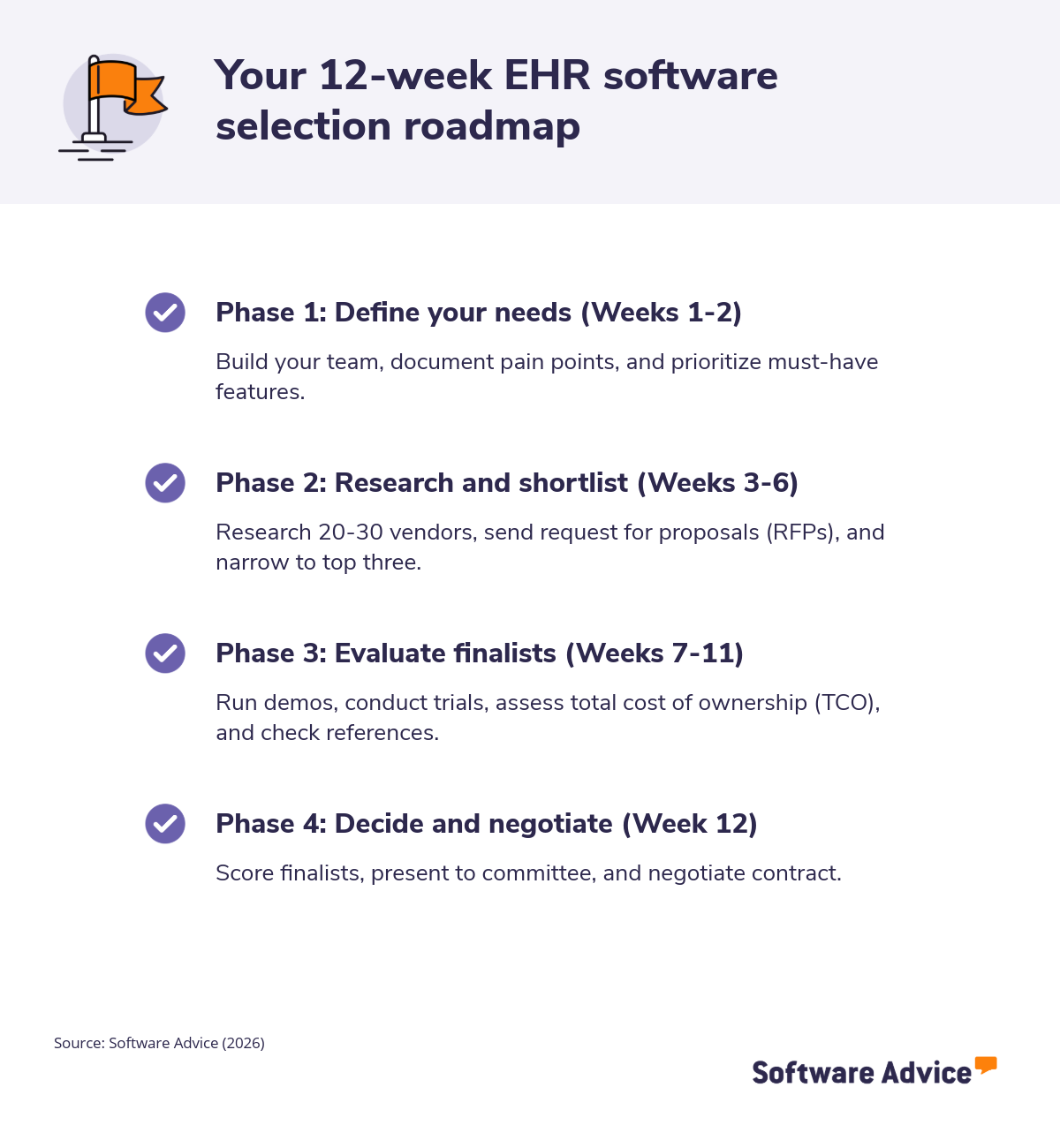
12-step process for shortlisting EHR systems
Phase 1: Define your needs (Weeks 1-2)
Step 1 – Build your EHR selection committee
Your EHR selection committee should involve the following stakeholders:
Physician champion: A physician who is excited about implementing an EHR and whose energy can be contagious among other stakeholders.
Practice manager: A practice manager is a key member of your committee because they have an intimate understanding of the goings on in the practice across several disciplines.
Front desk representative: Your front desk representative is on the front lines, interacting with patients and physicians while working with your digital infrastructure.
Billing staff: A member of the billing staff is also a valuable addition because they form the bridge between services and revenue.
Once you have selected your committee, you should define each person’s role and responsibilities. Typically, you want roles and responsibilities that align with their day-to-day jobs. For example, someone from the billing staff may be assigned the responsibility of evaluating how the software improves the efficiency of the accounts receivable functions.
It’s equally important to establish meeting norms. For instance, you want to set the meeting cadence and decide on a decision-making framework, such as unanimity or majority rules.
For SMBs, it’s also crucial to keep your team lean, limiting to a maximum of three to five people.
Step 2 – Assess your current state and define goals
Assessing your current state begins with documenting pain points and areas where workflow efficiency suffers. Instead of relying on complaints from physicians or staff you’ve heard over the years, it’s best to gather reliable evidence using structured interviews. This involves setting aside time to meet with people in the billing department, support staff, providers, and even patients to gain a global view of pain points.
Then, based on this feedback, you’re ready to define 3 to 5 primary goals. For instance, you may decide to look for an EHR that improves documentation efficiency or enhances patient engagement.
Here are some example questions you can ask stakeholders while assessing your needs:
What frustrates you most about the current billing processes?
How many hours do you spend weekly on manual tasks?
These kinds of questions ground your search in practical realities.
You should also include a priority matrix, such as:
High priority: Business critical, has a direct impact on revenue.
Medium-high priority: Impacts overall efficiency without dragging down revenue.
Medium priority: Helps a significant number of people do their jobs better or more efficiently.
Medium-low priority: Would provide some efficiency improvements but has little impact on business outcomes.
Low-priority: Has little to no impact on business outcomes, but would make some stakeholders more comfortable.
Step 3 - Determine your required features and priorities (Week 2)
You should create a matrix involving must-have versus nice-to-have features, such as:
Clinical documentation templates
E-prescribing
Scheduling with recall automation
Integrated billing
According to Software Advice’s 2026 survey*, the biggest barriers to software investment are leveraging AI effectively (43%), security concerns (38%), and compatibility with existing systems (37%). Keep these in mind as you prioritize 2026 must-haves, including:
AI-powered documentation, which auto-generates notes from conversations
Cloud-native architecture
FHIR APIs for interoperability
Patient portals with secure messaging
Telehealth video
Mobile apps for providers
It’s important to add specialty-specific modules that align with your practice’s focus. For example, a cancer clinic may want EHR software that comes with oncology flowsheets.
Integrating your labs and imaging systems may also top some clinics’ lists. Either way, you should immediately eliminate any vendors that don't have your top 5 must-haves.
Phase 2: Research and shortlist (Weeks 3-6)
Step 4 - Research and discover EHR vendors (Week 3)
Source vendors from trusted directories such as:
Capterra blogs, such as 7 Top-Rated EMR Software
Professional networks or specialty groups
Tap EHR consultants for unbiased longlists and avoid vendor demos until you narrow your choices down.
At first, it’s best to target 20-30 candidates with solutions designed for SMBs, noting initial strengths, such as revenue cycle or telehealth tools.
Keep your observations in a log using a shared spreadsheet with columns such as:
Vendor
Deployment (cloud versus on-premise)
Specialties supported
Standout features
Step 5 - Conduct initial screening to narrow the field (Week 4)
This is where you start to narrow down your choices using aggressive filtering. Your goal is to trim 20-30 vendors down to 8-10 using knockout filters. Some effective criteria include:
Budget
Practice size match
Specialty support
Cloud deployment
Must-have features
It’s also key to eliminate those with high-risk factors like Capterra ratings under 4.2 stars. You can use Software Advice filters for “small practice” and “cloud” to narrow the search. And always document the rationale behind your elimination decisions to demonstrate their logic to other stakeholders.
Step 6 - Create and send your RFP (Request for proposal) (Weeks 4-5)
Draft a concise 5-page request for proposal (RFP) that covers:
Practice profile
Must-haves
2026 priorities, such as AI functionality and specific integrations
Some key questions to ask in your RFP include:
Can you detail the 3-year TCO per provider, including implementation?
Can you demonstrate AI documentation accuracy rates?
Please list FHIR/HL7 endpoints and lab partners
What is the implementation timeline for going live with 10 providers?
What are your support SLAs, and are training hours included?
Send your RFP to 8-10 screened vendors with a 10-day response deadline. Ask them to provide pricing tables and lists of similar clients.
Step 7 - Review and score RFP responses (week 6)
Create a 100-point rubric giving points to each requirement. For instance, you can structure it like this:
30 points features/AI,
25 points for pricing/TCO
20 points for integration/support
15 points for implementation
10 points for client references
Score each category independently, and then calculate the average. Identify red flags like vague pricing, weak FHIR, or 6+ month implementation timelines. Rigorously cut your list down to the top 3 scorers.
What the data shows: Successful EHR buyers shortlist exactly 3 vendors and decide within 12 weeks. More vendors and longer timelines don't lead to better decisions, they lead to analysis paralysis and buyer's remorse.
Phase 3: Evaluate your finalists (Weeks 7-11)
Step 8 - Conduct vendor demonstrations (weeks 7-8)
Prepare 5 to 7 realistic scenarios to present to vendors. They should be both common and somewhat challenging, in order to demonstrate the app’s real-world effectiveness.
For instance, your scenarios could include:
Chart a 15-minute sick visit with AI note generation.
E-prescribe a controlled substance.
Run an aging report for the billing department head.
As you observe the app’s performance, you should evaluate according to the following criteria:
UI speed
Mobile responsiveness
AI accuracy
Telehealth workflows
Virtual demos are most efficient, but you should request in-person demos for finalists.
Step 9 - Request free trials (week 9)
Test the top three choices using 2-week trials with real de-identified data. For instance, you can:
Have physicians chart 20 encounters
Ask billers to process claims
Have medical assistants (MAs) schedule appointments
After each test activity, gather feedback on the app’s performance and usability using quick surveys on a 1-5 scale.
It’s equally important to verify integrations by linking dummy lab results or data from other systems, while always keeping patient privacy top of mind.
Note each process’s load times and any glitches. Slow or unpredictable performance could result from the provider having weak cloud infrastructure or using a server physically far from your facility.
Step 10 - Evaluate total cost of ownership (week 10)
Assessing the total cost of ownership (TCO) involves relatively straightforward math. To project 3-year TCO, sum licensing, implementation, training, data migration, support, and integrations. For instance:
Licensing ($150/provider/month x 12 x 3)
Implementation ($20K flat)
Training (40 hours x trainer’s fee)
Data migration ($5K)
Support ($2K/year)
Integrations ($3K)
Example
Here’s a sample ROI analysis of a single feature, AI-powered documentation, to demonstrate how to put TCO numbers in context of your facility’s cash flow:
AI docs save 2 hours/provider/day x $100/hour x 250 days = $50K annual savings
Using similar calculations for key features, you can then compare the TCO of each of your finalists side-by-side.
Step 11 - Check references and conduct site visits (week 11)
Request 3 references per finalist from similar practices. Whenever possible, choose roughly the same number of providers and specialties. Here are some questions you can ask:
What was your actual go-live timeline?
Were your support ticket resolutions less than 24 hours?
What were your unexpected costs?
Would you renew again?
You can then cross-check their answers with feedback in Software Advice and Capterra to look for patterns. If possible, arrange a site visit to the top 2 finalists’ client sites for hands-on observation.
Phase 4: Decide and negotiate (Week 12)
Step 12 - Make your final selection and negotiate contract (week 12)
Tally the weighted scores using a rubric such as:
Features 40%
TCO 25%
Demos 20%
References 15%
Present your top recommendations along with data and visuals to the rest of the committee. To seal the deal, you can negotiate with the provider. Some effective negotiation asks: 10% implementation discount, 99.9% uptime SLA, free training, data ownership clause, and 3-year price lock.
Once you settle on terms, congrats! It’s time to launch. Sign with the provider, and kickstart your project plan, ideally targeting a 90-day go-live timeframe.
EHR selection checklist: 12 steps at a glance
Step | Action | Week |
|---|---|---|
1 | Build selection committee (3-5 people) | 1 |
2 | Document pain points, define 3-5 goals | 1-2 |
3 | List must-have vs. nice-to-have features | 2 |
4 | Research vendors, target 20-30 candidates | 3 |
5 | Apply knockout filters, narrow to 8-10 | 4 |
6 | Send RFP to 8-10 vendors | 4-5 |
7 | Score responses, cut to top 3 | 6 |
8 | Conduct vendor demos | 7-8 |
9 | Run 2-week trials with top 3 | 9 |
10 | Calculate 3-year TCO for each finalist | 10 |
11 | Check references, conduct site visits | 11 |
12 | Make final decision, negotiate contract | 12 |
Source: Software Advice (2026)
Key takeaways and next steps
Successful EHR buyers shortlist exactly 3 vendors and decide in 12 weeks. Data proves this avoids analysis paralysis and produces confident outcomes. This 12-step process delivers systematic narrowing through a rigorous evaluation process by committee.
Warning: If you end up past week 12 or have more than 3 vendors, reassess immediately.
By using the checklists in each phase religiously, you can quickly eliminate problematic choices. You can get started now using Software Advice’s EHR directory.
Survey methodology
*Software Advice’s 2026 Software Buying Trends survey was conducted online in August 2025 among 3,385 respondents in Australia (n=281), Brazil (n=278), Canada (n=293), France (n=283), Germany (n=279), India (n=260), Italy (n=263), Mexico (n=288), Spain (n=273), the U.K. (n=299), and the U.S. (n=588), at businesses across multiple industries, ages (1 year in business or longer), and sizes (5 or more employees). Business sizes represented in the survey include: 1,676 small (5-249 full-time employees), 822 midsize (250-999), and 887 enterprise (1,000+). The goal of this study was to understand the timelines, organizational challenges, research behaviors, and adoption processes of business software buyers. Respondents were screened to ensure their involvement in business software purchasing decisions.