
Best Construction Categories
Best Facilities Management Categories
Best Human Resources Categories
Best Legal Management Categories
Best Manufacturing Categories
Best Medical Categories
Best Property Management Categories
Get 1-on-1 advice in 15 minutes. It's free.

Josh P.

AI in EMR Software: What SMBs Should Know Before Choosing a System
Choosing the right AI‑enabled electronic medical records (EMR) can help practices reduce documentation time, improve data quality, and support more coordinated patient care. Many teams want AI to speed up charting and streamline workflows without adding burden to clinicians.
The challenge: adopting AI while keeping daily routines intact, ensuring staff trusts new suggestions, validating outputs, and managing ongoing data privacy requirements.
This guide explains where AI helps, what to look for, how pricing typically works, and how to prepare your team, without listing or ranking vendors.
How is AI used in EHR: 10 key features to look for
Based on capabilities identified across leading AI‑enabled EMR tools, here are ten common AI features practices will encounter in the market*.
Ambient documentation: AI captures clinician–patient conversations and converts them into structured draft notes. This helps clinicians stay engaged during visits and complete documentation with fewer manual steps. Ambient tools often support SOAP and other template formats.
Automated visit summaries: AI condenses long encounters into concise summaries that highlight key discussion points, history, and follow‑ups. These summaries help clinicians get up to speed quickly during handoffs or chart reviews and are especially useful for multisite teams.
Speech‑to‑text dictation: AI‑powered voice recognition transforms spoken input into clinical text. This reduces typing, supports hands‑free note entry, and speeds up routine chart updates, especially in busy or multi‑specialty practices.
Predictive charting and suggestion cues: Some EMRs analyze past clinician behavior and surface likely orders, documentation phrases, or follow‑up actions. These AI‑driven prompts reduce repetitive steps and help maintain consistent documentation patterns across visits.
Clinical note generation: AI takes transcripts, uploaded audio, or visit text and drafts structured notes, such as SOAP or data, assessment, and plan (DAP) notes, based on the clinician’s preferred documentation style.
Document indexing and data extraction: AI categorizes scanned documents, eFaxes, uploads, and remittance data. It then routes them to the correct patient record or workflow.
Voicemail transcription and prioritization: AI transcribes voicemails, extracts caller details, and assigns urgency levels. This helps staff act on inbound inquiries faster, especially in behavioral health or high‑volume settings where calls accumulate quickly.
Automated billing and claims assistance: AI supports revenue cycle tasks by extracting billing details, matching payments to patient accounts, and reducing manual posting errors.
AI‑assisted chat and navigation: Some EMRs include chat‑based assistants that draft responses to patient messages or navigate the EHR using natural‑language prompts.
Session recording analysis for telehealth: AI processes virtual visit recordings, transforming session audio into transcripts, summaries, and structured notes. By linking these outputs to the patient chart, telehealth workflows become more efficient with fewer manual follow‑up steps.
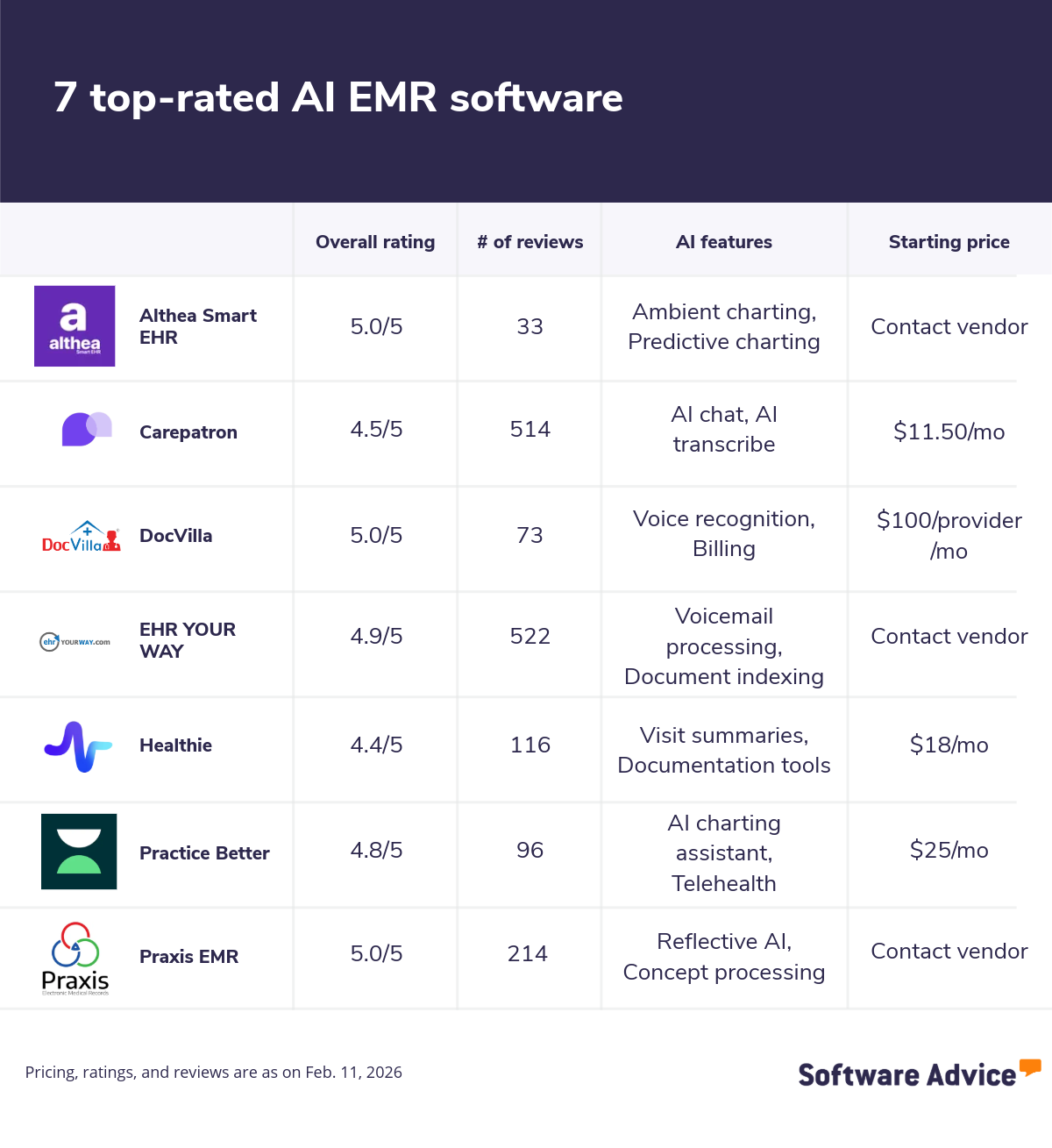
7 top-rated AI EMR software solutions
Below is a list of seven AI‑enabled EMR software, presented alphabetically, that met our inclusion criteria based on verified user reviews and our research team’s analysis. These tools represent the types of AI capabilities commonly used to support documentation, streamline administrative tasks, and enhance clinical workflows.
What are the benefits of using AI EMR software?
AI‑enabled EMR systems enhance clinical documentation, optimize operational tasks, and reduce administrative burden. Below are common benefits based on capabilities seen across leading AI‑driven EMR tools:
Increased efficiency: Automates documentation tasks such as transcription, note drafting, and clinical summaries, reducing manual typing and accelerating chart completion.
More consistent documentation: Uses AI to standardize note structure, surface relevant prior encounters, and help ensure details are captured accurately and consistently across providers.
Improved clinical accuracy: AI surfaces relevant medical history, prior cases, or structured patient summaries to support more informed decision‑making and reduce the risk of overlooked information.
Reduced administrative workload: AI handles time‑consuming tasks like transcribing sessions, cleaning up free‑form notes, and organizing documents, allowing clinicians to focus more on direct care.
Better information retrieval: AI‑generated visit summaries, histories, and structured notes help clinicians quickly get up to speed, improving continuity of care in multisite or multidisciplinary practices.
How much does AI EMR software cost?
AI‑enabled EMR platforms vary in price based on the depth of automation, including documentation tools, specialty needs, user count, and whether the system bundles telehealth, practice‑management, or template customization features. While pricing differs across vendors, the patterns below reflect what is commonly offered in the market.
Free trials: Many AI‑enhanced EMRs offer 7- to 30-day trials, giving clinicians a chance to test features such as AI scribing, automated summaries, or telehealth workflows before subscribing.
Free versions: Some vendors provide free starter tiers, typically limited to basic charting, scheduling, or documentation tools. These free versions usually exclude advanced AI features such as ambient note generation or automated summaries.
Entry-level plans: Lower‑tier plans often begin around $7 per user per month, providing essential EMR functionality with limited automation and basic charting or messaging tools.
Mid-tier plans: Mid‑range subscriptions, often $10 to $30+ per user per month, tend to include key AI‑driven features such as automated note drafting, transcription, summaries, or workflow cues. These tiers suit growing practices that want more efficiency without the cost of enterprise tools.
High-end plans: Premium packages are geared toward multi‑provider clinics or organizations that rely heavily on advanced automation (e.g., ambient documentation, predictive suggestions, integrated telehealth + EMR AI). These plans command higher pricing due to deeper AI capabilities and larger user bases.
Hidden costs associated with AI EMR software
Besides the software license, additional costs may include:
Training: Some vendors charge extra for onboarding or advanced training sessions to help teams adopt AI documentation or workflow tools efficiently.
Third-party integrations: AI EMRs often integrate with telehealth platforms, dictation tools, or analytics add‑ons. Specific integrations may carry additional subscription or usage fees.
Data storage: Most subscriptions include baseline storage, but practices that retain large volumes of audio recordings, transcripts, or video files may incur extra storage costs depending on the vendor.
Buyer checklist: How to evaluate AI‑enabled EMR systems
Choosing an AI‑enabled EMR requires assessing how the technology works, how it fits into daily workflows, and how it impacts costs, privacy, and clinical accuracy. These considerations can help teams compare systems effectively.
Data inputs, accuracy, and oversight: Understand what fuels the AI tool, such as transcripts, chart history, or de‑identified clinical data, and how accuracy is checked before drafts enter the chart. Systems that tune to your specialty and monitor outputs continuously reduce correction work, while generic models may increase editing time.
Security and privacy safeguards: AI EMRs handle sensitive clinical data, so verify HIPAA alignment, BAA availability, encryption, audit logs, and role‑based access with SSO/MFA. If external AI services confirm the use of private endpoints, sub‑processor transparency, and that your data stays out of shared training models.
Control and customization: Check how far you can adjust confidence thresholds, note structures, summarization rules, and specialty‑specific phrasing. More control helps teams align AI outputs with existing workflows and reduces the cleanup of documentation. Limited customization can create friction for clinicians.
Pricing structure and what’s included: Clarify which AI features are in base tiers versus premium add‑ons. Understand pricing units, per user, per provider, per action, or per transcription minute, and check for caps, overage costs, or integration fees. This helps anticipate long‑term spend as usage increases.
Training and adoption support: AI tools require straightforward onboarding, specialty‑relevant training, and guidance on validating drafts. Vendors that offer structured training and ongoing support can help teams build trust in AI and adopt features without disrupting clinical routines.
Common pitfalls to avoid while adopting AI in EMRs
Adopting AI in an EMR can streamline documentation and reduce administrative steps, but many practices still face avoidable issues during rollout. These pitfalls often stem from misaligned expectations, limited oversight, and insufficient feature tuning. Below are common challenges teams should anticipate.
Underestimating the review workload. Many teams expect AI tools to eliminate documentation, but ambient notes, summaries, and draft text still require clinician review before entering the chart. When practices overlook this requirement, they encounter editing backlogs or slowed visit closures. Setting expectations around human validation early helps avoid workflow disruption.
Using generic or untuned templates. AI outputs are only as effective as the templates and rules they follow. If practices rely on generic structures or defaults, clinicians end up rewriting sections because the phrasing, sequencing, or detail level does not match their specialty. Tuning templates and summarization logic before go‑live helps reduce manual edits and keeps documentation consistent across providers.
Lacking governance for templates, prompts, and QA. Without clear owners for prompts, templates, accuracy monitoring, and exceptions, documentation quality can drift over time. Teams may also lose visibility into which AI features are helping and which are creating rework. Establishing governance roles and periodic review cycles helps sustain quality as AI adoption expands.
Overlooking privacy and data‑handling requirements. Some practices enable AI features before confirming privacy safeguards such as HIPAA alignment, BAA execution, encryption, audit logging, or sub‑processor transparency. Misalignment between a vendor’s data‑handling practices and the organization’s requirements can delay implementation or reduce the number of AI functions that can be activated. Reviewing security and privacy posture early prevents late‑stage obstacles.
Tracking the wrong success metrics. Measuring feature usage, like how often a clinician clicks an AI button, does not indicate whether the AI is reducing workload or improving care. Practices should instead track edits per note, documentation time, handoff quality, or staff satisfaction. These operational metrics offer clearer insight into whether the AI is improving workflows or adding unnecessary steps.
6‑step readiness plan for SMB practices
Preparing for AI‑enabled EMR adoption works best when teams start small, set clear expectations, and build structured oversight. These steps help practices introduce AI without disrupting existing workflows.
Map workflow pain points: Identify where time is being lost, such as manual transcription, long note‑closure cycles, or slow document intake, and capture baseline metrics. Knowing the biggest bottlenecks helps teams match AI capabilities to real needs.
Choose 2–3 AI capabilities to pilot: Pick a small set of features that directly solve the issues you identified, such as ambient documentation or document indexing. A narrow scope helps teams adopt AI incrementally and reduces workflow disruption.
Define accuracy rules and review steps: Set clear expectations for how AI‑generated drafts are reviewed, corrected, and approved. Establishing accuracy thresholds and reviewing ownership upfront keeps documentation quality consistent during rollout.
Pilot in one service line first: Begin with a controlled trial in a department with predictable workflows, track metrics such as edits per note or time‑to‑close to understand how AI changes daily documentation.
Train clinicians to validate AI outputs: Provide short, focused training on review workflows and best practices for correcting AI‑generated content. This builds confidence, reduces resistance, and ensures teams use the tools as intended.
Scale gradually with governance: Assign owners for templates, prompts, and QA as adoption expands. Periodic tuning of summarization logic, accuracy settings, and privacy controls supports stable long‑term performance.
Frequently asked questions when selecting AI EMR software
Here are some common questions to ask software vendors:
Are AI features included in the base price or added as paid upgrades? Transparency in packaging helps you anticipate the total cost of ownership. Request a clear breakdown of which AI capabilities, such as ambient transcription, automated summaries, or workflow assistants, are included in standard EMR tiers versus premium plans. Also ask how pricing is calculated (per user, per provider, per AI action, or per transcription minute), whether usage caps exist, and whether setup or integration fees apply.
Can clinicians control when and how AI activates during a visit? AI that runs continuously may overwhelm users, while AI that is too passive may not deliver value. Understand whether providers can toggle ambient listening, adjust when drafts generate, or switch between manual and AI‑assisted modes.
How does the system handle multi‑provider workflows? If multiple clinicians, care coordinators, or staff members contribute to the chart, confirm how the AI maintains context across users, especially for shared patients, rotating teams, or multisite practices.
What device and environment requirements does AI need? Some ambient tools may require specific microphones, bandwidth levels, or compatible browsers. Confirm hardware needs, mobile availability, and whether clinicians can use AI features across laptops, exam rooms, or mobile devices.
Survey methodology
In the “Common AI capabilities in EMR software” section, we considered products that:
Have at least 20 unique product reviews published on Software Advice within the past two years, with an average rating of 4.0 or higher (as of Feb. 11, 2026).
Meet our market definition for EMR software: “Electronic medical record (EMR) software stores, organizes, and manages a patient’s clinical information within a single healthcare practice. It supports core point‑of‑care workflows such as charting, documentation, medication lists, problem histories, and clinical notes.”
Show evidence of offering AI capabilities as demonstrated by publicly available sources, such as the vendor’s website.
For the section titled “How much does AI EMR software cost?”, only products with publicly available pricing information and AI features, as of Feb. 11, 2026, were considered for pricing calculations.
*For details about the products and their AI-enabled features, we referenced publicly available sources, primarily vendor websites, as of February 2026. In some cases, vendors provide us with information that our research team then validates using public sources.
Editorial Independence: We select and rank products based on an objective methodology developed by our research team. While some vendors may pay us when they receive web traffic or leads, this does not influence our methodology.