
Best Construction Categories
Best Facilities Management Categories
Best Human Resources Categories
Best Legal Management Categories
Best Manufacturing Categories
Best Medical Categories
Best Property Management Categories
Get 1-on-1 advice in 15 minutes. It's free.

Josh P.

A Guide to Business Intelligence Software Pricing Models
If you’re a data analyst, collecting and sorting data from multiple sources can be complex. A dedicated business intelligence tool can simplify these operations for you, but selecting the best tool and its pricing plan requires careful evaluation of factors, such as overall budget, number of users, non-negotiable features, and the total cost of ownership.
With this in mind, we’ve created a guide to simplify business intelligence software pricing. We provide clarity on the costs associated with top-rated business intelligence solutions, including pricing structures, subscription fees, implementation costs, and additional expenses. By offering a detailed business intelligence software pricing comparison, we aim to help you make an informed software purchase that fits your budget and business needs.
What is business intelligence software?
Business intelligence software enables businesses to access, analyze, and share information in order to improve decision-making through gathering performance metrics. By providing an infrastructure for compiling, analyzing, and distributing key data, these applications facilitate more accurate reporting and monitoring as well as strategy implementation and assessment. The core features of business intelligence software are dashboards, self-service data preparation, and visual analytics.
What are the different types of business intelligence software pricing models?
Business intelligence software solutions have different pricing plans or ranges determined by several factors, such as the number of users, software features, data volume, deployment model, customization, support level, and available integrations. Here are some common business intelligence tool pricing models:
Subscription license
You pay a monthly or annual fee to use the software for a set period of time. Pricing is typically based on the number of users per month. The subscription model is commonly used for cloud-based deployments where the system is hosted by the software provider on their servers and can be accessed by your users on compatible devices, such as laptops, smartphones, and tablets via the internet.
Some common types of subscription pricing options include:
Per user: Pricing is based on the number of users accessing the software. It can be either a flat fee per user or a tiered structure where the cost per user decreases as the number of users increases.
Tiered: Different pricing tiers based on the software features included with higher tiers offering more advanced functionalities.
Per department: Charges are incurred for each department or division within an organization.
Flat rate: A single, fixed fee for a specified period, regardless of the number of users or job postings.
Pay as you go: Charges are based on the actual consumption of software resources, such as the amount of data processed or reports generated.
Perpetual license
Under this pricing model, you pay a one-time upfront fee for the permanent license to own and use the business intelligence solution. The fee can vary based on the number of users. The perpetual pricing model is commonly used for on-premise deployments where the software is hosted and maintained in-house on your own servers.
Free and open source license
These pricing options are commonly used by small-business owners or teams with limited budgets and resources.
Freemium: A basic version of the software is offered for free with premium features, add-ons, or additional services available for a fee.
Open source: The software source code is freely available, allowing users to modify and distribute it. While the software is often free to use, you may incur implementation and maintenance costs.
Common subscription pricing tiers for business intelligence software
Under the subscription model, per-user pricing is the most commonly seen. You pay a fixed fee for every user seat, and prices increase as the number of user seats increases. Per-user pricing plans are typically of three types, according to analysis by our research team.
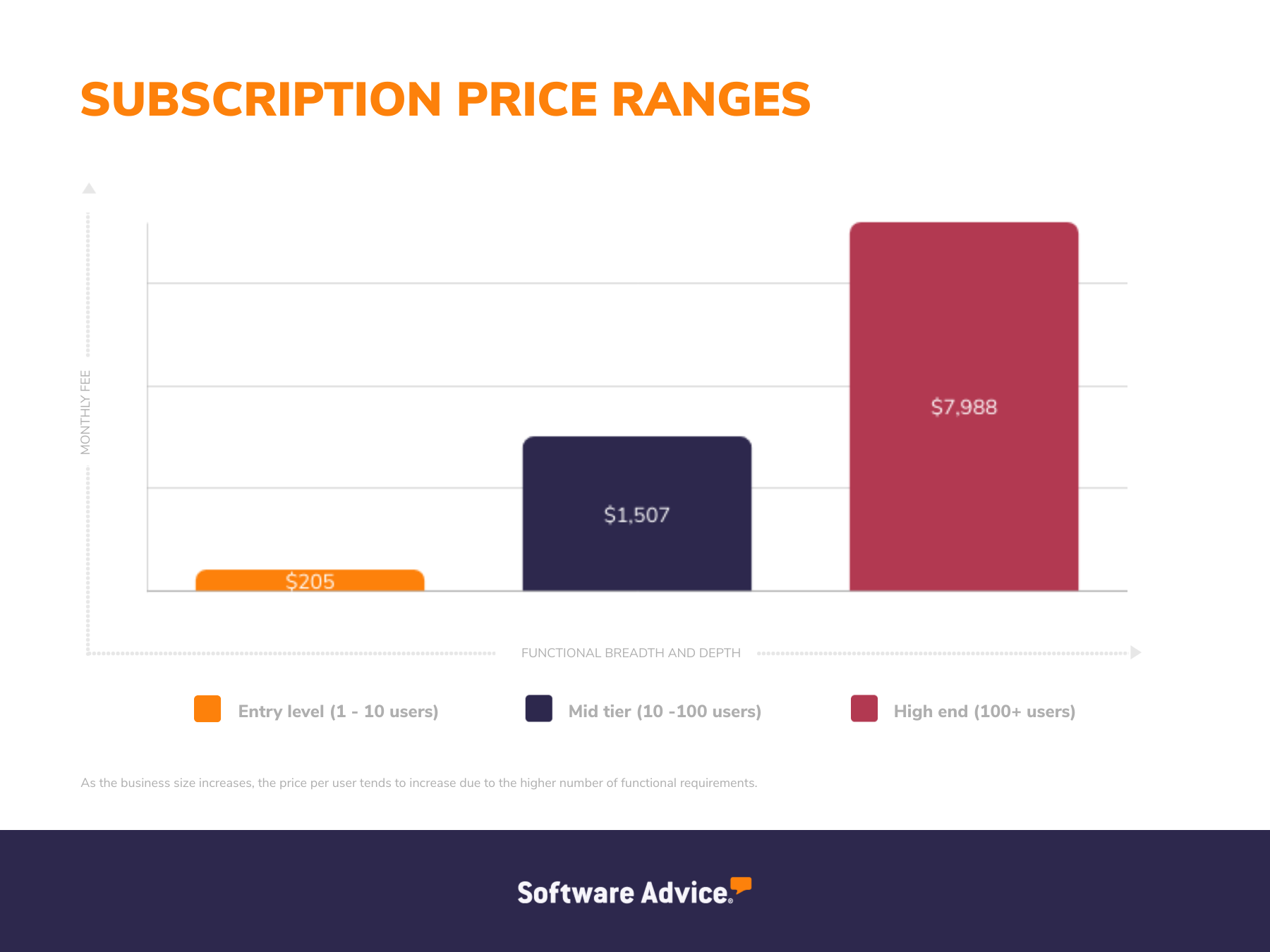
Entry-level plans (one to 10 users): These plans cost up to $205 per month and offer access to standard software features. They are suitable for small businesses with basic feature needs, such as data storage, data visualization, and reporting.
Mid-tier plans (10 to 100 users): Costing up to $1,507 per month, these plans offer advanced features, such as customizable dashboards, predictive analytics, real-time data feeds, and machine learning capabilities. These plans are suitable for businesses that have outgrown entry-level business intelligence tools but don’t require the full range of functionality offered by enterprise-level systems.
High-end plans (100+ users): They cost up to $7,988 per month and offer a range of advanced business intelligence capabilities, including unlimited features from entry-level and mid-tier plans, blockchain integration, geo visualizations, and premium support options. These plans suit larger enterprises with complex data needs, comprehensive analytics, and customized support requirements.
For reference, below is a snapshot of the prices of the most reviewed business intelligence solutions with subscription pricing plans. These products are taken from the most recent Software Advice FrontRunners report for business intelligence software.*
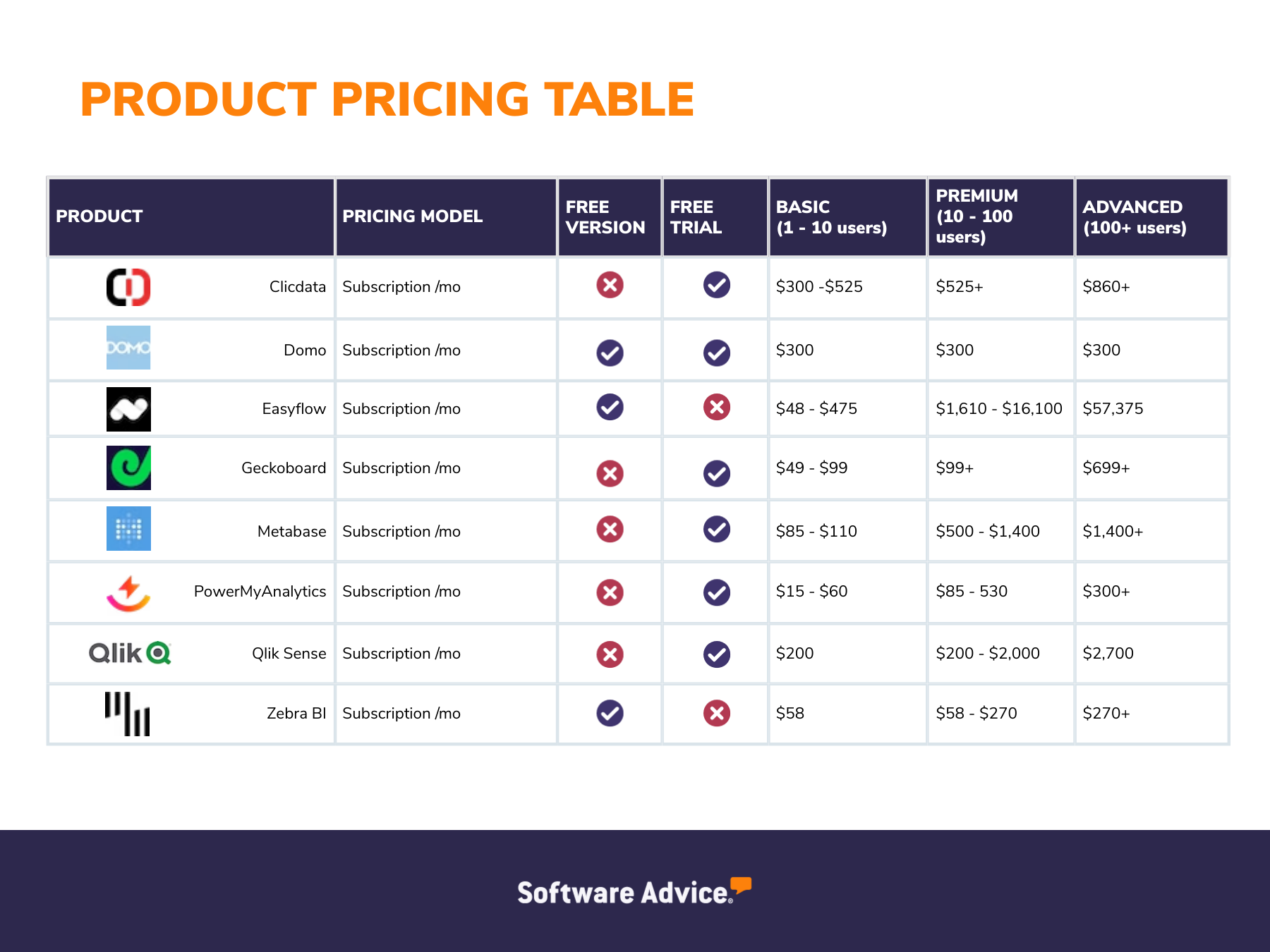
Note: To find out the subscription price of each tier (entry level, mid tier, and high end), we calculated the median value based on their respective pricing mentioned in the product pricing table above. In this case, the median represents the middle value of the monthly fee for each pricing tier when all the top-rated software solutions are considered. While average pricing may be easily skewed by outliers, the median value gives users an understanding of the midpoint of ranges they're likely to encounter.
What are the upfront and recurring costs associated with business intelligence software?
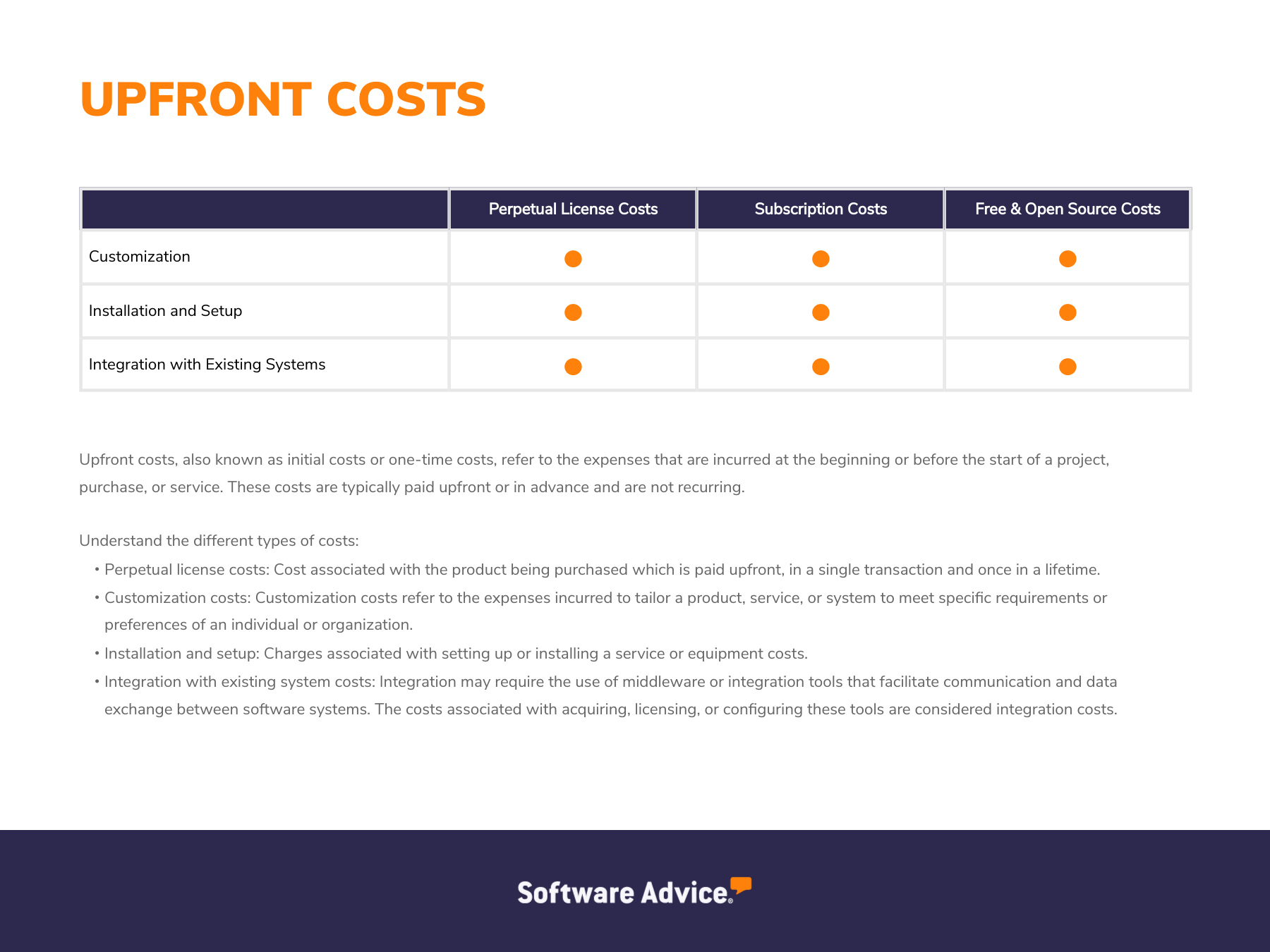
Upfront costs are the initial expenses incurred when purchasing or subscribing to software, such as licensing, installation, setup, and training. The graphic below illustrates the primary upfront costs associated with business intelligence software.
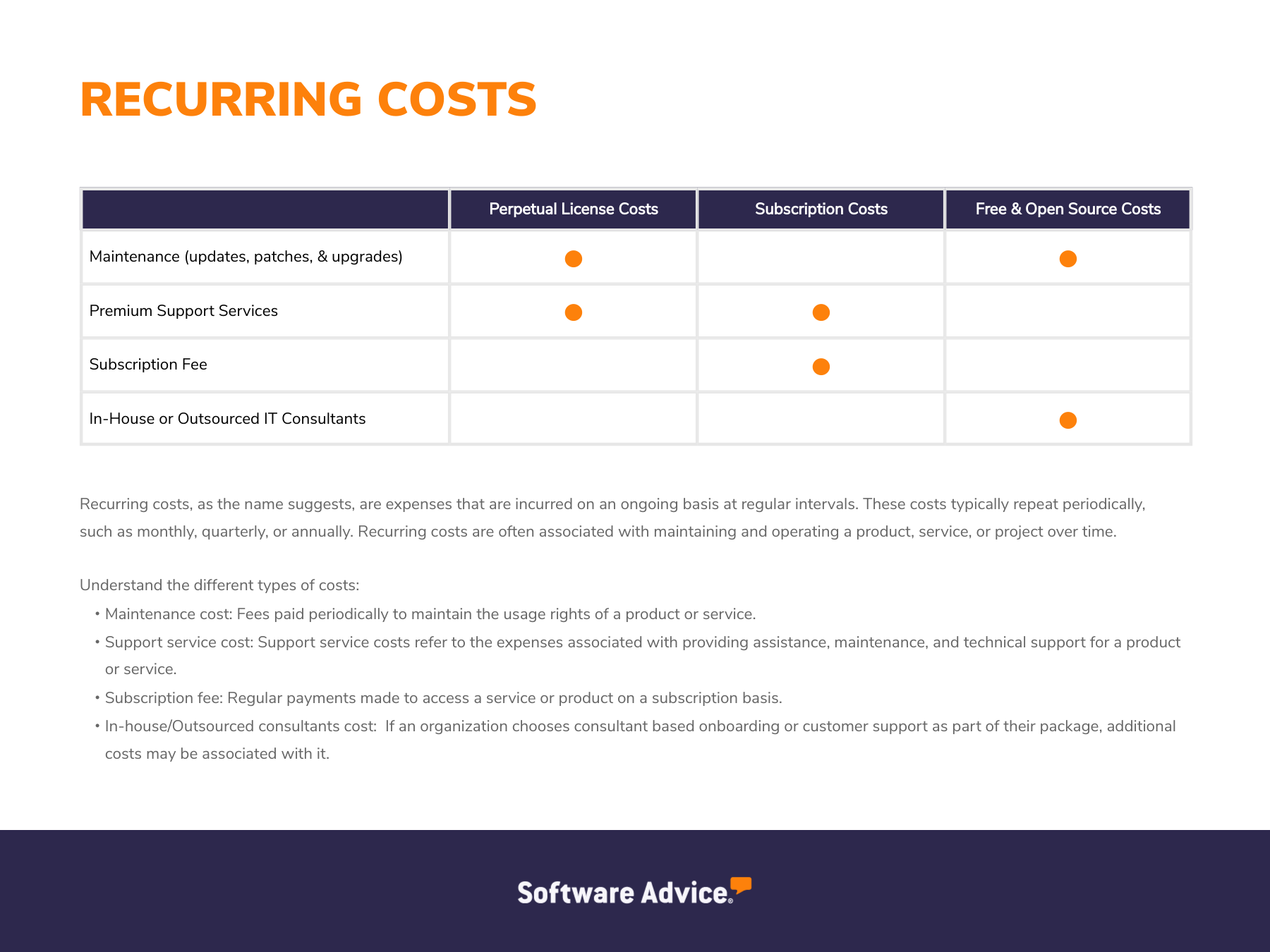
Recurring costs are the ongoing expenses associated with using software, such as subscription fees and maintenance costs. These costs may be charged monthly or annually and can also include expenses for upgrades or additional user licenses. The graphic below shows the primary recurring costs associated with business intelligence software.
| Subscription license | Perpetual license | Free and open source license |
|---|---|---|---|
Upfront costs | Installation, setup, and software customization. | One-time license fee, hardware (e.g., servers, storage devices, network infrastructure equipment), and installation charges. | Open source plans may involve installation and setup expenses—free plans don’t have any upfront costs. |
Recurring costs | Monthly or annual subscription fee and premium support offerings (e.g., 24/7 phone support hours, quick ticket response time). | Monthly, annual, or ad hoc maintenance (e.g., updates, patches, upgrades) and premium support offerings (e.g., extended phone support hours). | Free plans don’t have recurring costs—open source plans can include fees for server hosting, additional features, and IT staff hours to modify the source code. |
Hidden costs | Customization, implementation of unique company branding, and integration with existing software, such as enterprise resource planning (ERP), customer relationship management (CRM), and data warehouses. | Customization, integration, and IT staff overtime (or hiring more IT staff) to maintain servers and infrastructures for a BI solution. | Implementation, customization, maintenance, integration with existing tech stack, training, and premium support costs could apply to both free and open source plans. |
What are the additional costs associated with business intelligence software?
These additional costs are common across different software providers and pricing models, so it is important to include them in your budget.
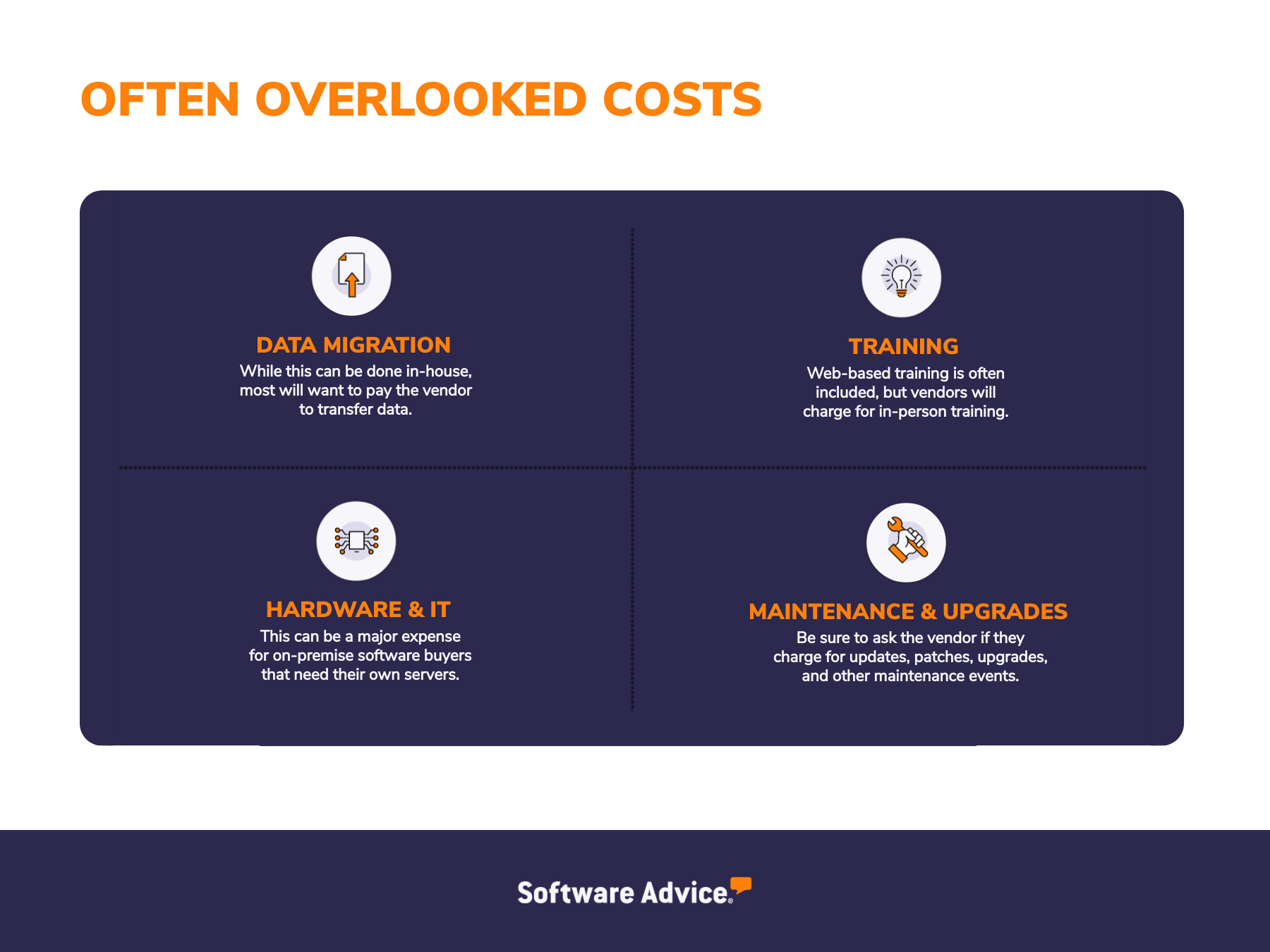
Data migration: Data migration costs in BI software refer to the expenses incurred when transferring existing data, such as customer information, sales data, financial data, operational data, and other relevant datasets, from an existing system or manual process to a new BI solution. These costs can vary depending on the volume and complexity of the data.
Training: Training costs refer to the expenses incurred in educating your employees on how to effectively use and leverage the BI tool. These costs can vary significantly depending on the complexity of the software, the size of your team, and the chosen training method. Factors such as the number of users, the frequency of use, and the need for specialized training can also influence the overall training costs.
Hardware and IT: Hardware costs are the expenses incurred for the underlying infrastructure required to run the BI solution. These costs can vary depending on the deployment model (on-premises or cloud-based) and the specific hardware and software requirements. IT costs, on the other hand, are the costs associated with hiring IT staff to manage and maintain the new system.
Maintenance and upgrades: Once the business intelligence software is in place, ongoing maintenance is necessary to ensure it functions smoothly. These expenses typically include software upgrades, security patches, technical support costs, and potential fees for major version upgrades. Regular maintenance ensures that the BI platform remains compatible with other systems and adapts to changing business needs.
How to find the right pricing plan for business intelligence software
Understand your business needs: Before investing in the best business intelligence software, identify your business requirements which include technical, compliance, and reporting requirements. Next, understand the essential features you would require to fulfill these requirements. These features may include data visualization, custom reporting, collaboration tools, multiple data sources, or integration with other systems. In general, plans with advanced business intelligence features, such as predictive analytics, interactive dashboards, and AI-powered insights are priced higher than the basic options.
Determine the number of users: Determining the number of users is an important factor when evaluating pricing plans for the best business intelligence software. The number of individuals who will need access to the software directly impacts the cost. If your organization has a large team that requires frequent use of BI tools, you'll likely need a plan that accommodates a higher number of users. On the other hand, if only a few individuals will need access, a plan with a lower user limit might be sufficient. Understanding your user base will help you choose a pricing plan that aligns with your budget and requirements.
Evaluate your budget: By understanding your financial constraints, you can narrow down your options and choose a solution that fits within your budget. Consider factors such as your overall IT budget, the return on investment (ROI) you expect from BI, and any potential cost savings from using BI tools to improve efficiency or make data-driven decisions. Setting a realistic budget will help you avoid overspending and ensure that the BI software aligns with your financial goals.
Common questions to ask when choosing business intelligence software
When selecting a BI software solution, it's essential to ask the right questions to ensure you choose the best fit for your organization. Here are some key questions to consider:
Is there a free trial or demo version of the software?
A free trial or demo version of business intelligence software can help you evaluate the software's features, user interface, and suitability for your specific needs. By trying the software before purchasing, you can see how the software integrates with your existing systems to ensure compatibility. This can minimize the risk of investing in software that doesn't meet your needs and make a more confident purchasing decision.
Are there any additional costs?
There are often additional costs associated with business intelligence software beyond the initial purchase or subscription fee. These may include customization, integration, training, and data migration costs. Understanding these potential hidden costs can help you make more informed decisions about the total cost of ownership for your BI software and avoid unexpected expenses.
Are there any associated costs with scalability?
As your data volume, user base, or complexity of analysis increases, you may need to upgrade your hardware or cloud infrastructure, purchase additional software licenses, or train additional users. It's important to inquire about these potential costs when evaluating BI software and planning for future growth. A scalable solution can help you avoid costly upgrades and disruptions as your business expands.
What are the best business intelligence software packages?
Do the business intelligence software tools listed in this guide fall within your budget? If yes, compare their features and read real user reviews of more than 1,000 similar products listed on our business intelligence category page.
Methodology
*The products featured in this guide qualified for the most recent business intelligence software FrontRunners report and were highly rated by users.
Only products with publicly available pricing information were included in this table. We summarized publicly available pricing sources, including vendor websites as of September 2024, beginning with the lowest monthly pricing (not including annual discounts) for packages that include the core functionality for this software category.
The core features of these business intelligence software tools include dashboard, self-service data preparation, and visual analytics.
We have also listed pricing for more advanced packages (per user, when available) that include these core software feature(s). As always, your company’s specific needs may differ, and final pricing will vary.
Note: This article is intended to inform our readers about business-related concerns in the U.S. It is in no way intended to provide financial advice or to endorse a specific course of action. For advice on your specific situation, consult your accountant or financial consultant.