
Best Construction Categories
Best Facilities Management Categories
Best Human Resources Categories
Best Legal Management Categories
Best Manufacturing Categories
Best Medical Categories
Best Property Management Categories
Get 1-on-1 advice in 15 minutes. It's free.

Josh P.

Buyer Insights to Guide Your Legal Management Implementation
Growing caseloads, evolving regulations, and rising client expectations make running a legal practice increasingly demanding. Routine administrative work often pulls attorneys away from client service and strategic casework. Legal management software helps firms stay organized by simplifying daily operations, reducing compliance risks, and giving legal teams more time to focus on client needs rather than paperwork.
However, to make the right purchase, it is crucial to understand which features matter most for your practice, typical pricing expectations, and the common challenges firms face when evaluating legal management systems.
How we can help: Each year, Software Advice talks to thousands of legal management buyers. We’ve distilled their insights on budgets, features, and pain points to help you choose the right tool.
Key insights
Legal management buyers prioritize case management, while current users rank client management as most important.
Most businesses rely on non-specialized tools or manual methods to handle their day-to-day legal management operations. A small percentage of businesses do not have any system in place.
Switching to legal management software is driven by the need for efficiency, functional sufficiency, and new business opportunities.
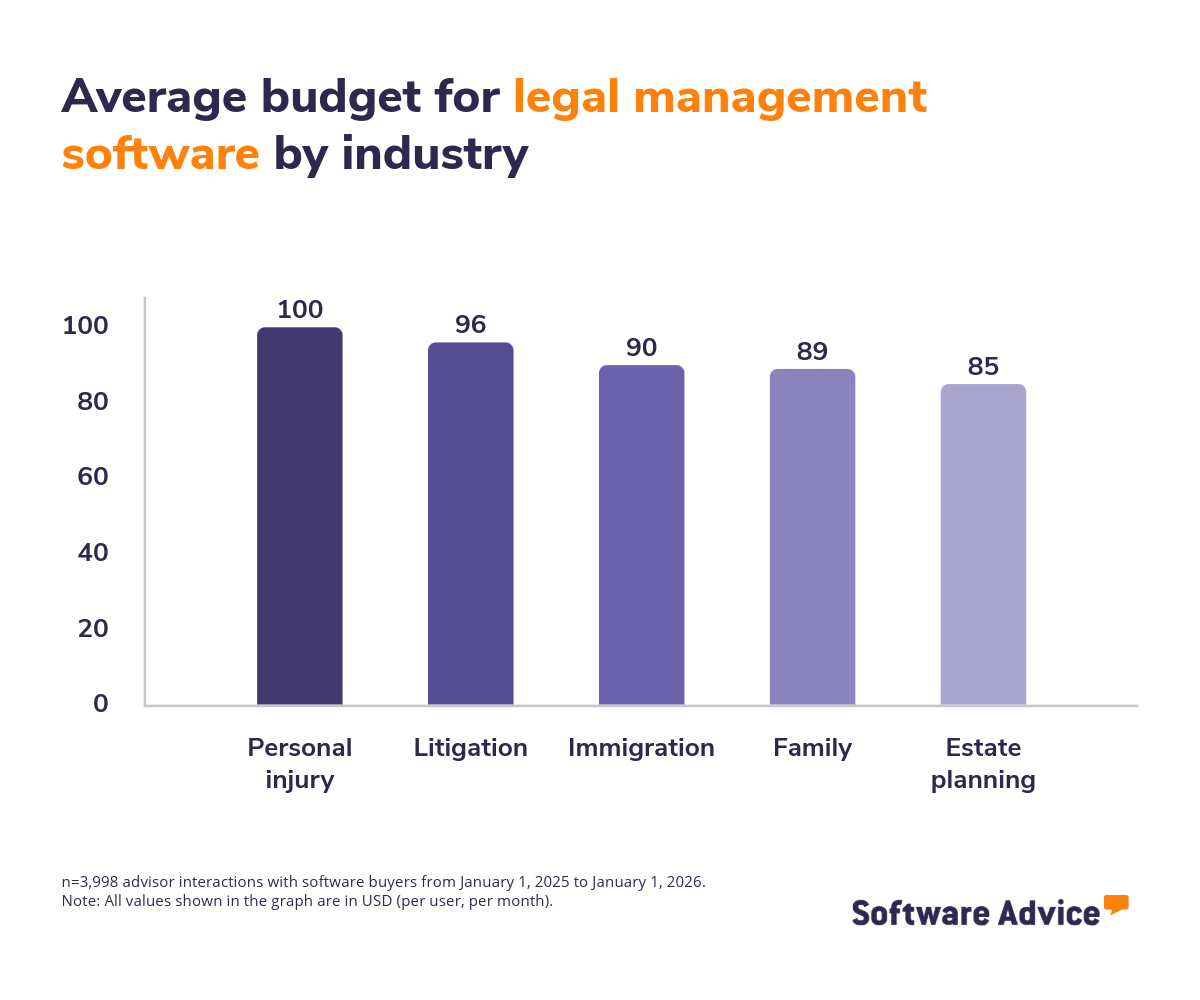
The top five industries investing in legal management software allocate between $85 to $100 per user, per month with an overall buyer average of $93.
Prospective buyers and current users prioritize different features
We analyzed thousands of legal management software reviews available on Software Advice to identify the features that software users consider most critical for their business. Our findings revealed a gap between what legal software buyers and users prioritize.
Around 39% of users say client management is their most essential feature, while 88% of legal software buyers look for case management during evaluation.
This gap signals a critical insight: Buyers often prioritize features that organize case information and support matter workflows during the purchase process, while end‑users tend to value tools that help manage client interactions and communications in day‑to‑day work.
Client management helps legal teams track contacts, intake details, communication history, and key deadlines across matters. It supports stronger client service by keeping information accurate and accessible, enabling firms to maintain consistent updates, reduce back‑and‑forth, and respond quickly to client needs.
Case management consolidates case files, documents, tasks, calendars, and matter notes in a single workspace. It supports structured workflows, improves visibility across legal processes, and helps teams coordinate actions such as drafting, filing, review, and court‑related tasks without switching between systems.
Pro tip
Choose simple, purpose‑built software that solves a single problem, test it for a few months, and drop it if it doesn’t deliver. This approach helps firms avoid overpaying, reduces learning curves, and increases adoption.
Current pain points for legal management software buyers
When our advisors asked buyers what methods they were currently using to handle their day-to-day legal practice operations, here's what they found:
Nearly 35% of buyers rely on non-specialized tools, such as accounting and time tracking platforms, while 27% buyers are still using manual methods. Including paper-based methods and spreadsheets to manage their day-to-day operation workflows.
Around 21% of buyers do not have any system in place yet.
These discussions shed light on businesses' real-life challenges with their existing methods, which include inefficiency (35%), limited functionality (31%), and new business opportunities (15%).
Inefficiency: Manual processes and non-specialized tools make routine legal work time‑consuming. Tasks such as tracking deadlines, organizing documents, or logging communication must be handled across multiple files or platforms, increasing the chance of missed updates. As caseloads grow, these methods require extra steps for data entry, follow‑ups, and verification, slowing down both attorneys and support staff and making it harder to maintain accurate records.
Limited functionality: Non‑specialized tools lack integrated features for matter tracking, document storage, billing, and task coordination. Without these capabilities in one place, firms must switch between unrelated systems to manage information, which complicates workflows. Manual approaches also make it difficult to maintain current case files, organize discovery materials, or coordinate calendars. This fragmentation limits visibility across active matters and makes it harder for teams to work from a shared source of truth.
New business opportunities: Firms using manual or non-specialized tools often struggle to scale when new opportunities arise. For example, taking on more clients, expanding into new practice areas, or adding additional staff. Manual systems cannot keep pace with higher volumes of documents, deadlines, or client inquiries. Non‑specialized platforms are typically built for basic functions and do not support legal‑specific workflows, making it difficult to adapt operations quickly. This slows growth and reduces the firm’s ability to respond to shifts in demand.
Reasons for switching to a dedicated legal management software
Compared to the existing methods used by professionals, a dedicated legal management software solution offers the following benefits:
Improved operational efficiency: A dedicated legal management system centralizes tasks such as matter tracking, deadlines, communication logs, and document handling, reducing the time spent navigating multiple tools or updating manual records. By keeping essential information in one place, legal teams can move through daily work with fewer steps, fewer errors, and quicker access to case‑related details.
Better compliance management: Legal management software supports compliance by maintaining accurate recordkeeping, audit trails, standardized workflows, and controlled access to sensitive information. These capabilities help firms stay aligned with regulatory expectations, reduce the risk of missing required documentation, and ensure that key actions, such as filings or disclosures are completed on time.
Stronger visibility into legal workloads: With all matters, tasks, and deadlines in one system, firms gain a clearer view of workload distribution across attorneys and staff. This visibility helps identify bottlenecks, uncover capacity gaps, and support more informed resource allocation. It also makes it easier to track progress on active matters and ensure that nothing is overlooked.
More consistent document and matter organization: A dedicated platform keeps documents, notes, emails, and case details organized within structured matter folders. This consistency reduces the risk of lost files, mismatched versions, or scattered information. It also helps teams work from the same set of materials, improving collaboration and reducing time spent searching for important records.
Reliable tracking of legal spend: Legal management systems offer tools to log billable hours, expenses, and budgets in a standardized format, making financial information easier to track and review. Firms can monitor spending trends across matters, identify cost drivers, and share accurate billing information with clients. This transparency supports better planning and improves overall financial oversight.
Pro tip
Choose legal management software with dashboards for deadlines, tasks, and document status. This helps teams spot bottlenecks early and keep cases moving without constant manual checks.
Average budget for legal management software buyers
The budget for purchasing legal management software varies from one industry to another based on your feature requirements, user count, deployment model, and integration needs. However, based on our advisors’ interactions, the average budget across industries for purchasing legal management software was approximately $93 per user, per month.
The chart below highlights the average buyer budget per user, per month for the top industries interested in legal management software.
Use cases for legal management software
Based on our advisors’ interactions, these are the top industries using a legal management tool for different use cases:
Litigation practices manage high‑volume documents, strict deadlines, and complex case timelines. They use legal management software to organize pleadings, motions, discovery materials, and correspondence while keeping tasks and court dates aligned. Features such as matter‑based document storage, deadline tracking, email logging, and team task coordination are essential to maintain accuracy across fast‑moving cases and ensure that filings and responses happen on schedule.
Estate planning attorneys handle wills, trusts, asset inventories, and long‑term client relationships. They rely on legal management software to store client profiles, track document versions, manage signatures, and coordinate updates as client circumstances change. Tools such as secure document templates, contact management, e‑signature workflows, and controlled access are important because they support accuracy, confidentiality, and consistent document preparation across multiple planning scenarios.
Immigration practices manage extensive paperwork, strict filing requirements, and long case timelines. Legal management software helps track forms, deadlines, intake data, and client communication in one place, making it easier to monitor case progress across petition types. Features like form libraries, workflow checklists, document tracking, and communication logs are particularly valuable because immigration work involves recurring updates, multi‑step government processes, and frequent client follow‑ups.
Family firms work with sensitive matters such as custody, divorce, support agreements, and mediation. They use legal management software to organize documents, manage communication history, schedule hearings, and maintain accurate records for emotional and fast‑changing cases. Tools such as centralized matter folders, secure messaging logs, calendar management, and billing support help attorneys stay prepared for negotiations or court appearances while keeping client information organized and protected.
Personal injury (PI) practices depend on detailed documentation, medical records, evidence tracking, and clear timelines related to accidents or injuries. Legal management software supports these firms by consolidating case notes, settlement details, expenses, and communication in one place. Features such as document management, settlement and expense tracking, contact logs, and task management are important because PI cases evolve over months or years and require consistent updates, evidence organization, and accurate financial records.
Pro tip
Choose tools that use AI to help with tasks such as drafting documents, summarizing case files, or tracking deadlines, so your team spends less time on manual steps. AI in legal work helps reduce routine admin effort and gives firms quicker, more accurate insights across cases.
Looking for more resources?
Click here to check out our legal management software directory, FrontRunners, Buyers Guide, and compare hundreds of products.
Survey methodology
Software buyers analysis methodology
Findings are based on data from conversations that Software Advice’s advisor team has daily with software buyers seeking guidance on purchase decisions. The data used to create this report is based on interactions with small-to-midsize businesses seeking legal management tools. For this report, we analyzed approximately 3000+ phone interactions from January 1, 2025 to January 1, 2026.
The findings of this report represent buyers who contacted Software Advice and may not be indicative of the market as a whole. Data points are rounded to the nearest whole number.