
Best Operating Systems Software of 2026
Updated April 24, 2025 at 8:51 AM

Written by Supriya Deka
Market Research Specialist

Edited by Mehar Luthra
Team Lead, Content
- Popular Comparisons
- Buyers Guide
- Related Software
Compare Products
Showing 1 - 22 of 22 products
Compare Products
Sort by
Reviews: Sorts listings by the number of user reviews we have published, greatest to least.
Average Rating: Sorts listings by overall star rating based on user reviews, highest to lowest.
Alphabetically (A-Z): Sorts listings by product name from A to Z.

Linux Mint is an operating system built on Ubuntu and Debian projects that helps businesses run a variety of free and open-sourc...Read more about Linux Mint
Linux Mint's Best Rated Features
See All
Linux Mint's Worst Rated Features
See All

Big Sur is the latest operating system for Apple computers that provides a sleek display with customizable start pages, a notifi...Read more about MacOS Big Sur
MacOS Big Sur's Best Rated Features
See All
MacOS Big Sur's Worst Rated Features
See All

Raspberry Pi OS is an operating system designed to help professionals access pre-compiled software bundles on Raspberry Pi hardw...Read more about Raspberry Pi OS
Raspberry Pi OS's Best Rated Features
See All
Raspberry Pi OS's Worst Rated Features
See All

Ubuntu is an oper-source operating system that comes with cloud optimization and enhanced security for applications and files. T...Read more about Ubuntu
Ubuntu's Best Rated Features
See All
Ubuntu's Worst Rated Features
See All

Fedora Workstation is an operating system designed to help businesses using Linux devices build, test and deploy application cod...Read more about Fedora Workstation
Fedora Workstation's Best Rated Features
See All
Fedora Workstation's Worst Rated Features
See All

CentOS Linux is an operating system (OS) that helps professionals streamline processes related to partition backups, data securi...Read more about CentOS Linux
CentOS Linux's Best Rated Features
See All
CentOS Linux's Worst Rated Features
See All

iOS 14 is the latest operating systems for iOS devices that provides new compact calling functionality, allowing users to call a...Read more about iOS14

iOS14's Best Rated Features
See All
iOS14's Worst Rated Features
See All

Debian is a Linux-based operating system that helps businesses run free and open-source applications including LibreOffice, VLC ...Read more about Debian
Debian's Best Rated Features
See All
Debian's Worst Rated Features
See All

Kubuntu is an on-premise operating system that allows users to browse the internet, complete assignments, and live chat directly...Read more about Kubuntu
Kubuntu's Best Rated Features
See All
Kubuntu's Worst Rated Features
See All

Manjaro is a Linux distribution system that helps businesses run and manage Windows-based and open-source applications. The appl...Read more about Manjaro

Junos OS is a Linux-based operating system that helps businesses run multiple open-source automation frameworks, such as Chef, P...Read more about Junos OS

The people who are looking to get great performance out of their computers, they can use Linux Lite high performance desktop ope...Read more about Linux Lite

If you want to run Kubernetes, Talos OS is the right choice. Talos OS will automate the secure installation of a purpose-built...Read more about Talos OS

SUSE Linux Enterprise Desktop is an operating system, which enables businesses to access email clients, web browsers, collaborat...Read more about SUSE Linux Enterprise Desktop
SUSE Linux Enterprise Desktop's Best Rated Features
See All
SUSE Linux Enterprise Desktop's Worst Rated Features
See All

Parrot OS is a GNU/Linux distribution based on Debian, which helps IT teams of all sizes develop software and perform security-r...Read more about Parrot OS
Parrot OS's Best Rated Features
See All
Parrot OS's Worst Rated Features
See All

Oracle Solaris is an enterprise operating system designed for large-scale cloud environments. It provides consistent compatibili...Read more about Oracle Solaris

Oracle Linux is an open-source operating system that helps businesses streamline application development and virtualization oper...Read more about Oracle Linux

Oracle Linux's Best Rated Features
See All
Oracle Linux's Worst Rated Features
See All

Red Hat Enterprise Linux is an open-source operating system, which provides a foundation for businesses to deploy applications, ...Read more about Red Hat Enterprise Linux
Red Hat Enterprise Linux's Best Rated Features
See All
Red Hat Enterprise Linux's Worst Rated Features
See All

Android 11 is the latest operating system that can be used by Samsung, Oppo, Nokia, Motorola, and OnePlus devices. The system co...Read more about Android 11
Android 11's Best Rated Features
See All
Android 11's Worst Rated Features
See All

Windows 11 is the most recent operating system for Windows users, having removed several features from Windows 10, such as no lo...Read more about Windows 11
Windows 11's Best Rated Features
See All
Windows 11's Worst Rated Features
See All

Jeeves is an all-in-on financial platform, ideal for global teams. Offering corporate cards, business accounts, accounts payabl...Read more about Jeeves
No reviews yet

VxWorks® is a real-time operating system (RTOS) designed for embedded systems, with a focus on enabling safe, secure, and reliab...Read more about VxWorks
No reviews yet
Popular Comparisons


Buyers Guide
This detailed guide will help you find and buy the right operating systems software for you and your business.
Last Updated on April 24, 2025Whether you're a gamer, graphic designer, developer, or medical professional, you use a personal computer (whether desktop or laptop), tablet, and/or mobile device to complete tasks, store files, and use various applications. Without an operating system, you wouldn't be able to do any of that.
Your laptop or mobile device already has an operating system that lets you access and use the device. However, sometimes you need to upgrade or change the operating system to a more advanced version that continues to meet your needs over time.
Operating systems (OS) act as a bridge between the physical components of a computer or device and the programs and applications you use on it. An OS provides the interface for users to control and communicate with the device. These systems are capable of managing computer hardware, data, and program files.
Whatever computers or devices you use, we created this buyers guide to provide all the essential information you need to choose or upgrade to the right operating system.
Here’s what we'll cover:
What is an operating system?
Operating systems act as a platform for other software to run. These systems provide an interface to connect computers/devices with other tech such as scanners, printers, and copiers. The typical OS can simultaneously handle and run operations such as storage/memory management, file management, security, processor management, and device management.
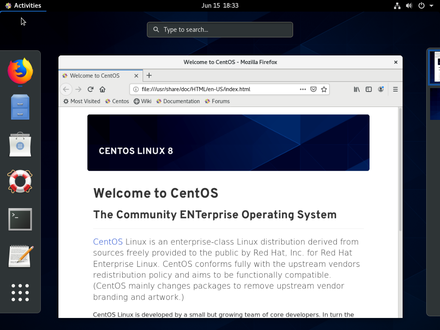
User interface in CentOS Linux Software (Source)
Common features of operating systems
Memory management | Allocate portions of memory/storage space to programs and reallocate that space when no longer needed. |
System updates | Improve or make changes to the current version based on user feedback, trends, and other factors. This functionality provides fixes for features that aren't working as intended, adds minor software enhancements and compatibility, addresses security issues, and improves hardware operation. |
User interface | Allow users to interact with their computer, device, or application. This interface connects the user and system, allowing them to exchange information and instructions with minimum user effort to achieve the desired outcome. |
Application management | Manage the operation, maintenance, versioning, and upgrading of an application throughout its lifecycle. Monitor all components of an application to see if they are up and running. |
Data security | Secure information and confidential data by providing strong authorized keys to users or by encrypting data stored in the system. This allows the software to rectify errors as soon as possible and prevent malware attacks. |
File management | Manage files in the system by allowing users to create, modify, and delete files. This functionality also allows users to create new files, locate and share them with other users, or transfer them to connected devices. |
What type of buyer are you?
Before purchasing an operating system, you should determine your buyer category so you can choose the right tool. Most buyers fall into the following categories:
For personal use: These buyers use laptops and devices for recreational purposes such as gaming, storing personal files, and research purposes. Often, such buyers don't use the same applications required by businesses and prefer an operating system that is easy to use.
Some free operating systems offer features such as file and application management, user-friendly interfaces, memory management, and system updates, and can work for such buyers.
For businesses: Organizations using a network of computers and devices to run their business require multiple applications. These buyers often have a server in place to handle user connections, storage, and multiple computers and devices. These users require an OS that provides security and privacy, remote access, support for mobile devices, file and printer sharing, backups, and more.
Buyers in this category often need to pay for their operating systems, which can be tailored to their unique business needs. Some systems even offer features such as advanced threat protection. These buyers should look for scalable systems that are compatible with any applications and hardware they already use. Scalability allows users to increase or decrease system performance pending on changes in application and processing demands.
Benefits of operating systems software
Graphical user interface (GUI): Most operating systems now have a graphical user interface (GUI) that lets you interact with your device via visual representations such as menus, icons, and buttons. This is an improvement over the traditional interface that required users to write commands in order to access system functionalities.
Data safety: An operating system allows users to access data stored in computers or devices, and is responsible for managing data safely and securely. The OS tracks all data and program file names as well as location, and performs common functions such as copying/erasing/backing up. Most operating systems have built-in tools to protect against security threats, including virus scanning utilities and setting up a firewall to block suspicious network activity.
Sharing of resources: Operating systems provide network services and file-sharing capabilities so you can share resources such as printers, scanners, and modems with other users. You can even transfer files such as videos, images, and applications to connected devices, and send data to multiple users using built-in email functionality if included.
Market trend to understand:
Virtual reality operating systems (VR-OS): Virtual reality technology is causing major disruptions in multiple industries, including gaming, healthcare, events, engineering, and education. In response, operating system vendors need to create solutions that can support 2D apps and 3D immersive content. These VR-OS enable users to work in an empty space using a wearable device such as a head-mounted display connected to a wireless mouse/keyboard and don't require a laptop or desktop to function. Big players are working on creating their own VR operating systems as virtual reality technology is gaining speed; software vendors are expected to follow suit.
Note: The application selected in this article is an example to show a feature in context and is not intended as an endorsement or recommendation. It has been obtained from sources believed to be reliable at the time of publication.