
Best Construction Categories
Best Facilities Management Categories
Best Human Resources Categories
Best Legal Management Categories
Best Manufacturing Categories
Best Medical Categories
Best Property Management Categories
Get 1-on-1 advice in 15 minutes. It's free.

Josh P.

Top 7 Legal Case Management Software With AI-Enabled Features
Modern legal teams increasingly rely on AI‑enabled case management systems to streamline how they gather information, manage documents, and stay aligned on active matters. These platforms bring all core legal workflows into one place and strengthen them with AI features that support clearer communication, quicker retrieval of case details, and smoother coordination across teams. By improving efficiency and reducing friction in daily tasks, AI adds a meaningful advantage, helping firms move through their caseloads with greater accuracy, speed, and confidence.
Why this matters: As per Software Advice’s 2026 legal software buying trends, nearly 93% of attorneys using legal AI tools say the technology improves the quality and accuracy of legal advice, signaling strong confidence in its practical impact. Additionally, 84% of legal professionals believe that lawyers proficient in AI tools will be more successful over the next five years, underscoring the growing importance of these skills for long‑term career growth and firm competitiveness.
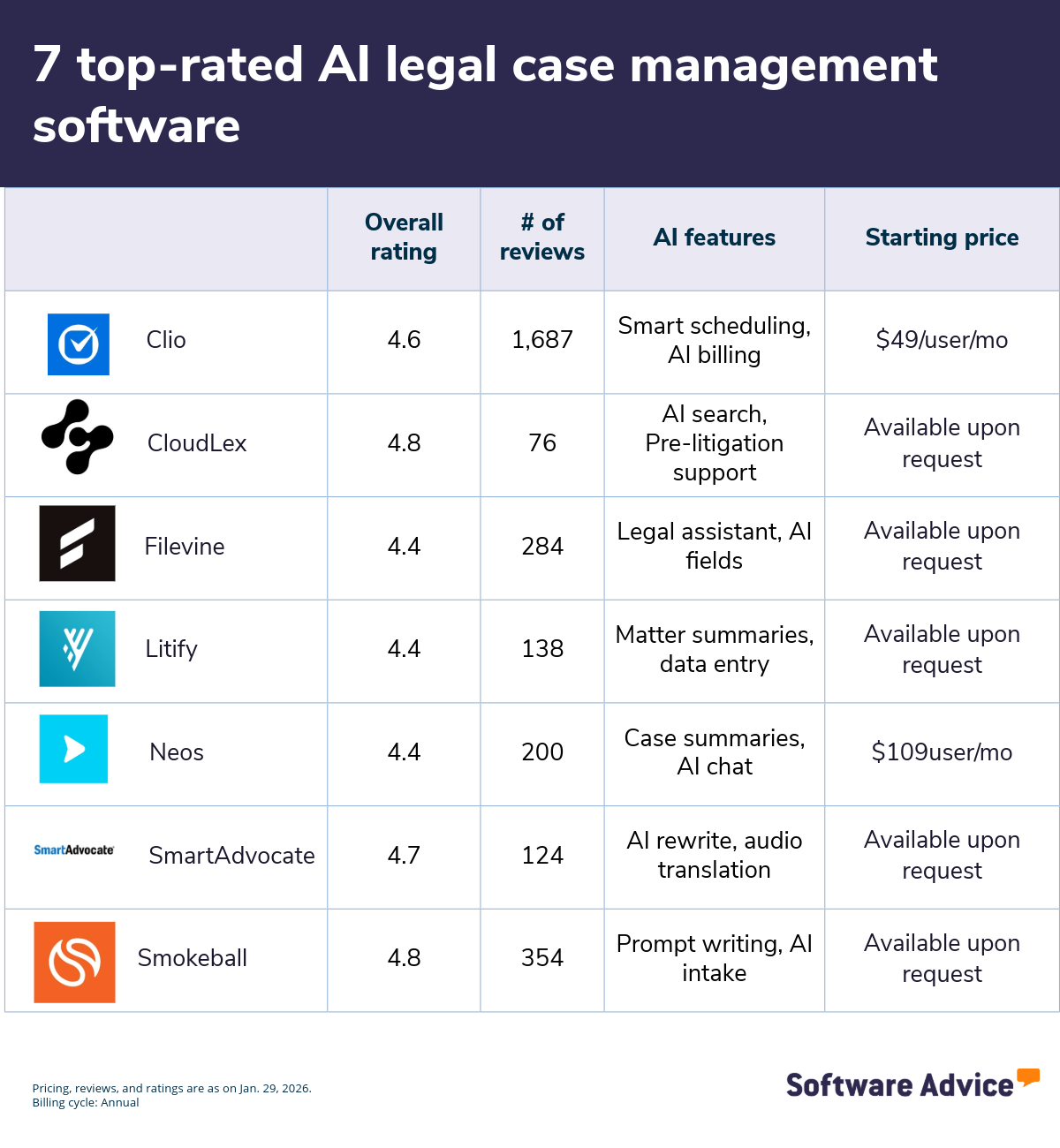
Why you should read on: To help you choose, here’s a list of the 7 top-rated AI legal case management software platforms, sorted alphabetically, based on verified user reviews. All of these tools offer essential case management features, including client management, document management, and billing and invoicing.
1. Clio
Clio is a legal practice management platform with built‑in AI capabilities designed to support daily law firm operations, including scheduling, billing, and document creation. Rather than focusing solely on case analysis, Clio applies AI to operational tasks such as scheduling coordination, time capture, billing preparation, and everyday legal writing.
It also includes AI tools that assist with calendar management, surface billable activities from firm communications, and generate first drafts for routine documents and client correspondence within the practice management system.
AI-enabled legal case management features*:
Smarter scheduling: Suggest meeting times based on participant availability, confirm appointments faster, and link scheduled events to matters so deadlines and case activity stay visible.
AI billing and invoicing: Capture billable work from emails and activities, draft time entries, and generate invoice drafts that attorneys can review before sending to clients.
Legal drafting: Leverage AI to produce first drafts of routine emails, matter summaries, and standard documents to start faster while retaining control over edits and approvals.
Customer support options: Chat, email, and phone.
Who should consider Clio’s AI capabilities?
It’ll likely fit law firms that want AI support across all operational workflows rather than merely case‑specific analytics. Practices aiming to reduce time spent on scheduling coordination, time tracking, and routine drafting while keeping attorneys in control of final outputs will benefit from these efficiencies. Plus, it’s embedded AI features, such as scheduling assistance, AI‑assisted time and invoice preparation, and first‑draft document generation, are particularly relevant for time-strapped attorneys looking to streamline operations.
Starting price: $49 per user, per month
Billing cycle: Annual.
2. CloudLex
This platform applies AI to personal injury case management, supporting law firms with advanced search, medical record interpretation, and pre‑litigation work. Its AI tools, powered by Lexee, use semantic search, natural language processing (NLP), and context‑aware evaluation to help legal teams surface key case information, understand complex medical histories, and prepare efficient pre‑litigation packages.
AI-enabled legal case management features*:
Advanced AI search: Use cognitive and semantic search to instantly fetch relevant information from case files, intake records, and legal documents. CloudLex applies NLP, synonym recognition, and context awareness to return more accurate results than keyword search alone.
AI-assisted medical record interpretation: Organizes and interprets complex medical records to help attorneys understand injury timelines, medical histories, and case‑critical details. Lexee transforms unstructured medical data into actionable insights that support stronger case narratives.
Pre-litigation support: Manage early‑stage claim work by simplifying information collection and generating cost‑effective pre‑litigation demand packages. This allows firms to support clients needing faster settlements without stretching internal resources.
Customer support options: Chat, email, and phone.
Who should consider CloudLex’s AI capabilities?
CloudLex is well‑suited for personal injury law firms that need deeper case insights, faster document analysis, and support for early claim resolution. Firms that routinely handle medically complex cases can benefit from Lexee’s ability to interpret medical histories and highlight injury timelines. Practices seeking to reduce manual research time and create efficient pre‑litigation packages may find value in its semantic search and structured claim‑building tools.
Starting price: Available upon request from the vendor.
Pro tip
Look for AI tools that can summarize cases, interpret documents, or answer questions using matter‑specific context, not just surface isolated data points.
This helps ensure insights reflect the full case history, timelines, and relationships between documents.
3. Filevine
Filevine is a legal work platform that centralizes case management, documents, communication, billing, and workflows in one connected workspace. It unifies intake, lead tracking, document organization, and collaboration, while its AI tools provide instant case insights, automate document review, and enhance intake and lead workflows. The software also offers Docs+ tools that feature unlimited storage, advanced optical character recognition (OCR) search, and integrated email management.
AI-enabled legal case management features*:
AI Legal Assistant: Retrieve case insights instantly by accessing information pulled directly from documents, notes, timelines, communications, and other project data inside Filevine. The assistant highlights discrepancies, surfaces risks, and provides actionable next‑step guidance so attorneys can move cases forward with greater clarity.
AI fields: Extract and organize key information from uploaded documents directly into project fields, reports, or document templates. This feature scans handwritten notes and text in digital images using OCR.
Document management: Access your documents alongside your cases and tasks for better context, collaboration, and security. Its OCR‑powered search lets you locate terms across PDFs, images, and scanned files while AI‑driven tools extract, summarize, and organize key details to support faster document review.
Customer support options: Email, phone, and live help.
Who should consider Filevine’s AI capabilities?
Firms seeking deeper visibility into case data, automated document intelligence, and efficient workflows can benefit from Filevine’s embedded AI ecosystem. Plus, those handling high document volumes or requiring fast access to case insights may find its AI Legal Assistant and Docs+ tools especially valuable. Filevine is also well‑suited for legal teams wanting to unify intake, case management, communication, and review processes inside a single system.
Starting price: Available upon request from vendor.
4. Litify
This software is a legal case management platform built on Salesforce that applies AI to keep matters current, highlight case context, and flag client risks as work progresses. Litify’s AI capabilities focus on turning unstructured inputs (documents, emails, forms) into structured matter data, generating concise summaries to orient case teams, and analyzing client communications for tone and urgency, so attorneys and staff can prioritize next steps with greater awareness.
AI-enabled legal case management features*:
Automated data entry: Extract case‑relevant data—such as parties, incident details, dates, and values from documents, intake forms, and email communications, then map that information to the correct matter fields. This helps teams keep case records current and consistent as new information is added throughout the matter lifecycle.
Matter summaries: Assemble key facts, recent updates, deadlines, and task activity into concise matter overviews. Your team can quickly understand case status, identify next steps, or get oriented during handoffs without reviewing the full document history.
Client sentiment scoring: Use AI-powered client sentiment scoring to monitor client satisfaction in real-time, proactively identify at-risk clients, and reduce attrition. This feature helps you analyze written client communications to assess tone, responsiveness, and engagement trends over time.
Customer support options: Email, knowledge base, and online tickets.
Who should consider Litify’s AI capabilities?
Legal teams that rely on quick handoffs, shared dashboards, and client communication signals to coordinate work across matters may find Litify’s AI capabilities relevant. Firms handling high case volumes or distributed teams can use its AI‑assisted data capture, matter summaries, and sentiment scoring to maintain visibility into case status, assign next steps with more context, and identify potential client risks during active case management.
Starting price: Available upon request from the vendor.
Pro tip
Shortlist software that lets teams save, edit, or reuse AI results directly inside case files, rather than forcing separate steps or external tools. This makes it easier to apply insights during handoffs, reviews, and client communications.
5. Neos
Neos is a case management system that helps legal teams review documents, keep case records current, and access matter information without digging through full files. Its capabilities include generating case and document summaries, extracting details from uploaded files into case records, and allowing users to ask questions about documents directly within the system. Neos also offers these features as part of a bundled tier that combines summaries, data extraction, document drafting, and conversational access to case information.
AI-enabled legal case management features*:
AI document extraction: Pull names, dates, amounts, and medical or financial details from uploaded documents and place that information directly into the appropriate case fields. This helps teams keep matters complete and accurate as new records, forms, or filings are added without manually re‑entering the same information across the system.
AI case summaries: Create brief summaries at the case or document level that highlight key facts, recent activity, and important milestones. For longer files, summaries can reference specific pages, allowing attorneys and staff to review status and context quickly without reading entire documents.
AI chat: Ask questions about a case or specific document, such as identifying deadlines, locating information in deposition transcripts, or clarifying document contents, and receive answers based only on the uploaded materials. Teams can also standardize common prompts and save chat responses to case notes for future reference.
Customer support options: Email and phone calls.
Who should consider Neos’s AI capabilities?
Case teams managing large document sets or mass‑tort–style portfolios where a firm handles many related cases with shared facts, similar documents, and overlapping timelines may benefit from these capabilities. They may find NEOS’s page‑aware summaries, extraction‑to‑fields, and guided chat features aligned with day‑to‑day case management.
Starting price: $109 per user, per month.
Billing cycle: Annual.
6. SmartAdvocate
SmartAdvocate is a litigation‑focused legal case management platform with built‑in AI tools designed to help teams review case materials, manage communications, and work across multilingual evidence within active matters. Its AI capabilities are embedded directly in the case workspace and help teams in summarizing legal content, refining written communications, and converting audio and foreign‑language inputs into usable case information.
AI-enabled legal case management features*:
Document summaries: Create summaries of cases, motions, briefs, medical records, and depositions that attorneys can save directly to the case file, email to team members, or regenerate using different prompts. These summaries are designed to capture core facts and context for ongoing case review rather than replace full document analysis.
AI-rewrite: Edit and refine notes, emails, or drafted text within the case record to adjust tone, clarity, or language. Users can use this feature to prepare client‑facing messages or internal updates without leaving the case management system.
Audio translation: Convert voice messages, recorded statements, depositions, or calls into written transcripts, and translate non‑English audio or text into English (or another preferred language). This allows firms to incorporate spoken or multilingual information directly into the case file.
Customer support options: Knowledge base and phone support.
Who should consider SmartAdvocate’s AI capabilities?
SmartAdvocate may suit litigation practices that work with large volumes of written and spoken case materials, including depositions, medical records, and client communications. Firms that regularly handle audio evidence or non‑English content and want those inputs summarized, rewritten, or translated within the same case workspace may find its AI features aligned with their case management needs.
Starting price: Available upon request from the vendor.
Pro tip
Prefer AI that produces multi‑document summaries and a live case summary that updates as you add filings, emails, and exhibits, plus conversational search over the full record and not just early review.
7. Smokeball
It’s a legal practice management platform that brings together matter management, document handling, client communication, and billing within a unified workspace. Smokeball is designed to help small and midsize law firms operate more efficiently by connecting daily workflows, automating routine tasks, and centralizing matter‑specific information. Smokeball AI, powered by its embedded assistant, Archie, enhances these core capabilities by supporting firms with intelligent intake, drafting support, matter summaries, and communication insights.
AI-enabled legal case management features*:
AI-powered intake: Create, digitize, and customize intake forms using Smokeball AI. The tool helps legal teams upload existing paper or PDF forms, convert them into digital formats, and tailor questionnaires to specific practice areas.
AI-prompt writing: Improve and refine written work by using Smokeball’s AI Prompt Writing Guide to craft clearer, more effective prompts that generate stronger outputs from Archie AI. This feature helps legal teams draft emails, summarize documents, prepare client updates, and handle other text‑based tasks.
Conversation summaries: Generate concise summaries of client and internal conversations with a single click as Smokeball AI reviews message threads and produces private, staff‑only overviews. This helps attorneys quickly get up to speed on case discussions, identify next steps, and avoid searching through long message histories.
Customer support options: Email, knowledge base, and phone calls.
Who should consider Smokeball’s AI capabilities?
Smokeball’s AI tools can be valuable for firms that want to reduce administrative workload, improve communication clarity, and simplify intake without adding complexity. Practices that handle high matter volumes, rely on frequent client updates, or need consistent documentation may specifically benefit from its AI‑powered summaries, drafting tools, and intelligent forms.
Starting price: Available upon request from the vendor.
What are the benefits of using legal case management tools with AI capabilities?
Legal case management tools with AI capabilities help law firms move beyond basic automation by applying intelligence to case data, documents, and workflows. This helps reduce manual effort while supporting faster, more informed legal work. Below, we discuss some common benefits of AI legal tools.
Benefit | Description |
|---|---|
Faster review and understanding of case information | These tools help surface key documents, emails, and timelines, offering summaries or highlights so teams can grasp case context quickly and reduce time spent hunting for details. |
Reduced administrative workload | AI legal tools offer drafting assistance, smart search, and automated file linking to matters, helping staff cut back on manual filing, formatting, and repetitive updates. |
Improved consistency and data accuracy across cases | These tools use AI to apply consistent logic when organizing files, naming documents, and connecting information to matters, helping reduce errors and maintain reliability across every case. |
Quicker insights to support case planning | AI-enabled legal case management systems highlight important details, identify missing information, or flag upcoming deadlines earlier, helping attorneys plan strategy with more confidence. |
Better client communication and responsiveness | The software helps produce clearer email drafts and retrieves case facts on demand, enabling faster, more accurate updates so clients get timely answers with fewer back‑and‑forths. |
How much does AI legal case management software cost?
AI legal case management software can range from $7 to $199+ per user, per month (billed annually), depending on the vendor, AI capabilities, and integration requirements. Most platforms follow tiered pricing models, including:
Free trials: These usually last up to 14 days and give users access to all or limited AI features of the software. These no-cost trial plans are ideal for users who want to try a tool before purchasing.
Free versions: Offer perpetual access to basic AI-enabled legal case management features, including simple email drafting assistance, limited document capture or upload, and entry‑level search capabilities. These free plans are ideal for small businesses on a budget.
Entry-level plans: Start at around $7 per user, per month (billed annually) and include essential features, such as core matter management, basic document storage, and simple task tracking. These are suitable for businesses that need foundational case management without advanced automation.
Mid-tier plans: Range from $12 to $119 per user, per month (billed annually) and include more advanced matter management, expanded document tools, stronger collaboration options, and broader AI‑assisted features. These are good for businesses that need deeper functionality and more flexibility as their caseloads and teams grow.
High-end plans: Cost over $199 per user, per month (billed annually) and provide more sophisticated capabilities, such as full workflow automation, expanded analytics, high‑capacity document tools, and the most advanced AI features. These plans suit larger firms that manage complex matters and require extensive customization.
Hidden costs associated with AI legal case management software
Besides the software license, additional costs may include:
Training and onboarding: Legal teams may need time and guidance to learn how to use AI features effectively, particularly when workflows shift from manual review to AI‑assisted analysis. This learning curve can temporarily reduce productivity and require dedicated training resources.
Data preparation and maintenance: AI capabilities depend on accurate, well‑structured case data. Firms may need to invest additional effort in cleaning, standardizing, and maintaining documents and records to ensure AI outputs remain reliable and usable.
Premium AI access and usage limits: Some vendors package AI features within premium tiers or as usage‑based add‑ons. What starts as a base subscription can grow over time as firms unlock more AI functionality or exceed included usage thresholds.
Questions to ask vendors when selecting AI legal case management software
Here are some common questions to ask software vendors:
What legal workflows does the AI actually support? AI features in legal case management software usually support tasks such as drafting communications, searching documents or matter data, linking files to the right case, and automating repetitive processes. Some tools also help with summarizing information or preparing templates. Because capabilities differ across systems, it’s important to confirm which workflows the AI can reliably take on and whether those tasks fit your team’s work style.
How does the software protect client data and confidentiality? Most legal case management systems secure data through encryption, role‑based permissions, secure hosting environments, and detailed audit logs. Many also follow industry‑recognized compliance standards to safeguard confidentiality. Firms should review the vendor’s security policies, understand where data is stored, and ensure the platform aligns with their regulatory and ethical requirements.
Are AI features included in the base price or sold separately? AI capabilities can be packaged differently depending on the provider. Entry‑level plans may include basic AI tools, while advanced features such as automation, analytics, or bulk document handling might require higher‑tier subscriptions or paid add‑ons. Reviewing the pricing structure helps avoid unexpected costs and ensures the plan matches your needs.
How much human review is required for AI outputs? Most AI legal case management tools still require human oversight to ensure accuracy, context, and compliance with ethical standards. While AI can draft content or surface information quickly, legal professionals should always verify details, check for omissions, and confirm that the output reflects the correct matter context. Firms should ask vendors how much editing is typically needed, which tasks still require manual approval, and what safeguards are in place to prevent unreviewed AI content from reaching clients or entering official records.
Survey methodology
To be considered for this list, products had to:
Have at least 20 unique product reviews published on Software Advice within the past two years, with an average rating of 4.0 or higher (as of January 29, 2026).
Meet our market definition for legal case management software: “Legal Case Management software coordinates documents, scheduling, conflicts, contacts, and reporting associated with legal cases. These applications enable an integrated solution to automate case management, client history tracking, and contracts as well as billing and accounting. Legal Case Management solutions also often include database management, electronic discovery, and automatic document template editing features, enabling organizations to manage and update key case-related data.”
Show evidence of offering AI capabilities as demonstrated by publicly available sources, such as the vendor’s website.
For the section titled “How much does AI legal case management software cost?”, only products with publicly available pricing information and AI features, as of January 29, 2026, were considered for pricing calculations.
*Our research team identified these features from vendor websites (as of Jan. 29, 2026) based on their analysis of what users find valuable in or expect from AI-enabled legal case management software. This list is not exhaustive. For additional capabilities, refer to the vendor's website.
Editorial Independence: We select and rank products based on an objective methodology developed by our research team. While some vendors may pay us when they receive web traffic or leads, this has no influence on our methodology.