
Best Network Access Control (NAC) Software of 2026
Updated March 19, 2026 at 6:01 AM

Written by Baljeet Kaur
Senior Market Research Specialist

Edited by Rina Rai
Senior Editor
- Popular Comparisons
- Buyers Guide
Compare Products
Showing 1 - 25 of 42 products
Compare Products
Sort by
Reviews: Sorts listings by the number of user reviews we have published, greatest to least.
Average Rating: Sorts listings by overall star rating based on user reviews, highest to lowest.
Alphabetically (A-Z): Sorts listings by product name from A to Z.

NordLayer is a toggle-ready network security platform designed for modern businesses. It provides secure connection, protection,...Read more about NordLayer


NordLayer's Best Rated Features
See All
NordLayer's Worst Rated Features
See All

Foxpass is a cloud-based and on-premise platform that helps small to large enterprises automate threat detection and access cont...Read more about Foxpass


UTunnel Secure Access offers a comprehensive suite of Cloud VPN, Zero-Trust Network Access (ZTNA), and Mesh Networking solutions...Read more about UTunnel VPN

UTunnel VPN's Best Rated Features
See All
UTunnel VPN's Worst Rated Features
See All

Stop ransomware! ThreatLocker helps organizations reduce their surface areas of attack with policy-driven endpoint security. Ins...Read more about ThreatLocker

ThreatLocker's Best Rated Features
See All
ThreatLocker's Worst Rated Features
See All

Device42 is an asset management solution that enables IT administrators to track hardware, software, devices and networks. The k...Read more about Device42


Device42's Best Rated Features
See All
Device42's Worst Rated Features
See All

Conecta Suite is the ideal solution for those looking to maximize the potential of Google Workspace and boost team productivity....Read more about Conecta Suite
Conecta Suite's Best Rated Features
See All
Conecta Suite's Worst Rated Features
See All

Pulseway is an integrated IT assets and network monitoring solution designed for IT administrators to remotely monitor and contr...Read more about Pulseway

Pulseway's Best Rated Features
See All
Pulseway's Worst Rated Features
See All

Perimeter 81 is the first Cybersecurity Experience Platform to streamline SASE through its groundbreaking ease-of-use and unifie...Read more about Perimeter 81


Perimeter 81's Best Rated Features
See All
Perimeter 81's Worst Rated Features
See All

Genea Access Control is a cloud-based access control software designed to help small businesses to large enterprises ensure the ...Read more about Genea Security

Network configuration manager is a cloud-based and on-premise compliance management system that assists small to large sized org...Read more about SolarWinds Network Configuration Manager

Powered by Zero Trust Architecture, Appgate secure access and cybersecurity solutions enable businesses to reduce risk and ensur...Read more about Appgate SDP

Secomea is a Secure Remote Access (SRA) solution specifically designed for industrial networks and OT equipment. It is utilized ...Read more about Secomea

Secomea's Best Rated Features
See All
Secomea's Worst Rated Features
See All

Ideal for larger companies, Varnish Software's powerful caching technology helps the world's biggest content providers deliver l...Read more about Varnish Enterprise

Kentik is a cloud-based network management solution which assists network managers, network engineers and operators with data en...Read more about Kentik
Kentik's Best Rated Features
See All
Kentik's Worst Rated Features
See All

Free to try and up to 3 connected users - OpenVPN Access Server is a full-featured SSL VPN software solution that integrates Ope...Read more about OpenVPN Access Server

OpenVPN Access Server's Best Rated Features
See All
OpenVPN Access Server's Worst Rated Features
See All

Teleport is a gateway for managing access to K8s clusters, Linux & Windows servers, databases, and applications. Teleport provi...Read more about Teleport

Application Control Plus helps you monitor and regulate different applications installed on managed endpoints on a centralized p...Read more about ManageEngine Application Control Plus

Openpath is a cloud-based keyless door access control solution that helps small to large businesses across real estate, educatio...Read more about Openpath

PureDome is a leading business VPN solution, dedicated to boosting network security for organizations and remote teams worldwide...Read more about PureDome

Network Configuration Manager is a robust solution designed to empower network organizations with efficient network configuratio...Read more about ManageEngine Network Configuration Manager

ManageEngine Network Configuration Manager's Best Rated Features
See All
ManageEngine Network Configuration Manager's Worst Rated Features
See All

SAP Access Control is an access management software designed to help businesses across various industry verticals, including ban...Read more about SAP Access Control

Carbon Black App Control is an on-premise compliance and access governance application that helps businesses streamline processe...Read more about Carbon Black App Control

Verkada is the leader in cloud-managed enterprise building security, enabling over 20,000 organizations worldwide to protect the...Read more about Verkada

Banyan Security’s next-generation zero trust network access platform offers seamless remote access to corporate resources hosted...Read more about Banyan Security


NACVIEW is a network access control solution that provides visibility and control over all devices connecting to an organization...Read more about NACVIEW

Popular Comparisons


Buyers Guide
This detailed guide will help you find and buy the right network access control (nac) software for you and your business.
Last Updated on April 29, 2025The increasing number of devices accessing corporate networks requires businesses to pay special attention to network security. However, deploying separate security solutions (antivirus, firewall, etc.) from different vendors can increase the complexity of network infrastructure and end up costing significantly on maintaining each of them.
Such challenges can be handled by deploying a centralized solution called network access control software. This software helps organizations keep unauthorized devices and users out of organizational networks. It controls who has access to what part of the network and helps track access details such as the time of access and the device used.
But given the many options available on the market, buying a network access control tool can be confusing. To help you figure out how to find the tool that matches your business needs, we’ve created this buyers guide that has all the essential information relating to network access control software.
Here’s what we'll cover:
What is network access control software?
Network access control software is a solution that helps organizations strengthen their network security by enforcing access policies for internal as well as external users and devices. These policies govern device authentication and endpoint configuration.
The solution grants users or devices access to organizational resources depending on the degree of authorization awarded to them. The right to grant, revoke, or block access on a case-by-case basis typically rests with the network administrators.
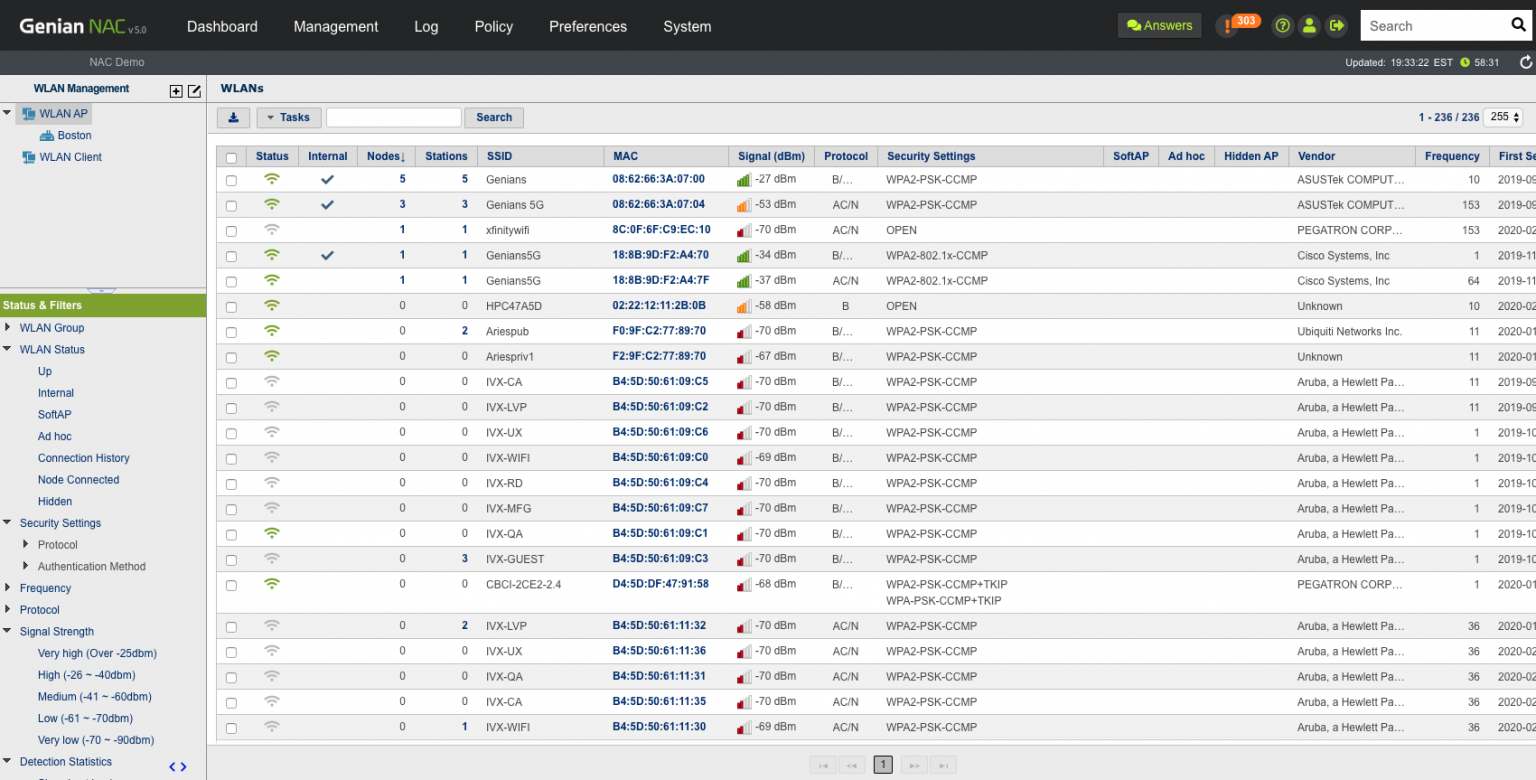
Network access control in Genian NAC Software (Source)
Common features of network access control software
The features vary by product or vendor but most network access control tools have the following in common:
Access controls/permissions | Authenticate and authorize individuals to access the information they are allowed to see and use based on their roles, devices, location, etc. |
Network security | Secure organization network by adopting preventive measures against unauthorized access, misuse, malfunction, modification, destruction, or improper disclosure. |
Policy creation | Define policies for network devices or users to follow in order to achieve business objectives. These include rules and specifications about how access to the network is managed, who may access information, and under what circumstances. |
Asset tracking | Track or scan all company-owned assets (in this case, devices) or those entering into the network, regardless of where they are located. This capability also allows blocking devices that show malicious behavior. |
Dashboard | Use a centralized dashboard to view insights into network traffic analysis, devices entering and leaving the network, suspicious behaviors, etc. |
Multiple authentication methods | Use more than one authentication method to authorize users to access company data, applications, and other resources via the organization network. |
Continuous monitoring | Continuously assess, discover, and classify users as they connect to the organizational network without disrupting business operations. This helps network and security administrators discover and mitigate security threats as and when they evolve. |
Multi-device support | Oversee all outside devices that join the network and access company resources. |
Third-party integration | Integrate with other third-party tools such as access governance tools and firewalls to enhance security policies. |
Remote access/control | Monitor and control access to the network from anywhere and at any time. This feature helps employees to work remotely while enjoying access to their organization’s computer or network. |
What type of buyer are you?
Before purchasing network access control software, you should assess which buyer category you belong to. The majority of buyers fall into the following categories:
Small and midsize businesses (SMBs) (up to 500 employees): SMBs need network access control to ensure the security of their organization network from outside devices and users. Due to budget constraints and lack of IT experts, they outsource some of their business processes such as accounting, IT services, and digital marketing to outside parties. This makes their network vulnerable to threats such as data breaches, noncompliances, and mishandling of sensitive information.
Investing in a network access control solution that has a low cost of implementation and features such as remote access control, authentication of devices, and incident response capabilities will be beneficial for buyers of this segment. This will help SMBs provide controlled access to users based on their role, device and location, and protect their data from outside attacks.
Large enterprises (over 500 employees): Unlike SMBs, large enterprises have a complex network infrastructure with a huge number of devices, applications, files, and other resources connected to each other. Additionally, such organizations are rapidly deploying internet of things (IoT) applications, automation and other IT initiatives related to data analytics—which means moving huge amounts of data over networks. This makes the security of IT networks essential for such organizations.
A fully featured network access control system that offers continuous monitoring of network access, encryption, and authentication features will be beneficial for this segment. They should opt for a tool that helps ensure all devices comply with organizational security requirements, sensitive information moving across are encrypted, and prevent unauthorized access to data.
Benefits of network access control software
Listed below are some benefits you can expect from using a network access control software tool:
Network visibility: Network access control solutions can help identify which devices exist on your network and who has access to them. The comprehensive view of the entire network allows administrators to detect the root cause of any issue and proactively assess them before they critically affect the organization’s infrastructure.
Achieving compliance: Network access control solutions help organizations meet compliance standards across many industries, such as HIPAA, SOX, NIST, and PCI-DSS. Network and security administrators can bring organization security policies into compliance with the help of such tools by conducting audits and checks on each user type, device type, and operating system.
Protect sensitive data: The aim of network access control solutions is to control access of devices and users to organization networks and infrastructure. This access control capability helps network administrators provide controlled or restricted access to data based on user role, time of day, location, application, etc.
Market trend to understand
Here’s a market trend to keep in mind when selecting a network access control software solution for your business:
The growing need for network access control software with the rise in bring your own device (BYOD): Nowadays, wireless networks and mobile technologies have introduced personal devices (via BYOD) into the workplace. Many businesses have also adopted the remote working trend. These businesses will need controls to ensure users and devices do not compromise the safety of the network. This has accelerated the need for network access control solutions to control outside devices and remote workers by ensuring they are configured for proper data protection.
Note: The application selected in this article is an example to show a feature in context and is not intended as an endorsement or recommendation. It has been obtained from sources believed to be reliable at the time of publication.