
Best Automated Testing Software of 2026
Updated January 27, 2025 at 9:52 AM
- Popular Comparisons
- Buyers Guide
Compare Products
Showing 1 - 25 of 186 products
Compare Products
Sort by
Reviews: Sorts listings by the number of user reviews we have published, greatest to least.
Average Rating: Sorts listings by overall star rating based on user reviews, highest to lowest.
Alphabetically (A-Z): Sorts listings by product name from A to Z.

ACCELQ is a cloud-based platform for continuous functional & API automation testing which utilizes ‘natural language programming...Read more about ACCELQ


ACCELQ's Best Rated Features
See All
ACCELQ's Worst Rated Features
See All

QA Wolf is a simple, fast, and free end-to-end testing tool, fully optimized for the entire team. With QA Wolf, users can create...Read more about QA Wolf


QA Wolf's Best Rated Features
See All
QA Wolf's Worst Rated Features
See All

Automatur is a cloud-based marketing automation software that helps businesses attract and convert more leads into customers. It...Read more about Automatur
No reviews yet

TeamCity by JetBrains is a continuous integration solution for DevOps teams. It can be used by developers, engineers, managers, ...Read more about TeamCity

TeamCity's Best Rated Features
See All
TeamCity's Worst Rated Features
See All

Sahi Pro is a test automation tool, which assists QA professionals with cross-browser web applications, Java applets, mobile and...Read more about Sahi Pro

Sahi Pro's Best Rated Features
See All
Sahi Pro's Worst Rated Features
See All

Testiny is a state-of-the-art test management platform that is renowned for its user-friendly interface and powerful features. T...Read more about Testiny


Rapise by Inflectra is a cornerstone solution for automated software testing. It is a comprehensive system with a rich array of ...Read more about Rapise


PFLB is a cloud-based and AI-enabled load testing platform designed to help teams scale their websites and applications and simu...Read more about PFLB


PFLB's Best Rated Features
See All
PFLB's Worst Rated Features
See All

At Subject7, we enable TRUE codeless automation and empower anyone on your team to create expert-level automation. We accelerate...Read more about Subject7

Mailinator is an email management software designed to help businesses access text messages, incoming emails and attachments usi...Read more about Mailinator
Mailinator's Best Rated Features
See All
Mailinator's Worst Rated Features
See All

The Postman API Platform delivers high productivity for developers, great quality for APIs, and airtight governance for organiza...Read more about Postman
Postman's Best Rated Features
See All
Postman's Worst Rated Features
See All

Test automation can be complex to implement. Opting for Mr Suricate facilitates this process and bring you many benefits. Mr Su...Read more about Mr Suricate

MagicPod is a test automation platform for mobile app testing and browser testing. It supports the acceleration of the release c...Read more about MagicPod
MagicPod's Best Rated Features
See All
MagicPod's Worst Rated Features
See All

All-in-one software testing solution is CONTEXTQA, which provides a low-code, no-code, no-maintenance platform that enables busi...Read more about ContextQA
ContextQA's Best Rated Features
See All
ContextQA's Worst Rated Features
See All

Loadero uses Selenium web browser automation to simulate real user interaction with the tested application. This allows detailed...Read more about Loadero
Loadero's Best Rated Features
See All
Loadero's Worst Rated Features
See All

ZeuZ is a cloud-based and on-premise automation testing platform designed to help businesses create test workflows for desktop, ...Read more about ZeuZ

Tuskr is a modern cloud-based test management software that provides enterprise-class features and deep integrations. The softwa...Read more about Tuskr
Tuskr's Best Rated Features
See All
Tuskr's Worst Rated Features
See All

Modern cloud-based TestOps platform built for QA and Dev teams, which helps to boost software testing efforts....Read more about Qase
Qase's Best Rated Features
See All
Qase's Worst Rated Features
See All

Mailosaur is an API-based testing platform designed for developers and quality assurance teams to test email, SMS, and user acti...Read more about Mailosaur


PractiTest is a cloud-based test management solution that helps businesses maintain quality assurance and reduce product defects...Read more about PractiTest

Test Case Management system testomat.io is a web-based testing tool that allows users to structure test projects best. It synchr...Read more about testomat.io
testomat.io's Best Rated Features
See All
testomat.io's Worst Rated Features
See All

Codemagic is a CI/CD tool for mobile application projects across Flutter, Android, Unity React Native and iOS. Businesses can us...Read more about Codemagic
Codemagic's Best Rated Features
See All
Codemagic's Worst Rated Features
See All

aqua ALM is an AI-powered test management solution helping QA teams to speed up releases x2. Enjoy enterprise-level flexibility ...Read more about aqua
aqua's Best Rated Features
See All
aqua's Worst Rated Features
See All

Database Performance Analyzer is an application-performance monitoring solution that helps users monitor and analyze database pe...Read more about Database Performance Analyzer


LambdaTest is a GenAI-powered Quality Engineering Platform that empowers teams to test intelligently, smarter, and ship faster. ...Read more about TestMu AI
TestMu AI's Best Rated Features
See All
TestMu AI's Worst Rated Features
See All
Popular Comparisons


Buyers Guide
This detailed guide will help you find and buy the right automated testing software for you and your business.
Last Updated on January 27, 2025Testing is an important part of the software development process. It lets you check if the software you’ve developed matches the defined requirements, works as expected, and is free of errors or bugs. But manual testing is not only time-consuming but also prone to human errors.
With automated testing software, you can run the same manual steps unattended, saving both time and effort. You can reuse the test cases, so you won’t have to create every test from scratch. You can also perform multiple tests simultaneously. Your developers can focus on more value-adding tasks such as ensuring a high-quality user experience and improving software functionality.
However, these benefits hinge on selecting an automation testing tool that addresses your business needs. The right tool can bring down costs by eliminating manual testing and help you churn high-quality software solutions. On the other hand, a tool that doesn’t meet your needs can leave you wishing for more or better features and even add to your expenses.
In this buyers guide, we discuss essential details about test automation software as well as explain things to keep in mind when buying software for your business.
Here's what we'll cover:
What is automated testing software?
Automated testing software is a tool commonly used by software quality assurance (QC) teams to check if a developed solution is performing as expected. It helps automate repetitive tasks such as collecting test data, planning requirements, and creating the test automation framework.
The software streamlines the test creation and test execution processes and helps identify any gaps, errors, or programming defects in the source code of a software solution. It can be used to test functional aspects such as software features and specifications, as well as nonfunctional aspects such as effectiveness and user experience
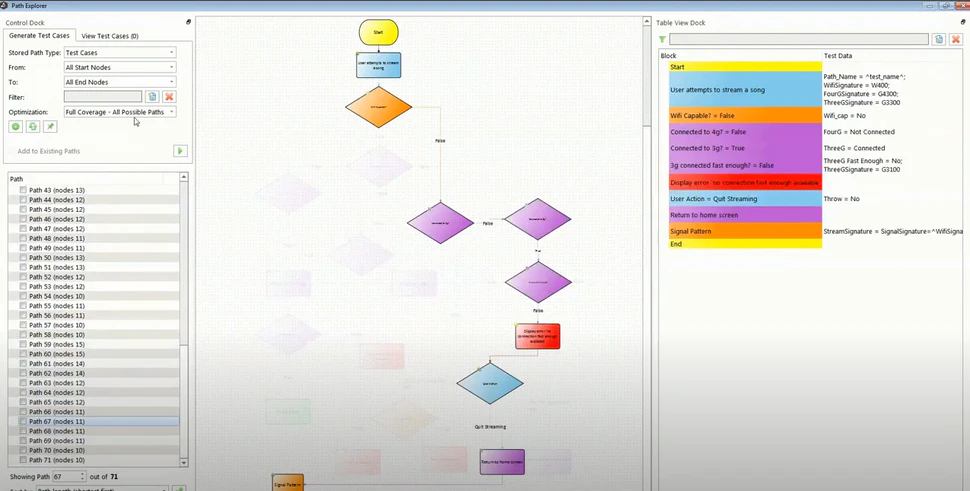
Creating test cases in Agile Requirements Designer (Source).
Common features of automated testing software
Different vendors offer different features in their test automation platforms. Selecting software with the right features is easier when you know what the most common features are and what they do. Let’s look at some common features of an automated testing tool.
Move and copy | Reuse test cases across projects, so you don’t have to define objectives, execute conditions, and test automation procedures for each project. |
Parameterized testing | Run the same test case multiple times with different values. This helps developers save the effort involved in creating multiple test cases to test various input values. |
Requirements testing | Check if the final product meets the defined requirements. This also includes testing nonfunctional aspects such as software effectiveness and performance. |
Parallel execution | Run multiple tests simultaneously in different development environments. |
Test script review | Create, edit, review, and approve the instructions to be executed on a software solution to check if it’s performing as expected. |
Security testing | Evaluate the security of a developed tool by detecting any vulnerabilities that might expose its data to intruders. |
Requirements management | Define and manage the requirements for new software tools. You can also link requirements to other sub-requirements or parent requirements. |
What type of buyer are you?
These are the two common buyer categories for automated testing tools:
Buyers looking for specialized testing tools: These buyers need a tool to test a specific type of software or software functionality. They should opt for a test automation tool that specializes in their area they need help with. Some examples of such tools are graphic user interface (GUI) testing software, exploratory testing software, functional testing software, and application programming interface (API) testing software.
Buyers looking for all-in-one solutions: These buyers are on the lookout for an all-in-one testing platform or a test suite. They should select a tool that supports multiple testing types, such as regression testing, unit testing, API testing, and UI testing. They should also consider tools that can test both web and mobile applications.
Benefits of automated testing software
There are many benefits to choosing an automated software testing tool, including:
Greater insights: Automated software testing provides insights into the causes of test failure. A manual tester will have to spend significant time and effort to trace down the exact cause of a failure, but test automation software can help identify the same in a few minutes by offering complete access to memory contents, file contents, and data tables.
Increased productivity: Automated testing software can conduct multiple tests simultaneously. This helps reduce the workload of your QC team. QC staff can invest the extra time in further optimizing the software testing process and improving the software framework.
Key considerations
Listed below are some key factors to consider when selecting an automation testing tool:
Conduct a needs analysis: Software selection can be tricky if you don’t know what you’re looking for in a tool. Therefore, conduct a needs analysis to understand what your requirements are and which software features can meet them. Check with your testing team which format they want the test results in, if they prefer a cloud-based or an on-premise tool, what level of automation they need, etc.
Evaluate the vendor’s track record: Before shortlisting any vendors, conduct some research. Check how long they’ve been in the software industry, the kind of clients they’ve worked with, the quality of support they provide, and what users say about their business practices. To find this information, check out vendors’ websites or read user reviews on third-party platforms such as ours.
Note: The application selected in this article is an example to show a feature in context and is not intended as an endorsement or recommendation. It has been obtained from sources believed to be reliable at the time of publication.