


Best Web Content Management Software of 2026
Updated March 18, 2026 at 2:33 PM

Written by Supriya Deka
Market Research Specialist

Edited by Stephanie Sandoval
Content Editor
- Popular Comparisons
- Buyers Guide
Compare Products
Showing 1 - 25 of 51 products
Compare Products
Sort by
Reviews: Sorts listings by the number of user reviews we have published, greatest to least.
Average Rating: Sorts listings by overall star rating based on user reviews, highest to lowest.
Alphabetically (A-Z): Sorts listings by product name from A to Z.

Narrato is a platform for content marketing teams for content creation, planning, collaboration & project management platform. ...Read more about Narrato Workspace


Narrato Workspace's Best Rated Features
See All
Narrato Workspace's Worst Rated Features
See All

Shopamine is the ultimate digital commerce and website builder for businesses of all sizes, offering expert-recommended tools to...Read more about Shopamine


Shopamine's Best Rated Features
See All
Shopamine's Worst Rated Features
See All

We want to help you to make full use of our tools so that you're set up for winning from day zero. Bloomreach connects the dots...Read more about Bloomreach


Bloomreach's Best Rated Features
See All
Bloomreach's Worst Rated Features
See All

Wix Studio is a web development platform designed to help agencies and enterprises create digital experiences across various ind...Read more about Wix Studio


Wix Studio's Best Rated Features
See All
Wix Studio's Worst Rated Features
See All

Webiny is an enterprise content management software that helps businesses build and deploy sites using a drag-and-drop page buil...Read more about Webiny


Webiny's Best Rated Features
See All
Webiny's Worst Rated Features
See All

Flotiq is a content management system (CMS) platform that is designed to enable fast and easy content delivery to any channel. T...Read more about Flotiq

Flotiq's Best Rated Features
See All
Flotiq's Worst Rated Features
See All

HubSpot CMS Hub is a cloud-based content management system that provides businesses with the tools to build custom websites, edi...Read more about HubSpot Content Hub

HubSpot Content Hub's Best Rated Features
See All
HubSpot Content Hub's Worst Rated Features
See All

Are you looking for a content management solution that empowers your entire team to create, collaborate, and publish digital con...Read more about caisy


In a digital age dominated by dynamic content requirements and rapidly shifting consumer preferences, Penzle emerges as a headle...Read more about Penzle
Penzle's Best Rated Features
See All
Penzle's Worst Rated Features
See All

FAULIO is a cloud-based content management solution that allows organizations to create, publish and schedule series, movies, po...Read more about FAULIO

WordPress VIP is the leading agile content platform. Built on the flexibility and ubiquity of WordPress, which powers 40% of th...Read more about WordPress VIP

Our unlimited licensing model means that Elcom’s Intranet can support and connect your entire workforce - without the high price...Read more about Elcom CMS


Zesty.io is a cloud-based content management system (CMS) that enables businesses to create, manage, and deploy digital content ...Read more about Content.One


EasyWebshop is an e-commerce software designed to aid small businesses and online entrepreneurs in establishing an online presen...Read more about EasyWebshop
EasyWebshop's Best Rated Features
See All
EasyWebshop's Worst Rated Features
See All

Cleverstory is a web content management software that helps businesses create immersive and interactive content to capture and e...Read more about Cleverstory

Mura is a headless content management system (CMS) designed to help businesses, government organizations and educational institu...Read more about Mura CMS


ButterCMS is a cloud-based content management system that helps businesses design and manage webpages, blogs and marketing sites...Read more about Butter CMS


Designed for small to large Shopify retailers, Because Intelligence is a cloud-based web content management solution that helps ...Read more about Because Intelligence


WordPress is an open-source, cloud-based content management system based on PHP and MySQL that helps small to large businesses c...Read more about WordPress

WordPress's Best Rated Features
See All
WordPress's Worst Rated Features
See All

Maglr is a content management software designed to help marketers and designers create, edit and share content in the form of co...Read more about Maglr

Sitecore Experience Platform is a cloud-based content management system, designed to help businesses maintain customer relations...Read more about Sitecore Experience Platform

Brightspot is the leading content management system that enables global organizations to execute their digital strategy by offer...Read more about Brightspot

Contentstack is a cloud-based headless CMS solution designed to help businesses manage content, access controls, approval workfl...Read more about Contentstack


Storyblok is the world's first headless CMS that works for both developers & business users. A traditional CMS makes it difficu...Read more about Storyblok
Storyblok's Best Rated Features
See All
Storyblok's Worst Rated Features
See All

OpenText TeamSite is a cloud-based platform designed to assist businesses with authoring, editing, testing, analyzing and publis...Read more about OpenText Web CMS

Popular Comparisons


Buyers Guide
This detailed guide will help you find and buy the right web content management software for you and your business.
Last Updated on April 30, 2025Web content management (WCM) software provides users with tools to create, edit, and publish digital content such as embedded audio, text, and video files for websites. Users who do not have coding skills can easily write and upload the content by selecting pre-built templates to design the web content.
WCM solution also helps marketers, developers, and IT teams create and personalize web pages with the built-in tools available for the website visitors. This solution caters to businesses that deal with various types of web content creation, such as blogs, websites, portfolios, online stores or any other content. Additionally, the software allows users to oversee site performance, activity logs, and configure proxy settings.
There are many options available on the market, making it difficult to decide which software to purchase. In this buyers guide, we’ve provided all the information you need to make the right purchase decision for your web content management solution.
Here’s what we'll cover:
What is web content management software?
A web content management software provides users with tools required for building custom websites, editing and creating web pages, and publishing them. The solution allows businesses to personalize the content for each visitor depending on various factors such as demographics, visitor activity, and more.
Users can also access the software on a web browser by editing the content along with the layout and format using the browser-based interface. WCM software typically has two parts: content management application (CMA) and content delivery application (CDA). CMA is a front end interface on which users can directly work and make changes without getting involved in coding. CDA provides a back end interface which converts all the commands and actions done on the front end into a functional website.
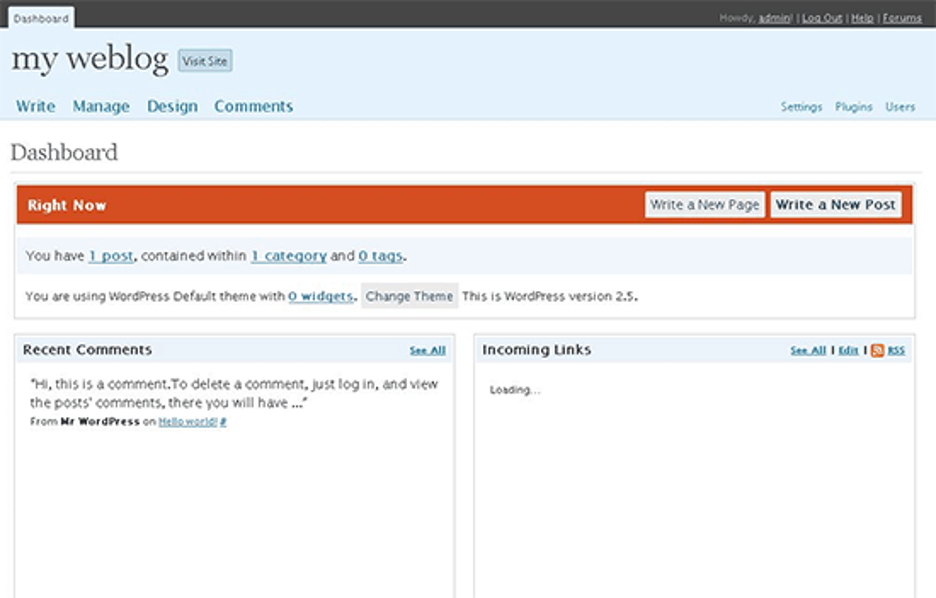
Dashboard in WordPress (Source)
Common features of web content management software
Most web content management systems have the following features in common:
Collaboration tools | Allows team members to communicate, share media files, and work together. Editors have the ability to review and approve the content before pushing for publication. Supports simultaneous access and edits by multiple users on a specific content. |
Content delivery | Lets you control, manage, and plan the distribution of the content through various platforms or channels online. |
Templates | Provides users with sample pre-built templates of web pages that can be customized as per their need or usage. Content creators can use these ready-to-use templates rather than designing their own. |
Campaign management | Helps users create and plan a set of actions in order to complete marketing specific goals. Create and track messages for sending out to potential leads through surveys, social media, emails, print materials, and giveaways. |
Content personalization | Collects information about your customers such as keywords searched, location, ads clicked, etc. to create a personalized experience for content delivered across the network for each user. |
Drag & drop editor | Drag and drop images, icons, widgets and prototypes from the desktop, apps or central library. |
Media management | Stores, manages, edits and places different types of media such as video, images, and audio for the website content. |
SEO management | Facilitates search engine optimization as well as better ranking on Google Analytics for the associated content. |
Social media integration | Integrates with social media platforms to push your website content on apps like Facebook, Twitter, LinkedIn, etc., or to include your social media content on your website. |
Website accessibility tools | Fixes/remediates issues or optimizes site elements to improve accessibility for visitors with disabilities or unique needs. |
What type of buyer are you?
Most buyers of web based CMS platforms belong to either of the following categories:
For startups (1 - 100 users): These organizations have a limited ask and budget to cater to their clients. If you belong to this category of buyers, you will want a software that offers core functionalities such as collaboration tools, campaign management, and content delivery management. These businesses are growing in nature and prefer solutions that offer different capabilities as different modules so they can opt for more modules or move to suite-based pricing going forward. Startups generally need a limited range of services to offer to their clients and would restrain opting for a full product suite.
For midsize businesses (101-250 employees): These buyers tend to choose best-of-breed products because they have established major parts of their businesses. They often look for solutions that offer core features along with security features, integration capabilities, and CRM tools. This segment of buyers have an in-house tech team of editorial writers and website developers.
For large enterprises (250+ employees): The companies that have a huge workforce and focus on highly appealing websites. They look for solutions that offer scheduling of updates, posts, and content without much oversight from the employees. It would also create bandwidth for them to focus on developing the tasks rather than managing them.
Benefits of web content management software
Simplifies collaboration and version control: Assets are all stored in the same central location and can be manipulated by multiple people. Users can approve, review, and leave comments on assets, and version control constantly updates instances of the asset for everyone working on it. This software makes it easy for multiple users who need to collaborate on the same content. It allows the team to collaborate with the use of built-in tools. For instance, marketers can put a planner of the important date, writers can create content, while a graphic designer can create and insert the required images and so on.
In-depth analysis of website performance: No matter your industry, monitoring the campaign effectiveness is important. It helps businesses to keep track of what is working for them and what is not. They can track the engagement metrics across various platforms to understand data insights so that you can adjust the content accordingly. For instance, CMS software that is equipped with analytics and reporting features can provide actionable insights from your content in real time. With this data, your team of content creators will know what content and which platform would produce the best result.
Multi-site publishing: A web content management system should offer users the ability to create, manage, and deliver the content on multiple sites simultaneously. It helps users choose the set of content and its format for each platform. For instance, users may want to publish a specific news story on a public website using one format and another format for posting on the company's intranet webpage.
Key considerations
Here are a few things to keep in mind when purchasing a web content management software:
Multichannel support: This would include the capability for hybrid approaches to deliver content across multiple platforms and/or channels. The CMS software should also have the capability to support ongoing interactions with multiple individuals and target audiences while they are mobile. The solution that allows you to create custom campaigns tailored to each channel will save you time and resources.
Digital experience: At the minimum, a web content management software should offer the support for responsive web designs in order to accommodate mobile browsers. A web content management system should not produce a full-screen display on mobile apps or mobile browsers. Instead, it should divide the digital content into discrete content blocks which dynamically assembles at runtime to enhance customer experience. For instance, the users who are traveling would not have the patience to scroll through to find the required content. The WCM tool should make your full-screen and mobile layout highly usable.
Content accessibility: Your content management system should have the ability to assign tags to web forms and web blocks. It should offer tags management to define, organize, and prepare a glossary of all the tags used in the webforms of a project. Tagging the content blocks makes it easier for the search engine to locate the relevant information according to keywords searched. This will, in turn, fetch more accurate results for the users.
Integration with social media platforms: WCM solution has become a great way of marketing, collecting surveys, and building brand presence. Whether you want your social media post to be featured on your website, or you want your visitors to share digital content from your website, the CMS solution should have capabilities for all such scenarios. Integration with platforms like LinkedIn, Twitter, Facebook, and Tumblr will benefit your business to build a strong web presence and increase the reach to the right audience. The web content management system should also provide a content Application Platform Interface (API) your external applications can connect with to pull content from the content management software.
Market trends to understand
Application of artificial intelligence to WCM is the future: As companies continue to automate their processes and software functionality in order to reduce costs and time associated with certain workflows, the rise of intelligence-based content services is revolutionizing the way businesses create and manage content. According to a survey by Gartner, CEOs who are investing in projects to improve the user experience journey with their business consider AI as the top priority. Wherein AI can be leveraged to create and automate content for content autoclassification, content translation, and metadata management etc. AI can also help in making content pieces granular and reusable across various channels. This AI capability can automate the conversion of one type of content into another based on customer segment, day and time, and delivery channel.
Note: The applications mentioned in this article are examples to show a feature in context and are not intended as endorsements or recommendations. They have been obtained from sources believed to be reliable at the time of publication.