
Best Photo Editing Software of 2026
Updated April 29, 2025 at 4:47 AM

Written by Bandita Awasthi
Content Writer

Edited by Rina Rai
Senior Editor
- Popular Comparisons
- Buyers Guide
Compare Products
Showing 1 - 25 of 78 products
Compare Products
Sort by
Reviews: Sorts listings by the number of user reviews we have published, greatest to least.
Average Rating: Sorts listings by overall star rating based on user reviews, highest to lowest.
Alphabetically (A-Z): Sorts listings by product name from A to Z.

Adobe Firefly is a generative AI design tool for creating images, videos, audio, and vector graphics. It is designed for content...Read more about Adobe Firefly


Adobe Firefly's Best Rated Features
See All
Adobe Firefly's Worst Rated Features
See All

Creating professional, on-brand designs should not slow your team down. DocHipo is a powerful yet easy-to-use design platform bu...Read more about DocHipo


DocHipo's Best Rated Features
See All
DocHipo's Worst Rated Features
See All

Adobe Photoshop is a photo editing and graphic designing solution that helps businesses edit and enhance digital images and crea...Read more about Adobe Photoshop


Adobe Photoshop's Best Rated Features
See All
Adobe Photoshop's Worst Rated Features
See All

Canva is a cloud-based graphic design tool used to create on-brand marketing content, sales presentations, training videos and m...Read more about Canva


Canva's Best Rated Features
See All
Canva's Worst Rated Features
See All

Artistly is a photo editing software that stands out for its user-friendly AI-powered platform, tailored for individuals without...Read more about Artistly

Artistly's Best Rated Features
See All
Artistly's Worst Rated Features
See All

Adobe Lightroom is a photo editing solution that helps with photo sharing, editing, and storage and management. The main feature...Read more about Adobe Lightroom
Adobe Lightroom's Best Rated Features
See All
Adobe Lightroom's Worst Rated Features
See All

Nodalview is a sales and marketing platform tailored for real estate professionals to create, manage, and share property visuals...Read more about Nodalview
Nodalview's Best Rated Features
See All
Nodalview's Worst Rated Features
See All

Lightshot is a photo editing solution, which enables professionals to capture screenshots according to requirements. The tool su...Read more about Lightshot
Lightshot's Best Rated Features
See All
Lightshot's Worst Rated Features
See All

Greenshot is an on-premise photo editing tool, which enables technical writers, software developers, project managers, and other...Read more about Greenshot
Greenshot's Best Rated Features
See All
Greenshot's Worst Rated Features
See All

Google Photos is a simple way to keep all your photos safe, with backup and sharing made easy. With Google Photos, your memories...Read more about Google Photos
Google Photos's Best Rated Features
See All
Google Photos's Worst Rated Features
See All

Evoto AI is a photo editing solution that helps businesses use artificial intelligence-enabled tools to enhance existing images....Read more about Evoto AI

Evoto AI's Best Rated Features
See All
Evoto AI's Worst Rated Features
See All

Pixelmator Pro is a photo editing solution for macOS designed to help businesses adjust, modify and enhance images using various...Read more about Pixelmator Pro

Pixelmator Pro's Best Rated Features
See All
Pixelmator Pro's Worst Rated Features
See All

Capture One is an on-premise RAW converter and photo editing solution that assists photographers with media capturing, editing, ...Read more about Capture One
Capture One's Best Rated Features
See All
Capture One's Worst Rated Features
See All

Feed Image Editor is an online application for improving image advertising of your online store and increasing sales. The app su...Read more about Feed Image Editor

Feed Image Editor's Best Rated Features
See All
Feed Image Editor's Worst Rated Features
See All

Photoleap is a photo editing solution designed to help artists import, create and edit images on a centralized platform. Creativ...Read more about Photoleap

autofox is a cloud-based photo editing software that helps automotive businesses capture and manage vehicle stock images via art...Read more about autofox
autofox's Best Rated Features
See All
autofox's Worst Rated Features
See All

Glo3D 360 Car Photography offers a media studio with an AI-enabled end-to-end solution that helps car dealers improve customer e...Read more about Glo3D 360 Car Photography

GotPhoto is a cloud-based platform for volume photographers specializing in school, sports, and dance photography, senior portra...Read more about GotPhoto


At Binkies 3D, we create high-quality, interactive 3D content for e-commerce websites. Our mission is to bring a better digital ...Read more about Binkies 3D

Ribbet is a photo editing software with hundreds of effects, layouts, designs, and fonts to choose from to customize photos. The...Read more about Ribbet

DynaPictures helps marketers generate unique, quality images for social media, ad campaigns, events, and other campaigns via API...Read more about DynaPictures


Mighty Image is an image API designed to transform images as needed. This product primarily serves developers and businesses tha...Read more about Mighty Image


Designed for small to large businesses, Phot.AI is a cloud-based solution that helps streamline photo editing via artificial int...Read more about Phot.AI

PhotoAlign is a photo editing solution designed for dentists and their teams. It lets users edit and align photos on a single sc...Read more about PhotoAlign

PhotoKit is a powerful online photo editor that helps you to perfect photos. With just a few clicks, users can enhance photos, r...Read more about PhotoKit
Popular Comparisons


Buyers Guide
This detailed guide will help you find and buy the right photo editing software for you and your business.
Last Updated on April 29, 2025Whether you’re a corporate organization or a media house, you will need to work with pictures and graphics. This may be in the form of magazine photos, digital images, or social media posts. You rely on these images for marketing purposes, user experience, or product representations.
However, producing or editing these images can take up a substantial amount of time when handled manually. Moreover, if the images aren’t edited professionally or if they are low quality, it can have an adverse effect on your brand image.
This is where photo editing software comes in handy. The tool helps you process images faster with the help of features such as pre-built templates and batch processing. Moreover, it also allows you to produce high-quality images by letting you adjust the lighting, color schemes, and background.
In this buyers guide, we will learn more about image editing software and its features and benefits.
Here's what we'll cover:
What is photo editing software?
Photo editing software is a software tool that helps you create and edit photos. It offers features such as real-time editing, image libraries, image import and export, pre-built templates, and watermarking. These features help businesses and media houses save the time and effort involved in processing and publishing images. The tool also allows for batch processing of images which helps in the generation of forms, templates, and graphics that need to be produced in bulk.
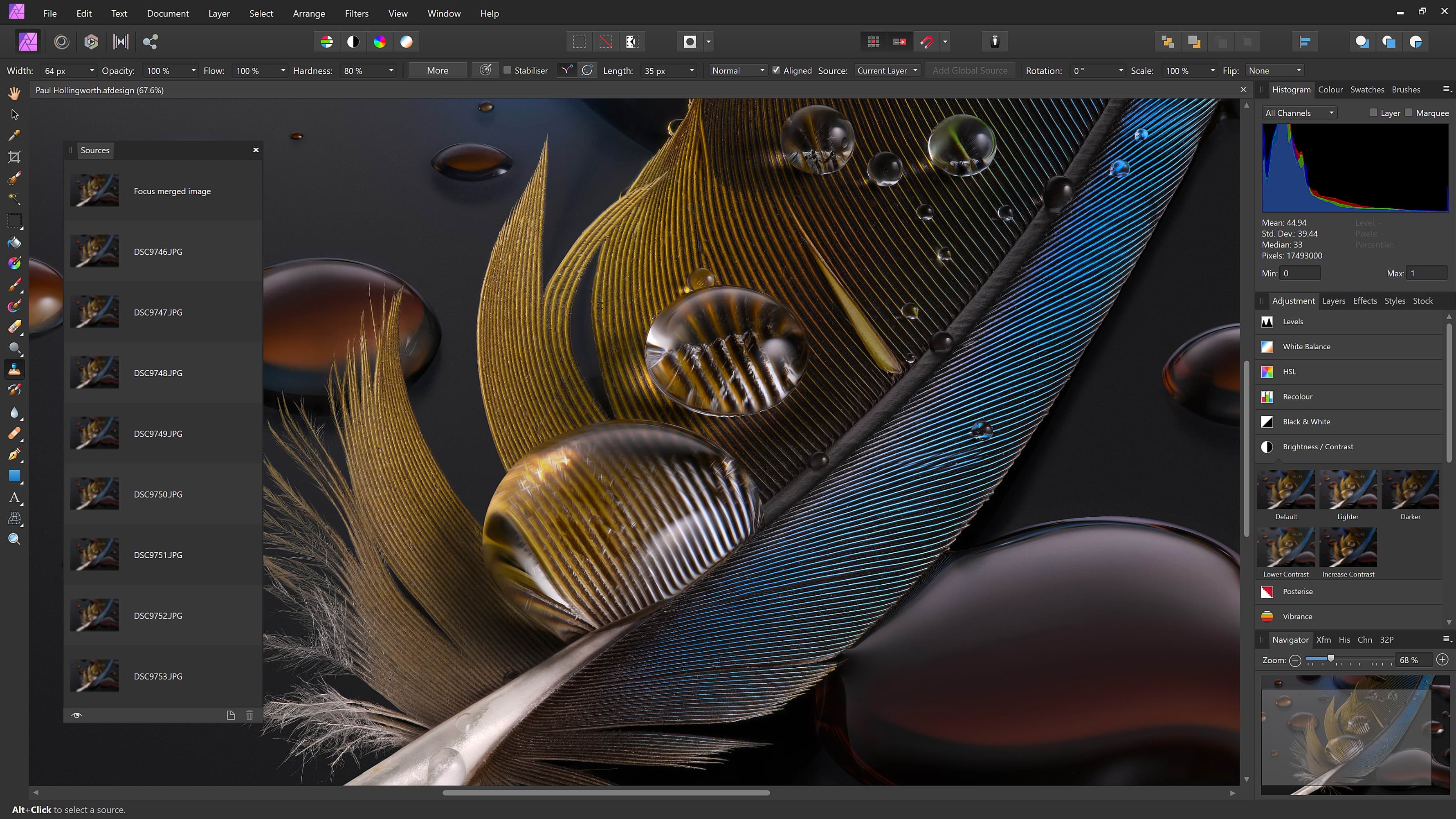
A view of the photo editing effects in Affinity Photo (Source)
Common features of photo editing software
To select an online photo editor tool that’s right for your business, it’s essential to learn about its common features. So let’s look at some common features of an image editing tool.
Real-time editing | Make changes to pictures in real time, such as adjusting the lighting and color. View the before and after images side-by-side to compare the differences. |
Image library | Store your images in an image library, organize them into different folders as needed, create projects to work on, apply filters to sort through the stored images. |
Media imports and export | Import images of various formats, such as JPEG, PDF, GIF, and BMP, and convert them into another file format as needed before exporting. |
Pre-built templates | Select from a range of pre-built templates that you can customize as needed. You can also add your own branding, text, font, color, icons, and more as required. |
Watermarking | Add digital watermarks to your photos to protect their authenticity. Use transparent and customizable watermarks available in the form of images or text. |
Batch processing | Upload multiple images to be edited in a similar manner, as a batch. This may include adding the same orientation, size, or filter to the images. |
What type of buyer are you?
These are the two common buyer categories for online photo editor tools:
Buyers looking for a professional-grade tool: These buyers include photographers, art directors, graphic designers, working for businesses, newspapers, and magazines. They look for a tool that allows them to airbrush the subject or remove errors from images. Graphic designers working for businesses may want to create graphics for corporate websites or social media platforms, at scale. They need a tool that offers features such as batch processing, watermarking, and pre-built templates.
Buyers looking for a tool suited to beginners: These buyers are amateurs or novices in the field of photo editing. They generally require a tool for basic editing and slight modifications such as adjusting the lighting, cropping, and adding frames to the pictures. They may go for a free photo editing software tool that offers an easy-to-use user interface, a free version that allows basic adjustments to play around with, or tutorial videos.
Benefits of photo editing software
There are many benefits to choosing a photo editing app including:
Reduced time: The tools can help reduce the time it takes to edit and create images. Using pre-built templates, simplified watermarking, easy import and export, you can save the time involved in doing all this manually. The batch processing feature also allows you to process multiple images simultaneously, thereby drastically reducing the time involved with processing each image individually.
Better branding: Using the tool, you can make your brand stand out by applying your selected color scheme as well as creating and saving templates that align with your brand guidelines for future use. You can also use your own logos or watermarks to help reinforce your branding and to make your content easily noticeable.
Market trends to understand
Here’s a market trend that’s impacting the photo editing app industry:
Artificial intelligence (AI) for picture enhancements: AI-driven photo editing apps are becoming mainstream and help edit photos and make improvements beyond merely adding stylistic photo effects and filters or adjusting the lighting. The technology uses neural networks to study the image, identify people present in them, and modifies the underlying pixels to render an artistic style to them.
If you still have trouble finding a software tool, we can help you find the right software for your needs and budget in 15 minutes or less, for free. Schedule a call or click here to chat with a software advisor now.
Note: The application selected in this article is an example to show a feature in context and is not intended as an endorsement or recommendation. It has been obtained from sources believed to be reliable at the time of publication.