
Best 3D Architecture Software of 2026
Updated March 16, 2026 at 9:36 PM

Written by Barkha Bali
Senior Writer

Edited by Parul Sharma
Editor
- Popular Comparisons
- Buyers Guide
Compare Products
Showing 1 - 25 of 72 products
Compare Products
Sort by
Reviews: Sorts listings by the number of user reviews we have published, greatest to least.
Average Rating: Sorts listings by overall star rating based on user reviews, highest to lowest.
Alphabetically (A-Z): Sorts listings by product name from A to Z.

D5 Render is a real-time ray tracing renderer for architecture, landscape, interior design, engineering and other 3D professiona...Read more about D5 Render


D5 Render's Best Rated Features
See All
D5 Render's Worst Rated Features
See All

Adobe Creative Cloud is a suite of photography, video, design and user experience tools that helps businesses create, source and...Read more about Adobe Creative Cloud


Adobe Creative Cloud's Best Rated Features
See All
Adobe Creative Cloud's Worst Rated Features
See All

The software offers interior design teams an extensive asset library with numerous design fixtures, including lighting, furnitur...Read more about Coohom
Coohom's Best Rated Features
See All
Coohom's Worst Rated Features
See All

AutoCAD is a 2D and 3D design and drafting platform for architects, engineers, construction professionals, field technicians and...Read more about AutoCAD

AutoCAD's Best Rated Features
See All
AutoCAD's Worst Rated Features
See All

Bluebeam's suite of products emerges as a comprehensive solution tailored for professionals in the construction and design field...Read more about Bluebeam Revu


Bluebeam Revu's Best Rated Features
See All
Bluebeam Revu's Worst Rated Features
See All

Hover’s new connected platform replaces disconnected apps with one reliable solution for measuring, designing, estimating, and b...Read more about Hover

Hover's Best Rated Features
See All
Hover's Worst Rated Features
See All

Built for architects and designers, Lumion’s real-time rendering solutions fit seamlessly into your workflow, letting you visual...Read more about Lumion
Lumion's Best Rated Features
See All
Lumion's Worst Rated Features
See All

Concept3D is a cloud-based mapping platform designed to help businesses in healthcare, education, hospitality and other sectors ...Read more about Concept3D


nTopology is a computer-aided design (CAD) software that provides small to large manufacturing firms with innovative engineering...Read more about nTopology


nTopology's Best Rated Features
See All
nTopology's Worst Rated Features
See All

Arcadium is an AI-powered 3D house design tool used to create floor plans, room layouts, and house designs online. It is suitabl...Read more about Arcadium
Arcadium's Best Rated Features
See All
Arcadium's Worst Rated Features
See All

AutoCAD Architecture is architectural design software. It helps users design and draft industry-specific designs. AutoCAD Archit...Read more about AutoCAD Architecture
AutoCAD Architecture's Best Rated Features
See All
AutoCAD Architecture's Worst Rated Features
See All

Roomle is a cloud-based platform for 3D visualization and product configuration. It includes a Rubens solution that allows busin...Read more about Roomle


Roomle's Best Rated Features
See All
Roomle's Worst Rated Features
See All

AGi32 is a comprehensive photometric calculation tool that helps lighting designers, architects, and electrical engineers asses...Read more about AGi32
AGi32's Best Rated Features
See All
AGi32's Worst Rated Features
See All

Revit is a building information modelling (BIM) software that helps constructions companies, structural engineers, architects an...Read more about Revit


Revit's Best Rated Features
See All
Revit's Worst Rated Features
See All

colormass is an online 3D management software that provides a centralized platform for companies to manage their 3D assets. This...Read more about colormass


Homestyler is a 3D architecture software that create detailed floor plans and generate 3D renderings to visualize ideas. Users c...Read more about Homestyler
Homestyler's Best Rated Features
See All
Homestyler's Worst Rated Features
See All

Inertia is a cloud-based construction management solution designed to help enterprises breakdown complex operations and streamli...Read more about Inertia


RFEM 6 is a finite element analysis (FEA) software created by Dlubal Software. It is a 3D structural analysis and design solutio...Read more about RFEM

Render Plus is a 3D architecture and CAD suite designed for professionals using AutoCAD, Revit and SketchUp applications. It off...Read more about Render Plus Suite

BrioVR is a cloud-based 3D visualization software designed to help individuals and businesses in e-commerce, real estate, advert...Read more about BrioXR

The sophistication of CAD with the simplicity of CPQ systems, LightningCAD was created to be customized for any design and/or co...Read more about LightningCad


For furniture, home furnishings, appliances, and more, Live Furnish is 3D Made Simple. Without a computer science degree or prio...Read more about imagine.io

3D Repo's mission is to rapidly modernise the AECO industry by giving all stakeholders democratic access to project data in a se...Read more about 3D Repo

abstractBIM is a building information modeling (BIM) solution, which enables businesses in the architecture, engineering, constr...Read more about abstractBIM

𝐂𝐄𝐓 𝐌𝐚𝐭𝐞𝐫𝐢𝐚𝐥 𝐇𝐚𝐧𝐝𝐥𝐢𝐧𝐠 is a powerful software solution revolutionizing the material handling industry. This a...Read more about CET Material Handling
Popular Comparisons


Buyers Guide
This detailed guide will help you find and buy the right 3d architecture software for you and your business.
Last Updated on April 23, 2025Software Applications for 3D Architecture
For architects, engineers, and construction firms at large, manual two-dimensional designs are time-consuming and error-prone. Even after multiple iterations, 2D drawings may fail to communicate the final project concept. With 3D architecture software, however, architects and engineers can provide virtual tours, giving stakeholders the full experience of a proposed project.
3D architecture software includes features such as 3D modeling, computer-aided design (CAD) tools, and animations so users can design virtual tours and visualize structures. These tools allow multiple designers and architects to collaborate and co-edit designs via virtual 3D models.
In this buyers guide, we'll explore 3D architecture software as well as its features and benefits.
Here’s what we'll cover:
What is 3D architecture software?
3D architecture software is used by architects, construction professionals, and engineers to design virtual tours and create three-dimensional models. It uses 3D modeling and CAD tools to create a visualized concept of proposed structures.
3D architecture software uses building information modeling (BIM) to help architects analyze the entire construction process, including planning, operation, design, and maintenance. These tools also allow users to check errors in models, identify potential issues, and make changes. 3D architecture software facilitates animation, data import/export, image editing, and drafting.
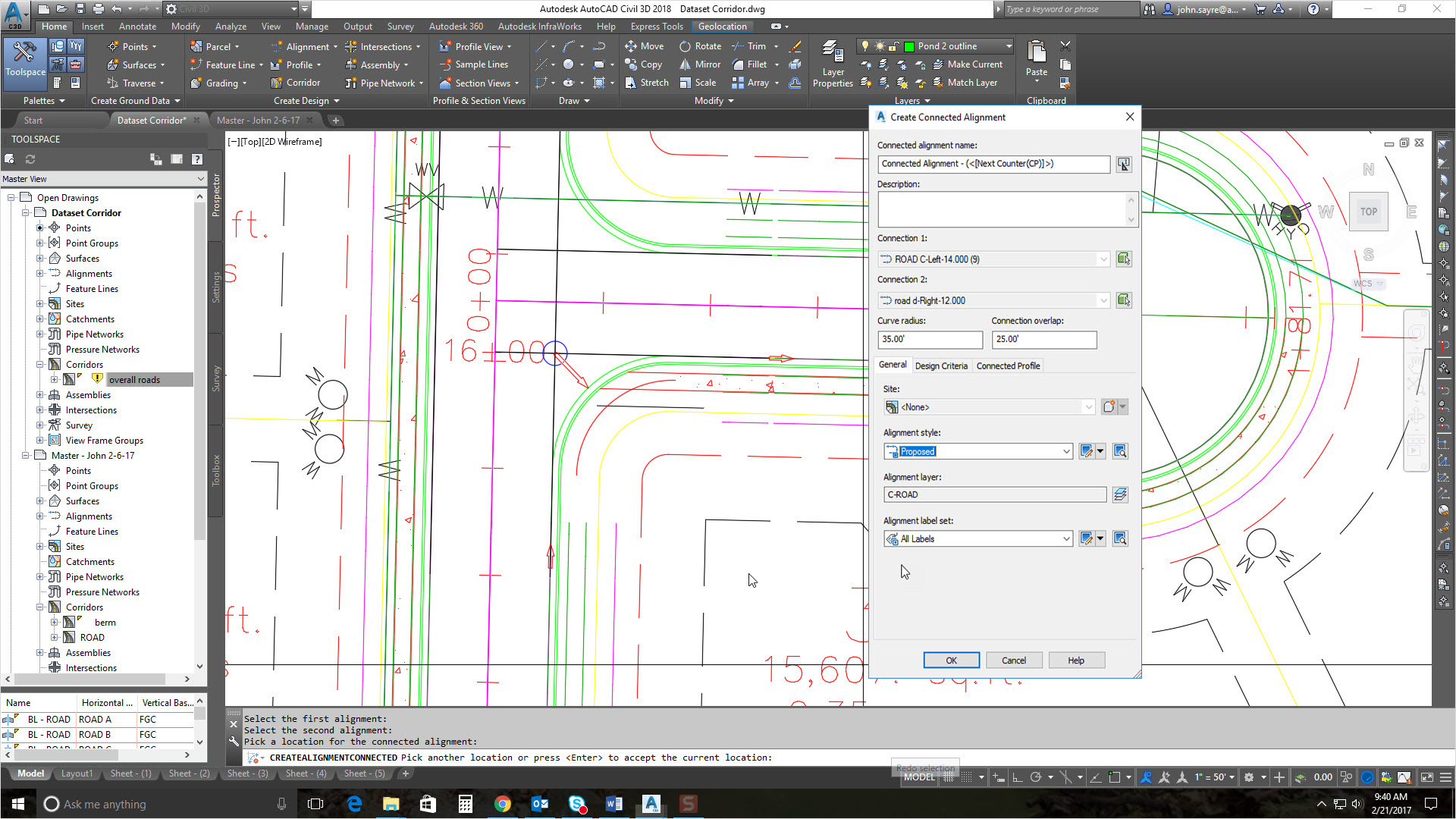
An example of a 3D architecture software dashboard in AutoCAD (Source)
Common features of 3D architecture software
3D modeling | Create a three-dimensional model of a structure to provide a realistic and accurate view of the project. Check errors in the architectural design process, provide virtual tours for clients, and more. |
Collaboration tools | Teams can collaborate and co-edit a 3D infrastructure model. |
Animation | Build 3D animations for landscapes and interiors to visualize ideas and provide an interactive experience. |
Building information modeling (BIM) | Evaluate physical as well as functional characteristics of a construction project by integrating every detail about the project's strategy, design, operation, and maintenance. |
CAD software | Develop, modify, and optimize 3D architectural designs. Calculate the impact of any change on the overall design. |
Component library | Select required presentation elements such as text, images, videos, and animations from a component library to create immersive presentations. |
Landscape design | Refine your 3D model by adding landscape elements such as trees, plants, and people. |
Data import/export | Import and export data files, diagrams, and 3D models. |
File management | Store and track all project-related files in a single database that only authorized stakeholders can access. |
What type of buyer are you?
Most 3D architecture software buyers belong to one of the following categories:
Large enterprises (500+ employees): Buyers in this segment include large businesses with separate teams of architecture design engineers and professionals. These professionals are involved in complex or multi-dimensional projects with multiple stakeholders. Buyers in this category should look for 3D visualization software with advanced features such as BIM, 3D rendering, 3D printing, project management, data import/export, and file management capabilities. These buyers should also pay special attention to whether the 3D architecture tools they're considering integrate with their existing software such as construction management and BIM tools.
Small and midsize enterprises (up to 500 employees): Buyers in this segment include small and midsize businesses with smaller teams and limited budgets. Often, these buyers provide construction design services as well as consulting throughout the project lifecycle. This means they need 3D architect software with collaboration tools, file management, and data import/export capabilities. These buyers should look for a basic 3D architecture tool that is effective yet cost-efficient.
Benefits of 3D architecture software
Realistic visualization: 3D architecture software uses animation and landscape design to help clients visualize project designs. Designers can create a virtual tour of architectural projects that include minute details such as textures, light, and outside views.
Streamline corrections and re-modeling: Users can re-model components separately without disturbing the overall design. Using the components library, editing and rectifying issues is much easier and more economical than manual 2D drafting.
Reduce costs and mitigate risk: You can easily rotate and view a 3D design from all sides, making it easier to analyze and identify potential issues. This helps save time and money by eliminating any stress points in the design.
Integrate multi-disciplinary data: BIM features integrate structured, multi-disciplinary data related to the strategy, design, and maintenance lifecycles into 3D models.
Key considerations for 3D architecture software:
Here are a few factors to consider while selecting 3D architecture software:
Business requirements: Evaluate your business requirements and your expectations for 3D architecture software to determine whether a basic tool would work or if you need a software package with advanced features such as 3D rendering, BIM, 3D printing, and drafting.
System compatibility: Ensure that the software you choose integrates with your existing tools and systems. You'll also want a tool that supports multiple file formats such as STEP, IGES, VDA, IDF, .OBJ, and .STL.
Features: Understand the core and unique features of specific 3D architecture software products before making your choice. The tool you choose should not only help you conceptualize ideas but also facilitate photorealistic rendering and presenting models.
Management cost: It is important to test and upgrade your software throughout its lifecycle. However, adding elements and features to your 3D architecture software can incur extra costs. Be sure to consider long-term management costs when initially investing in a tool.
Note: The application selected in this guide is an example to show a feature in context and is not intended as an endorsement or recommendation. It has been taken from sources believed to be reliable at the time of publication.