
Best App Design Software of 2026
Updated March 19, 2026 at 1:05 PM

Written by Barkha Bali
Senior Writer

Edited by Carolyn Santa Maria
Senior Editor
- Popular Comparisons
- FrontRunners
- Buyers Guide
Compare Products
Showing 1 - 25 of 96 products
Compare Products
Sort by
Reviews: Sorts listings by the number of user reviews we have published, greatest to least.
Average Rating: Sorts listings by overall star rating based on user reviews, highest to lowest.
Alphabetically (A-Z): Sorts listings by product name from A to Z.

Until Mighty Pro, your own branded mobile apps and website weren’t possible without risky, time-consuming, and expensive custom ...Read more about Mighty Pro


blocks.diy platform uses advanced AI to translate natural language descriptions into fully functional business applications in r...Read more about Blocks


Anima leads the design to code space, with over 1M installs on Figma, 300k installs on Adobe XD, and a customer base that includ...Read more about Anima


Anima's Best Rated Features
See All
Anima's Worst Rated Features
See All

Altova MobileTogether is a low code development software designed to help businesses build and deploy applications on various pl...Read more about Altova MobileTogether

AppSheet is a mobile app builder that helps users create iOS and Android apps from the data pulled from spreadsheets or cloud se...Read more about AppSheet

AppSheet's Best Rated Features
See All
AppSheet's Worst Rated Features
See All

LineUpr is an event app that helps organizers improve communication and engagement for on-site, hybrid, and virtual events. The ...Read more about LineUpr

LineUpr's Best Rated Features
See All
LineUpr's Worst Rated Features
See All

Figma is a cloud-based design tool, which helps businesses create, test, and deliver product designs in a collaborative manner. ...Read more about Figma


Figma's Best Rated Features
See All
Figma's Worst Rated Features
See All

Claritee is a dynamic web-based application revolutionizing the way marketing agencies, entrepreneurs, managers, developers, des...Read more about Claritee

Claritee's Best Rated Features
See All
Claritee's Worst Rated Features
See All

Shopney is a cloud-based mobile app building solution that helps Shopify and Shopify Plus brands design and launch native iOS an...Read more about Shopney

Shopney's Best Rated Features
See All
Shopney's Worst Rated Features
See All

Miro is a visual workspace for innovation that enables distributed teams of any size to dream, design, and build the future toge...Read more about Miro
Miro's Best Rated Features
See All
Miro's Worst Rated Features
See All

Bizness Apps is a cloud-based application development solution designed for small businesses. Users can configure pre-built appl...Read more about Bizness Apps

Apphive is a powerful, yet quite simple app builder that delivers an easy-to-use interface in its drag and drop editor. This all...Read more about Apphive
Apphive's Best Rated Features
See All
Apphive's Worst Rated Features
See All

Studio Creatio is a no-code platform with composable architecure to automate workflows and build applications with maximum degre...Read more about Studio Creatio


Studio Creatio's Best Rated Features
See All
Studio Creatio's Worst Rated Features
See All

PandaSuite helps designers, entrepreneurs, students, project managers and developers create applications. Users can preview inst...Read more about PandaSuite
PandaSuite's Best Rated Features
See All
PandaSuite's Worst Rated Features
See All

Choicely is an app building platform that helps businesses build high quality mobile apps. Choicely platform reduces the time...Read more about Choicely
Choicely's Best Rated Features
See All
Choicely's Worst Rated Features
See All

Ionic is an app platform that enables developers to build, secure, and deliver cross-platform mobile, web, and desktop apps. The...Read more about Ionic


Ionic's Best Rated Features
See All
Ionic's Worst Rated Features
See All

Eagle is a digital asset management software designed for anyone who have trouble organizing files such as images, videos, fonts...Read more about Eagle

WEM lets users build web and mobile applications with ease and simplicity. WEM No Code Platform enables, empowers and encourages...Read more about WEM
WEM's Best Rated Features
See All
WEM's Worst Rated Features
See All

TrackVia is a low-code workflow management platform designed to automate approvals, data capture, and reporting processes across...Read more about TrackVia

TrackVia's Best Rated Features
See All
TrackVia's Worst Rated Features
See All

Visily is the easiest and most powerful wireframe software that enables teams, regardless of size and skills, to brainstorm and ...Read more about Visily
Visily's Best Rated Features
See All
Visily's Worst Rated Features
See All

VisualNEO Web is a tool that allows users to create web and mobile applications. It has a user-friendly interface and advanced f...Read more about VisualNEO Web
VisualNEO Web's Best Rated Features
See All
VisualNEO Web's Worst Rated Features
See All

Softr is more than a no-code platform; it's the simplest way to transform your spreadsheets or databases into fully functional b...Read more about Softr
Softr's Best Rated Features
See All
Softr's Worst Rated Features
See All

Flowfinity is a no-code platform used to create, automate, and integrate custom business process applications fast. Based on 4 p...Read more about Flowfinity


Skuid is a cloud-based user experience platform that allows organizations to create applications for tracking resource productiv...Read more about Skuid

Kintone is a cloud-based, customizable workflow management platform suitable for businesses of all sizes. The key features of th...Read more about kintone
kintone's Best Rated Features
See All
kintone's Worst Rated Features
See All
Popular Comparisons



Your Guide to Top App Design Software, July 2023
Software Advice uses reviews from real software users to highlight the top-rated App Design products in North America.
Learn how products are chosenExplore FrontRunners


“Usability” includes user ratings for Functionality and Ease of Use.
“Customer Satisfaction” includes user ratings for Customer Support, Likelihood to Recommend and Value for Money.
Reviews analysis period: The reviews analysis period spans two years and ends the 15th of the month prior to publication.
Buyers Guide
This detailed guide will help you find and buy the right app design software for you and your business.
Last Updated on April 24, 2025Software Applications for App Design
As an app designer, you know how exhausting it is to create app design strategies and write extensive code for those designs.
Businesses often hire in-house designers or outsource the full process to third-party vendors. But not every business has the budget to outsource or establish an internal designing team. Using an app design software, you can create high-end app designs with visual app development and pre-built design templates, eliminating the need for writing code.
From creating an app layout to testing and deploying the app, this software covers all primary functionalities.
In this buyers guide, we will learn more about app design software as well as its features and benefits.
Here’s what we'll cover:
What is app design software?
App design software is a low- to no-code tool that helps app designers create mobile and web apps. It helps with designing apps for business-specific requirements (such as HR and finance apps) as well as consumer needs (such as ecommerce and content-based apps).
The tool helps to create mobile user interfaces, fully interactive wireframes, prototypes, and run user testing. The drag-and-drop feature helps in the visual modeling of apps by allowing users to choose specific elements from the software’s feature library and adding them to the app framework.
App design tools help more than two designers collaborate on creating a mobile UI design through real-time editing of app design frameworks. Most app design software also features no-code or low-code requirements that helps you put together the mobile user interface (UI) design or customize pre-designed templates without much knowledge of coding.
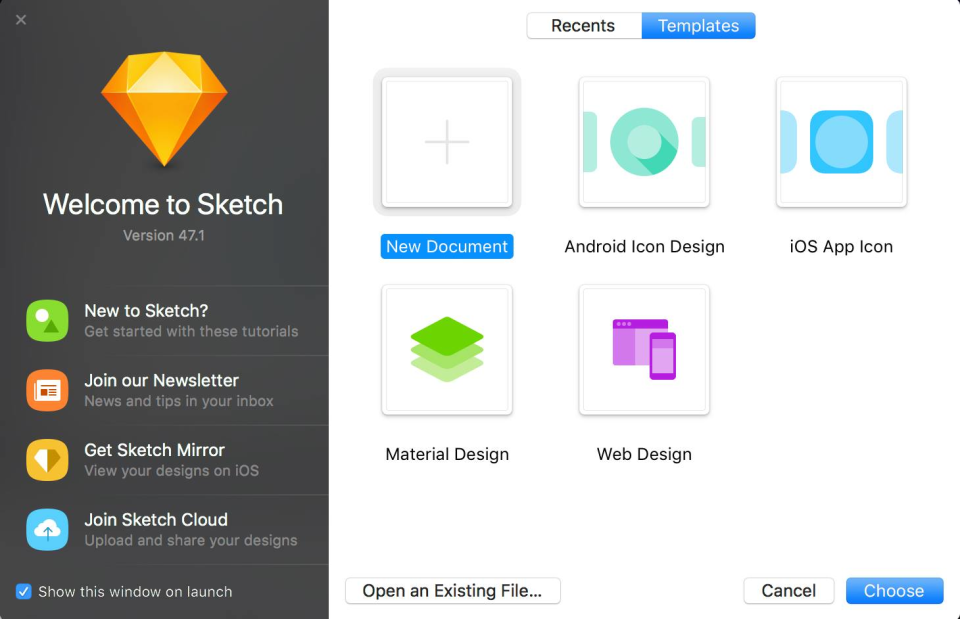
Example of app design software dashboard in Sketch Software (Source)
Common features of app design software
Given below are the most common features buyers seek when purchasing a mobile app design software:
Design templates | Select a pre-built template to edit, rearrange, and add your branding quickly, or start from scratch to build your own design. |
Visual modeling | Allow developers to collaborate and co-edit app designs to capture accurate requirements and outline the structure. |
Prototype creation | Create prototypes including navigational elements, visuals, and interactions to represent how the app will function. |
Drag and drop | Drag and drop pre-built UI and UX components in your app framework to set up the feature library and user interface elements. |
Testing management | Run live usability tests with end users to ensure premium quality. |
Collaboration tools | Access collaborative tools to share your app framework with your team and developers for quick feedback. |
Change management | Make changes or completely redesign the elements and see them reflected instantly on your app framework. |
Feature library | Level up with interactive features such as plugins, flowcharts, diagrams, and stock images. Discover icons and visualize data to make an engaging app design. |
What type of buyer are you?
Before selecting software, you should assess the type of buyer you are. Buyers of app design tools can be broadly categorized into these categories:
Large enterprises (over 500 employees): These businesses have different teams for different business functions having varying business requirements. They want to have more structured customization and integration features, as compared to small to midsize businesses (SMBs). Such buyers need a solution that allows the scalability of app and business analytics to have better control of their data. They should invest in fully loaded app design software tools that offer advanced features such as scalability, inspections, hybrid app creation, and security.
Large enterprises often use such design tools to build apps for internal business functions, such as HR and finance. They should consider software that offers a specific template for the business needs they require help with.
Small and midsize enterprises (up to 500 employees): These businesses comprise a small group of IT developers, freelancers, testers, and programmers to build mobile app UI/UX design. Since they typically have budget constraints, it’s ideal for them to choose software tools with no to low additional plugin costs. They should look for app design tools that don’t require coding, as that will save them from the need to hire professional programmers or outsource the task. Besides, they should consider easy-to-access software tools with drag-and-drop, pre-built UI/UX icons, wireframe, a prototyping tool, and pre-built templates.
SMBs usually use these tools to build ecommerce and/or content-based applications. They should invest in software tools with strong visual app development features and ones with ecommerce functionalities such as inventory management and payment processing.
Benefits of app design software
Here are the key benefits of app design software for your business:
Eliminates the need for programming skills: App design software almost entirely eliminates the need for programming skills. It uses the “what you see is what you get” approach, meaning that you can simply select the features you want your app to have and add them to your app model. So as you add a new element or component to your app model, it gets reflected in the preview in real time.
Access to pre-designed templates: App design software comes with a collection of pre-designed templates which act as a ready-made structure for your application. You can simply fill in all the required features, create wireframes, and prototypes to finish your app design. Also, if you have a specific design in mind, you can customize your own app model.
Personalize business experience: This software renders a 100% tailored experience with an intuitive approach to design apps. It allows you to customize the mobile app design according to your business requirements and working style.
Reduce cost: As compared to the cost for the services of a professional designer/developer, app design software is significantly more cost effective. You can use it at any point to make alterations to your app or fix issues instantly without any need to spend money on a dedicated team of developers.
Key considerations of app design software
App strategy: Consider the strategy of your app before anything else. Make sure the design tool can match your goals while providing an excellent user experience, as per your organization’s requirements. You should consider the following:
On which device would your app function, iOS or Android?
On which platform would your app run, web or mobile?
What user experience do you want your app to offer?
What is the goal of your app?
Required skill set: Most app design tools eliminate the need for programming/coding skills. However, some software might require a certain degree of coding. You should consider the skills required to utilize a certain design tool and what training is offered by the vendor.
User experience: Your app design software is supposed to make your app development easy. So, the tool’s interface should be easy to use, understandable, and intuitive. A lot of app design tools come with free trials which can be used by designers to test the efficiency of a software and make the right choice.
Testability: Testing plays an important role in app designing as it identifies any kind of deviations or complexities at an early stage. It checks whether or not the app is smooth and efficient for the end users. Your app builder should enable the users to test the app framework and make required changes.
Management costs: It is necessary to test, analyze, maintain, and upgrade the usage of your app throughout its lifecycle. When it comes to adding additional elements to your app in the future, you can incur extra costs. As a result, before selecting an app design software, you should consider the long-term management costs and implications.
Note: The application selected in this guide is an example to show a feature in context and is not intended as an endorsement or recommendation. It has been taken from sources believed to be reliable at the time of publication.