
Best Proctoring Software of 2026
Updated March 19, 2026 at 11:22 AM

Written by Supriya Deka
Market Research Specialist

Edited by Carolyn Santa Maria
Senior Editor
- Popular Comparisons
- Buyers Guide
Compare Products
Showing 1 - 25 of 31 products
Compare Products
Sort by
Reviews: Sorts listings by the number of user reviews we have published, greatest to least.
Average Rating: Sorts listings by overall star rating based on user reviews, highest to lowest.
Alphabetically (A-Z): Sorts listings by product name from A to Z.

Talview is the trust infrastructure for high-stakes decisions in the AI era. As generative AI, deepfakes, and proxy networks und...Read more about Talview


Talview's Best Rated Features
See All
Talview's Worst Rated Features
See All

Constructor Proctor is a next-generation AI-powered proctoring solution designed to ensure exam integrity while offering flexibi...Read more about Constructor Proctor
Constructor Proctor's Best Rated Features
See All
Constructor Proctor's Worst Rated Features
See All

Honorlock makes online proctoring simple, safe and scalable for higher education institutions and professional education program...Read more about Honorlock


Digiexam is a reliable online exam platform for K-12 schools and universities, designed to manage the entire exam workflow and p...Read more about Digiexam

Digiexam's Best Rated Features
See All
Digiexam's Worst Rated Features
See All

ExamOnline uses an AI to auto-detect candidates by cross-checking their photos with images collected from registration. It verif...Read more about ExamOnline
ExamOnline's Best Rated Features
See All
ExamOnline's Worst Rated Features
See All

TestWe is a cloud-based and on-premise assessment platform that helps businesses manage online exams via skill tracking, score m...Read more about TestWe
TestWe's Best Rated Features
See All
TestWe's Worst Rated Features
See All

Evalart is a SaaS platform that offers online pre-employment assessments designed to help HR professionals and recruiters evalua...Read more about Evalart


Evalart's Best Rated Features
See All
Evalart's Worst Rated Features
See All

YouTestMe GetCertified is a comprehensive web-based platform for online examination, training, surveys, and certification, equip...Read more about YouTestMe GetCertified

YouTestMe GetCertified's Best Rated Features
See All
YouTestMe GetCertified's Worst Rated Features
See All

Integrity Advocate is an identity verification, participation monitoring, and exam proctoring solution. This solution protects l...Read more about Integrity Advocate


Asgard is a comprehensive authentication platform designed specifically for online training compliance. Asgard Authenticate prov...Read more about Asgard Authenticate


Asgard Authenticate's Best Rated Features
See All
Asgard Authenticate's Worst Rated Features
See All

BlinkExam is an online examination platform that enables schools, colleges, and organizations to conduct exams and assessments. ...Read more about BlinkExam

Proctorizer is a cloud-based and on-premise proctoring system designed to simplify exam supervision for educational institutions...Read more about Proctorizer

ProctorStone is an AI-powered and installation-free auto-proctoring solution that ensures the security, credibility, and integri...Read more about ProctorStone

Synap is an award-winning online exam platform, empowering organisations to seamlessly administer secure online exams on a large...Read more about Synap


Synap's Best Rated Features
See All
Synap's Worst Rated Features
See All

Proctorio is a remote exam monitoring solution that lets businesses in the education, corporate, and government sectors conduct ...Read more about Proctorio
Proctorio's Best Rated Features
See All
Proctorio's Worst Rated Features
See All

Form Presenter is a cloud-based proctoring application designed to facilitate the presentation of Google Forms for conducting on...Read more about Form Presenter


Hire the right candidates by testing the skills that matter. With eSkill, you can use customizable pre-hire assessments to asse...Read more about eSkill

eSkill's Best Rated Features
See All
eSkill's Worst Rated Features
See All

Designed for educators and businesses across all industries, BTL Surpass is a web-based software that helps with online exam cre...Read more about Surpass Assessment

ProctorU is an assessment management software designed to help academic institutions detect and prevent cheating and content the...Read more about ProctorU

Inspera Assessment is a digital assessment platform that allows institutions to manage the entire assessment cycle, from plannin...Read more about Inspera Assessment

Examity is a proctoring solution designed to help organizations protect test integrity. It is suitable for academic institutions...Read more about Examity

Dugga Digital Assessment is an online platform that offers a reliable and secure digital assessment solution. With its robust se...Read more about Dugga
Dugga's Best Rated Features
See All
Dugga's Worst Rated Features
See All

Proctortrack provides remote proctoring solutions for academic institutions. It leverages ID verification, automated proctoring,...Read more about Proctortrack

DigiProctor is an online testing and proctoring software that helps businesses and educators with building, administering, proct...Read more about DigiProctor
No reviews yet

easyProctor is a remote proctoring system powered by AI technology. It helps ensure the integrity of online exams. The system al...Read more about easyProctor
No reviews yet

Popular Comparisons


Buyers Guide
This detailed guide will help you find and buy the right proctoring software for you and your business.
Last Updated on April 30, 2025Companies and educational institutions globally are adopting a digital mode of hiring and learning since the beginning of the COVID-19 pandemic. Companies have been hiring candidates remotely, and academic institutions are administering online exams allowing students to continue learning from the comfort of their homes. But how are you monitoring them to avoid any misconduct, cheating, and dishonest behavior while taking these tests?
This is where online proctoring software turns out to be useful. Proctoring software empowers test administrators to monitor multiple test takers situated in remote locations throughout the duration of the test. This type of software verifies test takers’ identities and monitors their behavior to avoid any instances of academic dishonesty.
This buyers guide will go deeper into proctoring software and discuss what exactly the tool is and its common features and benefits.
Here’s what we'll cover:
What is proctoring software?
Proctoring software is an online tool that allows businesses and academic institutions to host virtual exams safely. It monitors the behavior, screen, and environment of test takers to ensure a cheat-proof examination process.
Proctoring solutions help eliminate the chances of impersonation, unauthorized support, or any other activity of the test taker that might question the integrity of the organization. Such software allows remote proctoring to monitor students via webcam or by using technologies, such as browser lockdown, voiceprint, biometrics, or analysis of video recorded during exams.
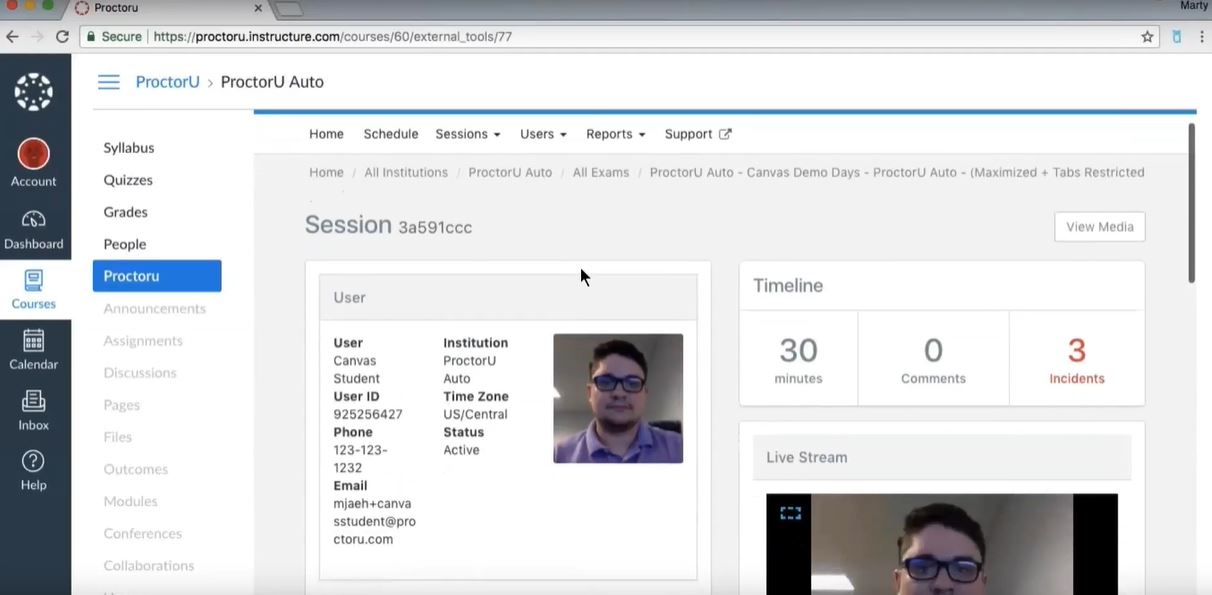
Identity authentication feature in ProctorU Software (Source)
Common features of proctoring software
The exact features vary depending on the product, but most proctoring tools generally have the following overlapping features:
Online tests | Administer tests virtually via computer or mobile devices using the internet. |
Violation tracking | Identify and raise violations for any kind of suspicious behavior by the test taker. This can include unusual eye movement during exams, the presence of unauthorized people in the background, or web browsing. |
Alerts/Notification | Send alerts to the proctor immediately due to any suspicious behavior by the user while undertaking online tests. |
Data security | Protect data entered by students and candidates on the exam site, such as identity, verification information, and contact details, from being leaked and misused by any third-party source. This feature should also protect exam content or exam papers from being leaked to maintain the integrity of online exams. |
Live proctoring | Monitor multiple test takers online from start to finish in real time via screen share, webcams, or audio recording. |
Mobile access | Access the software via any mobile device such as tablets and smartphones. The software can either be accessed via web browser or mobile application on such devices. |
Multiple authentication methods | Authenticate user identity with a range of methods while logging into or launching tests. User identity can be verified using a combination of ID cards, passwords, biometrics, etc. |
Reporting/analytics | Provide insights on test-taker behavior, such as deviations from past performance or browser history during tests. These can be further used to understand user engagement and to further improve online exams to better the test experience. |
Screen recording | Record what is happening on the computer screen as a video file or take screenshots of the entire desktop while test takers are taking the exam. |
Test scheduling | Arrange or schedule exams for students or candidates, and determine when, where, and how examination will be conducted. |
What type of buyer are you?
Before purchasing a solution, you should be mindful of what kind of buyer you are. The majority of buyers fall into these categories:
Academic institutions: Buyers in this category are higher education institutes, such as universities, who are adopting digital learning and conducting online exams with students located remotely. These online exams make it difficult for institutions to ascertain whether students are maintaining academic integrity. Online proctored exams make it easy for whoever is administering the test to supervise exams without being physically present.
This group should opt for a software that offers identity verification, browsing data, and security features to maintain a safe and effective testing environment. The software should also provide proper technical support to help students install the required hardware (i.e., webcam) or software before taking the tests.
Businesses: Companies and organizations looking to hire or conduct professional certification use talent assessments. Since the COVID-19 pandemic, businesses are adapting to the remote hiring trend, where candidates take assessment tests from the comfort of their homes. In order to add credibility and certify or hire the most qualified candidates, it is important to make sure to detect and prevent dishonest behavior while attempting these tests.
Buyers in this category should opt for a software solution that offers live proctoring, automated analysis of user behavior, browser patrolling, ID verification, and data privacy features. Additionally, the software should be compatible with the user’s software and hardware and support multiple web browsers to provide a seamless experience for all your test takers and maintain exam integrity.
Benefits of proctoring software
Below is a comprehensive list of benefits you can expect from proctoring software:
Identity verification: While conducting tests online for students or candidates located at different locations, it is essential for the organization to know whether the test taker is the same one as enrolled. Proctoring software helps you verify their identification by capturing the content on their IDs along with their photos when they launch the online exam.
Customization: Online proctoring software lets you customize your solution according to your needs. For example, you can design the exam in the learning management system and simply connect the proctoring software to do the monitoring for you. It lets you choose features that you would like to use for monitoring the tests, such as webcam, the ability to disable printing, browser lock, room scan, screen record, and so on.
Detailed reporting: The reporting feature of proctoring solutions can provide in-depth insights about test takers’ behavior. The reports provide information on how candidates approach exams, instances of cheating or use of unfair means, geo-location of candidates, or playback video of the candidate. This can help improve online exams by enabling secure and fair exam experience.
Key considerations when purchasing proctoring software
Compatibility with third-party apps: Your proctoring software choice should integrate with your already-existing tools, such as learning management system software and assessment software, which will help you create assessment tests and quizzes without the need for additional logins and passwords. This will also enable students to access their exams in a familiar environment. Also, the software should support a multitude of web browsers that test takers might use. This will enable test takers to have a seamless exam experience.
Security: Conducting tests online raises concerns about information privacy, such as students’ personal information and exam content.The online proctoring tool that you choose should ensure that any test takers entering personal information in the software is protected. It should also protect your exam content from possible leakage and plagiarism. This way your test takers will be more confident while entering their information in a safe, secured testing environment.
Market trends to understand
Here’s a recent trend in the proctoring software market that you should be aware of.
Artificial intelligence (AI) proctoring to improve cheating detection methods: Proctoring software provides features for remote monitoring and exam recording, but with AI capabilities, the software can further enhance the detection of fraudulent activities while taking the exams. AI-enabled remote proctoring software solutions can use facial recognition, voice recognition, and pattern recognition to identify unauthorized objects and identities in the environment. This will help create a better test-taking environment by making it very difficult to cheat during online assessments.
Note: The applications mentioned in this article are examples to show a feature in context and are not intended as endorsements or recommendations. They have been obtained from sources believed to be reliable at the time of publication.