
Best Virtualization Software of 2026
Updated March 16, 2026 at 8:21 AM

Written by Amita Jain
Senior Content Writer

Edited by Carolyn Santa Maria
Senior Editor
- Popular Comparisons
- Buyers Guide
Compare Products
Showing 1 - 25 of 71 products
Compare Products
Sort by
Reviews: Sorts listings by the number of user reviews we have published, greatest to least.
Average Rating: Sorts listings by overall star rating based on user reviews, highest to lowest.
Alphabetically (A-Z): Sorts listings by product name from A to Z.

ManageEngine OpManager is a network management solution that includes network and server monitoring, bandwidth analysis, configu...Read more about ManageEngine OpManager


ManageEngine OpManager's Best Rated Features
See All
ManageEngine OpManager's Worst Rated Features
See All

ManageEngine Applications Manager is an application performance monitoring and observability solution that is designed to empowe...Read more about ManageEngine Applications Manager


ManageEngine Applications Manager's Best Rated Features
See All
ManageEngine Applications Manager's Worst Rated Features
See All

Charon-SSP is a virtualization solution that creates virtual replicas of various SPARC family servers, including the Sun-4mV8, S...Read more about Charon-SSP
No reviews yet

Charon-AXP is a solution that emulates the Alpha environment on standard Windows or Linux-based systems. The emulator enables th...Read more about Charon-AXP
No reviews yet

Looking for a cost effective alternative to Citrix or VMware Horizon (Omnissa)? Inuvika OVD Enterprise is a feature rich prod...Read more about Inuvika OVD Enterprise


Inuvika OVD Enterprise's Best Rated Features
See All
Inuvika OVD Enterprise's Worst Rated Features
See All

CData Connect AI is the first managed Model Context Protocol (MCP) platform that enables enterprises to safely connect AI assist...Read more about CData Connect AI
No reviews yet

Site24x7 is a cloud-based website and server monitoring platform that helps small to large size businesses monitor websites, ser...Read more about Site24x7

Site24x7's Best Rated Features
See All
Site24x7's Worst Rated Features
See All

ManageEngine OpManager Plus is an integrated IT operations management solution that offers comprehensive monitoring capabilities...Read more about ManageEngine OpManager Plus
ManageEngine OpManager Plus's Best Rated Features
See All
ManageEngine OpManager Plus's Worst Rated Features
See All

Hornetsecurity‘s VM Backup is a powerful, reliable and easy-to-use backup and replication solution for Microsoft Hyper-V and VMw...Read more about VM Backup
VM Backup's Best Rated Features
See All
VM Backup's Worst Rated Features
See All

Runecast is a provider of one solution designed to help IT Security and Operations teams like yours effectively manage and mitig...Read more about Runecast

Google Cloud is a suite of cloud computing services that allows businesses to build, deploy, and scale applications. The platfor...Read more about Google Cloud


Google Cloud's Best Rated Features
See All
Google Cloud's Worst Rated Features
See All

Cameyo is the secure and 70% more cost-effective alternative to virtual desktop products like Citrix & VMware. Cameyo's Virtual ...Read more about Cameyo


VMware Fusion is a user-friendly application that lets users run Windows and other x86 operating systems on their Mac. With its ...Read more about VMware Fusion

Amazon Elastic Compute Cloud (Amazon EC2) is a web service designed to help businesses with cloud computing, video encoding, bat...Read more about Amazon EC2


Amazon EC2's Best Rated Features
See All
Amazon EC2's Worst Rated Features
See All

vSphere is a server virtualization solution, which enables businesses to run, manage, connect and secure applications in a unifi...Read more about vSphere
vSphere's Best Rated Features
See All
vSphere's Worst Rated Features
See All

CloudSigma is a pure-cloud infrastructure-as-a-service (IaaS) and platform-as-a-service (PaaS) provider that enables the digital...Read more about CloudSigma

Softdrive is a high-performance GPU virtual desktop. Softdrive is the least expensive and only GPU Cloud-PC that has its own cu...Read more about Softdrive

vCenter Server is a server management solution that helps businesses automate and build hybrid cloud infrastructures. Administra...Read more about vCenter Server
vCenter Server's Best Rated Features
See All
vCenter Server's Worst Rated Features
See All

StorMagic SvSAN is a hyper-converged storage solution that ensures high availability and eliminates downtime for servers. With S...Read more about StorMagic SvSAN


StorMagic SvSAN's Best Rated Features
See All
StorMagic SvSAN's Worst Rated Features
See All

NovaBACKUP Server Agent is a backup solution that delivers Windows Server, Hyper-V, and VMware backup for small and medium-sized...Read more about NovaBACKUP Server Agent

Cortado MDM is engineered to efficiently optimize your Mobile Device Management processes. With just a few clicks, you can set u...Read more about Cortado MDM

Flaneer is a virtual desktop provider. With Flaneer, your staff can access their work environment in 1 click, and in any situa...Read more about Flaneer


StackBill enables you to launch or enhance your public cloud business with highly efficient, cost-effective, reliable, and scala...Read more about Stackbill


Thinfinity Workspace is an advanced, unified platform designed to help organizations modernize their IT environments through a r...Read more about Thinfinity Remote Workspace


Traverse is a cloud-based network monitoring solution that offers tools to monitor hybrid cloud and network infrastructure. The ...Read more about Traverse

Popular Comparisons


Buyers Guide
This detailed guide will help you find and buy the right virtualization software for you and your business.
Last Updated on April 30, 2025With a number of employees using personal networks (and devices) for remote work, IT managers are tasked with the challenges of handling multiple mobile devices spread across the globe while protecting sensitive business data.
One way IT managers can resolve this issue is by making the infrastructure of technology more efficient with virtualization. Virtualization tools can help you extend the capabilities of your existing hardware and software without commanding huge investments in physical servers. It can connect your remote desktops to virtual servers created with minimal hardware support, and lets you monitor and upgrade them from anywhere with just a click.
With several virtualization systems available in the market, selecting the right one can be confusing and time consuming. This buyers guide has all the information you’ll need to make a software choice that works for your business.
Here's what we'll cover:
What is virtualization software?
Virtualization software is a solution that allows users to run multiple operating systems virtually on single computer hardware. It splits the central processing unit (CPU), server, storage, and memory into several virtual machines (VMs)–a piece of software that pretends to be a computer–each with its own operating system and applications. For example, you can operate a Linux virtual machine on Windows hardware.
The software enables companies to consolidate their IT resources on fewer physical machines which helps them improve overall IT turnaround in less space, power, and administrative overheads. Desktop virtualization tools are also used by developers and testers to test applications in multiple environments, say Windows and Mac, on one piece of hardware.
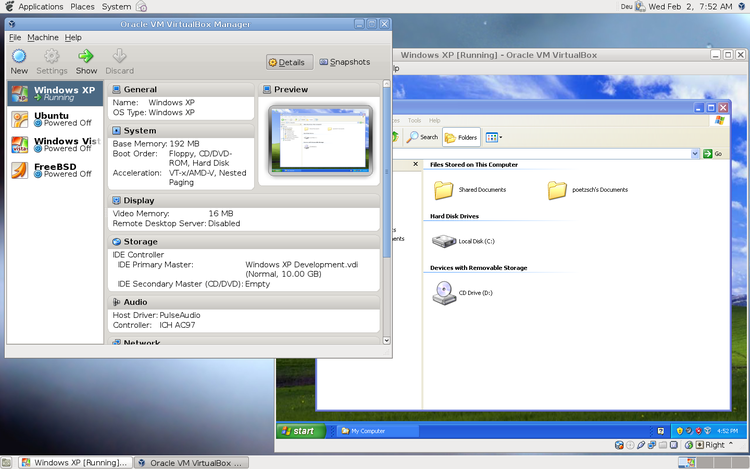
A view of the virtual machine manager in Virtual Box (Source)
Common features of virtualization software
These are the common features most buyers seek when purchasing virtualization software:
Configuration Management | Maintain your system by preventing unapproved changes from altering your virtual machine and the host machine. Identify the components of the system (servers, configuration, or software) with problem configurations and reconfigure them to your desired state. |
Data Migration | Move data from a virtual machine without suffering data loss or service lags. Upgrade to a higher version of the software even when working in a virtual environment with next to no downtime. |
Virtual Machine Monitoring | Create and manage multiple virtual environments on one physical machine and deploy different operating systems and applications. Also called a hypervisor, virtual machine monitoring creates a thin software layer between the host operating system and virtual environments. |
Access Controls/Permissions | Regulate user rights to certain areas of the host or virtual machine by setting permissions and issuing passwords. Control who can administer, run, suspend, or stop the virtual environments. |
Backup and Recovery | Create backups of your virtual machine within the system or remotely to save all of your data and the entire configuration, and resume productivity even if the system breaks down or requires an upgrade. |
Performance Monitoring | Monitor the performance of virtual machines and track the oversized, downsized, or unused VMs. Reallocate storage and memory between virtual environments as per business needs. |
What type of buyer are you?
Before you start evaluating software options, you'll want to know which buyer category you belong to. Most buyers of virtualization software fall into one of these categories:
Small businesses (less than 100 employees): These are startups and small organizations that work with a small group of IT developers, freelancers, testers, and programmers to build a technological product. Software tools providing virtualization on desktops with multiple OS support and group sharing features are ideal for them. These software solutions are cheaper than business-grade versions and provide easy-to-setup virtual machines with minuscule downtime.
Midsize businesses (from 100 to 500 employees): These buyers have a small employee base with growing IT requirements. But they expect to host fewer virtual machines compared with large businesses. They opt for virtualization software with desktop as well as server virtualization options to be able to control the workload centrally as their teams work remotely. They look for slightly more advanced features than small businesses, such as virtual desktop infrastructure (VDI), multi-factor authentication, and easy data migration. Another aspect of determining a good fit for software for these buyers is to assess the compatibility of existing hardware, including CPU, RAM, and hard drive storage, with the workload they plan to manage on the virtual systems.
Large businesses (over 500 employees): These buyers are large IT organizations comprising different teams and departments with varying business needs. They have deeper customization and integration requirements than SMBs. As such, they will need a solution with server virtualization that can allow for scalability of virtual machines, and storage virtualization to have more control of their data and information. These buyers should opt for a full-featured solution that offers advanced virtual machine monitoring or Type 1 hypervisor support, easy integration and deployment, configuration management, storage virtualization, disaster recovery, and responsive customer support. They should also look at the compatibility of old applications with hardware virtualization so that the data can be easily shared with the virtual machines.
Benefits of virtualization software
Let’s go through some of the key benefits of using a virtualization software solution in your business:
Reduced costs with hardware virtualization: Virtualization tools allow many operating systems and applications to run on fewer servers. This dramatically reduces the costs of acquiring the physical servers and the prices associated with storing and cooling them. Beyond savings on physical servers, virtual desktops save companies in software licensing costs by distributing computing power between users.
Improved business resilience: Virtualization technology makes a return to normalcy faster after a disaster. It allows businesses to back up mission-critical applications on a few servers stored at an alternate location, and live migration enables businesses to resume productivity with minimum to no interruption.
Efficient IT asset management: Software virtualization reduces software deployment time and administration efforts with one-click control and provides IT departments the flexibility to redistribute virtual hardware as per every user’s requirements. This enables IT teams to become much more adaptable and responsive to business needs.
Key Considerations
Listed below are some key considerations to keep in mind when purchasing a virtualization tool.
Hardware: Even though virtualization enables software resources to better utilize the underlying hardware, it doesn’t mean that the hardware itself has no bearing on the success of virtualization. Check for the type and ability of your hardware, whether it’s a workstation or a physical server, to host your virtualization solution.
System compatibility: Check if the virtualization tool you’re planning to buy supports the different types and versions of the operating system you intend to use. If you are purchasing virtualization tools for your software and IT development teams, ensure the solution you’re selecting supports the platforms on which they want to test their applications.
Budget: Investing in software features that your IT teams don’t need will not benefit your business. Discuss your needs with team members first. Understand your workload requirements and jot down a list of must-haves versus good-to-have virtualization features. Also, take a look at the licensing costs versus the total cost of ownership. After that, select a tool that best offers what you need without stressing your budget.
Note: The application selected in this guide is an example to show a feature in context and is not intended as an endorsement or recommendation. It has been taken from sources believed to be reliable at the time of publication.