
Best Closed Captioning Software of 2026
Updated March 18, 2026 at 1:11 AM

Written by Supriya Deka
Market Research Specialist

Edited by Ayush Dixit
Content Editor
- Popular Comparisons
- Buyers Guide
Compare Products
Showing 1 - 25 of 33 products
Compare Products
Sort by
Reviews: Sorts listings by the number of user reviews we have published, greatest to least.
Average Rating: Sorts listings by overall star rating based on user reviews, highest to lowest.
Alphabetically (A-Z): Sorts listings by product name from A to Z.

Riverside is an all-in-one podcast and video studio for businesses and content creators who demand professional quality without ...Read more about Riverside
Riverside's Best Rated Features
See All
Riverside's Worst Rated Features
See All

Vizard is a video generator and editor powered by artificial intelligence. This tool is suitable for marketers, creators, agenci...Read more about Vizard


Vizard's Best Rated Features
See All
Vizard's Worst Rated Features
See All

Sonix is the world's most accurate AI transcription platform. Fast, accurate, secure. Millions of users from all over the world...Read more about Sonix


Sonix 's Best Rated Features
See All
Sonix 's Worst Rated Features
See All

Transkriptor is an artificial intelligence (AI)-enabled online transcription solution that converts audio and video content with...Read more about Transkriptor

Transkriptor's Best Rated Features
See All
Transkriptor's Worst Rated Features
See All

YouTube is a web-based video platform that enables individuals, bloggers and enterprises to discover, host and share audio and v...Read more about YouTube

YouTube's Best Rated Features
See All
YouTube's Worst Rated Features
See All

With Covideo, users can record, send, and track videos easily. It includes deep analytics that provides real-time results and in...Read more about Covideo
Covideo's Best Rated Features
See All
Covideo's Worst Rated Features
See All

Videolinq is a leader in adding closed captioning over video, offering an affordable and efficient way to create automated capti...Read more about Videolinq


Videolinq's Best Rated Features
See All
Videolinq's Worst Rated Features
See All

EoleCC is a subtitling platform that helps businesses create subtitles in multiple languages using artificial intelligence (AI) ...Read more about EoleCC


Vatis Tech is an on-premise and cloud-based speech recognition software, it's API provides advanced speech-to-text technology th...Read more about Vatis Tech

Txtplay.ai helps organizations make their content more accessible and globally available through AI-powered transcription, capti...Read more about Txtplay

Txtplay's Best Rated Features
See All
Txtplay's Worst Rated Features
See All

Kensho Scribe is a transcription management solution that helps businesses convert speech-to-text for calls, voicemails, intervi...Read more about Kensho Scribe

Happy Scribe transcription software uses an artificial intelligence (AI) model to extract the speech from any file and convert i...Read more about Happy Scribe

Happy Scribe's Best Rated Features
See All
Happy Scribe's Worst Rated Features
See All

GoSpeech is a speech recognition software that converts speech into text. It is designed for journalists, business professionals...Read more about GoSpeech

Adobe Closed Captioning enables Adobe Connect users to embed captions in team meetings and online events. It allows participants...Read more about Adobe Presenter

Verbit is a closed captioning solution, which helps legal professionals and businesses in media, education and other industries ...Read more about Verbit

Matesub is an AI-based closed captioning solution designed to generate subtitles from a unified interface. The platform offers v...Read more about Matesub

3Play Media enables businesses in eCommerce, entertainment, government, education and other sectors to streamline transcription,...Read more about 3Play Media

CaseGuard is an AI-enabled redaction software designed to help identify and remove sensitive information from videos, audio file...Read more about CaseGuard

CaptionHub is a close captioning software designed to help businesses automate speech recognition to generate captions in multip...Read more about CaptionHub


Our proprietary speech recognition technology is unmatched in transcribing complex legal terminology and challenging audio. For ...Read more about Rev
Rev's Best Rated Features
See All
Rev's Worst Rated Features
See All

Maestra is a speech to text solution that helps businesses across marketing, education and publishing industries streamline clos...Read more about Maestra

# One paragraph Companies have a lot to say, and their audiences expect video content. PlayPlay is the video creation platform...Read more about PlayPlay
PlayPlay's Best Rated Features
See All
PlayPlay's Worst Rated Features
See All

FlexClip is an user-friendly online video editing platform for creators of all levels. With its drag-and-drop interface, a wide ...Read more about FlexClip
FlexClip's Best Rated Features
See All
FlexClip's Worst Rated Features
See All

Amberscript is an automatic script and subtitle generation service. Using artificial intelligence to analyze audio and video fil...Read more about Amberscript
Amberscript's Best Rated Features
See All
Amberscript's Worst Rated Features
See All

Adobe Express is a design, photo, and video editing application for creating content across various formats and platforms. It is...Read more about Adobe Express

Adobe Express's Best Rated Features
See All
Adobe Express's Worst Rated Features
See All


Buyers Guide
This detailed guide will help you find and buy the right closed captioning software for you and your business.
Last Updated on April 24, 2025As the video content creation space continues to grow, it’s important to adopt the best practices, tips, and trends. If you are looking to add value to your videos by adding subtitles or transcription text, closed captioning software is here to help. It provides a visual aid to people who are deaf or have a weak hearing ability. A closed captioning software usually provides both real-time subtitles for live events and pre-recorded captioning for pre-recorded shows, videos, movies, games, etc.
The solution is used by creative, marketing, and production teams in an organization whose goal is to ensure maximum comprehension and high video engagement. Marketing strategies across major industries often involve video content, which should be both inclusive and accessible to the audience. Accurate captioning is an inclusive step which can serve the people who are hard of hearing or deaf.
There are many options available on the market which makes it difficult in deciding which software to purchase. In this buyers guide, we’ve provided all the information you need to make the right purchase decision for your closed captioning solution.
Here’s what we'll cover:
What is closed captioning software?
A closed captioning solution provides users with the tools for converting text-to-speech. It has various applications across industries. It can be used by organizations for capturing meeting notes, ideas, or memos from recordings which can be shared in a text format using email or evernote. It allows businesses in entertainment, education, and government sectors to streamline speech recognition, transcription, and closed captioning processes.
The closed captioning software assists professionals by transforming picture and video content in multiple languages. Users can add a specific set of details to the transcript such as names and numbers of speakers, manner of speech, and language being used. This software solution often provides integration capabilities with third party platforms such as Vimeo, Facebook, Canvas, Google Drive and more to store and manage files.
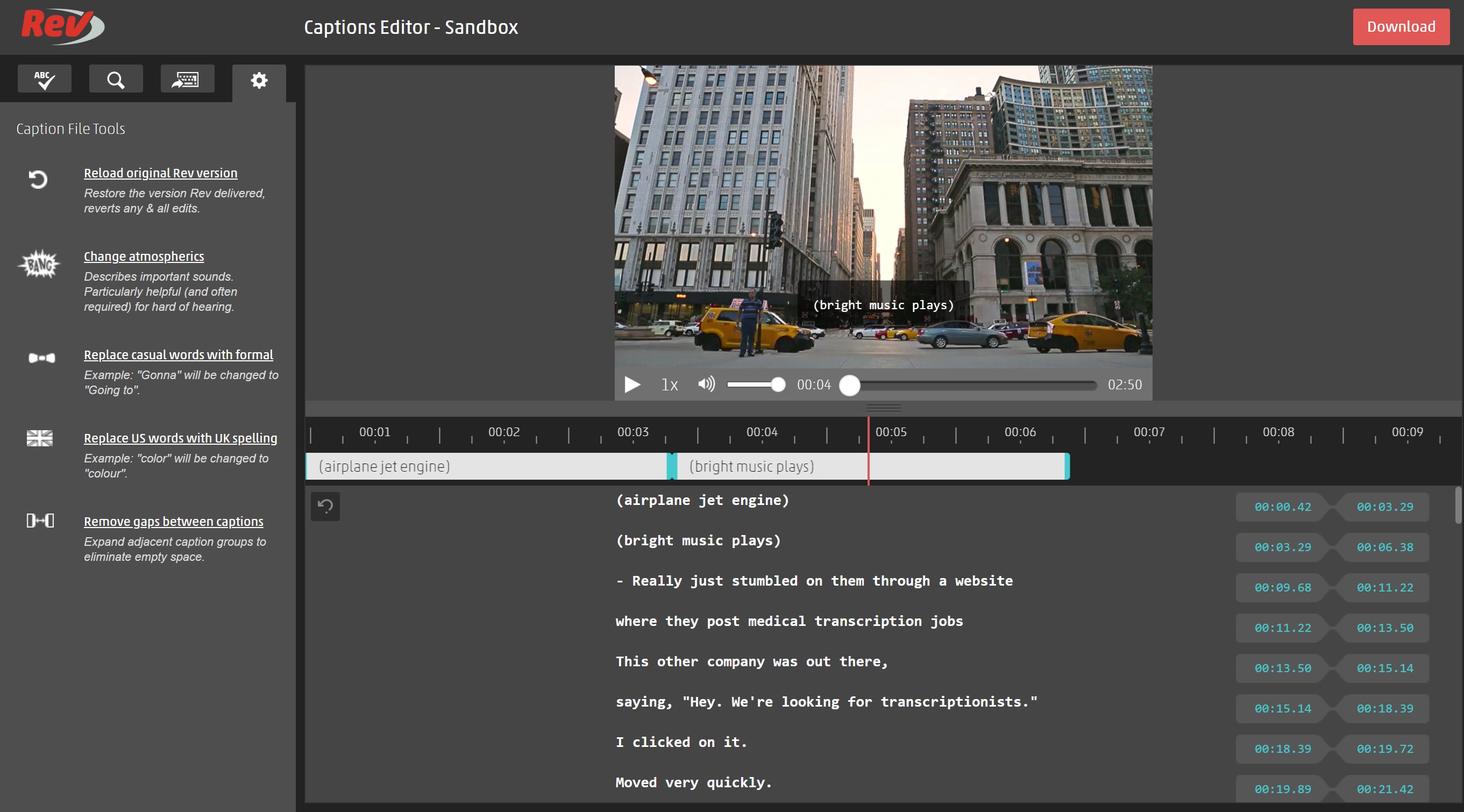
Caption editor in Rev Software (Source)
Common features of closed captioning software
Most closed captioning systems have the following features in common:
Speech recognition | Identifies words being spoken by a speaker and stores them for future reference. Trains your system to interpret and transcribe voice messages. |
Subtitles/closed captions | Enables users to automate processes for creating and displaying text for videos and other interpretative information for each scene. |
Text overlay | Displays the text created to match video content being spoken by the speaker. |
Audio/video file upload | Helps you determine the location to save your audio or video transcription files in the system. |
Content personalization | Creates a personalized experience for every visitor based on their location, ads they have clicked, keywords they searched for, and more. |
Machine translation | Translates multiple types of language through AI technology. |
Multi-language | Provides tools that can recognize and support multiple languages/dialects. |
Speech-to-text analysis | Enables users to analyze, correct, and monitor speech for transcriptions or recordings. |
Time stamps | Allows you to mark sentences, keywords, or phrases with specific time codes to synchronize the word with content. |
What type of buyer are you?
Most buyers of closed captioning platform belong to either of the following categories:
For businesses in the education and e-learning industry: Buyers in this category tend to seek software that is easy to use and navigate. They look for solutions that provide accuracy while being cost-effective. Their priority is that the solution should comply with ADA and all those laws that provide digital accessibility or inclusion to the deaf and hard-of-hearing people.
For businesses in media/entertainment: These buyers look for software that can quickly process videos and have quicker turnaround times, as their needs are dynamic and evolving in nature. They often need tools that offer multiple file format support as they require the video caption to be compatible with multiple applications. They look for integration capabilities so that they can save time to publish/contribute captions to the video content.
For businesses in event production: These buyers manage content that could either be pre-recorded or live. They look for a solution that can simplify the workflow through automations. They need a solution for making Zoom meetings, virtual conferences, and other online events successful by providing everyone with access to the audio/video content in the form of supporting text. Buyers in this category look for live transcription capabilities in the software.
For businesses in corporates/enterprise: These buyers look for software that can cater to their demand for multiple clients. Such buyers usually consider a platform which offers various caption formats, provide integration and open API capabilities, and maintain an ADA-compliant transcription process. These buyers cater to large audiences and users which could be their clients, employees, or end-users.
Benefits of closed captioning software
Improved indexing for search engine optimization: Google spiders, also known as Google bots, are constantly indexing pages from Google. But they cannot see or hear a video, which leads to web content going unnoticed because of improper indexing issues. Adding caption text to your videos solves this problem and provides your video content with a better ranking and more searchability. Which in turn, helps drive more traffic and engagement to your business.
Captioning the videos is often a legal requirement: There are laws in the United States, including Americans with Disabilities Act (ADA) which requires universities and colleges to include closed captions in their videos, such as online courses, recorded lectures, or any other video content being used for teaching purposes. This provides equal opportunity to those who have hearing loss and need captions to participate in class at the same level as their peers.
Wider reach to non-native speakers: It can become a challenge for someone to understand what the other person is saying because of the speaker’s dialect or accent. There could be a scenario where the viewer has an understanding of the language but is still struggling to follow the words spoken in the video. Video captioning widens the content reach to viewers across different languages.
Here are a few things to keep in mind when purchasing a closed captioning software:
Accurate closed captions: As per the industry standards, a closed captioning service provider is required to produce 99% accurate results. Spelling, grammar, and punctuation are all part of accuracy calculations. This means that per 1000 words, there is leniency of 1% error, or 10 words. Check how a vendor measures its accuracy. For example, asking your vendor questions such as: What percentage accuracy does your platform offer? Is the accuracy the same for every caption file? Inaccurate captions could lead to miscomprehension of the message.
Described and Captioned Media Program (DCMP): The standard defines a set of guidelines as best practices. DCMP philosophy states that the captions should be accurate, consistent, clear, readable, and equal. Whether the software is processing the automatic captioning for a video file or for a live stream, following this standard set of rules ensures that the meaning and intent of the message should remain intact.
3Play standardization: Legal standards for captioning processes can be vague, 3play standard defines the captions to have good readability, timely caption placement, and should have proper speaker labels. For example, readability of a caption includes parameters like characters per line, timely synchronization, which is 3 to 7 seconds of display of text on screen. Proper speaker labels such as name of the speaker involved should be used, or generic labels such as “student”, “teacher”, and “speaker” should be used.
Support for various caption file formats: There are numerous closed caption formats available today. And every format has its unique purpose and usability. You may want to have a specific set of file support for your business. Checking this information beforehand could be handy as your business grows. For example, “SubRip Subtitle” file or commonly known as “.srt” is accepted by many media players and applications such as Facebook, YouTube, Kature, and more. Another file type ““Web Video Text Tracks,” or a .vtt file is used for cloud-based videos and accommodates rendering options, audio description, and text formatting and positioning. Another file format “.cap” is widely used for storing the characters in various languages to be used across countries.
Market trends to understand
Artificial Intelligence (AI) will impact the digital product teams: According to Gartner, the generative AI revolution will benefit organizations in digital production (full content available to Gartner clients). AI will help the video editor and video creator determine on-screen designs, content types, and help in generating captions in less time and with more accuracy. Companies are shifting their focus from manual to automation of processes. Such caption generating solutions will improve their turnaround times.
Note: The applications mentioned in this article are examples to show a feature in context and are not intended as endorsements or recommendations. They have been obtained from sources believed to be reliable at the time of publication.