


Best Data Preparation Software of 2026
Updated March 15, 2026 at 12:17 AM
- Popular Comparisons
- Buyers Guide
Compare Products
Showing 1 - 25 of 110 products
Compare Products
Sort by
Reviews: Sorts listings by the number of user reviews we have published, greatest to least.
Average Rating: Sorts listings by overall star rating based on user reviews, highest to lowest.
Alphabetically (A-Z): Sorts listings by product name from A to Z.

SAS Viya is a cloud-native platform designed for data analytics, machine learning and data management. It supports organizations...Read more about SAS Viya


SAS Viya's Best Rated Features
See All
SAS Viya's Worst Rated Features
See All

BroadPeak is a low-code data integration solution designed for energy and commodity trading firms, enabling seamless connectivit...Read more about BroadPeak


Hevo is a no-code, bi-directional data pipeline platform specially built for modern ETL, ELT, and Reverse ETL Needs. It helps da...Read more about Hevo


Hevo 's Best Rated Features
See All
Hevo 's Worst Rated Features
See All

Alteryx Designer is a desktop-based self-service data profiling, preparation, blending, and analytics product used to create vis...Read more about Alteryx Designer


Alteryx Designer's Best Rated Features
See All
Alteryx Designer's Worst Rated Features
See All

Phocas is a SaaS platform designed to help mid-market businesses in manufacturing, wholesale distribution, and retail make data-...Read more about Phocas


Phocas's Best Rated Features
See All
Phocas's Worst Rated Features
See All

datapine is a business intelligence software designed to empower companies in exploring, visualizing, analyzing, and sharing the...Read more about datapine


ActiveBatch is a cloud-based and on-premise workflow management solution designed on helping businesses implement low-code IT wo...Read more about ActiveBatch

ActiveBatch's Best Rated Features
See All
ActiveBatch's Worst Rated Features
See All

Rivery is a cloud-based solution that provides small to large enterprises with business intelligence tools to manage and automat...Read more about Rivery


ClicData is a modern data platform providing data teams a complete set of tools: data integration, built-in data lakehouse, data...Read more about ClicData

ClicData's Best Rated Features
See All
ClicData's Worst Rated Features
See All

SplashBI is a cloud-based business analytics platform that provides pre-built insights to help businesses make data-driven decis...Read more about SplashBI

Location Insights you can trust. CleverMaps is a map-based analytics platform transforming how the world is using data to solve...Read more about CleverMaps


Piwik PRO Analytics Suite allows for tracking users' online behavior and interactions with sites, digital products, and apps. Wi...Read more about Piwik PRO


Composable is an on-premise and cloud-based business intelligence (BI) solution that enables enterprises to streamline decision-...Read more about Composable DataOps Platform


DigitalRoute is a data management platform that helps businesses integrate the platform with any system within a company's IT in...Read more about DigitalRoute
DigitalRoute's Best Rated Features
See All
DigitalRoute's Worst Rated Features
See All

Funnel is a marketing intelligence platform designed to aggregate data from various marketing channels and provide tools for rep...Read more about Funnel


Nexla is a hybrid business intelligence (BI) solution that helps analysts, business users and data engineers across various sect...Read more about Nexla

GivingDNA is a cloud-based data analytics and wealth screening solution designed to help nonprofits in creating highly precise d...Read more about GivingDNA
GivingDNA's Best Rated Features
See All
GivingDNA's Worst Rated Features
See All

NGS-IQ is a query, report writing and online analytical processing (OLAP) solution exclusively for IBM i, iSeries, System i and ...Read more about NGS-IQ

Inzata is a cloud-based business intelligence platform that helps automate and manage processes of data collection, preparation,...Read more about Inzata

9Spokes is a data platform that aggregates meaningful data inputs across your business. Think of 9Spokes as a virtual advisor, h...Read more about 9Spokes


Bold BI is an on-premise and cloud-based software that enables businesses in construction, education, energy, healthcare, insura...Read more about Bold BI

Reeport is a cloud-based data analytics platform, which helps businesses of all sizes automate the collection of data from multi...Read more about Reeport

Tableau is an integrated business intelligence (BI) and analytics solution that helps to analyze key business data and generate ...Read more about Tableau
Tableau's Best Rated Features
See All
Tableau's Worst Rated Features
See All

Pyplan, as an advanced Planning and Analysis platform, possesses the adaptability to cater to personalized planning methodologie...Read more about Pyplan

Board is the Enterprise Planning Platform built to accelerate business performance and enable continuous planning with greater f...Read more about BOARD
BOARD's Best Rated Features
See All
BOARD's Worst Rated Features
See All
Popular Comparisons


Buyers Guide
This detailed guide will help you find and buy the right data preparation software for you and your business.
Last Updated on January 27, 2025As a business, you need to trust that your data is complete, formatted, and up-to-date so you can make accurate business decisions. It can be disastrous if the data you're using for analysis or decision-making is inaccurate, and that's why data preparation is key to business success.
Data preparation allows businesses to simplify and automate various manual processes that are associated with collecting and cleaning data. Data preparation tools enhance operational efficiency and accuracy.
However, selecting one data preparation tool from among the hundreds on the market can be overwhelming. That's why we've created this buyers guide to detail everything you need to know before making the final purchase decision.
Here's what we'll cover:
What is data preparation software?
Data preparation software is a tool that allows businesses to explore, gather, and manipulate data into a form that is ready for analysis. The software cleans and consolidates data into a single table, file, or curated dataset for data visualization or other operational processes.
Data preparation software is useful when you need to:
Combine data from multiple sources
Manually enter data into spreadsheets
Deal with unstructured data (e.g., PDF files or web pages)
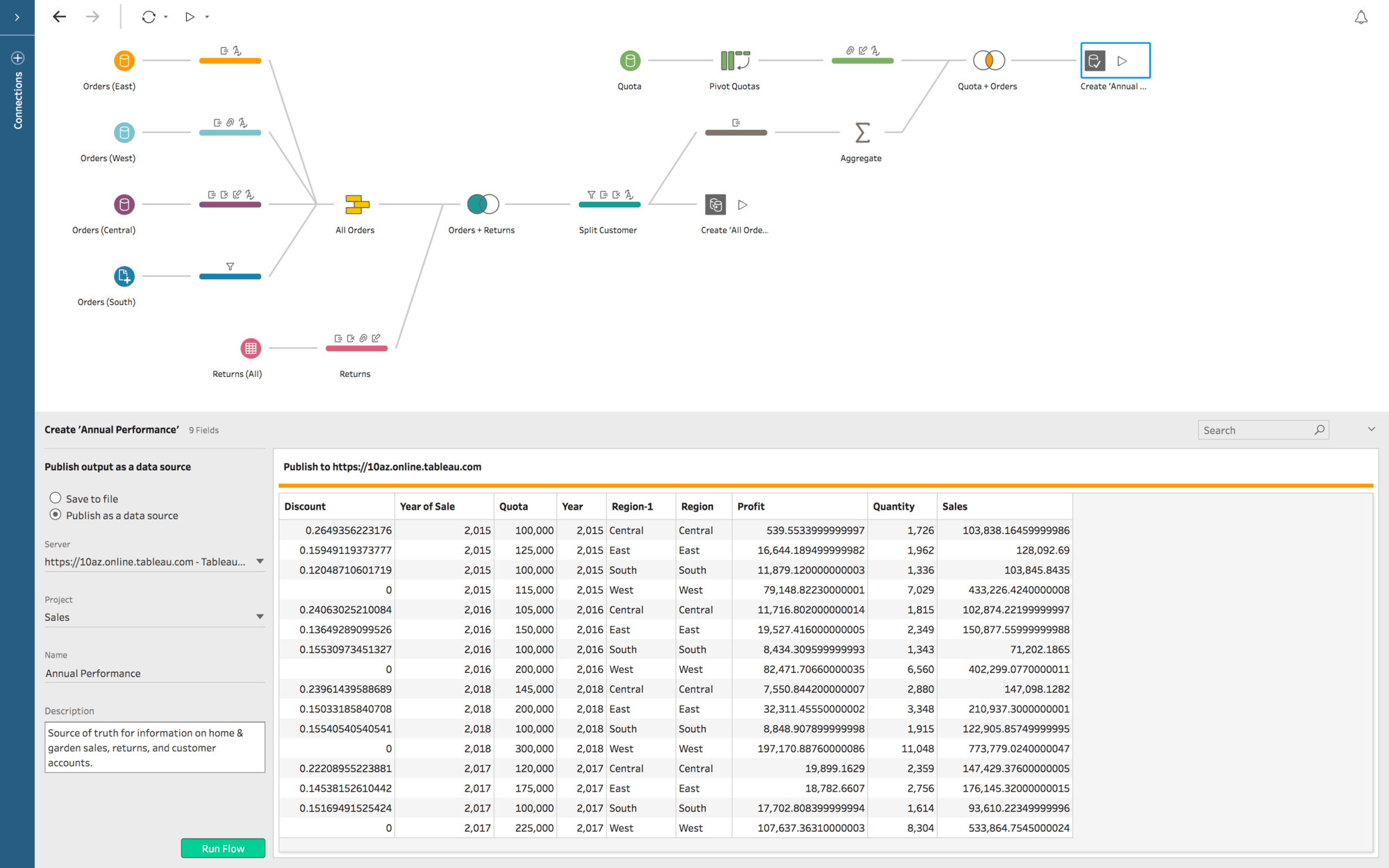
Clean data for analysis in Tableau's Prep Builder (Source
Common features of data preparation software
Different vendors offer different features in their data preparation software. Selecting the best data preparation software for your business is easier when you know what the common features are and what they do.
Data access | Access and import structured or semi-structured data from multiple sources. |
Data mashup/data blending | Blend multiple types of data sources, or normalize multiple data sources into common formats for integrated data analyses. |
Data transformation | Transform raw data into usable data by correcting typos, standardizing data, and converting and normalizing numeric values into standard forms. |
Data modeling | Specify data types and their relationships with each other. |
Interactive user interface (UI) | Combine multiple data sources through an intuitive, visually oriented UI. |
Collaboration | Share, comment on, and promote datasets. |
Data governance | Leverage security features such as data encryption, user permission, authentication, and security filtering at user/group/role levels. |
To further understand these features and learn about data preparation software vendors, call our advisors at 855-998-8505 for free, no-obligation help. They'll help you narrow down your options by listening to your requirements and recommending the best-suited solutions for your business.
What type of buyer are you?
Before you start evaluating data preparation software options, you'll need to know what buyer category you belong to. We believe most buyers will fall into one of the below categories:
Business owners and analyst teams: Business owners often use the tool themselves or hire business analyst teams to do the job. These teams are found in every business that is involved in any form of data analysis. Business analyst workgroups use data preparation tools to collate data from different sources, avoid manual data entry, and transform unstructured data. They usually don't need complex dashboard capabilities or governance features, but would require functionalities such as data access, data blending, and data transformation.
IT departments: Even though data preparation tools are designed for business users (owners and analysts), IT departments also use these tools in many organizations. In addition to data cleaning features, IT departments prefer tools with data modeling capabilities, since they'll have to support data modeling for the whole organization rather than just a small analyst workgroup. They'll need a tool that offers data governance to protect sensitive data from users who don't need to access it as part of their roles.
Benefits of data preparation software
While some of the benefits of data preparation software may be clear from our discussion above, we've called out the most notable ones below:
Accurate business decisions: Cleaner data results in better data analyses and reporting, which eventually leads businesses to make more accurate business decisions.
Reduced data errors: Data preparation tools minimize manual intervention in processes such as collation and consolidation, thus reducing errors.
Key considerations
Here are some important aspects to consider before you purchase data preparation software:
Scalability: Ask your shortlisted vendors about the scalability of their tools. You'll need a solution that supports your business as it grows and is able to handle your expanding needs. For instance, if you plan to go from being a single-location business to a multi-location one, the software must be able to gather data from all the new locations and handle the higher volume.
Customer support: Find out if the vendor offers support 24/7, only during business hours, or not at all. Also, ask about available support options, such as email, phone, or live chat.
Note: The applications selected in this article are examples to show a feature in context and are not intended as endorsements or recommendations. They have been obtained from sources believed to be reliable at the time of publication.