
Best Construction Categories
Best Facilities Management Categories
Best Human Resources Categories
Best Legal Management Categories
Best Manufacturing Categories
Best Medical Categories
Best Property Management Categories
Get 1-on-1 advice in 15 minutes. It's free.

Josh P.

5 Essential Types of Medical Software for Your Practice (and How to Build Your Tech Stack)
Finding the right medical software isn’t just a checkbox, it involves a lot of nuances for small and midsize practices. With countless options and overlapping features, it’s easy to feel stuck before you even start.
Whether you're opening a new practice, setting up your first system, or replacing outdated systems, you don't need a dozen medical tools. You need five essentials: a way to manage patient records, handle billing, schedule visits, prescribe medications, and offer remote care.
This guide breaks down these five essential types of medical software, with top-rated options for each.
What is medical software?
Medical software refers to the various systems designed to help your practice or healthcare organization operate more efficiently. These options include software systems to manage electronic patient records, including data on medical histories, medications, and demographics.
The benefits of medical software solutions are especially compelling for small and midsize (SMB) practices. The right software can:
Quickly retrieve patient data
Automate billing and claims
Reduce administrative workload
Enable secure patient scheduling
Analyze your practice's operations
Measure and evaluate patient engagement
Here's what each essential category does, and where to start.
Five essential types of medical software
1. Electronic medical software
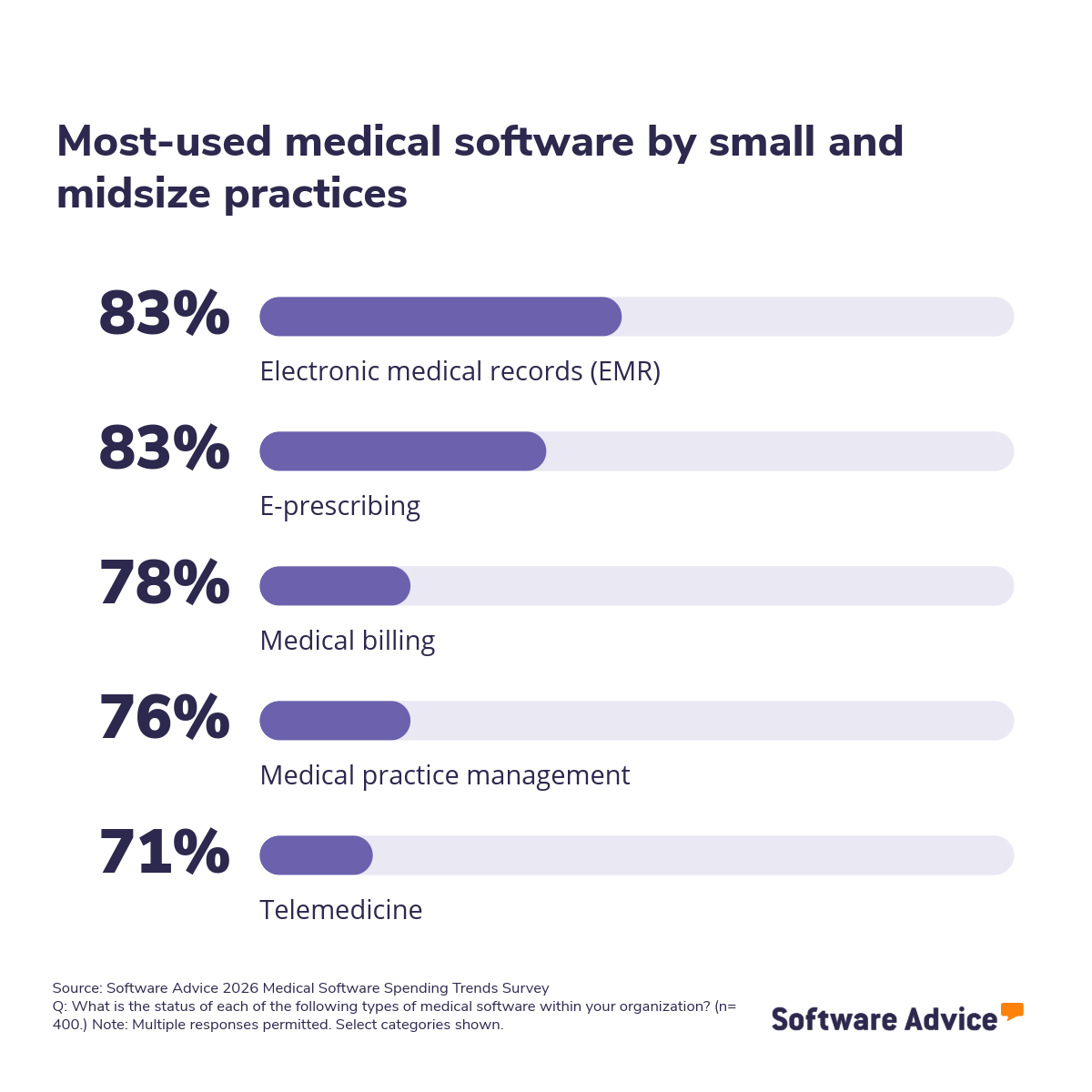
Electronic medical record software, or EMR software, stores patient data, including medical history, past doctor visits, diagnoses, and medications. According to the Software Advice 2026 Software Buying Trends survey, EMR is the most common type of medical software used by over 83% of medical practitioners, making it the foundation for any practice's tech stack.*
Core features of EMR tools
Charting: Manage patient documentation describing all clinical interactions, diagnoses, procedures, medications, etc.
Patient records management: Managing different types of patient records, including paper documents, digital files, billing information, and scheduling details
Who should consider EMR tools?
EMR tools are suitable for medical practices that need a centralized system to store and access patient records securely. They are ideal for clinics and healthcare providers that handle frequent patient visits, manage complex medical histories, or require quick access to lab results and prescriptions during consultations.
A practice manager can leverage EMR dashboards to track patient progress, automate documentation, and reduce manual data entry. These tools also benefit practices aiming to qualify for Medicaid or Medicare incentives, which require certified electronic health record (EHR) systems, and those planning to expand telehealth services or operate across multiple locations.
Highest-rated EMR tools from Software Advice Frontrunners
Software Advice Frontrunners for electronic medical records (EMR) tools identifies the highest-rated and most popular products based on a proprietary blend of user ratings and popularity scores. The two highest-scoring products are listed below.
Analysis performed February 2025


2. Medical practice management
Medical practice management tools help clinics handle the day-to-day operations like scheduling appointments, managing patient intake, verifying insurance, and tracking the administrative side of your practice.
While EMR focuses on clinical documentation, practice management keeps the front office running smoothly. Many all-in-one platforms bundle practice management with EMR. But standalone options exist for practices that want deeper scheduling functionality or already have an EMR they're happy with.
Core features of medical practice management tools
Appointment scheduling: Book, reschedule, and manage patient appointments with calendar views, automated reminders, and waitlist management to reduce no-shows.
Staff and resource management: Coordinate provider schedules, room assignments, and equipment availability across the practice.
Who should consider medical practice management tools?
Practice management software is suitable for healthcare providers that need to streamline administrative tasks and improve patient flow. It’s ideal for clinics that handle high appointment volumes, manage multiple providers, or want to reduce no-shows with automated reminders.
A practice manager can use these tools to coordinate schedules, track billing status, and monitor performance metrics.
Highest-rated medical practice management tools from Software Advice Frontrunners
Software Advice Frontrunners for medical practice management tools identifies the highest-rated and most popular products based on a proprietary blend of user ratings and popularity scores. The two highest-scoring products are listed below.
Analysis performed February 2025


3. E-prescribing
E-prescribing software is a secure system that helps patients get the medications they need on time by allowing health professionals to send prescriptions directly to the patient’s preferred pharmacy. Digital prescriptions are becoming commonplace; 83% of medical professionals say they use e-prescription software.
E-prescribing software typically includes an up-to-date drug database that has information on drug interactions and supports the easy refilling and renewal of prescriptions. Additionally, some systems integrate with EMR software to streamline the flow of data back and forth, providing updated patient information.
Core features of e-prescribing software
Electronic prescription transmission: Send prescriptions securely to pharmacies.
Formulary management: Determine clinically appropriate and cost-effective medications and therapies for patients. Identify potential conflicts before prescribing.
Who should consider e-prescribing software?
E-prescribing software is suitable for practices that want to eliminate handwritten prescriptions and improve patient safety. It’s ideal for clinics that manage high prescription volumes, treat chronic conditions requiring frequent refills, or aim to reduce medication errors.
Providers can use these tools to speed up prescription workflows, ensure compliance with state regulations, and improve patient satisfaction by minimizing delays at the pharmacy. These systems also benefit practices integrating telehealth, where prescriptions need to be sent electronically after virtual visits.
Highest-rated e-prescribing tools from Software Advice Frontrunners
Software Advice Frontrunners for e-prescribing tools identifies the highest-rated and most popular products based on a proprietary blend of user ratings and popularity scores. The two highest-scoring products are listed below.
Analysis performed June 2025

4. Medical billing
Medical billing tools help practices manage the financial side of practice by automating claims, verifying insurance eligibility, and reducing payment delays. Medical billing features are requested by over half of buyers talking to our advisors.
These systems ensure accurate reimbursement and simplify revenue cycle management, the process of getting paid for the care you provide. It automates much of the tedious back-and-forth with insurance companies, reduces claim errors, and speeds up collections.
Core features of medical billing software
Claims management: Create, submit, and track insurance claims.
Claims scrubbing: Detect and correct errors before submission to reduce rejections.
Insurance eligibility verification: Confirm patient coverage in real time to avoid billing issues.
Who should consider medical billing software?
Medical billing software is suitable for practices that want to improve collections and reduce administrative burden. It’s ideal for clinics that process a high volume of insurance claims, manage multiple payers, or struggle with claim denials and delayed payments.
Billing applications are often bundled into practice management or all-in-one EMR platforms. But standalone billing software makes sense for practices with complex payer mixes or a dedicated billing team that needs more advanced functionality. Some practices skip software entirely and outsource billing to a third-party service, though that comes with its own trade-offs in cost and control.
Highest-rated medical billing tools from Software Advice Frontrunners
Software Advice Frontrunners for medical billing software identifies the highest-rated and most popular products based on a proprietary blend of user ratings and popularity scores. The two highest-scoring products are listed below.
Analysis performed March 2025

5. Telemedicine
Telemedicine software enables providers to see patients remotely through secure video, phone, or messaging, expanding access to care beyond the office. What started as a necessity during the pandemic has become a patient expectation: according to our survey, 71% of medical professionals now use telemedicine platforms, but adapting to telemedicine is still a challenge for 10%.
Providers can use these tools to maintain continuity of care, reduce cancellations, and improve patient satisfaction by offering virtual consultations.
Core features of telemedicine software
Appointment scheduling: Book and manage virtual visits through an integrated calendar.
Medical-purpose consultations: Conduct secure video sessions for diagnosis, treatment, and follow-up.
Remote treatment planning: Create and access personalized care plans based on patient symptoms, without an in-person visit.
The average percentage of virtual appointments is now 17%, and 2 in 5 practices that see patients remotely do so using general video conferencing tools (e.g., Zoom) rather than purpose-built solutions.
Who should consider telemedicine software?
Telemedicine software is suitable for practices that want to expand access to care and reduce in-clinic visits. It’s ideal for clinics serving rural areas, patients with mobility challenges, or those looking to offer flexible appointment options.
Many EMR and practice management platforms now include basic telehealth functionality. But standalone telemedicine software offers deeper features, such as better video quality and virtual waiting rooms, for practices where remote visits are a significant part of the workload.
Highest-rated telemedicine tools from Software Advice Frontrunners
Software Advice Frontrunners for telemedicine tools identifies the highest-rated and most popular products based on a proprietary blend of user ratings and popularity scores. The two highest-scoring products are listed below.
Analysis performed March 2025
What are the benefits of medical software?
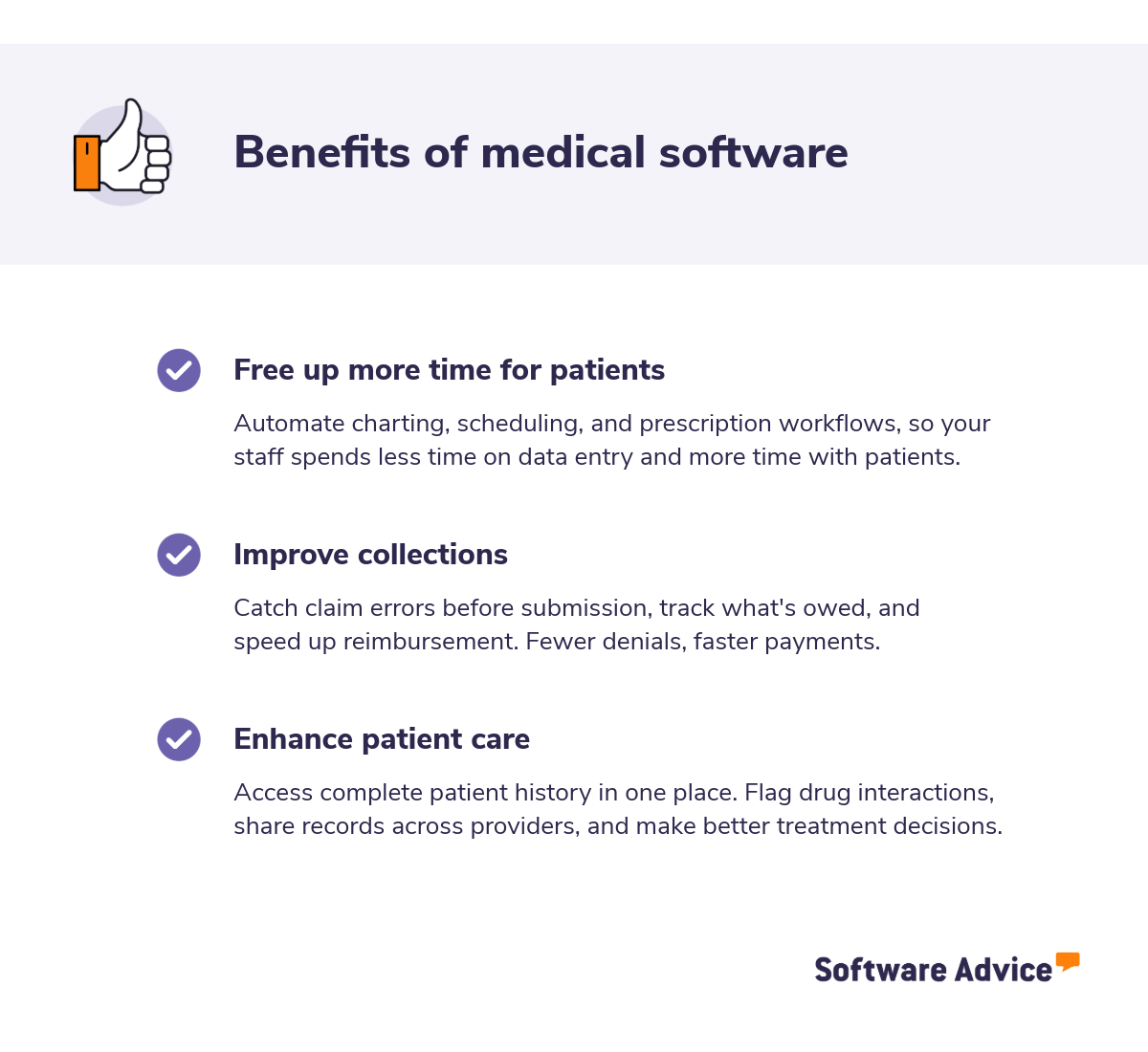
There are many benefits of implementing medical software in your healthcare practice, not the least of which is its ability to save you time, help you get paid faster, and improve the care you deliver. According to the Software Advice 2026 Medical Software Spending Trends Survey, the top sources of satisfaction with medical software are security, ease of use, and functionality.* However, it’s worth noting that different types of healthcare software will offer specific advantages to your medical practice. Let's talk about some of the more general benefits you'll experience.
Free up more time for patients
By automating administrative tasks, medical software solutions enable you to spend more time helping your patients. For instance, by using EHR software, you can significantly reduce the amount of time you spend performing data entry and documenting patient progress. As a result, your staff gets more time to interact with patients, making them feel more comfortable and welcome.
Similarly, it can be challenging to make accurate decisions within the span of a relatively short patient visit. However, by using medical imaging software, you can get quick access to the data and analysis you need to make a reliable decision in less time. This also helps reduce the number of repeat visits and improve patient satisfaction.
Improve collections
The collections and claims processes can be both intricate and emotionally charged, especially when hampered by inconsistency or confusion. But with the right medical software, you can easily see what patients owe and how insurance coverages impact their obligations.
These solutions can identify payment trends and produce data that makes it easier to pinpoint issues in the collections process. Using this software, you can quantify the effects of procedural adjustments, making it easier to answer questions and avoid conflicts with frustrated patients.
Using an EHR system, you can even automate the claim generation process, reducing inaccuracies and saving both time and money down the road. By using software that produces reliable, consistent claims, you eliminate unnecessary delays when it comes to getting reimbursed by insurance companies.
Enhance patient care
Because medical software improves the accuracy of patient information, it also enhances patient care. For instance, with the right EHR software, a doctor can see, at a glance, a patient's entire medical history. Then, using data from previous diagnoses and treatments, the doctor can make a better-informed decision about which treatments to prescribe.
Medical software also enables greater collaboration between departments. For instance, doctors can see the results of blood tests and imaging and use them to make the best decisions for their patients. Multiple physicians can also collaborate over medical software, sharing ideas and data as they devise the best treatment plans.
Because medical software can have such a positive impact on patient care, the majority of small practices rely on at least two software products to run their operations.*
How to choose the right medical software based on your business requirement?
The medical tech stack you choose will depend on the nature of your practice. For instance, all medical professionals looking to qualify for Medicaid and Medicare incentives must use a certified EHR system. Similarly, if you work in an inpatient facility, you’ll need software with bed management, long-term patient stay management, and UB-04 billing features.
The kind of software you choose also depends on the specific processes you want to optimize. As a rule of thumb, it helps to make a list of the pain points or challenges your medical practice is currently facing so you can identify the most optimal solution.
We've covered the five essential types of medical software: EMR for patient records, practice management for scheduling and admin, e-prescribing for medications, billing for claims and collections, and telemedicine for remote care. Many providers wonder if these functions require separate tools.
Do you need all five solutions as separate tools?
Probably not. Most practices don't. Many practices use an all-in-one platform that bundles everything into a single system. Others piece together standalone tools for each function.
According to the Software Advice 2026 Medical Software Spending Trends Survey, the majority of small practices (1-5 providers) use just one or two software products—38% use exactly two, and another 25% use just one.
There are trade-offs either way.
One system might work better if... | Separate tools might work better if... |
|---|---|
You want one login, one vendor, one support line | You need stronger functionality in a specific area (like billing or telehealth) |
Your staff doesn't have time to learn multiple platforms | You already have a tool you like and want to build around it |
You're starting fresh with no existing systems | You've been burned by an all-in-one before and want more control |
You prefer simplicity over customization | You have someone who can manage integrations between tools |
How to find the right medical software?
This guide gives a fair idea of how to assess the benefits of medical software so you can start evaluating the ROI it would produce for your practice. It also helps you understand the various attributes to focus on as you narrow down your options.
The goal is to choose a software product that frees up time for you and your staff, giving your practice more bandwidth to interact with patients without negatively impacting the accuracy or quality of your performance.
Overwhelmed by options? Schedule a free, personalized consultation with our advisors. They will make it easier to create a shortlist of the best medical solutions for your needs.
Survey methodology
*Software Advice 2026 Medical Software Trends Survey was conducted online in September 2025 among 400 physicians in the U.S. employed full-time in medical practices. The goal of this study was to understand the timelines, organizational challenges, research behaviors, and adoption processes of medical software buyers. Respondents were screened to ensure their involvement in medical software purchasing decisions. The study included 134 small practices (1-5 licensed providers), 144 medium practices (6-20 licensed providers), and 122 large practices (more than 20 licensed providers).