
Best Integrated Development Environment (IDE) Software of 2026
Updated March 18, 2026 at 1:14 AM

Written by Kritika Tyagi
Writer

Edited by Rina Rai
Senior Editor
- Popular Comparisons
- FrontRunners
- Buyers Guide
Compare Products
Showing 1 - 25 of 53 products
Compare Products
Sort by
Reviews: Sorts listings by the number of user reviews we have published, greatest to least.
Average Rating: Sorts listings by overall star rating based on user reviews, highest to lowest.
Alphabetically (A-Z): Sorts listings by product name from A to Z.

XMLSpy is an on-premise solution that helps businesses leverage XML and JSON editors to build applications and manage modeling p...Read more about XMLSpy


IntelliJ IDEA is a JetBrains IDE for professional development in Java and Kotlin, created to boost productivity with AI-powered ...Read more about IntelliJ IDEA


IntelliJ IDEA's Best Rated Features
See All
IntelliJ IDEA's Worst Rated Features
See All

PhpStorm is an integrated development environment (IDE) editor that lets developers program, test, debug and complete code for s...Read more about PhpStorm
PhpStorm 's Best Rated Features
See All
PhpStorm 's Worst Rated Features
See All

PyCharm is an on-premise Python integrated development environment (IDE) solution, which helps organizations and professional d...Read more about PyCharm
PyCharm's Best Rated Features
See All
PyCharm's Worst Rated Features
See All

DbVisualizer is a database management solution that helps businesses monitor and analyze the performance of multiple databases t...Read more about DbVisualizer

DbVisualizer's Best Rated Features
See All
DbVisualizer's Worst Rated Features
See All

WebStorm – JavaScript and TypeScript IDE. With out-of-the-box support for JavaScript, TypeScript, and related technologies, as ...Read more about WebStorm
WebStorm's Best Rated Features
See All
WebStorm's Worst Rated Features
See All

JupyterLab is an open-source web application implementing the Jupyter interactive computing environment. As a multi-user system ...Read more about The Jupyter Notebook
The Jupyter Notebook's Best Rated Features
See All
The Jupyter Notebook's Worst Rated Features
See All

RStudio is an integrated development environment for R and Python. This software is ideal for data scientists, DevOps engineers,...Read more about RStudio Desktop
RStudio Desktop's Best Rated Features
See All
RStudio Desktop's Worst Rated Features
See All

Visual Studio is an application development solution that helps businesses create web, mobile, Mac and Windows-based application...Read more about Microsoft Visual Studio
Microsoft Visual Studio's Best Rated Features
See All
Microsoft Visual Studio's Worst Rated Features
See All

With support for over 1,600 software components and frameworks, Syncfusion Essential Studio® streamlines the creation and implem...Read more about Essential Studio
Essential Studio's Best Rated Features
See All
Essential Studio's Worst Rated Features
See All

dbForge Studio for SQL Server is a database management package designed for developers, administrators, and DevOps specialists. ...Read more about dbForge Studio for SQL Server


Flowfinity is a no-code platform used to create, automate, and integrate custom business process applications fast. Based on 4 p...Read more about Flowfinity


JetBrains DataGrip is an advanced IDE tailored to meet the specific needs of professional SQL developers. It helps users avoid b...Read more about DataGrip
DataGrip's Best Rated Features
See All
DataGrip's Worst Rated Features
See All

dbForge Studio for Oracle is an integrated development environment (IDE) that allows for management, development, and administra...Read more about dbForge Studio for Oracle


DHTMLX delivers a wide range of highly customizable JavaScript UI widgets for developing enterprise web applications of any comp...Read more about DHTMLX
DHTMLX's Best Rated Features
See All
DHTMLX's Worst Rated Features
See All

Designed for the front-end community, CodePen is a code editor and social community platform that allows users to build and depl...Read more about CodePen


CodePen's Best Rated Features
See All
CodePen's Worst Rated Features
See All

Sand Boxer is a fully automated solution to refresh databases with no coding skills required. It allows developers to test ideas...Read more about Sand Boxer

Constructor is a learning management platform designed to support various educational and research needs across schools, higher ...Read more about Constructor


Koin is a web-based Kotlin dependency injection framework that helps developers build and assemble Kotlin-related technologies i...Read more about Koin LTS

Slurp Data Services Platform is a cloud-based integration platform that lets users quickly develop and deploy agile data service...Read more about Slurp Data Services Platform

inxware is a software designed to simplify software creation and improve the maintainability and deployability of software appli...Read more about inxware

Rider is an integrated development environment platform designed for .NET developers building enterprise software solutions acro...Read more about Rider

Bring innovations to life faster with low-code on App Engine Build rich business-critical apps faster: • Empower all creato...Read more about App Engine

Visual LANSA is an integrated development environment (IDE) that allows users to develop and maintain cloud-based and desktop ap...Read more about Visual LANSA

Velneo is a Spanish-based software development platform that allows developers to build and deploy custom business applications ...Read more about Velneo


Velneo's Best Rated Features
See All
Velneo's Worst Rated Features
See All
Popular Comparisons



Your Guide to Top Integrated Development Environment (IDE) Software, August 2022
Software Advice uses reviews from real software users to highlight the top-rated Integrated Development Environment (IDE) products in North America.
Learn how products are chosenExplore FrontRunners


“Usability” includes user ratings for Functionality and Ease of Use.
“Customer Satisfaction” includes user ratings for Customer Support, Likelihood to Recommend and Value for Money.
Reviews analysis period: The reviews analysis period spans two years and ends the 15th of the month prior to publication.
Buyers Guide
This detailed guide will help you find and buy the right integrated development environment (ide) software for you and your business.
Last Updated on April 24, 2025Building software is a time-consuming process that involves writing codes, running them through a compiler, checking for coding errors, and deploying the software apps. These steps make the software development process not only lengthy but also prone to syntax, runtime, and logical errors. To shorten the process and avoid making errors, you can use integrated development environment (IDE) software.
IDE software allows you to complete all development processes using a single platform and detect errors right from the time you start writing codes. Designed to maximize productivity, the software includes commonly used developer tools such as a source code editor, compiler, and debugger in a single graphical user interface (GUI).
Many IDE applications are available in the market, making it challenging to choose the one that best suits your business needs. This guide will help you understand the features, benefits, and things to consider before purchasing IDE software.
Here’s what we'll cover:
What is IDE software?
An integrated development environment (IDE) is a software development platform that provides editing, compiling, and debugging functionalities in one place. It automates repetitive software development tasks to help save time. Source code developer, text editor, compiler, debugger, and build automation are some basic features of IDE software.
IDE software allows developers to write codes and check for errors in real time. It also gives them suggestions to write better codes. The software helps perform tasks such as source code building, debugging, and team collaboration without switching between different tools.
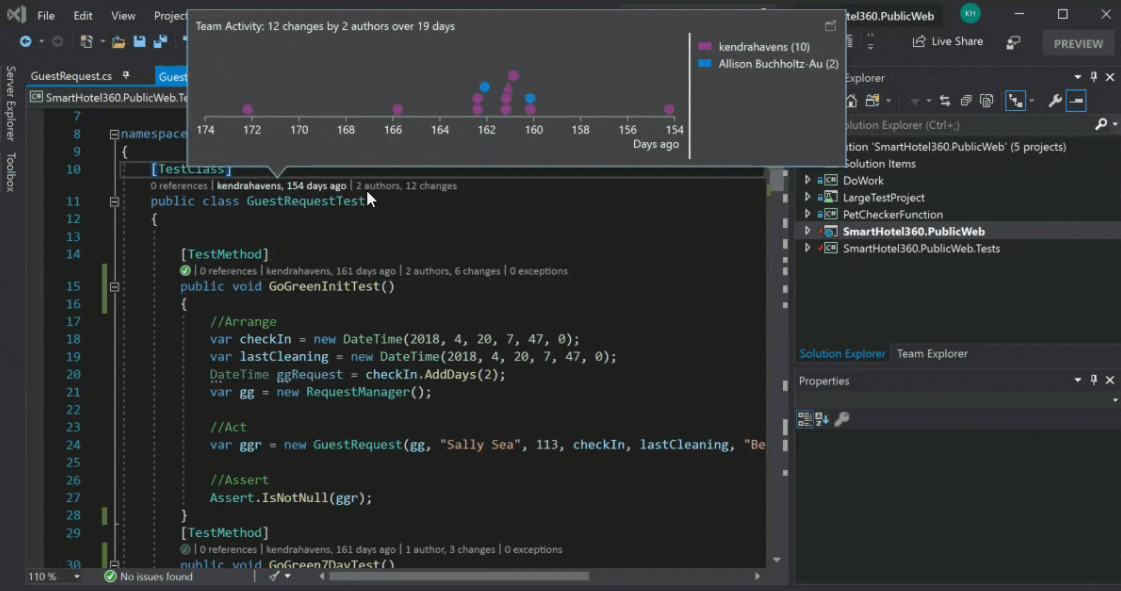
A view of the productivity features tab in Microsoft Visual Studio (Source)
Common features of IDE software
Most IDE software products include the following features:
Debugging | Use the debug mode to detect and remove errors in your software codes in real time or after the code completion process. |
GUI | Use a central interface that includes all development tools to avoid switching between different applications. |
Write and edit source codes, compile source codes for execution, debug application programs, and automate common tasks. | |
Code editing | Access a specialized editor for writing codes. It differentiates the various elements of codes so programmers can read codes easily. |
Data modeling | Create a visual representation of data to help developers understand how data is structured and stored in a database. |
Deployment management | Manage the entire deployment process, from designing and building software to testing and releasing software for end users. |
What type of buyer are you?
Most IDE software buyers belong to one of the following categories:
Small and midsize enterprises (up to 500 employees): Small and midsize businesses (SMBs) usually have a small team of developers and a strict budget to follow. They work on a range of in-house or client-based software development projects. Therefore, they need access to code libraries for different programming languages, easier deployment from the local folder to the web server, and integration capabilities. Their goal is to maximize the productivity of each software developer with the limited resources they have.
These buyers should opt for a cloud-based IDE solution that supports multiple programming languages and code libraries. A cloud IDE will allow SMB buyers to maintain cost-efficiency and scalability while allowing better customization.
Large enterprises (over 500 employees): These buyers have large teams that simultaneously work on multiple projects; therefore, their development needs are extensive. They may even have more than one development team, often working at different locations. They need an IDE platform that can also function as a work management tool, allowing them to plan and build a roadmap for building software.
An IDE platform that offers collaboration capabilities such as live share and pair programming should suit the needs of these buyers. It will allow development teams to work together and remain updated during each stage of the software development process. These buyers should also choose a highly configurable IDE that allows them to integrate plug-ins as needed.
Benefits of IDE software
Implementing an IDE software solution has various benefits, including:
Integrates multiple programming apps: Building software is a lengthy process. You have to navigate through multiple tools, learn how to use them, and then get on to writing and executing codes. An IDE solution offers tools such as a text editor, debugger, and compiler on the same platform, allowing for an easier setup and removing the need to keep switching between different tools. By doing so, it helps save time and increase productivity.
Automates coding tasks: With features such as syntax highlighting and autocomplete, IDE software helps automate the coding process. While syntax highlighting allows programmers to read codes easily by highlighting the different elements of source codes, autocomplete predicts what developers are going to write next and assists with code completion. IDE software also highlights coding errors in real time, allowing developers to make changes before compiling the codes.
Standardizes the development process: IDE tools help bring uniformity to the entire software development process. These solutions offer code libraries where you can store all the codes your team has created. Also, new hires can leverage these resources to get up to speed with your team’s standards.
Key considerations:
Here are a few key considerations to keep in mind before purchasing IDE software:
Integration requirements: Assess your development needs and decide if you need integration for programming languages, testing tools, software building solutions, or mobile app development. Many IDE solutions are free to use, but you’ll be charged if you opt for integrations. Therefore, check the type of integration you need to ensure you choose a product that caters to the needs of your software development team.
Customer support: You can obtain community support for popular open source IDE tools; however, customer support is usually available for paid software only. Also, paid products have more updates and bug fixes compared to open source tools.
Software requirements: Integrating your IDE software with plug-ins to achieve your development goals can slow down its performance due to integration vulnerabilities. Some IDEs can also give performance issues in loading, autocompletion, and code compilation. In most cases, the system on which you want to set up IDE software should have a compatible operating system with decent RAM.
Note: The application selected in this guide is an example to show a feature in context and is not intended as an endorsement or a recommendation. It has been taken from sources believed to be reliable at the time of publication.