
Best Backup Software of 2026
Updated March 20, 2026 at 2:32 AM

Written by Supriya Deka
Market Research Specialist

Edited by Stephanie Sandoval
Content Editor
- Popular Comparisons
- FrontRunners
- Buyers Guide
Compare Products
Showing 1 - 25 of 159 products
Compare Products
Sort by
Reviews: Sorts listings by the number of user reviews we have published, greatest to least.
Average Rating: Sorts listings by overall star rating based on user reviews, highest to lowest.
Alphabetically (A-Z): Sorts listings by product name from A to Z.

NinjaOne is an IT management software platform designed to consolidate various IT operations into a single console. It provides ...Read more about NinjaOne


NinjaOne's Best Rated Features
See All
NinjaOne's Worst Rated Features
See All

Cove Data Protection is a cloud-based backup and disaster recovery solution designed to protect servers, workstations, and Micro...Read more about Cove Data Protection


Cove Data Protection's Best Rated Features
See All
Cove Data Protection's Worst Rated Features
See All

IDrive helps businesses of all sizes manage automated data backup processes across various devices such as Windows, Mac, iOS, An...Read more about IDrive

IDrive's Best Rated Features
See All
IDrive's Worst Rated Features
See All

Acronis Cyber Backup Cloud is a cloud-based and on-premise data backup and MSP solution that provides data protection for busine...Read more about Acronis Cyber Backup
Acronis Cyber Backup's Best Rated Features
See All
Acronis Cyber Backup's Worst Rated Features
See All

Comet is a fast, secure all-in-one backup platform for businesses and IT providers. Our backup software supports businesses acro...Read more about Comet Backup


Comet Backup's Best Rated Features
See All
Comet Backup's Worst Rated Features
See All

ProBackup: Backup & Recovery for SaaS Apps ProBackup is a purpose-built backup and recovery solution for business-critical clou...Read more about ProBackup

ProBackup's Best Rated Features
See All
ProBackup's Worst Rated Features
See All

ManageEngine RecoveryManager Plus is a software that helps you recover your system in case of failure. It is used by businesses,...Read more about ManageEngine RecoveryManager Plus
No reviews yet

Sesame Software gives enterprises complete control over their data. Our platform simplifies how organizations move, manage, and ...Read more about Sesame Software


Sesame Software's Best Rated Features
See All
Sesame Software's Worst Rated Features
See All

Skyvia is a cloud-based data integration, backup and management platform for businesses of all sizes. Key features include direc...Read more about Skyvia


Skyvia's Best Rated Features
See All
Skyvia's Worst Rated Features
See All

NAKIVO Backup & Replication is a backup, ransomware protection, and site recovery solution for virtual, physical, cloud, and Saa...Read more about NAKIVO Backup & Replication


NAKIVO Backup & Replication's Best Rated Features
See All
NAKIVO Backup & Replication's Worst Rated Features
See All

DiskStation Manager is a web-based operating system designed for Synology network attached storage (NAS) appliances, which helps...Read more about DiskStation
DiskStation's Best Rated Features
See All
DiskStation's Worst Rated Features
See All

Macrium Reflect is our award-winning, on-premise business backup and recovery solution that helps businesses schedule backups, c...Read more about Macrium Reflect Workstation

Macrium Reflect Workstation's Best Rated Features
See All
Macrium Reflect Workstation's Worst Rated Features
See All

SyncBackPro is an on-premise backup solution designed to help businesses, hospitals, government departments and law enforcement ...Read more about SyncBackPro
SyncBackPro's Best Rated Features
See All
SyncBackPro's Worst Rated Features
See All

#1 Global Leader in Data Resilience We keep businesses worldwide up and running. From secure backups to intelligent data insi...Read more about Veeam Data Platform
Veeam Data Platform's Best Rated Features
See All
Veeam Data Platform's Worst Rated Features
See All

G Cloud is a web-based backup solution, which enables individuals to store and secure mobile data such as contacts, messages, im...Read more about G Cloud
G Cloud's Best Rated Features
See All
G Cloud's Worst Rated Features
See All

GRBackPro is an on-premise data backup software, designed to help businesses schedule backup jobs, define session names, create ...Read more about GRBackPro

SimpleBackups is a cloud-based backup solution that automatically automates backups for servers, databases, and SaaS application...Read more about SimpleBackups
SimpleBackups's Best Rated Features
See All
SimpleBackups's Worst Rated Features
See All

Rubrik is a data management solution that helps businesses streamline data backup, archiving, offsite replication and compliance...Read more about Rubrik
Rubrik's Best Rated Features
See All
Rubrik's Worst Rated Features
See All

Use SqlBak to backup, restore and monitor MSSQL Server, MySQL Server, PostgreSQL Server, Azure SQL and Amazon RDS databases. The...Read more about SqlBak
SqlBak's Best Rated Features
See All
SqlBak's Worst Rated Features
See All

VMware Cloud Director Availability is a secure data migration and business continuity solution that lets users handle disaster r...Read more about VMware Cloud Director Availability

VMware Cloud Director Availability's Best Rated Features
See All
VMware Cloud Director Availability's Worst Rated Features
See All

Hornetsecurity‘s VM Backup is a powerful, reliable and easy-to-use backup and replication solution for Microsoft Hyper-V and VMw...Read more about VM Backup
VM Backup's Best Rated Features
See All
VM Backup's Worst Rated Features
See All

Keepit is a backup platform that provides organizations with a private infrastructure to protect data across Microsoft 365 cloud...Read more about Keepit
Keepit's Best Rated Features
See All
Keepit's Worst Rated Features
See All

Use SQLBackupAndFTP to backup and restore MSSQL Server, MySQL Server, PostgreSQL Server, Azure SQL and Amazon RDS databases. The...Read more about SQLBackupAndFTP
SQLBackupAndFTP's Best Rated Features
See All
SQLBackupAndFTP's Worst Rated Features
See All

TrueNAS, the world's most deployed storage software, is a universal data platform that allows users to easily adopt a modern, op...Read more about TrueNAS CORE
TrueNAS CORE's Best Rated Features
See All
TrueNAS CORE's Worst Rated Features
See All

HYCU is the fastest growing leader in the multi-cloud and SaaS data protection-as-a-service industry. By delivering true SaaS-ba...Read more about HYCU R-Cloud
HYCU R-Cloud's Best Rated Features
See All
HYCU R-Cloud's Worst Rated Features
See All
Popular Comparisons



Your Guide to Top Backup Software, March 2024
Software Advice uses reviews from real software users to highlight the top-rated Backup products in North America.
Learn how products are chosenExplore FrontRunners


“Usability” includes user ratings for Functionality and Ease of Use.
“Customer Satisfaction” includes user ratings for Customer Support, Likelihood to Recommend and Value for Money.
Reviews analysis period: The reviews analysis period spans two years and ends the 15th of the month prior to publication.
Buyers Guide
This detailed guide will help you find and buy the right backup software for you and your business.
Last Updated on April 24, 2025Computers and mobile devices help you search and store data that is imperative to your business. As cyberattacks occur more often, data security has become very important. If your data happens to get corrupted or stolen, you could end up spending heavily (both in terms of time and money) on hiring experts for the data recovery process, which most of the time is not successful. With the help of backup software and security measures, you can protect your data before any cyber attack or other disaster takes place.
Backup software helps you replicate important data residing on your computer or device and stores it in a secondary storage location. This tool has the ability to maintain different versions of the same file, which can be restored easily during disaster recovery, such as accidental file/data deletion, file corruption, and lost or stolen data.
In this Buyers Guide, we will learn more about backup software and its features and benefits.
Here’s what we'll cover:
What is backup software?
Backup software is used by businesses to create duplicate copies of computer files, folders, documents, databases, hard drives, and server data to a storage medium. Businesses find the software helpful as it prevents data loss by allowing employees to restore lost data or replace original files in case of file corruption or deletion.
Backup software acts as a disaster recovery solution, allowing businesses to save their most critical data by performing scheduled backups over a period of time. This lets business leaders avoid business disruptions by keeping data secure and making it available whenever needed.
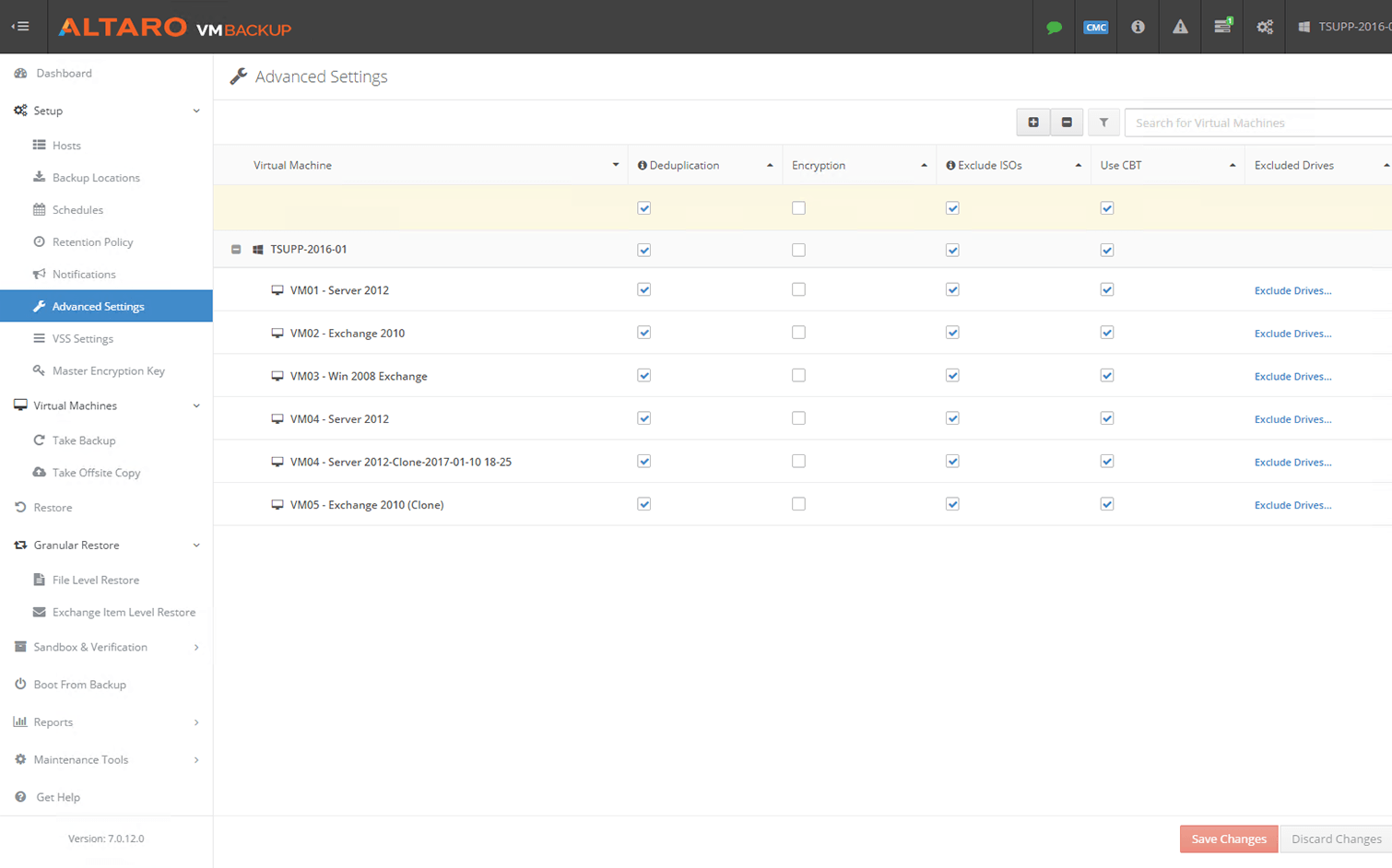
Encryption in Altaro VM Backup Software (Source)
Common features of backup software
The most common backup software features include some or all of the following:
Cloud backup | Sends a copy of a file (or database) to a secondary, off-site location (or a data center) for storage in case of hardware failure, file corruption or other disaster. The secondary server and data storage is hosted by a third-party service provider. This is also known as online backup or remote backup. |
Compression | Encodes, restructures, and modifies data in the cloud storage to reduce its size. Compressed files require less storage capacity, resulting in a decrease in storage expenses and high data backup speed. |
Encryption | Secures your backup data by converting it into codes while transmitting over unsecured networks for storage purposes. Since the data is backed up and stored in a third-party storage provider, encrypting your data before transferring will help you protect it from getting into the wrong hands. |
Compliance reporting | Generates reports that include a licensing summary as well as data backup statistics for compliance measurement. This helps your IT team save time on auditing, capacity planning, service level agreement (SLA) compliance, and more. |
Backup scheduling | Determines how often your data needs to be backed up so that in the event of a data loss, the most recent backup is available. This will allow you to restore the data/file/folder you were working on previously. It is an automated process which eliminates the need for running manual backups. |
Incremental backup | Syncs only the data that has been changed or created since the last backup. For example, if a full backup was performed on a Monday, then Tuesday's incremental backup will update all new or changed files since Monday's backup. Wednesday’s incremental backup will update all new changes made since Tuesday’s backup, and so on. This allows you to save time and disk space. |
Differential backup | Syncs all the files that have changed since the last full backup. Unlike incremental backups that copy the changed data since the last incremental backup, differential backup is the cumulative backup of all changes since the last full backup. For example: If a full backup of a system is performed on Sunday, the backup on Monday will only save the file changes made since Sunday, on Tuesday it will only save the files that changed since Sunday, and so on until the next full backup is performed. |
Data retention policy | Creates a backup strategy that determines and keeps track of how long backups must be kept, the versions it should maintain, and how to dispose them when it’s no longer required. |
Incremental backup | Records events that occur during a backup process. This includes notifications when a file fails to open and error messages when file errors arise. A backup log can help you save time by addressing backup issues such as backup failures and file verification errors. |
What type of buyer are you?
Before purchasing backup software, you should assess which buyer category you belong to. The majority of buyers fall into the following categories:
Small and midsize businesses (SMBs) (up to 500 employees): Small and midsize businesses are more prone to data loss and file corruption because they have limited resources, budget, and expertise to fight malware and cyberthreats that lead to data theft. The loss of business data files can end up costing companies a lot of money, which can shut their businesses down or put them into heavy debt. Therefore, SMBs should opt for a backup solution that is easier to install and maintain. Backup software with features such as cloud storage, continuous backup, anti-virus, and archiving would be beneficial for these buyers, as it would help prevent total data loss and ensure disaster recovery.
Large enterprises (over 500 employees): Compared to SMBs, large enterprises have more capital to spend on their data protection. But given their size, they have a large number of devices in a network that stores large amounts of data. Additionally, large enterprises have offices in different locations which makes their data vulnerable to threats such as cyberattacks, DDoS attacks, and insider threats. Corrupted, lost, or stolen data can cost businesses their revenue, customers, and brand reputation. A fully featured backup solution can be beneficial for buyers. Large enterprises should look for a tool that offers automatic backups, encryption, remote access, file sharing and security to help them backup and secure their data from any kind of threat.
Benefits of backup software
Listed below are some benefits you can expect from using a backup solution:
Faster file recovery: The ability to restore data folders or files faster in order to keep your business running, recover lost revenue, and prevent downtime is very important when your files are corrupted or stolen. Backup software stores all necessary details and also provides scheduled backup options that will automatically store the latest version of the file or the data as you work on them. Such features allow you to access data within a few minutes and get it back in times of disaster such as, power failure, hard drive crashes, data deletion, and corruption.
Data security: Your critical files and folders are encrypted before transferring to a storage medium for backup. This protects your backup data from being accessed or viewed by unauthorized parties or from falling into the wrong hands.
Improved productivity: When it comes to a backup tool, there’s no need to worry about the safety and security of your duplicate files. The archived files can be used for strategic planning by performing a trend analysis or deriving forecasts of business outcomes. This can help you make more effective plans for the business which improves productivity. This also leads to a more effective and efficient workflow.
Market trends to understand
Here’s what you should keep in mind when selecting a backup software solution for your business:
Multi-cloud backup will dominate the market: The move to multi-cloud within companies is becoming popular. This is because a multi-cloud environment (that includes public and private cloud storage) results in lower downtime for critical services by reducing the dependency on a single cloud provider, and better security by reducing the chances of data loss/leakage. Additionally, storing data in multiple clouds (also known as data redundancy) can save you money as it requires lower storage costs for companies located in different geographies. Realizing the popularity of the multi-cloud environment among organizations, backup software vendors have started partnering or integrating with leading cloud providers to offer data backup for multi-cloud enterprises in order to increase data redundancy and reliability.
Note: The application selected in this article is an example to show a feature in context and is not intended as an endorsement or recommendation. It has been obtained from sources believed to be reliable at the time of publication.