
Best Cloud Management Software of 2026
Updated February 18, 2026 at 10:10 AM

Written by Marcela Gava
Senior Content Analyst

Edited by Mehar Luthra
Team Lead, Content
- All Software
- Buyer's Guide
- Software Advice FrontRunners
- Frequently Asked Questions
- Popular Comparisons
Cloud management software helps IT admins and DevOps teams monitor cloud usage, control cloud spend, and manage multi‑cloud setups. With 200+ tools built for different cloud architectures, automation levels, and security protocols, choosing the right one isn’t always straightforward. To help you narrow it down, I've curated a list of highly-rated productsi and the cloud management software FrontRunners based on user reviews. For further information, read my cloud management software buyer's guide.
Cloud Management Software
Sort by
Reviews: Sorts listings by the number of user reviews we have published, greatest to least.
Average Rating: Sorts listings by overall star rating based on user reviews, highest to lowest.
Alphabetically (A-Z): Sorts listings by product name from A to Z.

ManageEngine Applications Manager is an application performance monitoring and observability solution that is designed to empowe...Read more about ManageEngine Applications Manager


ManageEngine Applications Manager's Best Rated Features
See All
ManageEngine Applications Manager's Worst Rated Features
See All

Site24x7 is a cloud-based website and server monitoring platform that helps small to large size businesses monitor websites, ser...Read more about Site24x7


Site24x7's Best Rated Features
See All
Site24x7's Worst Rated Features
See All

Tiger Bridge is a hybrid cloud solution that unifies local infrastructure with cloud storage through intelligent, policy-based d...Read more about Tiger Bridge
Tiger Bridge's Best Rated Features
See All
Tiger Bridge's Worst Rated Features
See All

Nerdio empowers IT professionals and managed service providers (MSPs) to deploy, manage, and cost-optimize virtual desktops in M...Read more about Nerdio


DoiT is a global leader in cloud operations, providing an intelligent multicloud platform that enables businesses to optimize co...Read more about DoiT

DoiT's Best Rated Features
See All
DoiT's Worst Rated Features
See All
Software Advice FrontRunners 2026

(2250)

(342)

(357)

(342)

(56)

(158)

(255)

(195)

(82)

(105)
Best for Usability

Google Cloud

In our analysis of Cloud Management products with the most market demand, Google Cloud is the highest rated for its usability out of the most popular tools.
Google Cloud is best suited for SMBs prioritizing usability, especially those seeking an intuitive platform for data management and collaboration. Our reviewers say its user-friendly interface, seamless integration with Google services, and easy onboarding make it accessible for teams with varying technical backgrounds.
- Reviewers Perspective
"The main strength in term of cloud services is the data portfolio, which makes companies of all sizes (startup, small, mid and large) transition into a data-driven model easily and following known best practices."
JEJose Enrique Hernandez Leon
Cloud Architect
Used for 2+ years
We analyzed 715 verified user reviews for Google Cloud to find out what actual users really think.
Cloud Storage
Organizations store and manage files with robust infrastructure and flexible options. Google Cloud supports scalability, security, and remote access for backup and collaboration across business sizes.Ease of Use
Teams set up and navigate Google Cloud with minimal training. The intuitive dashboard and tutorials enable efficient workflow management for both beginners and experienced users.Security and Access Control
Admins control access permissions and leverage encryption, identity management, and two-factor authentication. Google’s infrastructure and regular updates help protect sensitive data and ensure privacy. - Key FeaturesGoogle Cloud's scoreCategory average
Backup and Recovery
4.664.54 category average
Data Storage Management
4.704.62 category average
Monitoring
4.384.47 category average
- Screenshots


Best for Customization

ServiceNow

Of the products listed on our FrontRunners report, ServiceNow is the most requested by users for customization out of the most popular tools.
ServiceNow is ideal for organizations that require extensive customization of workflows and service management processes. Our reviewers point out that its flexible configuration options and customizable modules streamline ticketing and automate business processes to fit diverse operational needs.
- Reviewers Perspective
"Great experience, ServiceNow used as a ticketing tool for access provisioning, change management processes, as well as to auto provision access to other applications."
RGRoman Gomon
Sr. Manager, Internal Audit
Used for 2+ years
We analyzed 227 verified user reviews for ServiceNow to find out what actual users really think.
Ticket Management
Teams manage and track tickets using ServiceNow’s customizable templates and automation features. The centralized dashboard supports incident, request, and change management with clear visibility and reporting.Service Management
Organizations streamline IT, HR, asset tracking, and customer service processes in one environment. ServiceNow’s modules and service catalog options accelerate service delivery and improve collaboration.Ease of Use
Managers and staff navigate ServiceNow easily, with accessible functions and educational resources. The design supports efficient account and case management for both technical and non-technical users. - Key FeaturesServiceNow's scoreCategory average
Data Storage Management
4.504.62 category average
Monitoring
3.04.47 category average
- Screenshots


Best for Quick Implementation

Datadog

Datadog is the most requested by users for quick implementation out of the most popular tools, based on our analysis of Cloud Management products with the most market demand.
Datadog is best for teams seeking rapid implementation of monitoring and observability tools. Our reviewers say the platform’s quick setup, out-of-the-box integrations, and real-time dashboards enable fast deployment and immediate insights with minimal configuration effort.
- Reviewers Perspective
"It also offers RUM for user monitoring across different devices, custom metrics, as well as seamless integration with incident response tools."
ARAnurag Rai
Software Engineer
Used for 2+ years
We analyzed 246 verified user reviews for Datadog to find out what actual users really think.
Monitoring
Teams centralize monitoring for applications, servers, and infrastructure with Datadog’s flexible platform. Custom monitors and actionable insights support troubleshooting and performance management across environments.Log Management
Organizations consolidate logs from multiple environments for efficient analysis and alerting. Datadog’s unified platform streamlines incident detection, troubleshooting, and root cause analysis.Integrations
IT teams connect Datadog with a wide range of tools and cloud providers. The platform’s out-of-the-box and custom integrations support workflow adaptation and efficient collaboration. - Screenshots


Highly Rated for User Interface
Site24x7

According to our user reviews, Site24x7 is the highest rated for user interface out of the most popular tools.
Site24x7 is highly rated for its user interface, making it a strong choice for SMBs needing an approachable monitoring solution. Our reviewers highlight the intuitive dashboard, easy setup, and customizable alerts, which help teams efficiently monitor infrastructure without a steep learning curve.
- Reviewers Perspective
"I love the proactive monitoring capability of Site24x7. Because it uses multiply sites or datacentres in it services , you are able to pick quickly from the dashboard when services starts degrading."
PApeter awortwe
IT Asset,Configuration Manager, Service Catalog and Knowledge Manager
Used for 2+ years
We analyzed 255 verified user reviews for Site24x7 to find out what actual users really think.
Server Monitoring
IT teams monitor servers, websites, databases, and cloud infrastructure from a single dashboard. Site24x7’s real-time tracking and automation features support quick issue identification and broad coverage across IT environments.Alerts
Organizations configure real-time alerts with customizable thresholds and multiple delivery channels. This ensures timely incident response and supports automated remediation, though fine-tuning may be needed to reduce noise.Monitoring Setup
Admins deploy monitoring across infrastructure with intuitive dashboards and monitor types. The setup process supports specifying regions and rapid onboarding, making ongoing management efficient for diverse environments. - Key FeaturesSite24x7's scoreCategory average
Backup and Recovery
4.634.54 category average
Monitoring
4.764.47 category average
- Screenshots


Most Used By Information Technology and Services
DoiT

According to our user reviews, DoiT is the most requested by users in Information Technology and Services out of the most popular tools.
DoiT is most used by information technology and services organizations looking to optimize cloud spend and governance. Our reviewers say its cost management tools and proactive support help IT teams consolidate expenses and improve operational efficiency across multi-cloud environments.
- Reviewers Perspective
"The main feature we use is the cost reporting, which is really helpful to share with other teams so they can take ownership of their usage, and cost anomaly alerts are helpful to keep on top of changes."
BHBrett Hagelstein
IT Manager
Used for 1-2 years
We analyzed 8 verified user reviews for DoiT to find out what actual users really think.
- Screenshots


Most Used By E-Learning

DigitalOcean

In our analysis of Cloud Management products with the most market demand, DigitalOcean is the most requested by users in e-learning out of the most popular tools.
DigitalOcean is most used by e-learning organizations and is well-suited for SMBs seeking straightforward cloud infrastructure management. Our reviewers point out its simple control panel, fast server setup, and helpful documentation, which make onboarding and scaling easy for smaller teams.
- Reviewers Perspective
"DigitalOcean is a great choice for developers who want a simple, affordable, and fast cloud hosting solution."
IHIddy Hussein
Solution Architect
Used for 6-12 months
We analyzed 127 verified user reviews for DigitalOcean to find out what actual users really think.
Cloud Service
Developers manage cloud infrastructure with a user-friendly panel and transparent pricing. DigitalOcean supports reliable uptime and is well-suited for small to medium SaaS applications.Deployment
Teams deploy applications and servers quickly using one-click installs and extensive tutorials. Automated deployment options and a structured interface streamline workflows for development and testing.Server Setup
Admins set up virtual servers with a clean interface and customizable hardware or software. Documentation and support resources facilitate learning, while experienced users benefit from full control. - Key FeaturesDigitalOcean's scoreCategory average
Backup and Recovery
4.454.54 category average
Data Storage Management
4.274.62 category average
Monitoring
4.504.47 category average
- Screenshots
Best for Customer Satisfaction

Of the products listed on our FrontRunners report, ManageEngine Applications Manager is the highest rated for customer satisfaction out of the most popular tools.
ManageEngine Applications Manager is best for customer satisfaction, particularly for SMBs needing comprehensive monitoring with strong support. Our reviewers say its real-time monitoring, customizable dashboards, and responsive support team contribute to a smoother and more reliable IT management experience.
- Reviewers Perspective
"Applications Manager has allowed vertical monitoring across various layers of our IT structure while presenting detailed analysis to the various groups, thus enhancing the decision-making process."
MZMarcos Zaconeta
IT Support Specialist
Used for 1-2 years
We analyzed 197 verified user reviews for ManageEngine Applications Manager to find out what actual users really think.
Monitoring and Alerts
IT teams address performance issues before escalation by leveraging real-time monitoring and customizable alerts. The platform’s anomaly detection and root cause analysis streamline troubleshooting and improve system reliability.Server Monitoring
Admins track resource utilization, server status, and service health from a single console. ManageEngine’s agentless monitoring and scalability simplify managing large infrastructures and reduce manual checks.Performance and Speed
Organizations gain insights into application, server, and infrastructure performance using real-time monitoring and analytics. The tool supports identifying bottlenecks, optimizing workflows, and generating comprehensive reports across platforms. - Screenshots


Most Used By Health, Wellness and Fitness

New Relic

According to our user reviews, New Relic is the most requested by users in health, wellness and fitness out of the most popular tools.
New Relic is most used by health, wellness, and fitness organizations needing robust application monitoring. Our reviewers say its real-time dashboards, proactive performance insights, and streamlined setup help teams quickly identify and resolve issues, optimizing both workflow and user experience.
- Reviewers Perspective
"The real-time performance monitoring, powerful alerting, and customizable dashboards make it easy to detect issues quickly and maintain reliability."
RPRuchika Panigrahi
Site Reliability Engineer
Used for 2+ years
We analyzed 142 verified user reviews for New Relic to find out what actual users really think.
Performance and Speed
Teams use New Relic to visualize live performance data and quickly identify bottlenecks in their applications and infrastructure. This enables root cause analysis, workflow optimization, and continuous tracking of critical metrics such as CPU and memory usage, supporting informed decisions for application speed and reliability.Monitoring
Organizations monitor backend services, frontend apps, and cloud infrastructure in real time using New Relic’s customizable dashboards and proactive alerts. This centralized approach streamlines oversight of multiple servers and environments, supporting reliability and efficient troubleshooting.Error Tracing
Developers trace errors and debug code with New Relic’s real-time notifications and stack traces. The platform connects issues to their source, streamlining troubleshooting and improving response times, though some advanced tracing features may require additional configuration. - Screenshots


Best for AI powered

Dynatrace

Of the products listed on our FrontRunners report, Dynatrace is the most requested by users for AI powered out of the most popular tools.
Dynatrace is best for organizations seeking AI-powered observability across complex environments. Our reviewers highlight its automated root cause analysis, AI-driven insights, and intuitive interface, which accelerate troubleshooting and reduce manual monitoring effort.
- Reviewers Perspective
"Dynatrace is excellent with its AI engine, the engine that automates the RCA (root cause analysis), as it can replace the traditional monitoring tools by being able to identify and prioritize the real problems, offering actionable insights without requiring manual interventions."
MAMoustafa Abbas
IT Manager
Used for 1-2 years
We analyzed 62 verified user reviews for Dynatrace to find out what actual users really think.
Monitoring
Organizations monitor business operations, energy usage, and code-level performance using Dynatrace’s observability suite. The platform supports synthetic monitoring, threat detection, and deployment across diverse environments.Performance and Speed
Teams identify bottlenecks and optimize resources with Dynatrace’s automated performance monitoring. The system analyzes trends and provides detailed metrics for infrastructure and user experience.Dashboard
Managers track incident management and performance metrics using customizable dashboards. The interactive UI supports project requirements and enhances reporting, though initial setup may require adjustment. - Screenshots

Best for Automation Capabilities


In our analysis of Cloud Management products with the most market demand, AWS CloudFormation is the most requested by users for automation capabilities out of the most popular tools.
AWS CloudFormation is best for automation capabilities, making it suitable for teams aiming to manage infrastructure as code. Our reviewers say its template-driven approach enables automated, repeatable deployments and version control, streamlining cloud resource management and reducing manual errors.
- Reviewers Perspective
"AWS CloudFormation's best feature is infrastructure as code (IaC), allowing automated, repeatable deployments with version control."
SBSwaibu Bilali
AWS Solution Architecture
Used for 1-2 years
We analyzed 75 verified user reviews for AWS CloudFormation to find out what actual users really think.
CloudFormation
Teams create and manage cloud infrastructure using templates and commands, reducing manual intervention. AWS CloudFormation supports automating resource provisioning and managing complex setups as code.Deployment
Organizations deploy web services and infrastructure as code, enabling repeatable, version-controlled deployments. The platform supports collaborative workflows and consistent processes across regions.Ease of Use
Users familiar with YAML or JSON find AWS CloudFormation straightforward, leveraging its GUI and time-saving features. While suitable for various skill levels, some areas may require additional experience. - Screenshots


- Reviewers Perspective
"All our aws monitoring dashboard are built from cloudwatch, all lambdas, KMS, RDS have cloudwatch logs, you can turn it on for each operation can check what happens for that operation, it is very easy to use and learn how to query what you need."
SYShuchun Yang
Software Engineer
Used for 1-2 years
We analyzed 76 verified user reviews for Amazon CloudWatch to find out what actual users really think.
AWS Monitoring
Teams monitor AWS resources and applications in real time with Amazon CloudWatch, detecting anomalies and optimizing performance. The centralized dashboard streamlines tracking and managing AWS services for improved system health.Dashboards and Alarms
Admins set up dashboards to visualize metrics and configure alarms for real-time notifications. This enables proactive troubleshooting and helps maintain AWS application performance.Cloud Service Monitoring
CloudWatch provides visibility into resource usage, logs, and operational health across AWS environments. IT teams use it to monitor multiple services, set up alarms, and quickly diagnose issues. - Screenshots


- Reviewers Perspective
"I have Splunk forwarder installed over 100 servers to have logs sending over to Splunk Enterprise server, and the data ingest is very reliable."
PYPhilip Yan
Head of IT OPS
Used for 2+ years
We analyzed 194 verified user reviews for Splunk Enterprise to find out what actual users really think.
Log Management
IT teams aggregate, search, and visualize logs from diverse systems in real time. Splunk Enterprise streamlines troubleshooting and monitoring with flexible log segmentation and customizable storage policies.Dashboard Monitoring
Managers create dashboards to track system health, application performance, and network activity. The platform’s search engine and dashboard templates help visualize trends and monitor metrics efficiently.Data Analysis
Analysts process and visualize structured and unstructured data from multiple sources. Splunk Enterprise’s workflows and query language support real-time analytics and detailed reporting for business decisions. - Screenshots


Methodology
The research for the best cloud management software list was conducted in October 2025. We evaluated data (user reviews and demand signals) from the past 24 months as of the research date. Read the complete methodology.
Popular Cloud Management Comparisons


Buyer's Guide
This detailed guide will help you find and buy the right cloud management software for you and your business.
Last Updated on May 29, 2025Here's what we'll cover:
What you need to know about cloud management platforms
Cloud management platforms streamline the storage, transfer, and updation of corporate data through centralized control and optimization across diverse cloud environments. Features such as cost management, multi-cloud management, and real-time cloud monitoring enhance security through distributed architecture and streamlined access for employees across various locations and devices.
What we offer: We have over 260 different cloud management vendors on our site, and we've published more than 1,300 verified reviews of cloud management products in the past year alone. [1] If your business relies on storing and accessing data via the internet, the decision shifts from whether to use cloud management platforms to which platform best aligns with your company's unique needs.
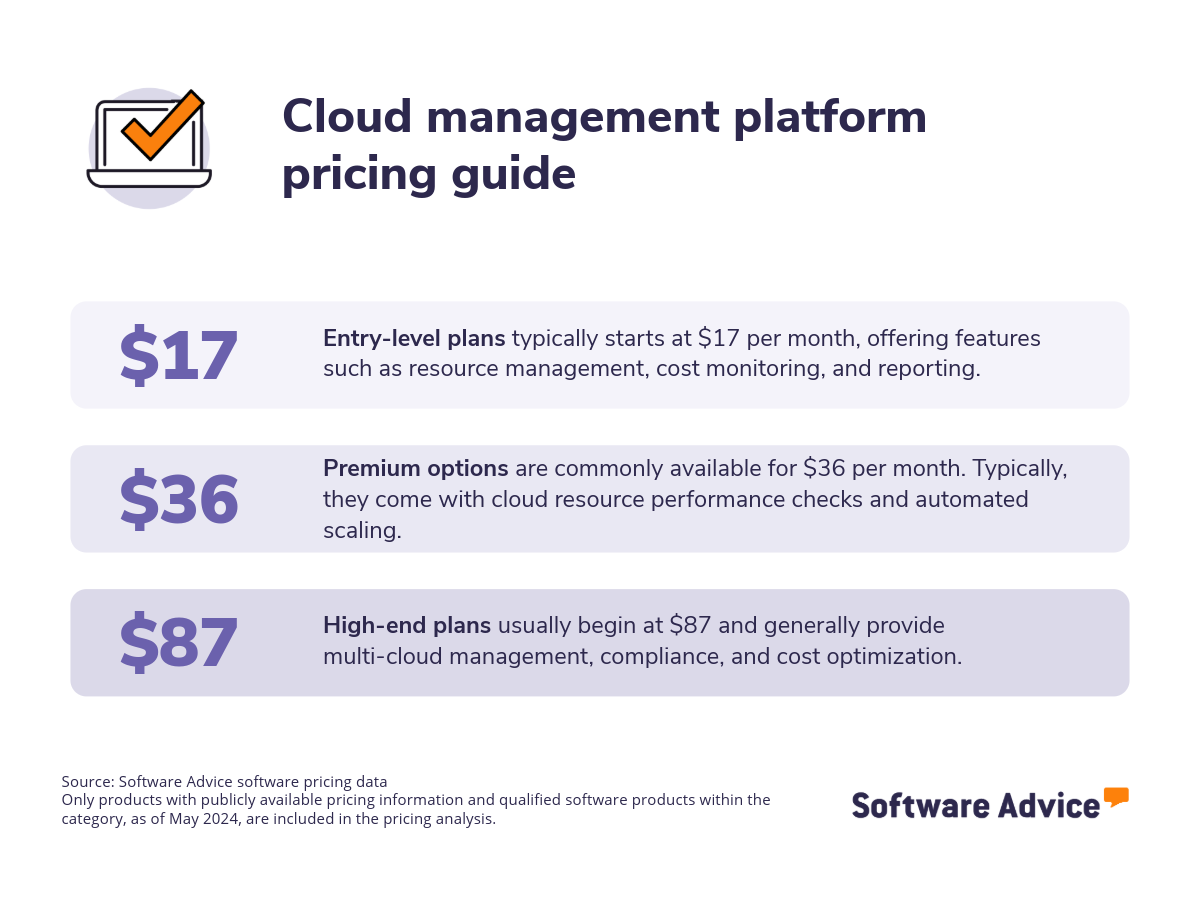
What’s it going to cost? In terms of pricing for cloud management tools, entry-level options commonly start at $17 per month, while high-end plans can cost as much as $87 per month. [2] Entry-level systems generally include resource management, cost monitoring, and reporting, while premium or advanced plans usually provide advanced features, including multi-cloud management, compliance, and cost optimization.
In addition, free trials are often offered by cloud management software vendors, and some systems even offer free versions.
How to start? first-time buyers should begin their evaluation by considering their budget, specific needs, and necessary integrations. Huddle with stakeholders to develop a list of critical questions for vendors during the evaluation process, such as:
Given our company's multi-cloud environment, how effectively does this platform provide a unified dashboard for monitoring and controlling data storage?
What security features does this software offer to mitigate potential breaches?
What specific alerting mechanisms does this software provide?
How will your platform's cost optimization feature help our company identify and reduce cloud spending?
What level of customer support is provided to ensure smooth implementation and ongoing management of our cloud resources?
What cloud integrations does your software offer?
Given the wide array of vendors, selecting the best cloud management platform can be daunting. To help you navigate this process, this guide will highlight the essential features and advantages of cloud management tools and offer a step-by-step approach to selecting the ideal solution for your organization.
What are cloud management platforms?
Cloud management platforms enable businesses to manage daily operations across public, private, and hybrid cloud environments, including storage, networking, and virtual machines. These systems monitor cloud resource utilization, facilitating cost control and optimization. They also provide security features like encryption and vulnerability management to protect data in complex cloud environments.
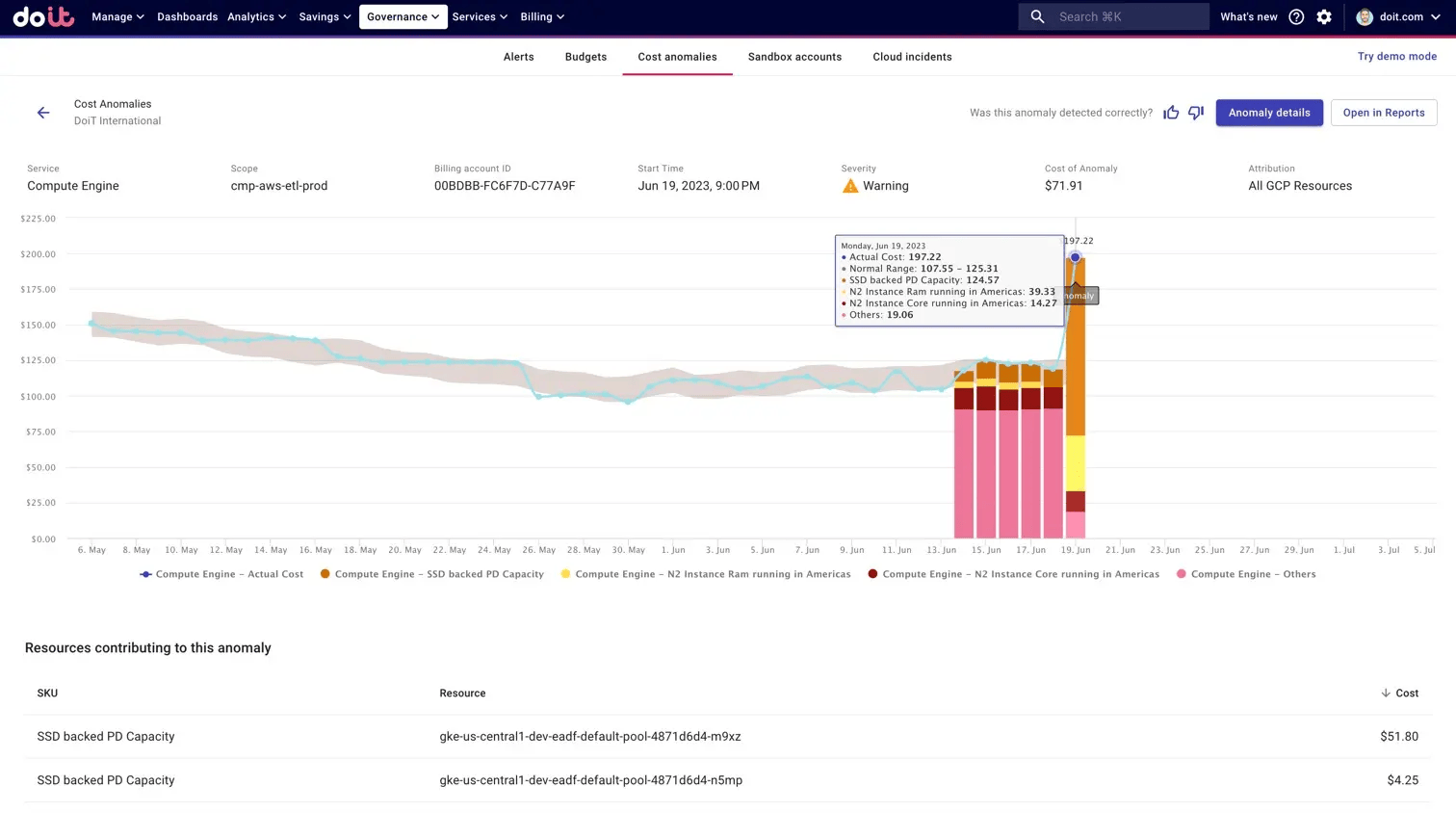
Anomaly detection in DoiT
Cloud management software simplifies data storage and enhances security by offering cost management, performance analysis, and event logs. It also provides real-time monitoring with alerts, tiered access controls, and spending optimization.
In a nutshell: The ability to analyze database status and performance enables businesses to make informed, data-driven decisions.
Essential features of cloud management platforms
When evaluating cloud management platform features, it's crucial to understand the core features, like access controls/permissions, cost management, multi-cloud management, and performance analysis that come as standard with every tool. Other common features, that may or may not be included with all software, include customizable questions, customizable templates, and data import/export options.
Based on our analysis of thousands of verified user reviews, we've identified the core features of cloud management software. [2] Having these handy will allow you to make an informed selection and pinpoint the most suitable solution for your needs.
Core cloud management features
Access controls/permissions | Define levels of authorization for access to specific files or systems. |
Cost management | Manage budgets, track and optimize spending, and align capacity to workload demand. |
Multi-cloud management | Monitor and secure applications and workloads across multiple public clouds. |
Performance analysis | Monitor and analyze the performance and status of a server or system/application. |
Common cloud management features
Compliance management | Track and manage adherence to policies for any service, product, process, or supplier. |
Real-time monitoring | Actively monitor systems, applications, or networks. |
Third-party integrations | Set up connections to third-party platforms to improve business processes. |
Backup and recovery | Create backups and provide methods to recover deleted/lost data. |
Event logs | Maintain a chronological record of actions or occurrences within a network, software, or process. |
Resource management | Plan, schedule, and execute the optimal and effective use of resources across projects. |
Security management | Manage and control the security aspects of an organization's digital assets, resources, and operations. |
Benefits and competitive advantages of using cloud management platforms
Our analysis of over 400 verified user reviews from the past year reveals that workflow automation, seamless integration, robust security, and cost reduction are the top-rated benefits of cloud management software. These align with the core needs of cloud management platforms: monitoring services, infrastructure management, cloud cost management, and data management. Here’s a breakdown of these benefits:
Streamlined third-party integrations: Enable seamless connections across multiple applications, saving time and resulting in greater efficiency with existing applications.
Comprehensive security: Such tools offer strong security features, such as encrypted credentials and proactive threat detection alerts, allowing businesses to reduce vulnerabilities and mitigate cyberattacks.
Improved cloud spending: Provides streamlined cloud spending management with cost optimization features that identify potential savings and provide tailored recommendations. This effectively helps organizations maximize their cloud budget.
Enhanced workflow automation: Empowers teams to automate processes and tasks, improving operational performance and minimizing manual effort.
How to choose the best cloud management platforms
Step 1: Define your requirements
Start by defining your specific needs, such as the required number of seats or users, and identifying necessary integrations with your existing tech stack. This will guide you towards the system that aligns with your current operational demands and supports your long-term goals.
What is the cost of cloud management software?
Our analysis suggests that entry-level plans generally start at $17 per month, premium plans are commonly available for $36, and advanced plans often start at over $87 per month. However, the price of cloud management software is difficult to generalize because it depends on the factors that vary by buyer, such as:
The number of seats, users, or domains
Required features
Third-party integrations
Need for AI-driven tools
Integration considerations for cloud management software
Integration capabilities are crucial for cloud management software, especially considering the need to create an entire security system which often requires seamless connections. Therefore, buyers should carefully evaluate the tools and categories the system can integrate with.
Cloud management systems are often integrated with database management software, web analytics software, and website security software. These integrations offer significant advantages as they streamline database access, enhance website and application security, and improve overall cloud management.
Explore different types of clouds
Cloud computing encompasses five main types: public, private, hybrid, multi-cloud, and high-performance computing (HPC) clouds. Understanding the differences between these types can help businesses determine which cloud solutions are best suited to their specific requirements and objectives. Each type offers distinct advantages and is suited to different needs, making the selection of a cloud type or service a very subjective decision.
Public clouds: Managed by third-party providers, they offer a range of resources such as networking, memory, processing power, and storage, accessible globally through the internet. Businesses can rent these resources to build their IT infrastructure without the need to purchase or maintain hardware.
Private clouds: Owned and controlled by the business, private clouds provide similar functionalities to public clouds but with exclusive access to resources. This setup allows companies to customize their cloud processes according to their workflows and meet stringent security standards requiring resource control.
Hybrid clouds: These blend public and private cloud features, enabling businesses to host sensitive data privately while utilizing public cloud resources for less critical operations.
Multi-cloud systems: They involve using multiple cloud providers to leverage unique features or to enhance security.
HPC clouds: Provide high-performance computing resources for tasks like machine learning and AI, offering cost-effective access to supercomputers and advanced hardware.
Be aware of potential drawbacks
Despite the advantages of cloud management software, it's essential to acknowledge potential drawbacks encountered during implementation, such as:
Overwhelming alerts/notifications: The alerts and notifications features of some platforms can present challenges that impact user experience and efficiency. Users have reported that it can become overwhelming due to an excessive number of notifications, which can be distracting and counterproductive. On the other hand, there are instances where alerts are delayed or not received at all, causing users to miss critical updates.
Server connectivity issues: Usability issues are prevalent with some server connectivity platforms. Sometimes, hardware assistance is inadequate, causing delays in resolving critical failures like memory problems, jeopardizing website stability. Configuration, especially on mobile devices, is often considered problematic.
Steep learning curve: Many beginners and less experienced users may encounter a steep learning curve. Some users report that the integration and setup processes can be complex and overwhelming, requiring time to navigate and utilize the software effectively. This complexity is often exacerbated by vague error messages and the lack of straightforward tutorials, which can hinder users from fully understanding advanced features.
Recognizing these limitations enables organizations to implement preventative measures and optimize the benefits of their cloud management strategy.
Step 2: Make a shortlist of cloud management software
With a plethora of cloud management software options available, selecting the perfect solution for your business can be overwhelming. However, with the right resources and expert support, the process can be significantly simplified. Start by checking out top-rated platforms that match your feature and storage requirements.
Once you have your shortlist of cloud management software, use our free, downloadable Software Comparison Chart to compare your final choices. This tool enables software buyers to compare up to three vendors side-by-side, focusing on key elements such as integration capabilities, pricing models, and available functionalities.
Step 3: Pick your best option
After meticulously narrowing down your choices, the next step is to participate in vendor demos. These sessions offer a valuable opportunity to dive deeper into the features of each product, allowing you to ask essential questions that will aid in making a well-informed investment decision.
How to prepare for vendor demos
Once you've finalized your list of potential cloud management solutions, schedule demo sessions with vendors to see how each system operates. Here’s a list of potential questions to ask them:
What kind of assistance is provided during implementation?
Inadequate customer service and guidance lead to failed implementations. It’s important to nail down the type and level of onboarding support the vendor offers. Also, clarify if there are any onboarding or training fees and whether such support is included in your subscription plan.
Which applications does your platform connect with?
Ensure the cloud management system integrates with your current software to maintain workflow and enable teamwork. Confirm if the software automates tasks, eliminates manual data entry, and centralizes data to boost productivity. Determine if required integrations are standard or custom, and clarify vendor responsibilities for implementation and maintenance.
What monitoring and alerting capabilities are offered?
Some vendors restrict the number of daily alerts, so to ensure your security monitoring remains uninterrupted if you surpass the contracted limit, evaluate the ease of tracking usage, how the system notifies you of consumption, the process for acquiring additional resources, and the associated costs.
Plus, verify the channels through which you will be notified of issues, if they align with your preferred communication methods, and whether you will receive immediate alerts.
For more demo prep information, take a look at our guide How To Cut Through the Sales Pitch During Software Demos.
Step 4: Make the most of your cloud management software
Focus on these key elements for a successful transition:
Start with a pilot project: Initiate a pilot deployment of the cloud management tool on a subset of workloads to assess its efficacy and make necessary adjustments before a full-scale rollout. Use this phase to gather performance metrics, resolve integration issues, and refine your cloud management strategy.
Offer hands-on training: Conduct multiple training sessions for all users, starting with basic features and gradually progressing to advanced capabilities. Clearly communicate to your team the reasons for selecting this tool, demonstrating how it streamlines daily cloud operations and enhances infrastructure efficiency. In addition, encourage users to engage with vendor-provided resources like training modules and FAQs and supplement these with internal Q&A sessions and develop a centralized knowledge base.
Assemble an IT maintenance team: Deploying new cloud management software may introduce temporary disruptions or confusion, potentially affecting incident response times. To mitigate this, ensure your IT or cloud operations team is adequately trained and equipped to maintain service level agreements (SLAs) during the transition.
For detailed guidance on ensuring a smooth cloud management deployment, refer to our guide 5 Critical Steps to a Successful Software Implementation Plan.
Platforms related to cloud management
As you explore cloud management software, you'll encounter related tools that serve complementary functions:
Server management: Enables IT system administrators to monitor and optimize server performance and health. They also provide a centralized logging system for tracking server outages and event records.
Infrastructure as a Service (IaaS): Facilitates the provisioning and control of on-demand data storage and network resources over the internet. This empowers organizations to manage their data, networks, operating systems, and deployed applications within IaaS environments.
More resources for your cloud management journey
Six Critical Elements of a Strong Cybersecurity Incident Response Plan for Healthcare Practices
Economic Concerns, Talent Shortages, and Cybersecurity Are Top Challenges for SMB Supply Chains
Healthcare Sees 14% Increase in Data Breaches in Two Years—Here's How to Keep Your Data Secure
About our contributors
Author
Marcela Gava is a senior content analyst with more than 14 years covering trends in multiple areas that have an impact on companies. She works as a data-driven writer and trend researcher, focusing her articles on cybersecurity, IT, finance, and digital culture.
Marcela has written nearly 50 research and analysis articles that draw on more than 2 million authentic reviews from software buyers on Capterra in order to help small and medium-sized businesses (SMBs) find the best technology solutions for their needs. In addition, the insights provided by her articles help SMBs make more informed and assertive decisions.
Her research studies have been featured in some of the most important Brazilian media outlets.
Editor
Mehar Luthra is a team lead at Software Advice and specializes in editing reports that cover the latest trends affecting small businesses. With nearly a decade of experience, she has edited a multitude of research articles, top-rated software reports, and thought leadership articles for diverse markets such as Brazil, Japan, Canada, France, Australia, and India. She finds it particularly rewarding to produce content that provides small-business owners with practical tips and helpful advice on topics such as the digitalisation of small businesses, eCommerce trends, and HR developments.
Armed with a double bachelor’s in law (LL.B.) and business economics from Delhi University, she won a full scholarship to study for a master’s in creative writing at the National University of Ireland, Galway. In addition, she has written blog articles spanning a variety of topics such as fiction and non-fiction books, mental health and anxiety, the latest restaurants, and more. Her articles have been featured in Ireland’s national magazine The Village, among other publications. A die-hard journaling fan, she enjoys watching psychological thrillers, reading fiction books, and drinking iced coffee (even in the winter).
Sources
Software Advice reviews data: Software Advice reviews are collected from verified users for individual software products. For this report, we analyzed reviews from the past year as of the production date. Read the complete methodology.
Software Advice software pricing data: Only products with publicly available pricing information and qualified software products within the category, as of May 2024, are included in the pricing analysis. Read the complete methodology.
Cloud Management FAQs
- What are cloud management platforms?
Cloud management platforms are tools that enable businesses to efficiently manage their data and applications across different cloud environments. They provide centralized control, optimize resources, and offer features like cost management, multi-cloud management, and real-time monitoring to enhance security and streamline access.
- What is the best cloud management platform?
Based on our analysis of popular products, the best cloud management platform is New Relic, which holds the highest overall rating from verified reviewers on Software Advice. However, your optimal choice will depend on your unique needs and preferences.
- Which platform is used for cloud computing?
Our analysis of leading cloud management platforms highlight five tools that address diverse cloud computing needs: 1) New Relic provides comprehensive stack monitoring with cloud-specific cost optimization. It’s also the highest rated among the most popular cloud management tools on Software Advice. 2) Google Cloud offers a broad suite of services for compute, storage, networking, and AI, integrating seamlessly with G-Suite. Our analysis identifies Google Cloud as the best free platform. 3) Site24x7 specializes in AI-driven cloud monitoring across major platforms like AWS, Azure, and Google Cloud. In our analysis, this system was considered the most affordable. 4) nOps focuses on cost optimization and centralized cloud management, integrating with AWS, Kubernetes, and GitLab. Our analysis of popular cloud management platforms on Software Advice reveals that nOps is praised for its value for money. 5) DoiT is tailored for FinOps teams, offering end-to-end cloud waste tracking, anomaly detection, and cost optimization tools. Based on our analysis of popular products, this tool is considered the best for ease of use.
- What are the different types of cloud platforms?
There are five main types of cloud, and they vary by ownership, access, and purpose. Public clouds, managed by third-party providers, offer internet-accessible resources for rent. Private clouds, owned and controlled by businesses, provide exclusive resource access for customization and security. Hybrid clouds combine public and private elements for flexible data hosting. Multi-cloud systems use multiple providers for diverse features or enhanced security. Finally, HPC clouds offer high-performance computing resources for demanding tasks like AI and machine learning.