


Best Solar Software of 2026
Updated March 19, 2026 at 10:55 AM
- Popular Comparisons
- Buyers Guide
Compare Products
Showing 1 - 25 of 40 products
Compare Products
Sort by
Reviews: Sorts listings by the number of user reviews we have published, greatest to least.
Average Rating: Sorts listings by overall star rating based on user reviews, highest to lowest.
Alphabetically (A-Z): Sorts listings by product name from A to Z.

Procore is a cloud-based construction management platform designed to connect field and office teams throughout the project life...Read more about Procore


Procore's Best Rated Features
See All
Procore's Worst Rated Features
See All

Knowify helps contractors budget, manage and invoice every construction project and service job with precision and get insights....Read more about Knowify


Knowify's Best Rated Features
See All
Knowify's Worst Rated Features
See All

JobNimbus is a customer relationship management (CRM) and project management solution tailored to meet the needs of contractors,...Read more about JobNimbus

JobNimbus's Best Rated Features
See All
JobNimbus's Worst Rated Features
See All

Plexxis offers comprehensive solutions created specifically for the most demanding specialty sub-contractors. With on premise, s...Read more about plexxis
plexxis's Best Rated Features
See All
plexxis's Worst Rated Features
See All

Traqspera is an easy to use, cloud-based solution that connects field crews and office staff. All relevant information is captur...Read more about Traqspera


B2W Schedule software for heavy civil construction scheduling and dispatching is a centralized, online solution for managing emp...Read more about B2W Schedule

Dataforma is a cloud-based solution designed for construction trades, including electrical, plumbing and HVAC. It is a web-based...Read more about Dataforma


B2W Track software for heavy civil construction field tracking and analysis enables contractors to manage projects and costs bas...Read more about B2W Track


B2W Track's Best Rated Features
See All
B2W Track's Worst Rated Features
See All

Trimble® Accubid® Anywhere provides a comprehensive estimating and takeoff solution for electrical contractors in an easy-to-man...Read more about Trimble Accubid Anywhere

IFS Cloud is a composable enterprise software application that orchestrates customers, people, and assets to reduce complexity, ...Read more about IFS Cloud

Onshape by PTC is the leading cloud-native CAD & PDM platform that runs on any device, anywhere-requiring zero IT. Onshape is fo...Read more about Onshape


Onshape's Best Rated Features
See All
Onshape's Worst Rated Features
See All

Merlin Project is a project management (PM) solution natively written for macOS and iOS. It caters to businesses of all sizes ac...Read more about Merlin Project

Payzerware is a cloud-based field service management solution which assists contracting firms with technician scheduling and dis...Read more about Payzerware

Payzerware's Best Rated Features
See All
Payzerware's Worst Rated Features
See All

Assignar is a cloud-based construction management solution designed for self-performing general contractors and subcontractors. ...Read more about Assignar


Assignar's Best Rated Features
See All
Assignar's Worst Rated Features
See All

SiteCapture is a mobile and cloud software designed for the solar, real estate, and construction industries to transform operati...Read more about SiteCapture


SiteCapture's Best Rated Features
See All
SiteCapture's Worst Rated Features
See All

Efficiently manage construction projects, personnel, processes, performance, paperwork, and profit - from the cloud with unlimit...Read more about Realtraker
Realtraker's Best Rated Features
See All
Realtraker's Worst Rated Features
See All

Builder Information System is a construction accounting and job costing for general contractors, specialty contractor, residenti...Read more about Builder Information System

McCormick Plumbing & Mechanical Estimating software was developed specifically to handle the needs of construction firms that op...Read more about McCormick

McCormick's Best Rated Features
See All
McCormick's Worst Rated Features
See All

K9ERP is a cloud-based business management system that offers financials, inventory, distribution, accounting, document manageme...Read more about K9ERP

Cyanic Automation is a cloud-based construction management solution that helps small to midsize businesses manage inventory, equ...Read more about Cyanic LEM

Estimator 2.0 is an on-premise solution for Windows, designed to help builders, architects, contractors and engineers automate p...Read more about Estimator 2.0

Starting at only $25pm! 60-day Free Trial! A modern cloud based Field & Services Platform for Mechanical Contractors, HVAC Co...Read more about MEC Pro


Riskcast is a web-based construction management tool for field teams. The platform offers tools, specifically designed for the c...Read more about Riskcast

Jobpac Connect by Trimble is a cloud-based Construction Project Management (CPM) solution designed to help users track accountin...Read more about Jobpac Connect

CutterCroix’s GiddyUp platform is an all-inclusive cloud-based solution including a canvassing app, CRM, workflow and estimating...Read more about GiddyUp
Popular Comparisons


Buyers Guide
This detailed guide will help you find and buy the right solar software for you and your business.
Last Updated on January 27, 2025Designing the layout for rooftop photovoltaic (PV) solar panels is a complicated process that many energy construction contractors need to manage while overseeing material costs and customer requirements.
Not only do contractors need to calculate the exact cost of raw materials required to install the solar panels, inverters, or power optimizers, they often also need to provide detailed return on investment (ROI) reports calculating annual energy savings for both commercial and residential customers.
All these administrative tasks can result in contractors having less time to spend on designing solar panel layouts. Enter solar design tools, which reduce administrative clutter by automating the design process and manage costs and customer requirements in a centralized dashboard.
In this buyers guide, we'll take a look at how solar design software helps automate key processes.
Here's what we'll cover:
Common features of solar software
Key considerations when purchasing solar software
What is Solar Software?
Solar software (aka solar design software) helps residential and commercial solar construction businesses plan and design layouts for installing PV panels on rooftops or other locations to optimize energy efficiency. These systems also help business manage solar sales proposals by showing customers PV panel design layouts, track material costs for PV system installations, manage energy storage, and generate energy usage reports and estimates.
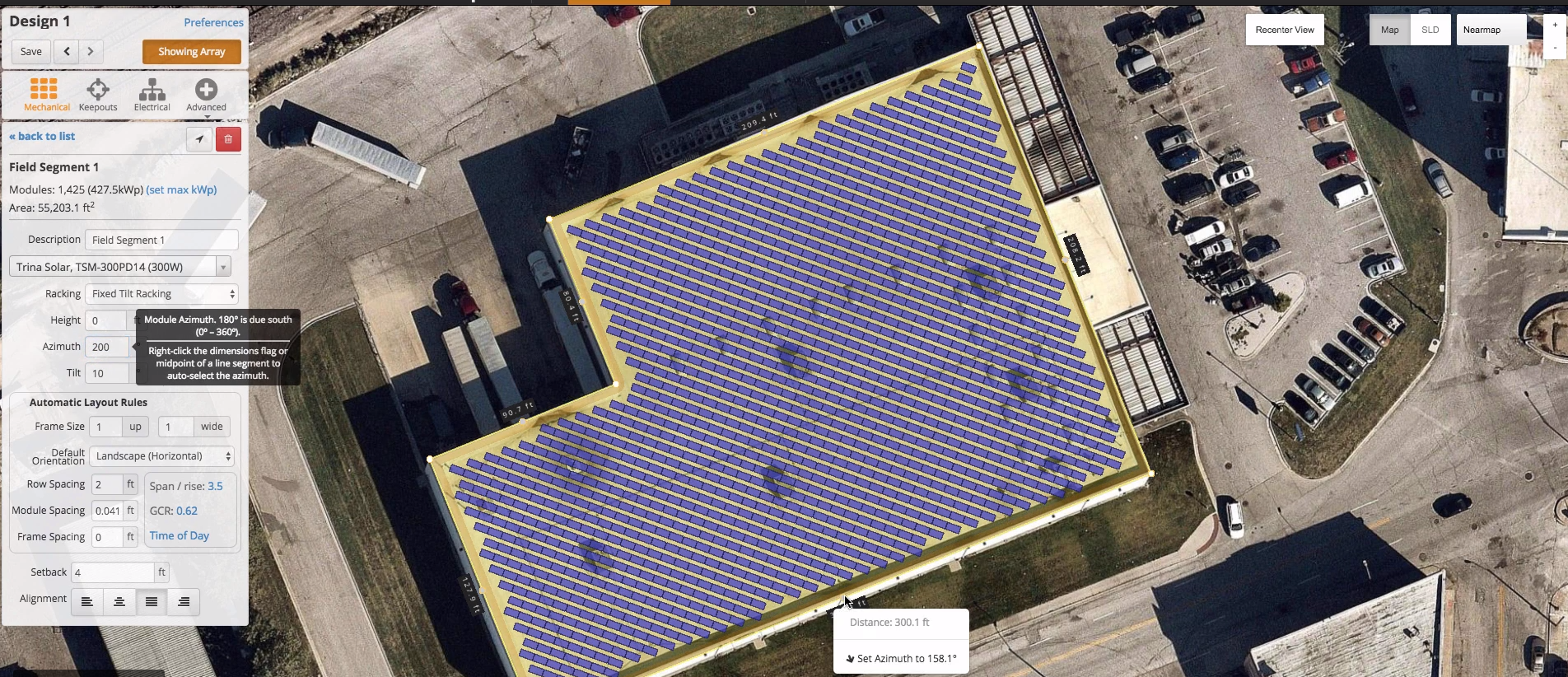
View of photovoltaic solar system design in HelioScope (Source)
Common features of solar software
Solar software often comes loaded with features, many of which may not be specific to your business needs.
When making your software purchase, focus on the core or common features offered by your shortlisted solutions to ensure you invest in the right tool. Here are the common features you should look for when evaluating solar software:
2D and 3D drawing | Create 2D and 3D drawings of area layouts for PV panel installation. |
Animation | Create 3D animations of PV panel layouts to gain a holistic view of PV electrical fittings. |
Electrical schematic design | Create blueprints of the electrical schematics required to connect PV panels to main electrical units. |
Bill of materials | Create a list of every part or component that makes up a product, including product numbers and quantities. |
Data import/export | Users can import/export images, files, and PDFs as needed. |
Reporting dashboard | View information related to solar power consumption, financial analysis, and energy savings in a single dashboard. |
What type of buyer are you?
Choosing the right solar software depends on the size and requirements of your solar industry business.
Here are three common types of solar software buyers and their unique considerations:
Small and midsize businesses. In this segment, buyers have a limited software budget, and their primary concern is often tool pricing. As small and midsize energy construction contractors typically offer solar energy solutions to residential units or smaller businesses, they can use cloud-based solar software instead of on-premise tools to stay within their budget.
Large enterprises. Businesses in this segment require software with advanced functionalities, and often have a larger budget to work with. Larger energy construction contractors cater to a wider audience, often installing solar panels on a bigger scale (e.g., warehouse rooftops, industrial buildings). Cloud-based solar software allows larger construction enterprises to choose from a suite of features such as 2D PV layout design, proposal generation, and sales management.
Best-of-breed buyers. This segment of buyers has mixed business requirements, similar to those listed above. Since they offer solar energy solutions to residences as well as bigger industrial units, these contractors often need solar software with a complete suite of features.
Benefits of solar software
No matter which of the above three buyer segments you belong in, solar software can help your business. Let's take a look at three key benefits:
Reduces raw materials waste. By creating the exact layout for each panel's installation, solar software helps business gauge the amount of raw materials required for electrical fittings to avoid waste.
Aids proposal and sales management. For customers who aren't sure how much they'll save by using solar power, solar software helps business generate proposals to highlight overall ROI post-installation.
Estimates total energy consumption for prospective systems. Once a PV layout is created, solar software reporting dashboards can estimate overall annual energy savings and assess the cost benefits of solar panel installation.
Key considerations when purchasing solar software
Your final step when purchasing solar software is evaluating these key areas to ensure your business makes the ideal purchase:
Integration with third-party software. Are you already using imaging software such as AutoCAD to design solar panel layouts in 2D and 3D? Ensure that the solar software you purchase integrates with this and any other design software you use.
Customer support. Does the solar software vendor offer 24/7 customer support? Are there any training modules or FAQs that can help you troubleshoot encountered issues? Make sure the vendor offers any and all support your business needs before purchasing.
Mobile application. Determine whether the solar software vendor you're considering offers a mobile app so employees can use the solution while working off-site.
Note: The applications selected in this article are examples to show a feature in context and are not intended as endorsements or recommendations. They have been obtained from sources believed to be reliable at the time of publication.