


Best CPG Software of 2026
Updated January 29, 2026 at 2:21 AM

Written by Giorgia Pisano
Content Associate

Edited by Mehar Luthra
Team Lead, Content

Reviewed by Allen Butt
Senior Advisor

Talk with us for a free 15-min consultation
Expert advisors like Jacqueline, who have helped 1,000+ companies, can find the right software for your needs.
- All Software
- Top Software
- Buyer's Guide
- Frequently Asked Questions
- Popular Comparisons
Consumer packaged goods (CPG) software helps manufacturers and distributors manage inventory, supply chains, and product performance. With 110+ tools listed on Software Advice, navigating the options can be complex. To help you narrow it down, I worked with our consumer packaged goods (CPG) software advisors to curate a list of recommended productsi and a list of highly-rated architecture accounting software based on user reviews. For further information, read my consumer packaged goods (CPG) buyer's guide.
CPG Software
Sort by
Reviews: Sorts listings by the number of user reviews we have published, greatest to least.
Average Rating: Sorts listings by overall star rating based on user reviews, highest to lowest.
Alphabetically (A-Z): Sorts listings by product name from A to Z.

NetSuite is an AI-powered cloud-based business management suite that incorporates ERP, financial management, CRM and eCommerce f...Read more about NetSuite


NetSuite's Best Rated Features
See All
NetSuite's Worst Rated Features
See All

Focus X is an all-inclusive enterprise resource planning (ERP) system that helps you connect every aspect of your business opera...Read more about Focus X
Focus X's Best Rated Features
See All
Focus X's Worst Rated Features
See All

Versa is Modern all-in-one Cloud ERP software created for fast growing inventory heavy manufacturing, distribution, and e-commer...Read more about Versa Cloud ERP


Microsoft Dynamics 365 Business Central is a cloud-based enterprise resource planning (ERP) software solution designed for midsi...Read more about Dynamics 365 Business Central

Dynamics 365 Business Central's Best Rated Features
See All
Dynamics 365 Business Central's Worst Rated Features
See All

aACE is a powerful, comprehensive business management solution designed for companies that have outgrown small-business packages...Read more about aACE


Best CPG Software for 2025


Highest Rated
NetSuite

Out of the most popular products in the CPG category, NetSuite earns the highest rating from Software Advice’s reviewers.
Small to midsize businesses that need a full-fledged ERP solution should consider NetSuite. In addition to the order management and inventory features that are essential in the CPG industry, NetSuite offers finance and human capital management (HCM) modules. The SaaS cloud app offers a completely integrated approach to product management, from ordering to fulfillment.
- Reviewers Perspective
“By consolidating your accounting in NetSuite, you can speed up your closure procedures and create reports with less effort.”
BFBecky Forde
Software Developer
Used for 2+ years
We analyzed 1,655 verified user reviews for NetSuite to find out what actual users really think.
Customization
Users value NetSuite's extensive customization capabilities, which allow them to tailor the system to their unique business processes. They find the flexibility to add custom fields, scripts, and forms beneficial for meeting specific needs. However, they note that advanced customization often requires technical skills or external support, which can be costly and time-consuming.Inventory management
Users rely on NetSuite for effective inventory management, praising its ability to track stock levels, manage orders, and streamline supply chain operations. They find the inventory control features comprehensive, helping them make informed decisions and maintain accurate records. Additionally, users appreciate the system's integration with other business functions, enhancing overall efficiency.Financial management
Users find NetSuite's financial management capabilities robust, helping them streamline operations and improve decision-making. They appreciate the multi-currency support, which simplifies international transactions and consolidations. Additionally, users highlight the comprehensive financial modules that provide visibility and control over their financial data, contributing to better organizational efficiency. - Screenshots


Best Free

Odoo

Among the most popular products chosen by our users, Odoo is the highest-rated app that offers a free plan.
Small businesses on the rise will appreciate Odoo’s combination of features and pricing. The free plan can provide enterprise-grade product management to startups and smaller orgs. As your company grows, you can take advantage of Odoo’s modular architecture by adding only the features you need. In addition to inventory management, Odoo also has CRM, sales, HR, and finance modules.
- Reviewers Perspective
“For SME business, Odoo offers very good value, excellent functionality across a multitude of useful apps and the support is professional and unparalleled.”
ASAshley Schep
Accountant
Used for 2+ years
We analyzed 1,168 verified user reviews for Odoo to find out what actual users really think.
Customization
Users find Odoo's platform highly customizable, allowing them to tailor the system to their specific business needs. They appreciate the ease of customization and the flexibility it offers, making it suitable for various industries and requirements. Additionally, users highlight the intuitive user interface and the extensive features available out of the box, which enhance their overall experience.Modularity
Users value the wide range of modules available in Odoo, which cater to different business areas and management needs. They find the comprehensive and customizable modules effective in streamlining business operations and improving efficiency. Furthermore, users appreciate the ability to create their own modules, which allows for greater flexibility and adaptability to their specific requirements.ERP solutions
Users find Odoo to be a comprehensive and cost-effective ERP solution that seamlessly integrates various business processes. They appreciate the extensive range of ERP features, which help them manage and optimize their operations efficiently. Additionally, users highlight Odoo's affordability compared to other ERP systems, making it an attractive option for businesses of all sizes. - Screenshots


Most Affordable

SPS Commerce

SPS Commerce, an EDI tool with dropshipping and order management features, has the lowest-priced paid plan among the most popular CPG apps.
Companies that regularly exchange business data with suppliers and customers should check out SPS Commerce. As an electronic document interchange (EDI) solution, SPS Commerce streamlines automated ordering, shipping, dropshipping, and fulfillment processes. SPS’s full-featured API allows development teams to create custom workflows and integrate the app with other business apps.
- Reviewers Perspective
“The software was able to integrate with our company's ERP system to process EDI documents quickly and with little to no errors.”
TVTracey Valdez
Director of Enterprise Operations
Used for 6-12 months
We analyzed 492 verified user reviews for SPS Commerce to find out what actual users really think.
Support team
Users highlight the exceptional customer support provided by SPS Commerce, noting the team's quick assistance and knowledgeable responses. They appreciate the prompt support and the ability to resolve issues efficiently. Additionally, users find the support team helpful and patient, enhancing their overall experience with the product.Training and learning curve
Users find SPS Commerce easy to train new users on, with minimal training required and a user-friendly interface. They acknowledge the high learning curve initially but appreciate the ease of use once familiar with the system. The software's simplicity in training new associates is a significant advantage for many users.Navigation
Users find SPS Commerce easy to navigate, with an intuitive interface that simplifies daily tasks. They appreciate the quick navigation and the ability to find information efficiently. The user-friendly design allows them to navigate through different forms and features with ease, enhancing their overall experience. - Screenshots


Best Value for Money

InfoPlus

Out of the most popular CPG products as chosen by our users, Infoplus has the highest rating for value for money.
Infoplus is geared toward eCommerce wholesalers and retailers. Businesses that need to track one or more warehouses will find Infoplus’s inventory management and shipping features useful. Infoplus is also a good fit for companies with multiple lines of business, as it allows for custom workflows for different operations.
- Reviewers Perspective
“Infoplus has a myriad of functions, most of which we need and use to operate our business. Once you get the hang of the platform, it's a lifeline to running the inventory and order processes smoothly.”
OCOlivia Canlas
CEO
Used for 2+ years
We analyzed 115 verified user reviews for Infoplus to find out what actual users really think.
Customer support
Reviewers commend Infoplus for its reliable and helpful customer support, which enhances their overall experience with the software. They find the support team responsive and capable of resolving issues efficiently. Users also appreciate the seamless integration with customer systems, which simplifies operations.Training
Users appreciate Infoplus's comprehensive training, which helps them understand and utilize the system effectively. They find the training process straightforward and the customer service team supportive throughout the learning curve. They particularly value the personalized approach to training and onboarding.Team management
Reviewers highlight the excellent support and implementation teams at Infoplus, noting their dedication and accessibility. They find the product team proactive in rolling out useful features, although sometimes the implementation team needs to catch up. Users appreciate the flexibility in team management and the assistance provided during system conversion. - Screenshots


Best Ease of Use

Sage 100

Out of the most popular CPG products, our user reviews gave Sage 100 the highest rating for ease of use.
Sage 100 is a cloud-based ERP suite for midsize manufacturing organizations, distributors, and professional services providers. Each module within Sage 100 integrates with the next, saving time and making it easy to manage complex order cycles. For example, the customer portal offers a click-to-pay feature, which kicks off payment processing and updates accounts receivable records.
- Reviewers Perspective
“Financial reporting has been made easy with the software as I am able to generate budgets and financial reports with a lot of flexibility and accuracy.”
DADoreen Ateyu
Sales Manager
Used for 1-2 years
We analyzed 335 verified user reviews for Sage 100 to find out what actual users really think.
Accounting software
Users find Sage 100 effective for managing accounting and payroll, with features that cater well to mid-sized companies. They appreciate the user-friendly interface and the software's ability to handle standard accounting processes seamlessly. Additionally, reviewers highlight its reliability and comprehensive functionality, making it a preferred choice for their accounting needs.Modules
Users value the AP and AR modules in Sage 100, noting their ease of use and effectiveness for business operations. They appreciate the seamless integration between modules, which ensures smooth information flow without the need for manual syncing. Reviewers also find the consistent format across modules beneficial, making it easier to learn and use additional modules as needed.User training
Users find Sage 100 easy to train on, with minimal training time required for new employees. They appreciate the software's straightforward nature, which simplifies the training process and makes it accessible even for those with basic user training. Reviewers highlight the ease of navigating the system, which contributes to efficient onboarding and user proficiency. - Screenshots


Best for Customer Service

Fishbowl

Our users ranked Fishbowl among the most popular CPG products and gave it the highest rating for customer service.
Fishbowl targets small to midsize manufacturing businesses. The platform aims to streamline all aspects of product management for organizations with limited administrative staff. Its purchasing, vendor management, and warehousing automation can save growing companies significant time. Fishbowl also integrates with popular small business apps like QuickBooks and Xero.
- Reviewers Perspective
“The time we're saving not having to manually comb through printed sales estimates to and then walk around the warehouse to see if we have the inventory on hand to fulfill it them is absolutely immeasurable.”
WSWhitney Smith
Operations Manager
Used for 1-2 years
We analyzed 967 verified user reviews for Fishbowl to find out what actual users really think.
Inventory management
Users find Fishbowl invaluable for tracking inventory, noting its ability to manage stock levels, automate reorder processes, and integrate with other systems. They appreciate the software's comprehensive features, which streamline inventory management, sales, purchasing, and manufacturing processes. Reviewers highlight the ease of tracking inventory across multiple locations, creating bills of materials, and managing orders efficiently, which significantly improves their operational efficiency.Support services
Users find Fishbowl invaluable for tracking inventory, noting its ability to manage stock levels, automate reorder processes, and integrate with other systems. They appreciate the software's comprehensive features, which streamline inventory management, sales, purchasing, and manufacturing processes. Reviewers highlight the ease of tracking inventory across multiple locations, creating bills of materials, and managing orders efficiently, which significantly improves their operational efficiency.Tracking
Users commend Fishbowl for its robust tracking capabilities, including tracking by serial numbers, lot numbers, and shelf life. They find it highly effective for keeping track of parts, costs, and products throughout the production process. Reviewers also appreciate the detailed activity reports and the ability to manage incoming, outgoing, and returning items efficiently, which aids in maintaining accurate inventory records. - Screenshots


Best for Functionality


Out of the most popular CPG products rated by our users, SAP S/4HANA has the highest rating for functionality.
SAP S/4HANA Cloud is a premier ERP suite suitable for small, midsize, and large businesses alike. Companies in the CPG space will appreciate the SaaS app’s rich feature set, which includes billing, product lifecycle management, quality control, and more. It integrates seamlessly with other SAP applications, making it a natural fit for existing SAP Fieldglass, Hybris Cloud, or Ariba users.
- Reviewers Perspective
“One of the best features of SAP HANA is its high performance and real-time processing capabilities. Because it stores data in memory rather than on disk, it can handle large amounts of data and provide fast query response times.”
MPMatti Pekka
Project Manager
Used for 2+ years
We analyzed 342 verified user reviews for SAP S/4HANA Cloud to find out what actual users really think.
Data management
Users appreciate SAP S/4HANA Cloud's high performance and real-time processing capabilities, which allow them to handle large amounts of data efficiently. They value the ability to access data from anywhere, enabling better data-driven decision-making and eliminating the need for additional systems. Additionally, features like data compression and in-memory computing technology provide fast data access and processing, enhancing overall productivity.ERP systems
Reviewers find SAP S/4HANA Cloud to be an excellent ERP system with easy integration across various business processes. They highlight its dynamic nature and the ability to stay updated with the latest APIs, which simplifies interactions with other systems. Users also appreciate its robust financial management capabilities, making it a reliable solution for managing and operating finance processes.Reporting
Reviewers praise the versatile reporting tools in SAP S/4HANA Cloud, which allow for extensive customization and detailed reporting. They find it easy to generate reports and manage workflows, enhancing their ability to capture and analyze data effectively. Users also appreciate the comprehensive coverage of functions and processes, making it a valuable tool for fulfilling business needs. - Screenshots


Methodology
The research for the best CPG software list was conducted in October 2024. We evaluated data (user reviews and demand signals) from the past 24 months as of the research date. Read the complete methodology.
Popular CPG Software Comparisons


Buyer's Guide
This detailed guide will help you find and buy the right cpg software for you and your business.
Last Updated on February 04, 2025Here's what we'll cover:
Benefits and competitive advantages of CPG software
How to choose the right CPG software
CPG software essentials
Consumer packaged goods (CPG) software helps businesses manage and monitor products as they move along the supply chain from manufacturing to sales. Generally, you’ll see CPG software categorized as enterprise resource planning (ERP) software, but this type of software is more niche and specialized to the CPG market. CPG solutions boost transparency and simplify the production, warehousing, distribution, marketing, and sales of consumable goods.
These tools are essential for small manufacturers and distributors of consumer packaged goods, who need to track and monitor their products for quality compliance. Besides that, these tools help in financial planning, product shipping, pricing management, and much more.
ERP software typically operates on a per-month subscription model, with costs varying significantly depending on the system's complexity and capabilities.
Pricing for ERP software costs $150 per month for basic plans, reflecting the diversity of features and scalability. Higher-priced enterprise plans provide additional features like warehouse and order management and detailed financial reporting capabilities. [1]
First-time buyers should consider both initial and ongoing expenses:
Common upfront costs include customization, integration, and installation.
Maintenance, support, and IT consultancy fees represent typical recurring costs.
CPG software might be more or less expensive than general ERP software due to the specific gap in the market that the software is trying to solve.
If you’re a first-time buyer, consider your budget, the number of users, use cases, necessary integrations, and bring a list of questions to ask vendors such as these:
How will this CPG system use artificial intelligence, machine learning, and predictive analytics to streamline our operations and enhance decision-making?
Does this CPG system support discrete manufacturing processes, including detailed management of materials, routings, and shop floor operations?
What tools and features does this CPG system offer for optimizing distribution, warehouse management, and logistics?
Can this CPG suite efficiently manage our operations across multiple organizations, geographies, and regulatory environments within one cloud platform?
How does this CPG system automate and improve the visibility of our financial management processes, and what impact will this have on our operations?
Read more about CPG software and how to choose the right system in our buyers guide. Or, if you’d prefer to chat with one of our experienced construction software advisors, such as Issac Routh or Adrian Cantu—who have a combined four years of experience helping business owners find the right CPG and ERP software—schedule a call or start a chat with us.
What is CPG software?
CPG software is a type of ERP, manufacturing, and supply chain software that helps businesses manage and monitor products from manufacturing to sales. It’s designed to bring greater transparency to the entire process of producing, warehousing, distributing, marketing, and selling consumable goods.
To give you an idea of the market, our site has 113 unique CPG software profiles and has published more than 1,000 user reviews for CPG software in the past year alone. [2]
That said, CPG software comes with specific functionality that you won’t find in more general manufacturing software. Here are a few specialized features you’ll see that you might want to consider:
Electronic data interchange
Pricing management
Forecast and demand planning
Buyer advocate and team lead, Nate Pozen, often hears that business owners find it hard to forecast how much inventory they need or what they need to manufacture if they don’t already have a good idea about what’s in their inventory. “Business owners will tell me that they’re selling things that they don’t have because they aren’t tracking their inventory well enough.”
That’s why forecasting and inventory management are so important for businesses looking for CPG software.
We’ll dive into more detail about these features later.
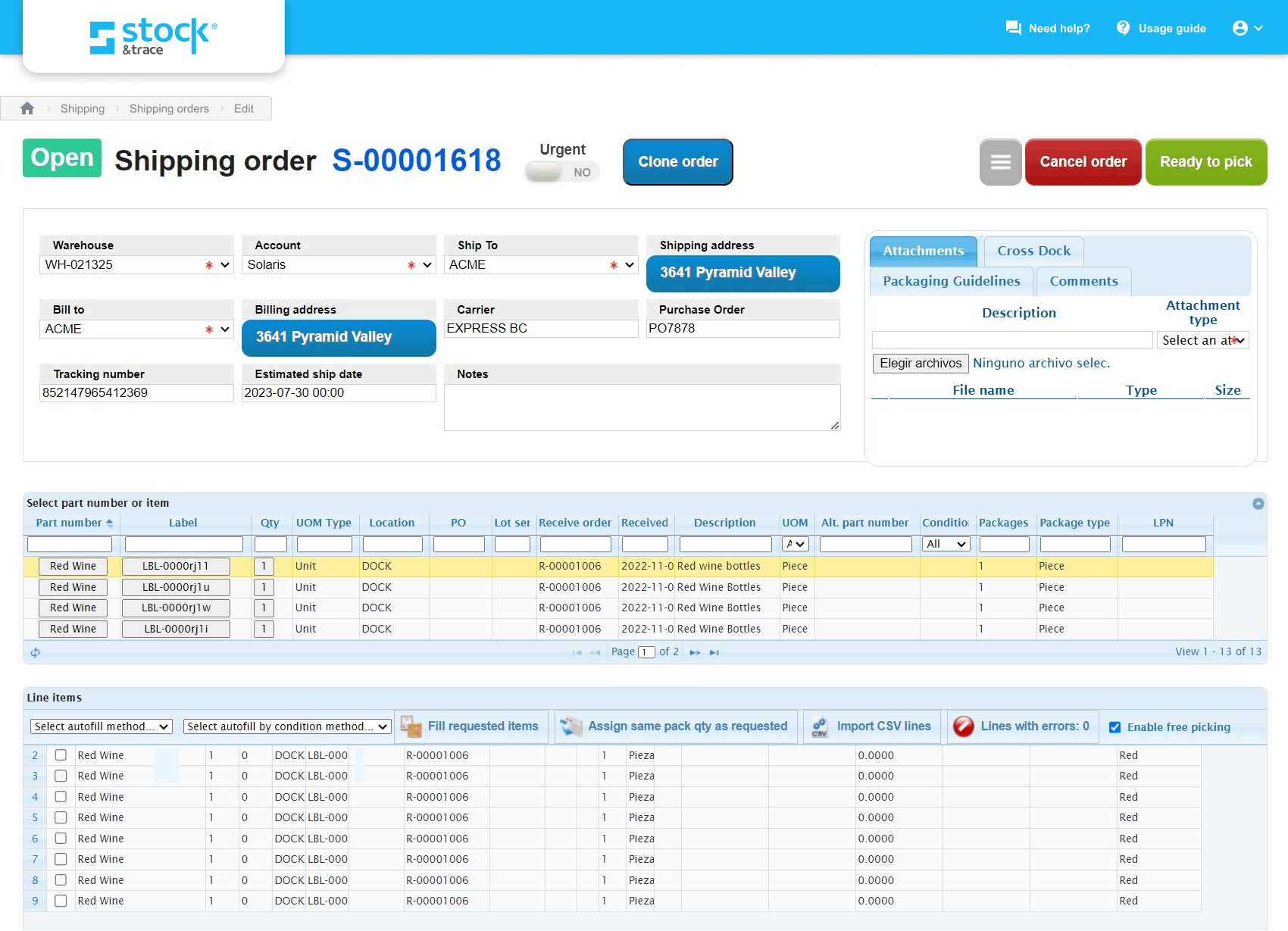
An example of a shipping order in CPG software
Features of CPG software
All ERP systems include financial management and integrated business operations features, with most systems also sharing several common functionalities such as accounting, inventory management, purchase order management, billing and invoicing, order management, reporting/analytics, and task management.
Core CPG software features
Each year, we speak to hundreds of professionals looking for CPG software and analyze those conversations to better understand which features are critical to them. Based on those discussions and analysis of our review data, here are the features we believe are core to manufacturing software.
Feature | Description |
Financial management | Critical for 84% of reviewers, this feature provides a clear view of your organization's financial health by facilitating financial planning, analysis, and reporting. |
Integrated business operations | Under one umbrella, this combines industry-specific management applications, such as supply chain management, human resources (HR), project management, and manufacturing. 76% of reviewers find this crucial. |
Common CPG software features
Based on our research and conversations with manufacturing professionals looking for ERP software, here are the features that are common, but not absolutely necessary.
Feature | Description |
Order management | Streamlines the entire order processing cycle, enhancing the efficiency from order receipt to fulfillment. 89% of users rate this feature as highly critical. |
Billing and invoicing | Automates billing and invoicing processes, reducing errors and improving cash flow management. 87% of users rate this feature as essential. |
Inventory management | Helps businesses maintain optimal inventory levels, manage stock distributions, and reduce costs associated with overstocking or stockouts. 85% of users also rate this feature as critical. |
Purchase order management | Streamlines the purchasing process, from order placement to inventory receipt and payment, ensuring cost-efficiency and proper record-keeping. 82% of users rate this feature as critical. |
Reporting/analytics | Provides insights into business performance, helping stakeholders make informed decisions based on real-time data. 85% of users rate this feature as important. |
Lot tracking | Track products along the supply chain by lot numbers to manage quality control and compliance. |
Customer management | Maintain a repository of customer profiles segmented by their preferences, purchase history, loyalty programs, and other details. |
Pricing management | Create sales quotes and handle product discounts as well as rebates. |
For more information on CPG features and recommendations, feel free to schedule an appointment with Routh or one of his colleagues.
Benefits and competitive advantages of CPG software
When talking to CPG professionals, Cantu says they’re often looking for better reporting and analytics automation.
“I have conversations with business owners who are selling on ecommerce platforms and have trouble pulling reports from all of those platforms. They’re looking for a system that will automatically update and pull that information so they can spend less time going to each platform and manually pulling the reports.”
In general, CPG software is designed to make your job more automated, efficient, and easier by taking some of the manual tasks you’re doing and streamlining them.
In that same vein, Routh points out that most business owners searching for CPG software are dealing with difficult order management and are looking to be able to automate that process.
“If they’re a manufacturer of consumer packaged goods, they need software to track raw material inventory. Distributors need to track their inventory and want automated systems that can help do that so that when they do an order, it automatically pulls those items from the inventory without having to do it manually.”
In addition to better bidding and communication, you’ll also find several other benefits that come with utilizing CPG software that will directly impact your bottom line:
Streamlined business operations: An ERP solution stores and tracks data across an organization, from warehouse management to benefits administration. Many ERP packages provide these functions as built-in software modules, but some also offer users the option to integrate stand-alone third-party tools, thus consolidating disparate applications into a single, unified ERP system.
Workflow automation: By leveraging advancements in artificial intelligence (AI) technology (e.g., machine learning, natural language processing), an ERP solution can automate routine business processes and free up human capital to focus on tasks that require human intervention.
Enhanced accessibility: With an increasing number of cloud-based options and IoT-enabled functionality (internet of things), such as smartphone access, ERP applications offer businesses unprecedented visibility into day-to-day operations. And all that information is accessible in real time, giving users the ability to retrieve and modify data on the fly.
When selecting a new system, CPG professionals need to reconsider their business process first, and then find the application provider that will most closely map to those processes or automate a new, more effective set of processes. They also need to get a wide set of users involved in the selection process so that each user feels invested in the new program and will adopt it when it goes live. Finally, you need to invest in proper training so that new users get up to speed on the system quickly and realize benefits from the new system early on. Here are a few examples of how these tools can help you gain a competitive advantage in the marketplace:
Increased operational efficiency: Through process automation and lean workflow management, an ERP platform can significantly boost operational efficiency and productivity.
Better data management: Data mismanagement and disorganization can stagnate a business, preventing it from reaching its full potential. But with ERP software, individuals across a business can find the information they need in a single system, rather than juggling multiple tools and risking duplicate or inaccurate data.
Informed business decisions: Advanced analytics bring deeper insights, giving decision-makers greater breadth of detail and a better understanding of business initiatives. ERP software's reporting capabilities empower leaders to make more informed decisions and better position their businesses for success.
How to choose the right CPG software
When you start the process of checking out potential CPG software solutions, you should detail all your requirements and categorize them based on their importance. Nice-to-have features, such as fixed asset tracking, can come at the very end. Therefore, the solutions you’re considering should address all your crucial needs first.
Step 1: Define your requirements
Before you start the CPG software selection process, begin outlining the requirements that are unique to your business. Not only will these guide you to the platform that meets your current demands—you will end up with software that supports your long-term goals as well.
Ideal deployment model
The two common types of system architecture are on premise and cloud-based. On-premise deployment involves installing the solutions on servers that are housed in your building. While this solution gives you more security because your licensing isn’t reliant on cloud-based services, it can be tiresome and expensive to maintain and upgrade the hardware over time.
On the other hand, the cloud gives users the flexibility of any time, anywhere access but the internet connection needs to be fast and steady all the time.
In general, you’ll find that most ERP and CPG software solutions are cloud-based, but on-premise solutions still exist if that’s something you need for your business.
Common CPG integrations
While CPG tools offer many functionalities that help companies manage different business processes, they are part of a larger software ecosystem consisting of tools such as PLM, CRM, and more. The CPG tool you buy must offer built-in integration with this closely related family of third-party tools. A benefit of this, for example, would be the ability to extract business insights and pricing guidelines from tools such as CRM.
Step 2: Make a shortlist of CPG software
With so many CPG options to choose from, it can be hard to narrow down your list, but it doesn’t have to be. Start by making a list of must-have and nice-to-have features. Your must-have features should be your primary focus, and every vendor on your shortlist must include those features. Nice-to-have features are not necessary to the success of your business but might make certain aspects easier—these might be features that aren’t included in every piece of software and might cost extra.
Once you have settled on your list of features, start looking at vendors. Find ones that have the features you need, and narrow your list of potential vendors to no more than five.
For more help and information about how to select your software, check out these resources:
Make Your Software Search More Seamless With a Software Advisor
After Your Advisor Call: 4 Tips to Keep Your Software Purchase on Track
Get qualified help from an advisor
At Software Advice, our advisors have experience helping hundreds of CPG professionals identify solutions that match their needs and budgets.
If you need guidance, you can chat online now with an advisor or schedule a phone call. In just a few minutes, your advisor will help you identify a shortlist of options that align with your company’s requirements.
Step 3: Pick your best option
You’ve compiled a list of your top choices, so now you need to start scheduling vendor demos. During your demos, you can explore features, understand pricing better, and ultimately make the right choice for your business. However, don’t go into these vendor demos without a plan, or you will be wasting your time.
How to prepare for vendor demos
Once you’ve compiled your shortlist of CPG software systems, schedule demo sessions with each vendor in order to learn more about their product. Our advisors are sometimes able to schedule these for you. This is your chance to ask questions about specific features they offer, pricing, technical support, training tools, and anything else that might be an important factor in choosing the right system.
Some questions you should consider asking vendors in each demo include:
How does the system architecture leverage emerging technologies?
How much will it cost to secure and maintain access to desired capabilities?
How can you migrate existing data to the tool?
What services are available to support implementation and deployment?
What long-term strategies are in place to improve your products and services?
About our contributors
Author
Molly Burke is a senior analyst and writer for Software Advice. She covers customer experience and marketing in the retail and restaurant industries, with a focus on how emerging technology is transforming the way everyday people shop. Her research helps business owners make software investment decisions that will help them navigate the ever-shifting retail landscape.
Molly’s research and analysis is informed by more than 120,000 authentic user reviews on Software Advice and nearly 8,000 interactions between Software Advice software advisors and retail software buyers. Molly also regularly analyzes market sentiment by conducting surveys of retail and restaurant leaders, as well as consumers, so she can provide the most up-to-date and helpful information to small and midsize businesses purchasing software or services.
Her insights on generative AI, social media, and other tech trends have been featured in The New York Times, Vogue, BBC, CNBC, Forbes, and the Financial Times, among other publications.
Editor
Caroline Rousseau is a content editor at Software Advice. A former content analyst, Caroline has, for the past five years, built, written and edited research reports about technological trends, opportunities, and challenges with a SMB audience in mind. Her content has been featured in French Tier 1 media including Le Monde, L’Express and Le Figaro, among other publications.
Her previous experience as a graphic designer, translator and LQA specialist in various industries converged into a skill set that allows her to create compelling content about today’s business matters. Caroline’s personal interests include literature and art and she has a passion for Albert Camus, graphic novels and drawing.
Advisors
Adrian Cantu is a software advisor. He joined Software Advice in 2022, and is based in Austin, TX.
Adrian works directly with small business leaders to connect them with best fit software providers. He assesses the technology needs of small businesses seeking manufacturing, distribution, fleet management, and professional services software. He has a background in sales and has worked in the service industry.
Adrian’s favorite part of being a software advisor is when the buyer sees the value in the service provided and expresses how appreciative they are.
Nate Pozen is a buyer advocate team leader. He joined Software Advice in 2021 as a software advisor, and now he manages a team of four software advisors. He is based in Austin, TX.
Nate and his team helps small businesses find the right HR, CRM, accounting, project management, and manufacturing software for their needs each year. They’re able to do this through one-to-one conversations designed to narrow down the list of potential tools to only those that are the best fit.
His favorite part of being a Software Advice advisor team manager is partnering with buyers to help them through their entire software journey.
Isaac Routh is an advisor manager. He joined Software Advice in 2020 as a software advisor, and now he manages a team of seven software advisors. He is based in Austin, TX.
Isaac and his team help small businesses find the right ERP, legal, business intelligence, and accounting software for their needs each year. They’re able to do this through one-to-one conversations designed to narrow down the list of potential tools to only those that are the best fit.
His favorite part of being a Software Advice advisor team manager is educating buyers and supporting small business owners.
Sources
Software Advice software pricing data: Only products with publicly available pricing information and qualified software products within the category are included in the pricing analysis. Read the complete methodology.
Software Advice advisor call notes: Findings are based on data from telephonic conversations that Software Advice’s advisor team had with small-to-midsize businesses seeking general contractor tools. For this report, we analyzed phone interactions up until the date of production. Read the complete methodology.
Software Advice reviews data: Software Advice reviews are collected from verified users for individual software products. For this report, we analyzed reviews from August 31, 2023 to August 31, 2024.
CPG Software FAQs
- What is CPG system?
Consumer packaged goods (CPG) systems are software solutions similar to enterprise resource planning (ERP) software, but specialized for CPG businesses. These tools allow businesses to manage and monitor products as they move along the supply chain, from manufacturing to store shelves.
- What do CPG stand for?
CPG stands for consumer packaged goods, a category of everyday products that consumers buy and replace frequently, including food, beverages, cosmetics and personal care products, and cleaning products.
- What is CPG analytics?
CPG analytics refers to the data and reporting used by CPG businesses to track and manage business performance. This can include key performance indicators like stock levels and sales.
- How are CPG companies using AI?
CPG companies are exploring artificial intelligence (AI) to scale their product offerings and personalize the customer experience. Examples of this include using generative AI to add digital experiences or direct-to-consumer channels, courting and converting machine customers, and personalizing product offerings based on customer data such as preferences and physical attributes. [4]
- How big is the CPG software market?
Here at Software Advice, you can browse over 100 CPG software products that have verified user reviews, so you can find the one that’s best suited to your business. You can also speak with our advisors, who are experienced in providing personalized help in finding the right software.