
Best Password Management Software of 2026
Updated January 27, 2025 at 9:53 AM
- Popular Comparisons
- Buyers Guide
Compare Products
Showing 1 - 25 of 93 products
Compare Products
Sort by
Reviews: Sorts listings by the number of user reviews we have published, greatest to least.
Average Rating: Sorts listings by overall star rating based on user reviews, highest to lowest.
Alphabetically (A-Z): Sorts listings by product name from A to Z.

Zoho Vault is a cloud-based security solution that helps teams manage their online passwords. Users can store and organize passw...Read more about Zoho Vault


Zoho Vault's Best Rated Features
See All
Zoho Vault's Worst Rated Features
See All

Bitwarden is an open source password management solution that empowers enterprises and individuals to securely store and share s...Read more about Bitwarden

Bitwarden's Best Rated Features
See All
Bitwarden's Worst Rated Features
See All

NordPass Business — The Ultimate Password Manager for Your Organization. Trusted by businesses worldwide, NordPass Business off...Read more about NordPass Business
NordPass Business's Best Rated Features
See All
NordPass Business's Worst Rated Features
See All

Rippling is an integrated workforce management platform that unifies HR, IT, and finance tools to streamline operations. It cent...Read more about Rippling


Rippling's Best Rated Features
See All
Rippling's Worst Rated Features
See All

Dashlane provides intelligent credential security, protecting businesses against the threat of human risk. The Dashlane Omnix™ p...Read more about Dashlane for Business
Dashlane for Business's Best Rated Features
See All
Dashlane for Business's Worst Rated Features
See All

ADSelfService Plus is an identity security solution that ensures secure and seamless access to enterprise resources and establis...Read more about ManageEngine ADSelfService Plus


ManageEngine Password Manager Pro is an enterprise-grade privileged password management solution. It securely stores and manages...Read more about ManageEngine Password Manager Pro


Shared computer access control with 2FA and automatic user-switching. Login to shared computers using phoneless-2FA and automati...Read more about GateKeeper Enterprise


Conecta Suite is the ideal solution for those looking to maximize the potential of Google Workspace and boost team productivity....Read more about Conecta Suite
Conecta Suite's Best Rated Features
See All
Conecta Suite's Worst Rated Features
See All

LogMeOnce is a cloud-based password and identity management solution that enables businesses of all sizes to manage login creden...Read more about LogMeOnce


LogMeOnce's Best Rated Features
See All
LogMeOnce's Worst Rated Features
See All

Avatier Identity Anywhere is a cloud-based identity management solution designed to help businesses manage their employees' digi...Read more about Avatier Identity Anywhere


AxCrypt is an encryption software with 256-bit AES encryption, developed for both businesses and private individuals. The Premiu...Read more about AxCrypt

AxCrypt's Best Rated Features
See All
AxCrypt's Worst Rated Features
See All

Twilio User Authentication & Identity offers digital identity verification and intelligence tools to build mutual trust between ...Read more about Twilio User Authentication & Identity
Twilio User Authentication & Identity's Best Rated Features
See All
Twilio User Authentication & Identity's Worst Rated Features
See All

TeamPassword is a cloud-based solution that enables small businesses to share and manage passwords across teams. Key features in...Read more about TeamPassword
TeamPassword's Best Rated Features
See All
TeamPassword's Worst Rated Features
See All

Password Depot is an on-premise password management solution that helps businesses secure passwords and other confidential data....Read more about Password Depot
Password Depot 's Best Rated Features
See All
Password Depot 's Worst Rated Features
See All

Forghetti is a password management solution that allows small businesses to generate passwords, PINs and memorable words by draw...Read more about Forghetti

1Password protects and stores all company secrets beyond SSO such as passwords, security tokens, 2FA codes, documents, and passk...Read more about 1Password
1Password's Best Rated Features
See All
1Password's Worst Rated Features
See All

Specops Password Auditor is a password audit tool that can identify password-related vulnerabilities within Active Directory acc...Read more about Specops Password Auditor
Specops Password Auditor's Best Rated Features
See All
Specops Password Auditor's Worst Rated Features
See All

VaultOne offers Privileged Access Management (PAM), Identity Management (IAM) and Passwords Management (PM) into a single soluti...Read more about VaultOne

heylogin is the password solution for your business. A smartphone swipe instead of a master password makes your everyday life pa...Read more about heylogin

Beyond Identity is fundamentally changing the way workforces and customers log in. We eliminate passwords and all phishable fact...Read more about Beyond Identity


Beyond Identity's Best Rated Features
See All
Beyond Identity's Worst Rated Features
See All

Entrust Identity as a Service is a cloud-based identity and access management service that provides digital security solutions f...Read more about Entrust Identity as a Service

Uniqkey is Europe’s leading password and access manager. It simplifies employee security while empowering companies with enhance...Read more about Uniqkey


Passbolt is the open-source password manager designed with team needs in mind, simplifying password management for organizations...Read more about Passbolt
Passbolt's Best Rated Features
See All
Passbolt's Worst Rated Features
See All

Proton Pass is a password manager designed to securely store, share, and auto-fill login credentials using end-to-end encryption...Read more about Proton Pass


Popular Comparisons


Buyers Guide
This detailed guide will help you find and buy the right password management software for you and your business.
Last Updated on January 27, 2025Poor password management is one of the major causes of security breaches that can cost businesses a fortune and damage their reputation. As a business, it's important that you implement strong password policies that not only protect your company data but also prevent hacking attempts. One of the most efficient ways of doing this is using password management software.
All password management software don’t necessarily offer the same features. Your right fit will solely depend on your security requirements. To help you get started, we’ve created a buyers guide with all the information required to evaluate the options available for your business.
In this guide, we’ll cover:
Here’s what we’ll cover:
What is password management software?
Password management software is an application that saves, generates, and manages passwords for various online accounts. It ensures security by storing passwords and login credentials of all business accounts in a secure database.
This database is encrypted using a master password, the only password that users need to remember. All encrypted password-related information is either stored in the local memory of a business user’s device or on the cloud. Password managers eliminate the need to remember multiple passwords, as all passwords are stored in a centralized encrypted database.
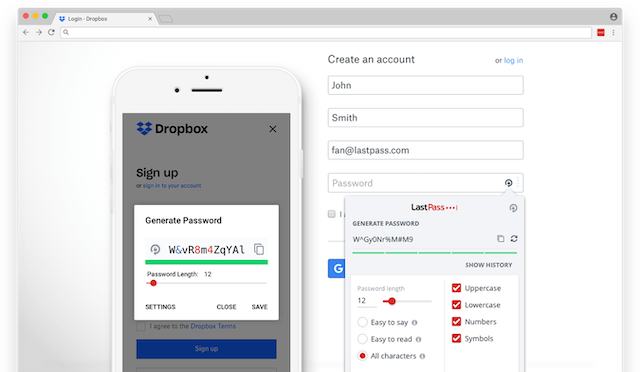
Password generator in LastPass (Source)
Common features of password management software
Password management software can not only remember all your passwords but also protect your business from hacking attempts. Thus, choosing software with the right features is essential. Here’s a list of the common features that you should look for when making a purchase.
Password generator | Create long, random, and unique passwords that are strongly encrypted. |
Credential management | Create, manage, and revoke credentials for user accounts. |
Single sign on (SSO) | Access multiple applications using a single set of login credentials. |
Password synchronization | Sync and manage user passwords across devices. |
Password reset | Allows end users to reset their passwords through a self-service portal. |
Multifactor authentication | Authenticate users via at least two identification methods, such as mobile and email OTP. |
User management | Manage user access for various IT resources, such as systems, devices, applications, storage systems, and networks. |
What type of buyer are you?
Based on the number of users, there are three broad categories of password management software buyers: freelancers or independent contractors, small and midsize businesses (SMBs), and large businesses. Let’s have a look at all the three categories.
Freelancers or independent contractors: Password management software designed for personal use supports a single device and lacks administrative capabilities. Such software may even have a cap on the number of applications supported. Freelancers and individual contractors who simply want to secure their business accounts and don't need administrative functions can opt for this software. Basic software features such as auto-fill for login forms, complex password generation, credential storage, and periodic alerts for updating passwords should fulfill the requirements of this type of buyers.
Small (less than 200 users) and midsize (200–500 users) firms: SMBs have greater password management needs than independent contractors, as they have more users and consequently a higher number of business accounts to secure. Such businesses should opt for software that doesn’t have a cap on the number of users and applications supported. Password management software equipped with reporting capabilities, a centralized dashboard to monitor password status, credential management, and multifactor authentication should fit the requirements of SMBs.
Large businesses (more than 500 users): Enterprise-level businesses employ a large number of employees; hence, they have advanced password protection requirements. It’s essential that large businesses choose software that can enforce password hygiene as well as monitor user behavior. Such software solutions restrict password-related information access to account owners, perform security audits to assess the strength of employee passwords, and alert businesses about password-related vulnerabilities to prevent cyberattacks and data breaches.
Benefits of password management software
Understanding the benefits of password management software will help you assess its usability in your line of business. Following are the key benefits of password management software:
Protection against cyberthreats: According to a password check website, the password “123456” has been used over 23 million times, making it one of the top 10 most hacked passwords. Using such passwords can result in severe security breaches. Password management software’s password generator feature helps create long, random passwords that are unique. The software also protects against phishing attacks by detecting fake websites and preventing such websites from accessing sensitive passwords.
Reduced burden on employees: In a business setup, employees have to work on multiple applications, and remembering the password of each application is a challenge. Password-related challenges are also a liability for businesses. Labor and productivity loss per company owing to the time spent by users on entering and/or resetting passwords is estimated to be $5.2 million annually. With password management software, employees need to set and remember just their master password, which they can use to access all other stored passwords.
Better password hygiene: Password hygiene involves the different measures taken by businesses to make their passwords more difficult to guess. While creating unique and strong passwords remains a crucial part of password hygiene, changing passwords periodically is also equally important. However, research shows that only 55% of people change their password even after a hack. Password management software issues repeated reminders to business users to change or update their passwords and in turn promotes good password hygiene.
Considerations when choosing password management software
Every organization has specific password management requirements, and it’s essential to choose a tool that can fulfill these requirements. Here are a few things that you should take into consideration when selecting a password management solution.
Compatibility with the devices you use: Most organizations use the same password management software across devices, and it’s likely that you’ll too. An incompatible solution will force your employees to find an alternative password management approach, making your business more prone to security breaches. Thus, it’s essential that the software you choose is compatible with all your existing devices, platforms, and browsers.
Credential management and account recovery: User account and system credentials should be accessible only to the account owner. Thus, it’s essential that you choose software with access control functionality to ensure that user passwords can’t be accessed by anyone else, including third-party cloud service providers. The software should also provide secure password recovery methods so that account owners can recover their accounts in case they forget the master password.
Strong and uniform password policy: Your preferred password management software should be capable of assessing the quality and strength of user passwords and suggesting changes to make them difficult to guess or hack. Software equipped with uniform password composition rules and the ability to track password history will help your users avoid easily guessed passwords. It’ll also allow administrators to set company-wide password policies, such as mandatory use of multifactor authentication.
Note: The applications selected in this article are examples to show a feature in context and are not intended as endorsements or recommendations. They have been obtained from sources believed to be reliable at the time of publication.