
Best Document Generation Software of 2026
Updated March 19, 2026 at 11:42 AM
- Popular Comparisons
- FrontRunners
- Buyers Guide
Compare Products
Showing 1 - 25 of 220 products
Compare Products
Sort by
Reviews: Sorts listings by the number of user reviews we have published, greatest to least.
Average Rating: Sorts listings by overall star rating based on user reviews, highest to lowest.
Alphabetically (A-Z): Sorts listings by product name from A to Z.

HotDocs is the premier document automation solution designed for businesses of any size or type, empowering users to convert fre...Read more about Mitratech HotDocs


ClickLearn is a Digital Adoption Platform designed to capture work processes in enterprise software and generate learning conten...Read more about ClickLearn


Adobe Acrobat helps teams create, edit, sign, and share documents securely trusted worldwide for reliable PDF workflows. Now wit...Read more about Adobe Acrobat


Adobe Acrobat's Best Rated Features
See All
Adobe Acrobat's Worst Rated Features
See All

Droplet is a forms and workflow automation solution that helps businesses design web forms and manage workflows. It enables orga...Read more about Droplet


Droplet's Best Rated Features
See All
Droplet's Worst Rated Features
See All

BrandOffice, developed by BrandQuantum is a cloud-based software that integrates with Microsoft Office and empowers every employ...Read more about BrandOffice


BrandOffice's Best Rated Features
See All
BrandOffice's Worst Rated Features
See All

DocOrigin is a document generation solution that is reliable, fast, space-efficient, cost-effective, enterprise-class, multinati...Read more about DocOrigin

Processes. People. Documents. No code automation platform designed for compliance, HR, legal, operations, procurement, sales an...Read more about Legito


UnForm is a document management solution that helps businesses automate their entire document-to-delivery process. It offers dat...Read more about UnForm


Any organization that must manage multiple documents that relate to each other requires contract automation (also known as docum...Read more about Celant Document Automation Engine
Celant Document Automation Engine's Best Rated Features
See All
Celant Document Automation Engine's Worst Rated Features
See All

Formstack Documents is a web-based document management system that enables users to merge data from the cloud into custom PowerP...Read more about Formstack Documents


Formstack Suite is a cloud-based form building solution that allows organizations to build online forms, collect information, in...Read more about Formstack Suite
Formstack Suite's Best Rated Features
See All
Formstack Suite's Worst Rated Features
See All

EasySend helps you evolve forms into easy digital experiences with no code. By going digital, you’ll streamline customer data in...Read more about EasySend


The advanced customization options offered by DocuGenerate can help your business generate documents for any business need, from...Read more about DocuGenerate


DocuGenerate's Best Rated Features
See All
DocuGenerate's Worst Rated Features
See All

PandaDoc is cloud-based document management software that helps users create proposals, quotes, contracts and more. The solution...Read more about PandaDoc
PandaDoc's Best Rated Features
See All
PandaDoc's Worst Rated Features
See All

Publuu is a digital tool that transforms static PDF files into interactive flipbooks. This software provides businesses with an ...Read more about Publuu

Publuu's Best Rated Features
See All
Publuu's Worst Rated Features
See All

iLovePDF is an online document management platform designed for managing and editing PDF documents. It provides tools for tasks ...Read more about iLovePDF

iLovePDF's Best Rated Features
See All
iLovePDF's Worst Rated Features
See All

Beefree is a cloud-based email marketing solution designed to help businesses, agencies, freelancers, nonprofits create, edit an...Read more about Beefree

Beefree's Best Rated Features
See All
Beefree's Worst Rated Features
See All

Folge is an on-premise application that helps businesses in IT, education, semiconductors, and other industries create documenta...Read more about Folge

Folge's Best Rated Features
See All
Folge's Worst Rated Features
See All

Microsoft Word is a productivity solution designed to help businesses of all sizes create, edit, view and share files with co-wo...Read more about Microsoft Word
Microsoft Word's Best Rated Features
See All
Microsoft Word's Worst Rated Features
See All

Docupilot is a cloud-based document generation solution that helps businesses of all sizes create, implement and manage automate...Read more about Docupilot
Docupilot's Best Rated Features
See All
Docupilot's Worst Rated Features
See All

Jotform is a cloud-based form automation solution that enables users to publish online forms and record customer responses. It h...Read more about Jotform Sign

Jotform Sign's Best Rated Features
See All
Jotform Sign's Worst Rated Features
See All

Pathagoras is an add in to Microsoft Word. It is the only plain text document assembly program on the market. 'Plain text' mea...Read more about Pathagoras

RFP Software for Government Contracting On average, customers increase their win rate by 9.8% with VT Docs. VisibleThread is a t...Read more about VT Docs
VT Docs's Best Rated Features
See All
VT Docs's Worst Rated Features
See All

Gavel is a document automation software designed to simplify document creation and client intake processes for legal professiona...Read more about Gavel

Gavel's Best Rated Features
See All
Gavel's Worst Rated Features
See All

Documint is a document generation solution that helps enterprises automate the generation of business documents in real-time. Th...Read more about Documint


Documint's Best Rated Features
See All
Documint's Worst Rated Features
See All
Popular Comparisons



Your Guide to Top Document Generation Software, July 2024
Software Advice uses reviews from real software users to highlight the top-rated Document Generation products in North America.
Learn how products are chosenExplore FrontRunners


“Usability” includes user ratings for Functionality and Ease of Use.
“Customer Satisfaction” includes user ratings for Customer Support, Likelihood to Recommend and Value for Money.
Reviews analysis period: The reviews analysis period spans two years and ends the 15th of the month prior to publication.
Buyers Guide
This detailed guide will help you find and buy the right document generation software for you and your business.
Last Updated on January 27, 2025If you run a business, you must be familiar with documents such as invoices, contract forms, employment agreements, and financial reports. You probably have a document template that includes branding elements such as your company logo and color as well as relevant data fields. And you most likely create these documents in bulk.
That said, you must also be aware how scattered the document generation process can get. You can end up using multiple software tools for creating, editing, compiling, and sharing documents. The process is time-consuming, and it’s also a task to trace and fix errors.
One way to save time and worry is using document generation software. The software can help you generate documents in bulk—numbers can go up to hundreds or thousands—and eliminate the need to switch between multiple tools.
A wide range of software options is available on the market, and choosing the one that best meets your needs and budget is important. This guide will help you understand the different factors you must consider when shortlisting a document generation solution.
Here's what we'll cover:
What is document generation software?
Document generation software is a software tool that helps create documents such as contracts and invoices in bulk quantities. It offers a single centralized platform for document creation, editing, sharing, and versioning. Most tools support document generation in various formats such as PDF, DOC, and HTML.
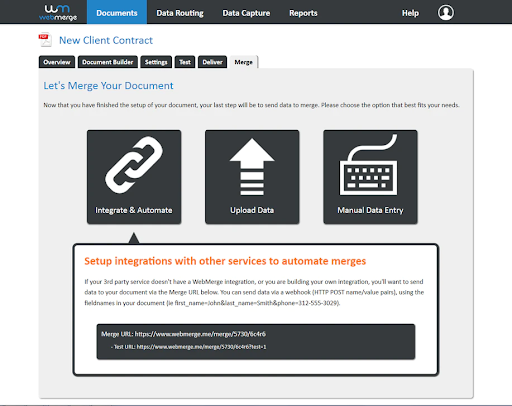
Merging documents in Formstack (Source)
Common features of document generation software
Here are some common features of a document generation tool:
Batch document processing | Generate multiple documents at a time, even as many as a thousand. Share the documents with end users via communication channels such as email. |
Collaboration | Collaborate with stakeholders in real time. Allow them to add comments to the documents and edit them simultaneously. |
Digital signature | Add digital signatures to documents. Create a list of signatories, along with their email addresses, and collect their digital signatures. Vendors offer the feature as part of their tool or via integration with third-party electronic signature software. |
Interaction tracking | Add trackable document links for each recipient or recipient group. The links let you track how customers interact with your documents, i.e., which links they've clicked on. |
Multiple output formats | Generate, save, and export documents in multiple formats such as PDF, HTML, DOC, and RTF. Some solutions also let you generate the same document in multiple formats simultaneously. |
Templates | Create customized document templates that have your company’s logo, color, headers, graphics, etc. You can also use built-in templates and save them for future usage. |
What type of buyer are you?
These are the two common buyer categories for document creation software:
Buyers looking for industry-specific software: Buyers from industries such as legal services, insurance, and telecommunication need to create templated documents such as legal contracts, insurance policies, and telephone bills in bulk. They should opt for a tool that offers predesigned templates for documents commonly used in their industry of operation. For example, a legal document generation tool has predesigned templates for documents approved by bar associations or legal publishers.
Buyers looking for industry-independent software: These buyers don’t need a tool that caters to a specific industry. Instead, they prefer creating their own customized templates and would like to go for tools that are known as all-in-one or industry-independent solutions. These buyers usually include industry-agnostic IT companies and conglomerates.
Benefits of document generation software
Here are the key benefits of document automation software for your business:
Improved efficiency: Document generation software helps improve process efficiency by automating repetitive tasks such as copying a template across documents, inserting graphics, and adding signatures. This reduces the overall time required to create a document as well as the chances of human error.
Reduced costs:Document generation software offers features such as batch document production and predefined templates that help create documents in bulk. You don’t have to maintain dedicated resources for overseeing or auditing documents or invest in multiple software tools, which leads to better cost savings.
Key considerations
When selecting a document generation tool for your business, keep the following points in mind:
Service record of the vendor: You may be tempted to buy a tool that offers the features you need in your desired price range, but there’s more to the picture. Don’t forget to run a background check to ensure the provider has a good track record. Consult someone who has already used the tool, read customer testimonials on the vendor’s website, or read user reviews on third-party websites such as ours.
Pricing options: The price of the software you’ve selected may change as your business expands and you need more features. Confirm software upgrade charges with the vendor and ensure it’s a price you’re comfortable with. If you don’t check this early on, you may have to switch vendors due to higher-than-expected costs, which could lead to potential loss of data and additional employee training.
Note: The application selected in this article is an example to show a feature in context and is not intended as an endorsement or recommendation. It has been obtained from sources believed to be reliable at the time of publication.