
Best Email Signature Software of 2026
Updated March 19, 2026 at 10:22 AM
- Popular Comparisons
- Buyers Guide
Compare Products
Showing 1 - 25 of 45 products
Compare Products
Sort by
Reviews: Sorts listings by the number of user reviews we have published, greatest to least.
Average Rating: Sorts listings by overall star rating based on user reviews, highest to lowest.
Alphabetically (A-Z): Sorts listings by product name from A to Z.

With CodeTwo Email Signatures 365, you can centrally manage organization-wide email signatures, legal disclaimers, automatic rep...Read more about CodeTwo Email Signatures 365


CodeTwo Email Signatures 365's Best Rated Features
See All
CodeTwo Email Signatures 365's Worst Rated Features
See All

Crossware is an email signature platform designed to help enterprises create consistent and compliant email signatures across al...Read more about Crossware Email Signature

BrandMail by BrandQuantum is an email signature solution that helps businesses design and manage employees' email signatures thr...Read more about BrandMail


BrandMail's Best Rated Features
See All
BrandMail's Worst Rated Features
See All

The smarter way to send email. Opensense helps marketing, sales, compliance, and IT teams unlock the power of employee email to ...Read more about Opensense


WiseStamp is an award-winning, enterprise-grade email signature management platform designed to scale with the needs of market-l...Read more about WiseStamp
WiseStamp's Best Rated Features
See All
WiseStamp's Worst Rated Features
See All

Exclaimer is the leading provider of email signature management solutions for Microsoft and Google email services. Its scalable ...Read more about Exclaimer

Exclaimer's Best Rated Features
See All
Exclaimer's Worst Rated Features
See All

Dynasend is a cloud-based email signature management solution designed to help organizations of all sizes streamline the creatio...Read more about Dynasend
Dynasend 's Best Rated Features
See All
Dynasend 's Worst Rated Features
See All

Sign.UseWise is a comprehensive email signature management solution that allows organizations to easily create and deploy profes...Read more about Sign.UseWise
Sign.UseWise's Best Rated Features
See All
Sign.UseWise's Worst Rated Features
See All

Signature 365 is an email signature management solution designed for Microsoft 365 and Exchange environments. It allows organiza...Read more about Signature 365
No reviews yet


Signature.email provides a no-code visual drag and drop editor to design a custom email signature generator for your organizatio...Read more about Signature.email


Bybrand is a cloud-based secure email signature manager designed for IT managers and marketing professionals. It enables employe...Read more about Bybrand
Bybrand's Best Rated Features
See All
Bybrand's Worst Rated Features
See All

Selzy is a cloud-based email marketing platform for any type of business. It allows marketers to design professional emails in l...Read more about Selzy


Selzy's Best Rated Features
See All
Selzy's Worst Rated Features
See All

Conecta Suite is the ideal solution for those looking to maximize the potential of Google Workspace and boost team productivity....Read more about Conecta Suite
Conecta Suite's Best Rated Features
See All
Conecta Suite's Worst Rated Features
See All

Rocketseed makes managing business email signatures and banners easy for both IT and Marketing teams. Designed for businesses of...Read more about Rocketseed Email Signatures
Rocketseed Email Signatures's Best Rated Features
See All
Rocketseed Email Signatures's Worst Rated Features
See All

Google Workspace Management, Google Drive Compliance, Email Signature, Contact Sharing, Drive Management and more. Protect your...Read more about Patronum

Patronum's Best Rated Features
See All
Patronum's Worst Rated Features
See All

With StampyMail users can manage all company email signatures in a very simple and fast way. Any modification to the signatures ...Read more about Stampymail
Stampymail's Best Rated Features
See All
Stampymail's Worst Rated Features
See All

HoneyBook is a client relationship platform designed to help small businesses manage proposals, contracts, invoices, payments, a...Read more about HoneyBook

HoneyBook's Best Rated Features
See All
HoneyBook's Worst Rated Features
See All

MySignature is a robust signature maker that provides users with a long list of powerful free features that could rival many pai...Read more about MySignature
MySignature's Best Rated Features
See All
MySignature's Worst Rated Features
See All

Letsignit helps organizations create and manage employees' email signatures and add customizable marketing banners to corporate ...Read more about Letsignit
Letsignit's Best Rated Features
See All
Letsignit's Worst Rated Features
See All

Manage all your employees' email signatures from one interface. Design a new template using a powerful and user-friendly tool. C...Read more about Signitic
Signitic's Best Rated Features
See All
Signitic's Worst Rated Features
See All

EngageBay is an AI-powered all-in-one CRM that helps small businesses and startups manage marketing, sales, and customer service...Read more about EngageBay CRM

EngageBay CRM's Best Rated Features
See All
EngageBay CRM's Worst Rated Features
See All

Docunize is an innovative template management solution designed to streamline and personalize the creation of MS Office document...Read more about Docunize


SignatureSatori provides Google Workspace administrators with a centralized platform to manage and deploy email signatures acros...Read more about SignatureSatori


Sigsync is a tool designed for IT admins, marketing teams and compliance officers who need centralized control over email brandi...Read more about Sigsync

Designed for businesses of all sizes, we advocacy is a cloud-based software that helps analyze campaign performance, deploy emai...Read more about we advocacy
Popular Comparisons


Buyers Guide
This detailed guide will help you find and buy the right email signature software for you and your business.
Last Updated on October 14, 2025We pay so much attention to what we write in business emails but not much attention to what goes on at the end of it. But believe it or not, email signatures are as important as the email body and subject.
When someone gets an email with sloppy looking or unprofessional email signatures with inaccurate information, it negatively impacts their opinion about the business. So, as a business, you need to ensure that all your employees have accurate email signatures that are consistent with your brand’s logo, colors, fonts, etc.
But doing all this manually can be challenging, especially if you want to include GIFs, live banners, and graphics in email signatures. To be able to do this, you’d need to invest in an email signature system.
To help you select email signature software that’s right for your business, we’ve created this buyers guide
Here's what we'll cover:
What is email signature software?
Email signature software is a tool that helps businesses standardize their email signatures. Businesses can create professional-looking email signatures using templates and customize them with brand colors, font, social icons, etc.
The software allows integrating ad banners, social media links, promotional banners, and blog links within email signatures. It can provide insights on metrics such as the number of emails sent, opened, clicked, etc.
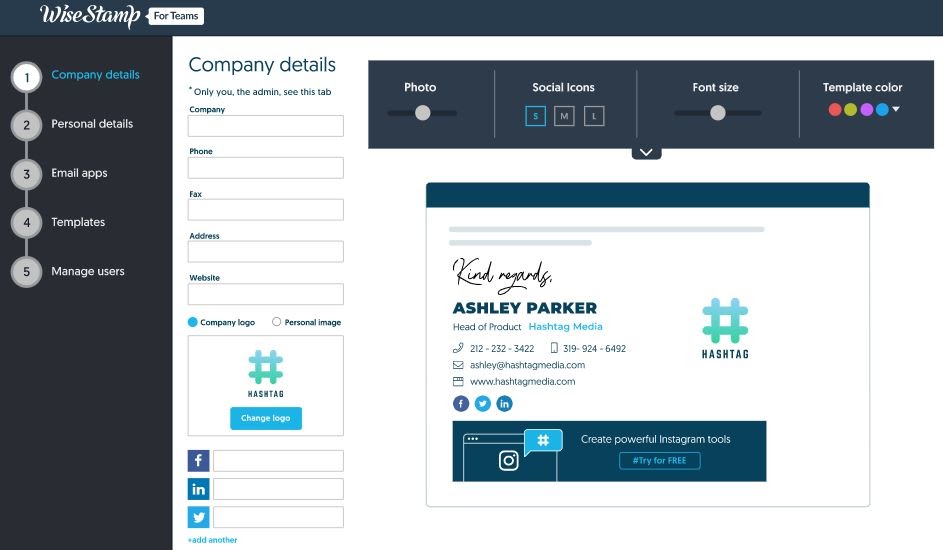
Signature management in WiseStamp (Source)
Common features of email signature software
Here are some common features most buyers seek when purchasing an email signature tool.
Signature management | Allows you to design email signatures from premade templates. You can choose the font style, colors, images, logo with email disclaimers, sender designation, etc. |
Auto-update | Allows you to make changes to the default template. For instance, you can change banners and photos, and the changes will be automatically updated in signatures across your organization. |
Campaign-specific signatures | Allows you to create email signatures specific to a campaign. You can add marketing campaign banners in all email signatures and share sales updates, blogs, company news, and upcoming events. You can choose from a sample banner gallery or and upload your own banners. |
Image library | Offers an image library where you can store images used in your emails. You can use and reuse these images. |
Reporting and analytics | Provides email marketing analytics that offers insights about real-time clicks on banners or other links within emails. You can also get information about the number of senders, templates used, receiver response rate, etc. to gauge the effectiveness of your emails. |
What type of buyer are you?
Before you start evaluating email signature platforms, you'll want to know which buyer category you belong to. Most buyers belong to one of the below categories.
Startups (fewer than 100 employees) and small businesses (up to 500 employees): These buyers are companies with a limited number of employees. So they’d need basic features such as signature management with premade email templates and personalized disclaimers. They might also want to integrate banners or images with company information, blogs, and updates.
Small businesses: Businesses with fewer than 100 employees should look for email signature solutions that track analytics. These solutions can inform marketers if, when, and how often recipients open their emails and which links are clicked to improve email delivery times, designs, call-to-action language, and more.
Midsize and large enterprises (over 500 employees): These buyers have more senders and would prefer customized email signatures across departments but with uniform branding elements. So they can look for advanced features such as multiple link integration in email signatures, multiple live marketing banners, and advanced analytics.
Benefits
There are several benefits of using email signature software. Here are a few of them.
Ensures branding consistency: The tool lets you create a consistent style of email signatures with colors, font, images, etc. unique to your brand. This helps you project uniform branding to your customers and partners.
Enables centralized management: Using an email signature tool, you can create and manage iterations of email signatures (in terms of branding related changes) across the departments. Any changes get synced across immediately.
Allows signature customization: The tool lets you customize signatures for different departments while keeping the branding consistent.
Key considerations
Keep a few things in mind when you set out to invest in an email signature system. Some of the important considerations are:
Discuss with your brand and marketing teams before picking this kind of tool. The tool must offer optimum features to maintain branding consistency and take care of marketing needs such as the ability to insert banner ads and event updates in email signatures.
Ensure that the product you choose is easy to use. You can ascertain this by taking a demo or trying out the free version. Ease of use will help you save money on employee training later on and will ensure easier adoption in the organization.
Note: The application selected in this article is an example to show a feature in context and isn’t intended as an endorsement or a recommendation. It has been obtained from sources believed to be reliable at the time of publication.