
Best Emergency Notification Software of 2026
Updated January 27, 2025 at 9:52 AM
- Popular Comparisons
- Buyers Guide
Compare Products
Showing 1 - 25 of 110 products
Compare Products
Sort by
Reviews: Sorts listings by the number of user reviews we have published, greatest to least.
Average Rating: Sorts listings by overall star rating based on user reviews, highest to lowest.
Alphabetically (A-Z): Sorts listings by product name from A to Z.

EZ Texting is an SMS marketing software designed for businesses to send mass text messages and MMS messages to their audiences. ...Read more about EZ Texting


EZ Texting's Best Rated Features
See All
EZ Texting's Worst Rated Features
See All

Crises Control is a cloud-based solution designed to help organisations of all sizes notify staff quickly and reliably during cr...Read more about Crises Control


All-in-One Platform to Detect, Understand, and Respond to Risk AlertMedia is purpose-built to enable fast, confident decision...Read more about AlertMedia


AlertMedia's Best Rated Features
See All
AlertMedia's Worst Rated Features
See All

From planning to reporting, the four interconnected modules of the Mitratech Continuity Planning platform empower you to manage ...Read more about Preparis

DeskAlerts is a cloud-based and on-premise solution designed to help small to large enterprises send critical notifications to e...Read more about DeskAlerts

Crystal Alarm is the personal alarm that ensures the safety of employees at their workplace. This platform is useful for busines...Read more about Crystal Alarm


Crystal Alarm's Best Rated Features
See All
Crystal Alarm's Worst Rated Features
See All

DERDACK Enterprise Alert® is enterprise-class alert notification and mobile response software. Unique in the market, it is desig...Read more about DERDACK Enterprise Alert


When critical systems fail or incidents happen, SIGNL4 bridges the ‘last mile’ to your staff, engineers, IT admins, and workers ...Read more about SIGNL4

Regroup is a mass notification solution that helps businesses in education, healthcare, hospitality and other industries send an...Read more about Regroup Mass Notification

Regroup Mass Notification's Best Rated Features
See All
Regroup Mass Notification's Worst Rated Features
See All

A robust health, safety and wellness platform, Kokomo24/7® offers a variety of tools for efficient management of complex situati...Read more about Kokomo24/7
No reviews yet

Textla is a messaging platform designed for effective communication via text messages. It enables users to schedule SMS campaign...Read more about Textla


Textla's Best Rated Features
See All
Textla's Worst Rated Features
See All

Dialog Health offers a cloud-based texting platform and communication solutions designed to tackle healthcare's unique challenge...Read more about Dialog Health


Dialog Health's Best Rated Features
See All
Dialog Health's Worst Rated Features
See All

RedFlag is a cloud-based solution that assists businesses of all sizes with sending emergency notifications in real-time. Key fe...Read more about RedFlag

RedFlag's Best Rated Features
See All
RedFlag's Worst Rated Features
See All

DialMyCalls is a cloud-based auto dialer solution that helps businesses of all sizes automate voice broadcasts, text messaging a...Read more about DialMyCalls

The Rave Alert mass notification system gets the right message to the right user at the right time from any internet-connected d...Read more about Rave Alert
Rave Alert's Best Rated Features
See All
Rave Alert's Worst Rated Features
See All

TextMarks is a cloud-based text messaging solution designed to help businesses of all sizes manage SMS marketing, group communic...Read more about TextMarks

FacilityOS is a global leader in facility, asset and visitor management. The integrated FacilityOS platform is supported by ro...Read more about FacilityOS

FacilityOS's Best Rated Features
See All
FacilityOS's Worst Rated Features
See All

Eltropy is a cloud-based digital communication software that helps lenders, credit unions, banks, debt collectors, FinTechs and ...Read more about Eltropy

Parim’s workforce management software lets you automate scheduling for simple and complex needs, track time and attendance with ...Read more about Parim


Parim's Best Rated Features
See All
Parim's Worst Rated Features
See All

Keep people informed when it matters most. Send personalized, informational, and emergency text messages (and calls) fast -- whe...Read more about Text-Em-All


Opsgenie is a cloud-based ITSM and issue tracking solution that helps development and operational teams make strategies for serv...Read more about OpsGenie
OpsGenie's Best Rated Features
See All
OpsGenie's Worst Rated Features
See All

Advanced Entry fully contactless sign-in Kiosk includes an automatic 'Temperature-reader' with 'Face recognition, as well as a c...Read more about Advanced Entry

Advanced Entry's Best Rated Features
See All
Advanced Entry's Worst Rated Features
See All

TextBetter is a business messaging solution that allows businesses to send & receive text messages with any existing landline nu...Read more about TextBetter


NetSupport Notify is designed to help organizations send mass notifications to update employees about announcements, reminders a...Read more about NetSupport Notify

CatapultEMS is the school emergency management system that empowers you to take control of your school's safety in minutes. Whe...Read more about CatapultEMS
CatapultEMS's Best Rated Features
See All
CatapultEMS's Worst Rated Features
See All
Popular Comparisons


Buyers Guide
This detailed guide will help you find and buy the right emergency notification software for you and your business.
Last Updated on January 27, 2025With businesses striving to become more agile, they must ensure that not only their customer-facing operations are accelerated, but also that internal communications are also fast—if not instantaneous. These communications could include instructing employees to back up data due to a software update, informing them about a policy change mandated by regulatory/management decisions, or any other important announcement.
Emergency notification software can help ensure that such communications reach all employees quickly. But how do you know which software is most suitable for your organization? There are several emergency notification solutions on the market.
That's why we have created this Buyers Guide to detail everything you need to know before making the final purchase decision.
Here's what we'll cover:
What is emergency notification software?
Emergency notification software is software designed to increase the speed and efficiency with which an organization can send emergency messages to its employees. The software automates actions such as sending out mass notifications, sharing information, and activating response teams to prevent any operational disruptions.
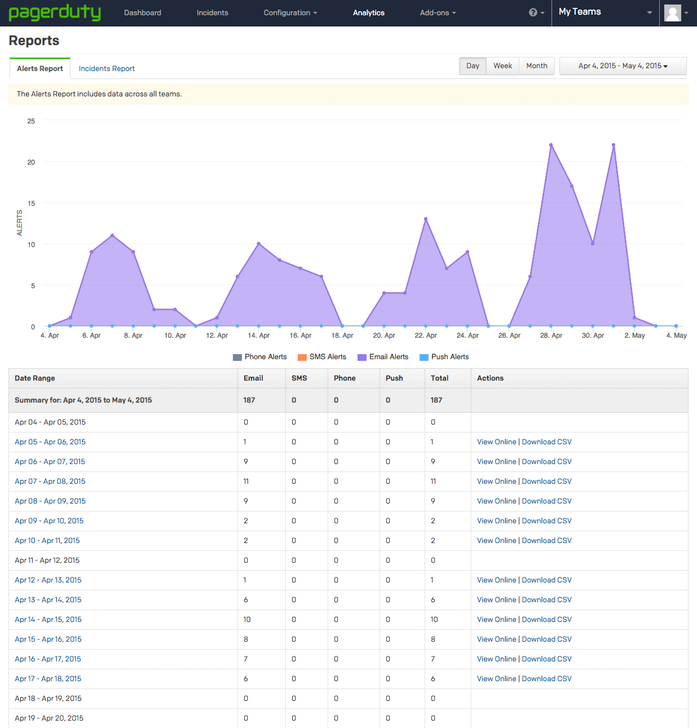
Alerts report in PagerDuty
Common features of emergency notification software
Different vendors offer different features in their emergency notification software tools. Selecting the right tool for your business is easier when you know what the common features are and what they do. Here's an overview.
Prebuilt templates | Use or create prebuilt notification templates to send emergency messages to specific employee groups or all employees, based on the event. |
Multichannel communications | Send mass notifications to employees via different modes such as phone call, email, or text message. |
Geotargeting | Use GPS coordinates to define an area (such as entire campus or specific hall) and send alerts to all mobile devices within that area. |
Alerts escalation | Escalate an incident up the authority hierarchy, if a user doesn't respond to or resolve the incident within a determined time. |
Real-time notifications | Reduce the delay between sending and receiving a message; near real-time notifications allow employees to receive critical updates as soon as possible and act fast. |
Reporting | Filter and view insights related to alerts and notifications made in a specific time period. |
What type of buyer are you?
Before you start evaluating emergency notification software options, you'll want to know what buyer category you belong to. Most emergency notification software buyers will fall into one of the below categories:
Small businesses (one to 49 employees): These buyers have simple requirements; they're looking to improve their process of sending alerts and notifications. Most are currently using manual methods, so they should start with basic emergency notification features such as prebuilt templates and multi-channel communications.
Midsize businesses (50 to 999 employees): These buyers may operate from multiple locations and have more layered teams, so they'll need additional features such as geotargeting and alerts escalation.
Large businesses (1,000+ employees): These buyers will prefer a single system to cover all of their communications needs. A full-suite IT communications solution that includes emergency notification as an integrated module would be the best option.
Benefits of emergency notification software
While some of the benefits of emergency notification software may be clear from our discussion above, we have called out the most notable ones below:
Increased message visibility: In a crisis such as internet outage or DDoS, your employees might not see an email right away. In case a telecom carrier (one that you or your employees use) is hit by any cyberattack, phone calls or text messages will get disrupted and your employees will not receive any communications over phone. There could be a number of other scenarios when all communications channels might not be accessible to all your employees. But multi-channel communications provides the redundancy that ensures all employees receive messages/alerts no matter what device/medium they have access to.
Geographic flexibility: If there is a malware attack or a phishing attempt at a certain location, only the employees of that region need to be alerted. Geofencing helps users send messages and alerts to a group of employees working at a specific geographic location.
Key considerations
Here are some important questions to consider before you purchase emergency notification software:
Mobile app availability: If you are constantly on the move, mobile apps can be useful for you. Check whether the emergency notification software you are considering offers access on mobile devices such as iOS- and Android-based smartphones or tablets. The mobile app will help you send alerts and notifications from any location.
Customer support: Ask software vendors if they offer support 24/7, only during business hours, or not at all. Also ask about available support modes, such as email, phone, or live chat.
Note: The applications selected in this article are examples to show a feature in context and are not intended as endorsements or recommendations. They have been obtained from sources believed to be reliable at the time of publication.