
Best Network Monitoring Software of 2026
Updated February 18, 2026 at 5:49 AM

Written by David Jani
Content Analyst

Edited by Caroline Rousseau
Senior Editor

Reviewed by Amanda Johnstone
Contributor
- All Software
- Buyer's Guide
- Software Advice FrontRunners
- Frequently Asked Questions
- Popular Comparisons
Network monitoring software gives IT teams and network managers the tools to detect outages, troubleshoot slowdowns, and safeguard business connectivity. With nearly 200 products built for everything from small offices to global networks, sorting through options is tough. To help you narrow it down, I've curated a list of highly-rated productsi and the network monitoring software FrontRunners based on user reviews. For further information, read my network monitoring software buyer's guide.
Network Monitoring Software
Sort by
Reviews: Sorts listings by the number of user reviews we have published, greatest to least.
Average Rating: Sorts listings by overall star rating based on user reviews, highest to lowest.
Alphabetically (A-Z): Sorts listings by product name from A to Z.

ManageEngine OpManager is a network management solution that includes network and server monitoring, bandwidth analysis, configu...Read more about ManageEngine OpManager


ManageEngine OpManager's Best Rated Features
See All
ManageEngine OpManager's Worst Rated Features
See All

Site24x7 is a cloud-based website and server monitoring platform that helps small to large size businesses monitor websites, ser...Read more about Site24x7

Site24x7's Best Rated Features
See All
Site24x7's Worst Rated Features
See All

ManageEngine OpManager Plus is an integrated IT operations management solution that offers comprehensive monitoring capabilities...Read more about ManageEngine OpManager Plus
ManageEngine OpManager Plus's Best Rated Features
See All
ManageEngine OpManager Plus's Worst Rated Features
See All

NetFlow Analyzer is a web-based bandwidth monitoring tool that gives end-to-end visibility to monitor application-level traffic ...Read more about ManageEngine NetFlow Analyzer

ManageEngine NetFlow Analyzer's Best Rated Features
See All
ManageEngine NetFlow Analyzer's Worst Rated Features
See All

Preseem is a Quality of Experience (QoE) solution designed to assist Internet Service Providers in managing their networks proac...Read more about Preseem
No reviews yet

Software Advice FrontRunners 2026

(357)

(342)

(253)

(31)

(195)

(254)

(82)

(91)

(89)

(110)
Best for Quick Implementation

Datadog

According to our user reviews, Datadog is the most requested by users for quick implementation out of the most popular tools.
Datadog is best for organizations seeking quick implementation of monitoring and observability tools. Our reviewers say setup is fast and intuitive, allowing teams to start monitoring infrastructure and applications with minimal configuration, and they highlight the ease of integrating with existing systems and rapid onboarding.
- Reviewers Perspective
"It also offers RUM for user monitoring across different devices, custom metrics, as well as seamless integration with incident response tools."
ARAnurag Rai
Software Engineer
Used for 2+ years
We analyzed 246 verified user reviews for Datadog to find out what actual users really think.
Monitoring
Organizations streamline monitoring across infrastructure, servers, databases, and cloud services. Real-time visibility and customizable monitors help track performance issues and consolidate monitoring tasks.Log Management
Teams centralize log collection and correlate logs with metrics and traces for troubleshooting. Real-time tracking and customizable filters support rapid incident detection and workflow consolidation.Integrations
Admins connect Datadog with cloud providers, databases, and collaboration platforms. Extensive integration options support both out-of-the-box and custom use cases for complex environments. - Key FeaturesDatadog's scoreCategory average
Alerts/Notifications
4.664.63 category average
Real-Time Data
4.474.61 category average
Real-Time Monitoring
4.604.71 category average
- Screenshots


Highly Rated for Customization
Site24x7

Of the products listed on our FrontRunners report, Site24x7 is the highest rated for customization out of the most popular tools.
Site24x7 is highly rated for businesses that require extensive customization in their monitoring solutions. Our reviewers point out the platform’s flexible alerting, customizable dashboards, and broad device support, making it easy to tailor monitoring and automation to specific operational needs.
- Reviewers Perspective
"I love the proactive monitoring capability of Site24x7. Because it uses multiply sites or datacentres in it services , you are able to pick quickly from the dashboard when services starts degrading."
PApeter awortwe
IT Asset,Configuration Manager, Service Catalog and Knowledge Manager
Used for 2+ years
We analyzed 255 verified user reviews for Site24x7 to find out what actual users really think.
Server Monitoring
IT teams oversee servers, websites, databases, and cloud infrastructure from a single dashboard. Real-time alerts and customizable thresholds help maintain reliability and minimize downtime.Alerts
Managers configure alerts for critical incidents, receiving notifications through multiple channels. This supports prompt response, though careful tuning is needed to avoid alert noise.Monitoring Setup
Admins set up monitors for websites, servers, and applications with an intuitive dashboard and quick configuration. Customization options streamline workflows for diverse IT environments. - Key FeaturesSite24x7's scoreCategory average
Alerts/Notifications
4.634.63 category average
Real-Time Data
4.154.61 category average
Real-Time Monitoring
4.794.71 category average
- Screenshots


Most Rated for SMBs

In our analysis of Network Monitoring products with the most market demand, ManageEngine OpManager is the most requested by small businesses out of the most popular tools.
ManageEngine OpManager is most rated for SMBs needing comprehensive network monitoring and management. Our reviewers say it offers an intuitive interface, quick setup, and centralized device monitoring, which streamlines troubleshooting and daily network oversight for smaller IT teams.
- Reviewers Perspective
"We have benefited from features like WAN RTT monitoring and VoIP performance tracking since it has provided us with information on areas that cannot be measured."
JJJudah Jessop
Infrastructure Engineer
Used for 6-12 months
We analyzed 191 verified user reviews for ManageEngine OpManager to find out what actual users really think.
Network Monitoring
IT teams monitor device health and performance metrics in real time. The platform supports diverse network environments, including virtual and cloud, and offers detailed reporting for proactive issue tracking.Network Device Management
Admins manage network devices with real-time monitoring, automatic discovery, and topology mapping. Multi-vendor support and customizable options simplify oversight of complex infrastructures.Setup and Deployment
Teams deploy OpManager quickly with pre-configured templates and an intuitive dashboard. The setup process suits small and mid-sized IT teams, though advanced options may require extra expertise. - Key FeaturesManageEngine OpManager's scoreCategory average
Alerts/Notifications
4.604.63 category average
Real-Time Data
4.694.61 category average
Real-Time Monitoring
4.684.71 category average
- Screenshots


Most Used By Computer & Network Security

groundcover

Of the products listed on our FrontRunners report, groundcover is the most requested by users in computer & network security out of the most popular tools.
Groundcover is most used by computer and network security teams looking for seamless Kubernetes observability. Our reviewers highlight its rapid setup, native EKS integration, and real-time insights, making it especially valuable for teams managing cloud-native environments.
- Reviewers Perspective
"By focusing on providing real-time, granular visibility into cloud environments, Groundcover helps teams identify issues faster and optimize systems more effectively."
APAshwat Prakash
Software engineer
Used for 2+ years
We analyzed 31 verified user reviews for groundcover to find out what actual users really think.
- Key Featuresgroundcover's scoreCategory average
Alerts/Notifications
4.504.63 category average
Real-Time Data
4.674.61 category average
Real-Time Monitoring
4.734.71 category average
- Screenshots


Most Used By Information Technology and Services

New Relic

According to our user reviews, New Relic is the most requested by users in Information Technology and Services out of the most popular tools.
New Relic is most used by information technology and services professionals who need deep application and infrastructure monitoring. Our reviewers say its real-time dashboards, proactive alerts, and streamlined setup help IT teams quickly identify and resolve performance issues.
- Reviewers Perspective
"The real-time performance monitoring, powerful alerting, and customizable dashboards make it easy to detect issues quickly and maintain reliability."
RPRuchika Panigrahi
Site Reliability Engineer
Used for 2+ years
We analyzed 142 verified user reviews for New Relic to find out what actual users really think.
Performance and Speed
Teams monitor live application performance, quickly identifying bottlenecks and optimizing workflows across their systems. Real-time dashboards and detailed reports help analyze server load, API latency, and database queries, supporting efficiency and stability in IT operations.Monitoring
IT managers use New Relic to monitor their entire technology stack, from backend servers to frontend applications. Centralized dashboards and robust alerting make it straightforward to detect issues and maintain system reliability across environments.Error Tracing
Developers track errors and debug code in real time with detailed stack traces and transaction context. Granular monitoring and error aggregation help pinpoint faulty code and assess user impact, though some find log management and distributed tracing less intuitive. - Key FeaturesNew Relic's scoreCategory average
Alerts/Notifications
4.774.63 category average
Real-Time Monitoring
4.584.71 category average
- Screenshots


Most Rated for Enterprise

PRTG

According to our user reviews, PRTG is the most requested by enterprises out of the most popular tools.
PRTG is most rated for enterprise environments that require robust, scalable network monitoring. Our reviewers point out its wide sensor variety, customizable dashboards, and ease of integration, which support efficient monitoring across large, complex infrastructures.
- Reviewers Perspective
"PRTG captures a big picture overview of an organization's entire infrastructure, the good and the bad which creates a reliable source for users who are seeking for monitoring purposes."
KPKrunal Patel
Cybersecurity Analyst
Used for 2+ years
We analyzed 207 verified user reviews for PRTG to find out what actual users really think.
Network Monitoring
Network teams monitor device health, uptime, and performance across infrastructure components. The user-friendly interface and robust sensor options support proactive issue resolution.Sensors
Admins use PRTG’s sensor library to monitor a wide variety of devices and services. The free version’s sensor limit and custom sensor options suit SMBs with diverse monitoring needs.Alerting
Teams configure alert thresholds and notification channels for different devices and conditions. This enables fast incident response and minimizes downtime. - Key FeaturesPRTG's scoreCategory average
Alerts/Notifications
4.534.63 category average
Real-Time Data
4.204.61 category average
Real-Time Monitoring
4.704.71 category average
- Screenshots


Most Used By Computer & Network Security

Dynatrace

According to our user reviews, Dynatrace is the most requested by users in computer & network security out of the most popular tools.
Dynatrace is most used by computer and network security teams seeking advanced, AI-driven observability. Our reviewers say its automated root cause analysis and real-time anomaly detection streamline troubleshooting and provide actionable insights for complex environments.
- Reviewers Perspective
"Dynatrace is excellent with its AI engine, the engine that automates the RCA (root cause analysis), as it can replace the traditional monitoring tools by being able to identify and prioritize the real problems, offering actionable insights without requiring manual interventions."
MAMoustafa Abbas
IT Manager
Used for 1-2 years
We analyzed 62 verified user reviews for Dynatrace to find out what actual users really think.
Monitoring
IT leaders use Dynatrace for tracking business operations and application health, including synthetic and code-level monitoring. The platform supports multiple environments, reducing tool sprawl.Performance and Speed
Teams leverage Dynatrace to detect performance issues and pinpoint root causes, reducing resolution time. Comprehensive analytics support trend analysis and operational efficiency.Dashboard
Managers design dashboards for incident management and business insights. The interactive UI helps monitor real-time data, though some users note a learning curve. - Key FeaturesDynatrace's scoreCategory average
Alerts/Notifications
4.474.63 category average
Real-Time Monitoring
4.694.71 category average
- Screenshots

Highly Rated for User Interface


According to our user reviews, Amazon CloudWatch is the highest rated for user interface out of the most popular tools.
Amazon CloudWatch is highly rated for users prioritizing a user-friendly interface for AWS monitoring. Our reviewers say its customizable dashboards, real-time alerts, and seamless AWS integration make it easy to track performance and address issues efficiently.
- Reviewers Perspective
"Amazon CloudWatch provides real-time monitoring and insights into AWS resources and applications, enabling users to detect anomalies, troubleshoot issues, and optimize performance."
AAAmaya Aneesh
Teacher
Used for 1-2 years
We analyzed 75 verified user reviews for Amazon CloudWatch to find out what actual users really think.
AWS Monitoring
Cloud teams monitor AWS resources and applications in real time, detecting anomalies and optimizing performance. Centralized dashboards and log collection streamline troubleshooting and resource management.Dashboards and Alarms
Admins visualize key metrics and set up alerts based on specific criteria. Automated alarms and real-time dashboards simplify proactive monitoring and incident detection.Cloud Service Monitoring
Organizations track metrics across multiple AWS resources, perform health checks, and diagnose issues quickly. Real-time logs and notifications support operational health in cloud environments. - Key FeaturesAmazon CloudWatch's scoreCategory average
Alerts/Notifications
4.584.63 category average
Real-Time Monitoring
4.584.71 category average
- Screenshots
Best for Customer Satisfaction

According to our user reviews, ManageEngine NetFlow Analyzer is the highest rated for customer satisfaction out of the most popular tools.
ManageEngine NetFlow Analyzer is best for customer satisfaction among teams needing detailed network traffic analysis. Our reviewers highlight its intuitive dashboards, real-time alerts, and strong support, which help users quickly resolve incidents and optimize network performance.
- Reviewers Perspective
"It has provided me with the ability to forecast based on prior history and traffic to be able to organize upgrades or allocate resources based on heavily used departments."
MAMohamed Atef
IT Infrastructure and Technical Support Manager
Used for 1-2 years
We analyzed 17 verified user reviews for ManageEngine NetFlow Analyzer to find out what actual users really think.
- Key FeaturesManageEngine NetFlow Analyzer's scoreCategory average
Alerts/Notifications
4.434.63 category average
Real-Time Data
4.724.61 category average
Real-Time Monitoring
4.724.71 category average
- Screenshots

Most Used By Education Management

Zabbix

Zabbix is the most requested by users in education management out of the most popular tools, based on our analysis of Network Monitoring products with the most market demand.
Zabbix is most used by education management organizations needing flexible, open-source monitoring. Our reviewers say it offers extensive customization, proactive alerting, and easy integration with various systems, making it suitable for diverse educational IT environments.
- Reviewers Perspective
"The most effective monitoring solution you can get for free - Great integrations and dashboarding, with some very advanced features such as dynamic dashboards and alerting."
SWSam West
Infrastructure Engineer
Used for 2+ years
We analyzed 94 verified user reviews for Zabbix to find out what actual users really think.
Monitoring
Admins monitor a wide range of devices, services, and applications with Zabbix. The platform’s templates, alerting, and visualization tools adapt to unique infrastructure and monitoring requirements in diverse industries.Open Source
Organizations implement enterprise-level monitoring without licensing fees. Zabbix’s open-source model encourages customization and flexibility, supporting businesses with specific needs or limited budgets.Dashboard
Teams create and share dashboards tailored to different roles, helping prioritize and respond to issues efficiently. Graphical orientation and user-based views streamline daily monitoring tasks. - Key FeaturesZabbix's scoreCategory average
Alerts/Notifications
4.714.63 category average
Real-Time Monitoring
4.784.71 category average
- Screenshots


Auvik

- Reviewers Perspective
"The automatic network subnet scanning feature is highly efficient, it identifies connected devices in a very timely manner while keeping the topology updated in real time."
HKHemin Khaleel AL OMER
Network Engineer
Used for 6-12 months
We analyzed 83 verified user reviews for Auvik to find out what actual users really think.
Network Device Management
Teams manage devices across sites by leveraging Auvik’s automatic discovery and categorization. This streamlines monitoring, troubleshooting, and administration for organizations with limited staff.Alerting
IT departments configure alert channels (email, SMS, integrations) to monitor critical devices. Customizable options and an intuitive interface help prevent major network issues.Network Mapping
Network managers document infrastructure efficiently using Auvik’s automated mapping and export features. Dynamic maps support onboarding, diagnostics, and multi-vendor environments. - Key FeaturesAuvik's scoreCategory average
Alerts/Notifications
4.544.63 category average
Real-Time Monitoring
4.724.71 category average
- Screenshots


Domotz

- Reviewers Perspective
"Through Domotz, I can finally connect via RDP, SSH, Telnet, HTTP/HTTPS, or even use remote power cycling through compatible PDU integrations — all from a ONE only dashboard."
ACAlessandro Cencioni
IT MANAGER
Used for 1-2 years
We analyzed 96 verified user reviews for Domotz to find out what actual users really think.
Customer Support
Teams streamline onboarding and troubleshooting by relying on Domotz’s responsive customer support. The support team’s proactive guidance helps SMBs resolve issues quickly and operate more efficiently.Remote Access
Admins use Domotz to troubleshoot and manage devices remotely, minimizing site visits. Secure connection options (RDP, SSH, web) enable support for multiple locations and rapid issue resolution.Device Monitoring
IT managers monitor network infrastructure and devices in real time using Domotz’s dashboard and automatic discovery. Customizable monitoring options simplify oversight across multiple sites. - Key FeaturesDomotz's scoreCategory average
Alerts/Notifications
4.544.63 category average
Real-Time Data
2.04.61 category average
Real-Time Monitoring
4.694.71 category average
- Screenshots


Icinga

- Reviewers Perspective
"icinga has been a solid monitoring tool that's quick to set up on my servers, with a modular design that makes custom checks simple and an interface that even my non-techy team members can handle"
AAAdetayo Adebayo
DevOps Engineer
Used for 6-12 months
We analyzed 44 verified user reviews for Icinga to find out what actual users really think.
- Key FeaturesIcinga's scoreCategory average
Alerts/Notifications
4.714.63 category average
Real-Time Monitoring
4.604.71 category average
- Screenshots


- Reviewers Perspective
"I have Splunk forwarder installed over 100 servers to have logs sending over to Splunk Enterprise server, and the data ingest is very reliable."
PYPhilip Yan
Head of IT OPS
Used for 2+ years
We analyzed 194 verified user reviews for Splunk Enterprise to find out what actual users really think.
Log Management
IT managers aggregate and analyze logs from multiple systems using Splunk Enterprise. Efficient search and visualization tools support troubleshooting and reporting across environments.Dashboard Monitoring
Teams build dashboards to track system health and performance. Real-time metrics and templates facilitate proactive monitoring and root cause analysis.Data Analysis
Organizations transform raw data into reports and dashboards. Splunk’s tools enable detailed analysis, supporting asset tracking and business forecasting. - Key FeaturesSplunk Enterprise's scoreCategory average
Alerts/Notifications
4.594.63 category average
Real-Time Data
4.434.61 category average
Real-Time Monitoring
4.474.71 category average
- Screenshots


- Reviewers Perspective
"The switch port mapper enabled me to map out devices in different buildings and to monitor the status of ports in real-time was useful for identifying unused ports, and organizing hardware."
HJHassene Jouini
IT Support Specialist
Used for 6-12 months
We analyzed 88 verified user reviews for ManageEngine OpUtils to find out what actual users really think.
Switch Port Management
IT managers map devices to switch ports across buildings, monitor port status, and identify unused ports. This aids in audits and hardware organization.IP Address Management
Admins monitor IP address usage, status, and activity history. Advanced scanning and real-time alerts reduce manual checks and prevent conflicts.Network Device Monitoring
Security teams identify unauthorized connections and monitor device performance. Auto-generated alerts and dashboards provide clear network visibility. - Key FeaturesManageEngine OpUtils's scoreCategory average
Alerts/Notifications
4.524.63 category average
Real-Time Data
4.744.61 category average
Real-Time Monitoring
4.664.71 category average
- Screenshots


- Reviewers Perspective
"It enables me to offer several specialized client reports that target significant figures in the network and maintain clients informed about their network health."
MHMartin Herrera
Purchasing Analyst
Used for 6-12 months
We analyzed 63 verified user reviews for ManageEngine OpManager MSP to find out what actual users really think.
Performance and Speed
IT teams diagnose issues and monitor latency, packet loss, and device availability. Real-time and historical data help resolve problems before escalation.Client Network Management
MSPs monitor multiple client networks, apply unique management plans, and track WAN links. Efficient remote management and client grouping streamline operations.Alert Management
Admins set alert levels per device and client, automate escalation, and receive instant notifications. Segmentation reduces unnecessary alerts and supports proactive response. - Key FeaturesManageEngine OpManager MSP's scoreCategory average
Alerts/Notifications
4.564.63 category average
Real-Time Monitoring
4.704.71 category average
- Screenshots


- Reviewers Perspective
"What I like about this software is that I can keep an eye on various equipment and systems that are critical to the company since with this tool I can detect any problem at any time."
DCDaniel Cardona
telecommunications technician
Used for 2+ years
We analyzed 67 verified user reviews for PRTG Enterprise Monitor to find out what actual users really think.
Monitoring
IT teams monitor networks, servers, and applications from a single dashboard. Customizable dashboards and real-time alerts help detect issues quickly and maintain operational continuity.Sensors
Admins tailor sensor setups to match unique network needs, using preconfigured and native sensors. Frequent updates expand sensor options, supporting diverse environments.Setup
Organizations deploy PRTG Enterprise Monitor rapidly with well-documented setup. The intuitive interface and lightweight requirements enable scaling in extensive IT environments. - Key FeaturesPRTG Enterprise Monitor's scoreCategory average
Alerts/Notifications
4.704.63 category average
Real-Time Data
4.04.61 category average
Real-Time Monitoring
4.714.71 category average
- Screenshots


Methodology
The research for the best network monitoring software list was conducted in October 2025. We evaluated data (user reviews and demand signals) from the past 24 months as of the research date. Read the complete methodology.
Popular Network Monitoring Comparisons


Buyer's Guide
This detailed guide will help you find and buy the right network monitoring software for you and your business.
Last Updated on October 14, 2025Here's what we'll cover:
Benefits and competitive advantages of using network monitoring software
How to choose the best network monitoring software for your business
What you need to know about network monitoring software
Network monitoring software is a system used to track network traffic in an organization. It provides businesses with essential information on their network mapping and performance, generates up-to-date status reports, and notifies them of early warning signals for system failures or cybersecurity risks.
To understand the market better, we’ve analyzed 1,540 verified reviews from network monitoring software users, looking over 227 network monitoring products. No business can afford to operate without oversight over its network security and performance. Thus, choosing the right option for your precise requirements is of vital importance.
Most network monitoring systems are priced on a “per user, per month” basis and start from $1-2 per user, per month for the most basic systems and rise to $17 per user, per month and upwards for the most advanced options. [1] Additionally, there are many options that can be used cost-free, via forever free or open license products, however, these often require more technical capacity to configure, run, and maintain and may leave some aspects of the task limited in comparison to paid options.
First-time buyers of network monitoring systems should start off by getting a clear understanding of the available budget, the number of users needing access, the number of devices on the network, and reports that might be necessary to properly track network traffic. It’s wise at this stage to gather with your key stakeholders to plan essential questions that can help you evaluate products based on your requirements. This might include:
Does the product have the ability to scale as the company grows?
Does the system use cloud or hybrid environment support?
Does the solution use protocols that run on our network devices?
What integrations can be used by the platform and can the tools we’re using now connect?
There are many different vendors available and all offer differing packages. In the following guide, we’ll look at the key factors that drive the successful implementation of a network monitoring product. This addresses the key features, benefits, and selection tips necessary to make the right choice.
What is network monitoring software?
System administrators use network monitoring software to identify bottlenecks, slow spots, malicious threats, and overall server performance. Users can find issues before they become serious problems and receive alerts when the network is experiencing problems. This software is also used to gauge metrics such as response time and server uptime.
Many of the available options provide activity dashboards that visualize overall usage statistics such as traffic, bandwidth, memory consumption, and bandwidth and memory consumption.
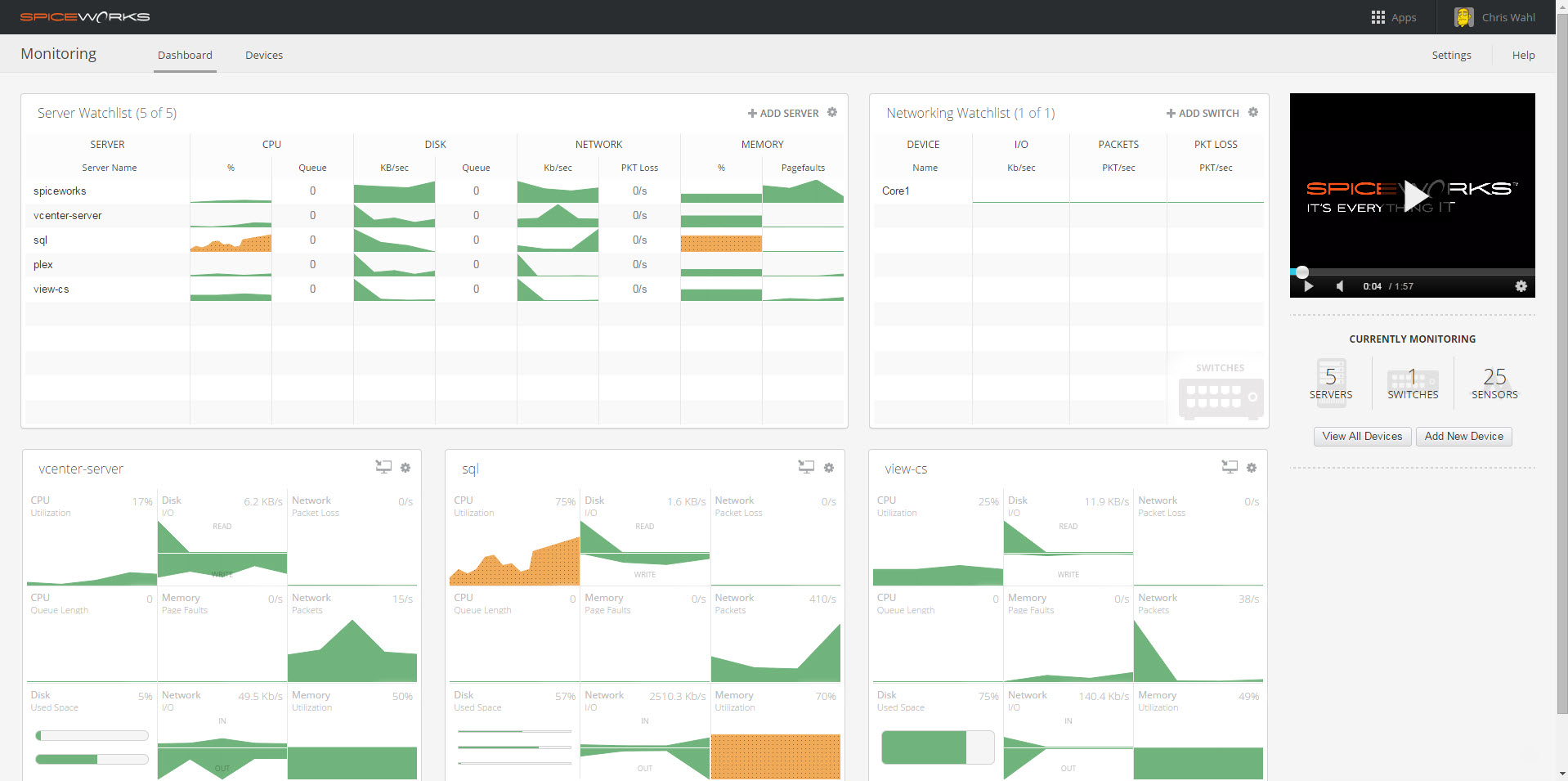
Spiceworks’ network monitoring dashboard
Network monitoring software is essential for large organizations with multiple server locations, as it provides an overview of all of a network’s performance statistics and data in one place, allowing the system administrator to quickly identify and respond to network issues. Businesses should also consider options provided within the website monitoring directory to better understand the solutions that are available.
Essential features of network monitoring software
There are several features to consider when assessing the network monitoring solutions on the market. Some functions such as notifications, network mapping, performance metrics, and real-time monitoring are found in most available systems. However, other key features can include tools for measuring bandwidth, simple network management protocol (SNMP), and auto-discovery of devices. Following our analysis of hundreds of verified reviews of network monitoring software, we identified the following features as some of the most important to users. [2]
Core features
Real-time monitoring | Processes that actively monitor systems, applications, and networks during their operational runtime that give up-to-date data in real time on system health. 95% of users rate real-time monitoring as important or highly important. |
Alerts/notifications | Pop-up messages, sounds, and banners that alert users of performance issues, updates, cybersecurity incidents, and other key indicators. 92% of users rate alerts/notifications as important or highly important. |
Network mapping | Visualizations of network topology and infrastructure of devices, connections, and configurations used within an organization. |
Performance metrics | Indicators to track network performance of applications and systems based on their operational use. |
Common features
Server monitoring | Continuously scan server traffic to understand network health and identify any failures or irregularities. 85% of users rate server monitoring as important or highly important. |
Configuration management | Adjust and manage the attributes and settings of key components across a network such as servers, hardware, and software. |
Device auto-discovery | Run scans across the network to identify machines and devices available and take pre-defined actions on discovery. |
SNMP | Simple Network Management Protocol (SNMP) is a network management operations standard. Most network monitoring software platforms are fully compatible with SNMP. |
Understanding the features that will best serve your business will help you derive the benefits of the software you eventually pick. Amanda Johnstone, a CEO and technologist with over 20 years of experience, explains how this matters: “Having a real clear knowledge and vision of what it is you need, whether it's starting from the start with a new technology or adding additional features or things onto your technologies to really know what capabilities you require”. [3]
Benefits and competitive advantages of using network monitoring software
Our analysis of 1,540 reviews over the past year, shows that team support, deployment, and resource utilization are some of the top-rated benefits of using network monitoring software. These features all support the essential requirements of network monitoring by helping improve coordination amongst your technical team, the process of adding and removing hardware from the network, and monitoring network traffic to achieve the best overall performance.
Better IT team collaboration: Work more closely as a technical team towards common goals, communicate more efficiently, and share important network documentation.
Simpler hardware deployment: Simplify the process of introducing new hardware onto your network and configure essential settings directly from a centralized portal.
Better utilization of network resources: Identify where bottlenecks and faults are occurring on the system so they can be quickly fixed, upgraded, or rerouted.
Improved network performance: Find areas for improvement in network bandwidth and monitor for issues so overall network performance can be maximized effectively.
How to choose the best network monitoring tool for your business
Step 1: Define your requirements
When you start on the path to choosing a network monitoring solution for your business, the first step is to map out the key requirements you and your team need. This should evaluate what kind of technical infrastructure you’ll be working with based on your current tech stack and whether the features included effectively move you toward your KPIs. Understanding these factors from the start will help you plan around the short-, medium-, and long-term goals of your network management.
Other important considerations aside from functionality include factors such as the budget you’ll have available, training support available, the number of devices that you can manage from the software, and any integrations you might need for your network monitoring program.
Amanda Johnstone suggests a way of going about this for first-time buyers is using a “consequence table.” This exercise gets businesses to list the potential risks facing their operations from a network monitoring perspective.
“Speaking as a business founder, I think it’s critical to know exactly what the impact is of [network disruption] incidents on things like your finances, your reputation, and your organization,” she says. “Based on the outcomes of your consequence table, you can decide on the required level of network monitoring for your company.” [4]
How much does network monitoring software cost?
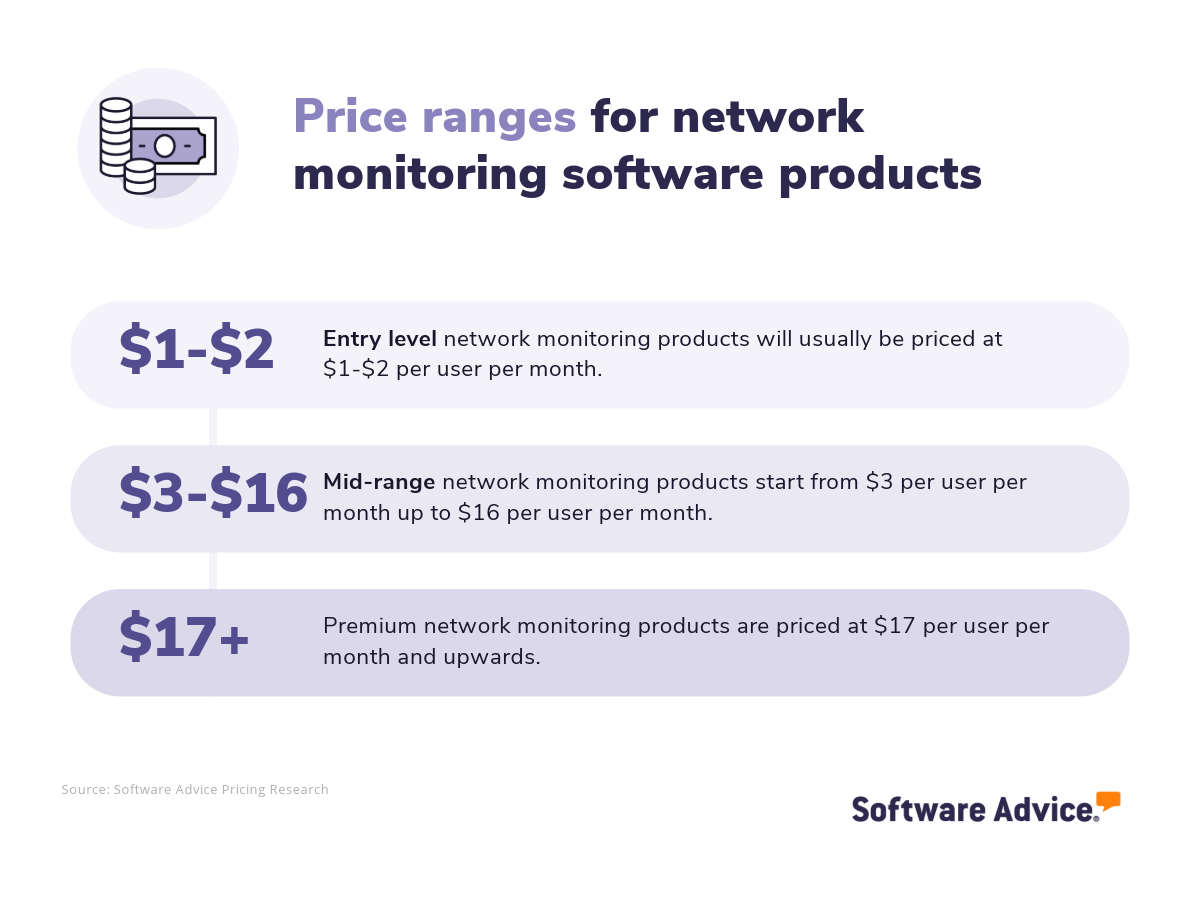
Network monitoring software is usually priced per user per month. The price varies depending on the type of system you choose, with entry-level systems costing $1-$2 per user per month. Buyers of mid-level systems can expect to pay $3-$16 per user per month, and for premium platforms, the price is usually $17 per user per month or above.
Integration necessities for network monitoring software
There are a number of important integrations that businesses can use with network monitoring software for effective performance, better security, or to provide more storage capacity for data and files. Some of these features may be included with a chosen system already but in cases where the technology or solution already exists, it may be more expedient to connect a new network monitoring system to other products that are already widely used in the enterprise.
In the initial stages, it is important to carefully assess the systems you already use that would connect with your chosen network monitoring product or any that you are planning to adopt in the meantime. This will help ensure that your whole tech stack can properly function together.
Potential drawbacks of network monitoring systems
Another aspect to pay particular attention to is the possible drawbacks you may encounter during the implementation and running of a new network monitoring platform. Even the best systems on the market have downsides of some capacity and planning around the possible pitfalls you may encounter can help you proactively sidestep them more effectively.
Some areas to watch out for with network monitoring especially are difficulties with bugs in the UI, faults and the handling of technical issues, dissatisfaction over pricing, and struggles to apply updates and patches correctly. When researching options, be sure to check feedback on these topics to assess if a platform is reliable enough for your purposes.
Step 2: Make a shortlist of potential network monitoring solutions
There are hundreds of network monitoring systems to pick from, and choosing one that fits your goals and technical setup can be a difficult task. Nevertheless, there are resources available you can use to make the process simpler.
Explore our list of network monitoring FrontRunners
If you’re looking for more information on network monitoring options before speaking to an advisor, use our FrontRunners report to get started, which lists products for this category with the best user ratings. Check out our full methodology for further details on how the report is compiled.
To find out more about the best ways to shortlist software products, you can also use our Ultimate Software Vendor Evaluation Guide. This explains how to compare and evaluate software and provides a comparison chart to assess each individual vendor based on their functionalities, training and support, costs, and deployment options.
Step 3: Picking the best option
Once you’ve looked over some of the options and narrowed down your choices, you’ll reach the stage of trying out vendor demos and trials and making your final selection. This is a vitally important step of the software buying process, giving you a more detailed and practical view of the platform of interest. It’s important to prepare carefully to capitalize on the benefits of these demonstrations.
How to prepare for vendor demonstrations
As you approach scheduling vendor demonstrations, you should consider some of the key questions you want to ask vendors and their representatives. This gives you an essential opportunity to clarify any queries or doubts you have about their software and assess properly whether the solution is right for your business.
Some important questions you might ask when testing a network monitoring system include:
Can the product be customized to our needs?
There are many areas where you may want to tailor software around your business’s unique operation and needs. During the demonstrations, this is a place to test the software solution against those needs. This might involve diving into how configuration settings can be adjusted across the network, and how notifications, alerts, and reports could be modified to generate for particular time-frames or to respond to specific incidents you regularly encounter.
What integrations are supported?
If your business needs to use a specific integration with a network monitoring solution, you should seek to understand how that can be achieved and what support or potential hurdles could arise when syncing data and operations. If some of your tech stack is not supported, creating bespoke solutions may be necessary in some cases, and product demonstrations and trials give you a chance to ask how that can be done and if it’s feasible to make your software work together.
How is support and training provided?
A network monitoring system might not always come with dedicated support. It’s sensible to explore what kind of assistance is provided as part of your product and how your team will be able to access it. To prepare for the potential implementation of a new system you should also find out whether any documentation, training material, or hands-on support is available to onboard the system if you choose it as your solution.
Step 4: Successfully implementing a new network monitoring platform
When you select a system and commit to its purchase, the implementation process can get underway. Whether you plan to introduce a network monitoring solution for the first time in your business or migrate from an existing system, there are some important points to consider during the onboarding period.
Set up clear leadership of the implementation
Assign responsibilities to the key stakeholders in your technical team who will implement and manage the network monitoring product you’ve chosen. You may choose to appoint an individual project manager for this task during the onboarding.
Provide training to users
Ensure that staff who will be working directly with the system receive training and communicate the adoption of the new system to the wider team. The training should address the day-to-day usage of the tool, how it will be used to inform tasks in performance management and security, and how it will collect and use data effectively.
Test the system with your devices
In the initial stages of onboarding, it may help to run a pilot test with one or more of your devices to ensure that the tool is working as expected before you migrate from another system. This can help reduce errors and potential risks from malicious traffic before you fully adopt your network monitoring system.
Our guide on the 5 Critical Steps to a Successful Software Implementation Plan can also provide more information about improving the onboarding of a new software system.
Software related to network monitoring
Network monitoring solutions come with many features, but it is sometimes necessary to supplement functionalities via related software systems to get the most comprehensive network monitoring visibility. Some types of software that are similar to network monitoring systems that you may consider include:
Application performance management software: Systems that measure application performance levels and status that can be used to perform diagnostics on strategic resources.
Computer security software: Automate the security monitoring of computer systems, scan networks for vulnerabilities, and configure security settings to meet regulatory standards.
Data center management software: Monitor and control connected networks and device organization, and use tools for application delivery, troubleshooting, and reporting across the business.
Database monitoring software: Optimize, diagnose, and track the performance of database applications. This can help organizations ensure data integrity and accessibility.
Endpoint detection and response software: Collect device endpoint data along with your other monitoring information and program automated responses and analysis reports.
IT management software: Control and monitor computer networks, operating systems, applications, network devices, security measurements, and other essential parts of your IT infrastructure.
Network security software: Restrict access to your network to authorized sources and applications only. Create rules that recognize legitimate traffic and block unknown, unrecognized, or potentially malicious uses.
Remote monitoring and management software: Systems that monitor systems and network traffic remotely. This allows distributed IT teams to monitor devices and networks in real time and apply important changes such as patches and configuration changes.
More resources for your network monitoring journey
About our contributors
Author
David Jani is a content analyst at Software Advice. With a background in tech journalism, public relations, professional training, and marketing, he uses his extensive experience to investigate small business technology trends, with a focus on marketing and cybersecurity, to provide timely, actionable insights for small and midsize businesses.
David’s research and analysis is informed by more than 150,000 authentic user reviews on Software Advice and nearly 3,000 interactions between Software Advice software advisors and software buyers. David also regularly analyzes market sentiment by conducting surveys of IT and marketing leaders so he can provide the most up-to-date and helpful information to small and midsize businesses purchasing software or services.
His thought leadership work has been featured in TechRadar, Maddyness, Daily Express, Startups Magazine and Raconteur.
Editor
Caroline Rousseau is a senior content editor at Software Advice.
A former content analyst, Caroline has, for the past five years, built, written, and edited research reports about technological trends, opportunities, and challenges with an SMB audience in mind. Her content has been featured in French Tier 1 media including Le Monde, L’Express, and Le Figaro, among other publications.
Her previous experience as a graphic designer, translator, and LQA specialist in various industries converged into a skill set that allows her to create compelling content about today’s business matters. Caroline’s personal interests include literature and art and she has a passion for Albert Camus, graphic novels, and drawing.
Contributor
As one of Australia's most globally acknowledged AI technologists and technology communicators, Amanda Johnstone's contributions have been celebrated by TIME as a Next Generation Leader and by The CEO Magazine with the Start-up Executive of the Year award, underscoring her significant impact in social impact technology. In 2023, LinkedIn awarded her as a Top Voice in Artificial Intelligence, one of only 1500 top voices globally of over 1 billion users.
Sources
Software Advice software pricing data: Only products with publicly available pricing information and qualified software products within the category, as of February 2023, are included in the pricing analysis. Read the complete methodology.
Software Advice reviews data: Software Advice reviews are collected from verified users for individual software products. For this report, we analyzed reviews from the past year as of the production date. Read the complete methodology.
Amanda Johnstone, LinkedIn
Network Monitoring FAQs
- What is network monitoring software?
Network monitoring systems are a type of IT software that is used to monitor network traffic in real time. It can assess network performance, identify devices on the system, block unauthorized usage, provide alerts for hardware failures, and generate reports based on network traffic and performance.
- What is the most popular network monitoring program?
Based on our analysis of user feedback collected from verified network monitoring users over the past two years, Zabbix is the product with the highest overall rating from customers.
- Which tool is used for network monitoring?
There are many types of network monitoring software available. Software Advice lists 227 products in this category and based on our research of verified reviews over the past two years, Zabbix is the product with the highest overall rating from users.
- How much does a network monitoring tool cost?
In some cases, a network monitoring system can be run for free using open-source and forever-free tools. However, these are usually limited in terms of features and support. Entry-level systems cost as little as $1-2 per user per month, with mid-level options costing around $3-$16 per user per month. For premium products, users can expect to pay $17 per user per month or higher.
- How do I monitor a network device?
It is possible to monitor network devices using a network monitoring tool. Depending on the product you use and the device that is being monitored, this may be able to be identified automatically with auto-detection. In other cases, the IP of the device can be manually entered so it can be identified and monitored.
- Which monitoring tool is best?
Based on our research of verified user reviews over the past two years, we found that Zabbix is the highest overall rated product for customers.
- What is network monitoring, with examples?
Network monitoring is a practice that tracks your entire network, devices and all, to gather data, gain performance insights, and identify areas of improvement. An example of one task you may conduct with a network monitoring system is a performance assessment, where the system gathers data, which can be used to create a report on bandwidth usage, device stability, and any incidents that affect network integrity and security.
- How do I monitor network usage by device?
A network monitoring tool can track the network usage of devices. The information gathered on its data usage can also be used to identify potential performance improvements or issues.
- What tool is used to monitor and troubleshoot networks?
A network monitoring software system can be used to monitor and troubleshoot organizational networks. These provide the necessary tools for mapping networks, identifying and configuring devices, and identifying performance and improvements in traffic.
- Can I monitor my network?
Yes, it is possible to monitor your network activity and traffic using a network monitoring system. These provide users with the tools necessary to gain visibility over their network infrastructure, monitor devices and uses, and assess performance.
- What are the four categories of network monitoring?
Generally speaking, network monitoring can be summarized into four categories: 1) Performance monitoring: Tracking and assessment of the effectiveness of device and network activity performance, 2) Availability monitoring: The tracking of available devices and nodes on the network to check for faults and offline elements, 3) Traffic and bandwidth modeling: Monitoring of the flow of information through the network to identify bottlenecks and choke points that may need rerouting or optimization, and lastly, 4) Security modeling: Monitoring and configuration-setting to ensure the security, stability, and integrity of networks.