
Best Construction Categories
Best Facilities Management Categories
Best Human Resources Categories
Best Legal Management Categories
Best Manufacturing Categories
Best Medical Categories
Best Property Management Categories
Get 1-on-1 advice in 15 minutes. It's free.

Josh P.

5 Types of Accounting Software: Which One Fits Your Business Needs?
Accounting software tracks and reports financial activity—but one tool rarely fits every business.
As teams grow, differences in billing, payments, and planning often push them beyond general‑purpose software. That’s when finance teams turn to tools built for specific workflows, such as payables, receivables, budgeting, or expense control.
If you’re in a similar position, it helps to first understand the different types of accounting software available and what each one is designed to handle.
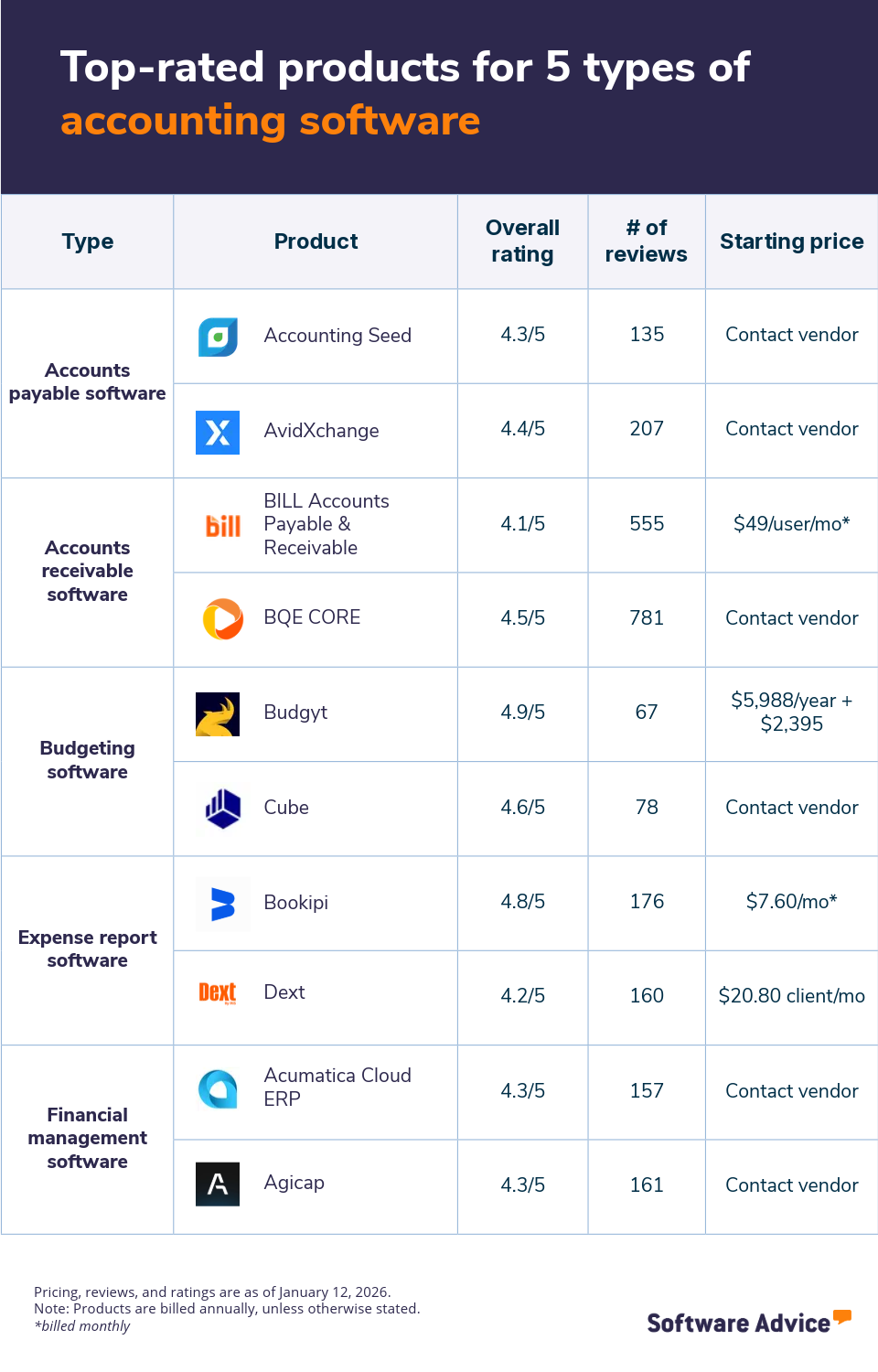
How we can help: We analyzed search behavior and thousands of user reviews from finance teams to identify the five most viewed types of accounting software on Software Advice. We’ve also included two top-rated tools for each category to help you choose the best fit for your processes.
1. Accounts payable software
Accounts payable software streamlines how businesses handle outgoing invoices, from receipt through approval to payment. It emphasizes approval workflows, payment scheduling, and vendor accuracy rather than broader accounting tasks. By creating a clear view of what’s pending, approved, or ready to pay, it replaces scattered email threads and manual follow-ups with consistent, enforceable processes. The result is fewer duplicate payments, better alignment with vendor terms, and more reliable financial records.
Core features of accounts payable software
Invoice management: Centralize all vendor invoices in one system to track receipt, approval status, and due dates. This reduces lost documents, missed payments, and confusion while giving teams clear visibility into liabilities.
Invoice processing: Route invoices through predefined approval workflows based on amount or department. The software flags duplicates and errors early, shortens approval cycles, and helps finance teams make timely payments to vendors.
Vendor management: Store vendor contact details, payment terms, and bank information. This prevents payment errors, supports accurate recordkeeping, and improves communication with suppliers across recurring transactions and ongoing relationships.
Who should consider accounts payable software?
Accounts payable software fits finance teams managing growing invoice volumes and multiple approvers. It benefits small and midsize businesses that need better payment control, audit trails, and visibility into cash outflows. Companies working with many vendors or tight payment terms use this software to reduce manual effort, avoid late fees, and maintain predictable, well-documented payment processes across departments and locations.
Software Advice reviews data* indicates that accounts payable software is predominantly used in the construction, accounting, and healthcare industries.
Highest-scoring accounts payable products from Software Advice FrontRunners
The 2025 Accounts Payable FrontRunners report identifies the highest-rated and most popular products based on a proprietary blend of user ratings and popularity scores. The two highest-scoring products are listed below.
*Analysis performed January 2026


2. Accounts receivable software
Accounts receivable software centers on billing, collections, and payment tracking so teams can issue invoices, record payments, and monitor outstanding balances in one place. It helps reduce revenue leakage, improves follow-up on overdue amounts, and keeps customer records accurate. The system also strengthens cash‑flow visibility and cuts manual reconciliation. As customer bases grow, it supports consistent billing and ensures revenue data stays reliable across sales, finance, and leadership reporting.
Core features of accounts receivable software
Billing and invoicing: Create and send accurate invoices on a set schedule. This feature applies pricing rules, taxes, and terms consistently, reducing billing errors and helping customers clearly understand what they owe.
Customer statements: Generate statements that summarize invoices, payments, and balances for each customer. Statements support follow-ups, reduce disputes, and give customers a reference point for outstanding amounts and payment clarity.
Receivables ledger: Maintain a real-time ledger that records all receivables activity. This feature tracks balances, partial payments, and adjustments, helping finance teams reconcile accounts and monitor collection performance accurately over time periods.
Who should consider accounts receivable software?
Accounts receivable software works best for businesses selling on credit or invoicing customers after delivery. Finance teams benefit when payment follow-ups, aging reports, and balance tracking become time consuming. The software suits growing companies that need reliable cash inflow visibility, fewer billing disputes, and structured collection processes without relying on manual spreadsheets across departments, regions, and reporting cycles consistently.
Software Advice reviews data* indicates that accounts receivable software is predominantly used in the accounting, construction, and IT industries.
Highest-scoring accounts receivable software tools from Software Advice FrontRunners
The 2025 Accounts Receivable FrontRunners report identifies the highest-rated and most popular products based on a proprietary blend of user ratings and popularity scores. The two highest-scoring products are listed below.
*Analysis performed January 2026


3. Budgeting software
Budgeting software helps teams plan spending before it happens by setting targets, testing assumptions, and comparing plans to expected results. It gives organizations a forward-looking view of resources, helping them align budgets with goals, anticipate gaps, and shift priorities early. The tool adds structure to annual budgets and rolling plans without complex modeling. As companies grow, it replaces static spreadsheets with shared, version‑controlled budgets that keep plans consistent across departments and planning cycles.
Core features of budgeting software
“What if” scenarios: Test spending assumptions by modeling multiple budget outcomes under different conditions. This feature shows how revenue changes or cost increases affect cash position, helping leaders choose safer plan decisions.
Forecasting: Predict future income and expenses using historical data and planned activities. Forecasting highlights gaps early, supports course correction, and helps teams plan staffing, purchases, and investments with confidence ahead clearly.
Who should consider budgeting software?
Budgeting software suits leadership and finance teams responsible for planning future spend. It helps growing businesses that need visibility into upcoming costs, changing revenue, or expansion plans. Organizations benefit when decisions require tradeoff analysis, scenario testing, and regular forecast updates to stay aligned with goals, cash limits, and operational priorities across teams during budgeting cycles, quarterly reviews, and strategy discussions.
Software Advice reviews data* indicates that budgeting software is predominantly used in the non-profit, IT, and healthcare industries
Highest-scoring budgeting software from Software Advice Frontrunners
The 2025 Budgeting FrontRunners report identifies the highest-rated and most popular products based on a proprietary blend of user ratings and popularity scores. The two highest-scoring products are listed below.
*Analysis performed January 2026

4. Expense report software
Expense report software manages how employee spending moves from submission to reimbursement. The category focuses on enforcing policies, validating expenses, and keeping records ready for review. It replaces paper forms and email approvals with a structured workflow. Finance teams use it to see where money goes, who approved it, and when reimbursement is due. The software supports consistent rules for travel, meals, and client expenses while reducing errors. It also improves employee trust by providing clear status updates and predictable reimbursement timelines across departments.
Core features of expense report software
Approval process control: Route expense submissions through defined approval paths based on role or amount, ensuring policy compliance, faster decisions, and clear accountability while reducing back-and-forth emails and unauthorized reimbursements.
Expense tracking: Record real-time employee expenses by category and project, giving finance teams visibility into spend patterns, budget impact, and reimbursement status without manual spreadsheets or delayed reports for managers.
Receipt management: Capture and store receipts digitally from mobile uploads or email, linking proof to each expense and reducing lost paperwork, audit gaps, and disputes during reviews and reimbursements and payment cycles.
Who should consider expense report software?
Expense report software fits organizations reimbursing frequent employee expenses across teams. It benefits finance managers who need policy enforcement, timely approvals, and spending visibility. Companies with traveling staff, client-facing roles, or distributed offices use it to reduce reimbursement delays, control out-of-policy claims, and maintain clean records without chasing receipts or approvals manually during audits, growth, and monthly reporting cycles periods.
Software Advice reviews data* indicates that expense report software is predominantly used in the IT, construction, and healthcare industries.
Highest-scoring expense report software from Software Advice FrontRunners
The 2025 Expense Report FrontRunners report identifies the highest-rated and most popular products based on a proprietary blend of user ratings and popularity scores. The two highest-scoring products are listed below.
*Analysis performed January 2026


5. Financial management software
Financial management software unifies core financial activities to give leaders a clear view of performance throughout the year. It connects data across functions so teams can spot trends, compare periods, and track progress against goals. Instead of focusing only on transaction entry, it emphasizes visibility and insight. Organizations use it to assess financial health, weigh options, and guide strategy with current information.
Core features of financial management software
Data visualization: Visualize financial data through charts and dashboards that show trends, variances, and performance quickly. This helps leaders spot issues early, compare periods, and communicate results clearly without digging spreadsheets daily.
Financial analysis: Analyze results across departments and timeframes to understand profitability, cost drivers, and margins. This feature supports informed decisions, highlights risks, and evaluates outcomes against plans and targets consistently over time.
Financial forecasting: Estimate future financial outcomes using historical data and current financial patterns. This feature projects revenue, expenses, and cash position over upcoming periods to support planning and helps users anticipate shortfalls or surpluses before they occur, giving more time to adjust decisions.
Who should consider financial management software?
Financial management software suits leaders and finance teams overseeing multiple financial activities. It helps growing businesses that need consistent reporting, deeper insight, and ongoing performance monitoring. Organizations benefit when decisions depend on clear trends, timely analysis, and reliable tracking across departments, entities, and periods. The software supports budgeting reviews, board reporting, and day-to-day oversight without relying on disconnected tools systems.
Software Advice reviews data* indicates that financial management software is predominantly used in the accounting, IT, and construction industries.
Highest-scoring financial management software from Software Advice FrontRunners
The 2025 Financial Management FrontRunners report identifies the highest-rated and most popular products based on a proprietary blend of user ratings and popularity scores. The two highest-scoring products are listed below.
*Analysis performed January 2026


Which type of accounting software should you choose?
Selecting the right accounting software depends on how your business handles money, reporting, and daily financial operations. Different teams manage payables, receivables, budgets, and expenses in different ways, so one tool rarely fits all needs. Use the factors below to narrow your choice and avoid paying for features you won’t use.
Assess your accounting needs. Start with the financial tasks that are time consuming and prone to errors. If vendor payments slow you down, accounts payable software fits better. If delayed customer payments hurt cash flow, accounts receivable software makes more sense. Businesses focused on planning and cost control benefit from budgeting software, while teams needing broad oversight should consider financial management software. A needs-first approach ensures the software solves real problems instead of adding complexity.
Consider your financial workflows. Your accounting software should match how financial work flows today. Some businesses rely on approvals and documentation, while others focus on forecasting or reporting. Expense report software suits teams with frequent reimbursements, while receivables software supports structured billing cycles. When software aligns with existing workflows, teams adopt it faster, reduce manual work, and maintain consistent financial records without disrupting daily operations.
Evaluate your team size and complexity. Smaller teams often need focused tools that handle one function well, such as expense reporting or invoicing. Larger or growing businesses benefit from software that supports multiple users, approval layers, and reporting needs. As complexity increases, choosing the right type of accounting software helps maintain control, visibility, and accountability without increasing administrative workload.
When should you upgrade from basic to advanced accounting tools?
Basic accounting tools work well when transactions are limited and processes stay simple. As a business grows, financial activities become more frequent, approvals multiply, and reporting expectations increase. At that point, basic tools start creating delays instead of clarity. The table below outlines common growth signals and explains when moving to advanced accounting tools becomes a practical next step.
Growth signal | Where basic tools fall short | How advanced accounting tools address the gap |
|---|---|---|
Rising invoice volumes | Manual entry and spreadsheet tracking increase errors and slow processing | Automated invoice handling manages higher volumes without adding manual workload |
Unclear cash position | Limited reporting shows only completed transactions | Real-time dashboards and forecasts improve cash flow planning |
Cross-team financial involvement | Shared spreadsheets cause version conflicts and data gaps | Centralized systems give teams controlled access to consistent data |
Time-consuming audits | Scattered records make document collection difficult | Built-in audit trails and histories speed up reviews and checks |
Need for ongoing financial insight | Static reports fail to explain trends or risks | Visual analysis highlights patterns and supports informed decisions |
Frequently asked questions about accounting software
What are the three main types of accounting software?
Accounting software typically falls into several types. Accounts payable software manages vendor invoices and payments. Accounts receivable software tracks customer billing and collections. Budgeting software supports planning and forecasts. Many businesses also use expense report software for reimbursements and financial management software for analysis, tracking, and reporting across the organization.
What is the most common accounting software?
Accounting Seed is one of the top products that made it to the Software Advice 2025 FrontRunners report for accounting software, which evaluates published user reviews. The report scores tools on usability and customer satisfaction, helping buyers identify products that consistently perform well for day-to-day accounting needs across different business sizes.
What is basic accounting software?
Basic accounting software handles core financial tasks such as recording income, expenses, and simple invoicing. It usually offers general ledgers, bank reconciliation, and basic reports. Small businesses use it to maintain records, meet compliance needs, and understand cash position without advanced analysis or automation for early-stage or low-volume operations today.
Survey methodology
To identify the accounting software types and products:
We looked at the search patterns and reviews from accountants on Software Advice between January 2024 January 2026 to identify the top five types of accounting software that are most viewed by visitors.
We then used Software Advice FrontRunners reports to identify the two highest-scoring products from each software category based on popularity and ratings scores. If the same product was top-scoring in multiple software categories, we included it only in the first category covered. In subsequent categories, we skipped to the next highest-scoring product to avoid repetition and ensure variety. (Read the complete FrontRunners methodology.)
Each product featured on Software Advice FrontRunners also had to meet the market definition of the software category they belonged to:
Accounts payable software: “Accounts payable software automates the process of controlling cash expenditures and managing financial transactions. It helps track invoices and provides tools for capturing errors and generating reports.”
Accounts receivable software: “Accounts receivable software deals with money that is owed to an organization. It automates the recording of payments on outstanding invoices and provides reports on collection and aging. Along with reports, Accounts Receivable applications generate monthly customer statements and collection letters.”
Budgeting software: “Budgeting software automates the coordination of an organization's financial resources and expenditures. It allows timely and accurate data management and analysis to provide an overall picture of a business's growth and profitability.”
Expense report software: “Expense report software assists organizations in keeping track of their business and travel expenses. These applications allow employees to submit records of their expenditures.”
Financial management software: “Financial management software is used for tracking and analyzing the financial stability of organizations as well as making predictions about their future financial performance.”
Editorial independence: We select and rank products based on an objective methodology developed by our research team. While some vendors may pay us when they receive web traffic or leads, this has no influence on our methodology.