
Best Self-Service Password Reset (SSPR) Software of 2026
Updated April 30, 2025 at 12:37 AM

Written by Himanshi Arora
Market Research Specialist

Edited by Stephanie Sandoval
Content Editor
- Popular Comparisons
- Buyers Guide
Compare Products
Showing 1 - 25 of 27 products
Compare Products
Sort by
Reviews: Sorts listings by the number of user reviews we have published, greatest to least.
Average Rating: Sorts listings by overall star rating based on user reviews, highest to lowest.
Alphabetically (A-Z): Sorts listings by product name from A to Z.

FastPass SSPR empowers organizations to enhance password security while streamlining user access. With FastPass Self-Service Pas...Read more about FastPass SSPR

FastPass SSPR's Best Rated Features
See All
FastPass SSPR's Worst Rated Features
See All

ADSelfService Plus is an identity security solution that ensures secure and seamless access to enterprise resources and establis...Read more about ManageEngine ADSelfService Plus


Zoho Vault is a cloud-based security solution that helps teams manage their online passwords. Users can store and organize passw...Read more about Zoho Vault


Zoho Vault's Best Rated Features
See All
Zoho Vault's Worst Rated Features
See All

Rippling is an integrated workforce management platform that unifies HR, IT, and finance tools to streamline operations. It cent...Read more about Rippling


Rippling's Best Rated Features
See All
Rippling's Worst Rated Features
See All

Conecta Suite is the ideal solution for those looking to maximize the potential of Google Workspace and boost team productivity....Read more about Conecta Suite
Conecta Suite's Best Rated Features
See All
Conecta Suite's Worst Rated Features
See All

Avatier Identity Anywhere is a cloud-based identity management solution designed to help businesses manage their employees' digi...Read more about Avatier Identity Anywhere


ReACT is a cloud-based solution that helps organizations establish automated processes to reset, identify, authenticate and sync...Read more about ReACT
ReACT's Best Rated Features
See All
ReACT's Worst Rated Features
See All

JiJi Self Service Password Reset enables Active Directory users to securely reset or change the passwords of their accounts. The...Read more about JiJi Self Service Password Reset

The fully integrated developer platform. Modern auth, access management and billing for engineers. Authentication happens at so...Read more about Kinde

LogonBox is a self-service password reset (SSPR) solution that helps businesses manage passwords across multiple external system...Read more about LogonBox

Workelevate is a digital employee experience platform that uses AI and automation to help organizations manage their IT operatio...Read more about Workelevate

Imprivata OneSign is a single sign-on (SSO) platform, which helps small to large healthcare organizations provide physicians wit...Read more about Imprivata OneSign

FusionAuth is a customer identity and access management (CIAM) software designed to help developers authenticate, authorize and ...Read more about FusionAuth


TeamPassword is a cloud-based solution that enables small businesses to share and manage passwords across teams. Key features in...Read more about TeamPassword
TeamPassword's Best Rated Features
See All
TeamPassword's Worst Rated Features
See All

At Ping Identity, we believe in making digital experiences both secure and seamless for all users, without compromise. We call t...Read more about Ping Identity


Ping Identity's Best Rated Features
See All
Ping Identity's Worst Rated Features
See All

Specops uReset is a self-service password reset solution that enables users to reset their password using an authentication engi...Read more about Specops uReset
Specops uReset's Best Rated Features
See All
Specops uReset's Worst Rated Features
See All

Oracle Identity Management enables businesses to streamline user identity verification, privilege access management, and securit...Read more about Oracle Identity Management


SSRPM is a self-service password reset solution, which helps businesses enable users to change their credentials by answering pr...Read more about SSRPM

ManageEngine AD360 is an integrated identity and access management solution that assists organizations to manage and secure user...Read more about ManageEngine AD360


ManageEngine AD360's Best Rated Features
See All
ManageEngine AD360's Worst Rated Features
See All

BIO-key PortalGuard IDaaS is a cloud-based IAM platform that offers options for multi-factor authentication, biometrics, single ...Read more about PortalGuard

From the most sophisticated identity technologies to the scale to support complex, global enterprises, SailPoint leverages a com...Read more about SailPoint


ManageEngine Password Manager Pro is an enterprise-grade privileged password management solution. It securely stores and manages...Read more about ManageEngine Password Manager Pro


Cisco Duo is a cloud-based workforce identity security solution that secures access to your applications, for any user and devic...Read more about Cisco Duo
Cisco Duo's Best Rated Features
See All
Cisco Duo's Worst Rated Features
See All

N-able Passportal is a cloud-based solution, which helps small to large managed service providers (MSPs) automate password prote...Read more about Passportal


Users have too many passwords used to sign into different systems and applications. Users respond to this complexity by: - Avoi...Read more about Bravura Pass
No reviews yet
Popular Comparisons


Buyers Guide
This detailed guide will help you find and buy the right self-service password reset (sspr) software for you and your business.
Last Updated on April 30, 2025Organizations often deploy IT resources on issues that can be self resolved. Password-related calls make up a major chunk of help desk tickets. And if you happen to be on the IT team in your organization you might have heard people grumbling about password reset calls. A self-service password reset tool can help the organization in maintaining help desk productivity along with other added benefits that we will discuss in detail below.
Self-service password reset (SSPR) software allows users who have forgotten their password or locked themselves out of their account, to securely authenticate themselves, reset their password, and unlock their account without being dependent on the service desk. Updated passwords are in effect instantly which allows users to access back their systems and applications in a usual manner.
Given the many solutions available on the market, it can be difficult to find a self-service password reset tool that’s right for your business. In this Buyers Guide, we’ve included all the information you’ll need to make a purchase decision.
Here’s what we’ll cover:
What is SSPR software?
SSPR tools facilitate businesses and individuals with password reset options without the intervention or support of the IT team. This tool makes it easier for employees to request and receive a link to generate and set a new password. Organizations often use this software to lay the burden off the IT team enabling users to reset their passwords at any time.
With help of this tool, users can proactively manage their account passwords and information. System administrators easily customize the verification question to ensure new passwords adhere to security requirements with as-you-type password strength enforcement. Newly generated passwords are in effect instantly, allowing users to be productive by providing immediate access to their systems and applications.
Further, its large dictionary and password history log help enforce strong password rules, preventing common keywords and shared passwords. It is used across various industries like education, healthcare, financial services, and managed service providers (MSPs).
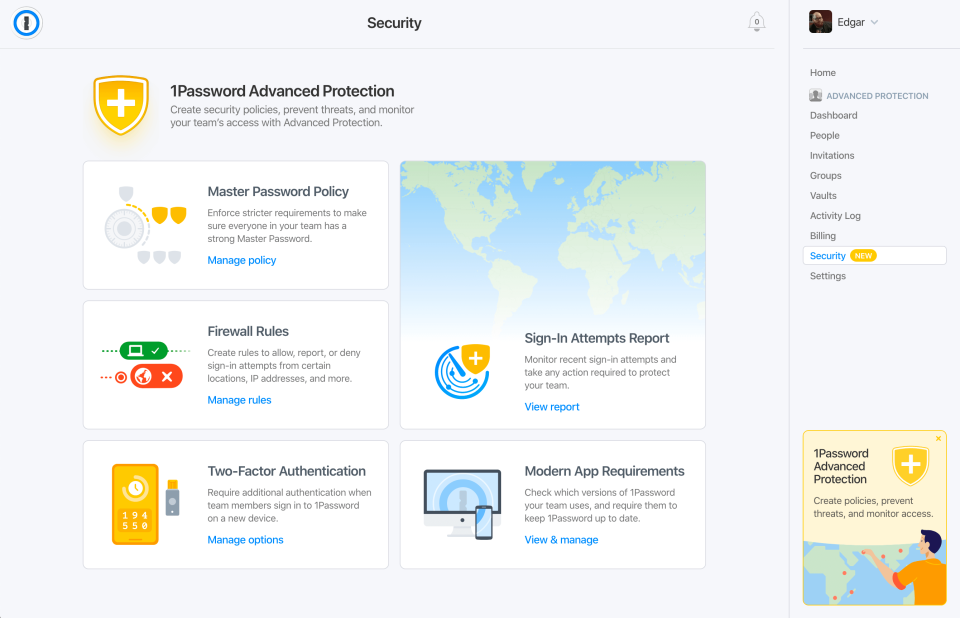
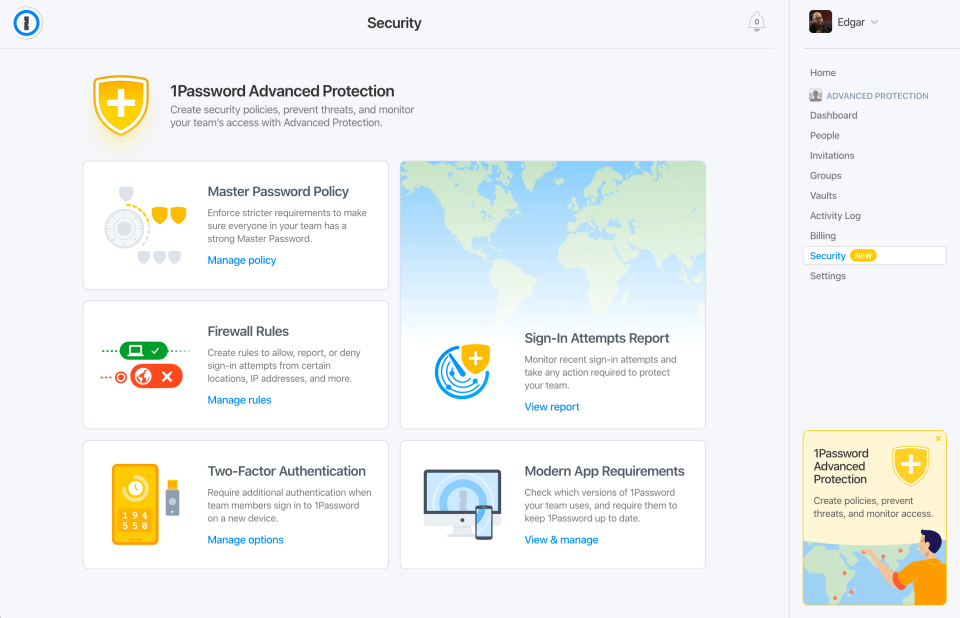
Password policy and Reporting in 1Password Software (Source)
Common features of SSPR software
Selecting software with the right features is easier when you understand what they are. The following are the key features of self-service password reset software tools:
Self-Service account unlock | Allows users to unlock accounts and reset passwords. |
Password expiry notification | Reminds users of their upcoming password or account expiration date via email and SMS. |
Strong password policy | Allows admin to create a strong password policy to ban weak passwords and palindromes. |
Password reset notification | Sends a notification to confirm the password has been reset. |
Reporting | Collects detailed reports like weak password reports, Identity verification failure reports to admin. |
Password synchronization | Synchronizes a new password with other cloud applications. |
Password Management | Generates and stores passwords in an encrypted database and assists in retrieving lost or forgotten passwords. |
What type of buyer are you?
Before you start evaluating options, you should know which buyer category you belong to so that you pick the right software. Most buyers belong to one of the following categories:
Small and midsize businesses: SMBs have a greater need for comprehensive password management in comparison to independent contractors. As they have more users and they need to secure a higher number of user accounts. These businesses should opt for SSPR software that offers an unlimited number of users as well as applications support. SMBs should look for a solution that offers capabilities such as reporting, a centralized dashboard for monitoring password statuses, management of credentials, and multifactor authentication (MFA).
Large businesses: Enterprise type businesses that may have more than a thousand employees need SSPR software that offers advanced features. For large enterprises, it becomes essential to monitor user behaviour along with enforcing password hygiene. Self-service password reset tools that have the capability to audit the employee’s password strength and provides features of automated alerts if there is any password-related issues in order to prevent data breaches, identity theft, or cyber-attacks.
Benefits of SSPR software
In this section, we’ve listed the key benefits of the SSPR tool.
Reduces help desk costs: By scaling password management with self-service, organizations can lower their help desk costs. This feature is a must-have for B2B and B2C environments wherein self-help is the only way to scale up or down. Self Service Password Reset enables your external users to securely maintain their credentials or unlock an account that was accidentally locked.
Increases security: Self Service Password Reset allows the IT department to more easily enforce strong password security rules. The IT team can configure password and challenge-response policies for an individual’s profile or for a specific group. Additionally, this tool also provides ways to keep user information secure with multi-factor authentication, security questions, and confirmation emails. These all help users feel both in control and secure. Adequate user authentication eliminates a common weakness of service desks, reducing the chances of identity theft and social engineering attacks.
24/7 password reset: Users can reset their passwords whenever they want to without help desk assistance. The solution allows users to reset their credentials due to expiration or forgetfulness. They just need to re-answer a few security questions and verify their identity. And post that they can reset their password anytime from anywhere and using any device.
Key considerations when purchasing SSPR tools
These are some factors that you should keep in mind when investing in an email verification tool.
Deployment options: Check whether the SSPR tool is deployed in the cloud or on-premise as both offer different pros and cons. The SSPR tool that is deployed in the cloud saves the need for installation while reducing the time to go live and relieves the management and maintenance of software and hardware, this can be a real benefit for MSPs focused on the sale. When the solution is deployed on-premise it provides customers with full ownership and control over the infrastructure, software, and resources.
Flexible authentication methods: The software should offer more than two modes of authentication to the users so that they have flexibility and ease in resetting their passwords. There are many options available such as one time passcodes, security questions, email notifications, secure tokens, and mobile app codes. Then the administrator can configure the minimum required authentication methods a user must give in order to unlock or reset their password. This will provide flexibility to users in choosing an authentication method in case they’re unable to access one.
Password synchronization: The SSPR tool should instantly synchronize password changes and password resets from windows AD with cloud and on-premise applications. The solution should offer the usage of one password across all enterprise applications.
Market trends to understand
Biometrics to surpass the need for passwords: Today, most organizations are aware of the adverse effects of password management and the burden it lays on the service desk. To take off this unnecessary load from the service desk team, enterprises are approaching options that can balance trust and accountability with user experience and cost. Biometric authentication can help in achieving that balance. According to Gartner, biometrics can enable passwordless authentication either alone or combined along with other methods. Biometrics integrated with phone-as-a-token authentication for passwordless multi-factor authentication (MFA) is likely to dominate in the workforce use cases.
A shift from a focus on policy to the adoption of new authentication methods: The security and risk management leaders should start focusing on password policies to reflect auditor’s and regulator’s requirements. According to a Gartner analyst, these password policies alone cannot mitigate the attacks against the passwords so it’s better to invest time and effort in assessing and implementing the controls. These technical controls can mitigate the impact of identity theft by implementing robust authentication methods.
Note: The application selected in this article is an example to show a feature in context and is not intended as an endorsement or a recommendation. It has been obtained from sources believed to be reliable at the time of publication.