


Best Data Extraction Software of 2026
Updated March 23, 2026 at 2:46 AM
- Popular Comparisons
- FrontRunners
- Buyers Guide
Compare Products
Showing 1 - 25 of 338 products
Compare Products
Sort by
Reviews: Sorts listings by the number of user reviews we have published, greatest to least.
Average Rating: Sorts listings by overall star rating based on user reviews, highest to lowest.
Alphabetically (A-Z): Sorts listings by product name from A to Z.

ScrapingBee is an API for web scraping, designed in small and large companies. Supply a URL, and ScrapingBee will handle headles...Read more about ScrapingBee
ScrapingBee's Best Rated Features
See All
ScrapingBee's Worst Rated Features
See All

NetNut is a proxy infrastructure built for developers, engineers, and data professionals who require reliable, high-performance ...Read more about NetNut
NetNut's Best Rated Features
See All
NetNut's Worst Rated Features
See All

Lightyear is an industry-leading cloud platform providing intelligent automation solutions for large SMEs & Enterprise level Pur...Read more about Lightyear


Lightyear's Best Rated Features
See All
Lightyear's Worst Rated Features
See All

SerpApi enables enterprises to gather, extract, and comprehend information from various search engine outcome pages. It provides...Read more about SerpApi
SerpApi's Best Rated Features
See All
SerpApi's Worst Rated Features
See All

Scrapfly's cutting-edge solution offers a range of features designed to enhance your web scraping experience. Enjoy automatic pr...Read more about Scrapfly


Scrapfly's Best Rated Features
See All
Scrapfly's Worst Rated Features
See All

Scrape.do is a web scraping API that caters to businesses and developers who need to extract data from websites at scale. Scrap...Read more about Scrape.do
Scrape.do's Best Rated Features
See All
Scrape.do's Worst Rated Features
See All

Apify is a full-stack web scraping and automation platform that helps anyone get value from the web. At its core is Apify Store)...Read more about Apify


Apify's Best Rated Features
See All
Apify's Worst Rated Features
See All

Skyvia is a cloud-based data integration, backup and management platform for businesses of all sizes. Key features include direc...Read more about Skyvia

Skyvia's Best Rated Features
See All
Skyvia's Worst Rated Features
See All

Coupler.io is a no-code data automation and analytics platform designed to help users streamline data extraction, stitch data fr...Read more about Coupler.io

Coupler.io's Best Rated Features
See All
Coupler.io's Worst Rated Features
See All

Get the data you need without coding. Choose a scraper, set your target, and collect data fast from various sources. Skip login ...Read more about lobstr
lobstr's Best Rated Features
See All
lobstr's Worst Rated Features
See All

BroadPeak is a low-code data integration solution designed for energy and commodity trading firms, enabling seamless connectivit...Read more about BroadPeak


APISCRAPY is an AI-driven web scraping and automation platform that converts any web data into ready-to-use data API. The platf...Read more about APISCRAPY
APISCRAPY's Best Rated Features
See All
APISCRAPY's Worst Rated Features
See All

Rayven designs and delivers operational systems for industrial and asset-intensive businesses. Most operations run on a mix of ...Read more about Rayven

Rayven's Best Rated Features
See All
Rayven's Worst Rated Features
See All

Nanonets is an AI-driven solution that automates document processing and data extraction workflows. Leveraging advanced Optica...Read more about Nanonets
Nanonets's Best Rated Features
See All
Nanonets's Worst Rated Features
See All

Autocene is a cloud-based no-code development platform that lets businesses of all sizes create and deploy applications to autom...Read more about Autocene
Autocene's Best Rated Features
See All
Autocene's Worst Rated Features
See All

# Veryfi: Transforming Documents into Data in Seconds Veryfi delivers an AI-powered platform that instantly converts documents ...Read more about Veryfi
Veryfi's Best Rated Features
See All
Veryfi's Worst Rated Features
See All

Docparser is a cloud-based document data extraction solution that helps businesses of all sizes retrieve data from PDFs, Word do...Read more about Docparser
Docparser's Best Rated Features
See All
Docparser's Worst Rated Features
See All

HasData is a web scraping API tool designed for extracting raw HTML or structured data from websites through a single API call. ...Read more about HasData
HasData's Best Rated Features
See All
HasData's Worst Rated Features
See All

Parseur is a cloud-based email parser solution that helps businesses of all sizes extract text from emails. The platform automat...Read more about Parseur
Parseur's Best Rated Features
See All
Parseur's Worst Rated Features
See All

AlgoDocs offers quick, safe, and accurate document data extraction, freeing you from tedious and error-prone manual data entry. ...Read more about Algodocs
Algodocs's Best Rated Features
See All
Algodocs's Worst Rated Features
See All

Twilio User Authentication & Identity offers digital identity verification and intelligence tools to build mutual trust between ...Read more about Twilio User Authentication & Identity
Twilio User Authentication & Identity's Best Rated Features
See All
Twilio User Authentication & Identity's Worst Rated Features
See All

𝗚𝗿𝗲𝗽𝘀𝗿 𝗲𝗺𝗽𝗼𝘄𝗲𝗿𝘀 𝗯𝘂𝘀𝗶𝗻𝗲𝘀𝘀𝗲𝘀 𝘄𝗶𝘁𝗵 𝗿𝗲𝗹𝗶𝗮𝗯𝗹𝗲, 𝗮𝗰𝗰𝘂𝗿𝗮𝘁𝗲, 𝗮𝗻𝗱 𝗮𝗰𝘁𝗶𝗼𝗻𝗮𝗯𝗹𝗲 𝘄𝗲...Read more about Grepsr
Grepsr's Best Rated Features
See All
Grepsr's Worst Rated Features
See All

Hevo is a no-code, bi-directional data pipeline platform specially built for modern ETL, ELT, and Reverse ETL Needs. It helps da...Read more about Hevo


Hevo 's Best Rated Features
See All
Hevo 's Worst Rated Features
See All

Cognism is the leading provider of European B2B data and sales intelligence. Ambitious businesses of every size use our platform...Read more about Cognism

Cognism's Best Rated Features
See All
Cognism's Worst Rated Features
See All

Rivery is a cloud-based solution that provides small to large enterprises with business intelligence tools to manage and automat...Read more about Rivery
Popular Comparisons



Your Guide to Top Data Extraction Software, November 2024
Software Advice uses reviews from real software users to highlight the top-rated Data Extraction products in North America.
Learn how products are chosenExplore FrontRunners


“Usability” includes user ratings for Functionality and Ease of Use.
“Customer Satisfaction” includes user ratings for Customer Support, Likelihood to Recommend and Value for Money.
Reviews analysis period: The reviews analysis period spans two years and ends the 15th of the month prior to publication.
Buyers Guide
This detailed guide will help you find and buy the right data extraction software for you and your business.
Last Updated on January 27, 2025For small businesses, data is a highly critical factor in determining customer needs, building sales and marketing strategies as well as understanding market trends.
Luckily for your small business, data is ubiquitous in the form of emails, program code, documentation, configuration files, websites etc. All of these can help you understand consumer habits and drive revenue. This data will also give you a competitive edge in the market.
For this reason, you should find ways to connect with your customers. However, small businesses often find it challenging to correctly identify customer behavior—how they select, buy and use your products.
Data extraction software can help you understand these customer actions. The software automates the collection of data from various websites and sources. It makes it easy to organize, store, retrieve and use this information to research and analyze customers.
But finding the right data extraction software can be tough for small businesses like yours. Knowing which features you need and fully realizing the benefits of those features will help you purchase the right software for your business.
This guide will help you understand data extraction software, its features and benefits.
Here's what we'll cover:
What Is Data Extraction Software?
Common Features of Data Extraction Software
Benefits of Data Extraction Software
What is Data Extraction Software?
Data extraction tools help businesses scrape data from a website or server. The data could be in the form of images, URLs, email addresses, phone numbers, etc.
The software can help you acquire data regarding the market, your customers and the general state of the economy every day, week or month. It can extract a variety of data, ranging from financial data (such as stock prices and bonds) to contact information (such as email IDs, phone numbers and social media profiles).
The data extraction process involves the following steps:
Load the data from the source page
Transform the source page for the extraction process
Identify the appearing elements (images, email IDs, etc.)
Filter these elements
Export of the final data to an output format (Excel, Word, etc.)
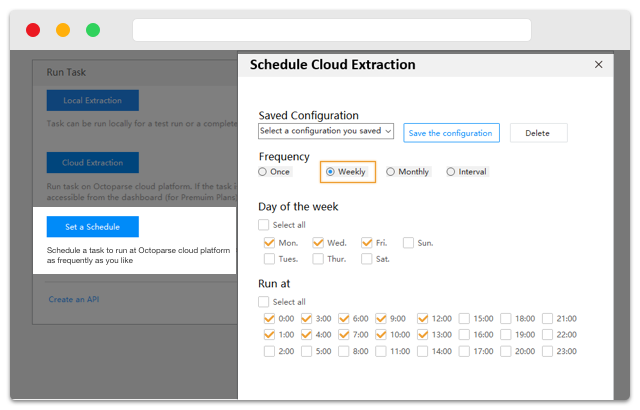
Schedule extraction feature in Octoparse (Source)
Common Features of Data Extraction Software
In this section, we cover the key software features that a buyer should be aware of before they purchase a solution. Most small businesses will need some (or all) of these features in their data extraction software:
Email address extraction | Collect email addresses from web pages, data files or any email account. |
Web data extraction | Collect content structures in the form of product catalogs, search results, URLs, etc., from various websites and store it in the company database. |
Schedule extraction | Set intervals (once a day, month or quarter) to scrape the most recent data whenever the tool detects updates or new content. |
IP address extraction | Extract IP addresses from files, folders, URLs and text snippets. |
Image extraction | Extract images of all sizes and types, including pictures, graphics and photos, from any kind of text file. |
Phone number extraction | Extract phone numbers from web pages and text files using an inbuilt logic that filters out the required information using a comma, colon or another character based per your preference. |
Import/export | Import data from tables and lists from websites, then export these into different formats such as Microsoft Excel or Word. |
Data handling | Organize collected data and store it on a server or in the cloud. |
To further understand these features and the vendors in this category, call our advisors at (844) 687-6771 for free, no-obligation guidance. They'll help you narrow down your options by understanding your requirements and recommending the best-suited solutions for your business.
What Type of Buyer Are You?
As you begin shortlisting your options for data extraction software, you need to understand the type of buyer you are. This will help you better analyze your requirements and the priority of software features into "must-have" and "optional."
This section breaks down the most common buyer types. Here are the three main types of buyers in this category:
E-commerce companies: These buyers need to study visitor demographics to deliver engaging customer experiences. They need data on the maximum viewed product categories, products delivering most sales, etc. Based on this data, they need to develop a strategy for customizing their offerings and promotions.
Government agencies: This buyer type needs data extraction software to control economic and infrastructural changes in their region. For instance, a district government body can analyze traffic data of a certain area with a high volume of road traffic. This could help them build better infrastructure models to ease the traffic situation in nearby areas as well.
Service providers: They require data extraction tools to improve their service offerings. Cable and internet service providers extract customer data to analyze their customers' needs and develop strategies to create the most effective up-sell opportunities.
Benefits of Data Extraction Software
So far, we've discussed that data extraction tools benefit businesses by automating the process of extracting data and reducing the overall scraping time. Here are some more benefits of using data extraction tools in your small business:
Extracts organic search results data for competitor analysis. The tool can pull data, such as title tags, meta keywords tags and backlinks, from competitor websites. The data allows you to do a competitor analysis of keywords that are driving traffic to a website, content categories that are attracting links and user engagement as well as the kind of resources you need to rank your site.
Enhances lead generation. A HubSpot survey found that "generating traffic and leads" was the top marketing challenge for 63 percent of marketers in 2018. Data extraction tools can enhance this process by extracting primary data (email IDs, contact information, etc.) based on your chosen criteria.
Key Considerations
Now that you're aware of the features and benefits of data extraction software, you should be better equipped to explore the solutions in the market. But before you purchase a solution, consider these key factors to make the right decisions:
Increasing data demands require scalability. Your data requirements will increase over time, so the solution should be able to handle future business expansion. A desktop as a service (DaaS) solution is ideal for small businesses and startups. It lets you scale up without having to invest a lot on hardware. DaaS also allows you to quickly make updates and upgrades at a relatively low cost than a traditional workstation infrastructure.
Mass data extraction requires a robust engine. The engine used for the data extraction process should be capable of managing the entire process: sorting, filtering and making advanced extraction algorithm. It should also be able to accommodate HTML structure changes, build a proper workflow for the process, log and track any failures as well as be resilient to changes and updates.
Data interface is essential. A graphical user interface (GUI) is essential to extracting data from visual sources such as websites. GUI lets you separate editing from viewing and gives a high degree of ease when configuring and extracting the data. If your tools lack GUI, it'll be difficult to create a direct relationship between the content you see and the HTML code or configuration files.
Keep these factors in mind when you are searching for a data extraction tool. Once you have fully understood your end-to-end requirements, shortlisting vendors will be easy.