
Best Multi-Factor Authentication Software of 2026
Updated March 17, 2026 at 5:06 PM

Written by Saumya Srivastava
Writer

Edited by Rina Rai
Senior Editor
- Popular Comparisons
- Buyers Guide
Compare Products
Showing 1 - 25 of 96 products
Compare Products
Sort by
Reviews: Sorts listings by the number of user reviews we have published, greatest to least.
Average Rating: Sorts listings by overall star rating based on user reviews, highest to lowest.
Alphabetically (A-Z): Sorts listings by product name from A to Z.

Rippling is an integrated workforce management platform that unifies HR, IT, and finance tools to streamline operations. It cent...Read more about Rippling


Rippling's Best Rated Features
See All
Rippling's Worst Rated Features
See All

Auth0 by Okta takes a modern approach to Identity and enables organizations to provide secure access to any application, for any...Read more about Auth0


Auth0's Best Rated Features
See All
Auth0's Worst Rated Features
See All

Okta is The World’s Identity Company™. As the leading independent Identity partner, we free everyone to safely use any technolog...Read more about Okta

Okta's Best Rated Features
See All
Okta's Worst Rated Features
See All

ADSelfService Plus is an identity security solution that ensures secure and seamless access to enterprise resources and establis...Read more about ManageEngine ADSelfService Plus


JumpCloud Directory-as-a-Service is an IT Management software, which helps businesses of all sizes manage devices or workstation...Read more about JumpCloud Directory Platform
JumpCloud Directory Platform's Best Rated Features
See All
JumpCloud Directory Platform's Worst Rated Features
See All

Twilio User Authentication & Identity offers digital identity verification and intelligence tools to build mutual trust between ...Read more about Twilio User Authentication & Identity
Twilio User Authentication & Identity's Best Rated Features
See All
Twilio User Authentication & Identity's Worst Rated Features
See All

JoinNow Cloud RADIUS eliminates the risks of legacy protocols and credential theft with a cloud-native solution built for modern...Read more about SecureW2 JoinNow Platform


SecureW2 JoinNow Platform's Best Rated Features
See All
SecureW2 JoinNow Platform's Worst Rated Features
See All

Shared computer access control with 2FA and automatic user-switching. Login to shared computers using phoneless-2FA and automati...Read more about GateKeeper Enterprise


Admin By Request is a cybersecurity solution designed to make comprehensive security simple. Our main goal is to enable enterpri...Read more about Admin By Request

Admin By Request's Best Rated Features
See All
Admin By Request's Worst Rated Features
See All

Conecta Suite is the ideal solution for those looking to maximize the potential of Google Workspace and boost team productivity....Read more about Conecta Suite

Conecta Suite's Best Rated Features
See All
Conecta Suite's Worst Rated Features
See All

Trusona is a leader of passwordless MFA solutions for enterprises within the financial services, healthcare, higher education, m...Read more about Trusona


LogMeOnce is a cloud-based password and identity management solution that enables businesses of all sizes to manage login creden...Read more about LogMeOnce

LogMeOnce's Best Rated Features
See All
LogMeOnce's Worst Rated Features
See All

Protectimus is a multi-factor authentication platform. It provides cloud-based and on-premises solutions to enhance security for...Read more about Protectimus


Under.io is a powerful software solution that simplifies customer onboarding and signing digital agreements. Our platform suppor...Read more about Under


Google Authenticator is a tool for securing your account. Google Authenticator generates six-digit codes that you can use as a w...Read more about Google Authenticator
Google Authenticator's Best Rated Features
See All
Google Authenticator's Worst Rated Features
See All

Beyond Identity is fundamentally changing the way workforces and customers log in. We eliminate passwords and all phishable fact...Read more about Beyond Identity

Beyond Identity's Best Rated Features
See All
Beyond Identity's Worst Rated Features
See All

A user management platform available only in English, Frontegg was built for B2B, B2C, and SaaS product developers who use the p...Read more about Frontegg
Frontegg's Best Rated Features
See All
Frontegg's Worst Rated Features
See All

Entrust Identity as a Service is a cloud-based identity and access management service that provides digital security solutions f...Read more about Entrust Identity as a Service

Uniqkey is Europe’s leading password and access manager. It simplifies employee security while empowering companies with enhance...Read more about Uniqkey


Proton Pass is a password manager designed to securely store, share, and auto-fill login credentials using end-to-end encryption...Read more about Proton Pass


UserLock brings modern identity and access management (IAM) to on-premises and hybrid Active Directory environments. Add multi-f...Read more about UserLock
UserLock's Best Rated Features
See All
UserLock's Worst Rated Features
See All

Authfy is a SEC4U low-code platform, a company focused on Cyber Identity, which enables secure digital journeys, providing the b...Read more about Authfy

OpenOTP is a security solution that offers identity and access management (IAM) capabilities. It is designed to simplify authent...Read more about OpenOTP

Spintly is a cloud-based platform that helps businesses handle physical security via access and visitor management tools. The pl...Read more about Spintly

Userfront gives secure, pre-configured authentication and authorization that stays up to date automatically. Teams focus on dire...Read more about Userfront
Popular Comparisons


Buyers Guide
This detailed guide will help you find and buy the right multi-factor authentication software for you and your business.
Last Updated on April 24, 2025Multi-factor authentication (MFA) software is essential for businesses to secure sensitive data. Whether it’s bank accounts, work accounts, applications, or cloud storage, instituting multi-factor authentication will ensure that only you or other authorized users have access to accounts that are critical to your business, which will protect you from data breaches.
In addition, the software offers features such as threat detection, incident response, remote access, endpoint monitoring, and more, making it a complete security solution.
Before you buy the software, you need to understand what multi-factor authentication software is, its features, who typically buys this type of software, and the benefits it will bring to your business. This buyers guide also covers some key considerations before purchasing software and the latest technology trends in the market.
Here's what we'll cover:
What is multi-factor authentication software?
Multi-factor authentication software is a cloud-based tool that helps businesses manage accounts carrying sensitive information via meta-directory, one-tap access, single sign-on, and more.
The software secures the accounts by prompting the owner or stakeholders to prove their identity through a set authentication method. This could be a one-time password (OTP), security key, hardware tokens, app-generated code, a mobile push message, or a phone call to the registered number. Once the user’s identity is proven, the user can access accounts, applications, and systems critical to the business, all in one go.
Multi-factor authentication software is used by businesses in hospitality, finance, healthcare, law, and ecommerce. However, businesses catering to other sectors along with entrepreneurs and individuals can also leverage this technology to enhance data security.
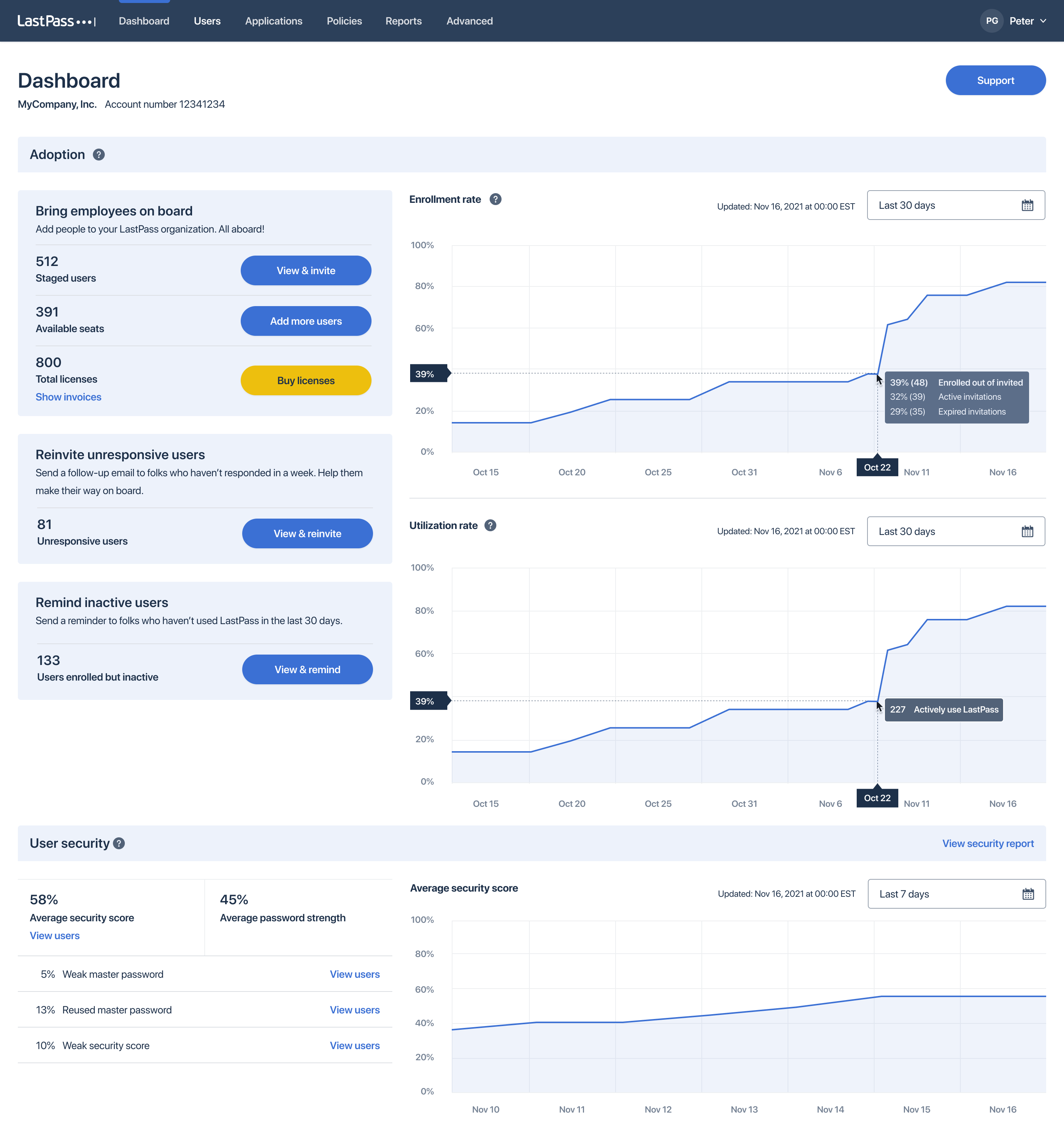
Dashboard in LastPass (Source)
Common features of multi-factor authentication software
Control who can have access to the accounts that are registered for multi-factor authentication. You can also define user groups and access policies to enhance security. | |
Credential management | Store usernames and passwords for multiple accounts in one place. Utilize them when facing issues during login and delete or change the information when you are alerted about unauthorized access. |
Get fast and secure access to single or multiple accounts by approving a push notification for login on your mobile device. | |
Multiple authentication methods | Select from multiple authentication options such as tapping on a universal 2nd factor (U2F) USB device, approving a push notification, entering an OTP, using biometrics, and more. |
Self-service portal | Save time for both you and your administrator by utilizing the self-service feature to add or change credentials, manage accounts, set up threat alerts, and more. |
Single sign-on (SSO) | Experience a consistent and hassle-free login experience for single or multiple accounts, whether from the office or a different location via your mobile device. |
What type of buyer are you?
Financial businesses: Financial service providers are prime targets of cyber theft. That makes it essential to have a fool-proof multi-factor authentication method in place to ensure data security and protect against breaches.
Such businesses can utilize multi-factor authentication software to secure applications, systems, and networks and can also pick different authentication methods to manage internal and external identities.
Legal firms: It is the ethical duty of a legal firm to protect their clients’ data, so they require multi-factor authentication software. The software can help mitigate the threat to the information infrastructure of these businesses by requesting unique identification information, in addition to a user’s username and password. These businesses can leverage the access management feature of the software to allow authorized access to clients and other stakeholders using a security key.
Healthcare businesses: Healthcare businesses require strong access control to help mitigate security risks related to remote access to patients’ data. Utilizing a fully-featured multi-factor authentication software with access management can help keep data secure. In addition, patients can also leverage the self-service portal to get secure access to the information they need.
Consumer businesses: Data security is essential in the consumer business, both for customers and owners. While customers fear identity theft and misuse of payment options, it is also not pleasant for business owners to fall prey to false payments made by digital thieves. Employing a multi-factor authentication software with a self-service feature will strengthen the security for these businesses, ensuring a hassle-free customer experience.
Corporate enterprises: In the digital workspace, information critical to a business is accessed by partners, employees, and vendors from a multitude of locations and networks. This brings along the risk of security breaches, but a multi-factor authentication software can help mitigate the risk. Not only does it help in user identity verification by gaining visibility into devices, but it also enforces adaptive policies to secure access.
Benefits of multi-factor authentication software
Reduces security breaches: Multi-factor authentication software offers endpoint security and visibility into all the end user devices that have access to sensitive data. This ensures strong authentication and prevents security breaches.
Improves access management: A strong MFA solution combined with convenient features such as a self-service portal or one-tap biometric authentication helps stakeholders to access the information quickly.
Enhance operational efficiency: Notifying stakeholders of each login attempt involves time and effort. However, the authentication software with features such as push notifications can reduce help desk efforts, which will allow them to focus on other essential aspects of the business.
Key considerations when purchasing multi-factor authentication software
Business needs: Every business has different compliance and security policies, depending on the nature of their work. This makes it essential to look for an adaptive MFA software that can align with your business requirements, such as cloud applications, remote access, a self-service portal, and more.
Budget: Price is an important factor when talking about long-term investments, especially in the case of small businesses. This makes it essential to look at the software subscription plans that can be included in the present operational cost of the business.
Market trend to understand
Here is a multi-factor authentication software market trend that you need to be aware of:
AR to soon redefine user authentication: Augmented reality (AR) and virtual reality (VR) have shown promising results in various industries, and now there are plans to use the technology to enhance multi-factor authentication. With the technology in place, an AR interactive system will initiate a conversation with the user to conduct identity tests via questions and images. While the basic principle of authentication remains the same, the AR interactive system will take the place of a textual authentication format. This innovation is currently being tested for its effectiveness, with plans to be launched in the near future.
Note: The application mentioned in this guide is an example to show a feature in context and is not intended as an endorsement or recommendation. It has been taken from sources believed to be reliable at the time of publication.