


Best e-Prescribing Software of 2026
Updated January 29, 2026 at 2:24 AM

Written by Lisa Morris
Associate Principal Analyst

Edited by Caroline Rousseau
Senior Editor

Reviewed by Bobby Walrdon
Senior Advisor

Talk with us for a free 15-min consultation
Expert advisors like Jacqueline, who have helped 1,000+ practices, can find the right software for your needs.
- All Software
- Top Software
- Popular Comparisons
- Buyer's Guide
- Frequently Asked Questions
E-prescribing software is a tool that enables medical prescribers to send prescriptions to patients’ preferred pharmacies electronically. It lets users quickly manage refills and check drug interactions or allergies before prescribing medications. E-prescribing is available as a feature in certain EHRs and practice management software or as standalone software that integrates with these larger systems. We have over 60 individual e-prescribing products on our website, and users have left over 1,100 reviews for these products in the past year [1]. To help you narrow it down, I worked with our e-prescribing software advisors to curate a list of recommended productsi and a list of highly-rated e-prescribing software based on user reviews.
e-Prescribing Software
Sort by
Reviews: Sorts listings by the number of user reviews we have published, greatest to least.
Average Rating: Sorts listings by overall star rating based on user reviews, highest to lowest.
Alphabetically (A-Z): Sorts listings by product name from A to Z.

RXNT’s cloud-based, ONC-certified medical software—Billing, Practice Management, EHR, and more—improves clinical outcomes & reve...Read more about RXNT


RXNT's Best Rated Features
See All
RXNT's Worst Rated Features
See All

athenaOne is an integrated solution designed for healthcare practices, offering electronic health records, revenue cycle managem...Read more about athenaOne


athenaOne's Best Rated Features
See All
athenaOne's Worst Rated Features
See All

CharmHealth is a comprehensive suite of healthcare solutions designed to streamline practice management, revenue cycle managemen...Read more about CharmHealth


CharmHealth's Best Rated Features
See All
CharmHealth's Worst Rated Features
See All

Tebra helps independent medical practices plug the revenue leaks caused by no-shows, manual processes, and slow reimbursements. ...Read more about Tebra


Tebra's Best Rated Features
See All
Tebra's Worst Rated Features
See All

NextGen® Office is an all-in-one, cloud-based support system designed to help independent practices improve clinical outcomes, i...Read more about NextGen Office


NextGen Office's Best Rated Features
See All
NextGen Office's Worst Rated Features
See All
Best E-Prescribing Software for 2025


Highest Rated

DocVilla

DocVilla has the highest overall rating in our analysis of e-prescribing products with the most market demand.
DocVilla was designed for medical practices, offering integrated features that handle all aspects of practice management, including e-prescribing capabilities. Users like the product as an all-in-one solution that handles electronic prescribing of controlled substances (EPCS) and integrates with EHR, EMR, PM, and RCM software. DocVilla primarily targets small practices, solo providers, and multi-specialty clinics.
- Reviewers Perspective
“DocVilla EMR engineering team is knowledgeable to even customize the software for various practices e.g I have connected DocVilla with salesforce CRM using API for patient marketing.”
NSNeeraj Somani
IT Strategy Consultant
Used for 2+ years
We analyzed 45 verified user reviews for DocVilla to determine what users think.
Customization and integration
Reviewers appreciate DocVilla's customization capabilities, which allow them to tailor the software to their specific practice needs. They highlight the ability to connect DocVilla with other software, such as Salesforce CRM, to enhance patient marketing and other functionalities. Users also value the engineering team's responsiveness in developing custom solutions and white-labeled patient portals, which adds a personalized touch to their operations.Scheduling and billing
Users find DocVilla's scheduling and billing features efficient and user-friendly, making managing appointments and financial transactions easier. They appreciate the claim submission process and the integration of patient payment and ERA processing, especially for administrative tasks. However, some users wish for additional features, such as the ability to email patients about appointment changes, to enhance the scheduling experience further.Customer support
Reviewers positively rate DocVilla's customer support for being prompt, professional, and highly effective in resolving issues. They commend the support team's availability and the extensive training resources provided, which help users navigate the software more easily. Additionally, users highlight the positive impact of excellent customer service on their overall satisfaction and the smooth transition to using DocVilla in their practices. - Key FeaturesDocVilla's scoreCategory average
E-Prescribing
5.04.45 category average
Healthcare Compliance
5.04.57 category average
HIPAA Compliant
4.984.78 category average
- Screenshots


Most Affordable
RXNT

Based on our analysis of the most popular e-prescribing products, RXNT is the most affordable option for those seeking the lowest-priced paid plan.
RXNT is practice management and billing software medical professionals use, including physicians, healthcare providers, billers, and health-related organizations. It is helpful for practices and organizations of all sizes and specialties and offers an award-winning e-prescribing tool. Users appreciate its many features, all offered at a rate below the industry average for healthcare software.
- Reviewers Perspective
“The most used features used during an eye exam in looking up patient medication history as well as prescribing medications to treat ocular disease.”
NPNatalia Pisklak
Optometrist
Used for 6-12 months
We analyzed 473 verified user reviews for RXNT to determine what actual users think.
E-Prescribing
Users find RXNT's e-prescribing feature efficient and user-friendly, particularly when prescribing controlled substances. They appreciate the prescribing process and the ability to prescribe medications electronically from anywhere. Integrating their EHR program enhances the prescribing experience, making it a valuable tool for their practice.Mobile accessibility
Users value RXNT's mobile accessibility, highlighting its ease of use on phones and tablets. They find the mobile app functional and convenient for handling after-hours requests and accessing the system from anywhere. The responsive support team enhances their experience, making mobile use a key software feature.Prescription refills
Users find RXNT's prescription refill process straightforward and efficient. They appreciate the ease of scheduling refill orders and the notifications for pharmacy refill requests. Quickly placing and sending refills to pharmacies is particularly beneficial for managing patient medications. - Key FeaturesRXNT's scoreCategory average
E-Prescribing
4.604.45 category average
Healthcare Compliance
4.914.57 category average
HIPAA Compliant
4.784.78 category average
- Screenshots


Best Value for Money
Tebra

In our analysis of the e-prescribing software options with the most market demand, Tebra was rated the highest based on its value for money.
Tebra is an effective choice for independent healthcare practices, including billing companies, new practices, and those specializing in psychology, family medicine, and pediatrics. This solution allows practices to reference patient medication histories and easily manage new prescriptions. Users report an excellent combination of price and features, making it a top solution for those seeking high value.
- Reviewers Perspective
“Tebra is very user friendly, I also enjoyed the fact that we were able to navigate throughout the chart from Demographics to accounts”
TBThomas Burns
CEO Owner
Used for 6-12 months
We analyzed 1,289 verified user reviews for Tebra to determine what actual users think.
Practice management
Users find Tebra's practice management features beneficial for small and large practices, appreciating the support for managing multiple providers. They highlight the software's suitability for new and small practices, noting its ease of use and comprehensive functionality. Reviewers also commend the system's ability to improve practice operations and support growth.Navigation
Reviewers appreciate Tebra's user-friendly navigation, which allows them to move quickly through various software sections. They find the multiple window feature and the ability to switch between tasks without closing windows particularly useful. Users also highlight the intuitive layout and the ease of accessing necessary information, making the system efficient and straightforward.Office efficiency
Users find that Tebra significantly improves office efficiency by streamlining front and back-office tasks. They appreciate the system's cloud-based hosting environment, which allows easy access from any location and supports office growth. Reviewers also note that the software enables them to focus on customer service and revenue-generating activities, enhancing overall productivity. - Key FeaturesTebra's scoreCategory average
E-Prescribing
3.644.45 category average
Healthcare Compliance
4.634.57 category average
HIPAA Compliant
4.344.78 category average
- Screenshots


Best Ease of Use

NextGen Office is a popular e-prescribing software with the highest rating among users who want an easy-to-use product.
NextGen Office is a leading software for smaller practices seeking a solution to transform ambulatory care operations. This practice management platform offers many features, including e-prescribing, that help practices minimize errors, increase efficiencies, and reduce costs. While this option provides cutting-edge technology, users report it is easy to navigate. Several integrated workflow solutions improve the e-prescribing process, which won the company an award for the highest accuracy in electronic prescribing.
- Reviewers Perspective
“NextGen Office gives me increased work power thanks to its many advantages such as advanced features, user-friendly interface and compatibility with many file formats”
GNGéovanny Ngueyep
Graphic designer
Used for 6-12 months
We analyzed 1,275 verified user reviews for NextGen Office to determine what actual users think.
EHR practice management
Users find NextGen Office's integration with other systems beneficial, making managing various aspects of practice management easier. They value the software's ease of use and comprehensive features, which improve operations and enhance efficiency. Additionally, users commend the customer service for being responsive and helpful, ensuring a smooth experience with the software.Customization
Users appreciate the practice-specific customization options available in NextGen Office, allowing them to tailor the system to their unique needs. They find the advanced features and custom forms particularly useful for improving workflow and efficiency. However, some users note that extensive customization can be time-consuming and may require reapplication after software updates.Staff training
Users find NextGen Office's staff training and support highly effective, helping their teams become more efficient and knowledgeable. They appreciate the implementation support, which supports a smooth transition to the new system. Additionally, users highlight the availability of support staff to troubleshoot and assist with any issues, making the training process more manageable. - Key FeaturesNextGen Office's scoreCategory average
E-Prescribing
3.964.45 category average
Healthcare Compliance
5.04.57 category average
HIPAA Compliant
4.554.78 category average
- Screenshots


Best Customer Service
CharmHealth

In our analysis of the top e-prescribing software options, CharmHealth was the highest-rated product for its customer service.
CharmHealth is best for smaller practices, but since scalability and customization options exist, this software can also be a good fit for growing practices or healthcare businesses. Users rate it the highest for its customer service. The software’s support team is said to be highly responsive and helpful, and they offer comprehensive onboarding assistance. In addition, a resource center provides FAQs, videos, podcasts, and forums.
- Reviewers Perspective
“The patients find the system easy to navigate and rarely do we have a patient complain they can't figure out how to get in the system.”
CNCandace Nelms
Office Manager
Used for 2+ years
We analyzed 145 verified user reviews for CharmHealth to determine what actual users think.
EHR practice management
Reviewers find CharmHealth's EHR system well-suited for small practices, offering essential features at a reasonable price. They commend the support team and the software's focus on integrative and functional medicine, which aligns well with their practice needs. Users also appreciate the comprehensive feature set that caters to integrative medicine concierge practices.Customization and improvement
Users appreciate CharmHealth's customizability, which allows them to tailor the software to their needs. They note that the company consistently improves functionality based on user feedback, keeping the software up-to-date and relevant. Reviewers appreciate the ongoing enhancements and the responsiveness to new ideas, contributing to a better user experience.Navigation
Reviewers find CharmHealth easy to navigate, with a simple and intuitive dashboard that enhances user experience. They appreciate the transition to telehealth, especially during the COVID-19 pandemic, facilitating uninterrupted patient care. Users also mention that the portal is visually appealing and straightforward, making it accessible even for those new to EHR systems. - Key FeaturesCharmHealth's scoreCategory average
E-Prescribing
4.04.45 category average
Healthcare Compliance
5.04.57 category average
HIPAA Compliant
4.664.78 category average
- Screenshots


Best for Functionality
athenaOne

Based on our analysis of the most popular e-prescribing software products, athenaOne was the highest-rated for functionality.
athenaOne provides users with many features, including e-prescribing capabilities. Some of the top e-prescribing features within this software include creating orders, viewing dosages, seeing real-time prescription costs, and more. Users report that the software is well-designed and that e-prescribing is particularly easy to navigate and implement.
- Reviewers Perspective
“I have used so many different electronic health sites and Athena is by far the most user friendly and hardly ever has tech issues.”
LYLoganne Young
Ultrasound Technologist
Used for 2+ years
We analyzed 883 verified user reviews for athenaOne to determine what users think.
EHR practice
Reviewers find athenaOne's EHR platform user-friendly and well-suited for small practices, highlighting its affordability and comprehensive features. They appreciate the system's ease of use, accommodating both experienced and volunteer providers. Users also commend the platform for its robust functionality, making it a reliable choice for managing electronic health records.Customization
Users value the customization options in AthenaOne, particularly the ability to personalize templates and order sets. They find the layout user-friendly and appreciate the opportunity to tailor the program to their specific needs. However, some users wish for even more extensive customization capabilities to suit their practice requirements better.Learning curve
Reviewers find AthenaOne easy to learn and appreciate the knowledgeable support provided. They highlight the system's user-friendly design, simplifying the learning process and helping users become efficient quickly. Users also mention that while there is a lot to learn initially, the ongoing discovery of new features enhances their overall experience with the software. - Key FeaturesathenaOne's scoreCategory average
E-Prescribing
4.084.45 category average
Healthcare Compliance
5.04.57 category average
HIPAA Compliant
4.694.78 category average
- Screenshots


Methodology
The research for the best E-Prescribing software list was conducted in November 2024. We evaluated data (user reviews and demand signals) from the past 24 months as of the research date. Read the complete methodology.
Popular e-Prescribing Comparisons


Buyer's Guide
This detailed guide will help you find and buy the right 2026 e-prescribing buyer’s guide: how to choose e-prescribing software for you and your business.
Last Updated on January 09, 2026Here’s what we’ll cover:
What is e-prescribing software?
What are the features of e-prescribing software?
Who uses e-prescribing software?
5 Steps to buying e-prescribing software
What is e-prescribing software?
E-prescribing software, also known as electronic prescribing or eRx software, helps healthcare providers digitally create, manage, and send prescription orders to pharmacies, including details like dosing and generic drug options.
Our recent Medical Software Trends survey reveals that two-thirds (67%) of physicians in the U.S. plan to increase their medical software spending in the next 12 months, with 8% anticipating a jump of more than 15%. [1] This is a strong signal that adoption of tools like e-prescribing software is accelerating.
These tools often integrate with electronic health record (EHR) systems, allowing providers to prescribe directly from the patient’s chart and access relevant clinical data.
There are still some practices that rely on paper charting, especially those in private practice for over a decade. “A lot of providers that have been practicing for 10 plus years privately, they don't want to leave their paper charting, so they're just reaching out to cover themselves until they retire,” says Bobby Waldron, Senior Medical Software Advisor at Software Advice.
E-prescribing replaces handwritten or faxed prescriptions with secure, electronic workflows that connect directly to pharmacies. This shift helps reduce medication errors, improves tracking and transparency, and speeds up access to treatment—benefiting both clinicians and patients.
Here's how electronic prescribing works:
Digital medical prescription entry: Providers use a cloud-based or mobile eRx system to select medications, dosages, and give instructions. The system often provides access to medication history to check for allergies or interactions.
Automatic compliance verification: The system applies DEA-compliant Electronic Prescriptions for Controlled Substances (EPCS) protocols and checks against Prescription Drug Monitoring Program (PDMP) databases for controlled substances.
Insurance coverage and cost check: A real-time prescription benefit (RTPB) check shows insurance coverage and cost options before finalizing the order.
Secure transmission to pharmacy: Once approved, the prescription is transmitted via a secure, Surescripts-certified network so pharmacies can begin processing immediately.
Patient notification and support: Patients receive notifications when medications are ready to pick up, and some platforms offer medication adherence tools to encourage proper usage.
With growing interest in digital health tools, many practices are increasing their investment in medical software to improve care delivery and operational efficiency.
What are the features of e-prescribing software?
Core e-prescribing software features
Software providers offer a variety of functional breadth and depth in their e-prescribing solutions. Each year, we speak to hundreds of e-prescribing and medical software users. We have analyzed those conversations to better understand which features are most critical to professionals. [2]
While some features are considered “core” functionality that should be included in all systems, others are considered “common” and may or may not be found in every e-prescribing product.
Feature | Description |
E-prescribing | Transmit prescriptions to pharmacies electronically using cloud-based or mobile e-prescribing tools. Orders can be processed individually or in batches. Order management tools are typically included to ensure pharmacies receive the prescriptions. |
Formulary management | Determine clinically appropriate and cost-effective medications and therapies for patients using formulary search tools and pharmacy network integration. |
Healthcare compliance | Compliant with healthcare rules and regulations, including DEA-compliant protocols for controlled substances, HIPAA standards for patient data privacy, and Surescripts-certified connections for secure prescription transmission, in order to protect patients’ data from loss or theft. |
Common e-prescribing software features
Feature | Description |
Medication selection | Prescribers can typically choose from multiple options when searching for a medication to include in the prescription order, including generic alternatives to brand-name drugs. |
Adverse interaction checks | Most systems offer alerts and warnings for potential adverse reactions from a particular prescription, such as drug interactions, allergies, dosage amounts and duplicates. |
Refill authorizations | Pharmacies can send refill requests to prescribers directly through the software's network. Providers can then approve or deny these requests electronically. |
Medication history views | Most solutions allow users to access a patient’s medication history by importing it from a pharmacy’s database, or through the medication claims history provided by insurance payers/pharmacy benefit managers. |
What advanced e-prescribing capabilities should you consider?
Basic e-prescribing features may be enough to meet compliance requirements. However, as your practice grows, advanced capabilities can enhance safety, efficiency, and patient experience. Look for tools that offer:
Drug interaction and allergy alerts to prevent harmful combinations
Medication history access for informed prescribing decisions
Formulary and benefit checks to help patients manage costs
Mobile prescribing so clinicians can approve refills or send prescriptions from anywhere
Beyond these essentials, many vendors now include advanced functionality such as:
Electronic prescribing of controlled substances (EPCS) with secure two-factor authentication
Integration with Prescription Drug Monitoring Programs (PDMPs) to track controlled substances
Electronic prior authorization to reduce delays in medication approvals
AI-powered decision support and ambient documentation to streamline workflows
Cost-saving tools like coupon integration for patient affordability
These features help practices move beyond compliance toward proactive care and operational efficiency. When evaluating vendors, consider which capabilities align with your clinical workflows and patient needs.
Expert tip for SMBs:
“Once practices meet basic compliance, they start asking for features like drug interaction alerts, real-time formulary checks, and mobile prescribing. These capabilities help clinicians make safer, faster decisions.” - Alejandra Aranda
Who uses e-prescribing software?
E-prescribing software is used across healthcare settings that prioritize speed, safety, and regulatory compliance in medication workflows. Common adopters include solo providers, small practices, and multi-specialty clinics aiming to reduce paperwork and improve prescription accuracy.
Typical users include:
Medical practice owners
Doctors
Nurse practitioners
Office managers
Whether managing a solo practice or a multi-specialty clinic, these roles use e-prescribing tools to reduce administrative burden, improve medication workflows, and enhance patient care.
What are the common use cases of e-prescribing software by industry?
Here is how e-prescribing software is used across industries:
Medical practice
Prescription management: Send prescriptions electronically to pharmacies and manage refills.
Compliance: Meet state-level mandates for electronic prescribing, including controlled substances.
Integration: Connect with EHR systems for streamlined patient care.
Hospital and health care
High-volume prescribing: Handle large numbers of prescriptions efficiently across departments.
Urgent care and telehealth services: Leverage mobile e-prescribing to issue prescriptions quickly during remote consultations, improving patient access and reducing delays in treatment.
Behavioral health and pain management: Rely on EPCS and PDMP integration to meet regulatory requirements and monitor high-risk medications.
Mental health care
Long-term medication tracking: Monitor psychiatric medications and dosage adjustments over time.
Secure communication: Share prescriptions and updates safely between providers and pharmacies.
Veterinary
Species-specific dosing: Calculate accurate medication doses for different animals.
Inventory management: Track medications and supplies to avoid shortages.
Wellness and fitness
Integration with scheduling: Link prescriptions to wellness plans and appointments.
Mobile access: Enable trainers or clinicians to approve prescriptions on the go.
5 Steps to buying e-prescribing software
Healthcare professionals value security in medical software above all else. Along with ease of use and functionality, security is the top priority for most practices when evaluating e-prescribing tools. [1] These features are also the top three most critical when researching products, suggesting most practices successfully find what they're looking for. These features reduce risk, save time, and help clinicians focus on care instead of paperwork.
Choosing e-prescribing software is a high-stakes decision. SMBs are investing more than ever: 77% plan to increase software budgets, and 82% expect revenue growth in the next 18 months. Yet, 45% of buyers regret at least one purchase in the past year. [3]
Our research shows a clear divide:
34% of buyers succeed: they adopt the right tool without regret or workflow issues.
40% struggle: they face regret or operational disruption after implementation.
This five-step buyer’s guide outlines proven methods used by successful adopters. It’s designed to help medical professionals avoid common pitfalls and choose e-prescribing software that supports long-term growth:
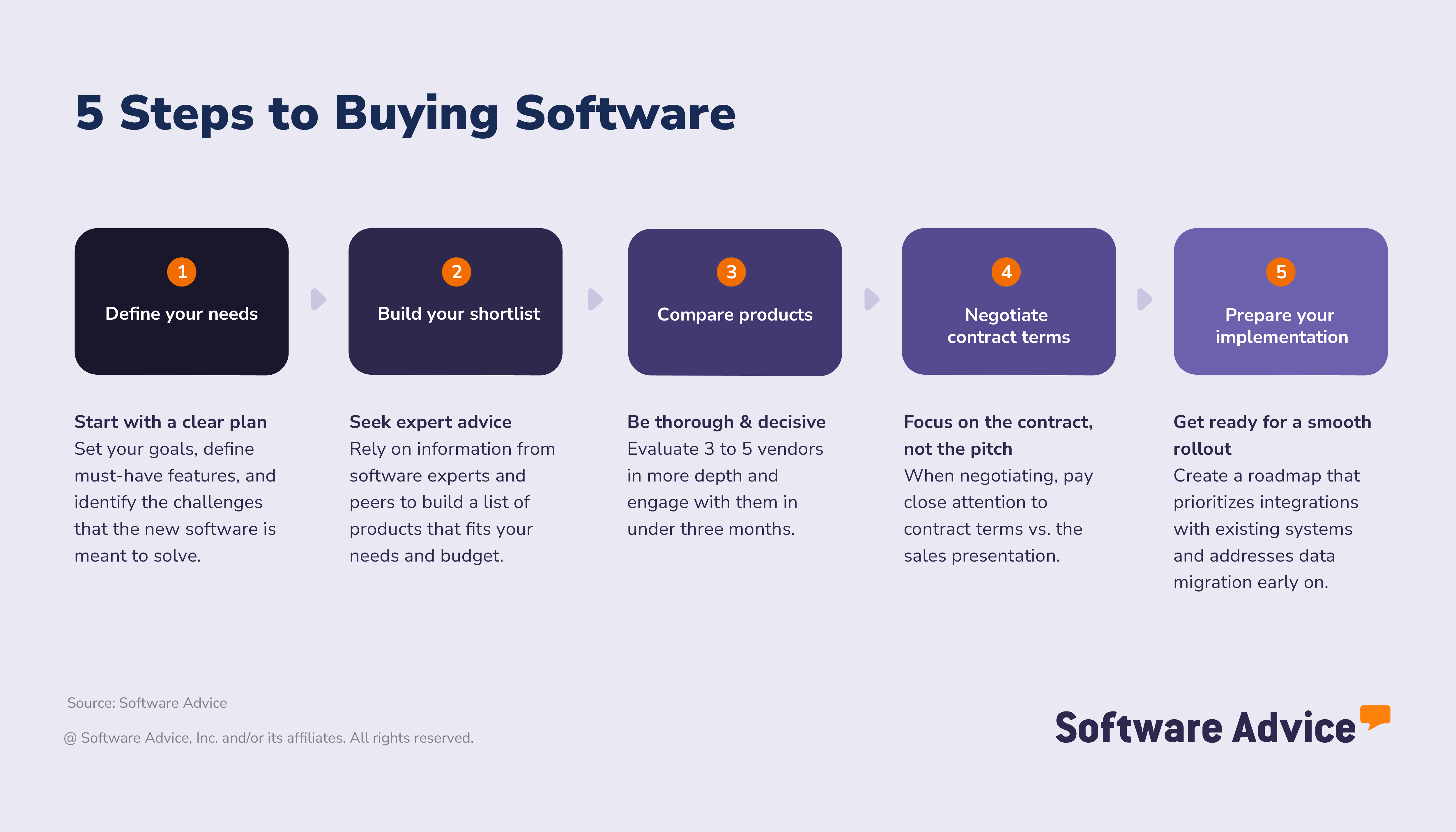
Step 1. Define your e-prescribing software needs and goals
Plan implementation and set clear post-deployment outcomes for success.
In fact, more than half (54%) of successful buyers develop a formal implementation plan, compared to just 29% of disappointed buyers [3]. This planning is crucial for mitigating disruptions and ensuring a smooth rollout.
Set your goals: What challenges do you want to solve with your e-prescribing software?
Before selecting an e-prescribing system, define what success looks like for your practice. Goals should align with your clinical workflows, compliance needs, and patient care priorities.
Common goals include:
Improve prescription accuracy. Reduce errors by replacing handwritten prescriptions with digital workflows that include medication history checks and interaction alerts.
Speed up prescription fulfillment. Use mobile e-prescribing and Surescripts-certified networks to send prescriptions instantly, minimizing delays and improving patient satisfaction.
Enhance compliance and control. Ensure DEA-compliant handling of controlled substances through EPCS protocols and PDMP integration.
Support medication adherence. Track refill behavior and send reminders to help patients follow treatment plans.
Success metrics to consider:
Reduction in prescription errors or pharmacy callbacks
Time saved per prescription transaction
Percentage of prescriptions sent electronically
Patient retention and satisfaction scores
Compliance rates for controlled substance prescribing
Mobile prescribing adoption rate
Medication adherence improvement
Setting clear goals and measurable outcomes will help you evaluate vendors more effectively and ensure your investment delivers meaningful results.
Set your requirements: Map business goals to features
Begin with the basics
Aligning your prescribing goals with e-prescribing features helps you select tools that support safe, efficient medication management. Here’s how common objectives connect to useful capabilities:
Goal area | Business goal (outcome) | Helpful features |
E-prescribing | Improve prescription accuracy | Decision support Formulary management Clinical notes |
Operational efficiency | Speed up prescription fulfillment | Mobile alerts Prescription renewal Secure messaging Appointment scheduling |
Healthcare compliance | Enhance compliance and control | Compliance tracking HIPAA compliant Reporting/Analytics |
Patient experience | Support medication adherence | Confirmations/Reminders Patient portal SMS reminders |
Our advisors can help your team define prescribing priorities and match them to the right e-prescribing capabilities. If you’d like personalized assistance, you can chat online now or schedule a call at your convenience.
Once you’ve aligned your goals with core features, the next step is to anticipate how your needs may evolve. Many SMBs start with basic functionality, but quickly see the value in advanced capabilities, especially as patient volumes grow or compliance requirements become more complex.
Identify stakeholders: Who needs to be involved for a successful e-prescribing software purchase?
Selecting e-prescribing software is a team effort. Involving the right stakeholders ensures the system meets clinical, operational, and compliance needs. Here’s who should be part of the decision-making process and why:
Physicians and prescribers: They are the primary users and must be involved to ensure the system fits clinical workflows.
IT and technical support teams: They handle integration with existing systems, security, and troubleshooting during implementation.
Expert tip for SMBs:
“Bring in clinicians, administrators, and compliance experts early in the process. Each group sees different risks and requirements. Their combined input ensures the e-prescribing system integrates smoothly, supports billing accuracy, and meets security standards.” - Alejandra Aranda
Step 2. Build your shortlist and seek expert advice
Not all sources of information about software vendors and products are equally reliable.
In fact, the success of your purchase is directly related to the quality of the information you rely on to create your list of software vendors.
We discovered that disappointed buyers tend to rely more on generative AI and forums, which may provide less reliable or relevant information. On the other hand, successful buyers rely less on generative AI to develop their shortlist and instead favor insights from industry experts and software review/comparison sites.
Get real advice from real people
Review side-by-side comparisons of leading e-prescribing platforms and check verified user reviews for insight into real use cases. Peer input can highlight usability issues, integration challenges, and support quality—especially for solo providers and small practices.
Explore Software Advice to know over 60 e-prescribing products backed by 1,100+ user reviews from the past year—giving you real-world insights to make confident decisions.
Download our software comparison chart to compare up to three software vendors on product functionality, training and support resources, and deployment options.
How to leverage user reviews
User reviews are a top resource for software buyers. Nearly one-third say reviews influence their decision most. For e-prescribing software, they reveal practical insights beyond vendor claims.
Make reviews work for you:
Filter by similar practices: Look for feedback from organizations with comparable patient volumes, specialties, or compliance needs.
Focus on workflow details: Check comments about prescription accuracy, refill management, and EHR integration.
Prioritize recent feedback: Sort reviews from the last 6-12 months to focus on current features and ensure quality support.
Compare ratings with context: A 3-star review explaining “integration with pharmacy networks is slow” is more useful than a generic 5-star rating.
Spot recurring themes: Multiple mentions of drug interaction alerts or mobile usability issues signal areas to probe during demos.
Expert tip for SMBs
“After narrowing down options using reviews, schedule demos with your top three vendors. This validates user feedback and ensures the software fits your prescribing workflows.” - Alejandra Aranda
How much does e-prescribing software typically cost?
Most software buyers in the medical market budget between $200 and $600 per provider per month for medical technology. [4] Only a small percentage spend less than $200 or more than $600, making mid-range pricing the most common expectation among buyers.
Pricing varies based on features, user count, and integration needs. To set a realistic budget:
Identify your needed features like e-prescribing, formulary management, and healthcare compliance.
Consider add-ons such as billing, reporting modules, and inventory management.
Factor in onboarding, training, and support costs.
Expert tip for SMBs:
If your practice handles a high volume of prescriptions or operates across multiple locations or specialties, prioritize systems that offer automation and customizable workflows. These capabilities can reduce repetitive tasks, improve consistency, and help scale operations without adding administrative burden. - Alejandra Aranda
How do e-prescribing pricing models compare?
Understanding the cost of e-prescribing software is key to avoiding surprises and finding the best fit for your practice. Pricing models vary, but most fall into these categories:
Subscription-based: Monthly or annual fees are common. They may be charged per prescriber or as a flat rate for the organization as a whole. This model offers predictable costs and often includes updates and support.
Tiered plans: Vendors frequently offer multiple tiers with different feature sets. Basic plans may cover core e-prescribing, while higher tiers add tools like EHR integration or telehealth. Check for price transparency tools to see what’s included at each level.
Free e-prescribing software: Some platforms offer limited free versions, often with caps on the number of users or prescriptions. These can work for very small practices, but may lack advanced compliance features.
Add-on costs: Beyond the base price, expect additional fees for onboarding, training, and compliance features, such as electronic prescribing of controlled substances (EPCS). Integration with other systems can also add to the total cost.
Expert tip for SMBs
“Request a full pricing breakdown, including implementation, training, and future upgrades. Use this to compare long-term value across your top choices.” - Alejandra Aranda
Step 3. Narrow your options and make your move
With numerous e-prescribing solutions available, it’s essential to efficiently screen vendors and focus on those that truly meet your needs. Keep an eye on:
User permissions and access controls. Ensure the system allows for role-based access, so only authorized staff can prescribe or view sensitive patient data. SOC 2-compliant software can help safeguard this access by meeting rigorous data security standards.
AI-powered safety features. Look for tools that offer automatic drug interaction alerts, dosage checks, and allergy warnings to reduce prescribing errors. Some systems also include clinical decision support to guide safer, evidence-based prescribing.
Integration with EHRs and pharmacy networks. Compatibility with your existing EHR system and pharmacy databases can streamline workflows and reduce duplicate data entry. Tools that support prior authorization automation can further reduce delays in medication access.
Mobile access and usability. If your team prescribes on the go, prioritize tools with responsive mobile interfaces and intuitive design.
Compliance with federal and state regulations. Verify that the software supports e-prescribing of controlled substances and holds EPCS certification. It should also meet DEA and HIPAA requirements to ensure legal and secure prescribing.
Once you have a shortlist, the next step is to evaluate vendors against critical criteria to ensure the solution aligns with your workflows and minimizes implementation risks.
Evaluation checklist
Use this checklist to assess whether a software product aligns with your business needs and operational realities. It’s designed to help SMBs identify practical considerations that are often overlooked during demos or trials, particularly those that impact usability, scalability, and long-term value.
How to schedule demos with e-prescribing software vendors
An e-prescribing demo is the best way to see how a platform fits your workflows and compliance needs. It moves you beyond feature lists and into real-world usability.
Request tailored demos: Ask vendors to show scenarios that match your daily tasks: creating prescriptions, managing refills, and handling controlled substances under DEA/HIPAA compliance.
Test mobile and free options: If a free e prescribing app is available, try it before the demo. It gives you a baseline for usability and helps you prepare questions about advanced features.
Cover security and integrations: Schedule a second demo for your technical team. Focus on data security, EHR integrations, and compliance workflows. This ensures you meet regulatory requirements without surprises.
Expert tip for SMBs
“Plan two demos: one for clinical workflows and one for technical evaluation. This approach balances usability with compliance and integration needs.” - Alejandra Aranda
What should you ask vendors when evaluating software?
Don’t settle for a generic tour. Ask vendors to walk through a real prescription workflow, from creating a prescription to sending it securely. This shows how the system handles compliance, integrations, and daily tasks.
Consider these questions to ask during demos:
Which platforms support controlled substance prescriptions?
Does it integrate with my EHR?
Is mobile access available?
How does the system handle prior authorizations?
Can I customize user roles and permissions?
What’s the average setup time?
Step 4. Negotiate contract terms and pricing
Get clarity before you commit
Before choosing an e-prescribing solution, understand the full e-prescribing software cost, contract details, and who needs to approve the purchase. Clear terms and price transparency tools help you avoid hidden fees and protect your practice from surprises later.
Glossary of e-prescribing contract terms
When reviewing contract terms for e prescribing, it’s critical to understand clauses that protect your practice and ensure compliance with regulations for a DEA-compliant e-prescribing tool or a cloud-based eRx platform.
Master Services Agreement (MSA): Defines the overall relationship, including responsibilities, payment terms, and dispute resolution.
Service Level Agreement (SLA): Specifies measurable service expectations such as uptime, response time, and support standards.
Data ownership clause: Clarifies who owns patient and prescription data and how it can be accessed or transferred.
Cancellation and renewal terms: Explain notice periods, auto-renewal rules, and any penalties for early termination. Understand renewal workflows and fallback options if you switch vendors.
Compliance obligations: Detail how the vendor ensures adherence to DEA and HIPAA requirements for electronic prescribing software.
Integration and support terms: Outline how EHR integrations are handled and what support SLAs apply for troubleshooting.
Expert tip for SMBs
Look for auto-renewal clauses and ask about data portability if you switch vendors. This prevents lock-in and protects your data. - Alejandra Aranda
What tips can help negotiate with e-prescribing software vendors?
Negotiation is about clarity and leverage. Use these strategies to secure the best deal for your practice:
Understand total cost: Ask for a full breakdown of the e prescribing software cost, including onboarding, EPCS tokens, and integration fees. Vendors like those offering cloud-based eRx platforms often bundle features—verify what’s included.
Check compliance and security: Confirm the system is a DEA-compliant e-prescribing tool and meets HIPAA standards. Ask how compliance updates are managed and whether they come at extra cost.
Review contract terms for e-prescribing: Look for clauses on data ownership, cancellation, and auto-renewal. Ask about data portability if you switch vendors to avoid lock-in.
Leverage flexibility: Negotiate discounts for annual commitments or multi-provider plans. Explore trial options or a free e-prescribing app to test usability before signing.
Expert tip for SMBs
Look for auto-renewal clauses and ask about data portability if you switch vendors. This protects your data and ensures long-term flexibility. - Alejandra Aranda
Step 5. Prepare your implementation and long-term success
Selecting your e-prescribing software is only the first step. To maximize its impact, you need a smooth implementation and a clear strategy for long-term use. Here’s how to position your team for success:
How to create an implementation roadmap—from onboarding to data migration
A clear implementation of e-prescribing software reduces disruptions and speeds up adoption and setup time. Begin with these key steps:
Onboarding
Assign a primary contact. Designate a point person on your team to coordinate with the vendor and manage communication throughout the process.
Provide role-based training for e-prescribing software. Offer tailored sessions for prescribers, nurses, and administrative staff. Training should cover prescription entry, refill workflows, and handling alerts to minimize errors.
Set clear timelines. Define milestones for each phase of onboarding—from account setup to full user access—so everyone knows what to expect and when.
Communicate expectations early. Share the onboarding plan with all stakeholders, including responsibilities and deadlines, to avoid confusion and delays.
Ensure access to support resources. Confirm that your team knows how to reach vendor support and where to find guides or tutorials for quick troubleshooting.
Integration and mobility
Integrate with core systems. Link the e-prescribing solution to your electronic health record (EHR) and practice management workflows. Proper integration eliminates duplicate data entry and ensures prescription details automatically update patient charts.
Enable mobile prescribing. Choose a platform with mobile-first design, so prescribers can send prescriptions from smartphones or tablets. This is especially important for urgent care, telehealth, and multi-location practices where flexibility matters.
Ensure pharmacy connectivity. Confirm that the system supports secure, real-time communication with pharmacies. Certification through networks like Surescripts helps streamline prescription routing and refill requests.
Testing
Test before going live. Run a pilot phase or use a test environment to validate workflows, identify gaps, and ensure all features—such as drug interaction alerts and formulary checks—function correctly.
Plan for go-live support. Ensure vendor support is available during launch for troubleshooting and user questions. Real-time assistance during the first weeks helps maintain momentum and confidence.
Documentation and rollout
Verify credentials and compliance. Confirm prescriber licenses, DEA numbers, and state-specific requirements before granting access. This step is critical for meeting legal and security standards.
Plan phased rollout. Introduce the system gradually, starting with a small group of prescribers before expanding to the entire team. This approach allows you to identify issues early and refine processes.
Establish feedback channels. Set up a way for users to report challenges or suggest improvements during rollout. Continuous feedback helps optimize workflows and user experience.
About our contributors
Author
Alejandra Aranda is a content analyst at Software Advice, specializing in technology trends while always on the lookout for strategic insights for small and midsize businesses. Her areas of focus are brand management, performance marketing, and anything related to digital marketing.
Alejandra’s research and analysis is informed by more than 150,000 authentic user reviews on Software Advice and over 15,000 interactions between Software Advice software advisors and marketing software buyers. Alejandra also regularly analyzes market sentiment by conducting surveys of marketing leaders so she can provide the most up-to-date and helpful information to small and midsize businesses purchasing software or services.
Alejandra led the session “Q-Commerce & M-Commerce in Spain 2023: How is consumption evolving thanks to technology” at Universidad Complutense de Madrid and has had research published in Spanish publications such as El Economista, Corresponsables, and El Español.
When she is not on the lookout for new marketing trends, she is probably exploring a bookshop or researching a new travel destination.
Editor
Mehar Luthra is a team lead at Software Advice and specializes in editing reports that cover the latest trends affecting small businesses. With nearly a decade of experience, she has edited a multitude of research articles, top-rated software reports, and thought leadership articles for diverse markets such as Brazil, Japan, Canada, France, Australia, and India. She finds it particularly rewarding to produce content that provides small-business owners with practical tips and helpful advice on topics such as the digitalisation of small businesses, eCommerce trends, and HR developments.
Armed with a double bachelor’s in law (LL.B.) and business economics from Delhi University, she won a full scholarship to study for a master’s in creative writing at the National University of Ireland, Galway. In addition, she has written blog articles spanning a variety of topics such as fiction and non-fiction books, mental health and anxiety, the latest restaurants, and more. Her articles have been featured in Ireland’s national magazine The Village, among other publications. A die-hard journaling fan, she enjoys watching psychological thrillers, reading fiction books, and drinking iced coffee (even in the winter).
Advisor
Bobby Waldron is a senior advisor. He joined Software Advice in 2019, and he is based in Austin, TX.
Bobby works directly with small-business leaders to connect them with best fit software providers. He assesses the technology needs of small businesses seeking medical and telemedicine software through one-to-one conversations and provides a short list of potential matches.
His favorite part of being a software advisor is helping buyers create realistic expectations of the software market.
Sources
The 2026 Medical Software Trends survey was conducted online in September 2025 among 400 physicians in the U.S. employed full-time in medical practices. The goal of this study was to understand the timelines, organizational challenges, research behaviors, and adoption processes of medical software buyers. Respondents were screened to ensure their involvement in medical software purchasing decisions. The study included 134 small practices (1-5 licensed providers), 144 medium practices (6-20 licensed providers), and 122 large practices (more than 20 licensed providers).
Software Advice reviews data: Reviews are collected from verified users for individual software products.
The 2026 Software Buying Trends survey was conducted online in August 2025 among 3,385 respondents in Australia (n=281), Brazil (n=278), Canada (n=293), France (n=283), Germany (n=279), India (n=260), Italy (n=263), Mexico (n=288), Spain (n=273), the U.K. (n=299), and the U.S. (n=588), at businesses across multiple industries, ages (1 year in business or longer), and sizes (5 or more employees). Business sizes represented in the survey include: 1,676 small (5-249 full-time employees), 822 midsize (250-999), and 887 enterprise (1,000+). The goal of this study was to understand the timelines, organizational challenges, research behaviors, and adoption processes of business software buyers. Respondents were screened to ensure their involvement in business software purchasing decisions.
Software Advice software pricing data: Only products with publicly available pricing information and qualified software products within the category are included in the pricing analysis.
Your Guide to Top e-Prescribing Software, April 2025


e-Prescribing FAQs
- What is e-prescribing software?
E-prescribing software allows healthcare providers to digitally create and send prescriptions to pharmacies. It helps reduce errors, improve efficiency, and ensure compliance with regulations for controlled substances.
- How does electronic prescribing work?
Providers enter prescriptions digitally, verify safety and compliance (DEA/EPCS, PDMP checks), review cost with real-time benefit tools, and transmit orders securely via a certified network like Surescripts. Patients receive notifications when medications are ready.
- How does e-prescribing help improve medication safety?
It reduces handwriting errors, checks for drug interactions and allergies, and provides access to medication history. Alerts and compliance protocols (EPCS, PDMP) prevent harmful combinations and misuse.
- What is an eRx?
An eRx is an electronic prescription created and sent digitally from a provider to a pharmacy through secure, certified networks.
- Which are the e-prescribing integration best practices and requirements?
The best practices and requirements for e-prescribing integration include connecting the system with your EHR for seamless workflows, ensuring DEA and HIPAA compliance, using a Surescripts-certified network for secure transmission, and integrating with pharmacy networks and PDMPs for controlled substance monitoring.
- How much does e-prescribe cost?
Most buyers monthly fee is $200–$600 per provider per month, depending on features, user count, and integrations.
- How to send electronic prescriptions?
Log into the e-prescribing platform, select medication and dosage, verify compliance and insurance coverage, then transmit the prescription securely to the pharmacy via the certified network.
- Are there any downsides to e-prescriptions?
Yes. Common issues include transmission delays, system incompatibility, and occasional data entry errors. Some pharmacies may still require manual verification, especially for controlled substances.
- How long does an electronic prescription take to get to the pharmacy?
Most e-prescriptions arrive within seconds to five minutes. Delays can occur due to system issues, manual verification, or missing information, especially during peak pharmacy hours.