
Best Org Chart Software of 2026
Updated March 27, 2026 at 6:47 AM
- Popular Comparisons
- Buyers Guide
Compare Products
Showing 1 - 25 of 69 products
Compare Products
Sort by
Reviews: Sorts listings by the number of user reviews we have published, greatest to least.
Average Rating: Sorts listings by overall star rating based on user reviews, highest to lowest.
Alphabetically (A-Z): Sorts listings by product name from A to Z.

Lucidchart is a cloud-based solution that helps small to large enterprises manage projects, data visualization, and diagramming ...Read more about Lucidchart


Lucidchart's Best Rated Features
See All
Lucidchart's Worst Rated Features
See All

Ninety is a cloud-based business operating system that helps small and midsized organizations build great companies by turning f...Read more about Ninety


Ninety's Best Rated Features
See All
Ninety's Worst Rated Features
See All

With functionality for employee recordkeeping, PTO tracking, recruiting, and more, Built for Teams offers a web-based HR platfor...Read more about Built


HR Partner is the HR system for small and mid-sized businesses. It includes employee records management, recruitment and applica...Read more about HR Partner

HR Partner's Best Rated Features
See All
HR Partner's Worst Rated Features
See All

Deel is the only global-first people platform that enables companies to hire, relocate, pay, manage, equip, and support talent i...Read more about Deel

Deel's Best Rated Features
See All
Deel's Worst Rated Features
See All

Canva is a cloud-based graphic design tool used to create on-brand marketing content, sales presentations, training videos and m...Read more about Canva
Canva's Best Rated Features
See All
Canva's Worst Rated Features
See All

Designed for small to large businesses, TalentHR is a cloud-based solution that helps streamline human resources (HR) operations...Read more about TalentHR

TalentHR's Best Rated Features
See All
TalentHR's Worst Rated Features
See All

Workleap is the people management platform that builds engaged and high-performing teams, one step at a time. With Workleap, sm...Read more about Workleap


Workleap's Best Rated Features
See All
Workleap's Worst Rated Features
See All

Ingentis org.manager is a leading solution for people and organizational analytics, org charts and organizational design trusted...Read more about Ingentis org.manager

Ingentis org.manager's Best Rated Features
See All
Ingentis org.manager's Worst Rated Features
See All

Ummense is an intelligent tool designed to facilitate the management of teams, projects, and processes, resulting in enhanced ag...Read more about Ummense
Ummense's Best Rated Features
See All
Ummense's Worst Rated Features
See All

Rolebase is a cloud-based solution that helps companies to capture Knowledge as they collaborate. It's the missing link between ...Read more about Rolebase


Rolebase's Best Rated Features
See All
Rolebase's Worst Rated Features
See All

EntityKeeper provides a comprehensive entity management solution to businesses of all sizes. Our platform simplifies the way you...Read more about EntityKeeper
EntityKeeper's Best Rated Features
See All
EntityKeeper's Worst Rated Features
See All

Klea is an AI-powered SaaS solution that makes legal entity management simple, smart, and scalable. Instead of juggling spreads...Read more about Klea
Klea's Best Rated Features
See All
Klea's Worst Rated Features
See All

WorkCanvas is a digital whiteboard designed to streamline visual collaboration and enhance productivity for teams of all sizes. ...Read more about WorkCanvas


ClayHR is a comprehensive cloud-based human resource management solution that helps mid to large enterprises manage the entire e...Read more about ClayHR


ClayHR's Best Rated Features
See All
ClayHR's Worst Rated Features
See All

Peerdom is a cloud-based org chart solution that allows users to build a comprehensive map of their people, teams, roles and wor...Read more about Peerdom

Peerdom's Best Rated Features
See All
Peerdom's Worst Rated Features
See All

aiio is a cloud-based process management tool natively based in the Microsoft 365 environment. With aiio, each employee can beco...Read more about aiio

Insperity is a human capital management (HCM) solution. It combines HR software with professional services to help businesses st...Read more about Insperity


Plumsail Org Chart is a solution that assists with building organizational charts in Microsoft SharePoint and Teams. It includes...Read more about Plumsail Org Chart


Designed for small to large organizations, Arbor is a cloud-based org chart software designed to streamline the creation, simula...Read more about Arbor

First software in LATAM to manage payroll, human resources, treasury and accounting of your company, all in the same system....Read more about TADÁ

Employee directory software for the modern workplace Help your employees connect and collaborate with OneDirectory, the enterpr...Read more about OneDirectory
OneDirectory's Best Rated Features
See All
OneDirectory's Worst Rated Features
See All

When it comes to knowing what employee compensation management, benefits strategies, and HR and payroll outsourcing tech compani...Read more about Sequoia One

OrgChart is a cloud-based and on-premise solution designed to help organizations in any industry manage operations for workforce...Read more about OrgChart
OrgChart's Best Rated Features
See All
OrgChart's Worst Rated Features
See All

Diligent Entities helps enterprises integrate their commercial data and simplifies operations to achieve compliance goals. The s...Read more about Diligent Entities

Popular Comparisons


Buyers Guide
This detailed guide will help you find and buy the right org chart software for you and your business.
Last Updated on January 27, 2025An organization chart is a diagrammatic representation of a company’s structure. It illustrates the various hierarchies and reporting relationships within an organization. Org chart software helps businesses create and manage their organization charts, which are used to establish key roles and responsibilities as well as define cross-team relationships.
A wide range of org chart software tools is available on the market, and choosing the one that best meets your needs and budget is important. This guide will help you understand the different factors you must keep in mind when shortlisting a software solution.
Here’s what we’ll cover:
What is org chart software?
Org chart software is a software tool that allows users to graphically represent their organizations’ hierarchical structure and illustrate the relationships between various employees, departments, and functions. It can source employee data from documents, such as Excel spreadsheets and CSV files, as well as internal tools, such as human resources (HR) and workforce management software, to automatically create well-defined organization charts.
Most org chart tools have an access control mechanism, which allows users to set data access permissions for protecting sensitive employee data from misuse and unauthorized access.
The software can automate the process of updating user roles—in case of promotions or resignations—so that the organization chart is up to date at all times.
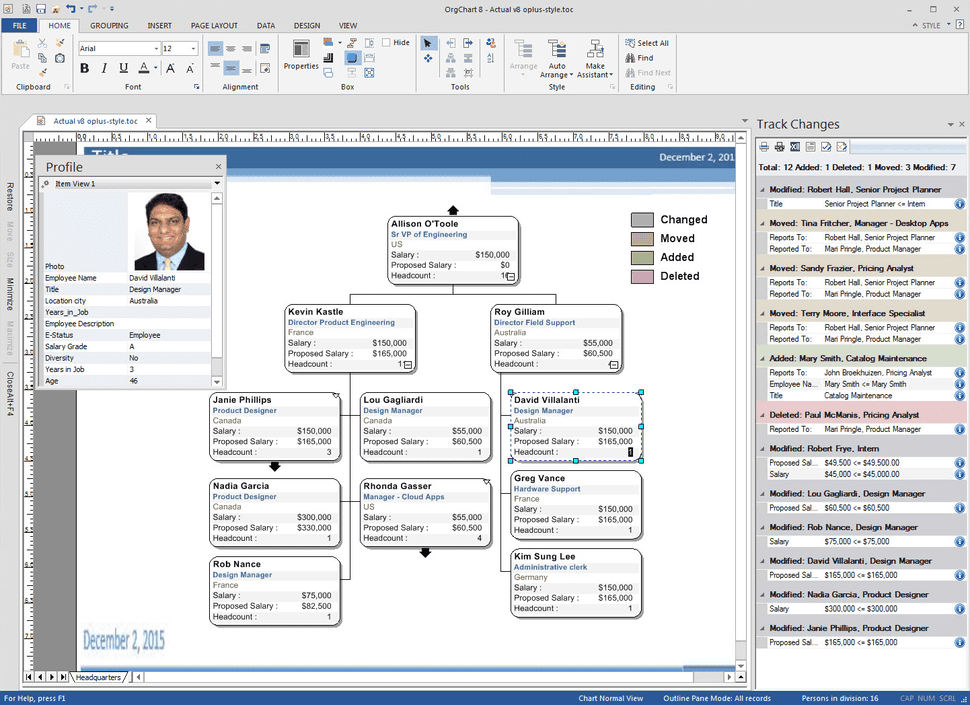
Org chart with employee details in OrgChart (Source)
Common features of org chart software
Different vendors offer different features in their org chart software. Selecting software with the right features is easier when you know what the most common features are and what they do. Here's a look at some of the common features of these tools.
Feature | Description |
Data visualization | Offers various design and visualization elements, such as shape options, images, and color themes, that allow you to create simple, intuitive organization charts. |
Data import/export | Lets you import employee data from various file formats, such as Excel and CSV, to create organization charts. You can also export the organization chart as an Excel or CSV file. |
Customizable templates | Offers predefined organization chart templates that can be customized using different colors, designs, logos, etc. |
Drag-and-drop interface | Allows you to change user roles/departments on the organization chart by simply dragging and dropping icons (employee images, departments, etc.) at the desired position. |
Collaboration | Lets multiple users work together on the same chart in real time via features such as revision history, commenting, and sharing. |
Employee database | Allows HR administrators to search and view employee details, such as full name, designation, work phone number, email, project, and department, to be updated on the organization chart. |
What type of buyer are you?
Before you start evaluating software options, you'll want to know which buyer category you belong to. Most buyers fall into one of the below categories.
Small and midsize businesses: These buyers usually belong to organizations with less than 250 employees. As they have fewer employees, their organization charts are less complex and require simple design elements and templates. Org chart software with standard features, such as data visualization, data import/export, and customizable templates, is recommended for such buyers. They can choose to upgrade later when their requirements increase.
Enterprises: These buyers mostly belong to large organizations that have over 250 employees and multiple office locations. The organization charts they need to create are complex and have various inter-team and inter-departmental relationships to clearly define the roles of multiple employees. These buyers should look for a fully featured org chart software that offers advanced design and visualization elements (drag-and-drop interface, custom colors, etc.), collaboration support, integration with existing HR software systems, and employee database management.
Benefits of org chart software
While some of the benefits of org chart software are clear from our discussion above, we've listed the most notable ones in this section.
Enhances the visibility of workforce relationships: Org chart software allows you to visualize your organization’s complete hierarchy, including employee roles across locations. Employees can view where they are placed within the organization and how they relate to fellow colleagues, business units, departments, etc. Thus, the software gives a bird’s-eye view of the whole organization structure.
Helps with project management: To find resources for new projects, project managers need information on various HR-related aspects, such as the current employee headcount, employee age, and compensation details. Managers can use org chart software to access all the required data, identify eligible employees, and share their details with stakeholders for further approval.
Key considerations when selecting org chart software
Listed below are some important points to consider before you purchase org chart software.
Mobile app availability: The software you’re planning to purchase should be available as a mobile app on iOS and Android smartphones or tablets. Mobile-ready software will allow you to perform tasks such as access employee details and update roles and responsibilities even when you’re on the move.
Customer support: Check which type of customer support is offered by your shortlisted vendors: 24/7, 24/5, or only during business hours. Also, ask about the available support channels, such as email, phone, or live chat. Having reliable support services will ensure that you can quickly fix any software issues without facing downtime.
Market trends to understand
Here’s a recent trend in the org chart software market that you should be aware of.
Artificial intelligence (AI) driving the adoption of org chart software: Software equipped with AI capabilities can run algorithms in real time to match the skill set of users with the requirements of open project positions. This can help organizations utilize their manpower efficiently. Thus, software vendors are increasingly offering AI capabilities in their org chart software.
Note: The application selected in this article is an example to show a feature in context and isn’t intended as an endorsement or a recommendation. It has been obtained from sources believed to be reliable at the time of publication.