


Best Case Management Software of 2026
Updated January 15, 2026 at 1:47 AM

Written by Eduardo Garcia
Content Analyst

Edited by Caroline Rousseau
Senior Editor

Reviewed by Emma Mayes
Advisor Manager

Talk with us for a free 15-min consultation
Expert advisors like Jacqueline, who have helped 1,000+ practices, can find the right software for your needs.
- All Software
- Top Software
- Popular Comparisons
- Buyer's Guide
- Frequently Asked Questions
Legal case management software helps law firms, legal departments, and solo practitioners manage cases, documents, billing, and compliance. With over 200 legal software tools designed for workflows and compliance, the market is crowded and difficult to navigate. I consulted our legal software advisors to pinpoint high-performing products. Browse the full list or dive into the buyers guide.
Case Management Software
Sort by
Reviews: Sorts listings by the number of user reviews we have published, greatest to least.
Average Rating: Sorts listings by overall star rating based on user reviews, highest to lowest.
Alphabetically (A-Z): Sorts listings by product name from A to Z.

Filevine offers a comprehensive legal practice management platform designed to streamline document management, communication and...Read more about Filevine


Filevine's Best Rated Features
See All
Filevine's Worst Rated Features
See All

PracticePanther Legal Software is a cloud-based legal practice management software designed to support law firms of all sizes an...Read more about PracticePanther Legal Software

PracticePanther Legal Software's Best Rated Features
See All
PracticePanther Legal Software's Worst Rated Features
See All

Clio provides a cloud-based solution designed to streamline various aspects of law firm operations. Its platform supports essent...Read more about Clio

Clio's Best Rated Features
See All
Clio's Worst Rated Features
See All

8am MyCase is a cloud-based law practice management solution that helps small and midsize law firms streamline client communicat...Read more about 8am MyCase


8am MyCase's Best Rated Features
See All
8am MyCase's Worst Rated Features
See All

CosmoLex is a cloud-based legal management solution that offers features including time tracking, billing, trust accounting, tas...Read more about CosmoLex
CosmoLex's Best Rated Features
See All
CosmoLex's Worst Rated Features
See All
Best Legal Practice Management Software for 2025


Highest Rated

Bill4Time

Based on our analysis, Bill4Time is the highest-rated of the most popular tools for legal practice management.
Bill4Time is a good fit for small practices that need an all-in-one solution for timekeeping, billing and invoicing, expense tracking, and project management. The calendar and scheduling utilities make it easy for users to get a quick overview of each employee's workload. Bill4Time facilitates time entry and tracking via their mobile app for partners on the go.
- Reviewers Perspective
“Bill4Time's portability and ease of use are its greatest strengths; I can take care of client billing even when I'm away from the office.”
KLKrishna Love
HR Generalist
Used for 1-2 years
We analyzed 192 verified user reviews for Bill4Time to find out what actual users really think.
Billing management
Users appreciate Bill4Time's billing management for its portability and ease of use, allowing them to handle client billing from anywhere. They find the billing process simple and efficient, which saves time and enhances productivity. Additionally, users highlight the smooth transition from old billing programs and the software's intuitive features.Support team
Users commend Bill4Time's support team for their availability and helpfulness, making it easy to resolve any issues. They appreciate the prompt and effective assistance provided by the support staff. Additionally, users value the support team's patience and willingness to guide them through the setup and learning process.Reporting
Users find Bill4Time's reporting features convenient and appreciate the ability to create and customize reports easily. They say that generating comprehensive reports is easy. However, some users have challenges with report customization and selecting the right reports for specific needs. - Key FeaturesBill4Time's scoreCategory average
Case Management
4.804.66 category average
Case Notes
5.04.59 category average
Client Management
4.674.59 category average
- Screenshots


Most Affordable

Smokeball

In our analysis of legal practice management tools, Smokeball offered the lowest-priced plan out of the most popular tools.
Smokeball is designed for small firms in the U.S., U.K., and Australia that need to manage compliance and enhance productivity. Our reviewers mention that Smokeball's search and organization tools are excellent for practices that rely on remote work. It features an easy-to-use interface for practices that want to streamline practice management and billing with digital tools.
- Reviewers Perspective
“My billing has increased and the usage of the system helps me coordinate and keep up with my case load.”
ACAmber Cohoon
Managing Attorney and President
Used for 1-2 years
We analyzed 297 verified user reviews for Smokeball to find out what actual users really think.
Document management
Reviewers really like Smokeball's document management features, particularly for document access, generation, and organization. They appreciate the ability to create, customize, and save documents directly within the software, which streamlines their workflow. Additionally, users value the centralized location for documents, making it easier to collaborate with their team and maintain organized files.Document automation
Reviewers are impressed with Smokeball's document automation features, which save time and effort in document preparation. They find the automation of forms and fields particularly useful, as it ensures consistency. Users also appreciate the integration with other tools, which enhances the overall efficiency of their document management processes. - Key FeaturesSmokeball's scoreCategory average
Case Management
4.684.66 category average
Case Notes
4.624.59 category average
Client Management
4.634.59 category average
- Screenshots


Best Value for Money
Clio

Based on our analysis of practice management tools, Clio has the highest value for money rating among the tools we evaluated.
Clio is a good fit for small legal practices looking for an all-in-one practice management tool with a centralized dashboard and client intake capabilities. Clio is a cloud-based platform that enables members to track clients, manage billable hours, and collaborate remotely. Reviewers say that Clio offers robust customer support and has helped them streamline their practices.
- Reviewers Perspective
“Robust platform that integrates time-keeping, billing, write-offs, and lawyer productivity seamlessly.”
CVCarolina von Vajna
CFO
Used for 2+ years
We analyzed 1,662 verified user reviews for Clio to find out what actual users really think.
Client billing
Users appreciate Clio's robust billing features, which integrate time-keeping, billing, and lawyer productivity tools. They find the ability to track time and handle billing is intuitive. Additionally, users value the software's capability to manage cases, clients, bills, and trust requests, enhancing their overall organization and efficiency.Client management
Users value Clio's client management features, which help them offer exceptional service and keep client information organized. They find the software's client-centered approach helps manage client matters efficiently. Additionally, Clio's tools for capturing and organizing client information in one place enhance their ability to serve clients effectively. - Key FeaturesClio's scoreCategory average
Case Management
4.694.66 category average
Case Notes
4.544.59 category average
Client Management
4.654.59 category average
- Screenshots


Best Ease of Use
Filevine

In our analysis of legal practice management tools, Filevine had the highest rating for ease of use among our most popular tools.
Filevine is a solid choice for legal practices that need comprehensive billing and time management features; it includes built-in texting and emailing to help attorneys connect with clients. Practices that want to leverage AI can use it to review documents, summarize inconsistencies, and more. Reviewers say that it is easy for beginners to use and works well for growing practices.
- Reviewers Perspective
“Filevine is easily customizable and it is intuitive to develop on your own once you get a feel for the basic functions.”
RSRyan Schriever
Owner
Used for 2+ years
We analyzed 269 verified user reviews for Filevine to find out what actual users really think.
Customization
Users appreciate the high level of customization that Filevine offers, allowing them to tailor the platform to their specific needs. They find it beneficial to create custom templates and configure the system to fit the unique workflows of their law firms. Despite the time investment required for setup, users value the flexibility and control they have over the software's functionality.Task management
Users find Filevine's task management features intuitive and helpful for organizing their daily tasks. They appreciate the ability to assign tasks, create customizable task flows, and keep track of case information efficiently. The automation capabilities and organized workflow provided by Filevine help users stay updated on task statuses. - Key FeaturesFilevine's scoreCategory average
Case Management
4.714.66 category average
Case Notes
4.524.59 category average
Client Management
4.624.59 category average
- Screenshots


Best Customer Service
8am MyCase

In our analysis of practice management tools, MyCase has the highest rating for customer service out of all popular products.
MyCase is designed to fit the needs of small to midsize law firms that want to organize files and manage clients both on-site and remotely. It helps practice managers and attorneys track billable hours, create invoices, and collect payments. Solo practitioners say they appreciate MyCase's unified dashboard, secure document storage, and customer support.
- Reviewers Perspective
“The customer support provided by MyCase is also outstanding, as they are responsive, knowledgeable, and always ready to assist me with any questions or concerns.”
JMJoseph Mwaura
Associate
Used for 2+ years
We analyzed 702 verified user reviews for MyCase to find out what actual users really think.
Billing and calendar management
Users find MyCase highly efficient for time tracking, billing, and calendar management, which they use daily. They appreciate the calendar integration with other programs, although some users wish for more customization options and better conflict notifications. The billing features are generally praised for their ease of use, but a few users desire more flexibility and improvements.Client management
Reviewers appreciate MyCase for enhancing client communication and providing clients with easy access to their case information through the client portal. They find the platform intuitive and beneficial for reducing phone calls and keeping clients informed. Users also value the ability to streamline communication and manage client interactions effectively.Support team
Users consistently praise MyCase's support team for being responsive, knowledgeable, and helpful. They find the technical assistance valuable and appreciate the team's willingness to implement suggestions for product improvement. Reviewers also highlight the ongoing updates and enhancements to the platform, which reflect the support team's commitment to user satisfaction. - Key Features8am MyCase's scoreCategory average
Case Management
4.634.66 category average
Case Notes
4.604.59 category average
Client Management
4.634.59 category average
- Screenshots


Best Functionality

Litify

Based on our analysis of legal practice management tools, Litify has the highest rating for functionality of all popular products.
Litify works well for small to midsize firms that want to use data analysis to improve workflow and client management. It offers tools for client intake, document generation, timekeeping, and billing. Our reviewers share that Litify offers customization options that help them tailor the platform to their firm's needs.
- Reviewers Perspective
“Litify is an excellent case management platform that catapults the legal profession into the 21st century.”
JSJosh Schwartz
Associate
Used for 1-2 years
We analyzed 58 verified user reviews for Litify to find out what actual users really think.
Reporting
Reviewers find Litify's reporting capabilities highly customizable and easy to use. They appreciate the ability to create customized reports on the fly and the cloud-based nature of the reporting feature. Users frequently highlight the system's ease of use and the effectiveness of its reporting functions.Management improvement
Users value Litify for providing a comprehensive firm management perspective, allowing them to manage operations from their phones. They notice constant improvements in the software and they find the integration with Salesforce beneficial for building a tailored platform that enhances case management and mobility. Additionally, users find the Docrio features particularly beneficial for improving user experience. - Key FeaturesLitify's scoreCategory average
Case Management
4.434.66 category average
Case Notes
4.334.59 category average
Client Management
4.594.59 category average
- Screenshots


Methodology
The research for the best legal practice management software list was conducted in November 2024. We evaluated data (user reviews and demand signals) from the past 24 months as of the research date. Read the complete methodology.
Popular Case Management Comparisons


Buyer's Guide
This detailed guide will help you find and buy the right case management software for you and your business.
Last Updated on February 04, 2025Here's what we'll cover:
What is legal case management software?
Essential features of legal case management software
Benefits of using legal case management software
How to choose the best legal case management software
Understanding legal case management market trends
What you need to know about legal case management software
Legal case management software helps law firms and legal departments receive and process sensitive case and client data with less manual effort. These solutions enable lawyers to keep track of all case and client information in one place and automate daily workflows, such as viewing upcoming deadlines, tracking billable hours, and maintaining client communication logs.
In the past year, we’ve had more than 4,400 conversations with legal software buyers (of whom over 60% were solo practitioners with two to five employees). Of these, 83% asked about legal case management features. [1] Based on our analysis, buyers agree that the tool positively impacts their firms' daily work efficiency and management.
To give you an idea of the market's scope, we have over 200 different legal case management vendors on our site, and we've published more than 3,000 reviews for legal case management products in the past year. [2]
These systems are typically priced on a per user per month basis. Some vendors provide discounts if you pay annually instead of monthly. Over three-quarters of legal software buyers who spoke with our advisors budgeted $45 to $90 per user per month for case management applications. Larger firms with more users need advanced feature options, thus typically, budget on a higher end of more than $135 per user per month.
First-time buyers should begin evaluating with a budget, feature requirements, and specific use cases in mind. Consult with stakeholders on critical questions, such as:
Can the system handle time tracking and billing and generate customized invoices?
How does the software comply with data protection regulations to secure our clients’ information?
Does the software offer a client portal for communication and document sharing?
How many users can this system support, and does it offer different permission levels?
Can the software integrate with our existing tools like email and calendaring systems?
Choosing from so many different vendors can be a long and daunting process. Buyers must consider a number of variables before making a purchase. This guide will help you understand case management systems and get guidance on how to choose the right solution for you. We also tap into the expertise of our software advisors, Nathan Pozen, Roberto Velazquez, and Paleigh Knight, who have been leading buyers to the right software for over a combined 10 years. To get expert guidance, schedule a free consultation or start a chat with us today.
What is legal case management software?
Legal case management software processes and stores case and client data, allowing legal professionals to view tasks, track billable time, and use calendaring to ensure team synchronization. This helps firms increase efficiency and maximize revenue, thus growing their business.
These solutions include database management, electronic discovery, and editable template documents, enabling users to manage and update key case-related data with less manual effort.
A common misconception buyers have is that case management tools are the same as document storage systems, but the former are much more comprehensive in functionality. As Nathan Pozen, our advisor from Software Advice explains, "Legal case management software is far more than just a document storage system. While it certainly includes document management, it goes further to connect all aspects of a case. It allows lawyers to link documents to specific cases, track billable time, manage client communications, and set up automated workflows. Essentially, it creates a digital ecosystem for each case, ensuring that no detail falls through the cracks and allowing lawyers to work more efficiently and effectively."
Essential features of legal case management software
When comparing legal case management software systems for your business, it's important to know what features you can expect to see. We analyzed thousands of reviews and spoke to thousands of legal professionals to determine what we believe are core features of legal case management software you'll typically find in most systems.
Core legal case management features
Feature | Description |
Client management | Manage contact details and communication with clients. It lets you store client communication preferences and interaction history. 90% of users rate this feature as critical or highly important. |
Document management | Store, retrieve, and track all information on cases in a centralized location. It provides search functionality, access controls, and data import or export. 82% of users rate this feature as critical or highly important. |
Billing and invoicing | Create, manage, and send invoices or bills to clients. It lets you generate detailed invoices based on tracked billable hours and expenses. 79% of users rate this feature as critical or highly important. |
Common legal case management features
Legal case management software may include some or all of the capabilities given below.
Feature | Description |
Case notes | Access and track notes regarding case activities and updates within case files. Quickly jot down important details from client calls or court proceedings. 94% of users rate this feature as critical or highly important. |
Task management | Create, manage, and track to-do lists, assign staff to cases, and monitor the time spent on tasks to improve workflow efficiency. 92% of users rate this feature as critical or highly important. |
Tracking billable and non-billable hours | Track and record billable and non-billable time. Many systems include customization options to accommodate alternative fee arrangements, allowing users to record billable hours based on an hourly, transactional, or user-defined fee basis. |
Calendar management | Schedule tasks and appointments, set reminders and view upcoming deadlines and meetings. Also sync calendars with common email tools, such as Microsoft Outlook. |
Client portal | Private online space that lets legal departments securely share case files with clients and provide information access to clients. |
Conflict management | Automatically scan client or case data to check for conflicts of interest and statutes of limitations. This lets you quickly identify potential conflicts when onboarding a new client. |
Electronic signature | Digitally sign online documents. Send engagement letters to clients for electronic signature, speeding up the onboarding process. |
Workflow management | Create, design, and manage workflows for repetitive tasks. Set up an automated workflow for new client intake, such as conflict checks or contract generation. |
Benefits of using legal case management software
Law firms receive and process an incredible amount of sensitive case and client data through various mediums, such as phone calls, emails, and documents. Efficient organization and secure management of this information are crucial to maintaining client trust, ensuring regulatory compliance, and optimizing billable hours. Case management software helps law firms handle case and client data more effectively and with less manual effort.
Based on our conversations with software buyers, some of the biggest benefits of adopting legal case management software include:
Quick information retrieval: Legal case management software centralizes all case-related information in one place, eliminating the need for multiple filing systems or scattered digital folders. It allows lawyers to quickly search, access, and update case details, reducing time spent finding information and minimizing the risk of overlooking critical data.
Saves time in document creation: With state-specific and practice area-specific document templates offered by many case management software, legal professionals reduce the time spent on document creation. These smart templates ensure consistency and accuracy across all client communications and legal filings, boosting user productivity.
Improved time tracking and precise billing: The software allows lawyers to record billable hours more accurately and easily, often allowing them to associate time directly with specific cases or tasks. This reduces revenue leakage and provides valuable insights into how time is being spent across different clients and tasks.
Better client retention: With all case information readily available, lawyers can respond to client inquiries more promptly and accurately. Some vendors even offer client portals, allowing clients to securely access case updates and documents. This introduces transparency in client dealing and improves client retention.
How to choose the best legal case management software
Step 1: Define your requirements
Before selecting a case management system, take a moment to define your needs clearly. This will save you time and help you find a solution that truly fits your practices and growth goals.
Firm-specific functionalities
Start assessing and analyzing your current workflow to determine what's working well and where the bottlenecks are. Are you struggling with document organization, missing deadlines, or spending too much time on billing? Make a list of these pain points.
Also, consider your practice areas as different areas of law have unique requirements. For example, Roberto Velazquez, our advisor from Software Advice, explains, “A personal injury firm might need software with specific templates for demand letters and settlement agreements, as well as features to track medical records and insurance claims. On the other hand, an immigration law practice might require software with built-in forms for various visa applications and the ability to track important immigration deadlines and processes.”
Involve your team in the process, including the paralegals who handle most of your case files. This will help you gain practical insights about which features and integrations would save the most time.
Finally, think about your growth plans. A solo practitioner might need a simpler system than a firm hiring 50 lawyers. However, if you're planning to expand, you'll want to invest in software that can grow with you. Consider questions, such as:
How easy is it to add new users as your firm grows?
Does the pricing scale reasonably as you add users or cases?
Can you start with basic features and add more advanced ones as your needs evolve?
How much should you spend on legal case management software?
Legal case management systems are typically priced on a per user per month basis. Over 75% of legal software buyers who spoke with our advisors budgeted $45 to $90 a month for case management applications. Larger firms with more users need advanced feature options, and thus typically budget on a higher end of more than $135 per month. [1]
When budgeting for legal case management software, understand the full scope of what you're paying for. Many buyers start looking for specific features like time tracking, not realizing these solutions are often comprehensive, offering those features and more. Paleigh Knight, our advisor, suggests, “An all-in-one solution might seem pricier initially, but it could be more cost-effective than combining multiple systems.”
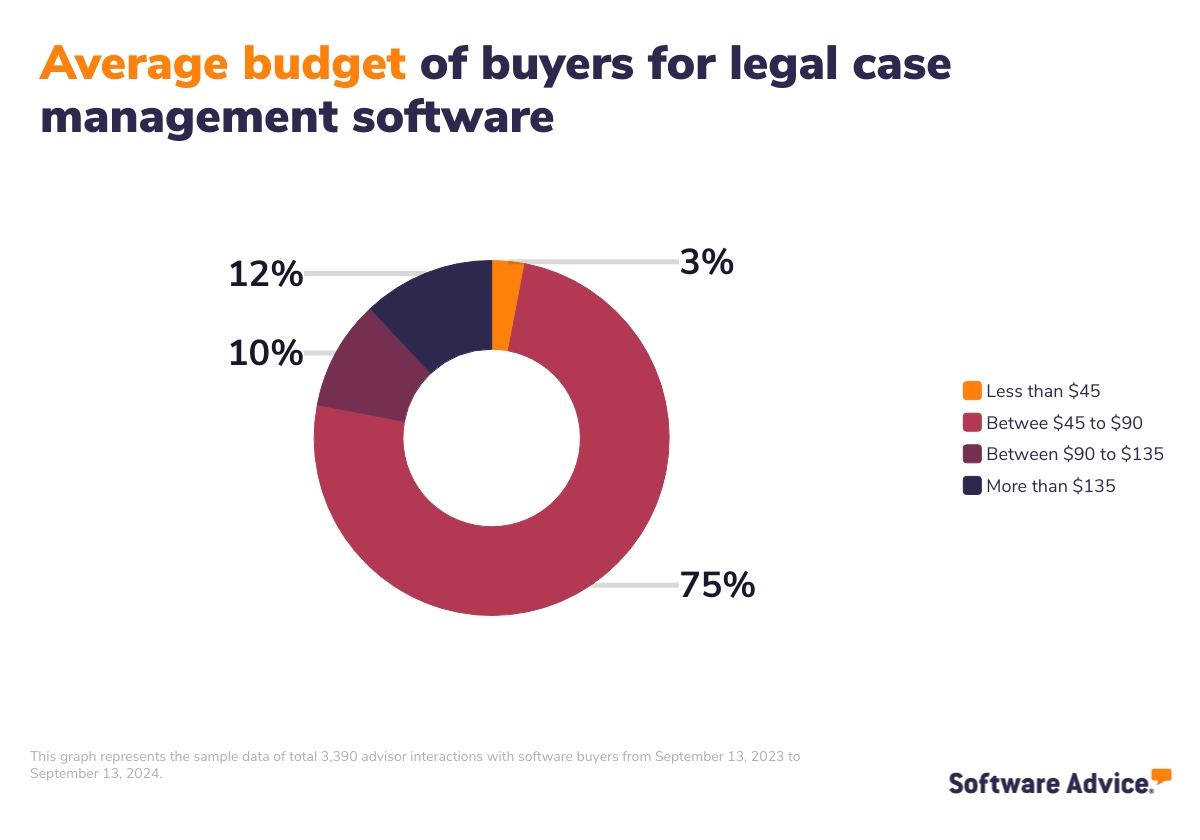
When considering costs, also consider upfront costs, such as data migration fees, training costs, charges for extra storage, and fees for integrating with other software.
The level of support and training often correlates with price, but if you have a large team, its value shouldn't be underestimated. As Pozen, our advisor notes, “If you're about to invest in a $90 per user per month system for a team of 75, you need to make sure the vendor doesn’t simply hand over the software without ensuring your team uses it effectively and reaps its overall value.” Gauge the extent of support provided by the vendor by asking questions like:
How big is your team that handles bugs and customer support?
What ongoing training do you offer?
How long will it take for me to get an answer to an issue?
Do you have a dedicated support manager or will I be speaking to somebody else every single time?
Consider security and compliance
Security is a top priority for both law firms and their clients. Before purchasing a system, consider these aspects:
Client preferences: Check with high-priority clients about their data security concerns. Some may have strong opinions about cloud storage or may prefer specific features like client portals to feel more at ease about their data.
Cloud vs. on-premise: Cloud-based systems often offer bank-grade security and run daily backups, but despite that, some clients may prefer on-premise solutions. Weigh the benefits of on-premise systems against their higher upfront costs and on-site IT staff requirements.
Basic security features: Check what data protection and security features the vendor provides. Some essential ones include data encryption, multi-factor authentication, regular data backups, access controls, compliance with relevant industry standards (e.g., HIPAA for medical clients), timely software updates, and protocols to handle breaches.
Data storage location: Ask providers about server locations, especially if you prefer or require data to be stored within specific territories.
Plan around integration options
Think about the tools you use every day. Does your accounting software need to talk to your case management system? What about your email, calendar, or document storage tools? Ensuring compatibility with these tools will positively impact your everyday workflow.
If your practice involves frequent court filings or deadline tracking, for instance, look for case management software with built-in or third-party integration with docketing functionalities. Some systems can automatically calculate and track important deadlines based on case type and jurisdiction.
Case management tools can be purchased either as standalone solutions or as part of a comprehensive legal practice management platform (whereby case management functionality is bundled with others). The latter systems handle the entirety of a firm’s business functions—including accounting, reporting, and even lead generation and marketing. If you don't already have strong accounting or firm management tools, you may consider exploring these comprehensive solutions. However, keep in mind that the accounting capabilities in many legal practice management systems are often quite basic.
Step 2: Make a shortlist of legal case management software
With so many legal case management software options to choose from, narrowing the right choices for your portfolio can be challenging—but with the right resources and support, it doesn’t have to be.
Get qualified help from an advisor
At Software Advice, our advisors, like Pozen, Velazquez, and Knight, have experience helping hundreds of landlords and property managers identify solutions that match their needs and budgets. Another of our advisors, Emma Mayes, says:
"We help [buyers] condense weeks of research into 15 minutes, offering five personalized recommendations that check all your boxes, based on a portfolio scale, budget, and functionality needs.”
If you need guidance, you can chat online with an advisor or schedule a phone call. In just a few minutes, our advisor will help you find a shortlist of options personalized to your needs.
Explore our FrontRunners list of legal case management
If you’re not ready to talk to an advisor just yet, you can also start compiling your shortlist of legal case management software with our FrontRunners report. Only products that earn top user ratings make it to this list. To be eligible for consideration, a product must:
Have at least 20 unique user reviews in the last 24 months
Be a stand-alone legal case management system, not just a partial tool, and
Offer key features.
Check out our full methodology description for more details on how the report is compiled.
Step 3: Pick your best option
Once you’ve got a shortlist, vendor demos are the next step. Vendor demos are your chance to understand how each tool works, what it costs, and whether it's the right fit for your firm. Here's how to make the most of these sessions:
Getting ready for software demos
Schedule demos with each shortlisted vendor, involve key team members who will be using the software and prepare a list of questions and scenarios based on your firm's specific needs.
Key questions you can ask vendors during demos:
How do you handle data migration from our current system?
What's the typical implementation timeline?
Do you provide user training? If so, what does it involve?
Can we customize document templates for our specific practice areas, such as immigration?
How does your pricing scale as we add users or cases?
Can we start with basic features and add more advanced ones later?
Can you break down all costs, including any upfront or ongoing charges?
Understanding legal case management market trends
Firms should be aware of the following market trends as they evaluate different case management products:
Alternative fee arrangements: As opposed to charging based on a billable hour, some lawyers and/or firms may charge clients based on a collar or fixed fee. As alternative billing models become more commonplace, firms should consider investing in case management software with reporting functionality. This will allow them to track costs associated with tasks, people, etc., more closely.
Legal process outsourcing: Outsourcing work to a third-party provider, for example, legal research, data collection, and other labor-intensive tasks, can help firms decrease costs to clients.
Leveraging social media marketing: Research has shown that reviews sites are popular ways of evaluating an attorney prior to meeting. Important information for prospective clients include how many years of experience the attorney has and how past clients have rated the lawyer for quality of service. Specifically, how well the attorney explained their legal options to them.
AI and machine learning integration: Many case management systems now incorporate artificial intelligence (AI) for tasks such as automated document review, intelligent time capture, and chatbots for client communication. Ask your software provider if they have plans to integrate AI features to enhance your workflow and provide a competitive advantage.
About our contributors
Author
Amita Jain is a senior writer for Software Advice, covering finance technology with a focus on expense management and accounting solutions for small-to-midsize businesses. After completing her master’s in policy studies from King’s College London, she began her career as a journalist in New Delhi, India, where she garnered first-hand knowledge of the startup space and the education sector. She spent nearly half a decade covering high-level events hosted by the United Nations and the Government of India. Her work has been featured in Careers360, among other publications.
Amita’s research and writing for Software Advice is informed by more than 130,000 authentic user reviews and over 30,000 interactions between Software Advice software advisors and software buyers. Amita also regularly speaks to leaders in the finance and accounting space so she can provide the most up-to-date and helpful information to small and midsize businesses purchasing software or services.
When she’s not contemplating tech solutions for SMBs, Amita finds her zen in swimming, doodling, and indulging in animated sitcoms and science fiction.
Editor
Parul Sharma is a content editor at Software Advice with expertise in curating content for various niches, including SaaS, digital marketing, and search engine optimization. With over half a decade of experience in content writing and editing, Parul has the expertise to simplify complex terms into engaging, valuable content for targeted audiences. She completed her graduation and post-graduation in English literature from Delhi University and was awarded the Dr. Asha Sahni Memorial Award for being the highest scorer in her graduating class.
Parul has contributed to the news, lifestyle, education, and health verticle of DNA India, India’s premier media channel. Outside of work, she can be found curating healthy recipes, coloring in mandala books, and spending quality time with her family.
Advisors
Nate Pozen is a buyer advocate team leader. He joined Software Advice in 2021 as a software advisor, and now he manages a team of four software advisors. He is based in Austin, TX.
Nate and his team helps small businesses find the right HR, CRM, accounting, project management, and manufacturing software for their needs each year. They’re able to do this through one-to-one conversations designed to narrow down the list of potential tools to only those that are the best fit.
His favorite part of being a Software Advice advisor team manager is partnering with buyers to help them through their entire software journey.
Paleigh Knight is a software advisor. She joined Software Advice in 2022 and is based in Austin, TX.
As part of the software advisor team, Paleigh helps construction and field service professionals who are seeking estimating, maintenance management, and work order software. She provides a short list of personalized technology recommendations based on budget, business goals, and other specific needs.
Paleigh’s favorite part of being a software advisor is helping buyers identify their needs, avoid hours of research, and see their businesses succeed.
Roberto Velazquez is a software advisor. He joined Software Advice in 2019, and he is based in Austin, TX.
As part of the software advisor team, Roberto helps legal, business intelligence, and accounting professionals who are seeking audit, compliance, risk management, and reporting software. He provides a short list of personalized technology recommendations based on budget, business goals, and other specific needs.
Roberto’s favorite part of being a software advisor is the opportunity to provide assistance to buyers in more than one language.
Sources
Software Advice advisor call notes: Findings are based on data from telephonic conversations that Software Advice’s advisor team had with small-to-midsize businesses seeking legal case management tools. For this report, we analyzed phone interactions from September 13, 2023, to September 13, 2024.
Software Advice reviews data: Reviews are collected from verified users for individual software products. For this report, we analyzed reviews from September 13, 2023, to September 13, 2024.
Your Guide to Top Case Management Software, July 2023


Case Management FAQs
- Which is the best legal software?
According to our analysis of products with high market demand and reviews, Bill4Time has the highest overall rating from verified reviewers on Software Advice.
- What is legal CRM software?
CRM software helps law firms manage client relationships by tracking interactions, appointments, and follow-ups. It integrates with legal case management systems, offers document management, and includes billing functionalities. CRMs can also ensure compliance with industry standards, provide analytics, and often feature automation and client portals for enhanced communication.
- How much does legal software cost?
Sophisticated legal software systems can cost over $100 a month, but entry-level plans average $42 a month, and many products offer free versions.
- What is legal practice management software?
Law practice management software streamlines case-related workflows, documentation, and client communication while offering features like electronic billing, calendar management, client portals, task management, and expense tracking. By automating routine administrative tasks, it saves time, reduces errors, and enhances service quality, with advanced features including reporting, activity dashboards, and rate management.