


Best Bookkeeper software of 2026

- Popular Comparisons
- Buyers Guide
Compare Products
Showing 1 - 25 of 126 products
Compare Products
Sort by
Reviews: Sorts listings by the number of user reviews we have published, greatest to least.
Average Rating: Sorts listings by overall star rating based on user reviews, highest to lowest.
Alphabetically (A-Z): Sorts listings by product name from A to Z.

Sage 50 Accounting is an accounting solution designed to cater to the needs of small and medium-sized businesses. It offers a su...Read more about Sage 50 Accounting


Sage 50 Accounting's Best Rated Features
See All
Sage 50 Accounting's Worst Rated Features
See All

Payhawk is a spend management platform that combines corporate cards, international bank payments, accounts payable, expense man...Read more about Payhawk


Payhawk's Best Rated Features
See All
Payhawk's Worst Rated Features
See All

Sage Accounting is a cloud-based accounting and invoice management solution for small to midsize businesses. It offers accountin...Read more about Sage Accounting


Sage Accounting's Best Rated Features
See All
Sage Accounting's Worst Rated Features
See All

Adaptive is the most powerful financial management tool for the construction sector, interfacing seamlessly with your financial ...Read more about Adaptive

Adaptive's Best Rated Features
See All
Adaptive's Worst Rated Features
See All

Mango Practice Management is a cloud-based, all-in-one practice management solution that is a game-changer for professional serv...Read more about Mango Practice Management


Mango Practice Management's Best Rated Features
See All
Mango Practice Management's Worst Rated Features
See All

DOKKA aims to automate the manual work in accounting and accounts payable with an AI-powered, cloud-based solution. Here's how ...Read more about DOKKA


Stampli provides the structure for any procure-to-pay (P2P) workflow, from purchase requests and approvals to invoicing and paym...Read more about Stampli
Stampli's Best Rated Features
See All
Stampli's Worst Rated Features
See All

Eleven is a cloud-based accounting platform purpose-built for modern accounting firms that need to scale efficiently without inc...Read more about Eleven
Eleven's Best Rated Features
See All
Eleven's Worst Rated Features
See All

BILL Spend & Expense (formerly Divvy) offers an extraordinary way for businesses to gain complete control over their spending wi...Read more about BILL Spend & Expense


BILL Spend & Expense's Best Rated Features
See All
BILL Spend & Expense's Worst Rated Features
See All

Easy online accounting software for small businesses. From tracking invoices to paying employees, staying in control of cash flo...Read more about Reckon One

Reckon One's Best Rated Features
See All
Reckon One's Worst Rated Features
See All

Wing has the world's best talent ready for you! Use your dedicated assistant to help you focus on your core activities by havin...Read more about Wing
Wing's Best Rated Features
See All
Wing's Worst Rated Features
See All

QuickBooks Enterprise is an accounting solution designed for SMBs across different industry verticals such as construction, nonp...Read more about QuickBooks Enterprise

QuickBooks Enterprise's Best Rated Features
See All
QuickBooks Enterprise's Worst Rated Features
See All

If you use Shopify, Amazon, Square, PayPal, Treez, Clover, Toast, Mindbody and/or other popular ecommerce and POS systems, Bookk...Read more about Bookkeep

Bookkeep's Best Rated Features
See All
Bookkeep's Worst Rated Features
See All

Pilot: One team for all your accounting needs. Pilot is the largest startup and small business focused accounting firm in the U...Read more about Pilot

Pixie is a practice management software that helps you get your accounting or bookkeeping practice running like clockwork. Its...Read more about Pixie
Pixie's Best Rated Features
See All
Pixie's Worst Rated Features
See All

ZipBooks is a cloud-based solution designed to streamline accounting, invoicing and financial management processes for small bus...Read more about ZipBooks

ZipBooks's Best Rated Features
See All
ZipBooks's Worst Rated Features
See All

Sunrise is a cloud-based accounting application for small businesses and freelancers in all industries. Primary features include...Read more about Lendio

Mesh makes it easy to manage global travel from request to reimbursement with powerful booking tools, multi-agency support, inte...Read more about Mesh Payments

Mesh Payments's Best Rated Features
See All
Mesh Payments's Worst Rated Features
See All

Quadient Accounts Payable Automation is a cloud-based accounts payable (AP) automation solution that empowers accounting teams t...Read more about Quadient Accounts Payable Automation
Quadient Accounts Payable Automation's Best Rated Features
See All
Quadient Accounts Payable Automation's Worst Rated Features
See All

DAVO is a sales tax management solution designed to help businesses automatically set sales tax aside daily using data from vari...Read more about DAVO


Pandle is a cloud-based accounting solution for small businesses across the UK. The platform helps streamline accounting activit...Read more about Pandle

PBS Accounting is robust professional level accounting software that fits a wide range of businesses and grows with your company...Read more about PBS Accounting


Corpay One is a leading bill pay solution for small businesses. Picture your bank’s bill pay - only smarter. You can build custo...Read more about Corpay One


Tax1099 offers an eFiling process that can be completed in three steps. The platform provides secure and reliable data protectio...Read more about Tax1099.com
Tax1099.com's Best Rated Features
See All
Tax1099.com's Worst Rated Features
See All

Centime is the leading cash management suite that helps fast-growing businesses easily control and manage cash flow. From foreca...Read more about Centime

Popular Comparisons


Buyers Guide
This detailed guide will help you find and buy the right bookkeeping software for you and your business.
Last Updated on January 27, 2025Bookkeeping may not be the most interesting part of running a business, but it is, without a doubt, one of the most essential business processes. Bookkeeping is part of the accounting function and helps organizations maintain error-free and comprehensive financial records. It keeps them up to date with the financial information required for running their business smoothly.
An alarming 29% of SMBs cite running out of money as a top reason for business failure. Considering businesses run the risk of closing down due to financial mismanagement, bookkeeping software can be highly beneficial for monitoring finances.
There are many bookkeeping software options in the market, and choosing the right vendor for your business can be challenging. To help you, we’ve created a Buyers Guide with all the information required to evaluate the options available for you.
In this guide, we will cover:
What are the benefits and potential issues of bookkeeping software?
What are some considerations when choosing bookkeeping software?
What is bookkeeping software?
Bookkeeping software is a type of software that helps businesses track their financial transactions, such as purchases, sales, receipts, and payments. It automates all the processes related to financial record keeping, including invoicing, creating sales and purchase orders, scheduling reports, sending payment reminders, and generating bills.
Bookkeeping software stores all financial data in a centralized repository. This data forms the basis of all accounting-related analysis that assists owners in making informed business decisions.
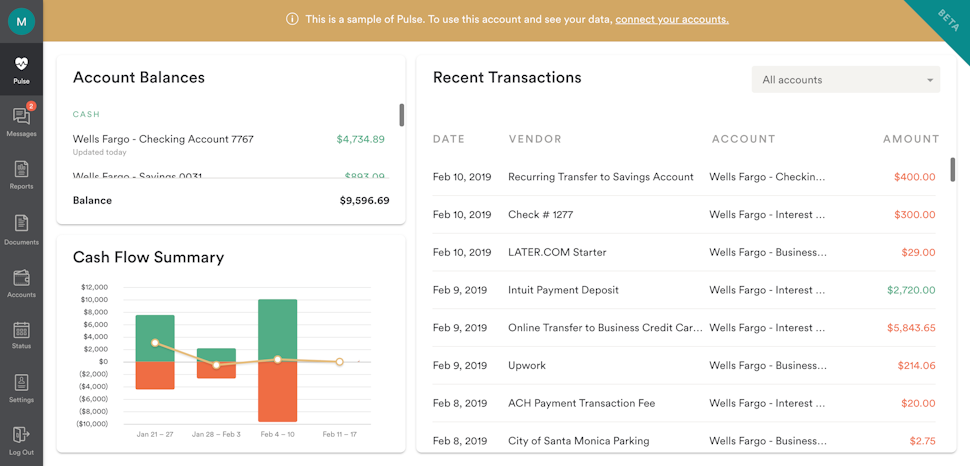
Detailed cash flow summary in Bench Bookkeeping (Source)
Common features of bookkeeping software
To select the right bookkeeping software for your business, it’s essential to get an overview of the common features. Here are some features that you should look out for.
Invoicing | Create customized invoices with brand logo and payment details. |
Expense tracking | Upload and track receipts to maintain a record of where money is being spent. |
Online payment | Process and receive online payments from vendors and customers. |
Reconciliation | Update and categorize financial transactions in real time, securely fetch transaction details, and reconcile all accounts. |
Reporting | Create dashboards, reports, and charts for all receivables, payables, and inventory. |
What type of buyer are you?
Based on the kind of financial software required, there are two broad categories of software buyers: businesses that need only the bookkeeping function and businesses that require advanced accounting features. Let’s have a look at both these types.
Businesses that need only the bookkeeping function: Businesses that need to only record their financial transactions and don’t require a complete accounting solution can opt for standalone bookkeeping software. This type of software records financial transactions but is not equipped to analyze them. Data analysis and interpretation have to be done by a separate finance team. These solutions are usually cheaper than full-suite accounting software.
Businesses seeking advanced accounting features: Businesses that are looking for advanced accounting features, such as inventory management, warehouse management, and financial analysis, along with the bookkeeping function can opt for a comprehensive accounting platform with a built-in bookkeeping module. A full-suite accounting solution summarizes, analyzes, and interprets the data collected by the bookkeeping module. These solutions are more expensive than standalone bookkeeping software due to the range of accounting features offered.
What are the benefits and potential issues of bookkeeping software?
You should weigh both the pros and cons of implementing bookkeeping software to assess why your business needs one and build a strong business case for an investment.
Following are the key benefits of bookkeeping software:
Lower business costs: By automating the bookkeeping function, this software eliminates the need for a separate financial record keeping team. It frees up resource bandwidth for more critical accounting analysis and decision making. This helps reduce accounting-related costs for businesses.
Improved budget planning: By organizing income and expenses, bookkeeping software makes it easier for businesses to compare their earnings against expenditure. Companies can use this data to create a financial roadmap for future expenses and the expected resources to cover those expenses.
Efficient tax filing: Businesses need to file tax returns every year, and accurate tax filing is solely dependent on correct financial records. Bookkeeping software records and stores all financial information and related documents in a centralized repository, making data readily available for tax purposes.
A potential issue that you might face when using bookkeeping software is as follows:
Lack of data security: Bookkeeping software has complete access to the financial data of businesses. It also stores the bank account details of customers. If this data is compromised, companies can become exposed to financial frauds. Therefore, it’s essential to exercise due diligence while conducting vendor assessments. Read what existing users have to say about a product, its security features, and support offered. Also, before entering into any vendor contract, check if the vendor is complying with applicable data security regulations, such as PCI DSS and GLBA.
What are some considerations when choosing bookkeeping software?
Now that you know the features and benefits of bookkeeping software, let’s have a look at a few key considerations that you should take care of while purchasing software.
Online payment capability: Clearing payables and collecting receivables on time are equally important. Bookkeeping software that supports online payment helps you make and receive payments anytime, anywhere. It also sends real-time reminders about any missed or due payments. The online payment capability also lets you view invoices and process payments using mobile devices, allowing you to get work done even when you’re out of office.
Customer support: Since bookkeeping solutions track finances, they are a crucial part of companies’ core operations. Thus, it’s imperative to discuss the level and quality of support offered. Your preferred subscription plan might have a low upfront investment but minimal, no, or only condition-based support, while other plans may be more expensive but offer complete software support services. It’s better to choose a solution whose support team can be accessed through most channels, including emails, online chats, and calls, so that you can quickly get help in case your software runs into trouble.
Integration capabilities: It’s essential to choose bookkeeping software that can integrate well with your existing business applications, such as inventory management and document management. A solution that supports integration will help you seamlessly transfer financial data across applications, eliminate data silos, avoid duplication, and save you from the hassle of repeated data entry.
Note: The application selected in this article is an example to show a feature in context and is not intended as an endorsement or recommendation. It has been obtained from sources believed to be reliable at the time of publication.