
Best Architecture Software of 2026
Updated April 24, 2025 at 1:04 PM

Written by Supriya Deka
Market Research Specialist

Edited by Rina Rai
Senior Editor
- Popular Comparisons
- FrontRunners
- Buyers Guide
- Related Software
Compare Products
Showing 1 - 25 of 90 products
Compare Products
Sort by
Reviews: Sorts listings by the number of user reviews we have published, greatest to least.
Average Rating: Sorts listings by overall star rating based on user reviews, highest to lowest.
Alphabetically (A-Z): Sorts listings by product name from A to Z.

Programa brings together project, process and product on one platform, to give interior designers and architects a new integrate...Read more about Programa


Programa's Best Rated Features
See All
Programa's Worst Rated Features
See All

SpecLink is a construction specification software designed to help businesses enhance the specification process at every stage o...Read more about RIB SpecLink
RIB SpecLink's Best Rated Features
See All
RIB SpecLink's Worst Rated Features
See All

Mosaic is an AI-powered, web-based resource and project management software that's guaranteed to boost profitability and product...Read more about Mosaic


Mosaic's Best Rated Features
See All
Mosaic's Worst Rated Features
See All

Grow your firm - and your impact Projectworks is professional services automation software (PSA) designed for consulting firms ...Read more about Projectworks

Projectworks's Best Rated Features
See All
Projectworks's Worst Rated Features
See All

AutoCAD is a 2D and 3D design and drafting platform for architects, engineers, construction professionals, field technicians and...Read more about AutoCAD


AutoCAD's Best Rated Features
See All
AutoCAD's Worst Rated Features
See All

Bluebeam's suite of products emerges as a comprehensive solution tailored for professionals in the construction and design field...Read more about Bluebeam Revu

Bluebeam Revu's Best Rated Features
See All
Bluebeam Revu's Worst Rated Features
See All

The web-based project management software Projektron BCS supports you during the whole project lifecycle: effective planning and...Read more about Projektron BCS

Projektron BCS's Best Rated Features
See All
Projektron BCS's Worst Rated Features
See All

Revit is a building information modelling (BIM) software that helps constructions companies, structural engineers, architects an...Read more about Revit


Revit's Best Rated Features
See All
Revit's Worst Rated Features
See All

Clientary is a full-suite app for teams to manage projects, hours, proposals, leads, invoices, payments, staff, and clients. Cli...Read more about Clientary


Clientary's Best Rated Features
See All
Clientary's Worst Rated Features
See All

Built for architects and designers, Lumion’s real-time rendering solutions fit seamlessly into your workflow, letting you visual...Read more about Lumion

Lumion's Best Rated Features
See All
Lumion's Worst Rated Features
See All

PASconcept is a cloud-based professional management solution for architectural, engineering and survey firms. It helps administr...Read more about PASconcept


BigTime is the AI-powered platform purpose-built for finance and operations leaders at growing professional services firms—inclu...Read more about BigTime


BigTime's Best Rated Features
See All
BigTime's Worst Rated Features
See All

Bonsai is a one-stop platform for creative and digital agencies, consultancies and professional service providers. It is designe...Read more about Bonsai

Bonsai's Best Rated Features
See All
Bonsai's Worst Rated Features
See All

Teamogy is a cloud-based all-in-one system designed for companies that want to run their business more clearly, effectively and ...Read more about Teamogy


Synergy is a cloud-based busiess and project management solution specifically designed for architecture, engineering and constru...Read more about Synergy

Synergy's Best Rated Features
See All
Synergy's Worst Rated Features
See All

FARO Sphere XG is a centralized Digital Reality Platform that unifies all your reality capture, geospatial, and 3D model data fo...Read more about FARO Sphere XG


Render Plus is a 3D architecture and CAD suite designed for professionals using AutoCAD, Revit and SketchUp applications. It off...Read more about Render Plus Suite

Inertia is a cloud-based construction management solution designed to help enterprises breakdown complex operations and streamli...Read more about Inertia


Layer is a flexible workspace solution that connects everyone and everything to BIM. It integrates with Revit and offers users f...Read more about Layer

BQE CORE is a cloud-based accounting and invoicing software designed for architecture, engineering, and consulting firms. The pl...Read more about BQE CORE Suite
BQE CORE Suite's Best Rated Features
See All
BQE CORE Suite's Worst Rated Features
See All

IntoAEC is an AI-powered project management software for architects, interior designers, and AEC professionals. It streamlines p...Read more about IntoAEC


Monograph is a cloud-based practice operations platform designed to helps engineers, architects, interior designers and landscap...Read more about Monograph
Monograph's Best Rated Features
See All
Monograph's Worst Rated Features
See All

BPT-Pro is an ideal illustrator dimensions plugin which can assist your drawing work at Adobe Illustrator (AI). You can measure ...Read more about BPT-Pro

Flexxter is a comprehensive project planning software with functions for planning, executing and approving projects in the const...Read more about Flexxter

Fresh Projects is practice management software built for architects and engineers. It combines fee calculation, timesheets, invo...Read more about Fresh Projects
Popular Comparisons



Your Guide to Top Architecture Software, March 2024
Software Advice uses reviews from real software users to highlight the top-rated Architecture products in North America.
Learn how products are chosenExplore FrontRunners


“Usability” includes user ratings for Functionality and Ease of Use.
“Customer Satisfaction” includes user ratings for Customer Support, Likelihood to Recommend and Value for Money.
Reviews analysis period: The reviews analysis period spans two years and ends the 15th of the month prior to publication.
Buyers Guide
This detailed guide will help you find and buy the right architecture software for you and your business.
Last Updated on April 24, 2025In construction firms, architects and engineers design complex architectural elements. They also control the design process from start to finish and maintain all related documents. For these professionals, using hand-made drawings or manual methods can be time-consuming as well as complicated to manage in terms of design revisions, stakeholder collaboration, and document control.
Architecture software allows architects and engineering teams to create, edit, and replicate the design of architectural elements digitally. It offers features such as 3D modeling and animation to help visualize the final structure of a building construction and check if the patterns are feasible in the real world. It also lets them collaborate online to discuss and implement design changes using a virtual 3D model.
Many architecture software options are available on the market, but one size doesn’t fit all. To help you choose the right software, we’ve created a buyers guide that has all the information you need to select an architecture tool that fits your needs.
Here’s what we'll cover:
What is architecture software?
Architecture software is design software used by architects, engineers, builders, and contractors, among others, to design and visualize building structures. It runs on a computer-aided design (CAD) program that lets users create high-quality designs, maintain design records, and check interferences between one or more design aspects.
Besides basic design features, the software also offers team management, workflow management, and presentation tools to help track project time, collaborate on tasks, and predict and plan labor and material requirements. It has a variety of applications, including 2D drafting, 3D modeling, animation, interior design, and image editing.
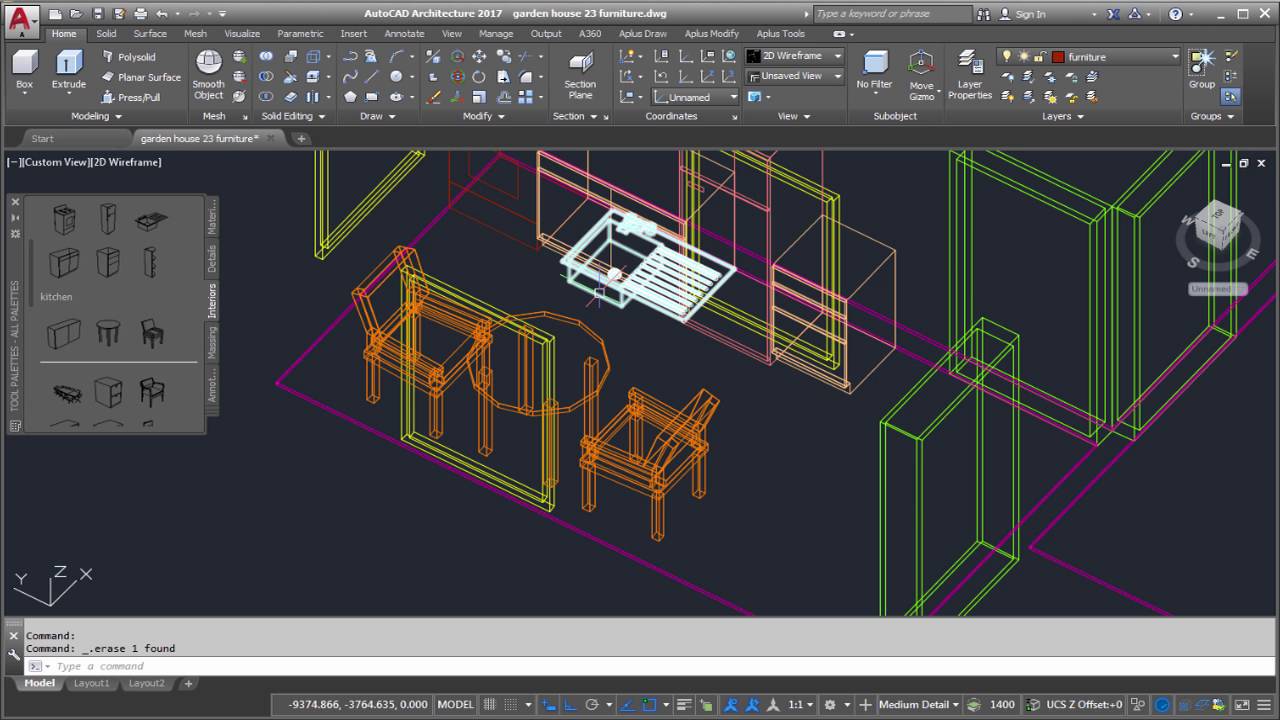
3D modeling in AutoCAD architecture software (Source)
Common features of architecture software
Software features vary by product or vendor, but most architecture tools have the following overlapping features:
Project management | Manage the complete project workflow, from planning, scheduling, and coordinating resources to estimating the cost and time required to execute each project phase. |
2D drawing | Draft, design, edit, and annotate on 2D drawings of floor plans, building layouts, elevations, and more. |
Drafting | Create diagrams or graphical representations of construction structures for technical, architectural, and engineering purposes. These diagrams include the dimensions of the different parts of buildings, materials to be used, elevations, and other specifications. |
3D modeling | Build 3D models of structures to get the actual view of a finished project. Check errors that may occur in the design process, give virtual tours to clients, and so on. |
Building information modeling (BIM) | Analyze every step in the building process, such as safety assessment and resource management. Centralize all information about planning, designing, operations, and maintenance. |
Contact management | Collect and store information about leads and customers, including their contact details, interaction history, and contract documents, in a centralized platform. |
Document management | Create, store, track, and manage all project-related files and documents in a centralized database that can be accessed only by authorized stakeholders. |
Presentation tools | Create immersive presentations with the help of text, images, videos, and animations to communicate your design ideas to clients. These tools help explain or discuss any modifications or special requirements that the clients may have. |
Bill of materials | Create a list of all the materials required to complete a project. A BOM includes raw materials, subassemblies, intermediate assemblies, components, and subcomponents. It helps define the labor and tools required for the construction process. |
Contract management | Manage the creation, negotiation, renewal, and data analysis of legal contracts. Contracts include the project overview, deliverables and timelines, scope of revisions, payment terms, and other specifications discussed with clients. |
Quotes/proposals | Automate the process of creating quotes and proposals for requests of service by clients. A quote includes information such as pricing, terms of service, and all other proposal details offered to clients. |
Architecture, engineering, and construction (AEC) industry | Use BIM and CAD workflows to cater to clients from the architecture, engineering, and construction industries. Automate design and construction workflows across the project lifecycle. |
What type of buyer are you?
Before purchasing software, you should understand which buyer segment you belong to. The majority of architectural design software buyers belong to one of the following categories:
Freelance professionals: Freelance architects or designers are solopreneurs who usually work on a single architectural project at a time. They offer construction designing services as well as provide consultation and guidance throughout the project. They need architecture software to share ideas with clients, reduce design costs, and save time by referring to previous design documents. An architecture tool with features such as 2D drawings, 3D drawings, presentation tools, quotes and proposals, and document management would be suitable for their needs.
Businesses: Buyers in this segment include businesses that have many architects and design engineers working as part of their project teams. These design professionals work on multiple projects simultaneously and need software for project scheduling, workflow management, document management, and design visualization. They also want to determine the cost of the materials and manpower needed for project completion. A full-featured architecture design software package would be suitable for these buyers. Integration with existing applications such as construction management, BIM, and general contractor software tools is another functionality they should look for.
Benefits of architecture software
Implementing an architectural software platform has various benefits, including:
Improved productivity: Architecture software allows your designers to experiment with ideas, identify design issues before construction begins, and save design patterns for future use or reference. It also offers prebuilt templates and a centralized data repository to save the time otherwise spent on creating designs from scratch and searching and retrieving historical documents.
Fewer errors: Architecture software allows your design team as well as your entire project team to coordinate on design updates in real time. It creates a 3D model of the building structure to let project members identify and fix errors before the actual construction begins. By visualizing the entire construction, your stakeholders can also provide feedback throughout the design process.
Better communication: Using architecture design software, you can create, manage, and store all designs and documents at a centralized location. A centralized design database ensures all your team members have access to up-to-date information. You can also visualize the building structure to better locate errors and discuss design changes or other client specifications.
Key considerations
Here are a few considerations to keep in mind when selecting an architecture design software tool:
Business needs: Different businesses have different architectural requirements. Therefore, evaluate your business needs first. A basic architecture tool will have 2D and 3D designing and project management features, which can be beneficial if you’re a freelance professional or you own a firm that’s involved in low-budget construction projects. But if you have a large enterprise with complex projects and multiple stakeholders, you may want an enterprise architecture system with advanced features such as BIM, 3D rendering, and 3D printing.
Learning curve: Moving to new software will involve a learning curve for your staff members, and without adequate training, they could struggle to complete their tasks. This can affect their productivity as well as your project outcomes. Therefore, select an architecture software tool that’s easy to learn and offers adequate training and support for your staff. You can also opt for a demo or a free trial to get a first-hand feel of the tool before deciding to invest.
Market trends to understand
Here are some architecture software market trends that you should be aware of:
Augmented reality (AR)-supported architecture tools are helping create interactive design visualizations. Augmented reality allows designers to place 3D models of their designs into the physical environment or the construction site. The technology uses mobile apps, headsets, and other smart devices and is widely adopted by vendors for design analysis—i.e., virtually walking through a completed model even before a brick is laid. It allows clients to get a realistic view of the project outcomes and stakeholders to review work as construction progresses. It also lets the project team collaborate on changes to accelerate design decisions and reduce errors resulting from communication gaps.
Note: The application selected in this article is an example to show a feature in context and is not intended as an endorsement or a recommendation. It has been obtained from sources believed to be reliable at the time of publication.