


Best Audit software of 2026

- Popular Comparisons
- FrontRunners
- Buyers Guide
Compare Products
Showing 1 - 25 of 394 products
Compare Products
Sort by
Reviews: Sorts listings by the number of user reviews we have published, greatest to least.
Average Rating: Sorts listings by overall star rating based on user reviews, highest to lowest.
Alphabetically (A-Z): Sorts listings by product name from A to Z.

VelocityEHS is different. We’re not just a software company, we’re expert problem solvers who know how to simplify complex issue...Read more about VelocityEHS
VelocityEHS's Best Rated Features
See All
VelocityEHS's Worst Rated Features
See All

Resolver’s risk management software is a cloud-based solution for midsize to larger enterprises that serves customers across a v...Read more about Resolver


Resolver's Best Rated Features
See All
Resolver's Worst Rated Features
See All

AWS CloudTrail is a cloud-based solution that helps businesses manage and view all the events and activities across AWS accounts...Read more about AWS CloudTrail
AWS CloudTrail's Best Rated Features
See All
AWS CloudTrail's Worst Rated Features
See All

Sprinto is a cloud-based security compliance automation platform that helps small to large businesses manage their compliance pr...Read more about Sprinto

Sprinto's Best Rated Features
See All
Sprinto's Worst Rated Features
See All

Recognized as a Leader in the Gartner® Magic Quadrant for both IT Risk Management and IT Vendor Risk Management, NAVEX IRM bring...Read more about NAVEX IRM


TenForce is an EHS software platform designed to help organizations manage operational risks while maintaining efficiency. It is...Read more about TenForce

ManageEngine ADAudit Plus is a Windows auditing, security, and compliance solution. Key features include comprehensive logon aud...Read more about ManageEngine ADAudit Plus


ManageEngine ADAudit Plus's Best Rated Features
See All
ManageEngine ADAudit Plus's Worst Rated Features
See All

Rivial Data Security enables organizations to accurately measure their risk, automate compliance, and mature their cybersecurity...Read more about Rivial Data Security
Rivial Data Security's Best Rated Features
See All
Rivial Data Security's Worst Rated Features
See All

Intellect is an AI-powered quality management system (QMS) and frontline operations solution for manufacturing. Built to suppor...Read more about Intellect QMS AI


Intellect QMS AI's Best Rated Features
See All
Intellect QMS AI's Worst Rated Features
See All

Suralink closes the Client Readiness Gap by combining its industry leading client collaboration portal with its newly launched a...Read more about Suralink


Suralink's Best Rated Features
See All
Suralink's Worst Rated Features
See All

Adaptive Compliance Engine (ACE) is a highly configurable, workflow-based, quality management system built for companies with co...Read more about ACE

Ncontracts is a risk management solution designed for banks, credit unions and other financial institutions. It provides an inte...Read more about Ncontracts


Ncontracts's Best Rated Features
See All
Ncontracts's Worst Rated Features
See All

ACE Inspection by PSC Software helps life sciences organizations manage regulatory inspections with greater visibility, coordina...Read more about ACE Inspection
No reviews yet
recommendations


LogicGate Risk Cloud is a no-code governance, risk, and compliance (GRC) platform that scales and adapts to the changing busines...Read more about LogicGate Risk Cloud


LogicGate Risk Cloud's Best Rated Features
See All
LogicGate Risk Cloud's Worst Rated Features
See All

ETQ Reliance is a cloud-based quality management system (QMS) software designed with an adaptable platform that powers 40 applic...Read more about ETQ Reliance

ETQ Reliance's Best Rated Features
See All
ETQ Reliance's Worst Rated Features
See All

Eleven helps small and medium-sized accounting firms to streamline their practice and scale. With this cloud accounting app, you...Read more about Eleven
Eleven's Best Rated Features
See All
Eleven's Worst Rated Features
See All

Onspring is a cloud-based governance, risk and compliance (GRC) platform that helps streamline business processes and enhance ef...Read more about Onspring
Onspring's Best Rated Features
See All
Onspring's Worst Rated Features
See All

Scrut Automation is a modern GRC platform designed to help businesses of all sizes achieve continuous compliance with frameworks...Read more about Scrut Automation
Scrut Automation's Best Rated Features
See All
Scrut Automation's Worst Rated Features
See All

QT9 QMS is a web-based quality management solution used by companies to comply with ISO and FDA quality standards. The software ...Read more about QT9 QMS
QT9 QMS's Best Rated Features
See All
QT9 QMS's Worst Rated Features
See All

WorkClout is a quality management platform for automotive parts manufacturers. Our software helps streamline & automate internal...Read more about WorkClout


Ensure customers find your most valuable digital content with 24/7 website monitoring from ContentKing, now part of the #1 enter...Read more about ContentKing

ContentKing's Best Rated Features
See All
ContentKing's Worst Rated Features
See All

Qualityze is a cloud-based Quality Management System (QMS) built on Salesforce that transforms quality processes into intelligen...Read more about Qualityze Suite

Qualityze Suite's Best Rated Features
See All
Qualityze Suite's Worst Rated Features
See All

IRIS CARBON is a robust, cloud-based disclosure management platform designed to simplify and automate the complex processes asso...Read more about IRIS CARBON
IRIS CARBON's Best Rated Features
See All
IRIS CARBON's Worst Rated Features
See All

Inspired by decades of experience in the industry, Corfix is the only project management software built by construction workers ...Read more about Corfix

Corfix's Best Rated Features
See All
Corfix's Worst Rated Features
See All

A1 Tracker Contract Management Software is a cloud-based contract management & lifecycle platform. A1 Tracker's features in...Read more about A1 Tracker


A1 Tracker's Best Rated Features
See All
A1 Tracker's Worst Rated Features
See All
Popular Comparisons



Your Guide to Top Audit Software, October 2024
Software Advice uses reviews from real software users to highlight the top-rated Audit products in North America.
Learn how products are chosenExplore FrontRunners


“Usability” includes user ratings for Functionality and Ease of Use.
“Customer Satisfaction” includes user ratings for Customer Support, Likelihood to Recommend and Value for Money.
Reviews analysis period: The reviews analysis period spans two years and ends the 15th of the month prior to publication.
Buyers Guide
This detailed guide will help you find and buy the right audit software for you and your business.
Last Updated on January 27, 2025Audit software helps organizations plan for, address and mitigate risks that could compromise the safety and/or quality of the goods or services they provide.
For businesses that adhere to government regulations and industry standards, audit management is a critical component of their compliance and risk management strategies.
If you’re considering investing in an audit management system, we’ve created this guide to help you make a more informed purchase decision. Here’s what we’ll cover:
What Is Audit Management Software?
What Are Common Features of Audit Software?
What Are The Benefits of Audit Management Software?
Key Considerations for Audit Management Software
What Is Audit Management Software?
This type of software standardizes audit management processes across an organization. It helps automate the various steps in the audit lifecycle, allowing businesses to conduct audits in a single, comprehensive framework.
Although the types of audits can vary—internal audits, supplier audits, quality audits etc.—audit software commonly encompasses these steps:
Steps in the Audit Life Cycle
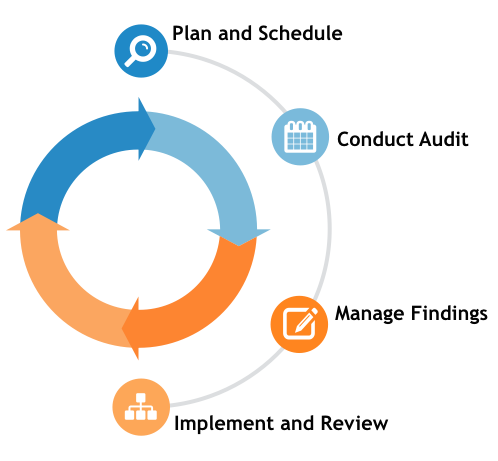
Plan and schedule: Prioritize risk areas, create targeted risk-based plan, plan when the audit will happen. Schedule resources, create and assign tasks and checklists, assign owner.
Conduct audit: Owner and teams perform audit tasks, apply document controls, track observations and records findings. This stage is often described as “field work.”
Manage findings: Track progress, monitor trends and analysis. Develop audit reports, review recommendations with management and design risk management implementation plans.
Implement and review: Implement action plans, observe and record findings. Monitor and track success of action items and note any inconsistencies that might require future audits.
What Are Common Features of Audit Software?
Auditing systems typically include the following capabilities:
Audit scheduling | View team and site calendars, resource availability and potential conflicts. Create timeline, schedule audit team and owner. |
Task and time tracking | Assign tasks and due dates, track progression of tasks and record time to resolution. Alert owner of overdue tasks. |
Configurable forms/checklists | Create and save custom forms and checklists according to the audit needs at hand: e.g., planning, completion, quality assurance. |
Email notifications | Set up automatic alerts to audit team about any changes to the schedule, priority items or follow-up tasks. |
Track progress of tasks, budget and timeline; view status of audit checklists; monitor performance and visualize trends. | |
Document and analyze data trends, performance reports and generate recommendations and action plans based on findings. |
What Type of Buyer Are You?
As mentioned above, businesses that regularly require audits typically fall into two categories:
Regulated by the FDA. Examples include pharmaceutical companies following directive 21 CFR 211 and medical device firms that adhere to 21 CFR 820. These businesses have to follow these regulations exactly. To do so consistently and without error requires an automated system.
Complying with industry standards. Examples include general manufacturers and businesses in the service industry that follow quality standards, such as ISO 9000. To become ISO 9000 certified, businesses are assessed on their quality assurance practices and must submit documentation of their processes. Audit software can streamline this process.
What Are the Benefits of Audit Management Software?
Audit software can provide organizations with several benefits, including:
Reduced risk. Standardizing audit management processes eliminates inconsistencies. It also provides visibility into workflows, data collection and report metrics.
Enhanced security. Securely store and manage audit documentation, recommendations and implementation plans in a centralized system.
Improved compliance. Comply with industry standards and government regulations while maintaining an accurate, searchable audit trail.
Key Considerations for Audit Management Software
When you’re evaluating potential audit management solutions for your business, start with detailing all your requirements and categorizing them based on their importance. Below are some parameters that will help you identify the right solution for you:
Automatic audit scheduling. Auditing a single process is relatively easy, but when there are thousands of processes across numerous locations and working areas, manual scheduling can be extremely difficult. Automatic audit management systems offer customized scheduling throughout the year based on factors such as the availability of auditors and the operational area. Automatic scheduling can help users map out their overall audit schedule for the complete year.
Convergence of safety and quality. The ability to integrate these two audit processes is an important consideration. Both share several common functions, such as document control and corrective action. On many occasions, for example, audit teams will review the corrective action process of environmental health and safety (EHS) systems but will do this at a later stage for quality management systems (QMS). Usually, both EHS and QMS have the same corrective action process, so, with audit management software, these can be managed in a single audit.
Mobility in the audit process. The audit process is usually conducted across an organization’s premises, including the warehouse and shop floor. It requires auditors to go to the physical location of each process and record the data. As such, there must be a mobile device, such as a tablet, to record data, especially in the case of cloud-based audit management systems. This feature allows the user to enter audit information into the system in real time.
Automated templates for checklists and audits. This feature speeds up the audit process without auditors having to compile checklists and type questions repeatedly. Most of the automated audit management solutions on the market provide a list of keywords that recognize several types of checklists and audits. With this feature, the user just has to choose the audit type to schedule the process, and the solution automatically pulls in the correct data.
Integration of audits with rest of QMS and EHS systems. Even if the overall audit process goes off smoothly, it will produce findings that require further action. Automated auditing solutions are usually included with QMS and EHS systems, and modern auditing systems automatically integrate with other quality and safety procedures, such as corrective action, to ensure complete transparency of information. You can also integrate audit findings to update all the records in document control and in training programs to make sure the staff is trained properly. Such integrations help management align the audit findings with the affected processes.