


Best Metal Fabrication Software of 2026
Updated February 18, 2026 at 5:52 AM

Written by Olivia Montgomery, PMP
Associate Principal Analyst

Edited by Parul Sharma
Editor

Reviewed by Bryan Dengler
Senior Advisor

Talk with us for a free 15-min consultation
Expert advisors like Jacqueline, who have helped 1,000+ companies, can find the right software for your needs.
- All Software
- Software Advice FrontRunners
- Popular Comparisons
- Buyer's Guide
- Frequently Asked Questions
Metal fabrication software helps manufacturers design, plan, and manage metal fabrication processes, improving precision, reducing waste, and boosting productivity. Metal fabrication software is a specialized material requirements planning (MRP) system and the leading manufacturing segment for software inquiries we get. With over 100 tools covering varied operational models, integration needs, or regulatory contexts, choosing the right system can be daunting. To help you narrow it down, I worked with our metal fabrication software advisors to curate a list of recommended productsi and a list of the metal fabrication software FrontRunners based on user reviews. For further information, read my metal fabrication software buyer's guide.
Metal Fabrication Software
Sort by
Reviews: Sorts listings by the number of user reviews we have published, greatest to least.
Average Rating: Sorts listings by overall star rating based on user reviews, highest to lowest.
Alphabetically (A-Z): Sorts listings by product name from A to Z.

NetSuite is an AI-powered cloud-based business management suite that incorporates ERP, financial management, CRM and eCommerce f...Read more about NetSuite


NetSuite's Best Rated Features
See All
NetSuite's Worst Rated Features
See All

Global Shop Solutions provides a comprehensive suite of enterprise resource planning (ERP) tools and solutions designed to help ...Read more about Global Shop Solutions


JobBOSS² is a job shop management software designed for custom manufacturers and machine shops. It supports make-to-order manufa...Read more about JobBOSS²


JobBOSS²'s Best Rated Features
See All
JobBOSS²'s Worst Rated Features
See All

Striven is a cloud-based enterprise resource planning (ERP) solution suitable for many industries and organizations of all sizes...Read more about Striven


Striven's Best Rated Features
See All
Striven's Worst Rated Features
See All

Cetec ERP is a manufacturing enterprise resource planning software built for small and medium sized businesses. Cetec ERP's clou...Read more about Cetec ERP


Cetec ERP's Best Rated Features
See All
Cetec ERP's Worst Rated Features
See All
Software Advice FrontRunners 2026

(1820)

(1284)

(157)

(106)

(199)

(164)

(344)

(243)

(865)

(367)
Best for Customization
NetSuite

Of the products listed on our FrontRunners report, NetSuite is the most requested by users for customization out of the most popular tools.
NetSuite is best for organizations that require extensive customization to match their unique business processes. Our reviewers say its flexible configuration options and ability to tailor forms, fields, and workflows help businesses adapt the system to evolving needs and improve operational efficiency.
- Reviewers Perspective
"Time to automate various accounting processes which reduces manual data entry, minimizes errors and saves time allowing us to focus on more strategic financial activities."
FSFlorence Schlensog
Trade Advisor
Used for 2+ years
We analyzed 760 verified user reviews for NetSuite to find out what actual users really think.
Features
Organizations manage ERP, CRM, project management, and HR within NetSuite. The platform’s flexibility and automation capabilities help businesses scale and adapt as needs evolve.Accounting and Financial Management
Finance teams use NetSuite for general ledger, accounts payable/receivable, tax management, and reporting. Automation and real-time visibility support accuracy and strategic decision-making.Data Management
Departments consolidate information for real-time reporting and analytics. NetSuite automates data entry, maintains accuracy, and supports robust workflows to reduce errors and enhance performance. - Screenshots


Highly Rated for Quick Adoption/Easy Adoption

Odoo

Of the products listed on our FrontRunners report, Odoo is the highest rated for quick adoption out of the most popular tools.
Odoo is highly rated for quick adoption, making it ideal for small businesses seeking a rapid and smooth onboarding experience. Our reviewers point out that its intuitive interface, modular structure, and effective bulk import features enable teams to get up and running quickly with minimal disruption.
- Reviewers Perspective
"The fact that everything is integrated into one system – sales, accounting, inventory, and marketing – really helps make workflows smoother and improves overall visibility into operations."
GMGustavo Medina
Manager
Used for 1-2 years
We analyzed 567 verified user reviews for Odoo to find out what actual users really think.
Customization
Users adjust Odoo’s modules and interfaces to fit unique business requirements. SMBs leverage the open-source, modular design to modify processes and logic, often without advanced programming, supporting diverse operational needs.Modules
Teams activate or deactivate Odoo modules to match changing business demands. This modularity covers core functions—CRM, accounting, inventory, HR—letting SMBs scale or specialize their system as operations evolve.Inventory Management
Odoo’s inventory tools connect with sales, accounting, and CRM. Businesses streamline warehouse tasks, track stock, and coordinate purchasing, using multi-location support and bulk import features to manage growth and daily operations. - Screenshots


Best for Usability

MRPeasy

Of the products listed on our FrontRunners report, MRPeasy is the highest rated for its usability out of the most popular tools.
MRPeasy is best for usability, suiting manufacturing businesses that need an intuitive and easy-to-learn system. Our reviewers say its straightforward interface and logical workflows allow users, even those new to ERP, to quickly manage inventory, production, and purchasing tasks with minimal training.
- Reviewers Perspective
"We now have ultimate stock control and manufacturing accuracy which was loose before we started with the program. As the site manager I can track costs and inventory saving me huge amounts of time and improving our profit margins by monitoring expences and overheads."
BHBen Hunt
Winery Manager
Used for 6-12 months
We analyzed 123 verified user reviews for MRPeasy to find out what actual users really think.
Ease of Use
Users find MRPeasy straightforward to navigate, with an intuitive interface that works consistently across both desktop and mobile platforms. They appreciate being able to access key information from almost anywhere in the system, which helps streamline their daily tasks and decision-making. Many reviewers highlight the comprehensive help materials, responsive support, and logical layout, which make MRPeasy easy to learn and efficient for new users to adopt without significant onboarding challenges.Customer Support
Users describe MRPeasy's customer support as responsive and helpful, with most inquiries addressed quickly through the ticketing system or email. They note that the support team is knowledgeable about the product and often references the manual, which helps users resolve issues and learn the system more effectively. Reviewers also mention that onboarding consultants and ongoing updates contribute to a positive support experience, although some would appreciate more individualized training and proactive guidance during setup.Production Process
Users rely on MRPeasy to manage and streamline their production processes, from planning and scheduling to procurement and inventory tracking. They value the system’s logical workflow, ability to handle complex product structures, and tools for forecasting material requirements and production timelines. While some reviewers mention that a few processes are rigid or require manual data copying, they generally find MRPeasy effective for organizing production and improving operational visibility. - Screenshots


Most Used By Construction

Sage X3

Of the products listed on our FrontRunners report, Sage X3 is the most requested by users in construction out of the most popular tools.
Sage X3 is most used by construction firms that need robust support for complex, multi-site operations. Our reviewers say it excels at managing inventory, manufacturing, and financials across multiple locations, providing reliable tracking and streamlined processes for construction businesses.
- Reviewers Perspective
"Sage X3 is a robust and flexible ERP system that excels in managing complex business operations across multiple departments, locations, and even countries."
PTPreci Thomas
Representative
Used for 6-12 months
We analyzed 57 verified user reviews for Sage X3 to find out what actual users really think.
Management
Organizations use Sage X3 to manage accounting, procurement, warehousing, production, and sales from a single platform. This centralization supports efficiency and coordination across departments and entities.Inventory and Manufacturing
Teams handle purchasing, logistics, and manufacturing within Sage X3. The system supports complex stock systems, mobile inventory management, and consolidated reporting, helping manufacturers and distributors maintain operational control.Ease of Use
Users navigate Sage X3’s interface with straightforward search and navigation tools. The design supports both new and experienced staff, making daily accounting and business processes more manageable. - Screenshots


Best for Quick Implementation


In our analysis of Metal Fabrication products with the most market demand, Dynamics 365 Business Central is the most requested by users for quick implementation out of the most popular tools.
Dynamics 365 Business Central is best for quick implementation, appealing to SMBs seeking a fast deployment with minimal disruption. Our reviewers say its seamless integration with Microsoft tools and user-friendly onboarding resources help teams get started efficiently and accelerate time to value.
- Reviewers Perspective
"D365 is a great ERP packed full of features for mid-sized companies."
AVAlexandra Van Ness
People Business Partner
Used for 2+ years
We analyzed 105 verified user reviews for Dynamics 365 Business Central to find out what actual users really think.
Integrations
Businesses link Dynamics 365 Business Central with Office 365, Power BI, and Outlook. This integration streamlines daily tasks, supports automation, and centralizes management for cohesive operations.Data Management
Teams access and analyze business data from a single cloud-based platform. The system supports secure storage, flexible access, and compatibility with Excel, enabling collaboration and transparency.Productivity
Managers use real-time metrics and optimized workflows to monitor business processes. The familiar Microsoft interface and integration with Office tools help reduce paperwork and support time savings. - Screenshots


Best for Customer Satisfaction

Genius ERP

Of the products listed on our FrontRunners report, Genius ERP is the highest rated for customer satisfaction out of the most popular tools.
Genius ERP is best for customer satisfaction, especially among custom manufacturers with complex production needs. Our reviewers say its responsive support, tailored training options, and ability to handle custom BOMs and engineering changes contribute to a positive user experience.
- Reviewers Perspective
"The one aspect that matters most to me is how engineering and production runs concurrently. When a design is complete in CAD format, the BOM and routing can be imported into the system so there is no need to re-enter specifications and save money from not realizing an expensive error."
WGWaleed Gomaa
Project Manager
Used for 1-2 years
We analyzed 123 verified user reviews for Genius ERP to find out what actual users really think.
Custom Manufacturing
Manufacturers manage high-mix, low-volume production and engineering documents in Genius ERP. The system supports CAD imports, BOM traceability, and frequent product changes for tailored workflows.Production Scheduling
Production teams schedule jobs, track order status, and allocate resources across work centers. The planning module helps manage inventory and respond to changes in manufacturing stages.Training and Learning Curve
Organizations rely on Genius Academy, webinars, and help sections to train staff. While resources are comprehensive, initial implementation and ongoing learning require significant time and effort. - Screenshots


Most Used By Electrical/Electronic Manufacturing

ERPAG

ERPAG is the most requested by users in electrical/electronic manufacturing out of the most popular tools.
ERPAG is most used by electrical and electronic manufacturing businesses that need strong inventory and production management. Our reviewers say its customizable inventory controls, ease of setup, and ability to handle multi-location tracking are particularly valuable for these industries.
- Reviewers Perspective
"It helped us streamline operations, track inventory, manage orders, and improve productivity."
THTINNUS HATTINGH
C.O.O
Used for 1-2 years
We analyzed 249 verified user reviews for ERPAG to find out what actual users really think.
Features
Organizations centralize manufacturing, inventory, purchasing, and document management in ERPAG. The platform’s robust feature set and customization options let SMBs adapt processes to their requirements.Inventory Management
Teams use ERPAG to monitor inventory, manage orders, and track raw materials. Real-time visibility and support for production planning help streamline stocktaking and reduce manual work.Integrations
Businesses connect ERPAG with QuickBooks, Xero, and Shopify to centralize information. While setup is straightforward for some platforms, limited integration options can challenge companies with diverse software needs. - Screenshots


Most Rated for SMBs


Of the products listed on our FrontRunners report, Acumatica Cloud ERP is the most requested by small businesses out of the most popular tools.
Acumatica Cloud ERP is most rated for SMBs, making it a strong choice for small and midsize businesses seeking scalability and flexibility. Our reviewers say its cloud accessibility, customizable dashboards, and robust integration options support efficient growth and remote work.
- Reviewers Perspective
"The system has ultimately provided our business with improved real-time visibility, better automation capabilities, and the flexibility to scale as we grow."
DADominic Albrecht
Head of Analytics
Used for 2+ years
We analyzed 110 verified user reviews for Acumatica Cloud ERP to find out what actual users really think.
Integrations
Businesses link Acumatica with CRM, e-commerce, and payment platforms. The open API and partner marketplace support automation and real-time visibility, helping SMBs extend functionality as requirements shift.Ease of Use
Staff navigate Acumatica’s interface with minimal training. The design and resources like wikis support quick onboarding, making it practical for organizations with varying technical backgrounds.Customization
Managers adapt dashboards and processes without coding for most changes. While advanced customizations may need IT support, the platform’s flexibility helps SMBs align the system with specific operational needs. - Screenshots


Most Used By Mechanical/Industrial Engineering
JobBOSS²

According to our user reviews, JobBOSS² is the most requested by users in mechanical/industrial engineering out of the most popular tools.
JobBOSS² is most used by mechanical and industrial engineering firms that require integrated quoting and job tracking. Our reviewers say its seamless workflow from estimating to order processing, along with user-friendly training resources, streamlines shop operations for these users.
- Reviewers Perspective
"Recently quoted parts, RFQ, etc. are all easy to use for us."
MCMilt Cummings
Project Manager
Used for 2+ years
We analyzed 540 verified user reviews for JobBOSS² to find out what actual users really think.
Ease of Use
Staff move between modules and tasks with minimal friction. The interface supports quick onboarding and efficient workflows, helping SMBs improve productivity across manufacturing and job tracking.Reports and Customization
Businesses generate built-in and custom reports for insights, but customizing often requires Crystal Reports knowledge or support. Some report exports are cumbersome, impacting flexibility for non-technical users.Quoting Process
Teams create, track, and convert quotes within JobBOSS², integrating with other modules. This reduces manual entry and errors, letting SMBs reference historical data for more accurate and competitive quoting. - Screenshots


Most Used By Construction

Sage 100

In our analysis of Metal Fabrication products with the most market demand, Sage 100 is the most requested by users in construction out of the most popular tools.
Sage 100 is most used by construction businesses looking for reliable accounting and payroll management. Our reviewers say its integrated modules for billing, payroll, and reporting help construction firms manage finances efficiently and adapt as their business grows.
- Reviewers Perspective
"I consider that Sage 100 is a complete accounting application, which allows you to adapt to the needs of customers."
COCarlos Ortiz
Supervisor - Financial Application Support Service
Used for 2+ years
We analyzed 249 verified user reviews for Sage 100 to find out what actual users really think.
Accounting
Organizations use Sage 100 for bookkeeping, reporting, and audit compliance. The platform supports a range of accounting needs, from daily transactions to advanced financial management, with an interface accessible to users with basic accounting knowledge.Small Business
SMBs implement Sage 100 to manage growth and daily operations. The software is easy to deploy for smaller organizations and robust enough to support more complex needs as businesses expand.Payroll
Administrators process payroll, direct deposits, and paycards in Sage 100. The system integrates payroll with accounting, automates tax filing, and provides straightforward wage slip access for efficient payroll management. - Screenshots


Methodology
The research for the best metal fabrication software list was conducted in October 2025. We evaluated data (user reviews and demand signals) from the past 24 months as of the research date. Read the complete methodology.
Popular Metal Fabrication Comparisons


Buyer's Guide
This detailed guide will help you find and buy the right metal fabrication software for you and your business.
Last Updated on January 27, 2025Here's what we'll cover:
Metal fabrication software essentials
What is metal fabrication software?
Features of metal fabrication software
How to choose the best metal fabrication software
Understanding metal fabrication market trends
Metal fabrication software essentials
Metal fabrication software is a specialized tool designed to assist in the design, planning, and management of metal fabrication processes. It helps manufacturers by improving precision, reducing waste, and enhancing productivity through features like purchase order management, production scheduling, and real-time monitoring. Metal fabrication is the leading manufacturing segment that software buyers have inquired about, with our software advisors helping over 500 buyers in the past year. [1]
“Metal fabrication software is the ideal, industry-specific MRP system to help you plan materials, manage inventory, and streamline procurement specifically for metal projects. It also teams up with MES systems to give you real-time insights and control over shop floor activities, making your production process smoother and more efficient,“ explains top advisor, Bryan Dengler.
To give you an idea of the market, our site features 126 different metal fabrication products, and in the past year alone, we've published over 940 reviews for 42 of these products. The majority of user reviews come from small to midsize businesses, with 42% of reviewers having 50 or fewer employees and 46% having between 51 and 200 employees. The largest industry represented is construction, followed by the automotive sector.
Most metal fabrication software management products are priced on a "per-month" basis, with entry-level pricing plans averaging around $254 per month for 1 to 20 users. This pricing model aligns closely with the budgets of the majority of buyers who have contacted us in the past year (74%). Premium and advanced system subscriptions start around $1,475 per month. [2]
First-time buyers should begin evaluating with a budget, number of users, specific use cases, and necessary integrations in mind. Be sure to consult with key stakeholders on a list of questions to help you evaluate systems based on your needs. Our experienced advisors, Bryan Dengler, Adrian Cantu, and Saul Sanchez, share the following questions to get you started:
Can your system manage and optimize production scheduling and workflow on the shop floor?
What features does your software offer for tracking material usage and inventory levels?
How does your solution support quality control and compliance with industry standards?
Does your software provide real-time data and analytics to monitor production performance and efficiency?
Can your system integrate with our existing tools and software, such as CRM or accounting systems?
With so many vendors out there, picking the right one can feel overwhelming. This guide will walk you through the key components of metal fabrication software and provide step-by-step advice on choosing the best solution for your practice.
If you would prefer to speak with one of our experienced MRP software advisors like Dengler, Cantu, and Sanchez, schedule a call or start a chat with us.
What is metal fabrication software?
Manufacturing businesses (i.e., fabrication shops) need software to handle projects. The software helps them from the time they bid for a contract to the final quality check of the finished product. It also automates inventory tracking, project scheduling, project cost calculation, quoting and bid proposal generation.
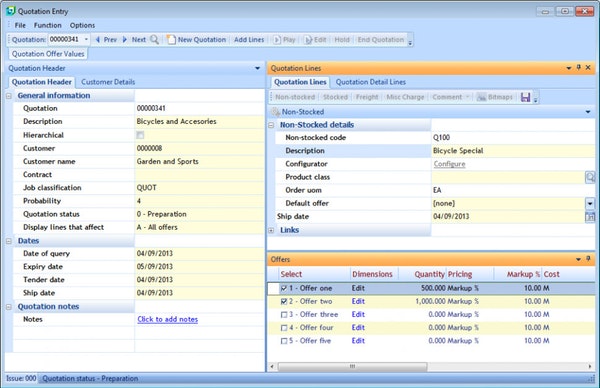
Calculating project costs and creating quotations in Syspro
Metal fabrication companies use all kinds of hardware technologies—from 2D laser cutting and robotic welding to even 3D printing. However, successful metal fabricators go a step further than just using hi-tech equipment. They also use software to ensure that their teams meet production deadlines and maintain high standards of quality.
Known as metal fabrication software, and part of the larger category of manufacturing systems, these solutions help metal fabricators manage different business operations. A feature of metal fabrication software is inventory management that's used to track materials and equipment located in different facilities.
Small businesses that use metal fabrication software will see tangible benefits such as better production planning, faster creation of bid proposals and optimal equipment utilization. The software will also help you eliminate the use of spreadsheets, which are prone to manual errors and waste a ton of employee time.
Features of metal fabrication software
In this section, we have shortlisted the wide-ranging features of manufacturing systems. These are the most common functionality that small businesses can expect in metal fabrication software.
Feature | Description |
Production planning and management | Understand the status of existing work orders, or assign new ones to employees, on visual dashboards. Also, plan job completions using Gantt charts. |
Document management | Create a centralized file repository of the drawings of product models, change orders, request for information (RFI) and other project-related documents. |
Inventory management | Automatically sort and track raw materials, stocked items, work-in-progress (WIP) items and finished products using serial or lot numbers. |
Estimating and quoting | Create project cost summaries by automatically calculating labor and materials costs. Use this information to generate bid proposals. |
Materials management | Calculate the requirement of materials and track the usage of equipment for the optimal utilization of equipment and materials. |
While these features are common to most metal fabrication tools, there could be variations in the depth of functionality and ease of use. Also, different vendors offer different integration options. For this reason, it's essential that you fully explore a tool's functionality to assess whether or not it meets your specific business requirements.
How to choose the best metal fabrication software
Step 1: Determine the type of buyer you are
Getting the right metal fabrication software for your business means analyzing the size of your organization and your software budget. To help you understand the different categories of buyers in this market, we have divided them into the following types:
Full-suite buyers: Large fabrication shops that work on varied projects, such as additive manufacturing, and use robotic automation will have complex needs. They want a one-stop solution for all their manufacturing needs. For instance, a full-suite solution will have built-in CAD tools so that designers can create 3D models for custom fabrication requests.
Small manufacturers: These buyers may not need advanced features but are looking to automate their wasteful manual processes. They need an easy-to-use solution that offers inventory management and project tracking so that they can improve their production speed and quality.
Once you identify the category that you fall under, the next step is to think about the type of software you need. Read about these considerations in the next section.
Step 2: Evaluate your key considerations
When you're shopping for software to use in your business, you need to keep certain things in mind such as software deployments and the use of mobile devices. Here are the top considerations to review vendor offerings before you purchase a solution:
Deployment options: For small fabrication shops, the ideal deployment would be in the cloud over on-premise due to the high upfront license costs of the latter. On-premise tools require you to handle software maintenance and data backup on your own. Therefore, opt for a cloud-based tool that has a smaller monthly subscription fee and the vendor is typically responsible for software upkeep.
Integrations offered: Third-party integrations are important for seamless data transfer between different systems. For example, integrating accounting software will help you create detailed financial reports about your profitability over time, while integrating CAD software will help you import 3D images and drawings. In general, integrations become essential to a small business as it grows and needs more complex systems to meet its requirements.
Mobile accessibility: This is important if your employees don't have fixed workstations. For instance, if you have a designer working remotely, then the ability to receive and send drawings on mobile devices makes processes very convenient. Similarly, warehouse workers can log in the information of new inventory from their mobile devices.
If you need guidance, you can chat online now with one of our advisors or schedule a phone call. You can get tailored recommendations about software that best fits your unique metal fabrication needs.
Understanding metal fabrication market trends
Among the many trends affecting the manufacturing industry, here are some of the most important ones:
Build complex prototypes with 3D printing: Fabrication shops have many uses of metal 3D printing systems that can be integrated with CAD software. This helps them quickly print prototypes and small parts with complicated designs. The technology is especially beneficial for custom fabrication businesses that cater to a wide array of industries such as aerospace and healthcare.
Track inventory easily with smart tagging: Advancements in inventory tagging, such as radio frequency identification (RFID), have solved many challenges of tracking and managing the records of equipment and materials. For instance, a business can monitor the status and availability of equipment remotely with RFID tags. This technology helps metal fabrication shops optimize the stocking of their inventory and prevent theft.
Automate equipment maintenance with Internet of Things (IoT): Manufacturing businesses can use IoT in many ways. For instance, install sensors connected to the internet at the site for automated equipment monitoring. Instead of employees manually checking the health of different systems, the sensors will constantly fetch data and automatically send alerts for any maintenance requirements. With predictive maintenance, businesses can prolong the life of equipment and prevent accidents.
About our contributors
Author
Olivia Montgomery is an associate principal analyst at Software Advice, covering program and project management with a focus on the strategic alignment of IT and operations to optimize digital transformation. Drawing from her experience as a former IT PMO leader and her background in humanities studies, Olivia delivers data-driven insights that empower business leaders to drive business growth through projects.
Olivia’s research and analysis is informed by nearly 200,000 authentic user reviews on Software Advice and over 10,000 interactions between Software Advice software advisors and project management software buyers. Olivia also regularly analyzes market sentiment by conducting surveys of project managers and PMO leaders so she can provide the most up-to-date and helpful information to small and midsize businesses purchasing software or services.
Her expertise is featured in Forbes, Bloomberg, CIO Dive, and TechRepublic, as well as in podcasts, such as The Digital Project Manager. Recently, she presented her research on emotional intelligence (EQ) and decision-making at PMI's Global Summit conference, shedding light on the crucial role of EQ in driving project success. When she's not analyzing tech trends, you can find Olivia horseback riding or re-watching Jurassic Park.
Editor
Parul Sharma is a content editor at Software Advice with expertise in curating content for various niches, including SaaS, digital marketing, and search engine optimization. With over half a decade of experience in content writing and editing, Parul has the expertise to simplify complex terms into engaging, valuable content for targeted audiences.
She completed her graduation and post-graduation in English literature from Delhi University and was awarded the Dr. Asha Sahni Memorial Award for being the highest scorer in her graduating class. Parul has contributed to the news, lifestyle, education, and health verticle of DNA India, India’s premier media channel.
Outside of work, she can be found curating healthy recipes, coloring in mandala books, and spending quality time with her family.
Advisors
Adrian Cantu is a software advisor. He joined Software Advice in 2022, and is based in Austin, TX.
Adrian works directly with small business leaders to connect them with best fit software providers. He assesses the technology needs of small businesses seeking manufacturing, distribution, fleet management, and professional services software. He has a background in sales and has worked in the service industry.
Adrian’s favorite part of being a software advisor is when the buyer sees the value in the service provided and expresses how appreciative they are.
Bryan Dengler is a senior advisor. He joined Software Advice in 2022, and is based in Austin, TX.
As part of the software advisor team, Bryan helps professionals from a wide range of industries who are seeking accounting, project management, manufacturing, learning management, and supply chain software. He provides a shortlist of personalized technology recommendations based on budget, business goals, and other specific needs.
Bryan’s favorite part of being a software advisor is knowing he’s made a valuable difference in a buyer’s life with each advising session he holds.
Saul Sanchez is a senior advisor. He joined Software Advice in 2019, and he is based in Austin, TX.
Saul works directly with small business leaders to connect them with best fit software providers. He assesses the technology needs of small businesses seeking a wide variety of software, including business intelligence, inventory management, manufacturing, and supply chain tools. Through one-to-one conversations, Saul provides a short list of potential matches.
His favorite part of being a software advisor is experiencing a buyer’s relief when they discover how much time and energy he’s saved them by helping narrow down the list of many possible options on the market.
Sources
Software Advice reviews data: Software Advice reviews are collected from verified users for individual software products. For this report, we analyzed reviews from August 19, 2023 to August 19, 2024.
Software Advice software pricing data: Only products with publicly available pricing information and qualified software products within the category, as of November 29, 2023, are included in the pricing analysis. Read the complete methodology.
Metal Fabrication FAQs
- What software do steel fabricators use?
Steel fabricators typically use a variety of software tools to assist with design and project management, with metal fabrication software being the top system manufacturers contact us about. According to our analysis of products with high market demand and reviews, the full-suite solution, Striven, had the highest overall rating from verified reviewers on Software Advice for metal fabrication software.
- What are the three 3 types of metal fabrication?
Metal fabrication mainly involves three key processes: cutting, bending, and assembling. Cutting breaks metal into smaller shapes, bending changes its form without removing material, and assembling combines metal parts using methods like welding or bolting to create the finished product. Metal fabrication software is used to help track and manage these processes.
- Which software is best for sheet metal design?
The best software for sheet metal design is typically a full-suite manufacturing resource planning (MRP) system. According to our analysis of products with high market demand and reviews, Striven has the highest overall rating from verified reviewers on Software Advice for metal fabrication software. If you’re looking for a 3D computer-aided design (CAD) tool, Striven also offers integrations with these systems.
- What is fabrication software?
Fabrication software is a specialized tool designed to help plan, design, and manage metal fabrication projects. The broader category of metal fabrication software helps streamline these processes including inventory management, purchase order management, and managing bill of materials. This software improves efficiency, reduces errors, and enhances productivity by automating various tasks in the fabrication process, from design to delivery.
- Which software is best for steel estimation?
The best software for steel estimation is a building information modeling (BIM) system. According to our analysis of products with high market demand and reviews, Striven had the highest overall rating from verified reviewers on Software Advice for metal fabrication. Striven’s estimation features help with steel estimation, creating more accurate and efficient calculations for material needs.