
Best Application Development Software of 2026
Updated February 18, 2026 at 10:24 AM

Written by Marcela Gava
Senior Content Analyst

Edited by Mehar Luthra
Team Lead, Content
- All Software
- Buyer's Guide
- Software Advice FrontRunners
- Frequently Asked Questions
- Popular Comparisons
App development software supports developers and IT teams in building, testing, and launching custom apps across platforms. With over 400 tools, each tailored to different coding environments or deployment needs, buyers can face a complex landscape. To help you narrow it down, I've curated a list of highly-rated productsi and the application development software FrontRunners based on user reviews. For further information, read my application development software buyer's guide.
Application Development Software
Sort by
Reviews: Sorts listings by the number of user reviews we have published, greatest to least.
Average Rating: Sorts listings by overall star rating based on user reviews, highest to lowest.
Alphabetically (A-Z): Sorts listings by product name from A to Z.

Caspio is a cloud-based, no-code, application development solution for organizations of all sizes. The platform is suitable for ...Read more about Caspio


Caspio's Best Rated Features
See All
Caspio's Worst Rated Features
See All

Odoo is a comprehensive, open-source suite of business applications designed to cater to the diverse needs of companies of all s...Read more about Odoo

Odoo 's Best Rated Features
See All
Odoo 's Worst Rated Features
See All

Modern software application development has evolved from deploying products periodically to build them on a daily or hourly basi...Read more about Artifactory


Artifactory's Best Rated Features
See All
Artifactory's Worst Rated Features
See All

SpreadsheetWEB is a cloud-based application development solution that allows users to generate apps using Excel spreadsheets. It...Read more about SpreadsheetWEB


SpreadsheetWEB's Best Rated Features
See All
SpreadsheetWEB's Worst Rated Features
See All

XMLSpy is an on-premise solution that helps businesses leverage XML and JSON editors to build applications and manage modeling p...Read more about XMLSpy


Software Advice FrontRunners 2026

(6151)

(2220)

(3004)

(1215)

(1343)

(535)

(1256)

(1379)

(332)

(249)
Best for Collaboration

GitHub

Of the products listed on our FrontRunners report, GitHub is the most requested by users for collaboration out of the most popular tools.
GitHub is best suited for teams and organizations prioritizing collaboration in software development projects. Our reviewers say its robust tools for code sharing, version control, and real-time project management make it easy to work together efficiently, streamline workflows, and support both public and private repositories.
- Reviewers Perspective
"Not only is it a remote repository for tracking changes and allowing multiple people to develop in the same system, it also provides a remote offsite backup of your source."
TBTony Byng
Owner
Used for 2+ years
We analyzed 907 verified user reviews for GitHub to find out what actual users really think.
Private Repositories
Teams create and manage private repositories for both personal and collaborative projects. GitHub’s user-friendly interface and robust collaboration tools help organize, share, and back up work securely in the cloud, though advanced privacy controls may require a paid subscription.Code Sharing
Developers use GitHub for seamless code sharing, enabling collaboration across locations. Version control, code review, and project management features help maintain code quality and foster open-source contributions and knowledge exchange.Project Management
Project managers organize and monitor tasks, assign roles, and track progress in GitHub’s centralized workspace. Issue tracking, project boards, and version history support efficient teamwork for personal, academic, and commercial projects. - Key FeaturesGitHub's scoreCategory average
Code Development
5.04.68 category average
Continuous Deployment
4.594.56 category average
- Screenshots


Best for Customization

Airtable

Of the products listed on our FrontRunners report, Airtable is the most requested by users for customization out of the most popular tools.
Airtable is ideal for SMBs seeking high levels of customization in their data and project management workflows. Our reviewers point out that its flexible interface, customizable fields, and automation options allow users to tailor databases and processes to fit diverse business needs without technical barriers.
- Reviewers Perspective
"Airtable facilitates all the features that allows me to track, plan and organize optometric projects automatically across my two current organizations."
COCharles Omondi
National Treasurer
Used for 2+ years
We analyzed 768 verified user reviews for Airtable to find out what actual users really think.
Data Management
Teams organize, visualize, and share data across projects with Airtable’s intuitive interface. Customizable views, linked records, and automation streamline complex relational data management and collaboration.Team Collaboration
Organizations rely on Airtable for seamless collaboration, using shared workspaces, customizable views, and commenting features to keep teams aligned and informed throughout project lifecycles.Spreadsheets
Users create, customize, and link records in Airtable’s spreadsheet-like workspace. Switching between grid, calendar, and kanban views supports diverse project needs and enhances data organization. - Screenshots


Best for Integrations


According to our user reviews, Microsoft Visual Studio is the most requested by users for integrations out of the most popular tools.
Microsoft Visual Studio is best for organizations that require extensive integrations across development tools and platforms. Our reviewers say its seamless connectivity with Azure, Git, and a wide range of plugins streamlines workflows and supports diverse programming languages and project types.
- Reviewers Perspective
"For editing code in python .It has options to download extensions example the python extension can be downloaded which helps in auto completing the code as well as for highlighting syntax errors."
IPIssac Paul
Senior Engineer
Used for 2+ years
We analyzed 841 verified user reviews for Microsoft Visual Studio to find out what actual users really think.
Code Development
Developers write, edit, and manage code across languages using IntelliSense, auto-completion, syntax highlighting, and shortcuts. Visual Studio supports efficient navigation, debugging, and project organization.Integrations
Technical teams tailor Visual Studio with plugins, extensions, and third-party tools. Seamless connections to version control, Azure, and databases improve collaboration and deployment efficiency.Development Environment
Organizations build desktop, web, mobile, and cloud applications in Visual Studio’s robust environment. Built-in tools for code editing, debugging, and project management streamline the software development lifecycle. - Screenshots


Highly Rated for Quick Implementation

GitLab

According to our user reviews, GitLab is the highest rated for quick implementation out of the most popular tools.
GitLab is highly rated for teams seeking quick implementation of DevOps and source code management workflows. Our reviewers say its intuitive setup, integrated CI/CD pipelines, and comprehensive project management features enable fast onboarding and efficient collaboration.
- Reviewers Perspective
"It has multiple functionalities, not limited to being a git repository manager, but it is a complete solution that includes version control, issue tracking and other collaboration tools."
PSPreeti Sarkar
Software Engineer
Used for 6-12 months
We analyzed 641 verified user reviews for GitLab to find out what actual users really think.
Private Repositories
Organizations manage private repositories with extensive access controls and flexible organization. GitLab supports unlimited private projects on self-hosted servers, combining privacy with collaboration and integrated tools.Source Code Management
Development teams use GitLab’s branch protection, code review, and version tracking to organize codebases and streamline workflows. Integrated DevOps lifecycle tools maintain code quality and facilitate collaboration.Integrations
IT managers connect GitLab with CI/CD, project management, and cloud platforms. Built-in continuous integration and deployment features, plus compatibility with Jira, Slack, and Jenkins, automate development processes. - Key FeaturesGitLab's scoreCategory average
Continuous Deployment
4.684.56 category average
Data Security
4.834.71 category average
- Screenshots


Most Rated for Enterprise

Bitbucket

Bitbucket is the most requested by enterprises out of the most popular tools.
Bitbucket is most rated for enterprise teams needing secure, scalable source code management with robust private repository options. Our reviewers point out its granular access controls, integration with Atlassian tools, and unlimited private repos support enterprise-grade collaboration and compliance.
- Reviewers Perspective
"Bitbucket is a Git-based source code repository hosting service that offers several standout features likes Built-in CI/CD with Bitbucket Pipelines and others."
AKA. K. Thakur
Android Developer
Used for 1-2 years
We analyzed 652 verified user reviews for Bitbucket to find out what actual users really think.
Private Repositories
Small teams manage sensitive or proprietary code with unlimited private repositories at no cost. Bitbucket’s robust permission settings and Atlassian integrations streamline project management and code security.Source Code Management
Organizations track changes, revert versions, and collaborate with Bitbucket’s strong version control, branch handling, and code review tools. Integration with issue tracking supports comprehensive workflow management.Integrations
Teams connect Bitbucket with Jira, Confluence, Jenkins, and Trello for real-time task tracking, continuous integration, and deployment. The ecosystem supports efficient workflows and centralized oversight. - Screenshots


Most Used By Information Technology and Services

Docker

In our analysis of Application Development products with the most market demand, Docker is the most requested by users in Information Technology and Services out of the most popular tools.
Docker is most used by information technology and services professionals who need reliable containerization for development and deployment. Our reviewers say its portability, ease of environment replication, and support for multiple platforms streamline DevOps workflows and reduce compatibility issues.
- Reviewers Perspective
"The ability to quickly create, deploy and scale applications makes it essential for modern development."
GVGabriele Varvarà
Data scientist
Used for 6-12 months
We analyzed 362 verified user reviews for Docker to find out what actual users really think.
Containers
Developers encapsulate applications and dependencies in lightweight containers, ensuring consistent operation across environments. Docker simplifies deployment, troubleshooting, and security by isolating processes.Deployment
IT teams package applications and environments into portable images for rapid, consistent deployment across local machines, servers, and cloud platforms. Docker supports automation and scalable workflows.Setup
Organizations replicate development and production environments with Docker, reducing setup time and complexity. Tutorials and community resources help teams overcome initial configuration challenges. - Screenshots


Highly Rated for User Interface


IntelliJ IDEA is the highest rated for user interface out of the most popular tools, based on our analysis of Application Development products with the most market demand.
IntelliJ IDEA is highly rated for users who value a sophisticated and intuitive user interface in their development environment. Our reviewers say its smart navigation, customizable UI, and advanced code completion features enhance productivity and make coding more efficient.
- Reviewers Perspective
"IntelliJ Integrated development environment has a unique user interface and smart navigation helps to navigate back and forth during code review, the function calls are not always sequential therefore this smart navigation is the one I like the most."
GSGokul S
Security assessment engineer
Used for 1-2 years
We analyzed 682 verified user reviews for IntelliJ IDEA to find out what actual users really think.
Code Writing
Developers leverage IntelliJ IDEA’s intelligent code completion, syntax highlighting, and smart suggestions to enhance productivity and code quality. The plugin ecosystem and real-time error detection streamline development across languages and frameworks.Software Development
Project teams use IntelliJ IDEA for comprehensive software development, from setup to deployment. Built-in tools for version control and efficient workflows facilitate both individual and team-based development, contributing to faster, higher-quality delivery.Integrations
Technical leads customize IntelliJ IDEA with plugins and external tools, connecting to version control systems, build tools, databases, Docker, and cloud services. The active plugin marketplace enables flexible, efficient development processes. - Key FeaturesIntelliJ IDEA's scoreCategory average
Code Development
4.774.68 category average
Data Security
4.634.71 category average
- Screenshots


Most Rated for SMBs

Sublime Text

According to our user reviews, Sublime Text is the most requested by small businesses out of the most popular tools.
Sublime Text is most rated for SMBs looking for a lightweight, flexible code editor that supports multiple languages. Our reviewers say its speed, ease of customization, and efficient multi-cursor editing make it especially practical for small teams and individual developers.
- Reviewers Perspective
"Earlier I would use VIM for text editing and I still use but with a really nice interface, Sublime Text steals the show. While it may not be as fast as VIM, it is the best one for most use cases."
VVVikas V
Software Consultant
Used for 2+ years
We analyzed 718 verified user reviews for Sublime Text to find out what actual users really think.
Code Editor
Developers edit code in a distraction-free, fast environment. Sublime Text’s customizable interface and package support streamline workflows for quick edits, note-taking, and coding in multiple languages.Integrations
Teams extend Sublime Text with plugins for diverse development needs. While plugin discovery and setup can be less intuitive, the ecosystem covers many languages and workflows, supporting manual configuration for advanced features.Language Support
Organizations switch between projects and technologies with Sublime Text’s broad language and file type support. Plugins enhance syntax highlighting, code snippets, and linting, streamlining development across coding environments. - Screenshots
Best for Mobile app

Bubble

Of the products listed on our FrontRunners report, Bubble is the most requested by users for mobile app out of the most popular tools.
Bubble is best for SMBs and individuals aiming to build mobile apps without coding experience. Our reviewers point out that its intuitive drag-and-drop interface and rapid learning curve enable users to design, customize, and deploy functional apps quickly, saving significant development time.
- Reviewers Perspective
"I have been developing with them for over three years and I really like it a lot."
JCjaime castillo
COO
Used for 2+ years
We analyzed 237 verified user reviews for Bubble to find out what actual users really think.
App Development
Entrepreneurs build complex applications without hiring developers or learning traditional coding. Bubble enables rapid prototyping, cost savings, and independent MVP launches across industries.No-Code Development
Non-technical founders create scalable, advanced applications with Bubble’s visual approach. The platform reduces barriers for software creation, focusing on design and logic instead of syntax.Integrations
Teams connect Bubble to external APIs and plugins, automating workflows and extending functionality. The API connector and plugin marketplace support integration, though documentation and plugin quality may vary. - Screenshots


Most Used By Non-Profit Organization Management
Caspio

Caspio is the most requested by users in non-profit organization management out of the most popular tools.
Caspio is most used by non-profit organization management teams needing accessible, no-code database solutions. Our reviewers say its user-friendly interface, flexible database creation, and strong customer support make it easy for non-technical users to build and manage custom applications.
- Reviewers Perspective
"We were able to organize and store detailed information on individual units, linking technical specifications, service history, and images within a clean relational database model."
MTMelissa Taylor
Environmental, Health, and Safety Coordinator II
Used for 1-2 years
We analyzed 204 verified user reviews for Caspio to find out what actual users really think.
Customer Support
Businesses access Caspio’s customer support team for guidance on technical challenges. Tutorials, forums, and attentive staff help resolve both standard and complex issues, supporting user success.Features
Organizations build robust, flexible applications using Caspio’s comprehensive feature set. Regular updates and customization options allow quick adaptation as business requirements evolve.Database Management
Teams create, organize, and maintain relational databases without extensive coding. Caspio streamlines custom data structures, imports, and reporting, supporting both simple and complex project needs. - Screenshots


- Reviewers Perspective
"The DataGrid is feature-rich, performant, and flexible, offering sorting, filtering, grouping, and customization options that are essential for real-world business applications."
BRBalasubramanian Ramanathan
Software Consultant
Used for 1-2 years
We analyzed 551 verified user reviews for Essential Studio to find out what actual users really think.
Customer Support
Users consistently highlight Essential Studio’s customer support as prompt, knowledgeable, and genuinely helpful, which is crucial when working on complex or time-sensitive projects. They appreciate that the support team provides detailed responses, often including code samples and practical solutions, making it easier to resolve technical issues and continue development without delays. Reviewers also note that support is accessible through multiple channels, such as chat and ticketing, and that assistance is provided quickly even for the free community tier, contributing to a smooth and reassuring experience.Components
Users find Essential Studio’s extensive library of customizable components invaluable for accelerating development and focusing on business logic rather than UI infrastructure. They note that the components are well-designed, stable, and easy to integrate across various platforms, which helps maintain consistency and visual cohesion in their applications. Reviewers also appreciate the breadth of available components, which cover a wide range of frameworks and use cases, allowing them to deliver feature-rich solutions efficiently.Documentation
Users describe Essential Studio’s documentation as comprehensive and generally well-structured, with many examples that help them get started and implement features quickly. However, they sometimes find that certain advanced scenarios or specific component behaviors are not fully covered, requiring them to seek additional support or search through forums and knowledge bases. While the documentation is a strong resource overall, reviewers would like to see more detailed, real-world examples and clearer explanations for complex use cases. - Screenshots


Quickbase

- Reviewers Perspective
"The color-coding is a nice feature and also very customizable in different places."
CACarlos Avila
IT Business Analyst
Used for 2+ years
We analyzed 199 verified user reviews for Quickbase to find out what actual users really think.
Customization
Quickbase lets businesses tailor workflows, branding, and interfaces. Teams adjust processes and personalize the platform without heavy technical input, using templates and intuitive design features for custom solutions.Data Management
Organizations use Quickbase for centralized data storage and real-time collaboration. Reporting tools and an intuitive interface help teams organize, visualize, and share data efficiently, supporting productivity and business insights.Reporting
Users generate custom reports and automate workflows with Quickbase’s reporting features. The platform supports quick report creation and visualization, though advanced formatting and consolidated reporting require improvement for complex needs. - Screenshots


Buddy

- Reviewers Perspective
"The GUI still works for read only making it easily accessible to less pipeline technical folks while also giving those maintaining the pipeline all the benefits of "as code"."
ANandy nash
Head of Cloud
Used for 1-2 years
We analyzed 153 verified user reviews for Buddy to find out what actual users really think.
Deployment
Buddy automates code delivery and manages releases across environments and technology stacks. Teams configure deployment actions and monitor real-time steps, handling both simple and complex workflows with minimal manual intervention.Ease of Use
Buddy’s interface enables quick onboarding and effortless management for both beginners and experienced professionals. The visually appealing design makes navigating features and understanding system operations efficient.Integrations
Organizations connect Buddy with a wide range of tools and services to enhance workflows. Integration setup is simple, with options for pre-configured and custom integrations supporting automation and continuous development. - Screenshots


Appy Pie

- Reviewers Perspective
"It has been a very interesting tool where I can create any type of application I need by just specifying the characteristics I want it to have and the artificial intelligence creates it as I asked and very quickly without having to download programs or have programming and coding knowledge, its prices are cheap and I can create the applications I want"
ARAnthony Robinson
finance and international business
Used for 6-12 months
We analyzed 652 verified user reviews for Appy Pie to find out what actual users really think.
Customer Support
Users consistently highlight Appy Pie's customer support as a standout feature, noting the team's availability around the clock and their willingness to resolve issues quickly. They appreciate the knowledgeable staff who provide clear guidance, whether assisting with app publishing or troubleshooting technical problems. Many reviewers mention that the support team is patient, responsive, and able to help users of all experience levels, making app development and submission much smoother.Ease of Use
Appy Pie’s straightforward interface enables both beginners and experienced users to create, edit, and update apps without coding knowledge. The platform streamlines the app-building process, allowing quick deployment and efficient project management.Training and Learning Curve
Appy Pie offers tutorials and step-by-step guides that make app creation possible without programming background. Clear instructions and helpful documentation shorten the learning curve, while educational resources and support facilitate building and customizing apps. - Screenshots


Polypane

- Reviewers Perspective
"The ability to view the website on multiple devices (sizes) at the same time is fantastic."
EREdwin Ricaurte
Owner
Used for 6-12 months
We analyzed 64 verified user reviews for Polypane to find out what actual users really think.
Development
Polypane speeds up frontend development by offering built-in tools that replace multiple browser extensions. Deep development insights and constant updates support UI and accessibility tasks, making the platform essential for daily work.Screen Sizes
Developers preview and adjust CSS breakpoints by displaying multiple screen sizes and resolutions at once. Viewing various device layouts accelerates workflow and helps quickly spot alignment or sizing issues.Performance and Speed
Polypane offers fast performance for manual testing and developer review tasks. Productivity increases with multiple tabs, but the software can become sluggish or resource-intensive when many panes or heavy sites are open. - Screenshots


Eclipse IDE

- Reviewers Perspective
"Eclipse IDE is a powerful tool for software development, especially for Java and other languages. While it has its drawbacks, particularly regarding performance and complexity, the benefits often outweigh these challenges for those willing to invest the time to learn and configure it effectively."
QHQuashawn Hawkins
Computer Science student
Used for 2+ years
We analyzed 161 verified user reviews for Eclipse IDE to find out what actual users really think.
Integrations
Teams expand Eclipse IDE’s functionality by integrating build tools, version control systems, and third-party frameworks. This plugin ecosystem enables customization for diverse development needs and streamlines workflows across projects.Development Environment
Developers configure Eclipse IDE for Java, web, and mobile projects. The accessible interface and workspace customization support both entry-level and advanced programming tasks, improving daily productivity.Language Support
Organizations use Eclipse IDE to develop in Java, C/C++, Python, and PHP. Plugin installation allows adaptation to new languages and frameworks, supporting multi-technology projects without switching tools. - Screenshots


Ionic

- Reviewers Perspective
"This is one of the best react platform out there i used ionic to test out my development skills on android and developed simple apps which had dynamic content"
TRTumelo Ringane
Developer
Used for 1-2 years
We analyzed 31 verified user reviews for Ionic to find out what actual users really think.
- Screenshots


- Reviewers Perspective
"My overall experience with Netbeans is positive. When it comes to large Java projects I often choose it as my IDE. Although, I'm sure there are better alternatives out there."
VKVasilis Karantousis
Web Developer
Used for 2+ years
We analyzed 160 verified user reviews for Apache NetBeans to find out what actual users really think.
Integrations
Apache NetBeans supports development across multiple languages and platforms by integrating with version control systems, database connectors, and deployment tools. Built-in plugin library and customization options streamline workflow and project setup.Performance and Speed
Users encounter slow startup times and lag when working with large or complex projects in Apache NetBeans. High memory consumption and sluggish performance affect navigation, compiling, and debugging, especially on machines with limited resources.Project Management
Teams manage multiple project types in Apache NetBeans with features like simultaneous project loading, version control support, and intuitive organization. Switching between projects and customizing components is convenient for academic, personal, and professional use. - Screenshots


- Reviewers Perspective
"I found the platform to be intuitive and user-friendly from the moment I started using it, making it easy for me to set up and deploy applications quickly."
RDRiya Dheeryan 👩💻
Co- Founder
Used for 1-2 years
We analyzed 48 verified user reviews for Code Capsules to find out what actual users really think.
Deployment
Code Capsules enables teams to set up and launch applications with minimal effort. The platform’s automation and version control reduce deployment complexity and costs, allowing quick, reliable releases without extensive technical expertise.Ease of Use
First-time users navigate Code Capsules efficiently thanks to its intuitive design and clear documentation. Onboarding and daily operations are straightforward, with responsive support minimizing obstacles and confusion.Cloud Development
Businesses consolidate development, deployment, and data management in Code Capsules’ cloud environment. Automation features support agile workflows, while secure, scalable access enables handling large projects and real-time data. - Screenshots


smapOne

- Reviewers Perspective
"Fast development and rollout of a mobile app, good user guidance and onboarding."
MSMichael Schaeufler
GF
Used for Less than 6 months
We analyzed 26 verified user reviews for smapOne to find out what actual users really think.
- Screenshots


Methodology
The research for the best application development software list was conducted in October 2025. We evaluated data (user reviews and demand signals) from the past 24 months as of the research date. Read the complete methodology.
Popular Application Development Comparisons


Buyer's Guide
This detailed guide will help you find and buy the right app development software for you and your business.
Last Updated on June 12, 2025Here’s what we’ll cover:
What you need to know about app development software
What is app development software?
Essential features of app development software
Benefits and competitive advantages of using app development software
How to choose the best app development software
Software related to app development
More resources for your app development journey
What you need to know about app development software
App development software supports the entire app creation process—from design and coding to testing, deployment, and analytics. It provides tools for building apps across desktop, mobile, and web.
What’s new? We analyzed data from over 600 verified reviews of app development system users to help you find the best tool for your needs. [1]
Choose from: We have over 400 app development systems listed on Software Advice, offering buyers a bevvy of options to find the best fit for their needs.
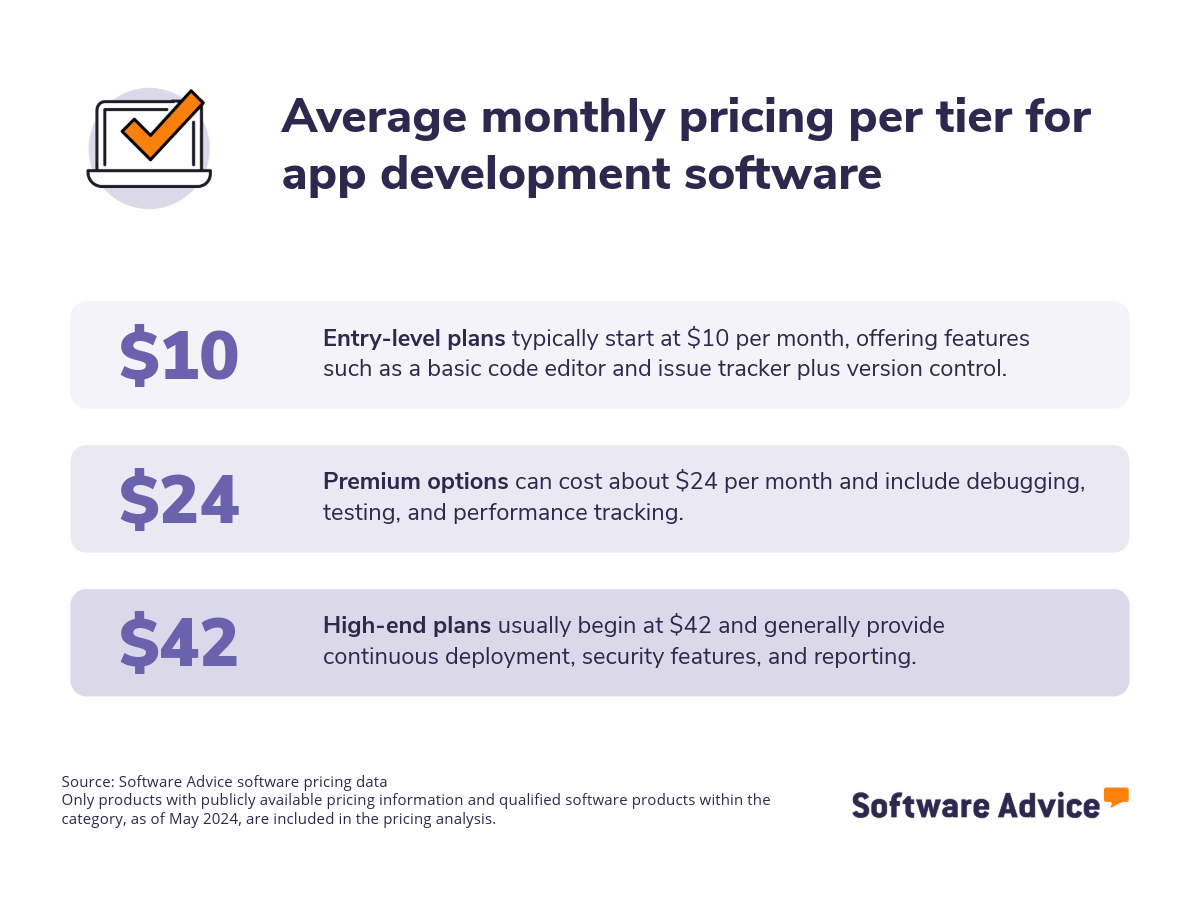
What’s it going to cost? Most application development systems are available through monthly subscriptions, starting at $10 for entry-level options, $24 for mid-tier systems, and $42 for high-end products. [2]
Selection prep: First-time buyers should evaluate their budget, specific needs, security requirements, and essential integrations. Collaborate with stakeholders to develop a list of key questions to guide your evaluation process, such as:
Which programming languages does your platform support for app development?
Can your platform facilitate the development of different types of apps? If your platform specializes in a specific type of app development, which type does it primarily cater to?
What analytical capabilities are integrated into your app development platform, and to what extent can these built-in analytics be customized to meet our specific reporting and monitoring needs?
How well does this platform integrate with our existing CI/CD tools?
What security features are built into the platform? How does it help our developers build secure applications?
This guide presents a step-by-step approach to selecting the best solution for your organization’s needs.
What is app development software?
Application development software, also known as app development software, provides a comprehensive toolkit for users to design, build, test, and maintain applications across web, desktop, native mobile, and hybrid platforms. This type of system is used by software engineers, architects, developers, UI/UX designers, and quality assurance testers, among other professionals.
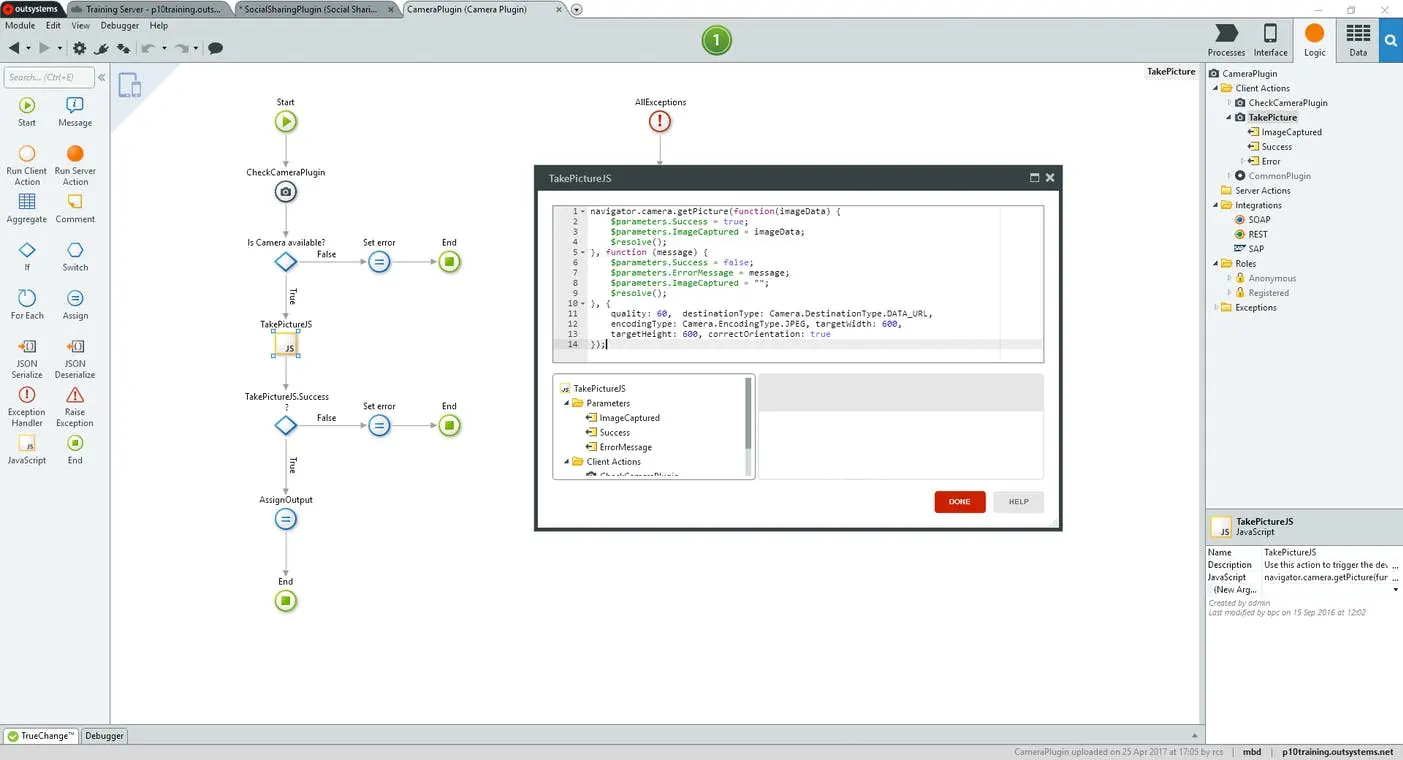
Development environment in OutSystems
These platforms streamline all aspects of app creation, from design and coding to testing, deployment on app stores, and even post-launch analytics, including app upgrades and licensing for mobile apps. Although specialized app analytics platforms exist, many app development systems typically include robust analytical features.
Looking for low-code/no-code? Some app development products also have low-code and no-code features, which minimizes the need for extensive traditional coding. Users with little to no programming knowledge can use them to build applications entirely through intuitive visual interfaces, often relying on drag-and-drop functionalities to assemble complete applications from pre-existing building blocks.
Evaluating the extent of these features and your team's coding proficiency is crucial when selecting the most suitable app development solution.
Common integrations: App development software frequently integrates with cloud storage and database management software to enhance the efficiency of the app creation process.
Essential features of app development software
When exploring app development options, it helps to know which features you should look out for and also to understand which ones are the most essential based on the experience of your peers. Core features like graphical user interface (GUI), integrated development environment (IDE), and lifecycle management come as standard. Common features include version control, API, collaboration tools, and debugging. Based on our review analysis, we've identified some of these essential features below: [1]
Core app development software features
GUI | A visual way of interacting with an application or operating system using items such as windows, icons, and menus. 85% of reviewers rate this feature as critical or highly important. |
IDE | An application for source code editing, compiling, and debugging. 81% consider this feature as critical or highly important. |
Lifecycle management | Manage the end-to-end lifecycle, from initial setup/development to deployment and maintenance. |
Common app development software features
Version control | Track revisions and updates made to files and navigate between versions. 85% rate this feature as critical or highly important. |
API | Application programming interface (API) allows for integration with other systems/databases. 85% rate this feature as critical or highly important. |
Debugging | Detect and remove errors. 84% rate this feature as critical or highly important. |
Collaboration tools | Provides a channel for team members to share media files, communicate, and work together. 82% of our reviewers rate this feature as critical or highly important. |
Benefits and competitive advantages of using app development software
Our analysis of over 2,700 verified user reviews from the past year reveals the top-rated benefits of app development software:
Improved teamwork: Promotes seamless, frictionless collaboration among team members. This creates a teamwork-friendly environment, improving project visibility and boosting productivity.
Uncomplicated app deployment: Simplifies deployments with easy steps, streamlining the app creation process and saving time.
Bug reduction: Minimizes errors through version control, enabling the monitoring of code changes and the ability to revert to previous versions.
Versatile programming: Supports several recognized programming and code languages, providing developers with comprehensive capabilities for different project types.
Ultimately, these benefits contribute to more efficient, diverse, and cost-effective application creation for businesses.
How to choose the best app development software
Step 1: Define your requirements
Start by defining your specific needs, such as the required number of seats or users, your usual development approach, AI features needed, and essential integrations with your existing tech stack. These will guide you towards the system that aligns with your current operational demands and supports your long-term goals.
What is the cost of app development software?
Our analysis indicates that entry-level options cost around $10 per month, mid-tier systems cost approximately $24 per month, and high-end products can cost as much as $42 per month.
Integration considerations for app development software
Integration capabilities are essential for app development software, as they accelerate the creation process, centralize data, and enable resource scaling. Application development systems are often integrated with cloud storage and database management. These integrations enable companies to enhance storage as applications grow and user data increases.
Evaluate the development approach
When selecting a development approach, businesses can benefit from methods that reduce both time and cost, especially if the team has limited technical expertise in native coding, for instance, which relies heavily on programming languages.
If your team lacks traditional coding skills, consider adopting systems with low-code or no-code capabilities. These systems utilize visual interfaces, drag-and-drop components, and pre-built templates to facilitate application development.
Low-code platforms may require some basic coding for advanced customizations or integrations, whereas no-code platforms aim to eliminate the need for any manual coding altogether. These approaches offer significantly faster development times and reduce dependency on professional developers for basic applications.
However, they come with limitations in customization options compared to traditional coding and may not be suitable for complex or highly specific application requirements.
Be aware of potential drawbacks
While app development management software offers numerous benefits, it's crucial to be aware of potential pitfalls that may arise during usage. Here are a few of them:
Limited customization: Some systems may not offer the expected level of customization needed by offering generic templates. This can be a drawback for businesses aiming to develop applications with distinctive designs and user interfaces. It also affects businesses seeking to implement complex functionalities
Performance issues: Certain platforms may have performance problems when handling larger projects, which can slow down the development process, disrupt workflows, and hinder productivity.
Steep learning curve: Those unfamiliar with programming or without prior experience with the platform may find such software cumbersome and overwhelming. As a result, they might need to spend significant time and effort learning how to use the system effectively.
By acknowledging these limitations, organizations can proactively apply preventative measures, and optimize the advantages of their app development implementation.
Step 2: Make a shortlist of app development software
Explore our list of app development FrontRunners
If you're unsure about which platforms to consider, you can start your selection process for app development tools by exploring our list above of 6 best development software for 2025 or our FrontRunners report. For more information on how the report is compiled, check out the full methodology description.
Once you've compiled your shortlist for application development software, you can utilize our complimentary, downloadable Software Comparison Chart to evaluate your final selection of system candidates. This resource allows software buyers to compare up to three vendors simultaneously, emphasizing crucial aspects like integration options, pricing structures, and available features.
Step 3: Pick your best option
How to prepare for vendor demos
Once you've assembled your shortlist, start arranging demo sessions with vendors to observe how each system functions. This provides a valuable chance to ask about features, integration capabilities, overall cost, technical assistance, training, and other essential elements that can impact your choice.
Here are some questions you might consider asking the vendor during the demo session:
What kind of support is provided during implementation?
A key reason implementations often fail is due to insufficient vendor support and guidance. It's crucial to ask providers about their plans to support your team throughout the system implementation phase. Additionally, confirm with vendors whether there are any extra costs associated with this process.
What integrations does your software support?
Understanding the available integrations is essential to ensure that the application management system can seamlessly connect with your existing tools, ensuring there are no disruptions in your workflow. This helps assess whether the software will improve efficiency by automating various application lifecycle tasks, eliminating manual data entry and consolidating critical information across your tech stack.
How does your system help us maintain application security throughout its lifecycle?
Applications frequently manage sensitive data, making it vital to understand the security measures in place to protect against unauthorized access, modification, or loss. Additionally, industries and regions may have specific data security regulations (e.g., GDPR, HIPAA), so ensure that the application management system supports compliance with these standards.
For getting ready for the demo session, take a look at our guide How To Cut Through the Sales Pitch During Software Demos.
Step 4: Make the most of your application development system
Here are some key factors to focus on when you implement your new software:
Launch a pilot project: Roll out an initial pilot project to gauge how the software works before implementing a full-scale launch. The pilot project can have a smaller team and will work on less critical tasks. This stage is crucial for gathering feedback, proactively addressing any bugs or integration concerns, and fine-tuning the implementation process to ensure a smooth and successful wider deployment.
Conduct regular trainings: Organize regular, frequent training sessions for all users, beginning with the basic features and gradually advancing to more complex functionalities. Clearly explain to your team why this tool was chosen, highlighting how its implementation can improve app creation workflows and boost productivity. Encourage users to utilize vendor-provided resources, such as video tutorials and FAQs. Additionally, conduct your own Q&A sessions and create a detailed knowledge base for users of the tool.
Plan for initial workflow disruptions/changes: Acknowledge that deploying new app development software may introduce temporary disruptions or lead to confusion, potentially affecting project timelines and response times to user issues. To mitigate this, ensure your development and support teams are adequately trained and equipped to maintain service level agreements (SLAs) during the transition.
For additional information on ensuring a seamless transition, refer to our guide 5 Critical Steps to a Successful Software Implementation Plan.
Software related to app development
As you explore app development software, you'll encounter related tools that serve complementary functions, such as:
Cloud storage: Provides online storage and management for many file types (text, documents, media, code, and other project assets). It allows on-demand access from anywhere, enhancing team collaboration, enabling long-term data archiving, and minimizing data loss.
Database management: Enables database creation for structured data storage in tables, defines relationships, and facilitates querying and reporting. This simplifies relational data interaction and helps generate insights for better decision-making.
More resources for your app development journey
About our contributors
Author
Marcela Gava is a senior content analyst with more than 14 years covering trends in multiple areas that have an impact on companies. She works as a data-driven writer and trend researcher, focusing her articles on cybersecurity, IT, finance, and digital culture.
Marcela has written nearly 50 research and analysis articles that draw on more than 2 million authentic reviews from software buyers on Capterra in order to help small and medium-sized businesses (SMBs) find the best technology solutions for their needs. In addition, the insights provided by her articles help SMBs make more informed and assertive decisions.
Her research studies have been featured in some of the most important Brazilian media outlets.
Editor
Mehar Luthra is a team lead at Software Advice and specializes in editing reports that cover the latest trends affecting small businesses. With nearly a decade of experience, she has edited a multitude of research articles, top-rated software reports, and thought leadership articles for diverse markets such as Brazil, Japan, Canada, France, Australia, and India. She finds it particularly rewarding to produce content that provides small-business owners with practical tips and helpful advice on topics such as the digitalisation of small businesses, eCommerce trends, and HR developments.
Armed with a double bachelor’s in law (LL.B.) and business economics from Delhi University, she won a full scholarship to study for a master’s in creative writing at the National University of Ireland, Galway. In addition, she has written blog articles spanning a variety of topics such as fiction and non-fiction books, mental health and anxiety, the latest restaurants, and more. Her articles have been featured in Ireland’s national magazine The Village, among other publications. A die-hard journaling fan, she enjoys watching psychological thrillers, reading fiction books, and drinking iced coffee (even in the winter).
Sources
Software Advice reviews data: Software Advice reviews are collected from verified users for individual software products. For this report, we analyzed reviews from the past year as of the production date. Read the complete methodology.
Software Advice software pricing data: Only products with publicly available pricing information and qualified software products within the category, as of May 2024, are included in the pricing analysis. Read the complete methodology.
Application Development FAQs
- Can I build my own app?
Absolutely, you can build your own app. App development software is often the key, providing essential tools for designing, building, testing, and deployment on various platforms. Depending on the system, you might even find low-code or no-code functionalities, allowing those without programming experience to create apps within user-friendly, drag-and-drop interfaces.
- What is the best app development platform?
According to an analysis of user reviews on Software Advice, OutSystems has the highest overall rating. It is one of the best choices for app creation thanks to its rapid application development, easy-to-use interface, built-in tools, and low-code capabilities.
- How much will it cost to build my app?
The cost to build your app can vary significantly depending on several key factors, including the complexity of features and functionalities of the app development software you choose, the number of users or scale you anticipate, and the type of system. App development software usually starts at $10 per month for entry-level options, $24 per month for mid-tier systems, and $42 per month for high-end products. However, the ultimate cost of building your app can range from a more affordable option for a very basic app you build yourself with a simple platform, to a more substantial investment for complex applications developed professionally.
- What programs do app developers use?
Beyond app development software, app developers often utilize other complementary tools. For instance, cloud storage software manages different types of online files, such as images and documents. Database management software is another key tool, enabling users to create organized databases with tables and connections, and to easily query and report on that data.
- Can I create an app without coding?
Yes, it's entirely possible to create an app without writing traditional code by utilizing app development software with low-code and no-code features. Low-code platforms minimize the amount of manual coding required, often using visual modeling and pre-built components. No-code platforms go even further, allowing you to build fully functional apps using entirely visual, drag-and-drop interfaces and pre-configured elements.