


Best Professional Services Automation Software of 2026
Updated January 29, 2026 at 2:30 AM

Written by Andrew Blair
Content Analyst

Edited by Mehar Luthra
Team Lead, Content

Reviewed by Isaac Routh
Advisor Manager

Talk with us for a free 15-min consultation
Expert advisors like Jacqueline, who have helped 1,000+ companies, can find the right software for your needs.
- All Software
- Top Software
- Buyer's Guide
- Frequently Asked Questions
- Popular Comparisons
Professional services automation (PSA) software helps service-based organizations manage projects, resources, and billing. With 310+ products on Software Advice, selecting the right one can imply time-consuming market research. To help you narrow it down, I worked with our professional services automation (PSA) software advisors to curate a list of recommended productsi and a list of highly-rated professional services automation (PSA) software based on user reviews. For further information, read my professional services automation (PSA) buyer's guide.
Professional Services Automation Software
Sort by
Reviews: Sorts listings by the number of user reviews we have published, greatest to least.
Average Rating: Sorts listings by overall star rating based on user reviews, highest to lowest.
Alphabetically (A-Z): Sorts listings by product name from A to Z.

TimeSolv is a cloud-based time tracking and billing solution that caters to accountants, consultants, architects and freelancers...Read more about TimeSolv


TimeSolv's Best Rated Features
See All
TimeSolv's Worst Rated Features
See All

Grow your firm - and your impact Projectworks is professional services automation software (PSA) designed for consulting firms ...Read more about Projectworks


Projectworks's Best Rated Features
See All
Projectworks's Worst Rated Features
See All

BQE CORE is a cloud-based accounting and invoicing software designed for architecture, engineering, and consulting firms. The pl...Read more about BQE CORE Suite

BQE CORE Suite's Best Rated Features
See All
BQE CORE Suite's Worst Rated Features
See All

Project Insight (PI) is award-winning work & project management software that helps companies manage and visualize projects, all...Read more about Project Insight

Project Insight's Best Rated Features
See All
Project Insight's Worst Rated Features
See All

BigTime is the AI-powered platform purpose-built for finance and operations leaders at growing professional services firms—inclu...Read more about BigTime


BigTime's Best Rated Features
See All
BigTime's Worst Rated Features
See All
Best PSA Software for 2025


Best Overall

Out of the most popular PSA products, BQE CORE Suite has earned the highest rating on Software Advice.
While BQE Core Suite was designed for architecture, engineering, and design firms, any professional services provider can benefit from it. BQE assigns an implementation support team to each customer so small to midsize businesses with limited IT teams and resources can get up and running quickly. BQE Core Suite’s flexible platform can also be customized for niche service providers.
- Reviewers Perspective
“It is a tool that allows you to have a better control of the projects and times that will be charged to the clients.”
IJIsrael Juarez
Senior Finance Professional
Used for 6-12 months
We analyzed 772 verified user reviews for BQE CORE Suite to find out what actual users really think.
Project management
Users appreciate BQE CORE Suite's project management capabilities, particularly its time tracking and project budgeting features. They find it easy to track time spent on each project, which helps in prioritizing tasks and managing project budgets effectively. Additionally, users value the software's ability to provide detailed insights into project progress, making it easier to manage multiple projects simultaneously.Invoicing
Reviewers find BQE CORE Suite's invoicing features highly beneficial, especially the ability to customize invoice templates to meet specific client needs. They appreciate the efficiency in tracking billable time and expenses, which simplifies the invoicing process and reduces errors. Users also highlight the software's capability to send invoices directly to clients, streamlining the billing process and improving cash flow.Support services
Users consistently praise BQE CORE Suite's support services, noting the knowledgeable and responsive support staff. They find the technical support team helpful in resolving issues quickly and appreciate the customer service's attentiveness and professionalism. Additionally, users value the ongoing assistance and updates provided, which enhance their overall experience with the software. - Key FeaturesBQE CORE Suite's scoreCategory average
Billing & Invoicing
4.534.62 category average
Task Management
4.374.67 category average
Time & Expense Tracking
4.764.54 category average
- Screenshots


Best Free

Wrike

Based on our analysis of PSA products with the most market demand, Wrike is the most popular product with a free plan.
Businesses of all sizes looking for a collaborative tool to unite internal teams will appreciate its project-based workflow. As a cloud-based platform, Wrike is a good choice for remote and hybrid staff who work from anywhere.
- Reviewers Perspective
“The dashboard of this platform has allowed us to better organize collaborative work by being able to manage team tasks in a simple way, without so many processes in the assignment of tasks.”
JNJosh Neuman
Realtor
Used for 1-2 years
We analyzed 2,724 verified user reviews for Wrike to find out what actual users really think.
Project management
Users appreciate how Wrike's dashboard simplifies task management and enhances collaboration among team members. They also find the platform's automation features particularly useful for reducing repetitive tasks and minimizing errors. Additionally, users value the ability to create, assign, and track tasks, which improves overall project organization and efficiency.Team collaboration
Reviewers highlight Wrike's customizable features and collaboration tools, which facilitate effective teamwork across different departments. They find the shared workspaces, task discussions, and document sharing features particularly beneficial for remote teams. Additionally, users appreciate the platform's flexibility, allowing them to tailor it to their specific team needs and improve overall project coordination.Project tracking
Users find Wrike's project management tools robust, enabling them to plan, schedule, and track projects efficiently. They appreciate the time tracking and task management features, which help them monitor progress and manage deadlines effectively. Additionally, users value the platform's ability to handle multiple projects simultaneously, making it easier to stay organized and meet project goals. - Key FeaturesWrike's scoreCategory average
Billing & Invoicing
4.044.62 category average
Task Management
4.584.67 category average
Time & Expense Tracking
4.404.54 category average
- Screenshots


Most Affordable


Out of the most popular products, Zoho Projects had the highest rating as the most affordable.
Zoho Projects comes with industry-specific project templates for a wide range of industries, including construction, real estate, and consulting services. In particular, construction managers appreciate the tool's time management capabilities while consulting firms use it to manage and deliver primary care projects.
- Reviewers Perspective
“Task management and time tracking are well thought out, and integration with other Zoho suite tools helps centralize information efficiently.”
MLMadjid Labed
Developer
Used for 1-2 years
We analyzed 713 verified user reviews for Zoho Projects to find out what actual users really think.
Project management
Users appreciate Zoho Projects for its robust collaboration tools and comprehensive project management feature set. They find the user-friendly interface and seamless project management capabilities particularly beneficial for organizing and managing tasks efficiently. Additionally, users highlight that Zoho Projects helps streamline workflows and enhances team collaboration, making it a valuable tool for businesses.Project tracking
Users benefit from Zoho Projects' project tracking features, which allow them to monitor project progress and status updates effectively. They find the time tracking and project progress monitoring tools useful for keeping projects on track and ensuring timely completion. Additionally, users appreciate the ability to visualize project progress and make informed decisions based on real-time data.Integration capabilities
Users value Zoho Projects for its integration capabilities with other Zoho apps and third-party tools, enhancing collaboration and productivity. They find the seamless integration with Zoho CRM and other applications particularly useful for centralizing information and streamlining workflows. - Key FeaturesZoho Projects's scoreCategory average
Billing & Invoicing
4.364.62 category average
Task Management
4.554.67 category average
Time & Expense Tracking
4.394.54 category average
- Screenshots


Best Value for Money

Smartsheet

Out of the most popular PSA products on Software Advice, Smartsheet offers the lowest-priced paid plan.
Businesses with project-based workflows can benefit from Smarthseet’s approach to project planning and tracking. The app’s automation features streamline many of the more mundane tasks associated with project management. Plus, Smartsheet’s reporting tools can help C-suite executives visualize the status of complex projects.
- Reviewers Perspective
“I have been using it since 2020 for my project tracking, daily tasks, monitor reports and so many other things and it provides a great visibility to me, my team and leadership on where we are on our projects with their timelines.”
ATAniruddha Tapkire
Operations Support
Used for 2+ years
We analyzed 3,375 verified user reviews for Smartsheet to find out what actual users really think.
Project management
Users appreciate Smartsheet's customizable nature, which allows them to adapt the tool to different business needs and workflows. They find it valuable for centralizing information, making it easy to assign tasks and track project progress. Additionally, users benefit from Smartsheet's integration with other tools, enhancing its utility for comprehensive project management.Team collaboration
Users find Smartsheet's collaboration tools effective for streamlining processes and improving team communication. They value the platform's ability to facilitate real-time data sharing and collaborative editing, which is particularly beneficial for remote teams. Additionally, users highlight the software's flexibility and ease of use, making it a robust solution for team collaboration.Project tracking
Users rely on Smartsheet for tracking project progress, managing tasks, and updating timelines efficiently. They appreciate the platform's ability to create comprehensive dashboards that provide visibility into project status and resource allocation. Furthermore, users find the tool's features for assigning tasks and setting deadlines intuitive and transformative for project management. - Key FeaturesSmartsheet's scoreCategory average
Billing & Invoicing
4.144.62 category average
Task Management
4.504.67 category average
Time & Expense Tracking
3.884.54 category average
- Screenshots


Best Ease of Use

FreshBooks

Out of the most popular PSA products rated by our users, FreshBooks had the highest rating for ease of use.
Service organizations that need to streamline their billing and payment processes can benefit from FreshBooks’ automation features. Its project and time-tracking modules are a good fit for service providers that bill by the hour. The expense and time tracking modules ensure all project work is captured, a particularly helpful feature for lawyers and business consultants.
- Reviewers Perspective
“The time-tracking feature enables our employees to log hours worked, making it easy to calculate payroll expenses and generate accurate invoices for billable time.”
SMStephen Mackarel
Managing Director
Used for 2+ years
We analyzed 4,474 verified user reviews for FreshBooks to find out what actual users really think.
Invoicing
Users appreciate FreshBooks for its efficient invoicing features, which include customizable invoice templates and professional-looking invoices. They find the time-tracking feature particularly useful for logging billable hours and generating accurate invoices. Additionally, users value the online payment options and automated reminders that streamline the payment collection process.Small business solutions
Users find FreshBooks particularly well-suited for small businesses, freelancers, and entrepreneurs due to its customizable features and ease of use. They appreciate its cost-effectiveness and the ability to manage financial records efficiently without needing extensive accounting knowledge. Additionally, users highlight the software's ability to streamline payroll management and other essential business operations.Customer service
Reviewers consistently praise FreshBooks for its excellent customer support, noting the responsiveness and helpfulness of the support team. They find the live customer support and quick resolution of issues to be particularly valuable. Additionally, users appreciate the seamless integration with other services and the overall positive customer experience provided by FreshBooks. - Key FeaturesFreshBooks's scoreCategory average
Billing & Invoicing
4.574.62 category average
Time & Expense Tracking
4.524.54 category average
- Screenshots


Best for Customer Service

Birdview

Birdview had the highest rating for customer service out of the most popular PSA applications on Software Advice.
Businesses that work with firm deadlines—like creative agencies or engineering firms—can benefit from Birdview’s timeline-focused approach to project management. Its resource allocation features help optimize task assignments for larger teams. Additionally, Birdview’s financial management features provide managers with real-time updates on project spending, helping them manage tight budgets.
- Reviewers Perspective
“I like that I can easily keep track of my time by tasks throughout the week. Since I use Birdview weekly to track my time, it makes it easy to also keep track of how many hours i'm dedicating to each project.”
ACAli Carreon
Designer
Used for 1-2 years
We analyzed 376 verified user reviews for Birdview to find out what actual users really think.
Project tasks
Users appreciate Birdview's project tasks feature for its ability to organize and manage tasks efficiently. They find it easy to assign tasks, track progress, and maintain project visibility, which enhances team collaboration and productivity. Additionally, the intuitive interface and ability to access specific projects from multiple areas within the site are highly valued by reviewers.Project management
Reviewers highlight Birdview's project management capabilities, noting its user-friendly interface and comprehensive features. They find the software effective for managing both large and small projects, appreciating its balance of simplicity and sophistication. Users also commend Birdview for streamlining project management processes and improving overall efficiency.Project tracking
Users find Birdview's project tracking tools invaluable for monitoring project progress and time management. They appreciate the ease of tracking time spent on tasks, generating reports, and visualizing project progress in one place. The software's ability to handle multiple projects and provide detailed insights into resource usage and task completion is also highly praised by reviewers. - Key FeaturesBirdview's scoreCategory average
Billing & Invoicing
3.404.62 category average
Task Management
4.464.67 category average
Time & Expense Tracking
4.584.54 category average
- Screenshots


Best Functionality

Kantata

Out of the most popular PSA products on Software Advice, Kantata has the highest functionality rating.
Midsize and large professional service firms will appreciate Kantata’s capacity planning and resource forecasting features. These functions help assign available team members to current and upcoming projects. Kantata also offers compliance management for global service providers, helping businesses with accounting and tax compliance across multiple regions.
- Reviewers Perspective
“The opportunity to centralize all of our initiatives in one place and provide individualized reports that tracked our development in relation to our key performance indicators is something we are really grateful for.”
JDJessica Davis
Game Programmer
Used for 1-2 years
We analyzed 618 verified user reviews for Kantata to find out what actual users really think.
Project management
Reviewers find Kantata effective for client collaboration, allowing them to communicate easily with team members and clients, assign tasks, and track project progress. They value the customizable options and analytics provided, which help in organizing project communication and analyzing project performance. Users also appreciate the ability to invite external collaborators and the flexibility to create and share project templates.Resource management
Users are impressed with Kantata's resource management, which offer extensive reporting and resource allocation capabilities. They find the reporting tools valuable for gaining insights into project progress and performance, and appreciate the ability to optimize resources and increase operational efficiency. The resource planning functionality is also highlighted as user-friendly and effective for managing resources across projects.Project tracking
Reviewers praise Kantata for its project tracking capabilities, which help them monitor project progress, manage tasks, and track time efficiently. They find the time tracking feature particularly useful for budgeting and showcasing productivity, and appreciate the organized way of viewing and managing tasks. Users also highlight the tool's ability to consolidate project progress and actions in a clean dashboard, making it easier to keep projects on track. - Key FeaturesKantata's scoreCategory average
Billing & Invoicing
3.804.62 category average
Task Management
4.214.67 category average
Time & Expense Tracking
3.904.54 category average
- Screenshots


Methodology
The research for the best PSA software list was conducted in October 2024. We evaluated data (user reviews and demand signals) from the past 24 months as of the research date. Read the complete methodology.
Popular Professional Services Automation Comparisons


Buyer's Guide
This detailed guide will help you find and buy the right professional services software for you and your business.
Last Updated on February 04, 2025Here's what we'll cover:
What you need to know about PSA software
Essential features of PSA software
Benefits and competitive advantages of using PSA software
How to choose the best PSA software for your business
Software related to PSA software
What you need to know about PSA software
PSA software provides professional service organizations with real-time access to critical information throughout the entire project lifecycle. By improving operational effectiveness, enhancing employee value, and increasing management visibility, it helps firms streamline their processes and deliver more value to their customers.
To give you an idea of the market, we have over 200 different PSA vendors on our site, we’ve published over 5,000 reviews for PSA products, and we've spoken to nearly 1,000 professional services software buyers in the past year alone. [1, 2]
Needless to say, the PSA market is vast, with hundreds of solutions available to cater to various industries. This diversity allows organizations to find a solution that best fits their specific needs, whether they are in accountancy, advertising, architecture, IT services, or other services-related professional industries. However, the market size and complexity can be daunting, making it essential for buyers to evaluate their options carefully.
Pricing for PSA software varies depending on the vendor, features offered, and scalability. Some solutions offer tiered pricing models based on specific organizational requirements. To put things into perspective, we’ve found that prices for high-end plans that have advanced PSA features average $363 per month, while entry-level pricing averages $43 per month for basic functionality. [3]
First-time buyers should begin evaluating with a budget, number of users, specific needs, and necessary integrations in mind. Ensure you’ve consulted with stakeholders on a list of critical questions to help you evaluate systems based on your needs, such as:
What specific features does the software offer, and how do they align with the organization's needs?
Is the software scalable to accommodate future growth?
Does the software integrate with other tools and systems your organization currently uses?
What level of customization is available to tailor the software to your specific processes?
How user-friendly is the software, and what kind of support and training is provided?
Because there are so many PSA systems available, choosing the right option can be a long, daunting process. In this guide, you’ll learn about the essential components of PSA software, get step-by-step guidance on how to choose the right solution for your business, and tap into the expertise of our experienced PSA software advisors, Isaac Routh, and Nathan Pozen, who have been leading buyers to the right software for a combined total of 10 years. To get expert guidance, schedule a free consultation or start a chat with us today.
What is PSA software?
PSA software encompasses a suite of applications designed for service-oriented organizations that need to automate their processes and manage their operations efficiently. Essentially, PSA software functions as an enterprise resource planning (ERP) software tailored specifically for professional services firms, focusing primarily on the management of services delivered through human resources (HR) rather than tangible assets.
PSA software typically includes features such as project management, resource management, timesheet management, and financial accounting. The integration of these capabilities into a single platform helps firms optimize business operations and improve various intangibles that are often difficult to quantify, such as employee turnover, vendor efficiency, and customer satisfaction.
Key industries benefiting from PSA software include, but are not limited to, accountancy, advertising, architecture, audit, construction, engineering, management consultancy, software/IT, aerospace and defense, telecommunications, and marketing services.
Essential features of PSA software
When comparing PSA software systems, it's important to know what features you can expect to see and which features are more advanced add-ons or uncommon. Some functionalities like billing and invoicing, project management, and time and expense tracking, are core features that will be available in every PSA software. Other features such as project accounting, help desk, and resource management, are still common. We analyzed thousands of reviews to determine what we believe are core features of PSA software:
Core features of PSA software
Billing & invoicing: Automates the process of generating and sending invoices, ensuring timely and accurate billing. This feature helps prevent revenue loss and improves cash flow by reducing delays in payment cycles.
Project management: Provides tools for planning, executing, and monitoring projects, including task assignments, timeliness, and project milestones. It ensures projects are completed on time and within budget, enhancing client satisfaction and operational efficiency.
Time & expense tracking: Enables accurate tracking of billable hours and expenses incurred during project execution. This feature is essential for precise billing, financial reporting, and performance analysis.
Common features of PSA software
Project accounting: Tracks revenues and expenses by client and project while simultaneously maintaining a close watch on profitability. A few key functions include billing as well as measuring accounts payable and receivable.
Help desk: Improves service support for customers that have urgent queries needing attention. Functions of a help desk involve managing and tracking inquiries to create prompt responses as well as the option to compile a FAQs section so clients can instantly find answers to common queries.
Knowledge & document management: Maintains information shared across company networks to ensure that knowledge isn’t lost with changes in time, location, or personnel. Functions involve collecting different document types, creating a centralized information repository, and making this knowledge accessible for future development.
Resource management: Gives companies the tools to track employees and assign them to projects according to their skill sets. Functions include helping managers streamline HR allocation via customizable databases and providing detailed profiles of professionals that show their project availability and qualifications.
Procurement & inventory: Ensures that supplies are acquired in compliance with regulations, are readily available, and have been safeguarded against loss. Functions include identifying the best products at the best price and automating the management of vendors, commodities, and contracts.
Sales & account management: Enables companies to provide high-quality services by tracking past transactions and customer information. Some functions include storing and organizing customer information, analyzing buying trends, generating leads, and personalizing marketing.
As an advisor specializing in PSA software, Routh addresses common misconceptions buyers have with PSA software, saying, “PSA systems are for client facing projects where you’re billing your time to the client and tracking the time it takes to work on those projects. In comparison with the features found in a traditional project management tool, a PSA software has financial management features in addition to the features a common project management tool would share with a PSA software.”
Benefits and competitive advantages of using PSA software
Isaac Routh has been helping buyers find software to run their firms for four years and counting. Based on his conversations with buyers, a clear benefit of adopting PSA software, as opposed to using disparate tools, is improved efficiency and integration by centralizing multiple features like accounting, project management, time tracking, and billing and invoicing. He notes that PSA software lets you "encompass a lot of different things when asking yourself what do you need the system to do and what do you need it to handle.”
Leveraging the core features of PSA software can provide your organization with a significant competitive advantage by streamlining operations, enhancing client satisfaction, and optimizing resource utilization. According to verified user reviews, PSA software has benefited companies by improving efficiency, reducing costs, and delivering higher quality services, and:
Improved control and coordination of projects: Project management is a central feature of PSA software, which provides tools for planning, executing, and monitoring projects. These tools ensure tasks are assigned, timelines are met, and milestones are achieved, leading to projects being completed on time and within budget. This benefit gives decision-makers a better overview of what's going on, helping them take control by improving operational efficiency and client satisfaction, and ensuring their organization stands out against the competition.
Automation of repetitive tasks: Automation within PSA software benefits users in many areas and reduces time spent on tasks such as data entry, reporting, and scheduling. By reducing the manual effort usually associated with these tasks, your team can focus on higher-value activities and increase productivity while reducing the risk of errors. Overall, automation enables organizations to be competitive through more efficient operations and faster project delivery.
Increased client satisfaction: PSA software provides users with enhanced visibility into client projects and needs, which allows your team to deliver personalized and timely service. Users also benefit from improved customer service where the software provides a centralized platform for managing client interactions, tracking project success, and addressing issues promptly.
Enhanced cash flow: The billing and invoicing features of PSA software automate and ensure the timely and accurate generation of invoices, which reduces delays in payment cycles and prevents revenue loss. PSA software users particularly cite invoice management as a benefit that improves cash flow and financial stability, enabling organizations to invest in growth opportunities and maintain good financial health.
How to choose the best PSA software for your business
Choosing the right PSA software can be quite overwhelming, with so many options offering varying features and capabilities. Here are some steps that can make this process more streamlined and successful:
1. Define your requirements
When defining your business's requirements for PSA software, it's important to consider several key factors to ensure that you get the solution that aligns with your organizational needs and goals.
Evaluate your business goals and objectives
First, clearly outlining your business goals and how PSA software can achieve them is the best place to start. Ask yourself what is slowing down your business operations and what solutions you need to solve those issues. Consider whether you need to improve project efficiency, enhance client satisfaction, or optimize resource utilization.
Take into account your business size and scalability
It’s important to identify the size of your business and which software is appropriate for your needs. Is your business undergoing exponential growth or do you plan to invest in a PSA software that will grow with your business? Consider the scalability of the software and ensure that it can grow with your business and accommodate an increasing number of users, projects, and clients without sacrificing performance.
Identify budget constraints
Next, consider how much you want to spend on PSA software. While the price of PSA software is difficult to generalize because of varying individual needs and other factors that can affect price, a good starting point is to identify how many users your business requires and the features you need to fulfill your business objectives. With that in mind, consider initial costs, subscription fees, and any other additional expenses for training and support. Additionally, some vendors may offer unbundled costs which means that while their prices may seem competitive in comparison, additional costs may place constraints on your original budget.
2. Make a shortlist of PSA software
After carefully defining your requirements, it's time to start narrowing down your options to create a shortlist and seek professional help in making an informed choice.
Get qualified help from an advisor
At Software Advice, our advisors have experience helping hundreds of businesses identify solutions that suit their business needs. If you need guidance on how to make a shortlist or have any doubts regarding your business requirements, you can chat online now with an advisor or schedule a phone consultation.
3. Pick your best option
Now that you have your curated shortlist, it's time to pick the best option. But how? Picking the best option means you need to try to get hands-on experience with the chosen software to ensure that it can fulfill a set of criteria before making your final choice. Here are a few things to consider before committing to a vendor:
Schedule a vendor demo
Vendor demos are sessions provided by the vendor to help get you familiar with the features of the product, its capabilities, and understand their pricing. Here, you have the chance to learn more about the product and ask questions to ensure that it aligns with your business needs. Be sure to ask about what is included in the price and whether technical support and training resources are available.
Evaluate your integration needs
Check the software’s ability to integrate with your existing systems and tools, such as customer relationship management (CRM), enterprise resource planning (ERP), and accounting software. A software solution with seamless integration is vital to streamlined workflows and improved data consistency across platforms.
Determine customizable options
When making your final choice, it's also important to determine the level of customization the software offers to meet your specific business processes and requirements. A customizable software solution can enhance the software's relevance and effectiveness for your business.
4. Make the most of your PSA software
Finally, once you’ve shortlisted and selected the PSA software that fits your business needs, it's important to take steps to ensure successful implementation and to maximize its benefits. Here are a few things to consider to make the most of your chosen PSA software:
Develop an implementation plan
When onboarding a new software solution, having a detailed implementation plan should include installation, configuration, data migration, and testing to ensure a smooth transition. Additionally, an implementation plan should outline the timeline, key milestones, and responsibilities. Key stakeholders from different departments should also be engaged to gather input to help tailor the software and ensure alignment with business goals.
Provide comprehensive training
Offer thorough training sessions for all users to ensure they understand how to effectively use the software. The training should cover an explanation of the core features of the software, best practices, and any customizable functionalities specific to your organization.
Monitor and evaluate performance
Regularly monitor the software's performance and evaluate its impact on your business operations. Collect user feedback to understand their experiences and challenges with the software. Use this feedback to fine-tune the software so that it continues to meet evolving needs. Finally, use analytics and reporting features to track key metrics and identify areas for improvement.
Software related to PSA software
PSA software is closely related to several other types of software that can complement its functionalities and enhance overall business operations, such as:
Accounting practice management software: Manages the financial and administrative aspects of accounting firms, including billing, client management, and compliance. Accounting practice management software helps professional accountants manage workflows across tasks, communicate with clients, and automate daily processes.
Proposal management software: Helps organizations create, manage, and track proposals. Some such tools are also a good fit for companies soliciting proposals as they organize and evaluate various aspects of multiple proposals at once.
Contract management software: Automates the creation, tracking, and monitoring of contracts and agreements. The software also allows for company-wide sharing of contract documents and the management of different document versions.
Time and expense software Automates the tracking of billable hours and reimbursement expenses. These solutions can be used by organizations in the professional services industries to monitor projects on a task and overall basis and billing rates so that the appropriate amount may be invoiced. Time and expense applications can also be used for expense reporting by employees who travel frequently.
Project management software: Automates task assignment, resource allocation, scheduling, and milestone tracking for all phases of a project. Project management tools and systems may take one of several approaches: collaborative, when multiple people work on a project; top-down, when one person works on a project at a time; or integrated, when multiple departments of the organization are involved.
Workflow management software: Coordinates the flow of tasks and ensures that business activities are properly implemented. Workflow management systems offer a collaborative environment that allows businesses to easily monitor and evaluate their processes. Organizations use it to facilitate instant access to data and schedule and synchronize changes, manage task dependencies, and test the effectiveness of business strategies.
About our contributors
Author
Andrew Blair is a content analyst at Software Advice, covering marketing, cybersecurity, and emerging technologies across industries. He leverages his technical expertise and business acumen, acquired from experience as a web developer in the eCommerce industry, to deliver data-driven insights on market and business operations, empowering businesses to embrace the right technology.
Andrew’s research and analysis are informed by more than 150,000 authentic user reviews on Software Advice and nearly 3,000 interactions between Software Advice software advisors and software buyers. Andrew also regularly analyzes market sentiment by conducting surveys of IT and marketing leaders so he can provide the most up-to-date and helpful information to small and midsize businesses purchasing software or services.
His research and data insights for small and midsize businesses have been featured in , , and media publications. Andrew’s commentary on tech trends is published in various content forms, including podcasts, videos, and written interviews. In his free time, he enjoys sports and spending time outdoors.
Editor
Mehar Luthra is a team lead at Software Advice and specializes in editing reports that cover the latest trends affecting small businesses. With nearly a decade of experience, she has edited a multitude of research articles, top-rated software reports, and thought leadership articles for diverse markets such as Brazil, Japan, Canada, France, Australia, and India. She finds it particularly rewarding to produce content that provides small-business owners with practical tips and helpful advice on topics such as the digitalization of small businesses, eCommerce trends, and HR developments.
Armed with a double bachelor’s in law (LL.B.) and business economics from Delhi University, she won a full scholarship to study for a master’s in creative writing at the National University of Ireland, Galway. In addition, she has written blog articles spanning a variety of topics such as fiction and non-fiction books, mental health and anxiety, the latest restaurants, and more. Her articles have been featured in Ireland’s national magazine The Village, among other publications.
A die-hard journaling fan, she enjoys watching psychological thrillers, reading fiction books, and drinking iced coffee (even in the winter).
Advisors
Isaac Routh is an advisor manager. He joined Software Advice in 2020 as a software advisor, and now he manages a team of seven software advisors. He is based in Austin, TX.
Isaac and his team help small businesses find the right ERP, legal, business intelligence, and accounting software for their needs each year. They’re able to do this through one-to-one conversations designed to narrow down the list of potential tools to only those that are the best fit.
His favorite part of being a Software Advice advisor team manager is educating buyers and supporting small business owners.
Nate Pozen is a buyer advocate team leader. He joined Software Advice in 2021 as a software advisor, and now he manages a team of four software advisors. He is based in Austin, TX.
Nate and his team helps small businesses find the right HR, CRM, accounting, project management, and manufacturing software for their needs each year. They’re able to do this through one-to-one conversations designed to narrow down the list of potential tools to only those that are the best fit.
His favorite part of being a Software Advice advisor team manager is partnering with buyers to help them through their entire software journey.
Sources
Software Advice advisor call notes: Findings are based on data from telephonic conversations that Software Advice’s advisor team had with small-to-midsize businesses seeking professional services automation tools. For this report, we analyzed phone interactions from August 2, 2023 to August 2, 2024. Read the complete methodology.
Software Advice reviews data: Software Advice reviews are collected from verified users for individual software products. For this report, we analyzed reviews from August 2023 to August 2024. Read the complete methodology.
Software Advice software pricing data: Only products with publicly available pricing information and qualified software products within the category, as of November 29, 2023, are included in the pricing analysis. Read the complete methodology.
Professional Services Automation FAQs
- What is a PSA in software?
A PSA in software, or professional services automation, is an integrated software solution tailored for service-focused organizations to enhance their operational efficiency. It combines a suite of applications to streamline business processes such as project management, resource allocation, time and expense tracking, and billing functions.
- Who uses PSA software?
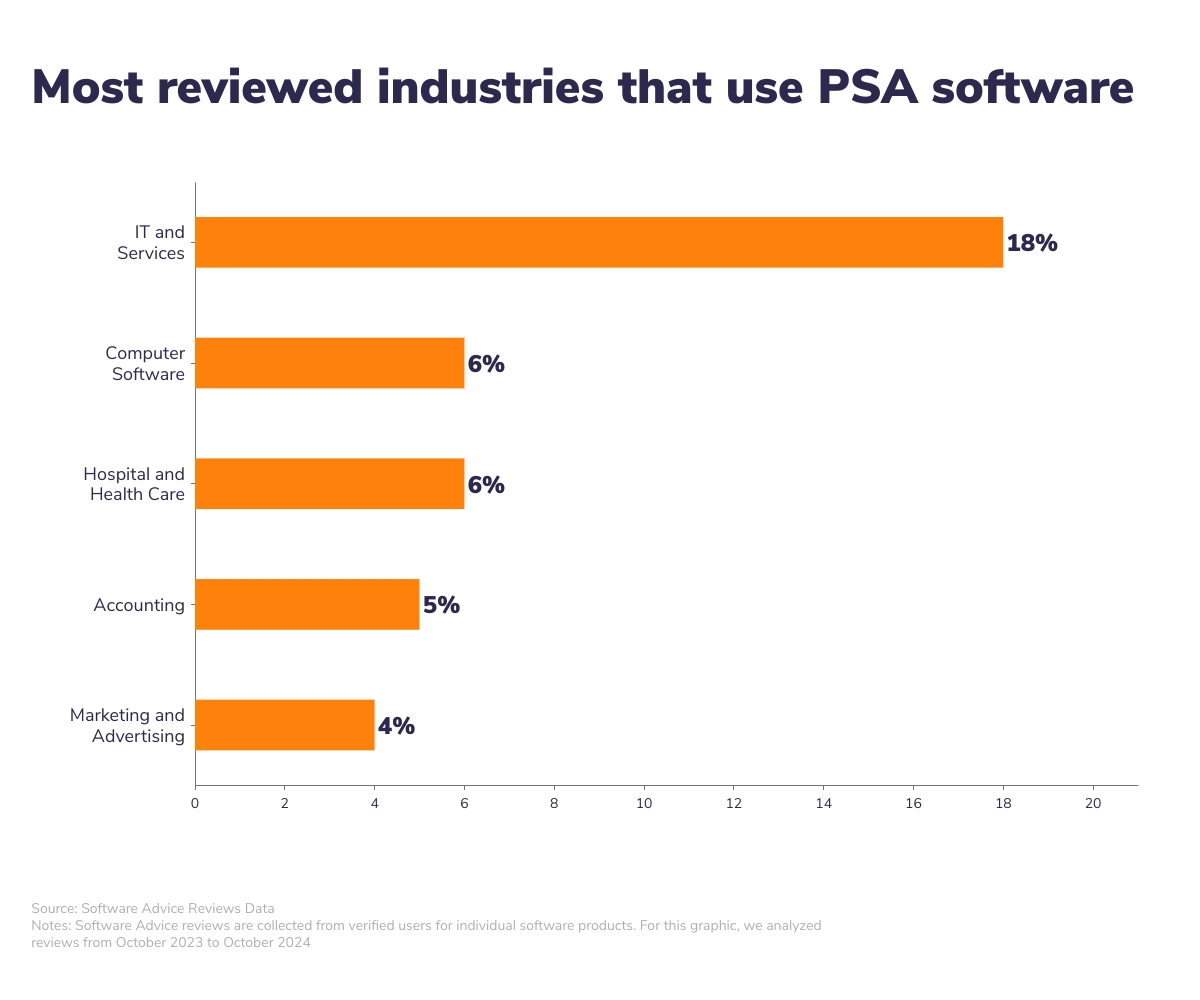
PSA software is typically used by professional services organizations that rely on project based work, and need to manage resources, projects, and client relationships efficiently. Our extensive analysis of reviews shows common users hail from IT and services, computer software, hospital and health care, accounting, and marketing and advertising industries.
- What is a professional services automation tool?
Professional services automation (PSA) is a comprehensive software solution designed for service-oriented organizations to streamline operations. PSA in software can be seen as a suite of applications that integrate project management, resource allocation, time and expense tracking, and billing functions. PSA software helps optimize service delivery, improve client satisfaction, and increase profitability by automating key business processes.
- What is the difference between ERP and professional services automation?
Enterprise resource planning (ERP) software integrates various business processes, including finance, HR, and supply chain management. PSA software, on the other hand, can be seen as a specialized subset of ERP, focusing primarily on the needs of service-oriented organizations.
- How much does a PSA tool cost?
Pricing for PSA tools is based on three common pricing models: perpetual license, subscription, and open source. PSA software subscriptions typically range from free to $43 per month for basic functionality. For more advanced features, prices average about $363 per month.