


Best Home Builder Software of 2026
Updated March 27, 2026 at 5:23 AM

Written by Shubham Gupta
Writer

Edited by Parul Sharma
Editor

Reviewed by Matthew "Cliff" Clifford
Software Advisor

Talk with us for a free 15-min consultation
Expert advisors like Jacqueline, who have helped 1,000+ companies, can find the right software for your needs.
- All Software
- Top Software
- Popular Comparisons
- Buyer's Guide
- Frequently Asked Questions
Home builder software helps construction managers, field teams, and office staff coordinate projects, budgets, and client communications. With 120+ products, each built for different workflows, team sizes, and regional compliance needs, choosing the right one can be overwhelming. To help you narrow it down, I worked with our home builder software advisors to curate a list of recommended productsi and a list of the home builder software Frontrunners based on user reviews. For further information, read my home builder software buyer's guide.
Home Builder Software
Sort by
Reviews: Sorts listings by the number of user reviews we have published, greatest to least.
Average Rating: Sorts listings by overall star rating based on user reviews, highest to lowest.
Alphabetically (A-Z): Sorts listings by product name from A to Z.

Houzz Pro is a business solution that streamlines operations for construction and design professionals. The platform offers plan...Read more about Houzz Pro


Houzz Pro's Best Rated Features
See All
Houzz Pro's Worst Rated Features
See All

The Sage Construction Suite includes a range of solutions tailored to meet the diverse needs of construction companies. The suit...Read more about Sage Construction Suite


Sage Construction Suite's Best Rated Features
See All
Sage Construction Suite's Worst Rated Features
See All

Procore is a cloud-based construction management platform designed to connect field and office teams throughout the project life...Read more about Procore


Procore's Best Rated Features
See All
Procore's Worst Rated Features
See All

Meet Ressio, the ideal companion for builders and contractors to manage their construction projects. With a modern design and a ...Read more about Ressio Software
Ressio Software's Best Rated Features
See All
Ressio Software's Worst Rated Features
See All

Smartsheet is a work execution platform and collaboration tool with a familiar spreadsheet-like interface that helps teams plan,...Read more about Smartsheet
Smartsheet's Best Rated Features
See All
Smartsheet's Worst Rated Features
See All
Best Home Builder Software for 2026

(2655)

(810)

(1084)

(596)

(2481)

(287)

(174)

(1013)


Highly Rated for Quick Implementation


- Screenshots


Best for Customer Satisfaction


- Screenshots


Best for Usability


- Screenshots


Most Used by Accounting

- Screenshots


Methodology
The research for the best Home Builder software list was conducted in March 2026. We evaluated data (user reviews and demand signals) from the past 24 months as of the research date. Read the complete methodology.
Popular Home Builder Comparisons


Buyer's Guide
This detailed guide will help you find and buy the right home builder construction software for you and your business.
Last Updated on October 08, 2025Here's what we'll cover:
What is home builder construction software?
Features of home builder software
Benefits and competitive advantages of home builder construction software
How to choose home builder software
Home builder software essentials
Home builder software, also known as residential construction management software, is an online tool that assists construction professionals with the entire home building process from initial client contact to punch lists. It automates notifications for warranty changes, and even allows customers to approve or suggest changes to the home design.
This tool can be used by custom home builders, remodelers, general contractors, and specialty contractors for project management, job costing, scheduling, and construction estimating.
According to conversations we have had with business owners, 75% of them pay a flat monthly fee of around $400 typically for unlimited users. Thirty-two percent pay, on average, $162 per user per month. [1]
Products that are priced higher usually include additional home building features such as 3D modeling, a floor plan manager, 3D rendering, bid management, billing and invoicing, customer relationship management (CRM), purchase order management, and advanced customer service support.
If you’re a first-time buyer, consider your budget, the number of users, use cases, and necessary integrations. Consult stakeholders to determine what questions you should ask vendors during an evaluation. Questions for vendors include:
How often does your software pull in prices for estimation?
Does the software have mobile functionality so our field agents can update in real time?
Are there project management features to manage subcontractors?
Read more about home builder software and how to choose the right system in our buyers guide. Or, if you’d prefer to chat with one of our experienced construction software advisors such as Matthew Clifford—who has led buyers to the right construction software hundreds of times—schedule a call or start a chat with us.
What is home builder construction software?
Home builder software is designed to help contractors and builders manage the complicated process of building a home from start to finish. Typically, you can expect some form of communication features to keep in touch with your client and subcontractors, scheduling, estimating, and takeoff.
To give you an idea of what the market looks like, we have 94 unique home builder software profiles on our site, and we’ve published more than 1,250 user reviews for home builder software in the past year alone. Only a small subset of buyers specifically search for home builder software. They tend to start by researching more general construction systems since many of these can also serve their needs.
That said, home builder software comes with specific functionality that you won’t find in more generalized construction software. Here’s a few specialized features you might want to consider:
Specialized job costing and invoicing
Link to vendors and subcontractors
Critical path method scheduling
We’ll dive into more detail about these features later.
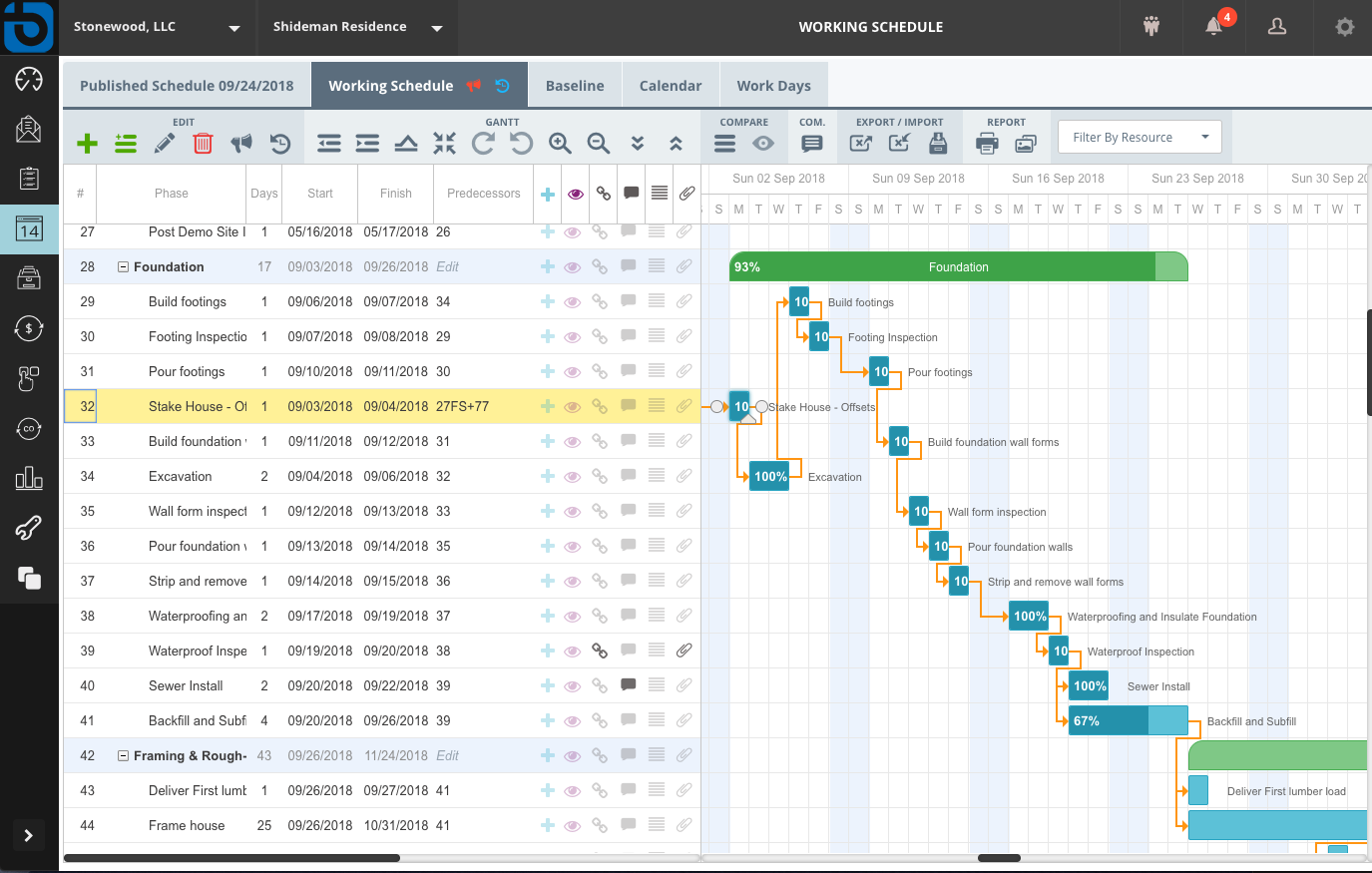
An example of schedule management in home builder software
Who uses home builder construction software?
Home builder solutions are used by construction businesses that focus on the construction and interior design of residential properties.
In the construction market, business size and IT resources typically break down as follows:
Single user: Less than $1 million in annual revenue. This is likely a small, family firm with no IT department and a single software user.
Small-business buyer: $50 million or less in annual revenue, two to 100 employees; likely no IT department, and requires two to 10 software user licenses.
Midsize-business buyer: $100 million or less in annual revenue, two to 100 employees; has an IT department and requires 11 to 100 user licenses.
Midsize-enterprise buyer: $100 million+ in annual revenue, 100+ employees, and an IT department; requires 100+ user licenses.
When it comes to home builder software specifically, overwhelmingly (90%) of business owners we have spoken to who are looking for home builder software have no more than five users with 37% having only a single user.
Additionally, the majority (82%) report less than $5 million a year in revenue with 43% reporting less than $1 million a year.
In general, the industry seems to support small-business solutions that help general contractors manage and run their businesses.
Specific questions to ask yourself when selecting home builder construction software include:
What size is your company? Most home builder construction programs are geared toward companies of a certain size, so this should be one of the first things to match when evaluating a program.
Do you want an on-premise, client/server-based deployment, or is your organization interested in exploring web-based deployment opportunities?
How well does your shortlist of potential systems integrate with your existing accounting, CRM, ordering, or other systems?
Features of home builder software
With all these management requirements, many contractors building a house typically require a complete construction management software system that can manage every aspect of the building process.
Home builders need most of the standard features that come with top-rated construction management software, but as you’re looking there are a few features for home builders to consider.
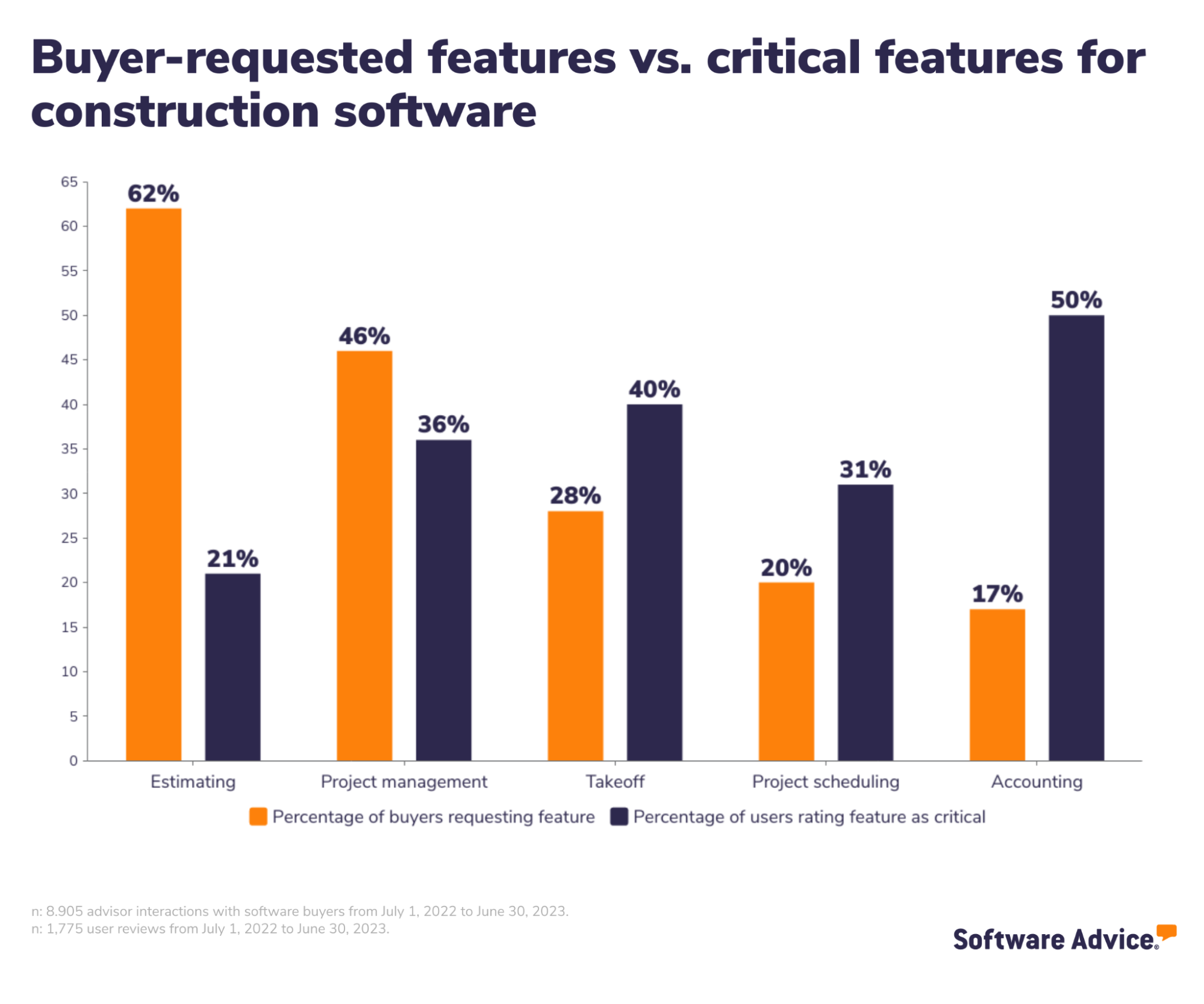
Core home builder software features
Each year, we speak to dozens of home builders and analyze their conversations to better understand which features are critical to them. Based on those discussions and analysis of our reviews data, here are the features that are core to general contractor software.
Feature | Description |
Project management | Plan and coordinate all the resources, costs, and time needed to execute assignments. 91% rate this feature as critical or highly important. |
Document management | Store, manage, and track all electronic documents in a centralized location. Of construction management business owners we spoke to, 83% of reviewers rate this feature as critical or highly important. |
Scheduling | Plan availability and assign specific time slots for tasks and resources. 64% rate this feature as critical or highly important. |
Common home builder software features
Based on our research and conversations with home builders, here are the features that are common, but not absolutely necessary.
Feature | Description |
Project tracking | Home building involves hundreds of individual tasks. Most of these have some degree of flexibility in terms of when they are executed, but all must be completed within a certain timeframe to avoid extending past the deadline. Of home builder contractors we spoke to, 83% rated this feature as critical or highly important. |
Mobile access | Access project information, plans, schedules, and updates instantly on mobile devices from anywhere to ensure everyone is working with the most current data. 80% of reviewers rate this feature highly. |
Budget tracking | Track actual spending to ensure it aligns with the planned budget. Record accurate forecasting of project costs based on past expenditures to make informed financial decisions. 71% percent of users rate this feature highly. |
Accounting integration | Eliminate manual data entry and the risk of errors associated with transferring financial information between different platforms. |
Multiple projects | Centralize project data, documents, schedules, and communication in one platform and allow for better resource allocation across construction projects. |
Task management | Organize project activities and deadlines systematically. Tasks can be prioritized and assigned to team members, ensuring clarity on project progress and responsibilities. |
Advisor Matthew Clifford says that general contractors are telling us the main thing they are having to solve is “how to communicate better between different departments and subcontractors to make sure everything is on track.” Having everything in one place, on one platform, keeps things streamlined and organized as opposed to trying to track and handle everything manually.
For more information on these features and to explore home builder software solutions, contact our advisors. They offer free, no-obligation assistance and can help you identify the best options based on your specific needs.
Benefits and competitive advantages of home builder construction software
Based on Clifford’s experience, home builders are most often coming to him to help look for better bidding options: “If they’re underbidding themselves, they’re shooting themselves in the foot.” A home builder who knows how to thread the needle between providing a competitive, attractive bid and one that doesn’t undercut their bottom line is going to be more successful in the long run. That’s easier said than done, and home builder software functionality can help accomplish that feat more effectively by improving efficiencies and accuracy at every stage of the process.
He also notes that communication between different job sites with various subcontractors is a huge pain point that he often talks to buyers about. “Being able to send pictures from job sites in order to get real-time updates is huge.”
This tracks with the over 600 conversations our advisors have had during the last year. Trouble communicating between job sites becomes overwhelming as companies grow.
In general, the primary benefits that you’ll see when you purchase and utilize home builder construction software will directly impact your bottom line by making you more efficient across the board:
Streamline communication and collaboration: Home builder platform offers instant messaging, emails, real-time updates, comments, document sharing, and task reminders for efficient communication and collaboration. The software stores all communication and project-specific information in a centralized database to ensure that all project stakeholders, including the teams, project managers, general contractors, and clients have access to the latest information and updates.
Save time creating and tracking purchase orders: Home builder tools allow builders to create purchase orders for services, equipment, and raw materials required for the completion of a project. The system also helps track vendor information, delivery times, purchase quantities, and costs for effective purchase order management. Several tools also provide templates for generating professional-looking purchase orders.
Get better data visualization to make smarter decisions: Home building software offers custom reporting that enables business owners to make better decisions. Some of the important reports generated by the software include daily logs, change orders, project summaries, schedule changes, invoices, open tasks, as well as expense and estimate reports.
Contractors who use general construction management software will often see these benefits, but by utilizing software specifically designed for home builders, you might gain a competitive advantage against your competitors. Software designed specifically for this industry might have features that are better suited to home building, such as 3D modeling, to help your potential clients envision what their new home might look like.
Here are a few examples of how these tools can help you gain a competitive advantage in the marketplace:
Scale your business: Mistakes happen when you’re trying to manage multiple jobs and coordinate paperwork across different job sites. Home builder software can help you avoid that by making managing projects easier, allowing you to continue to grow, while minimizing mistakes.
Operate more efficiently: Software generally helps you standardize your processes, making them more efficient overall. When everything is in one place, you can easily track the entire life cycle of your projects by automating tedious functions.
Provide more value to clients: Better estimating, quoting, takeoff, and processes all lead to a better client experience. If things run smoothly, your clients will be more likely to recommend you to their friends and family, and word of mouth will always be the best marketing your business receives.
How to choose home builder software
Before you begin, you should sit down with important stakeholders like your project manager and scheduler to determine what gaps in your current processes you need the software to address.
Step 1: Gather key considerations before comparing solutions
We’re a broken record here, but that’s why it’s so important to understand your core needs. What do you need your software to help you accomplish? Narrow down a list of the five most important pain points that your business is currently facing in order to determine the most crucial software solutions that will help you scale your business.
Here are a few different questions you can ask a vendor that can help you find the best solution:
What does the software not do?
This is perhaps the most important question you should ask vendors. Knowing how a product aligns with your requirements will let you know if it will be able to scale with you or if you'll need to supplement or integrate with another solution. Be sure to discuss your product requirements and business needs with each vendor on your product shortlist and ask them directly about the product's attributes as well as its limitations.
What is the average implementation timeline?
Implementation timelines can vary drastically depending on the tool you choose. Implementing an integrated business management platform will require a much more significant investment of time and resources than a standalone tool. Consider the time you'll need to get the new tool up and running and to train your users on a new system.
What data transfer services do you offer?
Some vendors will include data transfer within the cost of the software license, while other vendors may only offer data transfer at an additional cost. Asking about this service upfront can help you avoid sticker shock when you receive a price quote from the vendor. If data transfer services aren't included at all, you may have to hire a third party to help you move your data into the new system, which would require an additional investment of time and resources.
What support and training services do you offer?
Support and training can make or break an implementation. Before you start evaluating systems, consider your end users and the type of support they'll require over the life of the tool. Would they prefer support services over the phone or over chat? Are they tech-savvy enough to help themselves by reading support forums and discussion boards? Ask vendors about the support and training services they offer, and at what cost, so you can be sure to choose a tool that aligns with the needs of your users.
Clifford advises the business owners he talks to make sure that the vendors they’re talking to have some sort of accounting software or estimating software functionality because a lot of them don’t. If that’s the case, he lets business owners know that they’re likely going to have to find another program to handle those things, and that program might not integrate with their chosen solution.
Ultimately, this shouldn’t be a deal breaker, but it’s important to consider whenever you’re searching for new software.
Step 2: Set a realistic budget
Generally, the cost of home builder software is going to be hard to pin down because several factors can go into how much it will cost, including:
Number of users
Required features
Availability of IT support staff
According to our advisor conversations, most business owners (76%) who call us pay a flat monthly fee that costs, on average, $412, typically for unlimited users. Thirty-two percent pay per user, per month and pay on average $162 per user.
It’s important to remember that the cost of software is often tied directly to how feature-rich it is. If you’re looking for a best-of-breed all-inclusive software suite that can handle every aspect of your business, it will likely cost more. If you’re only looking for something that can handle scheduling and estimating, you might be able to find two different software solutions that are great at doing those two things but not much else.
That’s why it’s always important to nail down what pain points you want your software to address. You don’t want to pay for software features that you won’t use; you’ll be leaving money on the table in that case.
Step 3: Compare popular construction software
There are dozens of home builder programs for the construction market. In fact, several companies make multiple products for this one niche. Selecting the right one can be a daunting task, but as with any software, start by assessing your needs. An integrated suite will combine accounting, project management, scheduling, and home builder CRM, but you may need just one or two of these capabilities. Residential remodelers have specialized needs within this industry, so they should choose a dedicated residential remodeling system.
Specific questions to ask when selecting home builder construction software include:
What size is your company? Most home builder construction programs are geared toward companies of a certain size, so this should be one of the first things to match when evaluating a program.
What features do you need?
Do you want an on-premise, client/server-based deployment, or is your organization interested in exploring web-based deployment opportunities?
How well does the software integrate with your existing accounting, CRM, ordering, or other systems?
To choose the home builder construction software, it's crucial to compare how different solutions measure against each other. For a detailed and reliable comparison, visit Software Advice and explore the FrontRunners for construction management systems.
This method highlights which systems excel in areas such as user interface, functionality, and customer support and sheds light on potential shortcomings that could affect your operation. Such comparisons are instrumental in making an informed decision, ensuring you select a system that aligns perfectly with your requirements.
Software related to home builder software
Home builder software is designed to help you manage the entire project life cycle, from blueprint to billing. That said, software designed specifically for home builders can lack certain features, so you might need to look outside of home builder specific software for certain functionality or integrations.
Here are some related tools that focus more on one stage in the project life cycle:
Construction project management (PM) software: This software helps contractors manage the entire build process, from scheduling to client billing. These tools provide firms with the oversight and document control needed to monitor RFIs, change orders, and purchase orders so project budgets and timelines aren't disrupted.
Takeoff: Takeoff is a pre-sale process in which the estimator measures construction plans (blueprints and drawings) to determine the amount of materials and labor required for a job. Takeoff software is commonly sold as a standalone application grouped together with estimating or as part of a comprehensive, integrated suite.
Estimating: Estimating software calculates the material costs and labor takeoff to produce bid proposals. It's sold either as a standalone system, grouped with takeoff or as part of a comprehensive, integrated suite.
Bid management: Bid management, in which a contractor solicits bids from subcontractors and suppliers before submitting a job quote, is a process that helps bridge the gap between pre-sale and project management. Bidding can be found as an application within many construction systems or can be purchased as a standalone software.
Accounting: Construction accounting software helps firms manage their job costing, core accounting, fixed asset accounting, and payroll. It's common to find some job costing and budgeting in construction PM software.
About our contributors
Author
Shubham is a writer at Software Advice, specializing in project management. His focus is to guide project managers from planning to execution and beyond. His expertise also spans construction, manufacturing, and other related topics.
Shubham’s research and writing for Software Advice is informed by nearly 200,000 authentic user reviews and more than 10,000 interactions between Software Advice software advisors and project management software buyers. Shubham also regularly speaks to project managers and PMO leaders so he can provide the most up-to-date and helpful information to small and midsize businesses purchasing software or services.
Outside work, Shubham likes to explore the depth of Urdu poetry and enjoys his time with his dog.
Editor
Parul Sharma is a content editor at Software Advice with expertise in curating content for various niches, including SaaS, digital marketing, and search engine optimization. With over half a decade of experience in content writing and editing, Parul has the expertise to simplify complex terms into engaging, valuable content for targeted audiences. She completed her graduation and post-graduation in English literature from Delhi University and was awarded the Dr. Asha Sahni Memorial Award for being the highest scorer in her graduating class.
Parul has contributed to the news, lifestyle, education, and health verticle of DNA India, India’s premier media channel. Outside of work, she can be found curating healthy recipes, coloring in mandala books, and spending quality time with her family.
Advisor
Matthew Clifford is a software advisor. He joined Software Advice in 2023, and he is based in Fort Myers, FL.
Matthew works directly with small business leaders to connect them with best fit software providers. He assesses the technology needs of small businesses seeking construction and field service software through one-to-one conversations and provides a short list of potential matches.
For Matthew, the most enjoyable part of being a software advisor is getting to help buyers determine the best fit for them among the overwhelming amount of products on the market.
Source
Software Advice software pricing data: Only products with publicly available pricing information and qualified software products within the category, as of the production date, are included in the pricing analysis. Read the complete methodology.
Your Guide to Top Home Builder Software, January 2025


Home Builder FAQs
- What is the best construction management software?
According to our analysis of products with high market demand and reviews, Autodesk Construction Cloud had the highest overall rating from verified reviewers on Software Advice.
- Is there a free architecture software?
Yes, there are free architecture software options available that offer basic design and modeling features. These tools can be suitable for beginners or small projects, providing essential functionalities without the cost of premium software.
- Which software is best for building design?
According to our analysis of market demand and reviews, ARCHICAD received the highest overall rating from verified reviewers on Software Advice. It is highly regarded for its robust features and user-friendly interface, making it ideal for building design.
- Which software is best for house design?
Based on our analysis of market demand and reviews, Houzz Pro received the highest overall rating from verified reviewers on Software Advice. It is recognized for its comprehensive tools and ease of use, making it a top choice for house design.
- What software do architects use to build houses?
Architects use specialized design software to build houses, which provides tools for drafting, modeling, and visualizing architectural plans. These programs help in creating detailed and accurate designs, facilitating efficient project execution and communication with clients.