
Best Data Entry Software of 2026
Updated March 18, 2026 at 6:56 AM
- Popular Comparisons
- FrontRunners
- Buyers Guide
Compare Products
Showing 1 - 25 of 132 products
Compare Products
Sort by
Reviews: Sorts listings by the number of user reviews we have published, greatest to least.
Average Rating: Sorts listings by overall star rating based on user reviews, highest to lowest.
Alphabetically (A-Z): Sorts listings by product name from A to Z.

Process Runner eliminates SAP's biggest pain point - getting data in and out quickly. By turning Excel into a direct line to SAP...Read more about Process Runner

Process Runner's Best Rated Features
See All
Process Runner's Worst Rated Features
See All

AccuMail frameworks is an address validation tool designed to help businesses verify, standardize, and manage addresses in bulk ...Read more about AccuMail frameworks
No reviews yet

**Forms On Fire: Tailored Mobile Solutions for Field Service Automation** Forms On Fire offers a revolutionary mobile app desig...Read more about Forms On Fire


Altova MobileTogether is a low code development software designed to help businesses build and deploy applications on various pl...Read more about Altova MobileTogether

Intellimas is an enterprise level, low code, web application builder. Build your own apps or allow us to build them for you. I...Read more about Intellimas

Intellimas's Best Rated Features
See All
Intellimas's Worst Rated Features
See All

Submit Forms 83.3% Faster! Replace Inspection Sheets, Time Cards, Maintenance Or Safety Checklists, Job Cards & More With A Sin...Read more about Appenate

Appenate's Best Rated Features
See All
Appenate's Worst Rated Features
See All

SaasAnt Transactions, built for Quickbooks, is a data entry solution that helps businesses import, review, delete, and map daily...Read more about SaasAnt Transactions


SaasAnt Transactions's Best Rated Features
See All
SaasAnt Transactions's Worst Rated Features
See All

Culverdocs is a fully configurable, no-code platform that allows you to convert your existing paper-based documents into digital...Read more about Culverdocs
Culverdocs's Best Rated Features
See All
Culverdocs's Worst Rated Features
See All

Google Sheets Add-On is a tool to help you bring your financial data into your Google Sheet. Imagine completing your month-end ...Read more about LiveFlow
LiveFlow's Best Rated Features
See All
LiveFlow's Worst Rated Features
See All

PhraseExpander is an on-premise data entry solution that helps healthcare professionals capture notes and share them with team m...Read more about PhraseExpander

Docparser is a cloud-based document data extraction solution that helps businesses of all sizes retrieve data from PDFs, Word do...Read more about Docparser

Docparser's Best Rated Features
See All
Docparser's Worst Rated Features
See All

Operations Hub allows you to easily sync customer data and automate business processes. It supercharges your HubSpot CRM by sync...Read more about Operations Hub


Operations Hub's Best Rated Features
See All
Operations Hub's Worst Rated Features
See All

Fluix is a mobile-first platform that helps field teams work faster, safer, and stay compliant. Designed for industries like con...Read more about Fluix
Fluix's Best Rated Features
See All
Fluix's Worst Rated Features
See All

DbVisualizer is a database management solution that helps businesses monitor and analyze the performance of multiple databases t...Read more about DbVisualizer

DbVisualizer's Best Rated Features
See All
DbVisualizer's Worst Rated Features
See All

Parseur is a cloud-based email parser solution that helps businesses of all sizes extract text from emails. The platform automat...Read more about Parseur

Parseur's Best Rated Features
See All
Parseur's Worst Rated Features
See All

Build beautiful forms, access-controlled databases, and highly customizable business apps without any code - all in one place. ...Read more about Formaloo
Formaloo's Best Rated Features
See All
Formaloo's Worst Rated Features
See All

PaperSurvey is a cloud-based survey management software that helps organizations create, collect, print, scan, and upload survey...Read more about PaperSurvey
PaperSurvey's Best Rated Features
See All
PaperSurvey's Worst Rated Features
See All

GoSpotCheck by FORM is a mobile task management platform designed to help businesses across retail, healthcare, hospitality and ...Read more about GoSpotCheck by FORM


Jotform is a cloud-based form automation solution that enables users to publish online forms and record customer responses. It h...Read more about Jotform
Jotform's Best Rated Features
See All
Jotform's Worst Rated Features
See All

Klippa DocHorizon is a cloud-based Intelligent Document Processing solution. This advanced technology uses Optical Character Rec...Read more about Klippa DocHorizon


Klippa DocHorizon's Best Rated Features
See All
Klippa DocHorizon's Worst Rated Features
See All

AIDA: Revolutionize Your Document Management with AI-Powered Data Extraction and Automation AIDA is a groundbreaking intelligen...Read more about AIDA
AIDA's Best Rated Features
See All
AIDA's Worst Rated Features
See All

ASSIST is a document management solution that helps businesses manage their finance and cash flow. ASSIST's key features inclu...Read more about ASSIST

ASSIST's Best Rated Features
See All
ASSIST's Worst Rated Features
See All

With the help of Ficstar's robust web scraping technology, businesses may gather any amount of data they need from the Internet....Read more about Ficstar
Ficstar's Best Rated Features
See All
Ficstar's Worst Rated Features
See All

VLX is a platform that helps teams conduct digital inspections, verifications, and audits. An intuitive design empowers users wo...Read more about VLX


VLX's Best Rated Features
See All
VLX's Worst Rated Features
See All

Amazon Relational Database Service (RDS) is a cloud-based software that helps businesses leverage existing database engines to a...Read more about Amazon RDS


Amazon RDS's Best Rated Features
See All
Amazon RDS's Worst Rated Features
See All
Popular Comparisons



Your Guide to Top Data Entry Software, April 2023
Software Advice uses reviews from real software users to highlight the top-rated Data Entry products in North America.
Learn how products are chosenExplore FrontRunners


“Usability” includes user ratings for Functionality and Ease of Use.
“Customer Satisfaction” includes user ratings for Customer Support, Likelihood to Recommend and Value for Money.
Reviews analysis period: The reviews analysis period spans two years and ends the 15th of the month prior to publication.
Buyers Guide
This detailed guide will help you find and buy the right data entry software for you and your business.
Last Updated on January 27, 2025Though computers and software have, on the whole, been a boon to the business world, they come with certain drawbacks. One of the most grueling of those is data entry.
Data entry refers to the process of transferring numbers and figures from printed pages or other sources into your computer system. This can be a tedious, time-consuming task for your employees, and it is one that is particularly error-prone. Multiple hours of work are lost every day to data entry, when they could be better spent by your employees on the issues more central to your business.
This is why data entry software is among the most useful types of systems for your company to purchase and implement. A great deal of different types of software suites, for important office necessities such as customer relationship management (CRM) and project management, will have data entry features and functions. But if your company is too small to utilize those systems, if you have important data outside the purview of those areas or if your business relies on data entry as one of its chief concerns, you might require independent or specialized data entry software.
This Buyer's Guide will help you determine if you require data entry software, what features you might find most useful in that software and what you should ask of vendors when you are looking to purchase.
Here's what we'll cover in order to help you make this important decision:
Common Features of Data Entry Software
What Is Data Entry Software?
Almost everyone is familiar with the most commonly used system that could technically be classified as "data entry software"—Microsoft Excel. In addition to allowing you to create charts, calculate data and build interactive dashboards, Excel's user-friendly spreadsheets serve as a data entry solution for a wide variety of businesses.
However, using spreadsheets for your data entry is far from ideal. The amount of time it takes to enter each bit of information by hand can make things extremely tedious and can lead to a large number of errors. In addition, each spreadsheet is stored on one person's computer, and can't be accessed by multiple employees across the company. In many ways, using spreadsheets to enter data is little better than keeping that information in a hard-bound notebook.
More advanced data entry software deals with the problems you'll encounter with simple spreadsheets. Tools within the software can automate some of the most tedious, error-prone tasks. However, different data entry systems will speak to different methods of handling information and thus will automate those tasks in different ways. You'll want to find a system that is right for your business processes, particularly in regards to your business type.
A large amount of data entry software systems specifically address the needs of particular industries. There are different types of data entry software tools for fields such as medicine, accounting and insurance, for example, each of which offers specialized features relevant to that specific type of business and its needs.
Regardless of the industry, though, all data entry software shares a few key features in common, which we'll discuss in the following section.
Common Features of Data Entry Software
Electronic forms | Almost all dedicated data entry software will allow you to create custom forms that will ask for the key data you need to have entered into the system. Autofill features can make filling out these forms easier and less repetitive, while they can also be set to check for obvious or common errors. The software will then take the data entered into these forms and convert it into more complicated, classified formats for better storage and analysis. |
Data classification | Once data is entered into your system, it needs to be organized in a way that makes it effective and efficient to use. Data classification tools will do this for you, taking the data that you enter and converting it into a format that will be more beneficial for your future use and analysis. |
Data extraction | Sometimes you aren't just manually entering data, but rather need to take unstructured or poorly structured data sources and turn them into something usable. Data extraction tools can help you with this, by taking that unstructured data and further processing and classifying it so that you can use it in your business. |
Data cleaning | Data cleaning takes an existing set of data (a table, record set, database etc.) and scans through it to search for certain specified errors, inconsistencies and blank spots. |
Data validation | Data validation is a process performed at the time of data entry, ensuring that the data will not need to be cleaned at a later date by validating it as it is initially entered. In practice, this means tools in the system will make sure that you are avoiding common data entry errors so that your data is fully correct and useful for you. |
Scanning | Some businesses need to store visual information as much as they do text-based information. For those companies, specific data entry systems will allow you to scan in images to be stored with the rest of your data. In addition, some advanced software can scan in spreadsheets and other physical data sets and convert/classify them into usable data in your system. |
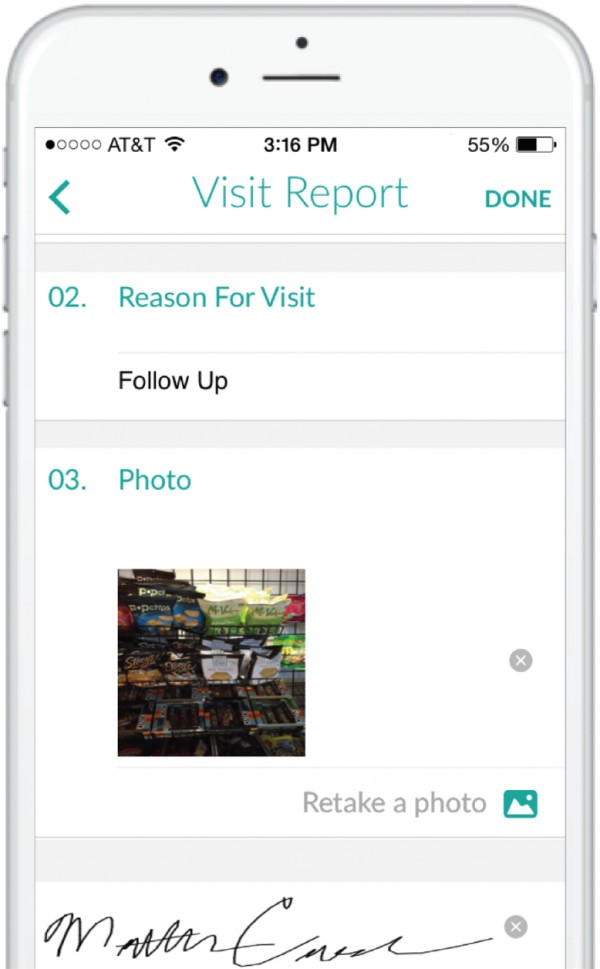
The mobile data collection page in Repsly
What Type of Buyer Are You?
It's hard to think of a business that doesn't require some amount of data entry as a part of its day-to-day operations. As such, this means that there as many types of data entry software buyers as there are types of businesses.
However, regardless of your specific business field, you will likely have different needs based on the size of your business, thus falling into one of the following categories:
Small business (fewer than 20 employees). Small businesses such as yours rely on employees with very specialized roles. As such, you may find that not all of your staff are engaged in daily data entry. In addition, you may rely less on data analysis than larger companies. The most important data entry software features for a business of this size will be electronic forms and data classification, in order to streamline data entry and ensure that when data is entered into the system, it is structured and stored in a meaningful manner.
Midsize business (20-100 employees). Larger companies deal with larger amounts of data. Thus, if your company is midsized, you will need the basic electronic forms and data classification that smaller businesses require, but you will also likely find yourself in need of data extraction, cleaning and validation tools, so that you can ensure the accuracy of your data and use it for accurate analysis and predictions.
Large business (more than 100 employees). At this size, your company will be dealing with a very large amount of data. You will want industry-specific data entry software that speaks to your market's particular needs, and might even require specified data entry systems for each unique department of your company, either as a stand-alone solution or part of a larger suite of business software.
Key Considerations
Other factors to take into consideration when picking the best data entry software for your business may include:
Industry specialization. As we've discussed several times in this Buyer's Guide, data entry software systems are typically specialized for specific industries. You will want to seek out a vendor that is geared toward your particular field, so that you can purchase software that is specific to your needs. If you are a medical practice, for example, you won't find much use for data entry software that's optimized for law firms. This will be your top concern when choosing the right vendor and software system for your business.
Integration with other systems. No matter how quickly and efficiently you're able to enter it into your computer, your data will be useless if you're not able to do something productive with it. This means that you want to be very sure that you'll be able to transfer the data you've entered into your other business software so that you can analyze it and make use of it. It's crucial that you check with vendors about whether their software will integrate with what you're already using (or plan to purchase) for other aspects of your business.
Mobile access. For many businesses and teams, data is collected while on-the-go, whether that's on a business trip or just a one-time meeting away from the office. That information is vital, though, and needs to be in your computer system as soon as possible. If your company frequently finds this to be the case, you'll want to be sure that you purchase data entry software that allows you to easily capture and/or enter data from smartphones or tablets.
Cloud-based software versus on-premise software. As recently as a couple of years ago, most software was bought to be housed by businesses on-premises. What this meant was that, after you purchased software, you had to have the space and the IT resources and knowledge to house the hardware for that system at your workplace. This was both costly and inconvenient. Fortunately, most software today is hosted via the cloud, and the hardware is housed by the vendor while the software itself is shared with you over the internet. Some enterprise-level businesses and software packages still utilize on-premise housing, for the sake of speed and processing power, but for small or midsize businesses it is generally much more convenient (and far less costly in time, money and IT resources) to host your software via the cloud.