
Best Daycare Software of 2026
Updated February 18, 2026 at 9:52 AM

Written by Alejandra Aranda
Content Analyst

Edited by Mehar Luthra
Team Lead, Content
- All Software
- Software Advice FrontRunners
- Popular Comparisons
- Buyer's Guide
- Frequently Asked Questions
Daycare software helps childcare staff and administrators manage attendance, billing, parent updates, and daily routines. With 100 tools built for varied operational models, integration needs, or regulatory contexts, selecting the right tool can be a challenge for teams juggling compliance and parent communication. To help you narrow it down, I've curated a list of highly-rated productsi and the daycare software FrontRunners based on user reviews. For further information, read my Daycare software buyer's guide.
Daycare Software
Sort by
Reviews: Sorts listings by the number of user reviews we have published, greatest to least.
Average Rating: Sorts listings by overall star rating based on user reviews, highest to lowest.
Alphabetically (A-Z): Sorts listings by product name from A to Z.

TUIO is a school management system that centralizes all enrollment, waitlisting, reporting, billing and payments in one online p...Read more about TUIO


TUIO's Best Rated Features
See All
TUIO's Worst Rated Features
See All

ChildPilot is a childcare management platform designed to streamline operations for daycares, preschools and other early childho...Read more about ChildPilot


ChildPilot's Best Rated Features
See All
ChildPilot's Worst Rated Features
See All

Famly is a comprehensive daycare management solution designed to help early childhood education (ECE) providers streamline opera...Read more about Famly


Famly's Best Rated Features
See All
Famly's Worst Rated Features
See All

Procare Solutions is a cloud and mobile-based childcare management platform that manages daily operations of childcare businesse...Read more about Procare Solutions

Procare Solutions's Best Rated Features
See All
Procare Solutions's Worst Rated Features
See All

brightwheel is a cloud and mobile-based childcare solution that simplifies administrative tasks, automates billing, and enhances...Read more about brightwheel
brightwheel's Best Rated Features
See All
brightwheel's Worst Rated Features
See All
Software Advice FrontRunners 2026

(188)

(3254)

(2748)

(305)

(264)

(200)

(3623)

(38)

(77)

(102)
Best for Customer Satisfaction

Playground

Of the products listed on our FrontRunners report, Playground is the highest rated for customer satisfaction out of the most popular tools.
Playground is best suited for childcare centers prioritizing customer satisfaction, as our reviewers say it offers responsive support and flexible communication tools that help keep parents informed and engaged throughout the day.
- Reviewers Perspective
"I love that for each announcement/post, as an Admin, I can choose to post on the app, send by email, send as an SMS text, or choose to send it all 3 ways."
CHCarrie Hoffman
Office Manager
Used for 2+ years
We analyzed 146 verified user reviews for Playground to find out what actual users really think.
Parent Communication
Users find that Playground streamlines communication with families by offering multiple channels for announcements, messaging, and real-time updates about children’s activities.Ease of Use
Users describe Playground as intuitive and easy to navigate, which helps them manage their childcare operations efficiently. They find the interface clean and straightforward, making it simple to access features and transition from other systems without difficulty.Payments
Users value Playground’s automated payment features, including invoice scheduling and autopay, which reduce manual work and help maintain accurate records. - Key FeaturesPlayground's scoreCategory average
Check-in/Check-out
4.794.72 category average
Communications Management
4.764.59 category average
Parent Portal
4.744.59 category average
- Screenshots


Best for Mobile app
brightwheel

According to our user reviews, brightwheel is the most requested by users for mobile app out of the most popular tools.
Brightwheel is ideal for those seeking the best mobile app experience, with reviewers noting its intuitive mobile interface, real-time updates, and seamless parent-teacher communication that make daily management and engagement easy on the go.
- Reviewers Perspective
"Features like attendance tracking, parent engagement tools, and learning assessments empower educators to focus more on teaching and less on administrative tasks, making it easy for teachers and parents to stay connected."
TBTamika Bennett
Teacher Assistant
Used for 1-2 years
We analyzed 784 verified user reviews for brightwheel to find out what actual users really think.
Parent-Teacher Communication
Users value Brightwheel for enabling seamless, real-time communication between parents and teachers, allowing both groups to stay updated on children’s daily activities and progress.Ease of Use
Users consistently describe Brightwheel as user-friendly, with an intuitive interface that simplifies daily tasks for educators, parents, and administrators.Billing and Payment
Users appreciate Brightwheel for its ability to automate billing, send invoices, and facilitate online payments, which streamlines administrative work and improves convenience for families. - Key Featuresbrightwheel's scoreCategory average
Communications Management
4.694.59 category average
Parent Portal
4.734.59 category average
- Screenshots


Best for Quick Adoption/Easy Adoption

In our analysis of Daycare products with the most market demand, Procare Solutions is the highest rated for its ease of adoption out of the most popular tools.
Procare Solutions is best for organizations needing quick and easy adoption, as our reviewers highlight its simple onboarding process, intuitive design, and helpful training resources that enable teams to get up and running efficiently.
- Reviewers Perspective
"This platform has enabled our preschool to move from (1) "paper and pencil" registration/enrollment/organization/communication, etc., (2) parent to teacher to director to bank payment processing and staff communication to practically a totally online, but personal experience with our students and my staff- just for starters."
LFLynn Frank
Director
Used for 2+ years
We analyzed 756 verified user reviews for Procare Solutions to find out what actual users really think.
Ease of Use
Users find Procare Solutions intuitive and straightforward, with most functions easy to learn and navigate for both staff and families. They appreciate having all essential features in one portal, which simplifies daily tasks and business management.Parent and Child Management
Users value Procare Solutions for its ability to streamline communication with families, offering features like daily updates, photo sharing, and messaging that keep parents informed about their children’s activities.School and Teacher Management
Users rely on Procare Solutions to organize student records, manage classroom activities, and facilitate communication between teachers, administrators, and families. - Key FeaturesProcare Solutions's scoreCategory average
Check-in/Check-out
4.574.72 category average
Communications Management
4.494.59 category average
Parent Portal
4.504.59 category average
- Screenshots


Most Rated for SMBs


Daily Connect is the most requested by small businesses out of the most popular tools, based on our analysis of Daycare products with the most market demand.
Daily Connect is most rated for SMBs, making it a strong choice for small and midsize childcare providers; our reviewers say it streamlines daily updates and parent communication, with reliable reporting and ease of use across multiple classrooms.
- Reviewers Perspective
"It allows us to track our day to day with children, and share it with their parents!"
EBEmmy Bloomquist
Assistant Director Substitute Teacher
Used for 6-12 months
We analyzed 232 verified user reviews for Daily Connect to find out what actual users really think.
Parent-Child Updates
Users find Daily Connect invaluable for keeping them updated on their children's activities and milestones throughout the day, whether they are parents, teachers, or administrators.Parent Communication
Users rely on Daily Connect to maintain seamless and efficient communication with parents, allowing them to send messages, share updates, and receive responses in real time.Ease of Use
Users consistently describe Daily Connect as intuitive and straightforward, making it simple for both new and experienced users to navigate and utilize its features. - Key FeaturesDaily Connect's scoreCategory average
Check-in/Check-out
4.934.72 category average
Communications Management
4.794.59 category average
Parent Portal
4.774.59 category average
- Screenshots


Most Used By Health, Wellness and Fitness
Famly

Of the products listed on our FrontRunners report, Famly is the most requested by users in health, wellness and fitness out of the most popular tools.
Famly is most used by health, wellness, and fitness organizations, with reviewers noting its user-friendly platform, real-time parent updates, and efficient communication features that support daily operations and engagement.
- Reviewers Perspective
"Famly is great all our staff and parents love it, I use it to communicate with staff and parents and the recording of observations is great"
MRMichelle Rose
Nursery Manager
Used for 1-2 years
We analyzed 202 verified user reviews for Famly to find out what actual users really think.
Nursery-Parent Communication
Users find Famly highly effective for facilitating communication between nursery staff and parents, allowing them to share updates, messages, and important information throughout the day.Parent Engagement
Users value Famly for its ability to keep parents engaged and informed about their children's experiences at nursery, with features like daily newsfeeds, instant messaging, and real-time updates.Ease of Use
Users consistently describe Famly as intuitive and straightforward, noting that both staff and parents quickly learn to navigate its features. - Key FeaturesFamly's scoreCategory average
Check-in/Check-out
5.04.72 category average
Communications Management
4.594.59 category average
Parent Portal
4.654.59 category average
- Screenshots


Most Used By Primary/Secondary Education
TUIO

In our analysis of Daycare products with the most market demand, TUIO is the most requested by users in primary/secondary education out of the most popular tools.
TUIO is most used by primary and secondary education providers, with reviewers highlighting its ability to simplify payment processing, reduce administrative workload, and provide flexible billing options for families and schools.
- Reviewers Perspective
"TUIO has saved us time and effort as we no longer have to prepare and send out invoices and with pre-authorized payments, we virtually never have to chase down clients for missed payments."
KHKeith Hay
Treasurer
Used for 2+ years
We analyzed 186 verified user reviews for TUIO to find out what actual users really think.
Payment Processing
Users find TUIO streamlines payment processing by offering automated invoicing, multiple payment options, and clear billing records, which saves considerable time for both administrators and families.Customer Support
Users consistently praise TUIO for its responsive and knowledgeable customer support team, which provides prompt assistance and clear guidance whenever questions or issues arise.Ease of Use
Users describe TUIO as a user-friendly platform with an intuitive interface that simplifies payment management and school administration tasks. They appreciate the straightforward setup process, clear navigation, and helpful resources such as guides and tutorials. - Key FeaturesTUIO's scoreCategory average
Communications Management
4.504.59 category average
Parent Portal
4.754.59 category average
- Screenshots


Most Used By Non-Profit Organization Management

Lillio

In our analysis of Daycare products with the most market demand, Lillio is the most requested by users in non-profit organization management out of the most popular tools.
Lillio is most used by non-profit organization management, as reviewers point out its comprehensive parent communication, easy sharing of daily updates and photos, and features that support both staff and family engagement.
- Reviewers Perspective
"Lillio made it easy for our staff to log activities for each child, helping our moms know what their children were doing and how they were growing each day."
BBBonnie Beauchamp
Lead Systems Analyst
Used for 1-2 years
We analyzed 914 verified user reviews for Lillio to find out what actual users really think.
Parent Communication
Users find Lillio highly effective for keeping parents informed about their children's daily experiences, including activities, milestones, and important updates.Daycare Updates
Users value how Lillio provides timely updates from daycare centers, allowing them to see daily activities, receive notifications, and communicate directly with caregivers.Photo Sharing
Users enjoy receiving photos of their children through Lillio, appreciating the ability to share these moments with extended family and revisit memories at any time. They mention that downloading, saving, and viewing photos can sometimes be cumbersome, with challenges such as low resolution, limited bulk download options, and occasional glitches in notifications or uploads. - Key FeaturesLillio's scoreCategory average
Check-in/Check-out
4.04.72 category average
Communications Management
4.594.59 category average
Parent Portal
4.664.59 category average
- Screenshots


Best for Usability

CareDay

CareDay is the highest rated for its usability out of the most popular tools, based on our analysis of Daycare products with the most market demand.
CareDay is best for usability, with reviewers saying its user-friendly interface, live updates, and efficient parent-teacher communication features make daily operations and parent engagement straightforward for childcare centers.
- Reviewers Perspective
"It provides parents with a transparent overview of their child's day and is so user-friendly that teachers enjoy using it to maintain accurate records for their students and communicate with parents and families!"
SHSavannah Hall
Executive Director
Used for 1-2 years
We analyzed 37 verified user reviews for CareDay to find out what actual users really think.
- Key FeaturesCareDay's scoreCategory average
Communications Management
4.964.59 category average
Parent Portal
4.924.59 category average
- Screenshots


Most Used By Individual & Family Services
ChildPilot

According to our user reviews, ChildPilot is the most requested by users in individual & family services out of the most popular tools.
ChildPilot is most used by individual and family services, with reviewers noting its reliable communication tools, real-time notifications, and ease of managing daily schedules and billing from any location.
- Reviewers Perspective
"It’s all in one it’s great for communication, enrollment and staff"
KKKenya Knight
Director
Used for 6-12 months
We analyzed 63 verified user reviews for ChildPilot to find out what actual users really think.
Customer Support
Users consistently praise ChildPilot’s customer support for being responsive, friendly, and attentive to their needs, with representatives who address questions promptly and thoroughly.Parent Communication
Users describe ChildPilot as a reliable tool for keeping parents informed through real-time notifications, messaging, and the sharing of photos and updates about their children’s activities.Ease of Use
Users highlight ChildPilot’s user-friendly interface and intuitive navigation, which make it easy to learn and operate even for those with limited technical experience. - Key FeaturesChildPilot's scoreCategory average
Check-in/Check-out
4.904.72 category average
Communications Management
4.484.59 category average
Parent Portal
4.474.59 category average
- Screenshots

Most Used By Education Management

Parent

Of the products listed on our FrontRunners report, Parent is the most requested by users in education management out of the most popular tools.
Parent is most used by education management organizations, with our reviewers saying it offers real-time notifications, intuitive daily reporting, and responsive customer support that streamline communication between staff and families.
- Reviewers Perspective
"Very good and easy to use, Thank you for [sensitive content hidden] the app account manager for his continuous support and availability"
MSManal Shahwan
Owner
Used for 1-2 years
We analyzed 72 verified user reviews for Parent to find out what actual users really think.
Ease of Use
Users find Parent straightforward and intuitive, making it easy for both staff and parents to navigate daily tasks. They appreciate the flexibility, clear layout, and the ability to customize features, which streamlines communication and routine activities.Customer Support
Users consistently describe Parent’s customer support as responsive, helpful, and available whenever questions or issues arise. They value the guidance provided by the support team, which includes training, quick introductions, and ongoing assistance that makes using the app less stressful.Post Update
Users appreciate that Parent offers a convenient platform for posting updates, sharing announcements, and keeping everyone informed in real time. They find the app quick for sharing daily activities and value the range of features available, but some mention that finding older posts can be challenging and that the app occasionally experiences slow loading or freezing. - Key FeaturesParent's scoreCategory average
Communications Management
4.654.59 category average
Parent Portal
4.664.59 category average
- Screenshots


myKidzDay

- Reviewers Perspective
"It has everything I need from budgeting, taxes, parent communication, lesson planning, and attendance with helpful videos to learn how to use each feature."
TBTabitha Bodie
Childcare Provider
Used for 6-12 months
We analyzed 96 verified user reviews for myKidzDay to find out what actual users really think.
Child and Parent Communication
Users find myKidzDay effective for keeping families informed about their children's daily activities, including meals, naps, and curriculum participation. They appreciate the real-time messaging features, which help parents feel more connected and at ease while their children are at daycare. Reviewers highlight the convenience of accessing updates, signing in and out, and managing essential daycare information, noting that the platform is user-friendly and supports a sense of community between parents and staff.Teacher Communication
Users value myKidzDay for simplifying communication between teachers and parents, making it easy to share updates, lesson plans, and important notes. They note that the app streamlines daily operations such as attendance, parent messaging, and classroom management, which helps reduce workload and keeps everyone informed. Reviewers also mention that the platform is accessible for both teachers and parents, supporting transparent and timely interactions throughout the school day.Staff Communication
Users report that myKidzDay enhances staff communication by providing clear documentation, easy attendance tracking, and accessible messaging tools. They find it straightforward to implement and train staff on, with features that support both administrative and teaching roles in daily operations. Reviewers mention that the app is user-friendly for staff members of varying technical abilities and that it helps keep everyone aligned on important updates and schedules. - Key FeaturesmyKidzDay's scoreCategory average
Communications Management
4.714.59 category average
Parent Portal
4.754.59 category average
- Screenshots


Methodology
The research for the best daycare software list was conducted in October 2025. We evaluated data (user reviews and demand signals) from the past 24 months as of the research date. Read the complete methodology. Read the complete methodology.
Popular Daycare Comparisons


Buyer's Guide
This detailed guide will help you find and buy the right child care software for you and your business.
Last Updated on May 23, 2025Here's what we'll cover:
What you need to know about daycare software
Essential features of daycare software
Benefits and competitive advantages of using daycare software
How to choose the best daycare software for your business
More resources for your daycare journey
What you need to know about daycare software
In a nutshell: Daycare software helps professionals manage operations in multiple types of childcare centers, including preschools, kindergartens, early education centers, after-school programs, drop-in programs, and camp facilities. These tools automate administrative tasks, keep attendance records, store parents’ contact information, track children’s health data, and help users schedule classes and appointments.
What’s new? The increased digitization of K-12 education has benefited learning and educational progression but has also raised concerns about infrastructural sustainability. In fact, according to a Gartner report, K-12 directors are re-evaluating IT infrastructure strategies to address rising technology demands, financial constraints, and increased security needs by shifting towards operationalizing costs through cloud Software-as-a-Service (Saas) and integration platform as a service iPaaS models. They are collaborating with financial professionals and superintendents to explore subscription licensing and equipment leasing as sustainable solutions for infrastructure upgrades and enhanced school safety measures. [1]
How we can help: Capterra lists over 100 daycare products on our site, and we’ve published nearly 2,600 verified user reviews for this category in the last two years, which allows us to present unique insights about daycare software and create a comprehensive buyer guide that illustrates how the software can help daycare businesses with their specific operational needs. [2]
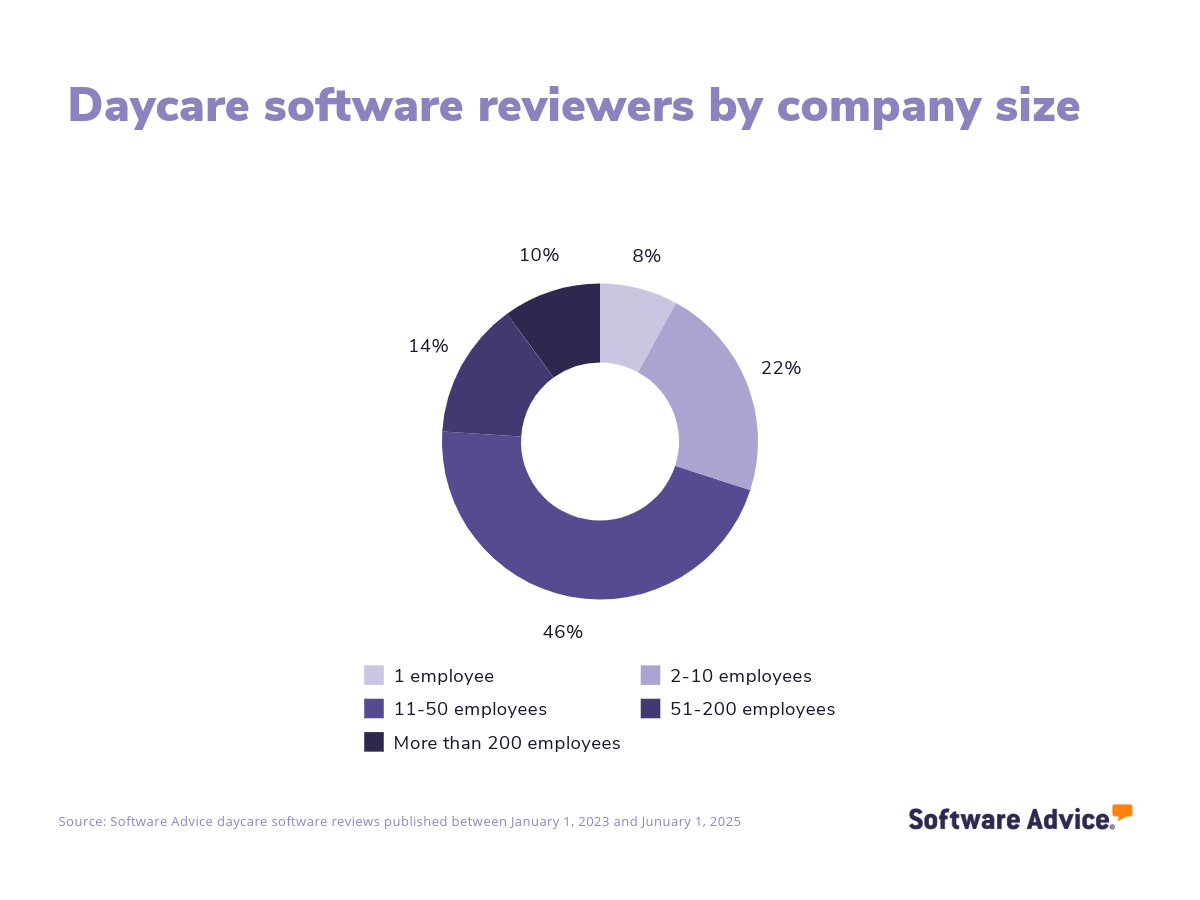
Types of daycare software users: When analyzing daycare reviewers' profiles, we see that the vast majority (76%) of all reviewers in the last two years come from companies with fewer than 50 employees. This may be because small and medium-sized companies need to streamline administrative tasks and regulatory compliance with a cost-effective solution.
Most daycare software solutions on the market are priced on a monthly subscription basis. Entry-level plans start at $44, mid-tier platforms cost about $95, and more advanced plans, which typically include development assessments, staff management, and advanced reporting, can cost around $201. [3]
When selecting daycare software for the first time, consider whether a daycare-specific solution or a broader school management software is more suitable for your needs, as the latter often serves K-12 schools and universities. To make an informed decision, evaluate your budget, the number of users, and the necessary integrations. Engage stakeholders by asking critical questions to assess potential systems, such as:
How does the software support communication between teachers and parents, and what features are available for sharing updates and concerns?
What capabilities does the system offer for tracking and managing children's health and safety records, including allergies and emergency contacts?
How user-friendly is the interface for staff, and what kind of training or support is provided during implementation?
What options are available for customizing the software to fit our daycare center's specific needs, such as branding or unique reporting requirements?
With over 100 daycare products listed on our site, it can be difficult to narrow down your options and find the right tool for your business. This guide will help you understand the essential features of daycare software, as well as pricing, benefits, and tips for selecting and onboarding your new software.
What is daycare software?
Daycare professionals are busy, and it can be difficult for them to keep up with their young charges and manage administrative, scheduling, and financial duties. That’s where daycare management software comes in: it helps daycare workers simplify and streamline the manual processes they do every day, including recordkeeping, generating activity reports, managing billing and attendance, and immunization tracking.
Daycare technology is useful for all kinds of childcare centers, including:
Licensed family childcare homes
Early childhood education programs/preschools
After-school programs
Drop-in programs
Busting myths: Some center administrators may think that a single-application software, such as an accounting program from an industry-agnostic vendor, will be enough to fulfill their needs. However, that isn’t ideal for long-term growth. It’s usually better to get a dedicated daycare management solution because it lets you streamline every specific aspect of the business, eliminating the need to buy different applications from multiple vendors that don’t interface with one another.
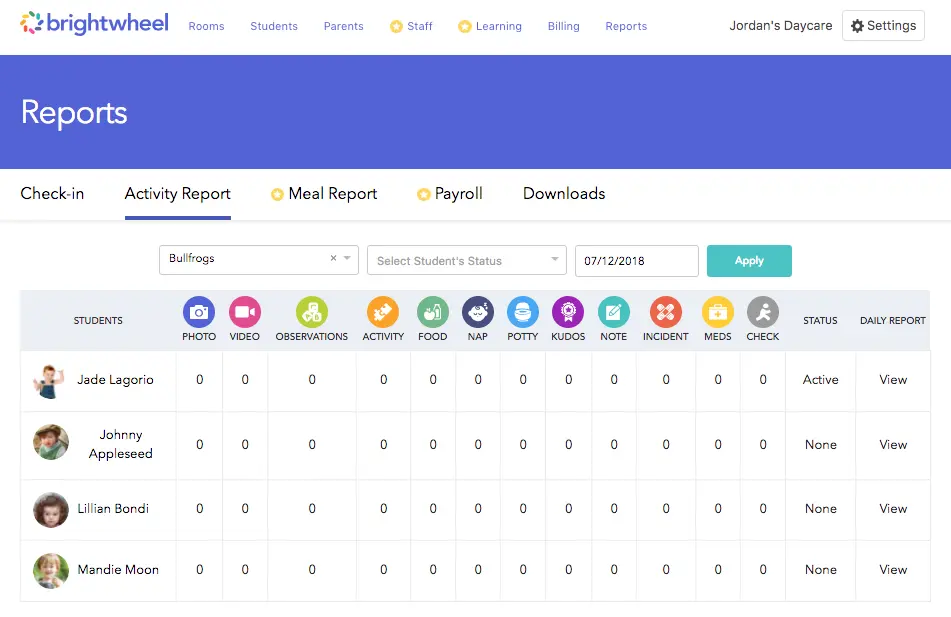
Example of an activity report generated within a daycare software solution (Source)
Essential features of daycare software
When choosing a daycare software solution, it’s crucial to select one with specific features for your business needs. All software in this category comes with a set of core features for managing attendance and registration, tracking calendars, and communicating. Other common features that may or may not come as standard incude a parent portal, payment processing, resource scheduling, and lesson planning. We analyzed thousands of reviews to show you the most critical daycare software features, according to real users.
Core daycare software features
Communications management | Record and track all relevant internal and external communications. 90% of reviewers rate this feature as critical or highly important. |
Attendance tracking | Track the attendance of specific individuals or groups. 78% rate this feature as critical or highly important. |
Calendar management | Track and manage schedules and meetings via an integrated calendar. |
Registration management | Oversee and coordinate the registration of attendees, visitors, customers, events, activities, etc. |
Common daycare software features
Parent portal | Portal for parents to see and update children's info, track progress, and more. 91% of reviewers rate this feature as critical or highly important. |
Records management | Record, store, update, and retrieve information. 81% rate this feature as critical or highly important. |
Payment processing | Accept, record, and reconcile financial transactions. 74% rate this feature as critical or highly important. |
Billing and invoicing | Create, manage, and send invoices or bills to clients. 65% rate this feature as critical or highly important. |
Document management | Store, manage, and track all electronic documents in a centralized location. |
Employee management | Track employee schedules, availability, and performance across projects and tasks. |
Enrollments/onboarding | Manage the enrollment and onboarding of all new applicants. |
Lesson planning | Create, organize, and manage class lesson plans efficiently. |
Meal/nutrition management | Plan the scheduling and distribution of meals and snacks. |
Resource scheduling | Allocate and manage resources, such as employees, equipment, facilities, and other assets. |
Task management | Create, manage, and track all task activities and progression. |
Benefits and competitive advantages of using daycare software
We analyzed over 2,600 verified reviews from users across industries including education, non-profit, and hospitals and health care to understand how daycare software benefits their businesses. Some of the most important findings include:
Enhanced teacher and parent communication
By providing a seamless platform for real-time updates, messaging, and sharing of daily activities, such tools improve the overall communication experience within the educational environment and between parents and daycare providers.
Simplified child progress tracking
Daycare systems offer a platform for logging daily activities, developmental milestones, and essential records. This tracking system enhances communication between parents and daycare providers, offering real-time insights into children's progress and fostering a collaborative environment for supporting children's development.
Improved parental controls
Functionalities like real-time updates, photos, and messages about children's daily activities and well-being enhance parental control. These allow parents to stay informed and connected with their children's experiences at daycare, making it easier for parents to manage their child's care and stay engaged with the daycare staff, ultimately fostering a more collaborative and transparent environment.
How to choose the best daycare software for your business
Step 1: Assess your business’s needs
Before you start your daycare software selection process, it’s critical that you define your business’s specific needs, such as managing scheduling, keeping track of immunization records, and monitoring attendance. Not only will this guide you to the childcare management software tool that meets your current needs—you’ll end up with software that supports your long-term goals as well.
Know which processes you need to optimize
Depending on your business model, you may need a system to automate attendance tracking, centralize communications, store information such as health records and emergency contacts, and manage resource allocation. Make sure these or other features you need are available before making a purchase.
Set a budget
When setting a budget, it's vital to calculate initial costs, subscription fees, and the ROI from automating outdated processes. With a detailed cost-benefit analysis, any investment in new childcare management software can be confidently justified, envisioning a future where the team focuses more on nurturing children rather than endlessly juggling paperwork.
Get input from stakeholders
In a childcare institution, many stakeholders will need to use the software for different purposes. For that reason, it’s essential to ensure the software meets administrative and pedagogical requirements. Engage with staff, parents, administrators, and other stakeholders involved in your daycare business to gather insights on the desired and most useful features.
Step 2: Evaluate your options and make a shortlist
With so many software options to choose from, selecting the best childcare management software for your business can be challenging, but with the right resources and support, it doesn’t have to be.
Explore our list of daycare FrontRunners
You can start compiling your shortlist of daycare software with our 2024 FrontRunners report for daycare software. Only products that earn top user ratings make this list. You can also check out our full methodology description for more details on how the report is compiled.
For more help creating a shortlist and a free comparison chart, check out our Ultimate Software Vendor Evaluation Guide. This will help you compare software evaluation criteria for each prospective vendor by tracking aspects such as functionalities, support offerings, costs, and deployment options.
Step 3: Make your selection
Once your shortlist is narrowed down to two or three options, start contacting vendors to learn more about these products.
Get ready for vendor demos
During demos, here are some questions you should consider asking vendors that will help you make the right decision:
What customization options are currently available?
Ask childcare management software vendors if the tool can be tailored to suit the specific way your team manages different childcare tasks, from parent communication to health data recording.
Do you offer any kind of personalized onboarding or customer support options?
Software onboarding can be a decisive moment to ask questions and familiarize yourself with a tool you will use for a long time. It's crucial to inquire about the vendor's strategy for supporting you and your team with any doubts you might have throughout the implementation process.
Which are the software’s scalability options?
Understanding scalability options means assessing how the software can grow with your business. This includes its ability to handle increasing numbers of users, children, and data and the possibility to add new features or modules as your needs evolve.
Step 4: Make the most of your daycare software
Now it’s time to start using your new software. Follow these tips to ensure a smooth outcome:
Training: Explore online resources and organize training sessions for all staff members to ensure they are comfortable with the software's features.
Communication: Establish clear communication channels within the software for staff and parents to facilitate seamless information sharing.
Data storage: Ensure all child and family information is securely stored and easily accessible. In addition, regularly back up data to prevent dada loss and ensure data integrity.
Compliance: Use the software to track compliance with local regulations, such as child-to-staff ratios, health records, and safety protocols.
Software related to daycare
When selecting daycare software, it's important to understand that certain features may require additional software systems to truly enhance the quality of your child care. While many platforms come equipped with a wide range of tools, you may find that some functionalities are best served by complementary software solutions. Here are a few types of software that are often associated with daycare systems, which may or may not be included in your chosen platform:
School management software: Helps educational institutions efficiently manage their administrative tasks and day-to-day activities, including attendance tracking, grading systems, and class and exam scheduling.
School accounting software: Dedicated software to handle the accounting side of an academic institution that helps staff work to their fullest potential by automating error-prone, time-consuming tasks.
More resources for your daycare journey
About our contributors
Author
Alejandra Aranda is a content analyst at Software Advice, specializing in technology trends while always on the lookout for strategic insights for small and midsize businesses. Her areas of focus are brand management, performance marketing, and anything related to digital marketing.
Alejandra’s research and analysis is informed by more than 150,000 authentic user reviews on Software Advice and over 15,000 interactions between Software Advice software advisors and marketing software buyers. Alejandra also regularly analyzes market sentiment by conducting surveys of marketing leaders so she can provide the most up-to-date and helpful information to small and midsize businesses purchasing software or services.
Alejandra led the session “Q-Commerce & M-Commerce in Spain 2023: How is consumption evolving thanks to technology” at Universidad Complutense de Madrid and has had research published in Spanish publications such as El Economista, Corresponsables, and El Español.
When she is not on the lookout for new marketing trends, she is probably exploring a bookshop or researching a new travel destination.
Editor
Mehar Luthra is a team lead at Software Advice and specializes in editing reports that cover the latest trends affecting small businesses. With nearly a decade of experience, she has edited a multitude of research articles, top-rated software reports, and thought leadership articles for diverse markets such as Brazil, Japan, Canada, France, Australia, and India. She finds it particularly rewarding to produce content that provides small-business owners with practical tips and helpful advice on topics such as the digitalisation of small businesses, eCommerce trends, and HR developments.
Armed with a double bachelor’s in law (LL.B.) and business economics from Delhi University, she won a full scholarship to study for a master’s in creative writing at the National University of Ireland, Galway. In addition, she has written blog articles spanning a variety of topics such as fiction and non-fiction books, mental health and anxiety, the latest restaurants, and more. Her articles have been featured in Ireland’s national magazine The Village, among other publications. A die-hard journaling fan, she enjoys watching psychological thrillers, reading fiction books, and drinking iced coffee (even in the winter).
Sources
Software Advice reviews data: Software Advice reviews are collected from verified users for individual software products. For this report, we analyzed reviews from the past two years as of the production date. Read the complete methodology.
Software Advice software pricing data: Only products with publicly available pricing information and qualified software products within the category, as of May 2024, are included in the pricing analysis. Read the complete methodology.
Daycare FAQs
- What is the best childcare management software?
According to our analysis of products with high market demand and reviews, Playground had the highest overall rating from verified reviewers on Software Advice.
- How much does daycare software cost?
Pricing for daycare software starts at $44 for basic systems, including features like check-in/check-out, digital sign-in, attendance reports, and parent communications. Mid-tier platforms cost about $95 and include billing and invoicing, lesson planning, and curriculum management features. More advanced plans can cost around $201, with features such as development assessments, staff management, and advanced reporting.
- How much does Procare cost per month?
Procare Solutions does not publicly disclose their monthly price. Instead, you would need to contact Procare’s sales team directly to obtain specific pricing information.
- What is a childcare management system?
Childcare management software, also known as childcare software or daycare software, is designed to help daycare centers, preschools, and childcare providers manage their operations, including recordkeeping, activity reports, billing, attendance, and immunization tracking.
- What does CCMS mean in daycare?
In the context of daycare, CCMS stands for ‘Child Care Management System’.