


Best Digital Asset Management Software of 2026
Updated February 18, 2026 at 9:50 AM

Written by David Jani
Content Analyst

Edited by Caroline Rousseau
Senior Editor

Talk with us for a free 15-min consultation
Expert advisors like Jacqueline, who have helped 1,000+ companies, can find the right software for your needs.
- All Software
- Software Advice FrontRunners
- Popular Comparisons
- Buyer's Guide
- Frequently Asked Questions
Digital asset management software helps creative, marketing, and brand teams centralize digital files from logos to videos for easy access and reuse. Across 300 tools tailored to diverse workflows, branding needs, and compliance rules, buyers face a complex landscape. To help you narrow it down, I worked with our DAM software advisors to curate a list of recommended productsi and a list of the digital asset management software frontrunners based on user reviews. For further information, read my digital asset management software buyer's guide.
Digital Asset Management Software
Sort by
Reviews: Sorts listings by the number of user reviews we have published, greatest to least.
Average Rating: Sorts listings by overall star rating based on user reviews, highest to lowest.
Alphabetically (A-Z): Sorts listings by product name from A to Z.

Klyck is a modern AI-powered content and document management platform designed to eliminate confusing folder systems and scatter...Read more about Klyck


Klyck's Best Rated Features
See All
Klyck's Worst Rated Features
See All

Contentverse is document management for every department in every industry. It's a blank slate for your team to recreate your st...Read more about Contentverse


WoodWing Assets is a versatile and powerful Digital Asset Management (DAM) solution, built to meet the demands of organizations,...Read more about WoodWing Assets


IntelligenceBank is a cloud-based Digital Asset Management (DAM) solution that helps businesses to streamline marketing processe...Read more about IntelligenceBank


IntelligenceBank's Best Rated Features
See All
IntelligenceBank's Worst Rated Features
See All

M-Files is a document management system designed to organize information and improve efficiency. It is used in industries such a...Read more about M-Files


M-Files's Best Rated Features
See All
M-Files's Worst Rated Features
See All
Software Advice FrontRunners 2026

(13228)

(5622)

(2221)

(83)

(141)

(224)

(150)

(282)

(89)
Best for Usability

Canva

Canva is the highest rated for its usability out of the most popular tools, based on our analysis of Digital Asset Management products with the most market demand.
Canva is best for users seeking high usability in design tools, including small business owners and marketers with limited design experience. Our reviewers say its intuitive interface and ready-made templates make it easy to create professional graphics quickly, streamlining workflows for both beginners and experienced users.
- Reviewers Perspective
"I use it for creating calendars, organizing ideas with bullet points, and simple graphic design for my business, and it’s been extremely helpful."
CPCharlene Prudhomme
owner
Used for 6-12 months
We analyzed 841 verified user reviews for Canva to find out what actual users really think.
Design
Users create a variety of professional designs without advanced skills. Canva’s interface and templates enable quick production of marketing visuals, presentations, and social media graphics.Templates
Teams leverage a vast library of templates to streamline creation of presentations and marketing materials. Ready-made designs save time and support consistent branding.Social Media
Businesses design and schedule social media posts efficiently. Canva’s tools and templates help maintain brand consistency and engage audiences across multiple platforms. - Key FeaturesCanva's scoreCategory average
Content Management
4.604.65 category average
Drag & Drop
4.674.72 category average
File Management
4.454.58 category average
- Screenshots


Best for Collaboration

Box

Box is the most requested by users for collaboration out of the most popular tools, based on our analysis of Digital Asset Management products with the most market demand.
Box is ideal for teams prioritizing collaboration, such as SMBs managing shared documents and projects across departments. Our reviewers point out that Box enables real-time editing, seamless sharing, and customizable permissions, making it easy to coordinate and update files among multiple users.
- Reviewers Perspective
"Box stands out for its seamless file sharing and collaboration features, robust security measures, and integrations with a wide range of productivity tools."
MFMassimo Ferrari
Sales
Used for 2+ years
We analyzed 817 verified user reviews for Box to find out what actual users really think.
File Sharing
Teams share files and folders securely with colleagues and partners from any device. Customizable permissions and link sharing support organized, cross-platform collaboration.Cloud Storage
Organizations store and access files from anywhere, reducing reliance on local storage. Box supports a wide range of file types and offers generous free storage for personal and business use.Security and Access Control
Businesses set detailed access controls and leverage encryption and compliance features. Box supports industry standards like HIPAA and GDPR, ensuring sensitive data remains protected. - Key FeaturesBox's scoreCategory average
Content Management
4.584.65 category average
Drag & Drop
4.624.72 category average
File Management
4.594.58 category average
- Screenshots


Best for Customization

Airtable

Airtable is the most requested by users for customization out of the most popular tools, based on our analysis of Digital Asset Management products with the most market demand.
Airtable is best for organizations needing extensive customization in their workflows and data management. Our reviewers say its flexible database structure, customizable fields, and ability to automate processes allow teams to tailor the platform to diverse project and collaboration needs.
- Reviewers Perspective
"Airtable facilitates all the features that allows me to track, plan and organize optometric projects automatically across my two current organizations."
COCharles Omondi
National Treasurer
Used for 2+ years
We analyzed 768 verified user reviews for Airtable to find out what actual users really think.
Data Management
Teams organize and visualize data across projects using custom dashboards and automation. Airtable supports complex relational data and streamlines processes by reducing manual entry.Team Collaboration
Departments coordinate tasks and updates with shared bases and role-based access. Airtable’s collaborative features keep teams aligned and improve project tracking.Spreadsheets
Organizations combine spreadsheet familiarity with advanced database features. Multiple views and relational links enable flexible data management and workflow customization. - Key FeaturesAirtable's scoreCategory average
Content Management
4.854.65 category average
Drag & Drop
4.754.72 category average
File Management
4.624.58 category average
- Screenshots


Most Used By Information Technology and Services

Cloudinary

In our analysis of Digital Asset Management products with the most market demand, Cloudinary is the most requested by users in Information Technology and Services out of the most popular tools.
Cloudinary is most used by information technology and services teams managing large volumes of media assets. Our reviewers say its robust APIs, automatic optimization, and ease of integration help developers streamline image and video management, improving website performance and workflow efficiency.
- Reviewers Perspective
"I love how easy Cloudinary makes it to upload and display images and videos on a website with a few API calls — the optimization features alone blew my website’s load times in half, with lightning-fast delivery over a CDN."
EGEleandro Grancho
Software Developer
Used for 2+ years
We analyzed 66 verified user reviews for Cloudinary to find out what actual users really think.
Image and Video Management
Developers manage large volumes of images, videos, and audio without quality loss. Automatic optimization and responsive delivery improve website performance and simplify asset management.Image Resizing
Teams compress, crop, and adjust images via URL-based APIs. This reduces bandwidth usage and boosts site speed, supporting efficient handling of diverse asset formats.Digital Asset Management
Organizations organize, store, and deliver digital assets in a centralized system. Folder management, metadata, and sharing features streamline collaboration for both technical and non-technical users. - Key FeaturesCloudinary's scoreCategory average
Content Management
4.674.65 category average
File Management
5.04.58 category average
- Screenshots


Most Rated for Enterprise


Of the products listed on our FrontRunners report, Adobe Experience Manager is the most requested by enterprises out of the most popular tools.
Adobe Experience Manager is most rated for enterprise users who require advanced web content management and integration capabilities. Our reviewers point out its flexible workflow integration, robust component system, and seamless connections with other Adobe tools support complex digital experience needs at scale.
- Reviewers Perspective
"The thing I like most about Adobe Experience Manager is that it supports Headless and Hybrid CMS models and it also has very good collaboration features."
LGLakshita Goyal
CEO
Used for 6-12 months
We analyzed 86 verified user reviews for Adobe Experience Manager to find out what actual users really think.
Ease of Use
Users navigate Adobe Experience Manager with ease, quickly accessing tools and personalizing workflows. This supports business teams managing and deploying content across channels, even without advanced technical backgrounds.Content Authoring
Teams create, edit, and publish content efficiently using role-based access and customizable templates. This enables multiple contributors to update content simultaneously, reducing reliance on developers.Integrations
Organizations integrate Adobe Experience Manager with other Adobe tools, third-party platforms, and development frameworks. APIs and backend configurations allow custom integrations to fit specific business needs. - Key FeaturesAdobe Experience Manager's scoreCategory average
Content Management
4.114.65 category average
Drag & Drop
5.04.72 category average
- Screenshots


Most Used By Commercial Real Estate

Bynder

Bynder is the most requested by users in commercial real estate out of the most popular tools.
Bynder is most used by commercial real estate teams needing centralized asset management and brand consistency. Our reviewers say its configurable taxonomy, easy sharing, and access controls help organizations efficiently organize, find, and distribute marketing materials across teams and partners.
- Reviewers Perspective
"The ability to categorize assets and add our own filters and taxonomy has made our digital asset management a breeze compared to our previous file structure."
KLKari Leahy
Marketing Project Manager
Used for 6-12 months
We analyzed 147 verified user reviews for Bynder to find out what actual users really think.
Asset Management
Teams organize, categorize, and safeguard digital content in one location. Batch tagging, flexible permissions, and version control support efficient management of large asset volumes.Document Management
Organizations categorize, tag, and manage documents for simplified content creation and usage. Search and reporting tools help teams locate and track files across the business.Search Functionality
Staff locate assets quickly using keywords, filters, and metadata. Customizable search criteria and tagging improve the accuracy and relevance of results, supporting productivity. - Key FeaturesBynder's scoreCategory average
Content Management
4.474.65 category average
Drag & Drop
3.674.72 category average
File Management
3.674.58 category average
- Screenshots


Most Rated for SMBs

MediaValet

MediaValet is the most requested by small businesses out of the most popular tools, based on our analysis of Digital Asset Management products with the most market demand.
MediaValet is most rated for SMBs seeking a reliable digital asset management solution. Our reviewers say its user-friendly onboarding, centralized asset storage, and efficient sharing features help teams quickly organize and access images and documents, reducing time spent searching for files.
- Reviewers Perspective
"MediaValet has provided a reliable, user friendly Digital Asset Management (DAM) solution for our brand to manage and share our image assets both with internal staff and outside partners."
EUErik Uppman
Vice President of Marketing
Used for 2+ years
We analyzed 94 verified user reviews for MediaValet to find out what actual users really think.
Digital Asset Management
Organizations centralize, organize, and share digital assets across teams and locations. Categorization, metatagging, and administrative controls streamline workflows and improve collaboration.Image File Management
Teams categorize and store large image volumes with tagging and custom templates. Thumbnail previews and batch operations support efficient image management.Upload Process
Staff use drag-and-drop and bulk uploading to add assets. Tagging and editing during upload maintain organization and clarity for distributed teams. - Key FeaturesMediaValet's scoreCategory average
Content Management
4.504.65 category average
Drag & Drop
4.404.72 category average
File Management
4.344.58 category average
- Screenshots


Best for Customer Satisfaction

Kontainer

In our analysis of Digital Asset Management products with the most market demand, Kontainer is the highest rated for customer satisfaction out of the most popular tools.
Kontainer is best for customer satisfaction, serving businesses that prioritize easy file sharing and client collaboration. Our reviewers point out that its intuitive interface, responsive support, and customizable access controls make sharing marketing materials and images with customers and partners efficient and straightforward.
- Reviewers Perspective
"It allows us to organise ourselves quickly and efficiently when sharing information between all the company's teams: sales, marketing, production, and also with external collaborators."
JRJosep Rayó
Graphic Design
Used for 1-2 years
We analyzed 206 verified user reviews for Kontainer to find out what actual users really think.
Ease of Use
Staff of all skill levels adapt quickly to Kontainer’s interface. The visual layout and practical features streamline organization and collaboration, reducing the learning curve for new users.Customer Support
Teams receive quick help and guidance through multiple channels. Kontainer’s support staff implement user feedback and resolve issues efficiently, ensuring smooth onboarding and ongoing use.File Sharing
Organizations distribute images, documents, and marketing materials using custom links and permissions. This centralizes sharing for both internal teams and external partners, saving time and streamlining workflows. - Key FeaturesKontainer's scoreCategory average
Content Management
4.624.65 category average
Drag & Drop
4.04.72 category average
File Management
4.544.58 category average
- Screenshots


Best for Quick Implementation

Dash

In our analysis of Digital Asset Management products with the most market demand, Dash is the most requested by users for quick implementation out of the most popular tools.
Dash is best for quick implementation, making it suitable for teams needing to rapidly centralize and manage digital assets. Our reviewers say setup is straightforward and the intuitive UI enables users to onboard and start organizing assets with minimal training, improving productivity from day one.
- Reviewers Perspective
"This software is very user-friendly and excellent for sharing assets with multiple people. When used effectively, it really helps streamline processes and improve efficiency."
DPDom P
Business Analyst
Used for 6-12 months
We analyzed 71 verified user reviews for Dash to find out what actual users really think.
Asset Management
Teams store, organize, and retrieve media files with flexible tagging and categorization. Custom fields and scalable structure support organized libraries for growing businesses.Ease of Use
Staff quickly adapt to Dash’s intuitive interface. Even new or infrequent users locate, share, and manage assets without difficulty, reducing onboarding time.Customer Support
Organizations access support through chat and video calls. Dash’s knowledgeable staff assist with onboarding and troubleshooting, ensuring smooth implementation. - Key FeaturesDash's scoreCategory average
Content Management
4.834.65 category average
Drag & Drop
5.04.72 category average
File Management
4.834.58 category average
- Screenshots


Methodology
The research for the best digital asset management software list was conducted in October 2025. We evaluated data (user reviews and demand signals) from the past 24 months as of the research date. Read the complete methodology.
Popular Digital Asset Management Comparisons


Buyer's Guide
This detailed guide will help you find and buy the right digital asset management software for you and your business.
Last Updated on April 02, 2025Here's what we'll cover:
What you need to know about digital asset management software
What is digital asset management software?
Essential features of digital asset management software
Benefits and competitive advantages of using digital asset management software
How to choose the best digital asset management software for your business
Software related to digital asset management systems
More resources for your digital asset management journey
What you need to know about digital asset management software
Digital asset management software is a system that businesses use to automate elements of their handling of digital material, such as image, video, and audio files. This empowers organizations to organize, locate, share, and work on these files within a centralized (often cloud storage) infrastructure. In the last year, we’ve spoken to 390 marketing software buyers to support them in finding the right tools to improve their promotional activities and find the best systems for their individual needs. [1]
Looking at the digital asset management software market specifically, we have well over 300 DAM systems listed on our website and have collected more than 6,000 reviews in the past year. Buyers have plenty of options available and vital feedback to help identify the best individual choices.
Most digital asset management systems are priced on a monthly subscription basis, starting at $74 for entry-level options, which rises to $126 and upwards for mid-tier systems. For upper-end products, prices usually start from $459. [2]
First-time buyers of DAM software should start the product selection process by considering their budgetary requirements, the number of users they need, the storage capacity necessary, and vital integrations that will help the process of managing digital asset files run smoothly. Some important questions to ask your stakeholders at this stage include the following:
Does the software provide enough storage space for our file portfolio?
Do the options have secure, granular controls for sharing files with stakeholders?
What workflows can this system automate?
Does the DAM system integrate effectively with other tools such as content management systems (CMS), productivity software, or social media management tools?
What is digital asset management software?
Digital asset management (DAM) software is a solution that helps businesses manage their content assets such as brand logos, product logos, product images, and media files. The software enables businesses to manage the development, organization, and distribution of the content assets used for creating brand pages, product websites, sales and marketing collaterals, and advertisements.
Since digital content is a subset of all content, it logically follows that DAM software is a subset of content management software. And, it is true. In fact, many content management systems have applications designed to handle digital assets. The difference is that DAM software is specifically designed and purpose-built to manage digital assets and media files.
Additionally, DAM software stores and organizes files for retrieval through search functions, and allows users to download digital assets in various file formats.
Users can create and manage asset profiles, which can include descriptions, metadata, keywords associated with the file, rights and permissions, and information on the creator. Many systems also provide file conversion functionality to download media in the appropriate format.
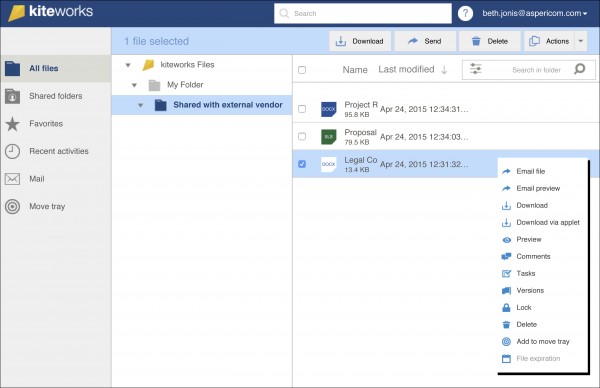
Sharing files externally with kiteworks
Typically, a DAM system can integrate with other applications, such as a content management systems, project management software, enterprise asset management software, and tools for media manipulation, such as Adobe Photoshop.
Essential features of digital asset management software
When looking at the hundreds of digital asset management system products available in the market, it's important to prioritize the features that will suit your business best. Some functionalities such as asset libraries and asset sharing are usually included as standard. However, other digital asset management software features, such as content management, branding customizations, or version control are usually included in these platforms as well. Our analysis of thousands of reviews of DAM software uncovers some of the main features users value the most. [3]
Core DAM features
Asset libraries | Organize the digital assets from across a business so they can be accessed more directly by staff members. 88% of users find this feature highly important or critical. |
Asset sharing | Share essential digital resources and media material with stakeholders and fellow staff members. 82% of users find this feature highly important or critical. |
Common DAM features
Content management | Develop and modify creative digital assets for marketing and promotion. 93% of users find this feature highly important or critical. |
Search/filter | Adapt filtering criteria and classifications to improve the searchability of assets made by your creative and marketing teams. 89% of users find this feature highly important or critical. |
Reporting/analytics | Collect data and generate analysis reports for better visibility over staff activity, performance, and other key KPIs. |
Rights management | Create rules and permissions for staff members, to ensure that sensitive data and assets are only accessible to key stakeholders. |
Version control | Track revisions made to specific assets and review and revert to older versions of an existing asset. |
Benefits and competitive advantages of using digital asset management software
Our analysis of over 6,000 reviews from the last 12 months uncovers a number of digital asset management software benefits. The top among reviewers is its ability to help teams work more closely together on projects that involve the development and deployment of digital assets, centralize brand marketing, and manage more intuitive workflows.
Improved team collaboration: A shared system facilitates better communication on projects, allowing stakeholders to comment, review, and approve digital assets.
Centralized brand marketing: Unify brand assets in a central storage system, create sharing permissions, and set, and edit, guidelines for branded material.
Better workflow management: Optimize workflows for tasks with automations, easier searchability of digital assets stored in your database, and scheduling assignments for staff.
How to choose the best digital asset management software for your business
Step 1: Define your requirements
Understanding your specific needs and planning the requirements necessary to onboard a DAM system are important steps to take before selecting your software. This should take into account how much storage you’ll need for your digital assets, the workflow tools included, the sharing features, and whether you need any content management solutions included with the software.
Other requirements to keep in mind when planning your software options include the budget necessary, the training needed, and the main integrations you will use with it.
How much does DAM software cost?
The cost of digital asset management software varies depending on several factors. Most systems are offered through monthly subscription packages; however, the tier level you pick will depend on factors such as the number of users needed, storage capacity, and specific features that your business will rely upon.
Pricing plan tiers are commonly organized as follows for DAM systems:
Entry-level: DAM software prices can start from $74 a month for an entry-level system with relatively basic features, such as asset libraries, sharing features, tagging, and search tools.
Mid-tier plans: Starting from $126, these plans come with more storage capacity, collaboration tools, version history, and approval workflow management.
High-end: These plans for digital asset management software often start from $459 and come with premium features, such as AI-powered insights on assets, advanced reporting, and automated metadata extraction.
Possible integrations
It’s also important to clearly understand how and where the DAM system you choose will integrate with software you already have or plan to use soon. This will help make the transition to using a digital asset management system much smoother and avoid potential bottlenecks in your daily work.
Some of the systems that might come into play are platforms that integrate into the process of planning, creating, managing, and publishing digital assets, such as content management systems, graphic design software, and productivity software. These all need to work together effectively so that digital assets remain properly tracked and tagged properly.
Be careful of the potential drawbacks
Onboarding a digital asset management system can bring many benefits, but it’s also wise to consider possible pitfalls during the selection and onboarding process. Most of these issues can be avoided, but it’s important to look out for mentions of the following potential problems when reviewing choices on the market.
Performance speed: Many users encounter issues with the speed and fidelity of the DAM software they adopt. Lagging systems can cause a more protracted user experience, delays in processes, and potential issues with syncing data.
Issue management: Bugs and glitches can occur in DAM systems leading to lost data and interruptions. When assessing options, check vendor reputations carefully and make sure they have sufficient customer support for bugs and regular updates to correct faults and issues.
File management: File management settings in digital asset management systems can cause users headaches. Some reviewers identify challenges with file search, organization, and categorization of assets as the consequences of this issue.
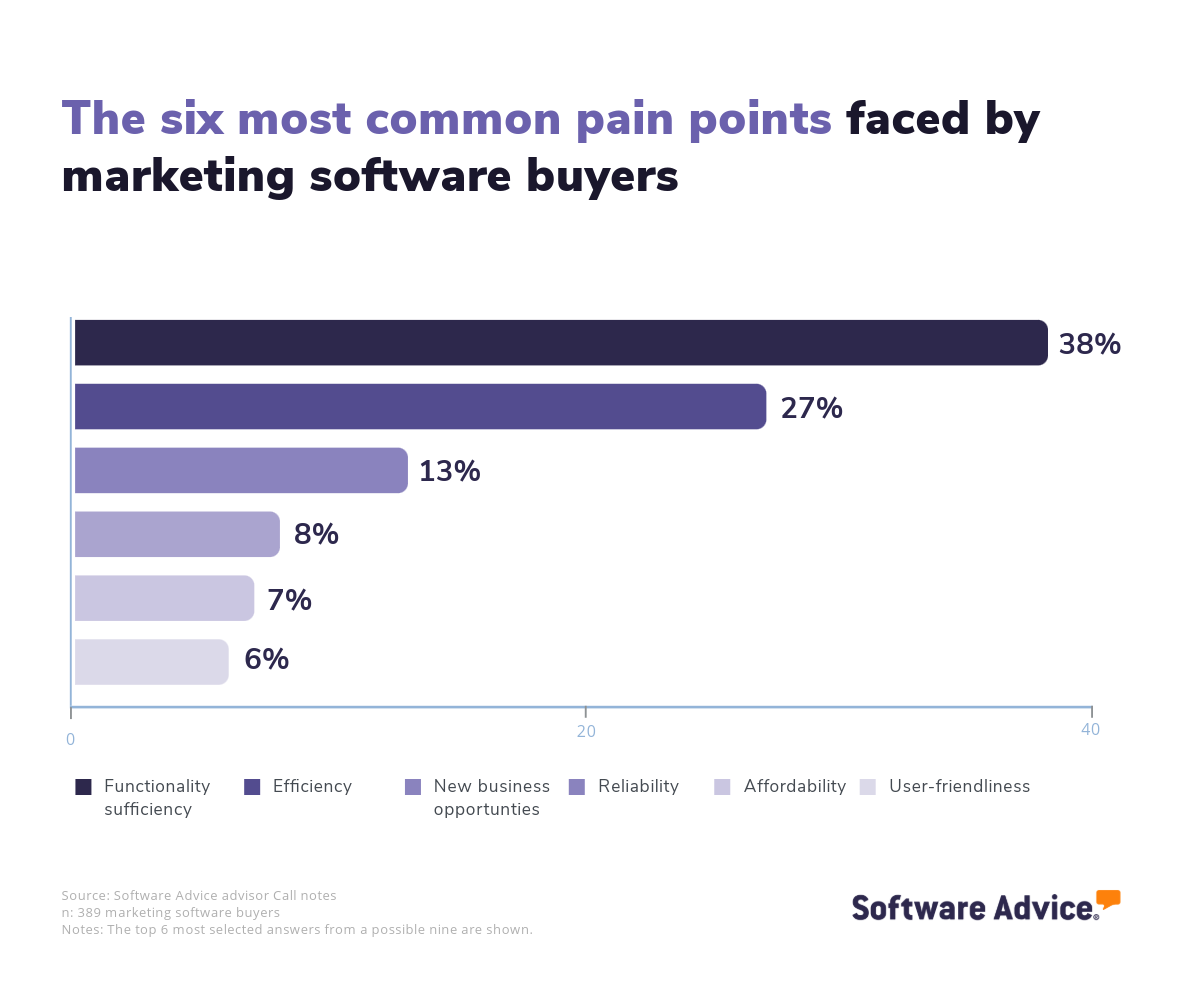
Calls with marketing buyers generally also reveal similar concerns from software users, such as pain points involving efficiency and reliability. However, the biggest overall issue for marketers is finding a system that suitably delivers the functions needed. It is important when assessing options to make sure the functions fit the organization in this way, to avoid adopting a system with too few features or ones that are too complex.
 CENTERED
Step 2: Make a shortlist of digital asset management software
There are hundreds of digital asset management systems to choose from, and selecting the best choice for your specific organization can prove tricky. However, with the right resources and support, it can be simplified.
Get qualified help from an advisor
Software Advice offers support from dedicated advisors who have direct experience helping buyers select a digital asset management system. Chat online with one of our team now, or schedule a call for help devising a shortlist of options that meet your needs.
After your call, you can also use our guide: After Your Advisor Call: 4 Tips To Keep Your Software Purchase on Track to help make the rest of the buying process smoother.
Explore our front-running DAM software selections
If you’re not quite ready to speak to an advisor or want to understand the market a bit better before arranging a call, our FrontRunners report can help you get started. This report lists the products with the highest user ratings from reviewers.
You can also use our free comparison chart, The Ultimate Software Vendor Evaluation Guide to assess evaluation criteria for possible software.
Step 3: Pick your best option
Once you’ve identified the most suitable selections for your organization, the next stage is to try vendor demonstrations. These give you a chance to properly test the included features to see how they fit your company’s expertise and expectations. However, preparation is important to get the most from these demos.
Preparing for vendor demos
Vendor demo sessions are not only a vital chance to check the system works as promised, it’s also your best moment to clear up any questions or doubts you and your stakeholders may have about adopting a new digital management system. Some practical questions you may ask at this point include:
What customer support is offered during onboarding (and beyond)?
At the earliest stages do you need extra support for you and your team as you adapt to the new system? If you do, does the company offer these services beyond the initial stages? Companies will usually, at the very least, provide passive customer support such as FAQs and community forums but may limit dedicated phone or live chat support or even make it a premium feature. It’s crucial to get clarity on what is on offer and whether it fits your expectations, budget, and requirements.
How does the upgrade path work?
If you are looking to adopt an entry-level or mid-tier digital asset management product, it’s sensible to get a clear picture of how suitable the company’s upgrade path will be as you grow. Does the price match your likely future budgets, and are the support and features what you may need going forward? These are factors to think about as you check the options.
Does the system connect with our tech stack?
As we’ve already discussed, it is important to plan how a system will work with possible integrations. At the demo and vendor call stage of the process you should explore this point particularly. Ask vendor representatives about how specific tools in your tech stack connect to understand how feasible integration is and whether connecting products are suitably supported.
How can the system be customized to fit specific needs?
Another factor to consider is how a system can be optimized for your specific needs. If you are just using your DAM system for storage, you should check if the tagging, filtering, and metadata information for files can be managed to fit your internal cataloging or categorization practices. Additionally, if you want to create and design digital assets in the tool, make sure it has the right features to build the kind of assets you need intuitively.
Step 4: Make the most of your digital asset management software
When you’ve selected the digital asset management product that works best for your organization, the next step is the implementation process. No matter if you’re switching from one DAM system to another or adopting one for the first time, it is essential to make sure it is introduced effectively into the business. To do this properly, the following steps can help.
Pick suitable implementation stakeholders: Pick a person or a team of people to take the lead in introducing the software to the business and potentially managing its use going forward. This role should oversee both technical and project management considerations of the new tool.
Migrate your files to the system: The time has come to move your digital assets from their existing storage point to the new system. At this stage, you should finalize the system's organization, ensure everything is backed up, and gradually move files into their new location.
Introduce staff to the new system: As the system is onboarded, it’s vital to set aside some time to formally introduce staff to the new digital asset management solution. This may include onboarding sessions and training but what is vital is that they are given sufficient information on accessing and using the new system.
Software related to digital asset management systems
A digital asset management system will usually come with a wide suite of features for handling your key marketing assets and digital files. However, in some cases, these may not cover the exact functionality your marketing team needs. When this happens, an alternative might work better. Some common systems that have similar features to DAM software include but may or may not come as part of the main package include the following:
Brand management software: This software helps businesses manage and maintain their brand identity with features such as asset management, brand guidelines, management, workflow and collaboration tools, and tracking functionality.
Content management systems: Content management systems (CMS) support an organization’s ability to store, publish, share content both internally and with the public. It provides a range of collaboration, content publication, and document management tools to achieve these tasks.
Document management software: Document management systems are used to automate the process of managing documents, from creation to distribution. They can be used to create various documents and assets.
Marketing automation software: Companies use marketing automation software to ease tasks such as campaign creation, workflows, and analysis. This gives organizations more transparency over their promotional channels and helps to centralize business information.
More resources for your digital asset management journey
5 Key Digital Asset Management Software Features and Top Products That Offer Them
An Experienced Marketer Shares His Top 4 Metrics for Lead Generation
About our contributors
Author
David Jani is a content analyst at Software Advice. With a background in tech journalism, public relations, professional training, and marketing, he uses his extensive experience to investigate small business technology trends, with a focus on marketing and cybersecurity, to provide timely, actionable insights for small and midsize businesses.
David’s research and analysis is informed by more than 150,000 authentic user reviews on Software Advice and nearly 3,000 interactions between Software Advice software advisors and software buyers. David also regularly analyzes market sentiment by conducting surveys of IT and marketing leaders so he can provide the most up-to-date and helpful information to small and midsize businesses purchasing software or services.
His thought leadership work has been featured in TechRadar, Maddyness, Daily Express, Startups Magazine and Raconteur.
Editor
Caroline Rousseau is a senior content editor at Software Advice. A former content analyst, Caroline has, for the past five years, built, written, and edited research reports about technological trends, opportunities, and challenges with an SMB audience in mind. Her content has been featured in French Tier 1 media including Le Monde, L’Express, and Le Figaro, among other publications. Her previous experience as a graphic designer, translator, and LQA specialist in various industries converged into a skill set that allows her to create compelling content about today’s business matters.
Caroline’s personal interests include literature and art and she has a passion for Albert Camus, graphic novels, and drawing.
Sources
Software Advice advisor call notes: Findings are based on data from telephonic conversations that Software Advice’s advisor team had with businesses seeking digital asset management software. For this report, we analyzed phone interactions from January 27, 2024, to January 27, 2025. Read the complete methodology.
Software Advice software pricing data: Only products with publicly available pricing information and qualified software products within the category, as of May 2024, are included in the pricing analysis. Read the complete methodology.
Software Advice reviews data: Software Advice reviews are collected from verified users for individual software products. For this report, we analyzed reviews from the past year as of the production date. Read the complete methodology.
Digital Asset Management FAQs
- What does digital asset management software do?
Organizations use digital asset management (DAM) software to administer their images, videos, audio, and other creative assets. The software provides features such as asset libraries and sharing features so staff can find and access essential digital assets.
- What is the best DAM?
According to an analysis of user reviews on Software Advice, OpenAsset has the highest overall rating. It is one of the best choices for digital asset management (DAM) thanks to its easy-to-use interface, searchability, image management tools, and excellent customer support.
- What is an example of digital asset management?
A company may use digital asset management to organize and consolidate a broad library of multimedia content. For example, an enterprise that has created a large amount of digital content for advertising or branding purposes may use such a system to make existing content easier to locate or improve the workflows of content creation, brand compliance, and approval.
- Why do you need a DAM platform?
A digital asset management system can prove vital to marketing and design professionals when handling creative content. These products make it easier to find and store digital assets, share them with stakeholders, and keep these files properly organized and searchable.
- How much does digital asset management software cost?
A DAM system is usually available on a monthly subscription basis. An entry-level system costs $74 per month, and the most advanced packages can cost as much as $459 per month.
- Do I need a digital asset management system?
A digital asset management system can be a necessity for companies that have large libraries of high-quality multimedia content. This can be especially practical for organizations that create a large amount of digital content, such as those managing digital marketing, brand management, or visual design tasks.
- What is the future of digital asset management?
Two important trends worth considering when assessing the future of digital asset management are the incorporation of artificial intelligence into these systems, which could lead to more intuitive search functions and more personalized experiences, and security and protection measures as the digital landscape evolves over time.