
Best Audio Conferencing Software of 2026
Updated March 24, 2026 at 5:15 AM

Written by Shubham Gupta
Writer

Edited by Caroline Rousseau
Senior Editor
- Popular Comparisons
- Buyers Guide
Compare Products
Showing 1 - 25 of 32 products
Compare Products
Sort by
Reviews: Sorts listings by the number of user reviews we have published, greatest to least.
Average Rating: Sorts listings by overall star rating based on user reviews, highest to lowest.
Alphabetically (A-Z): Sorts listings by product name from A to Z.

Riverside is an all-in-one podcast and video studio for businesses and content creators who demand professional quality without ...Read more about Riverside
Riverside's Best Rated Features
See All
Riverside's Worst Rated Features
See All

ULTATEL enables people to work together and get the information they need to do their best work, anywhere they are. Our cloud p...Read more about Ultatel Cloud Business Phone System


Ultatel Cloud Business Phone System's Best Rated Features
See All
Ultatel Cloud Business Phone System's Worst Rated Features
See All

Google Workspace (formerly G Suite) is a cloud-based suite of collaboration and document management tools designed to help busin...Read more about Google Workspace


Google Workspace's Best Rated Features
See All
Google Workspace's Worst Rated Features
See All

Slack is a cloud-based project collaboration and team interaction tool designed to facilitate communication across organizations...Read more about Slack
Slack's Best Rated Features
See All
Slack's Worst Rated Features
See All

LiveWebinar.com is a cloud-based webinar software that helps both small teams and enterprises manage webinars and online meeting...Read more about LiveWebinar


LiveWebinar's Best Rated Features
See All
LiveWebinar's Worst Rated Features
See All

Digital Samba (formerly known as Samba Live) is a cloud-based solution that helps businesses schedule, run and manage webinars, ...Read more about Digital Samba
Digital Samba's Best Rated Features
See All
Digital Samba's Worst Rated Features
See All

TurboMeeting is a collaboration solution that provides real-time applications including web conferencing, remote support, audio ...Read more about TurboMeeting

Sylaps is a cloud communication platform that allows team members to use a URL and join meetings on mobile devices, web browsers...Read more about Sylaps


WorkHub Connect is an internal team communication platform with video conferencing and chat features. It is a 360° corporate col...Read more about WorkHub Connect
WorkHub Connect's Best Rated Features
See All
WorkHub Connect's Worst Rated Features
See All

Sherpany is a meeting management solution that helps organizations streamline their meeting processes, improve collaboration, an...Read more about Sherpany
Sherpany's Best Rated Features
See All
Sherpany's Worst Rated Features
See All

MyOwnConference provides the complete all-in-one web-based solution for small or large businesses to host video conferences, web...Read more about MyOwnConference

StartMeeting is a meeting management solution designed to help businesses communicate as well as collaborate with external/inter...Read more about StartMeeting


vystem is an all-in-one event management software that caters to event organizers of all types and sizes. The platform offers un...Read more about vystem


vystem's Best Rated Features
See All
vystem's Worst Rated Features
See All

Callbridge is an online meeting software. Meeting transcriptions are powered by AI. Callbridge can automatically record your mee...Read more about Callbridge
Callbridge's Best Rated Features
See All
Callbridge's Worst Rated Features
See All

VidyoConnect is an enterprise communication solution for hosting secure meetings online. It is designed to streamline brainstorm...Read more about VidyoConnect

AnyMeeting is a cloud-based solution that helps businesses create registration pages, share screens, insert videos/audios, condu...Read more about AnyMeeting


ClickMeeting is a browser-based webinar solution, that brings the power of webinars and video conferencing to organizations of a...Read more about ClickMeeting

ClickMeeting's Best Rated Features
See All
ClickMeeting's Worst Rated Features
See All

Avaya Cloud Office is a cloud-based communications and collaboration solution designed for small to midsize businesses. It feat...Read more about Avaya Cloud Office

Lifesize is a cloud-based collaboration solution designed to help businesses connect with their workforce and external partners....Read more about CxEngage

Avaya UCaaS (formerly Avaya Aura Contact Center) is a cloud-based and on-premise call center solution that caters to all busines...Read more about Avaya UCaaS
Avaya UCaaS's Best Rated Features
See All
Avaya UCaaS's Worst Rated Features
See All

Nextiva is a customer experience management platform that consolidates all customer interactions into one AI-powered solution. T...Read more about Nextiva

Nextiva's Best Rated Features
See All
Nextiva's Worst Rated Features
See All

FreeConferenceCall.com is a conferencing platform with over 800,000 business users, including 500 well-known companies. It cater...Read more about FreeConferenceCall.com
FreeConferenceCall.com's Best Rated Features
See All
FreeConferenceCall.com's Worst Rated Features
See All

Jitsi Meet is an open-source video conferencing solution that helps businesses of all sizes create virtual rooms to conduct meet...Read more about Jitsi
Jitsi's Best Rated Features
See All
Jitsi's Worst Rated Features
See All

RingCentral Video is a cloud-based video conferencing solution designed to help businesses conduct meetings and enable team memb...Read more about RingCentral Video
RingCentral Video's Best Rated Features
See All
RingCentral Video's Worst Rated Features
See All

Phone.com is a cloud-based PBX business phone solution that caters to small businesses in industries such as retail, technology,...Read more about Phone.com
Phone.com's Best Rated Features
See All
Phone.com's Worst Rated Features
See All
Popular Comparisons


Buyers Guide
This detailed guide will help you find and buy the right audio conferencing software for you and your business.
Last Updated on April 24, 2025The rise of remote work has led to a corresponding increase in the need for conferencing software. Despite all the advancements in business technology (including video conferencing and screen sharing), audio conferencing continues to be the most commonly used tool for conducting meetings as it embraces clear, faster, and effective communication.
However, many small businesses face several challenges regarding business web-conferencing and team collaboration, mainly due to tight budgets and limited IT-infrastructure access. Sometimes, their workplace space may not provide any conference-hosting facility, forcing them to rent expensive breakout rooms at hotels that cost them more money.
Audio conferencing software helps businesses set up, manage, and conduct audio meetings and conference calls over a hosted voice connection, facilitating communication and empowering team collaboration.
This buyers guide takes you through the ins and outs of audio conferencing software from the basics to the common features, key considerations, and emerging market trends. This will help you make an informed decision while choosing the audio conferencing software for your business.
Here's what we'll cover:
What is audio conferencing software?
Audio conferencing software is a tool that allows businesses to conduct an audio conference (aka conference calling or audio teleconferencing) between two or multiple people using a dial-in option. This type of software is ideal for businesses with employees located in different parts of the world. Using audio conferencing solutions, team members can communicate as if they are in the same room, regardless of their physical location.
Today, the audio conference software has become the modern bridge of communication and collaboration, taking teleconferencing to the next level. Call conferencing, meeting recording, call scheduling, automated attendants, file sharing, mobile access, screen sharing, and real-time chat are some common features of an audio conferencing software.
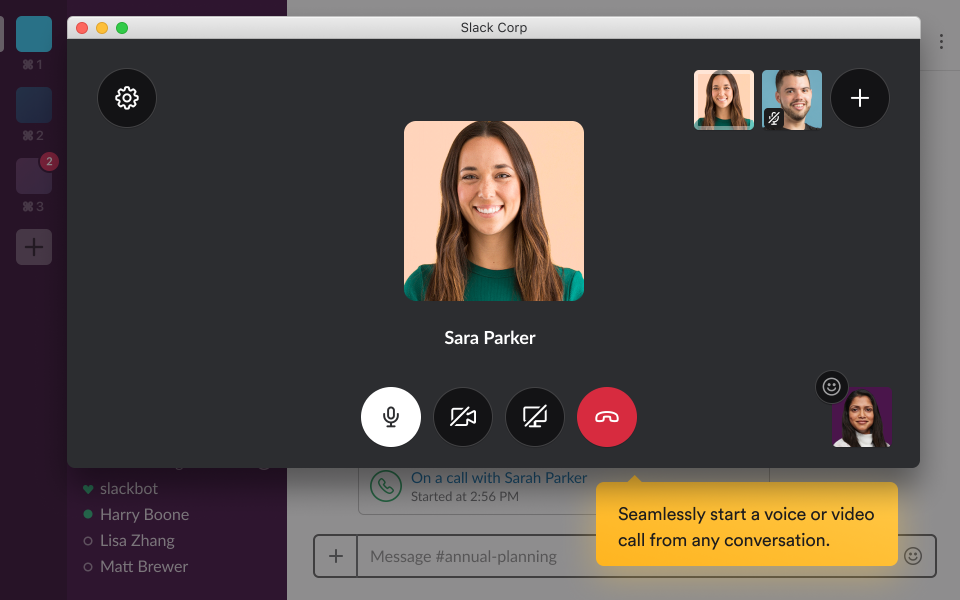
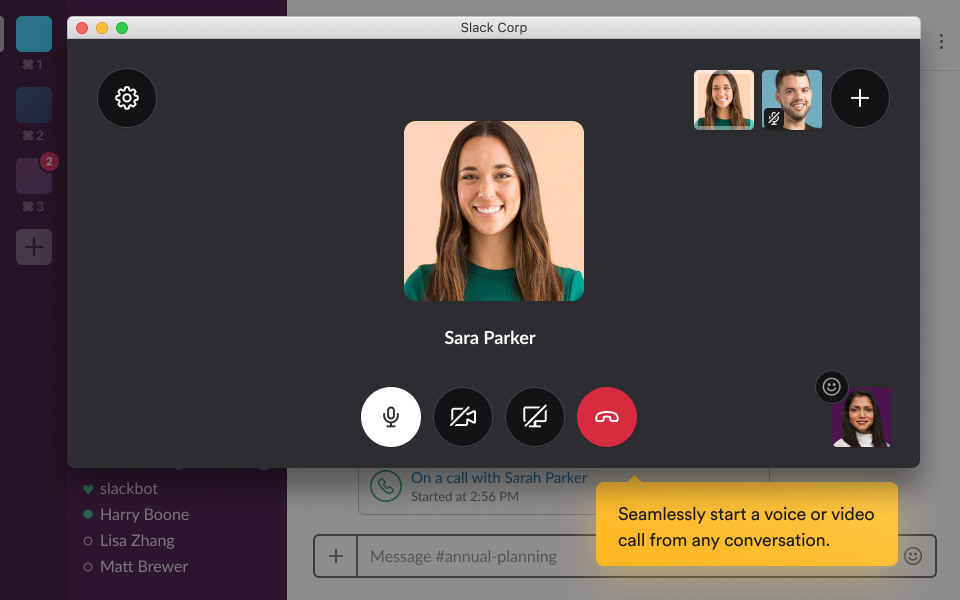
Voice/Video Conferencing in Slack (Source)
Common features of audio conferencing software
To make high-quality conference calls, you need a feature-packed audio conferencing software that can get you connected with your colleagues and clients easily and quickly. The following are some common features of audio conferencing services you can use to your advantage:
Audio/video recording | Enables users to record the audio/video of their meetings and conference calls, helpful in capturing all the important information discussed during the meeting(s). |
Call conferencing | Allows several participants to be on the same conference phone call at once. It also enables users to place multiple calls at one time, helping businesses save time and effort. |
Call scheduling | Lets users schedule a conference call in advance. It is helpful in organizing a meeting with any participant from different time zones and ensuring everyone's availability. |
File sharing | Helps in sharing files between the conference participants, enabling them to easily access all the crucial documents or presentations. |
Mobile access | Lets users make conference calls or join meetings from their mobile devices, providing them with greater flexibility and mobility. |
Live chat | Allows users to communicate with the participants in real time, and is helpful in asking questions, sharing ideas, or simply having a conversation with other attendees during the meeting(s). |
Screen sharing | Enables users to share the contents of their screen with the rest of the conference participants in real time. It facilitates demonstrations and presentations, and also helps save time and effort of having to share files and accessing them separately. |
Reporting/analytics | Helps organizers view stats, such as who attended the meeting, how long it lasted, the most active participants, etc. This improves future conferences by identifying the areas of improvement. |
What type of buyer are you?
Before you start considering your audio conferencing software options, you need to know what type of buyer you are so that you can make the right purchase decision.
Individuals: This type of buyer can be anyone who wants to use audio conferencing software to participate in teleconferences or webinars virtually. These buyers can also use audio conferencing software to connect with their family and friends across the country, state, and even around the world, helping them save money by avoiding long-distance telephone charges.
Small, midsize, and large businesses: These types of buyers are the most common ones as they frequently need to connect with colleagues, teams, and clients to communicate and collaborate. However, small businesses that have fewer employees need audio conferencing software with basic features, such as call conferencing, call scheduling, call recording, etc.
On the other hand, large businesses have comparatively larger teams and need to meet complex communication needs. Therefore, they require a collaboration tool with advanced features and functionalities along with basic ones, such as unlimited file sharing, live chat, comprehensive analytics, multilingual support, among others.
Educational institutions: With audio conferencing software, educational institutions can embrace collaborative learning. Students can work together on projects, and teachers can deliver interactive lectures by gathering in one virtual space. Educational institutions can also use this software to help connect students with guest speakers or experts in a particular field.
Online event organizers: These types of buyers can use audio conferencing software to host an event without the attendees having to be in the same room. This software can provide event organizers with the ability to hold live audio conferences, webinars, and various other events, as well as record and play these events back for later use. As it's much easier to organize online meetings, audio conferencing software helps organizers save time and money on travel and venue bookings.
Benefits of audio conferencing software
It's no secret that audio conferencing software has become a popular tool in the modern workplace due to its numerous benefits. Some of the most significant ones include:
Efficient and time-saving: Suppose a meeting is scheduled for seven people at the same time, but one person is out of town and another isn't available until later. With audio conferencing software, those two individuals can simply join in when they become available and the meeting can proceed as planned.
Convenient: With audio conferencing software, anyone can conduct a meeting from anywhere as long as they have access to a phone line or an internet connection. People can easily connect using their mobile phones rather than a business device, making attending meetings handy for everyone.
Enhanced collaboration: By eliminating barriers due to geographical location, audio conferencing software enables people in different parts of the world to communicate easily, resulting in improved collaboration. This leads to better engagement, productivity, and business results.
Highly secure: Security is of utmost importance as no business wants the risk of valuable and sensitive data falling into the wrong hands. Audio conferencing software uses identification, authentication, as well as authorization features to ensure absolute call security and confidentiality.
Key considerations for purchasing audio conferencing software
Choosing the right audio conferencing software can help your employees communicate and collaborate more effectively, taking your business to a whole new level. Here are a few significant factors to keep in mind while purchasing the software:
Go for a mobile-friendly solution: For ease of accessibility, businesses are embracing mobile-adaptive solutions these days. You must look out for audio conferencing software that is optimized to work with mobile devices, allowing people to attend audio meetings with one-touch dial-in and passcode authentication options right from the comfort of their smartphones.
Check for hybrid audio support: The mix of voice over internet protocol (VoIP) and the public switched telephone network (PSTN) within the same conference calling allows employees and third-party participants to use multiple connection options, making the communication seamless.
Seek out security: Exchange of sensitive information during conference calls is a common practice businesses follow. Thus, it becomes crucial for them to choose the audio conferencing software with enterprise-grade security, encryption, and centralized IT administration so they can safeguard valuable company data.
Look for integrations: To give employees the freedom and flexibility to communicate the way they want, you should invest in an audio conferencing system that offers seamless integration for your existing communication requirements. A good option is one that integrates with the most common business communication tools available in the market, plus offers support for web and video integrations.
Support structure: Despite the numerous robust features of audio conferencing software, it is inevitable that you will encounter problems that require customer support. Therefore, you must lay emphasis on the support structure while choosing the audio conferencing software. The solution must provide in-meeting support, live chat, phone support, etc.
Maximum number of participants: Even though this can vary depending on the software, be sure to check the maximum number of participants allowed by the audio conference software. Make sure to choose the software that can seamlessly meet all your communication needs without limiting the participants to join in.
Market trends to understand
The audio conferencing software market will continue to boom as remote work grows. Various new trends are emerging in the audio conferencing market with an increased focus on improving communication and team collaboration. Here’s one such driving trend:
Unified-communications-as-a-Service (UCaaS) adoption is skyrocketing - UCaaS is a cloud-delivered unified communication model that supports six communication functions, including telephony, meetings, messaging, mobility, and communication-enabled business processes. Amid the pandemic, UCaaS has boosted the level of online conferencing and communication services. In recent years, it’s been the preferred deployment model for SMBs. Businesses will continue to adopt UCaaS more and more as this trend continues to drive the market.
Note: The applications selected in this article are examples to show a feature in context and are not intended as endorsements or recommendations. They have been obtained from sources believed to be reliable at the time of publication.