


Best Inspection software of 2026

- Popular Comparisons
- FrontRunners
- Buyers Guide
Compare Products
Showing 1 - 25 of 276 products
Compare Products
Sort by
Reviews: Sorts listings by the number of user reviews we have published, greatest to least.
Average Rating: Sorts listings by overall star rating based on user reviews, highest to lowest.
Alphabetically (A-Z): Sorts listings by product name from A to Z.

MaintainX is a maintenance and asset management platform built for industrial and frontline teams. It helps organizations stream...Read more about MaintainX
MaintainX's Best Rated Features
See All
MaintainX's Worst Rated Features
See All

All-in-one home inspection software and business solution that just works. Mac/iOS & Android/PC friendly. Spectora gives you eve...Read more about Spectora
Spectora's Best Rated Features
See All
Spectora's Worst Rated Features
See All

Culverdocs is a fully configurable, no-code platform that allows you to convert your existing paper-based documents into digital...Read more about Culverdocs
Culverdocs's Best Rated Features
See All
Culverdocs's Worst Rated Features
See All

Limble is a CMMS platform designed to optimize maintenance operations and improve compliance. Its work order management allows u...Read more about Limble
Limble's Best Rated Features
See All
Limble's Worst Rated Features
See All

SnapInspect provides managers and owners with an exceptional solution designed to enhance tenant satisfaction and optimize busin...Read more about SnapInspect
SnapInspect's Best Rated Features
See All
SnapInspect's Worst Rated Features
See All

QT9 QMS is a web-based quality management solution used by companies to comply with ISO and FDA quality standards. The software ...Read more about QT9 QMS
QT9 QMS's Best Rated Features
See All
QT9 QMS's Worst Rated Features
See All

Qualityze is a cloud-based Quality Management System (QMS) built on Salesforce that transforms quality processes into intelligen...Read more about Qualityze Suite
Qualityze Suite's Best Rated Features
See All
Qualityze Suite's Worst Rated Features
See All

WorkClout is a quality management platform for automotive parts manufacturers. Our software helps streamline & automate internal...Read more about WorkClout

GoAudits is an audit and inspection application designed to simplify quality control processes using digital checklists and auto...Read more about GoAudits
GoAudits's Best Rated Features
See All
GoAudits's Worst Rated Features
See All

GoFormz is a platform used for creating digital forms and collecting data, used by teams of every industry and size. Using GoFor...Read more about GoFormz
GoFormz's Best Rated Features
See All
GoFormz's Worst Rated Features
See All

The #1 home inspection software: Create beautiful reports quickly and easily. Plus simplify scheduling, billing, report delivery...Read more about Inspection Support Network
Inspection Support Network's Best Rated Features
See All
Inspection Support Network's Worst Rated Features
See All

Fluix is a mobile-first platform that helps field teams work faster, safer, and stay compliant. Designed for industries like con...Read more about Fluix
Fluix's Best Rated Features
See All
Fluix's Worst Rated Features
See All

Focusing on operational efficiency, the Checklist Facil platform works to simplify the execution of checklists for the auditing ...Read more about Checklist Fácil
Checklist Fácil's Best Rated Features
See All
Checklist Fácil's Worst Rated Features
See All

Commusoft is built for commercial and industrial HVAC, plumbing, refrigeration, generators installers, and facility maintenance ...Read more about Commusoft
Commusoft's Best Rated Features
See All
Commusoft's Worst Rated Features
See All

**Forms On Fire: Tailored Mobile Solutions for Field Service Automation** Forms On Fire offers a revolutionary mobile app desig...Read more about Forms On Fire
No reviews yet

SafetyReports by AlignOps is an risk management software designed to help businesses in the construction, insurance, government ...Read more about SafetyReports by AlignOps
SafetyReports by AlignOps's Best Rated Features
See All
SafetyReports by AlignOps's Worst Rated Features
See All

AssetPool is a digital asset management and inspection tool that can be used on your phone and computer. There is no need for pa...Read more about AssetPool
AssetPool's Best Rated Features
See All
AssetPool's Worst Rated Features
See All

Xenia brings together facility maintenance, team operations, workplace safety and quality assurance, enabling managers to have a...Read more about Xenia
Xenia's Best Rated Features
See All
Xenia's Worst Rated Features
See All

Trackplan is a cloud-based computer-aided facility management (CAFM) solution designed for businesses of all sizes. It offers jo...Read more about Trackplan
Trackplan's Best Rated Features
See All
Trackplan's Worst Rated Features
See All

ArcSite is the go-to solution for mobile-first drawing, takeoff, and estimating. Designed for professionals who need to work fas...Read more about ArcSite
ArcSite's Best Rated Features
See All
ArcSite's Worst Rated Features
See All

Whip Around is a cloud and mobile-based fleet maintenance software designed to streamline operations, enhance compliance and max...Read more about Whip Around
Whip Around's Best Rated Features
See All
Whip Around's Worst Rated Features
See All

Fulcrum is a field-first SaaS platform designed to transform how organizations manage field data collection and inspections for ...Read more about Fulcrum
Fulcrum's Best Rated Features
See All
Fulcrum's Worst Rated Features
See All

BeepQuest is an inspection management platform designed to assist agencies, restaurants and businesses across various industries...Read more about BeepQuest

If you are a Health and Safety executive looking for a EHS software, SafetyQube is undoubtedly the best fit EHS software for you...Read more about SafetyQube
SafetyQube's Best Rated Features
See All
SafetyQube's Worst Rated Features
See All

Claim Leader is a cloud-based appraisal management system that can automate communications and workflow processes across the bus...Read more about Claim Leader
Popular Comparisons



Your Guide to Top Inspection Software, July 2025
Software Advice uses reviews from real software users to highlight the top-rated Inspection products in North America.
Learn how products are chosenExplore FrontRunners


“Usability” includes user ratings for Functionality and Ease of Use.
“Customer Satisfaction” includes user ratings for Customer Support, Likelihood to Recommend and Value for Money.
Reviews analysis period: The reviews analysis period spans two years and ends the 15th of the month prior to publication.
Buyers Guide
This detailed guide will help you find and buy the right inspection software for you and your business.
Last Updated on January 27, 2025Whether managing a fleet of taxis, manufacturing a product, or monitoring a supply chain, inspection is a vital checkpoint in every industry and business model.
The first thing that may come to mind when you hear the word "inspection" is a checklist to tick off. In reality, an inspection involves much more than checking boxes—there are workflows to create, tasks to assign, reports to write, and not to mention, a huge volume of data to collect for regulatory compliance and process/product improvement.
You can't do all of the above while also staying one step ahead of your competition if your inspection process still lives on pen and paper. Using a software tool, however, can ensure that inspection doesn't become a bottleneck that slows down your time-to-market.
But, before you set out exploring all the options available there are a few things you need to know, such as the common features to look for and considerations to weigh when choosing a vendor.
We've created this Buyers Guide to detail everything you need to know before making the final purchase decision.
Here's what we'll cover:
What is inspection software?
Inspection software is software that allows users to digitalize all or part of their inspection process, which comprises functions such as managing schedules, conducting timely inspections, creating checklists, and storing and tracking documents. This type of software helps businesses save time, manage compliance, and reduce human effort by automating inspection-related tasks.
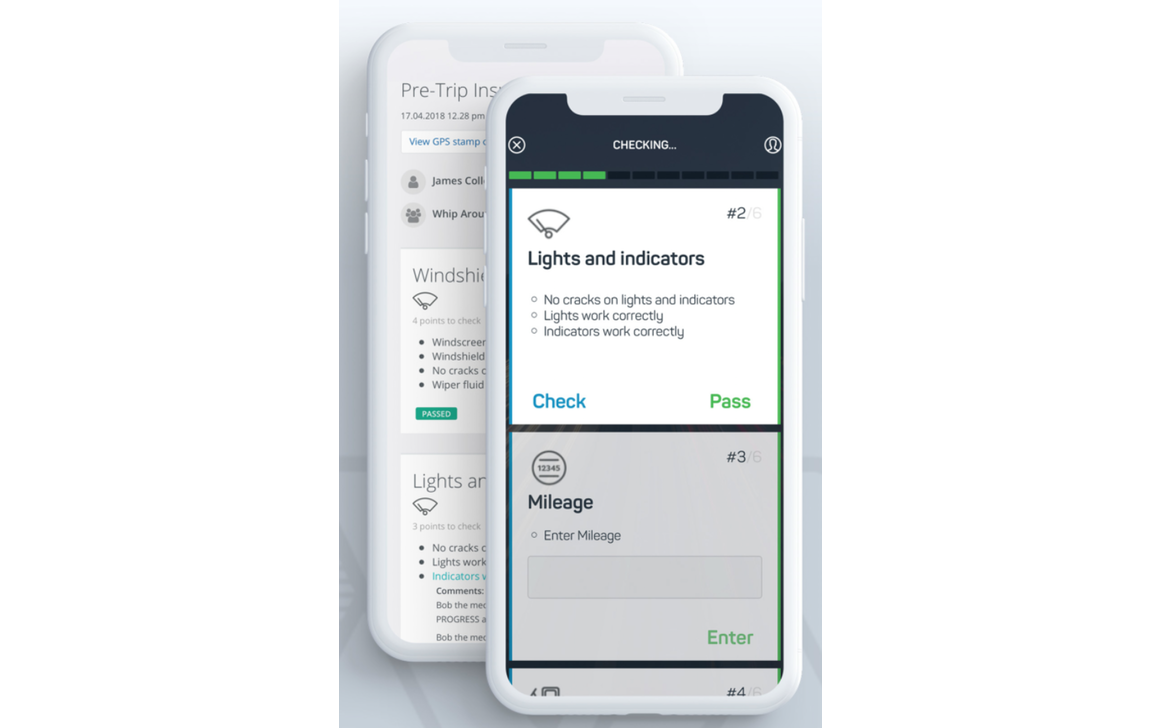
Pre-trip fleet inspection using Whip Around
Common features of inspection software
Different vendors offer different features in their inspection software. Selecting the right tool for your business is easier when you know what the common features are and what they do. Here's an overview.
Inspection task management | Create, view, manage, and complete inspection tasks to reduce chances of making manual errors. |
Customized inspection templates | Use customizable, built-in templates for specific tasks; add appropriate questions/options to templates. |
Offline inspection | Perform inspection activities even when not connected to the internet. |
Inspection reminder | Receive alerts about pending/upcoming inspection activities through in-app pop-ups, email reminders, or text messages. |
Schedule recurring tasks | Create and schedule recurring tasks. When you complete a task, the software reschedules the task automatically for future inspections. |
Reporting | Create, download, send, and save copies of all your inspection reports for future reference. |
What type of buyer are you?
Before you start evaluating inspection software options, you'll want to know what buyer category you belong to. Most inspection software buyers will fall into one of the below categories:
Small businesses (1-49 employees): These buyers have simple requirements; they're looking to improve their inspection activities. Most are currently using manual methods, so the transition to an automated tool should be gradual and methodical. They should start with the basic inspection features, such as inspection task management and customized templates.
Midsize businesses (50-999 employees): These buyers require additional features because they deal with a relatively higher volume of customers, suppliers, and vendors. They may operate out of multiple facilities and require additional features such as offline inspection, inspection reminder, and recurring task scheduler.
Large businesses (1,000+ employees): These buyers benefit by using a single system to handle relative/adjacent functions, which are more granular given the scale of operations. The main benefit is the centralization of data exchange across teams or departments. They can opt for a complete operations management suite that includes inspection as a built-in module.
Benefits of inspection software
While some of the benefits of inspection software may be clear from our discussion above, we've called out the most notable ones below:
Speed up daily inspections: The right inspection software can bring down your daily workload significantly. It can reduce the time needed to do all tasks and speed up results.
Meet compliance requirements: Depending on your industry, you may have specific regulations that govern aspects such as workplace, environment, or product safety. While the software will help build workflows for necessary inspections and schedule tasks, its centralized data management will ensure that you have all the necessary information to produce when demanded by authorities.
Key considerations
Here are some important things to look out for before you purchase inspection software:
Mobile app availability: If you are constantly on the move, then mobile apps can be useful for you. Check whether the inspection software you're considering offers access on mobile devices such as iOS and Android smartphones/tablets. The mobile app will help you perform audit and inspection tasks from any location.
Customer support: Ask software vendors if they offer support 24/7, only during business hours, or not at all. Also, ask about available support modes, such as email, phone, or live chat.
Note: The applications selected in this article are examples to show a feature in context and are not intended as endorsements or recommendations. They have been obtained from sources believed to be reliable at the time of publication.